Istio Integration
Elastic Cloud Serverless projects are autoscaled environments, fully managed by Elastic and available on Elastic Cloud. Availability This functionality is in technical preview and is ready for evaluation. Use with caution in production; it is not recommended for mission-critical workloads. Elastic will work to fix any issues, but features in technical preview are not subject to the support SLA of official GA features. Specific Support terms apply. Elastic Cloud Serverless projects are autoscaled environments, fully managed by Elastic and available on Elastic Cloud. Availability This functionality is in technical preview and is ready for evaluation. Use with caution in production; it is not recommended for mission-critical workloads. Elastic will work to fix any issues, but features in technical preview are not subject to the support SLA of official GA features. Specific Support terms apply. The Elastic Stack includes Elastic's core products such as Elasticsearch, Kibana, Logstash, and Beats. Availability This functionality is in technical preview and is ready for evaluation. Use with caution in production; it is not recommended for mission-critical workloads. Elastic will work to fix any issues, but features in technical preview are not subject to the support SLA of official GA features. Specific Support terms apply. Unless stated otherwise on the page, this functionality is available when your Elastic Stack is deployed on Elastic Cloud Hosted, Elastic Cloud Enterprise, Elastic Cloud on Kubernetes, and self-managed environments. This documentation corresponds to the latest patch available for each minor version. If you're not using the latest patch, check the release notes for changes.
Serverless Observability
Preview
Preview
Serverless Security
Preview
Preview
Stack
Preview
9.0+
Preview since 9.0
| Version | 0.8.0 Availability Preview This functionality is in technical preview and is ready for evaluation. Use with caution in production; it is not recommended for mission-critical workloads. Elastic will work to fix any issues, but features in technical preview are not subject to the support SLA of official GA features. Specific Support terms apply. (View all) |
| Subscription level What's this? |
Basic |
| Developed by What's this? |
Elastic |
| Ingestion method(s) | File, Prometheus |
| Minimum Kibana version(s) | 9.0.0 8.11.0 |
To use pre-release integrations, go to the Integrations page in Kibana, scroll down, and toggle on the Display beta integrations option.
This integration ingest access logs and metrics created by the Istio service mesh.
The Istio datasets were tested with Istio 1.14.3.
The access_logs data stream collects Istio access logs.
Example
{
    "@timestamp": "2022-07-20T09:52:24.955Z",
    "data_stream": {
        "namespace": "default",
        "type": "logs",
        "dataset": "istio.access_logs"
    },
    "destination": {
        "address": "10.68.2.10:9080",
        "ip": "10.68.2.10",
        "port": 9080
    },
    "ecs": {
        "version": "8.3.0"
    },
    "event": {
        "category": [
            "web"
        ],
        "created": "2020-04-28T11:07:58.223Z",
        "duration": 1000000,
        "id": "785918d6-06b6-9312-bf77-6d9bd968dc21",
        "ingested": "2022-07-20T11:05:15.804584205Z",
        "kind": "event",
        "module": "istio",
        "original": "[2022-07-20T09:52:24.955Z] \"GET /details/0 HTTP/1.1\" 200 - via_upstream - \"-\" 0 178 2 1 \"-\" \"Mozilla/5.0 (Macintosh; Intel Mac OS X 10_15_7) AppleWebKit/537.36 (KHTML, like Gecko) Chrome/103.0.5060.114 Safari/537.36\" \"785918d6-06b6-9312-bf77-6d9bd968dc21\" \"details:9080\" \"10.68.2.10:9080\" inbound|9080|| 127.0.0.6:47889 10.68.2.10:9080 89.160.20.156:39696 outbound_.9080_._.details.default.svc.cluster.local default",
        "outcome": "success",
        "type": [
            "access"
        ]
    },
    "http": {
        "request": {
            "body": {
                "bytes": 178
            },
            "id": "785918d6-06b6-9312-bf77-6d9bd968dc21",
            "method": "GET"
        },
        "response": {
            "body": {
                "bytes": 0
            },
            "status_code": 200
        },
        "version": "1.1"
    },
    "istio": {
        "access": {
            "authority": "details:9080",
            "bytes": {
                "received": 0,
                "sent": 178
            },
            "downstream": {
                "local_address": "10.68.2.10:9080",
                "remote_address": "89.160.20.156:39696"
            },
            "duration": 2,
            "requested_server_name": "outbound_.9080_._.details.default.svc.cluster.local",
            "response": {
                "code_details": "via_upstream"
            },
            "route_name": "default",
            "upstream": {
                "local_address": "127.0.0.6:47889",
                "cluster": "inbound|9080||",
                "host": "10.68.2.10:9080",
                "service_time": 1
            }
        }
    },
    "network": {
        "community_id": "1:Kd61jBZsKdDUbZUBs5s/VI08qc0=",
        "protocol": "http",
        "transport": "tcp"
    },
    "related": {
        "ip": [
            "89.160.20.156",
            "10.68.2.10"
        ]
    },
    "source": {
        "address": "89.160.20.156:39696",
        "as": {
            "number": 29518,
            "organization": {
                "name": "Bredband2 AB"
            }
        },
        "geo": {
            "city_name": "Linköping",
            "continent_name": "Europe",
            "country_iso_code": "SE",
            "country_name": "Sweden",
            "location": {
                "lat": 58.4167,
                "lon": 15.6167
            },
            "region_iso_code": "SE-E",
            "region_name": "Östergötland County"
        },
        "ip": "89.160.20.156",
        "port": 39696
    },
    "tags": [
        "preserve_original_event"
    ],
    "url": {
        "original": "/details/0"
    },
    "user_agent": {
        "device": {
            "name": "Mac"
        },
        "name": "Chrome",
        "original": "Mozilla/5.0 (Macintosh; Intel Mac OS X 10_15_7) AppleWebKit/537.36 (KHTML, like Gecko) Chrome/103.0.5060.114 Safari/537.36",
        "os": {
            "full": "Mac OS X 10.15.7",
            "name": "Mac OS X",
            "version": "10.15.7"
        },
        "version": "103.0.5060.114"
    }
}
Exported fields
| Field | Description | Type |
|---|---|---|
| @timestamp | Event timestamp. | date |
| agent.ephemeral_id | Ephemeral identifier of this agent (if one exists). This id normally changes across restarts, but agent.id does not. |
keyword |
| agent.id | Unique identifier of this agent (if one exists). Example: For Beats this would be beat.id. | keyword |
| agent.name | Custom name of the agent. This is a name that can be given to an agent. This can be helpful if for example two Filebeat instances are running on the same host but a human readable separation is needed on which Filebeat instance data is coming from. | keyword |
| agent.type | Type of the agent. The agent type always stays the same and should be given by the agent used. In case of Filebeat the agent would always be Filebeat also if two Filebeat instances are run on the same machine. | keyword |
| agent.version | Version of the agent. | keyword |
| container.runtime | Runtime managing this container. | keyword |
| data_stream.dataset | Data stream dataset. | constant_keyword |
| data_stream.namespace | Data stream namespace. | constant_keyword |
| data_stream.type | Data stream type. | constant_keyword |
| destination.address | Some event destination addresses are defined ambiguously. The event will sometimes list an IP, a domain or a unix socket. You should always store the raw address in the .address field. Then it should be duplicated to .ip or .domain, depending on which one it is. |
keyword |
| destination.domain | The domain name of the destination system. This value may be a host name, a fully qualified domain name, or another host naming format. The value may derive from the original event or be added from enrichment. | keyword |
| destination.ip | IP address of the destination (IPv4 or IPv6). | ip |
| destination.port | Port of the destination. | long |
| ecs.version | ECS version this event conforms to. ecs.version is a required field and must exist in all events. When querying across multiple indices -- which may conform to slightly different ECS versions -- this field lets integrations adjust to the schema version of the events. |
keyword |
| error.message | Error message. | match_only_text |
| event.category | This is one of four ECS Categorization Fields, and indicates the second level in the ECS category hierarchy. event.category represents the "big buckets" of ECS categories. For example, filtering on event.category:process yields all events relating to process activity. This field is closely related to event.type, which is used as a subcategory. This field is an array. This will allow proper categorization of some events that fall in multiple categories. |
keyword |
| event.created | event.created contains the date/time when the event was first read by an agent, or by your pipeline. This field is distinct from @timestamp in that @timestamp typically contain the time extracted from the original event. In most situations, these two timestamps will be slightly different. The difference can be used to calculate the delay between your source generating an event, and the time when your agent first processed it. This can be used to monitor your agent's or pipeline's ability to keep up with your event source. In case the two timestamps are identical, @timestamp should be used. | date |
| event.dataset | Event dataset | constant_keyword |
| event.duration | Duration of the event in nanoseconds. If event.start and event.end are known this value should be the difference between the end and start time. | long |
| event.id | Unique ID to describe the event. | keyword |
| event.ingested | Timestamp when an event arrived in the central data store. This is different from @timestamp, which is when the event originally occurred. It's also different from event.created, which is meant to capture the first time an agent saw the event. In normal conditions, assuming no tampering, the timestamps should chronologically look like this: @timestamp < event.created < event.ingested. |
date |
| event.kind | This is one of four ECS Categorization Fields, and indicates the highest level in the ECS category hierarchy. event.kind gives high-level information about what type of information the event contains, without being specific to the contents of the event. For example, values of this field distinguish alert events from metric events. The value of this field can be used to inform how these kinds of events should be handled. They may warrant different retention, different access control, it may also help understand whether the data coming in at a regular interval or not. |
keyword |
| event.module | Event module | constant_keyword |
| event.original | Raw text message of entire event. Used to demonstrate log integrity or where the full log message (before splitting it up in multiple parts) may be required, e.g. for reindex. This field is not indexed and doc_values are disabled. It cannot be searched, but it can be retrieved from _source. If users wish to override this and index this field, please see Field data types in the Elasticsearch Reference. |
keyword |
| event.outcome | This is one of four ECS Categorization Fields, and indicates the lowest level in the ECS category hierarchy. event.outcome simply denotes whether the event represents a success or a failure from the perspective of the entity that produced the event. Note that when a single transaction is described in multiple events, each event may populate different values of event.outcome, according to their perspective. Also note that in the case of a compound event (a single event that contains multiple logical events), this field should be populated with the value that best captures the overall success or failure from the perspective of the event producer. Further note that not all events will have an associated outcome. For example, this field is generally not populated for metric events, events with event.type:info, or any events for which an outcome does not make logical sense. |
keyword |
| event.type | This is one of four ECS Categorization Fields, and indicates the third level in the ECS category hierarchy. event.type represents a categorization "sub-bucket" that, when used along with the event.category field values, enables filtering events down to a level appropriate for single visualization. This field is an array. This will allow proper categorization of some events that fall in multiple event types. |
keyword |
| http.request.body.bytes | Size in bytes of the request body. | long |
| http.request.id | A unique identifier for each HTTP request to correlate logs between clients and servers in transactions. The id may be contained in a non-standard HTTP header, such as X-Request-ID or X-Correlation-ID. |
keyword |
| http.request.method | HTTP request method. The value should retain its casing from the original event. For example, GET, get, and GeT are all considered valid values for this field. |
keyword |
| http.response.body.bytes | Size in bytes of the response body. | long |
| http.response.status_code | HTTP response status code. | long |
| http.version | HTTP version. | keyword |
| istio.access.authority | The value of the Host (HTTP/1.1) or Authority (HTTP/2) header. | keyword |
| istio.access.bytes.received | For HTTP/THRIFT this field is the body bytes received. For TCP this field is the downstream bytes received on connection. For UDP this field is not implemented (0). | long |
| istio.access.bytes.sent | For HTTP/THRIFT this field is the body bytes sent. For WebSocket connection it will also include response header bytes. For TCP this field is the downstream bytes sent on connection. For UDP this field is not implemented (0). | long |
| istio.access.connection_termination_details | Connection termination details may provide additional information about why the connection was terminated by Envoy for L4 reasons. | text |
| istio.access.downstream.local_address | Local address of the downstream connection. If the address is an IP address it includes both address and port. | keyword |
| istio.access.downstream.remote_address | Remote address of the downstream connection. If the address is an IP address it includes both address and port. | keyword |
| istio.access.duration | For HTTP/THRIFT this field is the total duration in milliseconds of the request from the start time to the last byte out. For TCP this field is the total duration in milliseconds of the downstream connection. For UDP this field is not implemented (0). | long |
| istio.access.log | Access log in custom Json format. | keyword |
| istio.access.requested_server_name | For HTTP/TCP/THRIFT this field is a string value set on ssl connection socket for Server Name Indication (SNI). For UDP this field is not implemented ("-"). | keyword |
| istio.access.response.code_details | Additional information about the response code, such as who set it (the upstream or envoy) and why. For TCP/UDP this field is not implemented ("-"). | text |
| istio.access.response.flags | Additional details about the response or connection. Field not implemented ("-") for UDP. | keyword |
| istio.access.route_name | For HTTP/TCP this field is the name of the route. For UDP this field is not implemented ("-"). | keyword |
| istio.access.upstream.cluster | Upstream cluster to which the upstream host belongs to. alt_stat_name will be used if provided. | text |
| istio.access.upstream.host | Upstream host URL (e.g., tcp://ip:port for TCP connections). | keyword |
| istio.access.upstream.local_address | Local address of the upstream connection. If the address is an IP address it includes both address and port. | keyword |
| istio.access.upstream.service_time | Envoy Upstream service time. | long |
| istio.access.upstream.transport_failure_reason | For HTTP if upstream connection failed due to transport socket (e.g. TLS handshake), provides the failure reason from the transport socket. The format of this field depends on the configured upstream transport socket. For TCP/UDP this field is not implemented ("-"). | text |
| istio.access.x_forwarded_for | x_forwarded_for (XFF) is a standard proxy header which indicates the IP addresses that a request has flowed through on its way from the client to the server. | keyword |
| log.file.device_id | ID of the device containing the filesystem where the file resides. | keyword |
| log.file.fingerprint | The sha256 fingerprint identity of the file when fingerprinting is enabled. | keyword |
| log.file.idxhi | The high-order part of a unique identifier that is associated with a file. (Windows-only) | keyword |
| log.file.idxlo | The low-order part of a unique identifier that is associated with a file. (Windows-only) | keyword |
| log.file.inode | Inode number of the log file. | keyword |
| log.file.vol | The serial number of the volume that contains a file. (Windows-only) | keyword |
| message | For log events the message field contains the log message, optimized for viewing in a log viewer. For structured logs without an original message field, other fields can be concatenated to form a human-readable summary of the event. If multiple messages exist, they can be combined into one message. | match_only_text |
| network.community_id | A hash of source and destination IPs and ports, as well as the protocol used in a communication. This is a tool-agnostic standard to identify flows. Learn more at https://github.com/corelight/community-id-spec. | keyword |
| network.protocol | In the OSI Model this would be the Application Layer protocol. For example, http, dns, or ssh. The field value must be normalized to lowercase for querying. |
keyword |
| network.transport | Same as network.iana_number, but instead using the Keyword name of the transport layer (udp, tcp, ipv6-icmp, etc.) The field value must be normalized to lowercase for querying. | keyword |
| related.ip | All of the IPs seen on your event. | ip |
| source.address | Some event source addresses are defined ambiguously. The event will sometimes list an IP, a domain or a unix socket. You should always store the raw address in the .address field. Then it should be duplicated to .ip or .domain, depending on which one it is. |
keyword |
| source.as.number | Unique number allocated to the autonomous system. The autonomous system number (ASN) uniquely identifies each network on the Internet. | long |
| source.as.organization.name | Organization name. | keyword |
| source.as.organization.name.text | Multi-field of source.as.organization.name. |
match_only_text |
| source.domain | The domain name of the source system. This value may be a host name, a fully qualified domain name, or another host naming format. The value may derive from the original event or be added from enrichment. | keyword |
| source.geo.city_name | City name. | keyword |
| source.geo.continent_name | Name of the continent. | keyword |
| source.geo.country_iso_code | Country ISO code. | keyword |
| source.geo.country_name | Country name. | keyword |
| source.geo.location.lat | Longitude and latitude. | geo_point |
| source.geo.location.lon | Longitude and latitude. | geo_point |
| source.geo.region_iso_code | Region ISO code. | keyword |
| source.geo.region_name | Region name. | keyword |
| source.ip | IP address of the source (IPv4 or IPv6). | ip |
| source.port | Port of the source. | long |
| tags | List of keywords used to tag each event. | keyword |
| url.original | Unmodified original url as seen in the event source. Note that in network monitoring, the observed URL may be a full URL, whereas in access logs, the URL is often just represented as a path. This field is meant to represent the URL as it was observed, complete or not. | wildcard |
| url.original.text | Multi-field of url.original. |
match_only_text |
| user_agent.device.name | Name of the device. | keyword |
| user_agent.name | Name of the user agent. | keyword |
| user_agent.original | Unparsed user_agent string. | keyword |
| user_agent.original.text | Multi-field of user_agent.original. |
match_only_text |
| user_agent.os.full | Operating system name, including the version or code name. | keyword |
| user_agent.os.full.text | Multi-field of user_agent.os.full. |
match_only_text |
| user_agent.os.name | Operating system name, without the version. | keyword |
| user_agent.os.name.text | Multi-field of user_agent.os.name. |
match_only_text |
| user_agent.os.version | Operating system version as a raw string. | keyword |
| user_agent.version | Version of the user agent. | keyword |
The istiod_metrics data stream collects Istiod metrics.
Example
{
    "istio": {
        "istiod": {
            "metrics": {
                "pilot_xds_config_size_bytes": {
                    "histogram": {
                        "counts": [
                            0,
                            0,
                            0,
                            0,
                            0,
                            0,
                            0
                        ],
                        "values": [
                            0.5,
                            5000.5,
                            505000,
                            2500000,
                            7000000,
                            25000000,
                            70000000
                        ]
                    }
                }
            },
            "labels": {
                "instance": "10.124.0.8:15014",
                "type": "type.googleapis.com/envoy.config.route.v3.RouteConfiguration",
                "job": "istio"
            }
        }
    },
    "@timestamp": "2022-09-23T09:30:56.055Z",
    "ecs": {
        "version": "8.6.0"
    },
    "data_stream": {
        "namespace": "default",
        "type": "metrics",
        "dataset": "istio.istiod_metrics"
    },
    "metricset": {
        "period": 10000
    },
    "event": {
        "duration": 10806443,
        "agent_id_status": "verified",
        "kind": "metric",
        "ingested": "2022-09-23T09:30:57Z",
        "module": "istio",
        "dataset": "istio.istiod_metrics"
    }
}
Exported fields
| Field | Description | Type | Metric Type |
|---|---|---|---|
| @timestamp | Event timestamp. | date | |
| agent.id | Unique identifier of this agent (if one exists). Example: For Beats this would be beat.id. | keyword | |
| cloud.account.id | The cloud account or organization id used to identify different entities in a multi-tenant environment. Examples: AWS account id, Google Cloud ORG Id, or other unique identifier. | keyword | |
| cloud.availability_zone | Availability zone in which this host, resource, or service is located. | keyword | |
| cloud.instance.id | Instance ID of the host machine. | keyword | |
| cloud.provider | Name of the cloud provider. Example values are aws, azure, gcp, or digitalocean. | keyword | |
| cloud.region | Region in which this host, resource, or service is located. | keyword | |
| container.id | Unique container id. | keyword | |
| data_stream.dataset | Data stream dataset. | constant_keyword | |
| data_stream.namespace | Data stream namespace. | constant_keyword | |
| data_stream.type | Data stream type. | constant_keyword | |
| ecs.version | ECS version this event conforms to. ecs.version is a required field and must exist in all events. When querying across multiple indices -- which may conform to slightly different ECS versions -- this field lets integrations adjust to the schema version of the events. |
keyword | |
| error.message | Error message. | match_only_text | |
| event.dataset | Event dataset | constant_keyword | |
| event.ingested | Timestamp when an event arrived in the central data store. This is different from @timestamp, which is when the event originally occurred. It's also different from event.created, which is meant to capture the first time an agent saw the event. In normal conditions, assuming no tampering, the timestamps should chronologically look like this: @timestamp < event.created < event.ingested. |
date | |
| event.kind | This is one of four ECS Categorization Fields, and indicates the highest level in the ECS category hierarchy. event.kind gives high-level information about what type of information the event contains, without being specific to the contents of the event. For example, values of this field distinguish alert events from metric events. The value of this field can be used to inform how these kinds of events should be handled. They may warrant different retention, different access control, it may also help understand whether the data coming in at a regular interval or not. |
keyword | |
| event.module | Event module | constant_keyword | |
| host.name | Name of the host. It can contain what hostname returns on Unix systems, the fully qualified domain name, or a name specified by the user. The sender decides which value to use. |
keyword | |
| istio.istiod.labels.* | Istiod metric labels | object | |
| istio.istiod.labels_id | Fingerprint generated by the labels. | keyword | |
| istio.istiod.metrics.*.counter | Istiod counter metric | object | counter |
| istio.istiod.metrics.*.histogram | Istiod histogram metric | object | |
| istio.istiod.metrics.*.rate | Istiod rated counter metric | object | gauge |
| istio.istiod.metrics.*.value | Istiod gauge metric | object | gauge |
The proxy_metrics data stream collects Istio proxy metrics.
Example
{
    "@timestamp": "2022-09-23T09:34:52.047Z",
    "data_stream": {
        "dataset": "istio.proxy_metrics",
        "namespace": "default",
        "type": "metrics"
    },
    "ecs": {
        "version": "8.6.0"
    },
    "event": {
        "agent_id_status": "verified",
        "dataset": "istio.proxy_metrics",
        "duration": 35506510,
        "ingested": "2022-09-23T09:34:52Z",
        "kind": "metric",
        "module": "istio"
    },
    "istio": {
        "proxy": {
            "metrics": {
                "istio_agent_go_gc_duration_seconds": {
                    "value": 0.000142478
                }
            },
            "labels": {
                "instance": "10.124.1.5:15020",
                "quantile": "0.25",
                "job": "istio"
            }
        }
    },
    "metricset": {
        "period": 10000
    }
}
Exported fields
| Field | Description | Type | Metric Type |
|---|---|---|---|
| @timestamp | Event timestamp. | date | |
| agent.id | Unique identifier of this agent (if one exists). Example: For Beats this would be beat.id. | keyword | |
| cloud.account.id | The cloud account or organization id used to identify different entities in a multi-tenant environment. Examples: AWS account id, Google Cloud ORG Id, or other unique identifier. | keyword | |
| cloud.availability_zone | Availability zone in which this host, resource, or service is located. | keyword | |
| cloud.instance.id | Instance ID of the host machine. | keyword | |
| cloud.provider | Name of the cloud provider. Example values are aws, azure, gcp, or digitalocean. | keyword | |
| cloud.region | Region in which this host, resource, or service is located. | keyword | |
| container.id | Unique container id. | keyword | |
| data_stream.dataset | Data stream dataset. | constant_keyword | |
| data_stream.namespace | Data stream namespace. | constant_keyword | |
| data_stream.type | Data stream type. | constant_keyword | |
| ecs.version | ECS version this event conforms to. ecs.version is a required field and must exist in all events. When querying across multiple indices -- which may conform to slightly different ECS versions -- this field lets integrations adjust to the schema version of the events. |
keyword | |
| error.message | Error message. | match_only_text | |
| event.dataset | Event dataset | constant_keyword | |
| event.ingested | Timestamp when an event arrived in the central data store. This is different from @timestamp, which is when the event originally occurred. It's also different from event.created, which is meant to capture the first time an agent saw the event. In normal conditions, assuming no tampering, the timestamps should chronologically look like this: @timestamp < event.created < event.ingested. |
date | |
| event.kind | This is one of four ECS Categorization Fields, and indicates the highest level in the ECS category hierarchy. event.kind gives high-level information about what type of information the event contains, without being specific to the contents of the event. For example, values of this field distinguish alert events from metric events. The value of this field can be used to inform how these kinds of events should be handled. They may warrant different retention, different access control, it may also help understand whether the data coming in at a regular interval or not. |
keyword | |
| event.module | Event module | constant_keyword | |
| host.name | Name of the host. It can contain what hostname returns on Unix systems, the fully qualified domain name, or a name specified by the user. The sender decides which value to use. |
keyword | |
| istio.proxy.labels.* | Istio Proxy metric labels | object | |
| istio.proxy.labels_id | Fingerprint generated by the labels. | keyword | |
| istio.proxy.metrics.*.counter | Istio Proxy counter metric | object | counter |
| istio.proxy.metrics.*.histogram | Istio Proxy histogram metric | object | |
| istio.proxy.metrics.*.rate | Istio Proxy rated counter metric | object | gauge |
| istio.proxy.metrics.*.value | Istio Proxy gauge metric | object | gauge |
- Setup a Kubernetes cluster. Since the Istio sample app requires lots of RAM (> 10GB) it's preferable to use a managed Kubernetes cluster (any cloud provider will do).
- Setup a EK cluster on Elastic Cloud. For the same reason that Istio sample app requires a lot of RAM, it's unfeasible to run the Elastic cluster on your laptop via elastic-package. As an alternative ECK might be used as well.
- Start elastic agents on Kubernetes cluster. The easiest way to achieve this is by using Fleet Server. You can find instructions here
- Download Istio cli following the instructions.
- Install Istio via instructions. The namespace
defaultis used with this basic installation. This is the same namespace where we are going to run the Istio sample app. - Deploy the sample application via instructions
- Open the application to external traffic and determine the ingress IP and ports. This step is slightly different depending where Kubernetes is running. More info at here and here. The following commands should be enough to get this working.
kubectl apply -f samples/bookinfo/networking/bookinfo-gateway.yaml
istioctl analyze

# since we are using a cloud environment with an external load balancer
export INGRESS_HOST=$(kubectl -n istio-system get service istio-ingressgateway -o jsonpath='{.status.loadBalancer.ingress[0].ip}')
export INGRESS_PORT=$(kubectl -n istio-system get service istio-ingressgateway -o jsonpath='{.spec.ports[?(@.name=="http2")].port}')
export SECURE_INGRESS_PORT=$(kubectl -n istio-system get service istio-ingressgateway -o jsonpath='{.spec.ports[?(@.name=="https")].port}')
export GATEWAY_URL=$INGRESS_HOST:$INGRESS_PORT
From the same terminal run the following command to open a browser to that link. This should verify that the sample application is reachable.
open "http://$GATEWAY_URL/productpage"
- Generate some traffic to the sample application
for i in $(seq 1 100); do curl -s -o /dev/null "http://$GATEWAY_URL/productpage"; done
- (Optional) You can visualize the graph of microservices in the sample app via instructions.
- Add the Istio integration from the registry.
- View logs and/or metrics from the Istio integration using the Discovery tab and selecting the right Data view
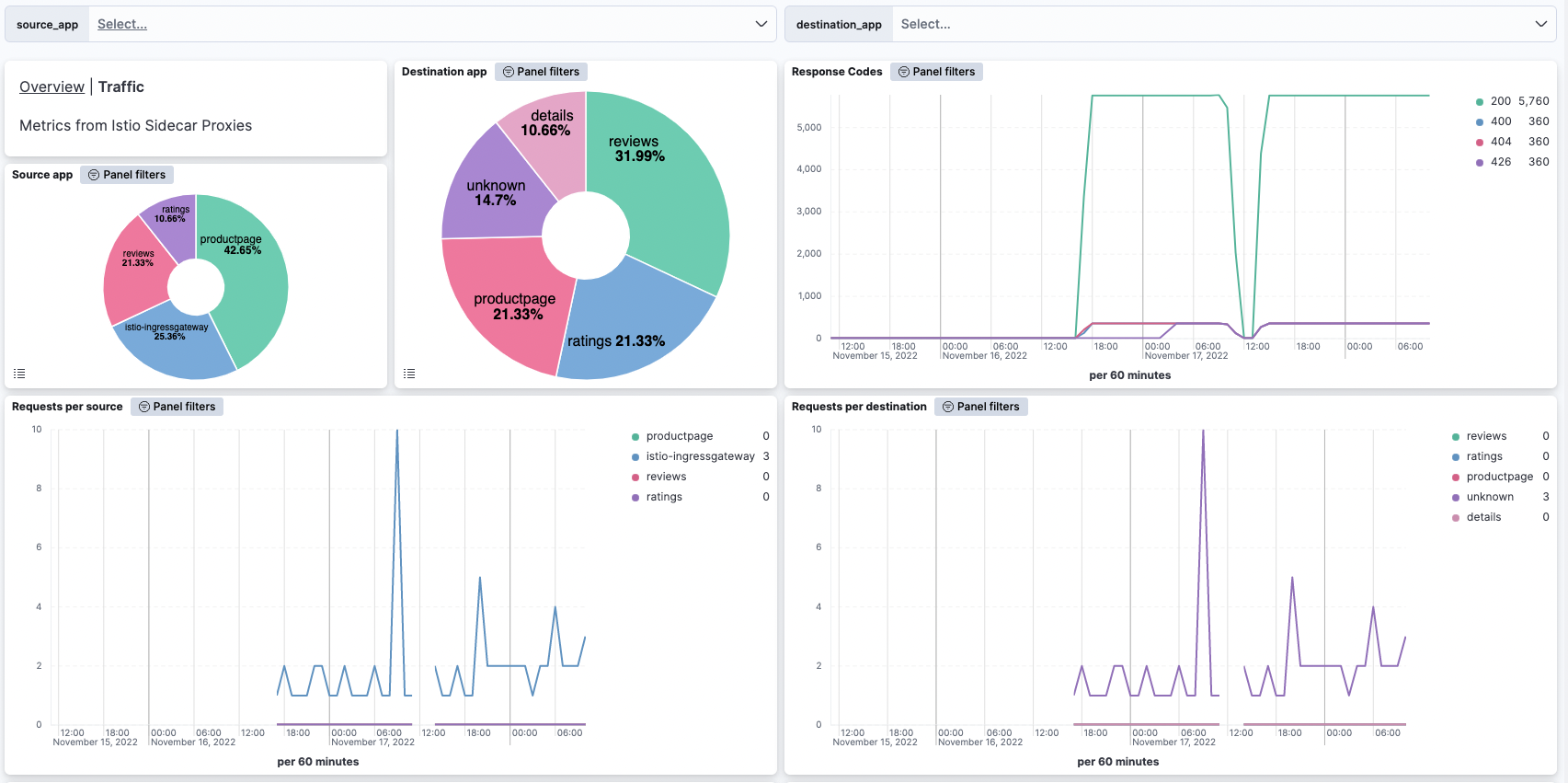
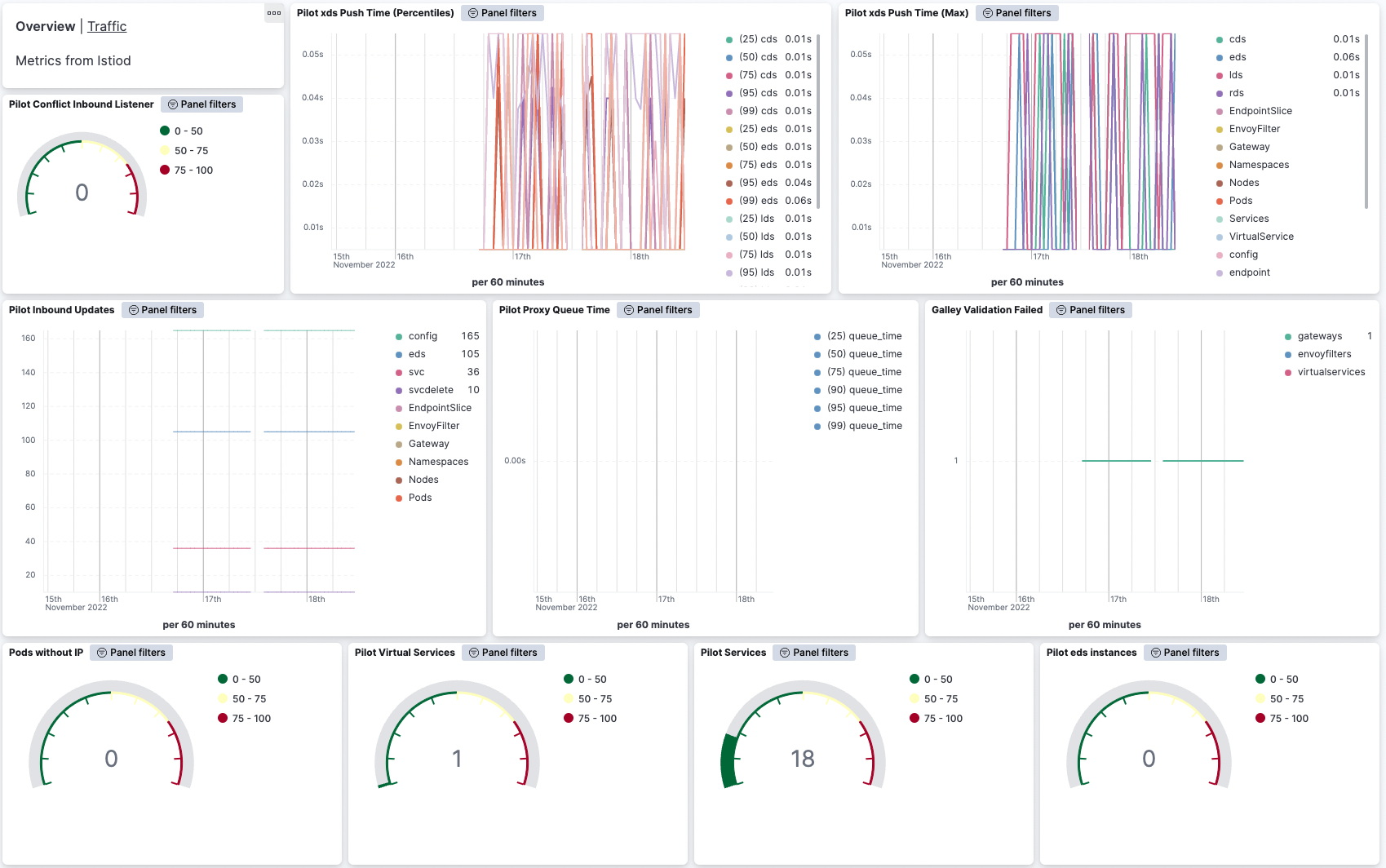
This integration includes one or more Kibana dashboards that visualizes the data collected by the integration. The screenshots below illustrate how the ingested data is displayed.
Changelog
| Version | Details | Minimum Kibana version |
|---|---|---|
| 0.8.0 | Enhancement (View pull request) Allow @custom pipeline access to event.original without setting preserve_original_event. |
9.0.0 8.11.0 |
| 0.7.0 | Enhancement (View pull request) Add support for Kibana 9.0.0 |
9.0.0 8.9.0 |
| 0.6.0 | Enhancement (View pull request) Add global filter on data_stream.dataset to improve performance. |
8.9.0 |
| 0.5.0 | Enhancement (View pull request) Adapt fields for changes in file system info |
8.9.0 |
| 0.4.2 | Bug fix (View pull request) Add null check to the rename processor |
8.9.0 |
| 0.4.1 | Enhancement (View pull request) Revert the metric format to have type object again. |
8.9.0 |
| 0.4.0 | Enhancement (View pull request) Enable TSDB by default for all metrics data streams. This improves storage usage and query performance. For more details, see https://www.elastic.co/guide/en/elasticsearch/reference/current/tsds.html. |
8.9.0 |
| 0.3.2 | Enhancement (View pull request) Update "Pilot xds expired" visualization to use last value instead of average. |
8.9.0 |
| 0.3.1 | Enhancement (View pull request) Add metric type. |
8.9.0 |
| 0.3.0 | Enhancement (View pull request) Set dimension fields. |
8.6.0 |
| 0.2.6 | Enhancement (View pull request) Added link to docs for condition filter |
8.6.0 |
| 0.2.5 | Enhancement (View pull request) Added categories and/or subcategories. |
8.6.0 |
| 0.2.4 | Enhancement (View pull request) Convert dashboards to Lens and other fixes |
8.6.0 |
| 0.2.3 | Bug fix (View pull request) Fix Access Log Common Format Ingest Grok Pattern for IPv6 |
8.4.0 |
| 0.2.2 | Enhancement (View pull request) Monitor Istiod service |
8.4.0 |
| 0.2.1 | Enhancement (View pull request) Metrics for Istiod and Proxy sidecar container |
8.4.0 |
| 0.2.0 | Enhancement (View pull request) Metrics for Istiod and Proxy sidecar container |
— |
| 0.1.0 | Enhancement (View pull request) Initial release |
8.3.0 |