Cloudflare Integration
Elastic Cloud Serverless projects are autoscaled environments, fully managed by Elastic and available on Elastic Cloud. Availability This functionality is generally available and ready for production usage. Elastic Cloud Serverless projects are autoscaled environments, fully managed by Elastic and available on Elastic Cloud. Availability This functionality is generally available and ready for production usage. The Elastic Stack includes Elastic's core products such as Elasticsearch, Kibana, Logstash, and Beats. Availability This functionality is generally available and ready for production usage. Unless stated otherwise on the page, this functionality is available when your Elastic Stack is deployed on Elastic Cloud Hosted, Elastic Cloud Enterprise, Elastic Cloud on Kubernetes, and self-managed environments. This documentation corresponds to the latest patch available for each minor version. If you're not using the latest patch, check the release notes for changes.
Serverless Observability
Generally available
Serverless Security
Generally available
Stack
9.1+
Generally available since 9.1
| Version | 2.39.0 (View all) |
| Managed integration release status | GA |
| Subscription level What's this? |
Basic |
| Developed by What's this? |
Elastic |
| Ingestion method(s) | API |
| Minimum Kibana version(s) | 9.1.4 9.0.7 8.19.4 |
You can use this integration as an Elastic Managed integration on Elastic Cloud Hosted deployments running this version or later.
Cloudflare integration uses Cloudflare's API to retrieve audit logs from the Cloudflare account and Cloudflare's Logpull API to retrieve traffic logs from Cloudflare, for a particular zone, and ingest them into Elasticsearch. This allows you to search, observe and visualize the Cloudflare log events through Elasticsearch.
Users of Cloudflare use Cloudflare services to increase the security and performance of their web sites and services.
Logpull is considered a legacy feature and it is recommended to use the Cloudflare Logpush integration for Cloudflare traffic logs for better performance and functionality. See here for more details.
Authenticating with API Key (Auth Key) using X-AUTH-EMAIL and X-AUTH-KEY is considered to be a legacy feature with several limitations that makes it less secure than API token (Auth Token). See here for more information on API Key limitations.
Elastic Managed integrations are only supported on Elastic Cloud Serverless and Elastic Cloud Hosted deployments. An Elastic Managed integration lets you ingest data from a cloud source while avoiding the orchestration, management, and maintenance associated with standard ingest infrastructure. Elastic runs the collector for you, so you can focus on your data instead of the infrastructure that collects it.
For more information, refer to Elastic Managed integrations and the Elastic Managed integrations FAQ.
- In Kibana go to Management > Integrations
- In the "Search for integrations" search bar type Cloudflare.
- Click on "Cloudflare" integration from the search results.
- Click on Add Cloudflare button to add Cloudflare integration.
Collect Audit logs with the Collect Cloudflare Audit logs via API input. The Audit logs option in the Collect Cloudflare Logpull logs via API input is DEPRECATED since version 2.31.0 and will be removed in a future release; it supports only Auth Email and Auth Key authentication. If you use it, deactivate it and enable Audit logs in the Collect Cloudflare Audit logs via API input instead.
The integration can retrieve Cloudflare audit logs using -
- Auth Email and Auth Key
- Auth Token
More information is available here.
Enter values "Auth Email", "Auth Key" and "Account ID".
- Auth Email is the email address associated with your account.
- Auth Key is the Global API key generated on the "My Profile" > "API Tokens" page.
- Account ID can be found here.
See here for more information on X-AUTH-EMAIL and X-AUTH-KEY.
Enter values "Auth Token" and "Account ID".
For the Cloudflare integration to be able to successfully get logs, one of the following permissions must be granted to the API Token -
- Account Settings Write, Account Settings Read
- Auth Token is the API Token generated on the "My Profile" > "API Tokens" or "Manage Account" > "Account API Tokens" page.
- Account ID can be found here.
See here for more information on API Token.
These logs contain data related to the connecting client, the request path through the Cloudflare network, and the response from the origin web server. For more information see here.
The integration can retrieve Cloudflare logs using -
- Auth Email and Auth Key
- Auth Token
More information is available here.
Enter values "Auth Email", "Auth Key" and "Zone ID".
- Auth Email is the email address associated with your account.
- Auth Key is the Global API key generated on the "My Profile" > "API Tokens" page.
- Zone ID can be found here.
See here for more information on X-AUTH-EMAIL and X-AUTH-KEY.
Enter values "Auth Token" and "Zone ID".
For the Cloudflare integration to be able to successfully get logs the following permissions must be granted to the API Token -
- Account.Access: Audit Logs: Read
- Auth Token is the API Token generated on the "My Profile" > "API Tokens" or "Manage Account" > "Account API Tokens" page.
- Zone ID can be found here.
See here for more information on API Token.
Audit logs summarize the history of changes made within your Cloudflare account. Audit logs include account-level actions like login and logout, as well as setting changes to DNS, Crypto, Firewall, Speed, Caching, Page Rules, Network, and Traffic features, etc.
Exported fields
| Field | Description | Type |
|---|---|---|
| @timestamp | Event timestamp. | date |
| cloud.image.id | Image ID for the cloud instance. | keyword |
| cloudflare.audit.actor.type | The type of actor, whether a User, Cloudflare Admin, or an Automated System. Valid values: user, admin, Cloudflare. | keyword |
| cloudflare.audit.metadata | An object which can lend more context to the action being logged. This is a flexible value and varies between different actions. | flattened |
| cloudflare.audit.new_value | The new value of the resource that was modified | flattened |
| cloudflare.audit.old_value | The value of the resource before it was modified | flattened |
| cloudflare.audit.owner.id | User identifier tag | keyword |
| cloudflare.audit.resource.id | An identifier for the resource that was affected by the action | keyword |
| cloudflare.audit.resource.type | A short string that describes the resource that was affected by the action | keyword |
| data_stream.dataset | Data stream dataset name. | constant_keyword |
| data_stream.namespace | Data stream namespace. | constant_keyword |
| data_stream.type | Data stream type. | constant_keyword |
| event.dataset | Event dataset | constant_keyword |
| event.module | Event module | constant_keyword |
| host.containerized | If the host is a container. | boolean |
| host.os.build | OS build information. | keyword |
| host.os.codename | OS codename, if any. | keyword |
| input.type | Type of Filebeat input. | keyword |
| log.flags | Flags for the log file. | keyword |
| log.offset | Offset of the entry in the log file. | long |
Example
{
    "@timestamp": "2021-11-30T13:42:04.000Z",
    "agent": {
        "ephemeral_id": "3c1b2b42-0ed4-4e3d-a006-3fdced104a81",
        "id": "0392f7e6-a4ab-4de6-b9ef-514d77323416",
        "name": "elastic-agent-20026",
        "type": "filebeat",
        "version": "8.19.4"
    },
    "cloud": {
        "account": {
            "id": "aaabbbccc"
        },
        "provider": "cloudflare"
    },
    "cloudflare": {
        "audit": {
            "actor": {
                "type": "user"
            },
            "owner": {
                "id": "enl3j9du8rnx2swwd9l32qots7l54t9s"
            },
            "resource": {
                "id": "enl3j9du8rnx2swwd9l32qots7l54t9s",
                "type": "account"
            }
        }
    },
    "data_stream": {
        "dataset": "cloudflare.audit",
        "namespace": "68685",
        "type": "logs"
    },
    "ecs": {
        "version": "8.11.0"
    },
    "elastic_agent": {
        "id": "0392f7e6-a4ab-4de6-b9ef-514d77323416",
        "snapshot": false,
        "version": "8.19.4"
    },
    "event": {
        "action": "rotate_api_key",
        "agent_id_status": "verified",
        "category": [
            "iam"
        ],
        "created": "2025-12-22T12:51:07.996Z",
        "dataset": "cloudflare.audit",
        "id": "8d3396e8-c903-5a66-9421-00fc34570550",
        "ingested": "2025-12-22T12:51:09Z",
        "kind": "event",
        "original": "{\"action\":{\"info\":\"key digest: c6b5d100d7ce492d24c5b13160fce1cc0092ce7e8d8430e9f5cf5468868be6f6\",\"result\":true,\"type\":\"rotate_API_key\"},\"actor\":{\"email\":\"user@example.com\",\"id\":\"enl3j9du8rnx2swwd9l32qots7l54t9s\",\"ip\":\"52.91.36.10\",\"type\":\"user\"},\"id\":\"8d3396e8-c903-5a66-9421-00fc34570550\",\"interface\":\"\",\"metadata\":{},\"newValue\":\"\",\"oldValue\":\"\",\"owner\":{\"id\":\"enl3j9du8rnx2swwd9l32qots7l54t9s\"},\"resource\":{\"id\":\"enl3j9du8rnx2swwd9l32qots7l54t9s\",\"type\":\"account\"},\"when\":\"2021-11-30T13:42:04Z\"}",
        "outcome": "success",
        "type": [
            "change"
        ]
    },
    "input": {
        "type": "httpjson"
    },
    "related": {
        "ip": [
            "52.91.36.10"
        ],
        "user": [
            "enl3j9du8rnx2swwd9l32qots7l54t9s"
        ]
    },
    "source": {
        "address": "52.91.36.10",
        "ip": "52.91.36.10"
    },
    "tags": [
        "forwarded",
        "cloudflare-audit",
        "preserve_original_event"
    ],
    "user": {
        "email": "user@example.com",
        "id": "enl3j9du8rnx2swwd9l32qots7l54t9s"
    }
}
These logs contain data related to the connecting client, the request path through the Cloudflare network, and the response from the origin web server. For more information see here.
Exported fields
| Field | Description | Type | |||
|---|---|---|---|---|---|
| @timestamp | Event timestamp. | date | |||
| cloudflare.bot.score.src | Detection engine responsible for generating the Bot Score. Possible values are Not Computed, Heuristics, Machine Learning, Behavioral Analysis, Verified Bot, JS Fingerprinting, Cloudflare Service. | text | |||
| cloudflare.bot.score.value | Cloudflare Bot Score. Scores below 30 are commonly associated with automated traffic. | long | |||
| cloudflare.cache.bytes | Number of bytes returned by the cache | long | |||
| cloudflare.cache.status | Status of cache | keyword | |||
| cloudflare.cache.status_code | HTTP status code returned by the cache to the edge. All requests (including non-cacheable ones) go through the cache. | long | |||
| cloudflare.cache.tiered_fill | Tiered Cache was used to serve this request | boolean | |||
| cloudflare.client.ip_class | Class of client, ex. badHost | searchEngine | allowlist | greylist.... | keyword |
| cloudflare.client.ssl.protocol | Client SSL (TLS) protocol | keyword | |||
| cloudflare.device_type | Client device type | keyword | |||
| cloudflare.edge.colo.code | IATA airport code of data center that received the request | keyword | |||
| cloudflare.edge.colo.id | Cloudflare edge colo id | long | |||
| cloudflare.edge.pathing.op | Indicates what type of response was issued for this request (unknown = no specific action) | keyword | |||
| cloudflare.edge.pathing.src | Details how the request was classified based on security checks (unknown = no specific classification) | keyword | |||
| cloudflare.edge.pathing.status | Indicates what data was used to determine the handling of this request (unknown = no data) | keyword | |||
| cloudflare.edge.rate_limit.action | The action taken by the blocking rule; empty if no action taken | keyword | |||
| cloudflare.edge.rate_limit.id | The internal rule ID of the rate-limiting rule that triggered a block (ban) or log action. 0 if no action taken. | long | |||
| cloudflare.edge.request.host | Host header on the request from the edge to the origin | keyword | |||
| cloudflare.edge.response.bytes | Number of bytes returned by the edge to the client | long | |||
| cloudflare.edge.response.compression_ratio | Edge response compression ratio | long | |||
| cloudflare.edge.response.content_type | Edge response Content-Type header value | keyword | |||
| cloudflare.edge.response.status_code | HTTP status code returned by Cloudflare to the client | long | |||
| cloudflare.firewall.actions | Array of actions the Cloudflare firewall products performed on this request. The individual firewall products associated with this action be found in FirewallMatchesSources and their respective RuleIds can be found in FirewallMatchesRuleIDs. The length of the array is the same as FirewallMatchesRuleIDs and FirewallMatchesSources. | keyword | |||
| cloudflare.firewall.rule_ids | Array of RuleIDs of the firewall product that has matched the request. The firewall product associated with the RuleID can be found in FirewallMatchesSources. The length of the array is the same as FirewallMatchesActions and FirewallMatchesSources. | keyword | |||
| cloudflare.firewall.sources | The firewall products that matched the request. The same product can appear multiple times, which indicates different rules or actions that were activated. The RuleIDs can be found in FirewallMatchesRuleIDs, the actions can be found in FirewallMatchesActions. The length of the array is the same as FirewallMatchesRuleIDs and FirewallMatchesActions. | keyword | |||
| cloudflare.origin.response.bytes | Number of bytes returned by the origin server | long | |||
| cloudflare.origin.response.expires | Value of the origin 'expires' header | date | |||
| cloudflare.origin.response.last_modified | Value of the origin 'last-modified' header | date | |||
| cloudflare.origin.response.status_code | Status returned by the origin server | long | |||
| cloudflare.origin.response.time | Number of nanoseconds it took the origin to return the response to edge | long | |||
| cloudflare.origin.ssl.protocol | SSL (TLS) protocol used to connect to the origin | keyword | |||
| cloudflare.parent.ray_id | Ray ID of the parent request if this request was made using a Worker script | keyword | |||
| cloudflare.ray_id | Ray ID of the parent request if this request was made using a Worker script | keyword | |||
| cloudflare.security_level | The security level configured at the time of this request. This is used to determine the sensitivity of the IP Reputation system. | keyword | |||
| cloudflare.waf.action | Action taken by the WAF, if triggered | keyword | |||
| cloudflare.waf.flags | Additional configuration flags: simulate (0x1) | null | keyword | ||
| cloudflare.waf.matched_var | The full name of the most-recently matched variable | keyword | |||
| cloudflare.waf.profile | low | med | high | keyword | |
| cloudflare.waf.rule.id | ID of the applied WAF rule | keyword | |||
| cloudflare.waf.rule.message | Rule message associated with the triggered rule | keyword | |||
| cloudflare.worker.cpu_time | Amount of time in microseconds spent executing a worker, if any | long | |||
| cloudflare.worker.status | Status returned from worker daemon | keyword | |||
| cloudflare.worker.subrequest | Whether or not this request was a worker subrequest | boolean | |||
| cloudflare.worker.subrequest_count | Number of subrequests issued by a worker when handling this request | long | |||
| cloudflare.zone.id | Internal zone ID | long | |||
| cloudflare.zone.name | The human-readable name of the zone (e.g. 'cloudflare.com'). | keyword | |||
| data_stream.dataset | Data stream dataset name. | constant_keyword | |||
| data_stream.namespace | Data stream namespace. | constant_keyword | |||
| data_stream.type | Data stream type. | constant_keyword | |||
| event.dataset | Event dataset | constant_keyword | |||
| event.module | Event module | constant_keyword | |||
| host.containerized | If the host is a container. | boolean | |||
| host.os.build | OS build information. | keyword | |||
| host.os.codename | OS codename, if any. | keyword | |||
| input.type | Type of Filebeat input. | keyword | |||
| log.flags | Flags for the log file. | keyword | |||
| log.offset | Offset of the entry in the log file. | long |
Example
{
    "@timestamp": "2019-08-02T15:29:08.000Z",
    "agent": {
        "ephemeral_id": "6005fa65-76fc-4117-ab08-dcd27cf976f6",
        "id": "07511c32-6ee9-4ef3-b9a6-33eead186c31",
        "name": "elastic-agent-46966",
        "type": "filebeat",
        "version": "8.16.0"
    },
    "client": {
        "address": "35.232.161.245",
        "as": {
            "number": 15169
        },
        "bytes": 2577,
        "geo": {
            "country_iso_code": "us"
        },
        "ip": "35.232.161.245",
        "port": 55028
    },
    "cloudflare": {
        "cache": {
            "status": "unknown",
            "tiered_fill": false
        },
        "client": {
            "ip_class": "noRecord",
            "ssl": {
                "protocol": "TLSv1.2"
            }
        },
        "device_type": "desktop",
        "edge": {
            "colo": {
                "id": 14
            },
            "pathing": {
                "op": "wl",
                "src": "filter_based_firewall",
                "status": "captchaNew"
            },
            "rate_limit": {
                "id": 0
            },
            "response": {
                "bytes": 2848,
                "compression_ratio": 2.64,
                "content_type": "text/html",
                "status_code": 403
            }
        },
        "firewall": {
            "actions": [
                "simulate",
                "challenge"
            ],
            "rule_ids": [
                "094b71fea25d4860a61fa0c6fbbd8d8b",
                "e454fd4a0ce546b3a9a462536613692c"
            ],
            "sources": [
                "firewallRules",
                "firewallRules"
            ]
        },
        "origin": {
            "response": {
                "bytes": 0,
                "status_code": 0,
                "time": 0
            },
            "ssl": {
                "protocol": "unknown"
            }
        },
        "parent": {
            "ray_id": "00"
        },
        "ray_id": "500115ec386354d8",
        "security_level": "med",
        "waf": {
            "action": "unknown",
            "flags": "0",
            "profile": "unknown"
        },
        "worker": {
            "cpu_time": 0,
            "status": "unknown",
            "subrequest": false,
            "subrequest_count": 0
        },
        "zone": {
            "id": 155978002
        }
    },
    "data_stream": {
        "dataset": "cloudflare.logpull",
        "namespace": "31527",
        "type": "logs"
    },
    "destination": {
        "bytes": 2848
    },
    "ecs": {
        "version": "8.11.0"
    },
    "elastic_agent": {
        "id": "07511c32-6ee9-4ef3-b9a6-33eead186c31",
        "snapshot": false,
        "version": "8.16.0"
    },
    "event": {
        "action": [
            "simulate",
            "challenge"
        ],
        "agent_id_status": "verified",
        "category": [
            "network"
        ],
        "created": "2025-10-21T11:14:07.142Z",
        "dataset": "cloudflare.logpull",
        "duration": 0,
        "end": "2019-08-02T15:29:08.000Z",
        "ingested": "2025-10-21T11:14:08Z",
        "kind": "event",
        "original": "{\"CacheCacheStatus\":\"unknown\",\"CacheResponseBytes\":0,\"CacheResponseStatus\":0,\"CacheTieredFill\":false,\"ClientASN\":15169,\"ClientCountry\":\"us\",\"ClientDeviceType\":\"desktop\",\"ClientIP\":\"35.232.161.245\",\"ClientIPClass\":\"noRecord\",\"ClientRequestBytes\":2577,\"ClientRequestHost\":\"cf-analytics.com\",\"ClientRequestMethod\":\"POST\",\"ClientRequestPath\":\"/wp-cron.php\",\"ClientRequestProtocol\":\"HTTP/1.1\",\"ClientRequestReferer\":\"https://cf-analytics.com/wp-cron.php?doing_wp_cron=1564759748.3962020874023437500000\",\"ClientRequestURI\":\"/wp-cron.php?doing_wp_cron=1564759748.3962020874023437500000\",\"ClientRequestUserAgent\":\"WordPress/5.2.2;https://cf-analytics.com\",\"ClientSSLCipher\":\"ECDHE-ECDSA-AES128-GCM-SHA256\",\"ClientSSLProtocol\":\"TLSv1.2\",\"ClientSrcPort\":55028,\"EdgeColoID\":14,\"EdgeEndTimestamp\":\"2019-08-02T15:29:08Z\",\"EdgePathingOp\":\"wl\",\"EdgePathingSrc\":\"filter_based_firewall\",\"EdgePathingStatus\":\"captchaNew\",\"EdgeRateLimitAction\":\"\",\"EdgeRateLimitID\":0,\"EdgeRequestHost\":\"\",\"EdgeResponseBytes\":2848,\"EdgeResponseCompressionRatio\":2.64,\"EdgeResponseContentType\":\"text/html\",\"EdgeResponseStatus\":403,\"EdgeServerIP\":\"\",\"EdgeStartTimestamp\":\"2019-08-02T15:29:08Z\",\"FirewallMatchesActions\":[\"simulate\",\"challenge\"],\"FirewallMatchesRuleIDs\":[\"094b71fea25d4860a61fa0c6fbbd8d8b\",\"e454fd4a0ce546b3a9a462536613692c\"],\"FirewallMatchesSources\":[\"firewallRules\",\"firewallRules\"],\"OriginIP\":\"\",\"OriginResponseBytes\":0,\"OriginResponseHTTPExpires\":\"\",\"OriginResponseHTTPLastModified\":\"\",\"OriginResponseStatus\":0,\"OriginResponseTime\":0,\"OriginSSLProtocol\":\"unknown\",\"ParentRayID\":\"00\",\"RayID\":\"500115ec386354d8\",\"SecurityLevel\":\"med\",\"WAFAction\":\"unknown\",\"WAFFlags\":\"0\",\"WAFMatchedVar\":\"\",\"WAFProfile\":\"unknown\",\"WAFRuleID\":\"\",\"WAFRuleMessage\":\"\",\"WorkerCPUTime\":0,\"WorkerStatus\":\"unknown\",\"WorkerSubrequest\":false,\"WorkerSubrequestCount\":0,\"ZoneID\":155978002}",
        "start": "2019-08-02T15:29:08.000Z"
    },
    "http": {
        "request": {
            "bytes": 2577,
            "method": "POST",
            "referrer": "https://cf-analytics.com/wp-cron.php?doing_wp_cron=1564759748.3962020874023437500000"
        },
        "response": {
            "bytes": 2848,
            "status_code": 403
        },
        "version": "1.1"
    },
    "input": {
        "type": "httpjson"
    },
    "network": {
        "bytes": 5425,
        "protocol": "http",
        "transport": "tcp"
    },
    "observer": {
        "type": "proxy",
        "vendor": "cloudflare"
    },
    "server": {
        "bytes": 2848
    },
    "source": {
        "address": "35.232.161.245",
        "as": {
            "number": 15169
        },
        "bytes": 2577,
        "geo": {
            "country_iso_code": "us"
        },
        "ip": "35.232.161.245",
        "port": 55028
    },
    "tags": [
        "forwarded",
        "cloudflare-logpull",
        "preserve_original_event"
    ],
    "tls": {
        "cipher": "ECDHE-ECDSA-AES128-GCM-SHA256",
        "version": "1.2",
        "version_protocol": "tls"
    },
    "url": {
        "domain": "cf-analytics.com",
        "extension": "php",
        "full": "https://cf-analytics.com/wp-cron.php?doing_wp_cron=1564759748.3962020874023437500000",
        "original": "/wp-cron.php?doing_wp_cron=1564759748.3962020874023437500000",
        "path": "/wp-cron.php",
        "query": "doing_wp_cron=1564759748.3962020874023437500000",
        "scheme": "https"
    },
    "user_agent": {
        "device": {
            "name": "Spider"
        },
        "name": "WordPress",
        "original": "WordPress/5.2.2;https://cf-analytics.com",
        "version": "5.2.2"
    }
}
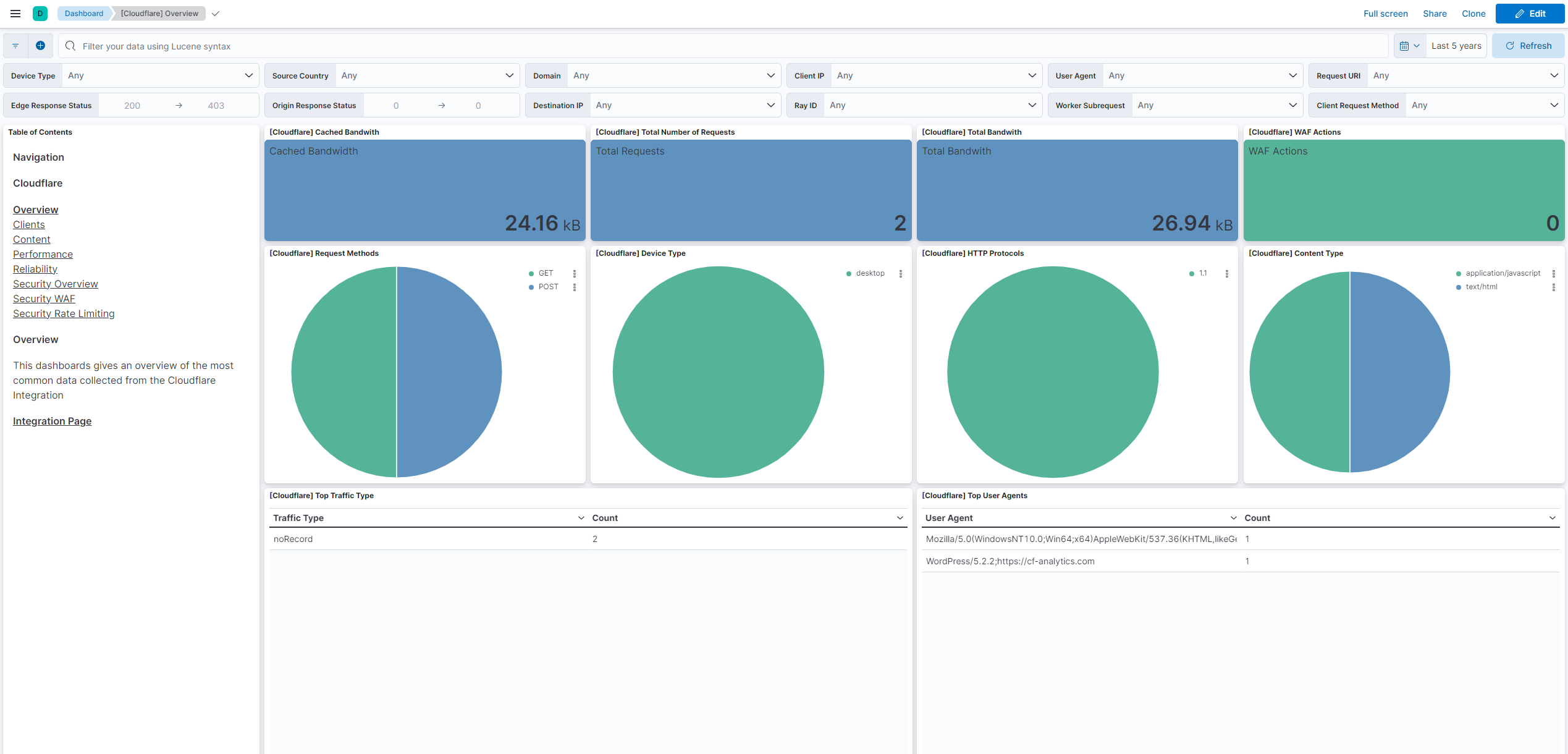
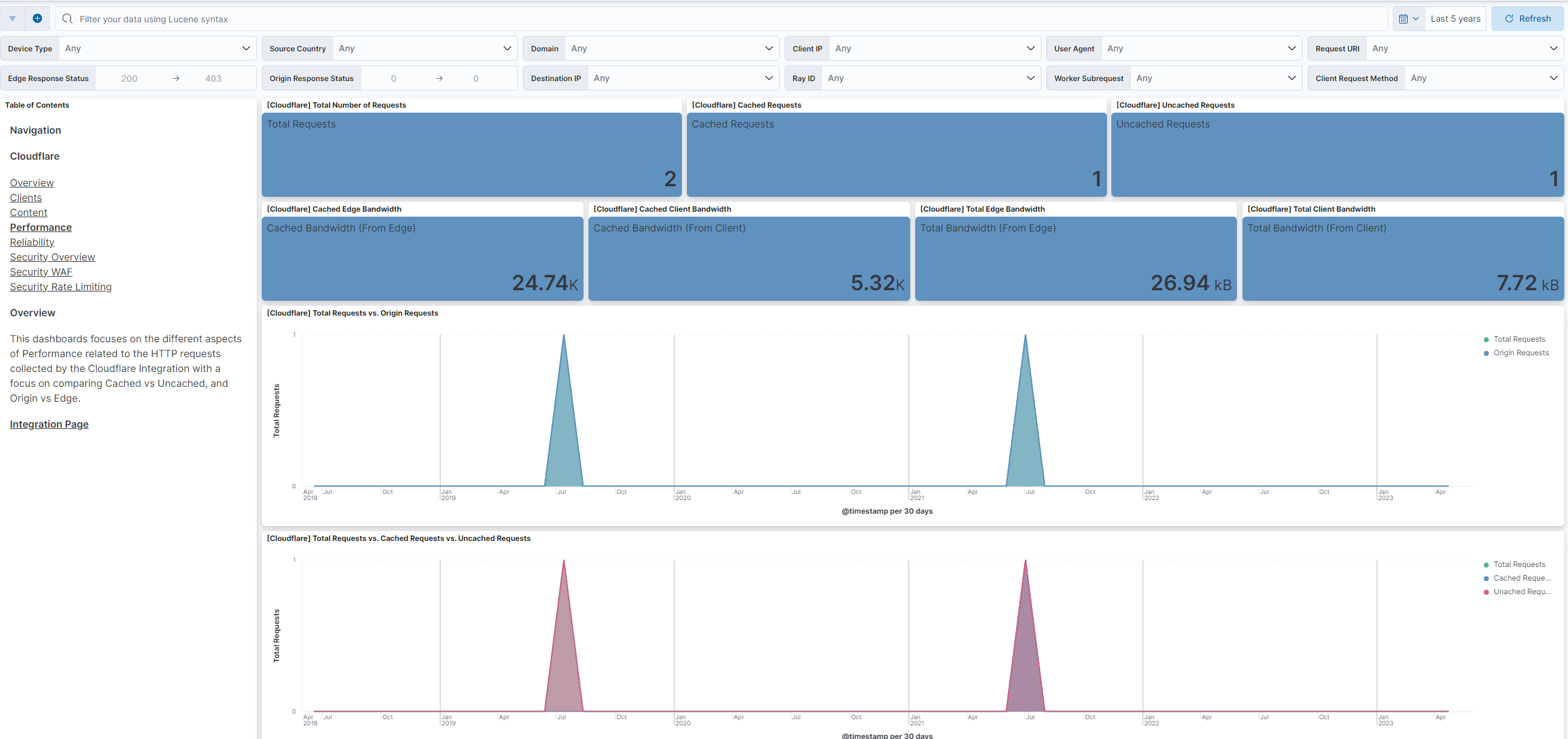
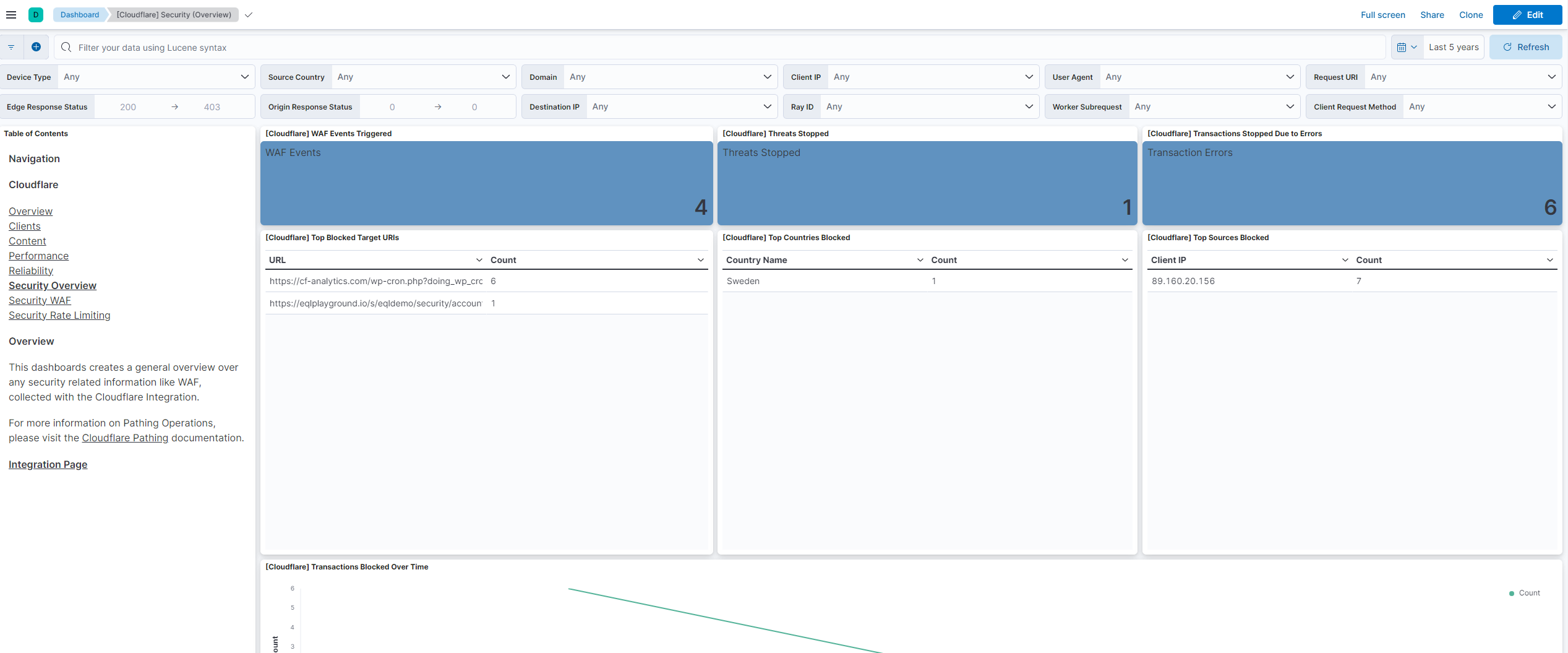
This integration includes one or more Kibana dashboards that visualizes the data collected by the integration. The screenshots below illustrate how the ingested data is displayed.
Changelog
| Version | Details | Minimum Kibana version |
|---|---|---|
| 2.39.0 | Enhancement (View pull request) Update Elastic Managed integration documentation to the current wording and docs links. |
9.1.4 9.0.7 8.19.4 |
| 2.38.0 | Enhancement (View pull request) Make the CEL input the default for the Audit logs data stream and disable its deprecated HTTPJSON option by default for new policies. Retitle the integration inputs by the data streams they collect. |
9.1.4 9.0.7 8.19.4 |
| 2.37.0 | Enhancement (View pull request) Add tags to ingest pipeline processors and add preserve_original_event to pipeline-level on_failure handlers. |
9.1.4 9.0.7 8.19.4 |
| 2.36.1 | Enhancement (View pull request) Set agentless deployment mode release field to ga. |
9.1.4 9.0.7 8.19.4 |
| 2.36.0 | Enhancement (View pull request) Set 'elastic' owner type. |
9.1.4 9.0.7 8.19.4 |
| 2.35.0 | Enhancement (View pull request) Publish Agentless to Elastic Managed integrations name change. |
9.1.4 9.0.7 8.19.4 |
| 2.34.0 | Enhancement (View pull request) Use new release field for agentless deployment mode to establish as beta. |
9.1.4 9.0.7 8.19.4 |
| 2.33.0 | Enhancement (View pull request) Enable Agentless deployment. |
9.1.4 9.0.7 8.19.4 |
| 2.32.1 | Bug fix (View pull request) Use triple-brace Mustache templating when referencing variables in ingest pipelines. |
9.1.4 9.0.7 8.19.4 |
| 2.32.0 | Enhancement (View pull request) Prevent updating fleet health status to degraded when pagination completes. |
9.1.4 9.0.7 8.19.4 |
| 2.31.1 | Bug fix (View pull request) Change default start time to 'now - 167h59m' to fix 'logs older than 168h0m0s are not available' error. |
9.0.0 8.16.0 |
| 2.31.0 | Enhancement (View pull request) Added CEL input to support API Tokens in Cloudflare audit data stream input. |
9.0.0 8.16.0 |
| 2.30.0 | Enhancement (View pull request) Update Kibana constraint to support 9.0.0. |
9.0.0 8.13.0 |
| 2.29.1 | Bug fix (View pull request) Updated SSL description in package manifest.yml to be uniform and to include links to documentation. |
8.13.0 |
| 2.29.0 | Enhancement (View pull request) Add "preserve_original_event" tag to documents with event.kind set to "pipeline_error". |
8.13.0 |
| 2.28.0 | Enhancement (View pull request) Allow @custom pipeline access to event.original without setting preserve_original_event. |
8.13.0 |
| 2.27.0 | Enhancement (View pull request) Update the kibana constraint to ^8.13.0. Modified the field definitions to remove ECS fields made redundant by the ecs@mappings component template. |
8.13.0 |
| 2.26.0 | Enhancement (View pull request) Improve handling of empty responses. |
8.12.0 |
| 2.25.0 | Enhancement (View pull request) Allow user configuration of results per page. |
8.12.0 |
| 2.24.0 | Enhancement (View pull request) Set sensitive values as secret. |
8.12.0 |
| 2.23.1 | Enhancement (View pull request) Changed owners |
8.10.1 |
| 2.23.0 | Enhancement (View pull request) Limit request tracer log count to five. |
8.10.1 |
| 2.22.0 | Enhancement (View pull request) ECS version updated to 8.11.0. |
8.10.1 |
| 2.21.0 | Enhancement (View pull request) Improve 'event.original' check to avoid errors if set. |
8.10.1 |
| 2.20.0 | Bug fix (View pull request) Updated the logpull data stream to more closely adhere to the API's requirements for interval time ranges, and updated the package to require Elastic stack 8.10.0 or newer. |
8.10.1 |
| 2.19.1 | Bug fix (View pull request) Add option to include Bot fields in API requests. |
8.7.1 |
| 2.19.0 | Enhancement (View pull request) Add Bot fields for HTTP events. |
8.7.1 |
| 2.18.0 | Enhancement (View pull request) Set 'community' owner type. |
8.7.1 |
| 2.17.0 | Enhancement (View pull request) ECS version updated to 8.10.0. |
8.7.1 |
| 2.16.0 | Enhancement (View pull request) The format_version in the package manifest changed from 2.11.0 to 3.0.0. Removed dotted YAML keys from package manifest. Added 'owner.type: elastic' to package manifest. |
8.7.1 |
| 2.15.0 | Enhancement (View pull request) Add tags.yml file so that integration's dashboards and saved searches are tagged with "Security Solution" and displayed in the Security Solution UI. |
8.7.1 |
| 2.14.1 | Bug fix (View pull request) Fix handling of unix timestamps. |
8.7.1 |
| 2.14.0 | Enhancement (View pull request) Update package-spec to 2.10.0. |
8.7.1 |
| 2.13.0 | Enhancement (View pull request) Update package to ECS 8.9.0. |
8.7.1 |
| 2.12.0 | Enhancement (View pull request) Document duration units. |
8.7.1 |
| 2.11.0 | Enhancement (View pull request) Document valid duration units. |
8.7.1 |
| 2.10.0 | Enhancement (View pull request) Document valid duration units. |
— |
| 2.9.0 | Enhancement (View pull request) Ensure event.kind is correctly set for pipeline errors. |
8.7.1 |
| 2.8.0 | Enhancement (View pull request) Adding new Lens dashboards |
8.7.1 |
| 2.7.0 | Enhancement (View pull request) Update package to ECS 8.8.0. |
8.7.1 |
| 2.6.0 | Enhancement (View pull request) Add a new flag to enable request tracing |
8.7.1 |
| 2.5.1 | Bug fix (View pull request) Safe escape authentication keys. |
8.4.0 |
| 2.5.0 | Enhancement (View pull request) Update package to ECS 8.7.0. |
8.0.0 |
| 2.4.2 | Enhancement (View pull request) Added categories and/or subcategories. |
8.0.0 |
| 2.4.1 | Bug fix (View pull request) Drop empty event sets. |
8.0.0 |
| 2.4.0 | Enhancement (View pull request) Update package to ECS 8.6.0. |
8.0.0 |
| 2.3.1 | Enhancement (View pull request) Migrate the visualizations to by value in dashboards to minimize the saved object clutter and reduce time to load |
8.0.0 |
| 2.3.0 | Enhancement (View pull request) Update package to ECS 8.5.0. |
8.0.0 |
| 2.2.4 | Bug fix (View pull request) Remove duplicate fields. |
8.0.0 |
| 2.2.3 | Enhancement (View pull request) Use ECS geo.location definition. |
8.0.0 |
| 2.2.2 | Bug fix (View pull request) Fix pagination issue. |
8.0.0 |
| 2.2.1 | Enhancement (View pull request) Remove unused visualizations |
8.0.0 |
| 2.2.0 | Enhancement (View pull request) Update package to ECS 8.4.0 |
8.0.0 |
| 2.1.3 | Bug fix (View pull request) Fix proxy URL documentation rendering. |
8.0.0 |
| 2.1.2 | Enhancement (View pull request) Update package name and description to align with standard wording |
8.0.0 |
| 2.1.1 | Bug fix (View pull request) Fixing possible indefinite pagination |
8.0.0 |
| 2.1.0 | Enhancement (View pull request) Update package to ECS 8.3.0. |
8.0.0 |
| 2.0.1 | Enhancement (View pull request) Add link to vendor documentation in readme |
8.0.0 |
| 2.0.0 | Enhancement (View pull request) Migrate map visualisation from tile_map to map object |
8.0.0 |
| 1.4.2 | Enhancement (View pull request) Update documentation |
8.0.0 7.16.0 |
| 1.4.1 | Enhancement (View pull request) Add _id field to the logpull data stream to deduplicate events. |
— |
| 1.4.0 | Enhancement (View pull request) Update to ECS 8.2 |
— |
| 1.3.2 | Enhancement (View pull request) Add documentation for multi-fields |
8.0.0 7.16.0 |
| 1.3.1 | Bug fix (View pull request) Allow logpull interval to be less than 2 minutes. |
8.0.0 7.16.0 |
| 1.3.0 | Enhancement (View pull request) Update to ECS 8.0 |
8.0.0 7.16.0 |
| 1.2.1 | Bug fix (View pull request) Regenerate test files using the new GeoIP database |
8.0.0 7.16.0 |
| 1.2.0 | Enhancement (View pull request) Add audit logs |
— |
| 1.1.1 | Bug fix (View pull request) Change test public IPs to the supported subset |
— |
| 1.1.0 | Enhancement (View pull request) Add 8.0.0 version constraint |
8.0.0 7.16.0 |
| 1.0.3 | Enhancement (View pull request) Uniform with guidelines |
7.16.0 |
| 1.0.2 | Enhancement (View pull request) Update Title and Description. |
7.16.0 |
| 1.0.1 | Bug fix (View pull request) Fix logic that checks for the 'forwarded' tag |
— |
| 1.0.0 | Enhancement (View pull request) make GA |
— |
| 0.2.0 | Enhancement (View pull request) Update to ECS 1.12.0 |
— |
| 0.1.1 | Enhancement (View pull request) Add proxy config |
— |
| 0.1.0 | Enhancement (View pull request) initial release |
— |