Containerd integration
Elastic Cloud Serverless projects are autoscaled environments, fully managed by Elastic and available on Elastic Cloud. Availability This functionality is in technical preview and is ready for evaluation. Use with caution in production; it is not recommended for mission-critical workloads. Elastic will work to fix any issues, but features in technical preview are not subject to the support SLA of official GA features. Specific Support terms apply. Elastic Cloud Serverless projects are autoscaled environments, fully managed by Elastic and available on Elastic Cloud. Availability This functionality is in technical preview and is ready for evaluation. Use with caution in production; it is not recommended for mission-critical workloads. Elastic will work to fix any issues, but features in technical preview are not subject to the support SLA of official GA features. Specific Support terms apply. The Elastic Stack includes Elastic's core products such as Elasticsearch, Kibana, Logstash, and Beats. Availability This functionality is in technical preview and is ready for evaluation. Use with caution in production; it is not recommended for mission-critical workloads. Elastic will work to fix any issues, but features in technical preview are not subject to the support SLA of official GA features. Specific Support terms apply. Unless stated otherwise on the page, this functionality is available when your Elastic Stack is deployed on Elastic Cloud Hosted, Elastic Cloud Enterprise, Elastic Cloud on Kubernetes, and self-managed environments. This documentation corresponds to the latest patch available for each minor version. If you're not using the latest patch, check the release notes for changes.
Serverless Observability
Preview
Preview
Serverless Security
Preview
Preview
Stack
Preview
9.0+
Preview since 9.0
| Version | 0.6.0 Availability Preview This functionality is in technical preview and is ready for evaluation. Use with caution in production; it is not recommended for mission-critical workloads. Elastic will work to fix any issues, but features in technical preview are not subject to the support SLA of official GA features. Specific Support terms apply. (View all) |
| Subscription level What's this? |
Basic |
| Developed by What's this? |
Elastic |
| Ingestion method(s) | API |
| Minimum Kibana version(s) | 9.0.0 8.13.0 |
To use pre-release integrations, go to the Integrations page in Kibana, scroll down, and toggle on the Display beta integrations option.
This integration is used to collect metrics from containerd runtime.
It collects CPU, memory and blkio statistics about running containers controlled by containerd.
The current datasets are: cpu, blkio and memory and are enabled by default.
The Containerd integration is currently tested with Containerd version v1.5.2.
Containerd daemon has to be configured to provide metrics before enabling containerd integration.
In the configuration file located in /etc/containerd/config.toml, the metrics endpoint needs to be set and containerd daemon needs to be restarted.
[metrics]
    address = "127.0.0.1:1338"
For cpu data stream, if Calculate cpu usage percentage setting is set to true, cpu usage percentages will be calculated
and, more specifically, fields containerd.cpu.usage.total.pct, containerd.cpu.usage.kernel.pct, containerd.cpu.usage.user.pct.
Default value is true.
For memory data stream, if Calculate memory usage percentage setting is set to true, memory usage percentages will be calculated,
and, more specifically, fields containerd.memory.usage.pct and containerd.memory.workingset.pct.
Default value is true.
This is the cpu dataset of the Containerd package. It collects cpu related metrics
from containerd's metrics APIs.
Exported fields
| Field | Description | Type | Unit | Metric Type |
|---|---|---|---|---|
| @timestamp | Event timestamp. | date | ||
| agent.id | Unique identifier of this agent (if one exists). Example: For Beats this would be beat.id. | keyword | ||
| cloud.account.id | The cloud account or organization id used to identify different entities in a multi-tenant environment. Examples: AWS account id, Google Cloud ORG Id, or other unique identifier. | keyword | ||
| cloud.availability_zone | Availability zone in which this host, resource, or service is located. | keyword | ||
| cloud.instance.id | Instance ID of the host machine. | keyword | ||
| cloud.provider | Name of the cloud provider. Example values are aws, azure, gcp, or digitalocean. | keyword | ||
| cloud.region | Region in which this host, resource, or service is located. | keyword | ||
| container.cpu.usage | Total CPU usage normalized by the number of CPU cores. | scaled_float | percent | gauge |
| container.id | Unique container id. | keyword | ||
| containerd.cpu.system.total | Total user and system CPU time spent in seconds. | double | s | gauge |
| containerd.cpu.usage.cpu.*.ns | CPU usage nanoseconds in this cpu. | object | ||
| containerd.cpu.usage.kernel.ns | CPU Kernel usage nanoseconds | double | nanos | gauge |
| containerd.cpu.usage.kernel.pct | Percentage of time in kernel space normalized by the number of CPU cores. | scaled_float | percent | gauge |
| containerd.cpu.usage.total.ns | CPU total usage nanoseconds | double | nanos | gauge |
| containerd.cpu.usage.total.pct | Percentage of total CPU time normalized by the number of CPU cores | scaled_float | percent | gauge |
| containerd.cpu.usage.user.ns | CPU User usage nanoseconds | double | nanos | gauge |
| containerd.cpu.usage.user.pct | Percentage of time in user space normalized by the number of CPU cores. | scaled_float | percent | gauge |
| containerd.namespace | Containerd namespace | keyword | ||
| data_stream.dataset | Data stream dataset. | constant_keyword | ||
| data_stream.namespace | Data stream namespace. | constant_keyword | ||
| data_stream.type | Data stream type. | constant_keyword | ||
| ecs.version | ECS version this event conforms to. ecs.version is a required field and must exist in all events. When querying across multiple indices -- which may conform to slightly different ECS versions -- this field lets integrations adjust to the schema version of the events. |
keyword | ||
| host.name | Name of the host. It can contain what hostname returns on Unix systems, the fully qualified domain name, or a name specified by the user. The sender decides which value to use. |
keyword | ||
| service.address | Address where data about this service was collected from. This should be a URI, network address (ipv4:port or [ipv6]:port) or a resource path (sockets). | keyword | ||
| service.type | The type of the service data is collected from. The type can be used to group and correlate logs and metrics from one service type. Example: If logs or metrics are collected from Elasticsearch, service.type would be elasticsearch. |
keyword |
Example
{
    "container": {
        "id": "c9b16941acc7ec09a2b5e677d2863dd5c235b95304e7e8432a403f28e4f3e939"
    },
    "agent": {
        "name": "kind-control-plane",
        "id": "e76bdfd9-382f-4f81-be2d-7031ea2f3e0b",
        "ephemeral_id": "09df445e-765a-4333-bb12-ab043d85149a",
        "type": "metricbeat",
        "version": "8.1.0"
    },
    "elastic_agent": {
        "id": "e76bdfd9-382f-4f81-be2d-7031ea2f3e0b",
        "version": "8.1.0",
        "snapshot": false
    },
    "containerd": {
        "namespace": "k8s.io",
        "cpu": {
            "usage": {
                "total": {
                    "pct": 0.004503286370848513,
                    "ns": 497538744548
                },
                "kernel": {
                    "pct": 0.0006661590189871613,
                    "ns": 91920000000
                },
                "user": {
                    "pct": 0.0022482866890816693,
                    "ns": 250140000000
                }
            }
        }
    },
    "@timestamp": "2022-01-17T10:56:05.804Z",
    "ecs": {
        "version": "8.0.0"
    },
    "service": {
        "address": "http://localhost:1338/v1/metrics",
        "type": "containerd"
    },
    "data_stream": {
        "namespace": "default",
        "type": "metrics",
        "dataset": "containerd.cpu"
    },
    "host": {
        "hostname": "kind-control-plane",
        "os": {
            "kernel": "5.10.47-linuxkit",
            "codename": "Core",
            "name": "CentOS Linux",
            "type": "linux",
            "family": "redhat",
            "version": "7 (Core)",
            "platform": "centos"
        },
        "containerized": true,
        "ip": [
            "10.244.0.1",
            "10.244.0.1",
            "10.244.0.1",
            "192.168.0.2",
            "172.18.0.2",
            "fc00:f853:ccd:e793::2",
            "fe80::42:acff:fe12:2"
        ],
        "name": "kind-control-plane",
        "id": "8572202eb1aa48f1a380b1d48c9ff9c3",
        "mac": [
            "a2:9c:01:82:64:e2",
            "d6:4a:2e:9f:3a:19",
            "4e:3b:ac:65:8e:2e",
            "02:42:c0:a8:00:02",
            "02:42:ac:12:00:02"
        ],
        "architecture": "x86_64"
    },
    "metricset": {
        "period": 10000,
        "name": "cpu"
    },
    "event": {
        "duration": 38067862,
        "agent_id_status": "verified",
        "ingested": "2022-01-17T10:56:06Z",
        "module": "containerd",
        "dataset": "containerd.cpu"
    }
}
This is the memory dataset of the Containerd package. It collects memory related metrics
from containerd's metrics APIs.
Exported fields
| Field | Description | Type | Unit | Metric Type |
|---|---|---|---|---|
| @timestamp | Event timestamp. | date | ||
| agent.id | Unique identifier of this agent (if one exists). Example: For Beats this would be beat.id. | keyword | ||
| cloud.account.id | The cloud account or organization id used to identify different entities in a multi-tenant environment. Examples: AWS account id, Google Cloud ORG Id, or other unique identifier. | keyword | ||
| cloud.availability_zone | Availability zone in which this host, resource, or service is located. | keyword | ||
| cloud.instance.id | Instance ID of the host machine. | keyword | ||
| cloud.provider | Name of the cloud provider. Example values are aws, azure, gcp, or digitalocean. | keyword | ||
| cloud.region | Region in which this host, resource, or service is located. | keyword | ||
| container.id | Unique container id. | keyword | ||
| container.memory.usage | Memory usage percentage. | scaled_float | percent | gauge |
| containerd.memory.activeFiles | Total active file bytes. | long | byte | gauge |
| containerd.memory.cache | Total cache bytes. | long | byte | gauge |
| containerd.memory.inactiveFiles | Total inactive file bytes. | long | byte | gauge |
| containerd.memory.kernel.fail.count | Kernel fail counter. | scaled_float | counter | |
| containerd.memory.kernel.limit | Kernel memory limit. | long | byte | gauge |
| containerd.memory.kernel.max | Kernel max memory usage. | long | byte | gauge |
| containerd.memory.kernel.total | Kernel total memory usage. | long | byte | gauge |
| containerd.memory.rss | Total memory resident set size. | long | byte | gauge |
| containerd.memory.swap.fail.count | Swap fail counter. | scaled_float | counter | |
| containerd.memory.swap.limit | Swap memory limit. | long | byte | gauge |
| containerd.memory.swap.max | Swap max memory usage. | long | byte | gauge |
| containerd.memory.swap.total | Swap total memory usage. | long | byte | gauge |
| containerd.memory.usage.fail.count | Fail counter. | scaled_float | counter | |
| containerd.memory.usage.limit | Memory usage limit. | long | byte | gauge |
| containerd.memory.usage.max | Max memory usage. | long | byte | gauge |
| containerd.memory.usage.pct | Total allocated memory percentage. | scaled_float | percent | gauge |
| containerd.memory.usage.total | Total memory usage. | long | byte | gauge |
| containerd.memory.workingset.pct | Memory working set percentage. | scaled_float | percent | gauge |
| containerd.namespace | Containerd namespace | keyword | ||
| data_stream.dataset | Data stream dataset. | constant_keyword | ||
| data_stream.namespace | Data stream namespace. | constant_keyword | ||
| data_stream.type | Data stream type. | constant_keyword | ||
| ecs.version | ECS version this event conforms to. ecs.version is a required field and must exist in all events. When querying across multiple indices -- which may conform to slightly different ECS versions -- this field lets integrations adjust to the schema version of the events. |
keyword | ||
| host.name | Name of the host. It can contain what hostname returns on Unix systems, the fully qualified domain name, or a name specified by the user. The sender decides which value to use. |
keyword | ||
| service.address | Address where data about this service was collected from. This should be a URI, network address (ipv4:port or [ipv6]:port) or a resource path (sockets). | keyword | ||
| service.type | The type of the service data is collected from. The type can be used to group and correlate logs and metrics from one service type. Example: If logs or metrics are collected from Elasticsearch, service.type would be elasticsearch. |
keyword |
Example
{
    "container": {
        "id": "9c46c226469ff14544c97e003f403a457eda5398b9de757179e7d704ac1c8f72"
    },
    "agent": {
        "name": "kind-control-plane",
        "id": "e76bdfd9-382f-4f81-be2d-7031ea2f3e0b",
        "ephemeral_id": "09df445e-765a-4333-bb12-ab043d85149a",
        "type": "metricbeat",
        "version": "8.1.0"
    },
    "elastic_agent": {
        "id": "e76bdfd9-382f-4f81-be2d-7031ea2f3e0b",
        "version": "8.1.0",
        "snapshot": false
    },
    "containerd": {
        "memory": {
            "activeFiles": 2568192,
            "cache": 41631744,
            "rss": 11759616,
            "swap": {
                "fail": {
                    "count": 0
                },
                "total": 54820864,
                "max": 56819712,
                "limit": 9223372036854772000
            },
            "kernel": {
                "fail": {
                    "count": 0
                },
                "total": 1294336,
                "max": 1773568,
                "limit": 9223372036854772000
            },
            "usage": {
                "pct": 5.9436899846332405e-12,
                "fail": {
                    "count": 0
                },
                "total": 54820864,
                "max": 56819712,
                "limit": 9223372036854772000
            },
            "workingset": {
                "pct": 1.7084111902931917e-12
            },
            "inactiveFiles": 39063552
        },
        "namespace": "k8s.io"
    },
    "@timestamp": "2022-01-17T10:53:55.882Z",
    "ecs": {
        "version": "8.0.0"
    },
    "service": {
        "address": "http://localhost:1338/v1/metrics",
        "type": "containerd"
    },
    "data_stream": {
        "namespace": "default",
        "type": "metrics",
        "dataset": "containerd.memory"
    },
    "host": {
        "hostname": "kind-control-plane",
        "os": {
            "kernel": "5.10.47-linuxkit",
            "codename": "Core",
            "name": "CentOS Linux",
            "family": "redhat",
            "type": "linux",
            "version": "7 (Core)",
            "platform": "centos"
        },
        "containerized": true,
        "ip": [
            "10.244.0.1",
            "10.244.0.1",
            "10.244.0.1",
            "192.168.0.2",
            "172.18.0.2",
            "fc00:f853:ccd:e793::2",
            "fe80::42:acff:fe12:2"
        ],
        "name": "kind-control-plane",
        "id": "8572202eb1aa48f1a380b1d48c9ff9c3",
        "mac": [
            "a2:9c:01:82:64:e2",
            "d6:4a:2e:9f:3a:19",
            "4e:3b:ac:65:8e:2e",
            "02:42:c0:a8:00:02",
            "02:42:ac:12:00:02"
        ],
        "architecture": "x86_64"
    },
    "metricset": {
        "period": 10000,
        "name": "memory"
    },
    "event": {
        "duration": 916030,
        "agent_id_status": "verified",
        "ingested": "2022-01-17T10:53:56Z",
        "module": "containerd",
        "dataset": "containerd.memory"
    }
}
This is the blkio dataset of the Containerd package. It collects blkio related metrics
from containerd's metrics APIs.
Exported fields
| Field | Description | Type | Unit | Metric Type |
|---|---|---|---|---|
| @timestamp | Event timestamp. | date | ||
| agent.id | Unique identifier of this agent (if one exists). Example: For Beats this would be beat.id. | keyword | ||
| cloud.account.id | The cloud account or organization id used to identify different entities in a multi-tenant environment. Examples: AWS account id, Google Cloud ORG Id, or other unique identifier. | keyword | ||
| cloud.availability_zone | Availability zone in which this host, resource, or service is located. | keyword | ||
| cloud.instance.id | Instance ID of the host machine. | keyword | ||
| cloud.provider | Name of the cloud provider. Example values are aws, azure, gcp, or digitalocean. | keyword | ||
| cloud.region | Region in which this host, resource, or service is located. | keyword | ||
| container.disk.read.bytes | Bytes read during the life of the container | long | counter | |
| container.disk.write.bytes | Bytes written during the life of the container | long | byte | counter |
| container.id | Unique container id. | keyword | ||
| containerd.blkio.device | Name of block device | keyword | ||
| containerd.blkio.read.bytes | Bytes read during the life of the container | long | byte | gauge |
| containerd.blkio.read.ops | Number of reads during the life of the container | long | gauge | |
| containerd.blkio.summary.bytes | Bytes read and written during the life of the container | long | byte | gauge |
| containerd.blkio.summary.ops | Number of I/O operations during the life of the container | long | gauge | |
| containerd.blkio.write.bytes | Bytes written during the life of the container | long | byte | gauge |
| containerd.blkio.write.ops | Number of writes during the life of the container | long | gauge | |
| containerd.namespace | Containerd namespace | keyword | ||
| data_stream.dataset | Data stream dataset. | constant_keyword | ||
| data_stream.namespace | Data stream namespace. | constant_keyword | ||
| data_stream.type | Data stream type. | constant_keyword | ||
| ecs.version | ECS version this event conforms to. ecs.version is a required field and must exist in all events. When querying across multiple indices -- which may conform to slightly different ECS versions -- this field lets integrations adjust to the schema version of the events. |
keyword | ||
| host.name | Name of the host. It can contain what hostname returns on Unix systems, the fully qualified domain name, or a name specified by the user. The sender decides which value to use. |
keyword | ||
| service.address | Address where data about this service was collected from. This should be a URI, network address (ipv4:port or [ipv6]:port) or a resource path (sockets). | keyword | ||
| service.type | The type of the service data is collected from. The type can be used to group and correlate logs and metrics from one service type. Example: If logs or metrics are collected from Elasticsearch, service.type would be elasticsearch. |
keyword |
Example
{
    "container": {
        "id": "42e49b56969eba4a3657745fba5bf7375e66f1a4b7a55a873f365e86fdc0de9b"
    },
    "agent": {
        "name": "kind-control-plane",
        "id": "e76bdfd9-382f-4f81-be2d-7031ea2f3e0b",
        "ephemeral_id": "09df445e-765a-4333-bb12-ab043d85149a",
        "type": "metricbeat",
        "version": "8.1.0"
    },
    "elastic_agent": {
        "id": "e76bdfd9-382f-4f81-be2d-7031ea2f3e0b",
        "version": "8.1.0",
        "snapshot": false
    },
    "containerd": {
        "blkio": {
            "summary": {
                "ops": 37,
                "bytes": 2838528
            },
            "read": {
                "ops": 37,
                "bytes": 2838528
            },
            "device": "/dev/vda",
            "write": {
                "ops": 0,
                "bytes": 0
            }
        },
        "namespace": "k8s.io"
    },
    "@timestamp": "2022-01-17T10:05:17.991Z",
    "ecs": {
        "version": "8.0.0"
    },
    "service": {
        "address": "http://localhost:1338/v1/metrics",
        "type": "containerd"
    },
    "data_stream": {
        "namespace": "default",
        "type": "metrics",
        "dataset": "containerd.blkio"
    },
    "host": {
        "hostname": "kind-control-plane",
        "os": {
            "kernel": "5.10.47-linuxkit",
            "codename": "Core",
            "name": "CentOS Linux",
            "family": "redhat",
            "type": "linux",
            "version": "7 (Core)",
            "platform": "centos"
        },
        "ip": [
            "10.244.0.1",
            "10.244.0.1",
            "10.244.0.1",
            "192.168.0.2",
            "172.18.0.2",
            "fc00:f853:ccd:e793::2",
            "fe80::42:acff:fe12:2"
        ],
        "containerized": true,
        "name": "kind-control-plane",
        "id": "8572202eb1aa48f1a380b1d48c9ff9c3",
        "mac": [
            "a2:9c:01:82:64:e2",
            "d6:4a:2e:9f:3a:19",
            "4e:3b:ac:65:8e:2e",
            "02:42:c0:a8:00:02",
            "02:42:ac:12:00:02"
        ],
        "architecture": "x86_64"
    },
    "metricset": {
        "period": 10000,
        "name": "blkio"
    },
    "event": {
        "duration": 36666537,
        "agent_id_status": "verified",
        "ingested": "2022-01-17T10:05:18Z",
        "module": "containerd",
        "dataset": "containerd.blkio"
    }
}
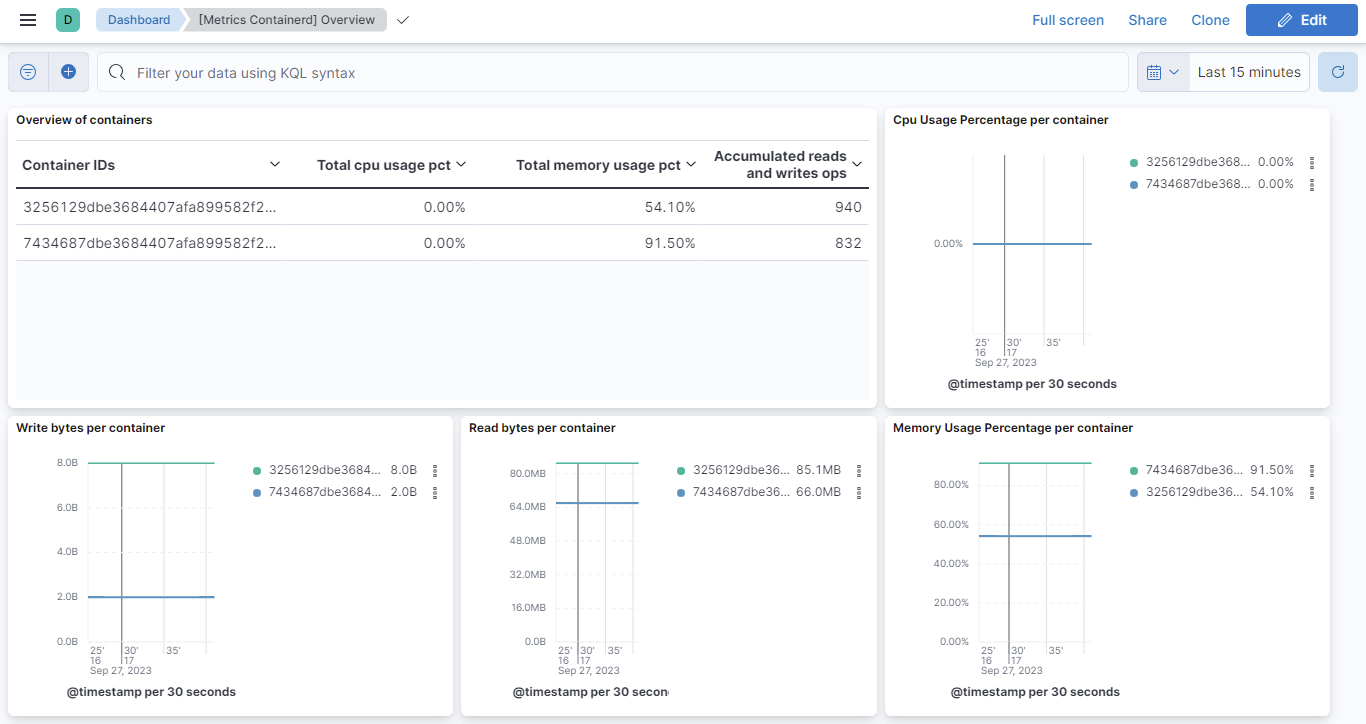
This integration includes one or more Kibana dashboards that visualizes the data collected by the integration. The screenshots below illustrate how the ingested data is displayed.
Changelog
| Version | Details | Minimum Kibana version |
|---|---|---|
| 0.6.0 | Enhancement (View pull request) Improve documentation |
9.0.0 8.13.0 |
| 0.5.0 | Enhancement (View pull request) Add support for Kibana 9.0.0 |
9.0.0 8.13.0 |
| 0.4.0 | Enhancement (View pull request) Add global filter on data_stream.dataset to improve performance. |
8.13.0 |
| 0.3.0 | Enhancement (View pull request) Enable time series data for metrics data streams. For more details, see https://www.elastic.co/guide/en/elasticsearch/reference/current/tsds.html. |
8.13.0 |
| 0.2.6 | Enhancement (View pull request) Add blkio dimensions mappings and ECS fields. |
8.13.0 |
| 0.2.5 | Enhancement (View pull request) Add memory dimensions mappings and ECS fields. |
8.13.0 |
| 0.2.4 | Enhancement (View pull request) Add cpu dimensions mappings and ECS fields. |
8.13.0 |
| 0.2.3 | Enhancement (View pull request) Migrate ContainerD Overview dashboard to lens. |
8.4.0 |
| 0.2.2 | Enhancement (View pull request) Added categories and/or subcategories. |
8.1.0 |
| 0.2.1 | Enhancement (View pull request) Tidy up markdown in readme.md |
8.1.0 |
| 0.2.0 | Enhancement (View pull request) Add new ECS fields |
— |
| 0.1.0 | Enhancement (View pull request) Create containerd package |
— |