IBM QRadar Integration for Elastic
Elastic Cloud Serverless projects are autoscaled environments, fully managed by Elastic and available on Elastic Cloud. Availability This functionality is generally available and ready for production usage. Elastic Cloud Serverless projects are autoscaled environments, fully managed by Elastic and available on Elastic Cloud. Availability This functionality is generally available and ready for production usage. The Elastic Stack includes Elastic's core products such as Elasticsearch, Kibana, Logstash, and Beats. Availability This functionality is generally available and ready for production usage. Unless stated otherwise on the page, this functionality is available when your Elastic Stack is deployed on Elastic Cloud Hosted, Elastic Cloud Enterprise, Elastic Cloud on Kubernetes, and self-managed environments. This documentation corresponds to the latest patch available for each minor version. If you're not using the latest patch, check the release notes for changes.
Serverless Observability
Generally available
Serverless Security
Generally available
Stack
9.0+
Generally available since 9.0
| Version | 1.3.0 (View all) |
| Managed integration release status | GA |
| Subscription level What's this? |
Basic |
| Developed by What's this? |
Elastic |
| Ingestion method(s) | API |
| Minimum Kibana version(s) | 9.0.0 8.18.0 |
You can use this integration as an Elastic Managed integration on Elastic Cloud Hosted deployments running this version or later.
IBM QRadar is a Security Intelligence Platform that provides a unified architecture for integrating security information and event management (SIEM), log management, anomaly detection, incident forensics, and configuration and vulnerability management.
The IBM QRadar integration for Elastic allows you to collect logs using IBM QRadar API, then visualise the data in Kibana.
The IBM QRadar integration is compatible with QRadar API version 20.0.
This integration periodically queries the QRadar API to retrieve logs.
This integration collects log messages of the following type:
Offense: collect offense records from the Offenses and Rules endpoints, with rule data enriched into the offenses to provide additional context.
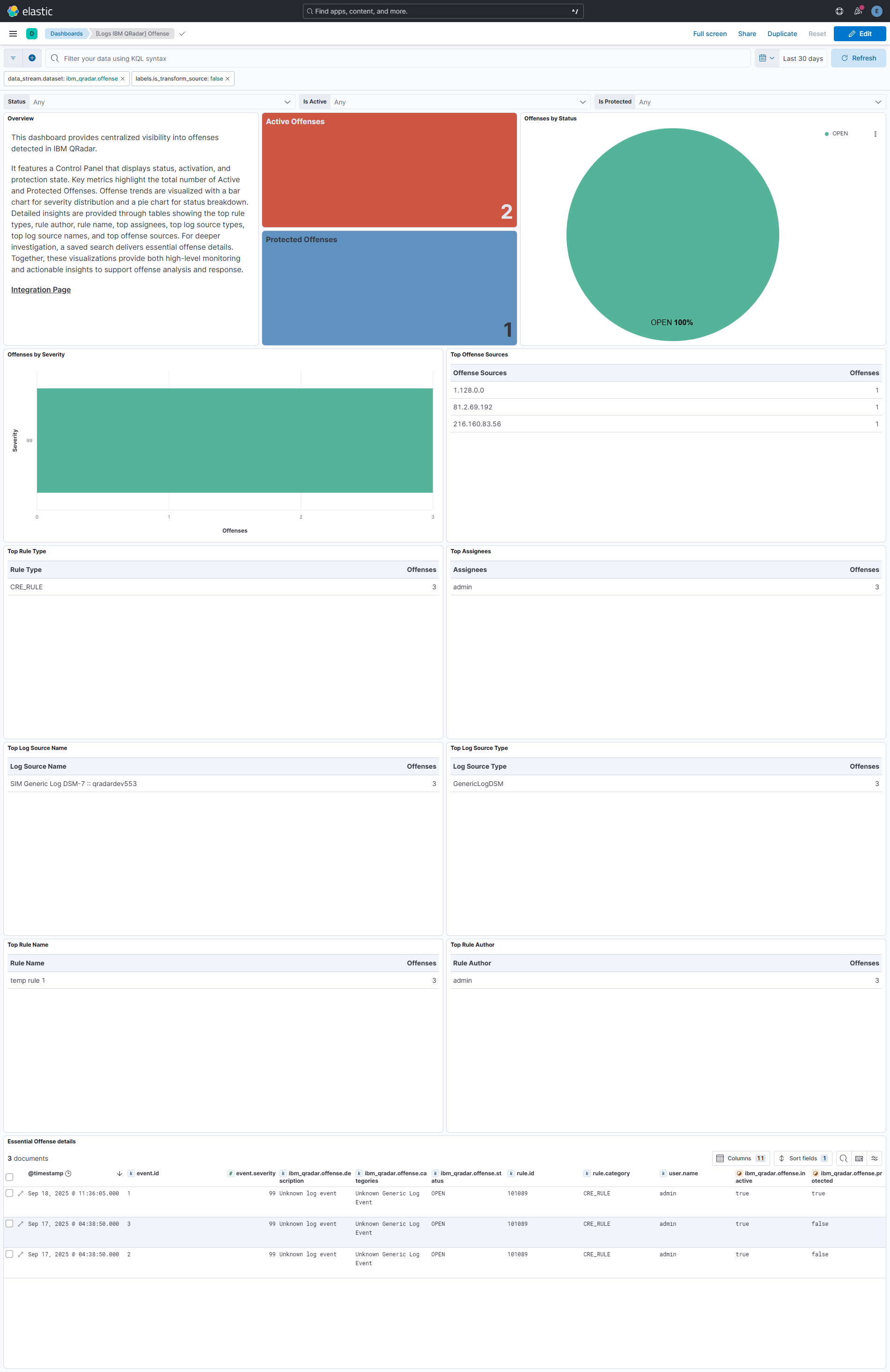
Integrating IBM QRadar with Elastic SIEM provides deep visibility into security offenses and their underlying context. Kibana dashboards track active and protected offenses, with metrics. Bar and pie charts highlight offense severity and status distribution, helping analysts quickly prioritize investigations.
Tables showcase the top contributing elements including rule types, assignees, log source types, log source names, and offense sources. A saved search of essential offense attributes IDs, severity, descriptions, categories, status, rules, assignees, activation and protection details ensures investigations are enriched with the necessary context.
These insights empower analysts to monitor offense activity, identify high-risk areas, and accelerate threat detection and response workflows.
This integration installs Elastic latest transforms. For more details, check the Transform setup and requirements.
To collect data through the IBM QRadar APIs, you need to create an Authorized Service Token with sufficient permissions. Authentication is handled using an Authorized Service Token, which serves as the required credential.
- Log in to the QRadar Console with an admin account.
- Go to the Admin tab, and in the User Management section, click Authorized Services.
- In the Authorized Services window, click Add Authorized Service.
- Fill in the following fields:
- Service Name: Provide a descriptive name for this service.
- User Role: Select the appropriate user role.
- Security Profile: Assign the security profile to define which networks and log sources this service can access.
- Expiry Date: Choose a date for the token to expire, or select No Expiry if indefinite use is required.
- Click Create Service.
- Select the row for the service you created, then copy the token string from the Selected Token field.
- Close the Authorized Services window.
- On the Admin tab, click Deploy Changes to apply the configuration.
For more details, see IBM Documentation.
This integration supports both Elastic Managed and Agent-based installations.
Elastic Managed integrations are only supported on Elastic Cloud Serverless and Elastic Cloud Hosted deployments. An Elastic Managed integration lets you ingest data from a cloud source while avoiding the orchestration, management, and maintenance associated with standard ingest infrastructure. Elastic runs the collector for you, so you can focus on your data instead of the infrastructure that collects it.
For more information, refer to Elastic Managed integrations and the Elastic Managed integrations FAQ.
Elastic Agent must be installed. For more details, check the Elastic Agent installation instructions. You can install only one Elastic Agent per host.
In the top search bar in Kibana, search for Integrations.
In the search bar, type IBM QRadar.
Select the IBM QRadar integration from the search results.
Select Add IBM QRadar to add the integration.
Enable and configure only the collection methods which you will use.
To Collect logs from QRadar API, you'll need to:
- Configure URL and Authorized Service Token.
- Adjust the integration configuration parameters if required, including the Interval, Batch Size etc. to enable data collection.
Select Save and continue to save the integration.
- In the top search bar in Kibana, search for Dashboards.
- In the search bar, type IBM QRadar, and verify the dashboard information is populated.
- In the top search bar in Kibana, search for Transforms.
- Select the Data / Transforms from the search results.
- In the search bar, type ibm_qradar.
- Transform from the search results should indicate Healthy under the Health column.
For more information on architectures that can be used for scaling this integration, check the Ingest Architectures documentation.
Exported fields
| Field | Description | Type |
|---|---|---|
| @timestamp | Date/time when the event originated. This is the date/time extracted from the event, typically representing when the event was generated by the source. If the event source has no original timestamp, this value is typically populated by the first time the event was received by the pipeline. Required field for all events. | date |
| data_stream.dataset | The field can contain anything that makes sense to signify the source of the data. Examples include nginx.access, prometheus, endpoint etc. For data streams that otherwise fit, but that do not have dataset set we use the value "generic" for the dataset value. event.dataset should have the same value as data_stream.dataset. Beyond the Elasticsearch data stream naming criteria noted above, the dataset value has additional restrictions: * Must not contain - * No longer than 100 characters |
constant_keyword |
| data_stream.namespace | A user defined namespace. Namespaces are useful to allow grouping of data. Many users already organize their indices this way, and the data stream naming scheme now provides this best practice as a default. Many users will populate this field with default. If no value is used, it falls back to default. Beyond the Elasticsearch index naming criteria noted above, namespace value has the additional restrictions: * Must not contain - * No longer than 100 characters |
constant_keyword |
| data_stream.type | An overarching type for the data stream. Currently allowed values are "logs" and "metrics". We expect to also add "traces" and "synthetics" in the near future. | constant_keyword |
| event.dataset | Name of the dataset. If an event source publishes more than one type of log or events (e.g. access log, error log), the dataset is used to specify which one the event comes from. It's recommended but not required to start the dataset name with the module name, followed by a dot, then the dataset name. | constant_keyword |
| event.module | Name of the module this data is coming from. If your monitoring agent supports the concept of modules or plugins to process events of a given source (e.g. Apache logs), event.module should contain the name of this module. |
constant_keyword |
| ibm_qradar.offense.assigned_to | The user the offense is assigned to. | keyword |
| ibm_qradar.offense.categories | Event categories that are associated with the offense. | keyword |
| ibm_qradar.offense.category_count | The number of event categories that are associated with the offense. | long |
| ibm_qradar.offense.close_time | The number of milliseconds since epoch when the offense was closed. | date |
| ibm_qradar.offense.closing_reason_id | The ID of the closing reason. | keyword |
| ibm_qradar.offense.closing_user | The user that closed the offense. | keyword |
| ibm_qradar.offense.credibility | The credibility of the offense. | long |
| ibm_qradar.offense.description | The description of the offense. | keyword |
| ibm_qradar.offense.destination_networks | The destination networks that are associated with the offense. | keyword |
| ibm_qradar.offense.device_count | The number of devices that are associated with the offense. | long |
| ibm_qradar.offense.domain_id | ID of associated domain if the offense is associated with a single domain. | keyword |
| ibm_qradar.offense.event_count | The number of events that are associated with the offense. | long |
| ibm_qradar.offense.first_persisted_time | The number of milliseconds since epoch at the time when the offense was created. | date |
| ibm_qradar.offense.flow_count | The number of flows that are associated with the offense. | long |
| ibm_qradar.offense.follow_up | True if the offense is marked for follow up. | boolean |
| ibm_qradar.offense.id | The ID of the offense. | keyword |
| ibm_qradar.offense.inactive | True if the offense is inactive. | boolean |
| ibm_qradar.offense.last_persisted_time | The number of milliseconds since epoch when an offense field was last updated. | date |
| ibm_qradar.offense.last_updated_time | The number of milliseconds since epoch when the last event contributing to the offense was seen. | date |
| ibm_qradar.offense.local_destination_address_ids | The local destination address IDs that are associated with the offense. | keyword |
| ibm_qradar.offense.local_destination_count | The number of local destinations that are associated with the offense. | long |
| ibm_qradar.offense.log_sources.id | The id of the log source. | keyword |
| ibm_qradar.offense.log_sources.name | The name of the log source. | keyword |
| ibm_qradar.offense.log_sources.type_id | The id of the log source type. | keyword |
| ibm_qradar.offense.log_sources.type_name | The name of the log source type. | keyword |
| ibm_qradar.offense.magnitude | The magnitude of the offense. | long |
| ibm_qradar.offense.offense_source | The source of the offense. | keyword |
| ibm_qradar.offense.offense_type | A number that represents the offense type. | keyword |
| ibm_qradar.offense.policy_category_count | The number of policy event categories that are associated with the offense. | long |
| ibm_qradar.offense.protected | True if the offense is protected. | boolean |
| ibm_qradar.offense.relevance | The relevance of the offense. | long |
| ibm_qradar.offense.remote_destination_count | The number of remote destinations that are associated with the offense. | long |
| ibm_qradar.offense.rules.average_capacity | The moving average capacity, in EPS, of the rule across all hosts. | long |
| ibm_qradar.offense.rules.base_capacity | The base capacity of the rule in events per second. | long |
| ibm_qradar.offense.rules.base_host_id | The ID of the host from which the rule's base capacity was determined. | keyword |
| ibm_qradar.offense.rules.capacity_timestamp | The epoch timestamp, in milliseconds, since the rule's capacity values were last updated. | date |
| ibm_qradar.offense.rules.creation_date | The number of milliseconds since epoch when the rule was created. | date |
| ibm_qradar.offense.rules.enabled | True if the rule is enabled. | boolean |
| ibm_qradar.offense.rules.id | The id of the rule. | keyword |
| ibm_qradar.offense.rules.identifier | The unique ID of the rule. | keyword |
| ibm_qradar.offense.rules.linked_rule_identifier | The linked ID of the rule. | keyword |
| ibm_qradar.offense.rules.modification_date | The number of milliseconds since epoch when the rule was last modified. | date |
| ibm_qradar.offense.rules.name | The name of the rule. | keyword |
| ibm_qradar.offense.rules.origin | The origin of the rule. | keyword |
| ibm_qradar.offense.rules.owner | The owner of the rule. | keyword |
| ibm_qradar.offense.rules.rule_type | The type of rule, one of "EVENT", "FLOW", "COMMON", or "USER". | keyword |
| ibm_qradar.offense.rules.type | The type of rule, one of "ADE_RULE", "BUILDING_BLOCK_RULE", or "CRE_RULE". | keyword |
| ibm_qradar.offense.security_category_count | The number of security event categories that are associated with the offense. | long |
| ibm_qradar.offense.severity | The severity of the offense. | long |
| ibm_qradar.offense.source_address_ids | The source address IDs that are associated with the offense. | keyword |
| ibm_qradar.offense.source_count | The number of sources that are associated with the offense. | long |
| ibm_qradar.offense.source_network | The source network that is associated with the offense. | keyword |
| ibm_qradar.offense.start_time | The number of milliseconds since epoch when the offense was started. | date |
| ibm_qradar.offense.status | The status of the offense. | keyword |
| ibm_qradar.offense.username_count | The number of usernames that are associated with the offense. | long |
| input.type | Type of Filebeat input. | keyword |
| labels.is_transform_source | Distinguishes between documents that are a source for a transform and documents that are an output of a transform, to facilitate easier filtering. | constant_keyword |
| log.offset | Log offset. | long |
| observer.product | The product name of the observer. | constant_keyword |
| observer.vendor | Vendor name of the observer. | constant_keyword |
Example
{
    "@timestamp": "2025-09-02T06:58:38.000Z",
    "agent": {
        "ephemeral_id": "2bbb47f4-1532-44c8-a62c-39304e4cb917",
        "id": "e4a56ce0-ba15-47c7-b047-d6aca6f0b6bf",
        "name": "elastic-agent-43805",
        "type": "filebeat",
        "version": "8.18.0"
    },
    "data_stream": {
        "dataset": "ibm_qradar.offense",
        "namespace": "89821",
        "type": "logs"
    },
    "ecs": {
        "version": "8.17.0"
    },
    "elastic_agent": {
        "id": "e4a56ce0-ba15-47c7-b047-d6aca6f0b6bf",
        "snapshot": false,
        "version": "8.18.0"
    },
    "event": {
        "agent_id_status": "verified",
        "created": "2025-08-28T06:46:03.000Z",
        "dataset": "ibm_qradar.offense",
        "id": "12",
        "ingested": "2025-09-18T06:37:16Z",
        "kind": "alert",
        "original": "{\"assigned_to\":null,\"categories\":[\"SIM User Authentication\"],\"category_count\":1,\"close_time\":null,\"closing_reason_id\":null,\"closing_user\":null,\"credibility\":4,\"description\":\"User Login\\n\",\"destination_networks\":[\"Net-10-172-192.Net_10_0_0_0\"],\"device_count\":1,\"domain_id\":0,\"event_count\":2,\"first_persisted_time\":1756363563000,\"flow_count\":0,\"follow_up\":false,\"id\":12,\"inactive\":true,\"last_persisted_time\":1756796318000,\"last_updated_time\":1756363560775,\"local_destination_address_ids\":[2],\"local_destination_count\":1,\"log_sources\":[{\"id\":64,\"name\":\"SIM Audit-2 :: qradardev522\",\"type_id\":105,\"type_name\":\"SIMAudit\"}],\"magnitude\":2,\"offense_source\":\"67.43.156.0\",\"offense_type\":0,\"policy_category_count\":0,\"protected\":false,\"relevance\":0,\"remote_destination_count\":0,\"rules\":[{\"average_capacity\":0,\"base_capacity\":0,\"base_host_id\":0,\"capacity_timestamp\":0,\"creation_date\":1133309726396,\"enabled\":false,\"id\":100407,\"identifier\":\"SYSTEM-1219\",\"linked_rule_identifier\":null,\"modification_date\":1756983618804,\"name\":\"Anomaly: Excessive Firewall Accepts Across Multiple Hosts\",\"origin\":\"SYSTEM\",\"owner\":\"admin\",\"rule_type\":\"EVENT\",\"type\":\"CRE_RULE\"}],\"security_category_count\":1,\"severity\":5,\"source_address_ids\":[10],\"source_count\":1,\"source_network\":\"Net-10-172-192.Net_172_16_0_0\",\"start_time\":1756363560775,\"status\":\"OPEN\",\"username_count\":1}",
        "severity": 47,
        "start": "2025-08-28T06:46:00.775Z",
        "type": [
            "info"
        ]
    },
    "ibm_qradar": {
        "offense": {
            "categories": [
                "SIM User Authentication"
            ],
            "category_count": 1,
            "credibility": 4,
            "description": "User Login\n",
            "destination_networks": [
                "Net-10-172-192.Net_10_0_0_0"
            ],
            "device_count": 1,
            "domain_id": "0",
            "event_count": 2,
            "first_persisted_time": "2025-08-28T06:46:03.000Z",
            "flow_count": 0,
            "follow_up": false,
            "id": "12",
            "inactive": true,
            "last_persisted_time": "2025-09-02T06:58:38.000Z",
            "last_updated_time": "2025-08-28T06:46:00.775Z",
            "local_destination_address_ids": [
                "2"
            ],
            "local_destination_count": 1,
            "log_sources": [
                {
                    "id": "64",
                    "name": "SIM Audit-2 :: qradardev522",
                    "type_id": "105",
                    "type_name": "SIMAudit"
                }
            ],
            "magnitude": 2,
            "offense_source": "67.43.156.0",
            "offense_type": "0",
            "policy_category_count": 0,
            "protected": false,
            "relevance": 0,
            "remote_destination_count": 0,
            "rules": [
                {
                    "average_capacity": 0,
                    "base_capacity": 0,
                    "base_host_id": "0",
                    "capacity_timestamp": "1970-01-01T00:00:00.000Z",
                    "creation_date": "2005-11-30T00:15:26.396Z",
                    "enabled": false,
                    "id": "100407",
                    "identifier": "SYSTEM-1219",
                    "modification_date": "2025-09-04T11:00:18.804Z",
                    "name": "Anomaly: Excessive Firewall Accepts Across Multiple Hosts",
                    "origin": "SYSTEM",
                    "owner": "admin",
                    "rule_type": "EVENT",
                    "type": "CRE_RULE"
                }
            ],
            "security_category_count": 1,
            "severity": 5,
            "source_address_ids": [
                "10"
            ],
            "source_count": 1,
            "source_network": "Net-10-172-192.Net_172_16_0_0",
            "start_time": "2025-08-28T06:46:00.775Z",
            "status": "OPEN",
            "username_count": 1
        }
    },
    "input": {
        "type": "cel"
    },
    "message": "User Login\n",
    "rule": {
        "author": [
            "admin"
        ],
        "category": [
            "CRE_RULE"
        ],
        "id": [
            "100407"
        ],
        "name": [
            "Anomaly: Excessive Firewall Accepts Across Multiple Hosts"
        ]
    },
    "tags": [
        "preserve_original_event",
        "preserve_duplicate_custom_fields",
        "forwarded",
        "ibm_qradar-offense"
    ]
}
These inputs can be used in this integration:
This integration dataset uses the following API:
Offense: QRadar Offense API.Rule: QRadar Rule API.
This integration includes one or more Kibana dashboards that visualizes the data collected by the integration. The screenshots below illustrate how the ingested data is displayed.
Changelog
| Version | Details | Minimum Kibana version |
|---|---|---|
| 1.3.0 | Enhancement (View pull request) Update Elastic Managed integration documentation to the current wording and docs links. |
9.0.0 8.18.0 |
| 1.2.0 | Enhancement (View pull request) Add tags to ingest pipeline processors. |
9.0.0 8.18.0 |
| 1.1.2 | Enhancement (View pull request) Set agentless deployment mode release field to ga. |
9.0.0 8.18.0 |
| 1.1.1 | Bug fix (View pull request) Handle offense rules not present in the rules dictionary during enrichment. |
9.0.0 8.18.0 |
| 1.1.0 | Enhancement (View pull request) Use new release field for agentless deployment mode to establish as beta. |
9.0.0 8.18.0 |
| 1.0.0 | Enhancement (View pull request) Promote integration to GA. |
9.0.0 8.18.0 |
| 0.2.0 | Enhancement (View pull request) Updated SIEM categorization. |
9.0.0 8.18.0 |
| 0.1.1 | Bug fix (View pull request) Remove duplicated field definition in transform. |
9.0.0 8.18.0 |
| 0.1.0 | Enhancement (View pull request) Initial release. |
9.0.0 8.18.0 |