Docker Integration
Elastic Cloud Serverless projects are autoscaled environments, fully managed by Elastic and available on Elastic Cloud. Availability This functionality is generally available and ready for production usage. Elastic Cloud Serverless projects are autoscaled environments, fully managed by Elastic and available on Elastic Cloud. Availability This functionality is generally available and ready for production usage. The Elastic Stack includes Elastic's core products such as Elasticsearch, Kibana, Logstash, and Beats. Availability This functionality is generally available and ready for production usage. Unless stated otherwise on the page, this functionality is available when your Elastic Stack is deployed on Elastic Cloud Hosted, Elastic Cloud Enterprise, Elastic Cloud on Kubernetes, and self-managed environments. This documentation corresponds to the latest patch available for each minor version. If you're not using the latest patch, check the release notes for changes.
Serverless Observability
Generally available
Serverless Security
Generally available
Stack
9.0+
Generally available since 9.0
| Version | 2.16.0 (View all) |
| Subscription level What's this? |
Basic |
| Developed by What's this? |
Elastic |
| Ingestion method(s) | API, File |
| Minimum Kibana version(s) | 9.0.0 8.16.2 |
This Integration collects metrics and logs from Docker containers.
The default data streams for metrics collection are: container, cpu, diskio, healthcheck, info, memory
and network. The image metricset is not enabled by default.
The container_logs data stream for containers' logs collection is enabled by default.
The Docker integration is currently tested on Linux and Mac with the community edition engine, versions 1.11 and 17.09.0-ce.
The Docker integration supports collection of metrics from Podman’s Docker-compatible API by Elastic Agent 8.16.2 or later versions. It has been tested on Linux and Mac with Podman Rest API v2.0.0 and above.
The docker Integration will try to connect to the docker socket, by default at unix:///var/run/docker.sock.
If Elastic Agent is running inside docker, you'll need to mount the unix socket inside the container:
docker run -d \
  --name=metricbeat \
  --user=root \
  --volume="/var/run/docker.sock:/var/run/docker.sock:ro" \
  docker.elastic.co/beats/metricbeat:latest metricbeat -e \
  -E output.elasticsearch.hosts=["elasticsearch:9200"]
For log collection since the discovery of the containers happen automatically, again access to unix:///var/run/docker.sock
will be needed so as Agent to be able to watch for Container events.
In addition, access is required to the containers' logs files which by default follows the pattern of
/var/lib/docker/containers/${docker.container.id}/*-json.log
If Elastic Agent is running inside docker, you'll need to mount the logs' directory too inside the container:
docker run -d \
  --name=metricbeat \
  --user=root \
  --volume="/var/run/docker.sock:/var/run/docker.sock:ro" \
  --volume="/var/lib/docker/containers:/var/lib/docker/containers:ro" \
  docker.elastic.co/beats/metricbeat:latest metricbeat -e \
  -E output.elasticsearch.hosts=["elasticsearch:9200"]
In all cases make sure that Agent has the proper permissions to access these files.
It is strongly recommended that you run Docker metricsets with a
period
that is 3 seconds or longer. The request to the
Docker API already takes up to 2 seconds. Specifying less than 3 seconds will
result in requests that timeout, and no data will be reported for those
requests.
In the case of Podman, the configuration parameter podman should be switched to true. This enables streaming of container stats output, which allows for more accurate CPU percentage calculations when using Podman.
The Docker container data stream collects information and statistics about
running Docker containers.
Exported fields
| Field | Description | Type | Metric Type |
|---|---|---|---|
| @timestamp | Event timestamp. | date | |
| agent.id | Unique identifier of this agent (if one exists). Example: For Beats this would be beat.id. | keyword | |
| cloud.account.id | The cloud account or organization id used to identify different entities in a multi-tenant environment. Examples: AWS account id, Google Cloud ORG Id, or other unique identifier. | keyword | |
| cloud.availability_zone | Availability zone in which this host, resource, or service is located. | keyword | |
| cloud.instance.id | Instance ID of the host machine. | keyword | |
| cloud.provider | Name of the cloud provider. Example values are aws, azure, gcp, or digitalocean. | keyword | |
| cloud.region | Region in which this host, resource, or service is located. | keyword | |
| container.id | Unique container id. | keyword | |
| container.image.name | Name of the image the container was built on. | keyword | |
| container.name | Container name. | keyword | |
| container.runtime | Runtime managing this container. | keyword | |
| data_stream.dataset | Data stream dataset. | constant_keyword | |
| data_stream.namespace | Data stream namespace. | constant_keyword | |
| data_stream.type | Data stream type. | constant_keyword | |
| docker.container.command | Command that was executed in the Docker container. | keyword | |
| docker.container.created | Date when the container was created. | date | |
| docker.container.ip_addresses | Container IP addresses. | ip | |
| docker.container.labels.* | Container labels | object | |
| docker.container.size.root_fs | Total size of all the files in the container. | long | gauge |
| docker.container.size.rw | Size of the files that have been created or changed since creation. | long | gauge |
| docker.container.status | Container status. | keyword | |
| docker.container.tags | Image tags. | keyword | |
| ecs.version | ECS version this event conforms to. ecs.version is a required field and must exist in all events. When querying across multiple indices -- which may conform to slightly different ECS versions -- this field lets integrations adjust to the schema version of the events. |
keyword | |
| event.dataset | Name of the dataset. If an event source publishes more than one type of log or events (e.g. access log, error log), the dataset is used to specify which one the event comes from. It's recommended but not required to start the dataset name with the module name, followed by a dot, then the dataset name. | keyword | |
| event.module | Event module | constant_keyword | |
| host | A host is defined as a general computing instance. ECS host.* fields should be populated with details about the host on which the event happened, or from which the measurement was taken. Host types include hardware, virtual machines, Docker containers, and Kubernetes nodes. | group | |
| host.architecture | Operating system architecture. | keyword | |
| host.ip | Host ip addresses. | ip | |
| host.mac | Host MAC addresses. The notation format from RFC 7042 is suggested: Each octet (that is, 8-bit byte) is represented by two [uppercase] hexadecimal digits giving the value of the octet as an unsigned integer. Successive octets are separated by a hyphen. | keyword | |
| host.name | Name of the host. It can contain what hostname returns on Unix systems, the fully qualified domain name, or a name specified by the user. The sender decides which value to use. |
keyword | |
| host.os.family | OS family (such as redhat, debian, freebsd, windows). | keyword | |
| host.os.full | Operating system name, including the version or code name. | keyword | |
| host.os.full.text | Multi-field of host.os.full. |
match_only_text | |
| host.os.kernel | Operating system kernel version as a raw string. | keyword | |
| host.os.name | Operating system name, without the version. | keyword | |
| host.os.name.text | Multi-field of host.os.name. |
match_only_text | |
| host.os.platform | Operating system platform (such centos, ubuntu, windows). | keyword | |
| host.os.version | Operating system version as a raw string. | keyword | |
| host.type | Type of host. For Cloud providers this can be the machine type like t2.medium. If vm, this could be the container, for example, or other information meaningful in your environment. |
keyword | |
| service.address | Address where data about this service was collected from. This should be a URI, network address (ipv4:port or [ipv6]:port) or a resource path (sockets). | keyword | |
| service.type | The type of the service data is collected from. The type can be used to group and correlate logs and metrics from one service type. Example: If logs or metrics are collected from Elasticsearch, service.type would be elasticsearch. |
keyword |
Example
{
    "@timestamp": "2017-10-12T08:05:34.853Z",
    "agent": {
        "hostname": "host.example.com",
        "name": "host.example.com"
    },
    "container": {
        "id": "cc78e58acfda4501105dc4de8e3ae218f2da616213e6e3af168c40103829302a",
        "image": {
            "name": "metricbeat_elasticsearch"
        },
        "name": "metricbeat_elasticsearch_1_df866b3a7b3d",
        "runtime": "docker"
    },
    "docker": {
        "container": {
            "command": "/usr/local/bin/docker-entrypoint.sh eswrapper",
            "created": "2019-02-25T10:18:10.000Z",
            "ip_addresses": [
                "172.23.0.2"
            ],
            "labels": {
                "com_docker_compose_config-hash": "e3e0a2c6e5d1afb741bc8b1ecb09cda0395886b7a3e5084a9fd110be46d70f78",
                "com_docker_compose_container-number": "1",
                "com_docker_compose_oneoff": "False",
                "com_docker_compose_project": "metricbeat",
                "com_docker_compose_service": "elasticsearch",
                "com_docker_compose_slug": "df866b3a7b3d50c0802350cbe58ee5b34fa32b7f6ba7fe9e48cde2c12dd0201d",
                "com_docker_compose_version": "1.23.1",
                "license": "Elastic License",
                "org_label-schema_build-date": "20181006",
                "org_label-schema_license": "GPLv2",
                "org_label-schema_name": "elasticsearch",
                "org_label-schema_schema-version": "1.0",
                "org_label-schema_url": "https://www.elastic.co/products/elasticsearch",
                "org_label-schema_vcs-url": "https://github.com/elastic/elasticsearch-docker",
                "org_label-schema_vendor": "Elastic",
                "org_label-schema_version": "6.5.1"
            },
            "size": {
                "root_fs": 0,
                "rw": 0
            },
            "status": "Up 7 minutes (healthy)"
        }
    },
    "event": {
        "dataset": "docker.container",
        "duration": 115000,
        "module": "docker"
    },
    "metricset": {
        "name": "container"
    },
    "service": {
        "address": "/var/run/docker.sock",
        "type": "docker"
    }
}
The Docker cpu data stream collects runtime CPU metrics.
Exported fields
| Field | Description | Type | Unit | Metric Type |
|---|---|---|---|---|
| @timestamp | Event timestamp. | date | ||
| agent.id | Unique identifier of this agent (if one exists). Example: For Beats this would be beat.id. | keyword | ||
| cloud.account.id | The cloud account or organization id used to identify different entities in a multi-tenant environment. Examples: AWS account id, Google Cloud ORG Id, or other unique identifier. | keyword | ||
| cloud.availability_zone | Availability zone in which this host, resource, or service is located. | keyword | ||
| cloud.instance.id | Instance ID of the host machine. | keyword | ||
| cloud.provider | Name of the cloud provider. Example values are aws, azure, gcp, or digitalocean. | keyword | ||
| cloud.region | Region in which this host, resource, or service is located. | keyword | ||
| container.cpu.usage | Total CPU usage normalized by the number of CPU cores. | scaled_float | percent | gauge |
| container.id | Unique container id. | keyword | ||
| container.image.name | Name of the image the container was built on. | keyword | ||
| container.name | Container name. | keyword | ||
| container.runtime | Runtime managing this container. | keyword | ||
| data_stream.dataset | Data stream dataset. | constant_keyword | ||
| data_stream.namespace | Data stream namespace. | constant_keyword | ||
| data_stream.type | Data stream type. | constant_keyword | ||
| docker.container.labels.* | Container labels | object | ||
| docker.cpu.core.*.norm.pct | Percentage of CPU time in this core, normalized by the number of CPU cores. | scaled_float | percent | gauge |
| docker.cpu.core.*.pct | Percentage of CPU time in this core. | scaled_float | percent | gauge |
| docker.cpu.core.*.ticks | Number of CPU ticks in this core. | long | counter | |
| docker.cpu.kernel.norm.pct | Percentage of time in kernel space normalized by the number of CPU cores. | scaled_float | percent | gauge |
| docker.cpu.kernel.pct | Percentage of time in kernel space. | scaled_float | percent | gauge |
| docker.cpu.kernel.ticks | CPU ticks in kernel space. | long | counter | |
| docker.cpu.system.norm.pct | Percentage of total CPU time in the system normalized by the number of CPU cores. | scaled_float | percent | gauge |
| docker.cpu.system.pct | Percentage of total CPU time in the system. | scaled_float | percent | gauge |
| docker.cpu.system.ticks | CPU system ticks. | long | counter | |
| docker.cpu.total.norm.pct | Total CPU usage normalized by the number of CPU cores. | scaled_float | percent | gauge |
| docker.cpu.total.pct | Total CPU usage. | scaled_float | percent | gauge |
| docker.cpu.user.norm.pct | Percentage of time in user space normalized by the number of CPU cores. | scaled_float | percent | gauge |
| docker.cpu.user.pct | Percentage of time in user space. | scaled_float | percent | gauge |
| docker.cpu.user.ticks | CPU ticks in user space. | long | counter | |
| ecs.version | ECS version this event conforms to. ecs.version is a required field and must exist in all events. When querying across multiple indices -- which may conform to slightly different ECS versions -- this field lets integrations adjust to the schema version of the events. |
keyword | ||
| event.dataset | Name of the dataset. If an event source publishes more than one type of log or events (e.g. access log, error log), the dataset is used to specify which one the event comes from. It's recommended but not required to start the dataset name with the module name, followed by a dot, then the dataset name. | keyword | ||
| event.module | Event module | constant_keyword | ||
| host | A host is defined as a general computing instance. ECS host.* fields should be populated with details about the host on which the event happened, or from which the measurement was taken. Host types include hardware, virtual machines, Docker containers, and Kubernetes nodes. | group | ||
| host.architecture | Operating system architecture. | keyword | ||
| host.ip | Host ip addresses. | ip | ||
| host.mac | Host MAC addresses. The notation format from RFC 7042 is suggested: Each octet (that is, 8-bit byte) is represented by two [uppercase] hexadecimal digits giving the value of the octet as an unsigned integer. Successive octets are separated by a hyphen. | keyword | ||
| host.name | Name of the host. It can contain what hostname returns on Unix systems, the fully qualified domain name, or a name specified by the user. The sender decides which value to use. |
keyword | ||
| host.os.family | OS family (such as redhat, debian, freebsd, windows). | keyword | ||
| host.os.full | Operating system name, including the version or code name. | keyword | ||
| host.os.full.text | Multi-field of host.os.full. |
match_only_text | ||
| host.os.kernel | Operating system kernel version as a raw string. | keyword | ||
| host.os.name | Operating system name, without the version. | keyword | ||
| host.os.name.text | Multi-field of host.os.name. |
match_only_text | ||
| host.os.platform | Operating system platform (such centos, ubuntu, windows). | keyword | ||
| host.os.version | Operating system version as a raw string. | keyword | ||
| host.type | Type of host. For Cloud providers this can be the machine type like t2.medium. If vm, this could be the container, for example, or other information meaningful in your environment. |
keyword | ||
| service.address | Address where data about this service was collected from. This should be a URI, network address (ipv4:port or [ipv6]:port) or a resource path (sockets). | keyword | ||
| service.type | The type of the service data is collected from. The type can be used to group and correlate logs and metrics from one service type. Example: If logs or metrics are collected from Elasticsearch, service.type would be elasticsearch. |
keyword |
Example
{
    "@timestamp": "2017-10-12T08:05:34.853Z",
    "container": {
        "id": "7f3ca1f1b2b310362e90f700d2b2e52ebd46ef6ddf10c0704f22b25686c466ab",
        "image": {
            "name": "metricbeat_beat"
        },
        "name": "metricbeat_beat_run_8ba23fa682a6",
        "runtime": "docker"
    },
    "docker": {
        "container": {
            "labels": {
                "com_docker_compose_oneoff": "True",
                "com_docker_compose_project": "metricbeat",
                "com_docker_compose_service": "beat",
                "com_docker_compose_slug": "8ba23fa682a68e2dc082536da22f59eb2d200b3534909fe934807dd5d847424",
                "com_docker_compose_version": "1.24.1"
            }
        },
        "cpu": {
            "core": {
                "0": {
                    "norm": {
                        "pct": 0.00105707400990099
                    },
                    "pct": 0.00845659207920792,
                    "ticks": 7410396430
                },
                "1": {
                    "norm": {
                        "pct": 0.004389216831683168
                    },
                    "pct": 0.035113734653465345,
                    "ticks": 7079258391
                },
                "2": {
                    "norm": {
                        "pct": 0.003178435024752475
                    },
                    "pct": 0.0254274801980198,
                    "ticks": 7140978706
                },
                "3": {
                    "norm": {
                        "pct": 0.0033261257425742574
                    },
                    "pct": 0.02660900594059406,
                    "ticks": 7705738146
                },
                "4": {
                    "norm": {
                        "pct": 0.0016827236386138613
                    },
                    "pct": 0.01346178910891089,
                    "ticks": 8131054429
                },
                "5": {
                    "norm": {
                        "pct": 0.000781541707920792
                    },
                    "pct": 0.006252333663366336,
                    "ticks": 7213899699
                },
                "6": {
                    "norm": {
                        "pct": 0.0005364748762376238
                    },
                    "pct": 0.00429179900990099,
                    "ticks": 7961016581
                },
                "7": {
                    "norm": {
                        "pct": 0.0005079449257425743
                    },
                    "pct": 0.004063559405940594,
                    "ticks": 7946529895
                }
            },
            "kernel": {
                "norm": {
                    "pct": 0.007425742574257425
                },
                "pct": 0.0594059405940594,
                "ticks": 26810000000
            },
            "system": {
                "norm": {
                    "pct": 1
                },
                "pct": 8,
                "ticks": 65836400000000
            },
            "total": {
                "norm": {
                    "pct": 0.015459536757425743
                },
                "pct": 0.12367629405940594
            },
            "user": {
                "norm": {
                    "pct": 0.006188118811881188
                },
                "pct": 0.04950495049504951,
                "ticks": 35720000000
            }
        }
    },
    "event": {
        "dataset": "docker.cpu",
        "duration": 115000,
        "module": "docker"
    },
    "metricset": {
        "name": "cpu",
        "period": 10000
    },
    "service": {
        "address": "/var/run/docker.sock",
        "type": "docker"
    }
}
The Docker diskio data stream collects disk I/O metrics.
When collecting container disk I/O metrics, some fields may consistently report zero values. This is a known behavior caused by limitations in Docker's stats API and the underlying Linux cgroups subsystem — not a bug in the integration. This also applies to stats collected from Podman.
Docker API limitations: Fields such as docker.diskio.read.service_time, docker.diskio.read.wait_time, and docker.diskio.read.queued are always zero because Docker's stats API does not populate the underlying values (these fields are returned as empty arrays).
cgroups version differences:
- cgroups v1 provides more detailed block I/O statistics. Fields like
docker.diskio.read.opsanddocker.diskio.write.opsare typically populated. - cgroups v2 exposes fewer block I/O metrics through the Docker API. Most fields beyond basic read/write bytes remain zero, including ops, queued, service_time, and wait_time.
What remains available: docker.diskio.read.bytes, docker.diskio.write.bytes, docker.diskio.read.ops, and docker.diskio.write.ops are the primary indicators of I/O activity and remain available regardless of cgroups version.
Recommendation: To get a more complete picture of disk I/O, complement container-level metrics with the System integration's system.diskio.* metrics (collected from /proc/diskstats), which are cgroup-version-independent and provide fields such as io_time, iops_in_progress, read.time, and write.time.
Exported fields
| Field | Description | Type | Unit | Metric Type |
|---|---|---|---|---|
| @timestamp | Event timestamp. | date | ||
| agent.id | Unique identifier of this agent (if one exists). Example: For Beats this would be beat.id. | keyword | ||
| cloud.account.id | The cloud account or organization id used to identify different entities in a multi-tenant environment. Examples: AWS account id, Google Cloud ORG Id, or other unique identifier. | keyword | ||
| cloud.availability_zone | Availability zone in which this host, resource, or service is located. | keyword | ||
| cloud.instance.id | Instance ID of the host machine. | keyword | ||
| cloud.provider | Name of the cloud provider. Example values are aws, azure, gcp, or digitalocean. | keyword | ||
| cloud.region | Region in which this host, resource, or service is located. | keyword | ||
| container.disk.read.bytes | Bytes read during the life of the container | long | counter | |
| container.disk.write.bytes | Bytes written during the life of the container | long | byte | counter |
| container.id | Unique container id. | keyword | ||
| container.image.name | Name of the image the container was built on. | keyword | ||
| container.name | Container name. | keyword | ||
| container.runtime | Runtime managing this container. | keyword | ||
| data_stream.dataset | Data stream dataset. | constant_keyword | ||
| data_stream.namespace | Data stream namespace. | constant_keyword | ||
| data_stream.type | Data stream type. | constant_keyword | ||
| docker.container.labels.* | Container labels | object | ||
| docker.diskio.read.bytes | Bytes read during the life of the container | long | counter | |
| docker.diskio.read.ops | Number of reads during the life of the container | long | counter | |
| docker.diskio.read.queued | Total number of queued requests | long | gauge | |
| docker.diskio.read.rate | Number of current reads per second | long | gauge | |
| docker.diskio.read.service_time | Total time to service IO requests, in nanoseconds | long | counter | |
| docker.diskio.read.wait_time | Total time requests spent waiting in queues for service, in nanoseconds | long | counter | |
| docker.diskio.summary.bytes | Bytes read and written during the life of the container | long | byte | counter |
| docker.diskio.summary.ops | Number of I/O operations during the life of the container | long | counter | |
| docker.diskio.summary.queued | Total number of queued requests | long | counter | |
| docker.diskio.summary.rate | Number of current operations per second | long | gauge | |
| docker.diskio.summary.service_time | Total time to service IO requests, in nanoseconds | long | counter | |
| docker.diskio.summary.wait_time | Total time requests spent waiting in queues for service, in nanoseconds | long | counter | |
| docker.diskio.write.bytes | Bytes written during the life of the container | long | byte | counter |
| docker.diskio.write.ops | Number of writes during the life of the container | long | counter | |
| docker.diskio.write.queued | Total number of queued requests | long | counter | |
| docker.diskio.write.rate | Number of current writes per second | long | gauge | |
| docker.diskio.write.service_time | Total time to service IO requests, in nanoseconds | long | counter | |
| docker.diskio.write.wait_time | Total time requests spent waiting in queues for service, in nanoseconds | long | counter | |
| ecs.version | ECS version this event conforms to. ecs.version is a required field and must exist in all events. When querying across multiple indices -- which may conform to slightly different ECS versions -- this field lets integrations adjust to the schema version of the events. |
keyword | ||
| event.dataset | Name of the dataset. If an event source publishes more than one type of log or events (e.g. access log, error log), the dataset is used to specify which one the event comes from. It's recommended but not required to start the dataset name with the module name, followed by a dot, then the dataset name. | keyword | ||
| event.module | Event module | constant_keyword | ||
| host | A host is defined as a general computing instance. ECS host.* fields should be populated with details about the host on which the event happened, or from which the measurement was taken. Host types include hardware, virtual machines, Docker containers, and Kubernetes nodes. | group | ||
| host.architecture | Operating system architecture. | keyword | ||
| host.ip | Host ip addresses. | ip | ||
| host.mac | Host MAC addresses. The notation format from RFC 7042 is suggested: Each octet (that is, 8-bit byte) is represented by two [uppercase] hexadecimal digits giving the value of the octet as an unsigned integer. Successive octets are separated by a hyphen. | keyword | ||
| host.name | Name of the host. It can contain what hostname returns on Unix systems, the fully qualified domain name, or a name specified by the user. The sender decides which value to use. |
keyword | ||
| host.os.family | OS family (such as redhat, debian, freebsd, windows). | keyword | ||
| host.os.full | Operating system name, including the version or code name. | keyword | ||
| host.os.full.text | Multi-field of host.os.full. |
match_only_text | ||
| host.os.kernel | Operating system kernel version as a raw string. | keyword | ||
| host.os.name | Operating system name, without the version. | keyword | ||
| host.os.name.text | Multi-field of host.os.name. |
match_only_text | ||
| host.os.platform | Operating system platform (such centos, ubuntu, windows). | keyword | ||
| host.os.version | Operating system version as a raw string. | keyword | ||
| host.type | Type of host. For Cloud providers this can be the machine type like t2.medium. If vm, this could be the container, for example, or other information meaningful in your environment. |
keyword | ||
| service.address | Address where data about this service was collected from. This should be a URI, network address (ipv4:port or [ipv6]:port) or a resource path (sockets). | keyword | ||
| service.type | The type of the service data is collected from. The type can be used to group and correlate logs and metrics from one service type. Example: If logs or metrics are collected from Elasticsearch, service.type would be elasticsearch. |
keyword |
Example
{
    "@timestamp": "2017-10-12T08:05:34.853Z",
    "container": {
        "id": "8abaa1f3514d3554503034a1df6ee09457f328757bbc9555245244ee853c0b44",
        "image": {
            "name": "zookeeper"
        },
        "name": "some-zookeeper",
        "runtime": "docker"
    },
    "docker": {
        "diskio": {
            "read": {
                "bytes": 42409984,
                "ops": 1823,
                "queued": 0,
                "rate": 0,
                "service_time": 0,
                "wait_time": 0
            },
            "summary": {
                "bytes": 42414080,
                "ops": 1824,
                "queued": 0,
                "rate": 0,
                "service_time": 0,
                "wait_time": 0
            },
            "write": {
                "bytes": 4096,
                "ops": 1,
                "queued": 0,
                "rate": 0,
                "service_time": 0,
                "wait_time": 0
            }
        }
    },
    "event": {
        "dataset": "docker.diskio",
        "duration": 115000,
        "module": "docker"
    },
    "metricset": {
        "name": "diskio",
        "period": 10000
    },
    "service": {
        "address": "/var/run/docker.sock",
        "type": "docker"
    }
}
The Docker event data stream collects docker events
Exported fields
| Field | Description | Type |
|---|---|---|
| @timestamp | Event timestamp. | date |
| container.id | Unique container id. | keyword |
| container.image.name | Name of the image the container was built on. | keyword |
| container.name | Container name. | keyword |
| container.runtime | Runtime managing this container. | keyword |
| data_stream.dataset | Data stream dataset. | constant_keyword |
| data_stream.namespace | Data stream namespace. | constant_keyword |
| data_stream.type | Data stream type. | constant_keyword |
| docker.container.labels.* | Container labels | object |
| docker.event.action | The type of event | keyword |
| docker.event.actor.attributes | Various key/value attributes of the object, depending on its type | flattened |
| docker.event.actor.id | The ID of the object emitting the event | keyword |
| docker.event.from | Event source | keyword |
| docker.event.id | Event id when available | keyword |
| docker.event.status | Event status | keyword |
| docker.event.type | The type of object emitting the event | keyword |
| ecs.version | ECS version this event conforms to. ecs.version is a required field and must exist in all events. When querying across multiple indices -- which may conform to slightly different ECS versions -- this field lets integrations adjust to the schema version of the events. |
keyword |
| event.dataset | Name of the dataset. If an event source publishes more than one type of log or events (e.g. access log, error log), the dataset is used to specify which one the event comes from. It's recommended but not required to start the dataset name with the module name, followed by a dot, then the dataset name. | keyword |
| event.module | Event module | constant_keyword |
| host | A host is defined as a general computing instance. ECS host.* fields should be populated with details about the host on which the event happened, or from which the measurement was taken. Host types include hardware, virtual machines, Docker containers, and Kubernetes nodes. | group |
| host.architecture | Operating system architecture. | keyword |
| host.ip | Host ip addresses. | ip |
| host.mac | Host MAC addresses. The notation format from RFC 7042 is suggested: Each octet (that is, 8-bit byte) is represented by two [uppercase] hexadecimal digits giving the value of the octet as an unsigned integer. Successive octets are separated by a hyphen. | keyword |
| host.name | Name of the host. It can contain what hostname returns on Unix systems, the fully qualified domain name, or a name specified by the user. The sender decides which value to use. |
keyword |
| host.os.family | OS family (such as redhat, debian, freebsd, windows). | keyword |
| host.os.full | Operating system name, including the version or code name. | keyword |
| host.os.full.text | Multi-field of host.os.full. |
match_only_text |
| host.os.kernel | Operating system kernel version as a raw string. | keyword |
| host.os.name | Operating system name, without the version. | keyword |
| host.os.name.text | Multi-field of host.os.name. |
match_only_text |
| host.os.platform | Operating system platform (such centos, ubuntu, windows). | keyword |
| host.os.version | Operating system version as a raw string. | keyword |
| host.type | Type of host. For Cloud providers this can be the machine type like t2.medium. If vm, this could be the container, for example, or other information meaningful in your environment. |
keyword |
| service.address | Address where data about this service was collected from. This should be a URI, network address (ipv4:port or [ipv6]:port) or a resource path (sockets). | keyword |
| service.type | The type of the service data is collected from. The type can be used to group and correlate logs and metrics from one service type. Example: If logs or metrics are collected from Elasticsearch, service.type would be elasticsearch. |
keyword |
Example
{
    "@timestamp": "2017-10-12T08:05:34.853Z",
    "agent": {
        "hostname": "host.example.com",
        "name": "host.example.com"
    },
    "docker": {
        "event": {
            "action": "pull",
            "actor": {
                "attributes": {
                    "name": "busybox"
                },
                "id": "busybox:latest"
            },
            "from": "",
            "id": "busybox:latest",
            "status": "pull",
            "type": "image"
        }
    },
    "event": {
        "dataset": "docker.event",
        "module": "docker"
    },
    "service": {
        "type": "docker"
    }
}
The Docker healthcheck data stream collects healthcheck status metrics about
running Docker containers.
Healthcheck data will only be available from docker containers where the
docker HEALTHCHECK instruction has been used to build the docker image.
Exported fields
| Field | Description | Type | Metric Type |
|---|---|---|---|
| @timestamp | Event timestamp. | date | |
| agent.id | Unique identifier of this agent (if one exists). Example: For Beats this would be beat.id. | keyword | |
| cloud.account.id | The cloud account or organization id used to identify different entities in a multi-tenant environment. Examples: AWS account id, Google Cloud ORG Id, or other unique identifier. | keyword | |
| cloud.availability_zone | Availability zone in which this host, resource, or service is located. | keyword | |
| cloud.instance.id | Instance ID of the host machine. | keyword | |
| cloud.provider | Name of the cloud provider. Example values are aws, azure, gcp, or digitalocean. | keyword | |
| cloud.region | Region in which this host, resource, or service is located. | keyword | |
| container.id | Unique container id. | keyword | |
| container.image.name | Name of the image the container was built on. | keyword | |
| container.name | Container name. | keyword | |
| container.runtime | Runtime managing this container. | keyword | |
| data_stream.dataset | Data stream dataset. | constant_keyword | |
| data_stream.namespace | Data stream namespace. | constant_keyword | |
| data_stream.type | Data stream type. | constant_keyword | |
| docker.container.labels.* | Container labels | object | |
| docker.healthcheck.event.end_date | Healthcheck end date | date | |
| docker.healthcheck.event.exit_code | Healthcheck status code | integer | |
| docker.healthcheck.event.output | Healthcheck output | keyword | |
| docker.healthcheck.event.start_date | Healthcheck start date | date | |
| docker.healthcheck.failingstreak | concurent failed check | integer | counter |
| docker.healthcheck.status | Healthcheck status code | keyword | |
| ecs.version | ECS version this event conforms to. ecs.version is a required field and must exist in all events. When querying across multiple indices -- which may conform to slightly different ECS versions -- this field lets integrations adjust to the schema version of the events. |
keyword | |
| event.dataset | Name of the dataset. If an event source publishes more than one type of log or events (e.g. access log, error log), the dataset is used to specify which one the event comes from. It's recommended but not required to start the dataset name with the module name, followed by a dot, then the dataset name. | keyword | |
| event.module | Event module | constant_keyword | |
| host | A host is defined as a general computing instance. ECS host.* fields should be populated with details about the host on which the event happened, or from which the measurement was taken. Host types include hardware, virtual machines, Docker containers, and Kubernetes nodes. | group | |
| host.architecture | Operating system architecture. | keyword | |
| host.ip | Host ip addresses. | ip | |
| host.mac | Host MAC addresses. The notation format from RFC 7042 is suggested: Each octet (that is, 8-bit byte) is represented by two [uppercase] hexadecimal digits giving the value of the octet as an unsigned integer. Successive octets are separated by a hyphen. | keyword | |
| host.name | Name of the host. It can contain what hostname returns on Unix systems, the fully qualified domain name, or a name specified by the user. The sender decides which value to use. |
keyword | |
| host.os.family | OS family (such as redhat, debian, freebsd, windows). | keyword | |
| host.os.full | Operating system name, including the version or code name. | keyword | |
| host.os.full.text | Multi-field of host.os.full. |
match_only_text | |
| host.os.kernel | Operating system kernel version as a raw string. | keyword | |
| host.os.name | Operating system name, without the version. | keyword | |
| host.os.name.text | Multi-field of host.os.name. |
match_only_text | |
| host.os.platform | Operating system platform (such centos, ubuntu, windows). | keyword | |
| host.os.version | Operating system version as a raw string. | keyword | |
| host.type | Type of host. For Cloud providers this can be the machine type like t2.medium. If vm, this could be the container, for example, or other information meaningful in your environment. |
keyword | |
| service.address | Address where data about this service was collected from. This should be a URI, network address (ipv4:port or [ipv6]:port) or a resource path (sockets). | keyword | |
| service.type | The type of the service data is collected from. The type can be used to group and correlate logs and metrics from one service type. Example: If logs or metrics are collected from Elasticsearch, service.type would be elasticsearch. |
keyword |
Example
{
    "@timestamp": "2017-10-12T08:05:34.853Z",
    "agent": {
        "hostname": "host.example.com",
        "name": "host.example.com"
    },
    "container": {
        "id": "cc78e58acfda4501105dc4de8e3ae218f2da616213e6e3af168c40103829302a",
        "image": {
            "name": "metricbeat_elasticsearch"
        },
        "name": "metricbeat_elasticsearch_1_df866b3a7b3d",
        "runtime": "docker"
    },
    "docker": {
        "container": {
            "labels": {
                "com_docker_compose_config-hash": "e3e0a2c6e5d1afb741bc8b1ecb09cda0395886b7a3e5084a9fd110be46d70f78",
                "com_docker_compose_container-number": "1",
                "com_docker_compose_oneoff": "False",
                "com_docker_compose_project": "metricbeat",
                "com_docker_compose_service": "elasticsearch",
                "com_docker_compose_slug": "df866b3a7b3d50c0802350cbe58ee5b34fa32b7f6ba7fe9e48cde2c12dd0201d",
                "com_docker_compose_version": "1.23.1",
                "license": "Elastic License",
                "org_label-schema_build-date": "20181006",
                "org_label-schema_license": "GPLv2",
                "org_label-schema_name": "elasticsearch",
                "org_label-schema_schema-version": "1.0",
                "org_label-schema_url": "https://www.elastic.co/products/elasticsearch",
                "org_label-schema_vcs-url": "https://github.com/elastic/elasticsearch-docker",
                "org_label-schema_vendor": "Elastic",
                "org_label-schema_version": "6.5.1"
            }
        },
        "healthcheck": {
            "event": {
                "end_date": "2019-02-25T10:59:07.472Z",
                "exit_code": 0,
                "output": "  % Total    % Received % Xferd  Average Speed   Time    Time     Time  Current\n                                 Dload  Upload   Total   Spent    Left  Speed\n\r  0     0    0     0    0     0      0      0 --:--:-- --:--:-- --:--:--     0\r100   338  100   338    0     0  13188      0 --:--:-- --:--:-- --:--:-- 13520\n{\n  \"license\" : {\n    \"status\" : \"active\",\n    \"uid\" : \"ea5a516e-d9ee-4131-8eec-b39741e80869\",\n    \"type\" : \"basic\",\n    \"issue_date\" : \"2019-02-25T10:18:24.885Z\",\n    \"issue_date_in_millis\" : 1551089904885,\n    \"max_nodes\" : 1000,\n    \"issued_to\" : \"docker-cluster\",\n    \"issuer\" : \"elasticsearch\",\n    \"start_date_in_millis\" : -1\n  }\n}\n",
                "start_date": "2019-02-25T10:59:07.342Z"
            },
            "failingstreak": 0,
            "status": "healthy"
        }
    },
    "event": {
        "dataset": "docker.healthcheck",
        "duration": 115000,
        "module": "docker"
    },
    "metricset": {
        "name": "healthcheck"
    },
    "service": {
        "address": "/var/run/docker.sock",
        "type": "docker"
    }
}
The Docker image data stream collects metrics on docker images
Exported fields
| Field | Description | Type | Metric Type |
|---|---|---|---|
| @timestamp | Event timestamp. | date | |
| agent.id | Unique identifier of this agent (if one exists). Example: For Beats this would be beat.id. | keyword | |
| cloud.account.id | The cloud account or organization id used to identify different entities in a multi-tenant environment. Examples: AWS account id, Google Cloud ORG Id, or other unique identifier. | keyword | |
| cloud.availability_zone | Availability zone in which this host, resource, or service is located. | keyword | |
| cloud.instance.id | Instance ID of the host machine. | keyword | |
| cloud.provider | Name of the cloud provider. Example values are aws, azure, gcp, or digitalocean. | keyword | |
| cloud.region | Region in which this host, resource, or service is located. | keyword | |
| container.id | Unique container id. | keyword | |
| container.image.name | Name of the image the container was built on. | keyword | |
| container.name | Container name. | keyword | |
| container.runtime | Runtime managing this container. | keyword | |
| data_stream.dataset | Data stream dataset. | constant_keyword | |
| data_stream.namespace | Data stream namespace. | constant_keyword | |
| data_stream.type | Data stream type. | constant_keyword | |
| docker.image.created | Date and time when the image was created. | date | |
| docker.image.id.current | Unique image identifier given upon its creation. | keyword | |
| docker.image.id.parent | Identifier of the image, if it exists, from which the current image directly descends. | keyword | |
| docker.image.labels.* | Image labels. | object | |
| docker.image.size.regular | Total size of the all cached images associated to the current image. | long | counter |
| docker.image.size.virtual | Size of the image. | long | gauge |
| docker.image.tags | Image tags. | keyword | |
| ecs.version | ECS version this event conforms to. ecs.version is a required field and must exist in all events. When querying across multiple indices -- which may conform to slightly different ECS versions -- this field lets integrations adjust to the schema version of the events. |
keyword | |
| event.dataset | Name of the dataset. If an event source publishes more than one type of log or events (e.g. access log, error log), the dataset is used to specify which one the event comes from. It's recommended but not required to start the dataset name with the module name, followed by a dot, then the dataset name. | keyword | |
| event.module | Event module | constant_keyword | |
| host | A host is defined as a general computing instance. ECS host.* fields should be populated with details about the host on which the event happened, or from which the measurement was taken. Host types include hardware, virtual machines, Docker containers, and Kubernetes nodes. | group | |
| host.architecture | Operating system architecture. | keyword | |
| host.ip | Host ip addresses. | ip | |
| host.mac | Host MAC addresses. The notation format from RFC 7042 is suggested: Each octet (that is, 8-bit byte) is represented by two [uppercase] hexadecimal digits giving the value of the octet as an unsigned integer. Successive octets are separated by a hyphen. | keyword | |
| host.name | Name of the host. It can contain what hostname returns on Unix systems, the fully qualified domain name, or a name specified by the user. The sender decides which value to use. |
keyword | |
| host.os.family | OS family (such as redhat, debian, freebsd, windows). | keyword | |
| host.os.full | Operating system name, including the version or code name. | keyword | |
| host.os.full.text | Multi-field of host.os.full. |
match_only_text | |
| host.os.kernel | Operating system kernel version as a raw string. | keyword | |
| host.os.name | Operating system name, without the version. | keyword | |
| host.os.name.text | Multi-field of host.os.name. |
match_only_text | |
| host.os.platform | Operating system platform (such centos, ubuntu, windows). | keyword | |
| host.os.version | Operating system version as a raw string. | keyword | |
| host.type | Type of host. For Cloud providers this can be the machine type like t2.medium. If vm, this could be the container, for example, or other information meaningful in your environment. |
keyword | |
| service.address | Address where data about this service was collected from. This should be a URI, network address (ipv4:port or [ipv6]:port) or a resource path (sockets). | keyword | |
| service.type | The type of the service data is collected from. The type can be used to group and correlate logs and metrics from one service type. Example: If logs or metrics are collected from Elasticsearch, service.type would be elasticsearch. |
keyword |
Example
{
    "@timestamp": "2017-10-12T08:05:34.853Z",
    "docker": {
        "image": {
            "created": "2019-03-25T09:57:14.000Z",
            "id": {
                "current": "sha256:fa96dbd9baead0b3a4550c861cc871f40c0c7482889fb5f09c705e7d0622358f",
                "parent": ""
            },
            "labels": {
                "license": "Elastic License",
                "org_label-schema_build-date": "20190305",
                "org_label-schema_license": "GPLv2",
                "org_label-schema_name": "logstash",
                "org_label-schema_schema-version": "1.0",
                "org_label-schema_url": "https://www.elastic.co/products/logstash",
                "org_label-schema_vcs-url": "https://github.com/elastic/logstash-docker",
                "org_label-schema_vendor": "Elastic",
                "org_label-schema_version": "8.0.0-SNAPSHOT"
            },
            "size": {
                "regular": 770558778,
                "virtual": 770558778
            },
            "tags": [
                "docker.elastic.co/logstash/logstash:8.0.0-SNAPSHOT"
            ]
        }
    },
    "event": {
        "dataset": "docker.image",
        "duration": 115000,
        "module": "docker"
    },
    "metricset": {
        "name": "image"
    },
    "service": {
        "address": "/var/run/docker.sock",
        "type": "docker"
    }
}
The Docker info data stream collects system-wide information based on the
https://docs.docker.com/engine/reference/api/docker_remote_api_v1.24/#/display-system-wide-information[Docker Remote API].
Exported fields
| Field | Description | Type | Metric Type |
|---|---|---|---|
| @timestamp | Event timestamp. | date | |
| agent.id | Unique identifier of this agent (if one exists). Example: For Beats this would be beat.id. | keyword | |
| cloud.account.id | The cloud account or organization id used to identify different entities in a multi-tenant environment. Examples: AWS account id, Google Cloud ORG Id, or other unique identifier. | keyword | |
| cloud.availability_zone | Availability zone in which this host, resource, or service is located. | keyword | |
| cloud.instance.id | Instance ID of the host machine. | keyword | |
| cloud.provider | Name of the cloud provider. Example values are aws, azure, gcp, or digitalocean. | keyword | |
| cloud.region | Region in which this host, resource, or service is located. | keyword | |
| container.id | Unique container id. | keyword | |
| container.image.name | Name of the image the container was built on. | keyword | |
| container.name | Container name. | keyword | |
| container.runtime | Runtime managing this container. | keyword | |
| data_stream.dataset | Data stream dataset. | constant_keyword | |
| data_stream.namespace | Data stream namespace. | constant_keyword | |
| data_stream.type | Data stream type. | constant_keyword | |
| docker.info.containers.paused | Total number of paused containers. | long | counter |
| docker.info.containers.running | Total number of running containers. | long | counter |
| docker.info.containers.stopped | Total number of stopped containers. | long | counter |
| docker.info.containers.total | Total number of existing containers. | long | counter |
| docker.info.id | Unique Docker host identifier. | keyword | |
| docker.info.images | Total number of existing images. | long | counter |
| ecs.version | ECS version this event conforms to. ecs.version is a required field and must exist in all events. When querying across multiple indices -- which may conform to slightly different ECS versions -- this field lets integrations adjust to the schema version of the events. |
keyword | |
| event.dataset | Name of the dataset. If an event source publishes more than one type of log or events (e.g. access log, error log), the dataset is used to specify which one the event comes from. It's recommended but not required to start the dataset name with the module name, followed by a dot, then the dataset name. | keyword | |
| event.module | Event module | constant_keyword | |
| host | A host is defined as a general computing instance. ECS host.* fields should be populated with details about the host on which the event happened, or from which the measurement was taken. Host types include hardware, virtual machines, Docker containers, and Kubernetes nodes. | group | |
| host.architecture | Operating system architecture. | keyword | |
| host.ip | Host ip addresses. | ip | |
| host.mac | Host MAC addresses. The notation format from RFC 7042 is suggested: Each octet (that is, 8-bit byte) is represented by two [uppercase] hexadecimal digits giving the value of the octet as an unsigned integer. Successive octets are separated by a hyphen. | keyword | |
| host.name | Name of the host. It can contain what hostname returns on Unix systems, the fully qualified domain name, or a name specified by the user. The sender decides which value to use. |
keyword | |
| host.os.family | OS family (such as redhat, debian, freebsd, windows). | keyword | |
| host.os.full | Operating system name, including the version or code name. | keyword | |
| host.os.full.text | Multi-field of host.os.full. |
match_only_text | |
| host.os.kernel | Operating system kernel version as a raw string. | keyword | |
| host.os.name | Operating system name, without the version. | keyword | |
| host.os.name.text | Multi-field of host.os.name. |
match_only_text | |
| host.os.platform | Operating system platform (such centos, ubuntu, windows). | keyword | |
| host.os.version | Operating system version as a raw string. | keyword | |
| host.type | Type of host. For Cloud providers this can be the machine type like t2.medium. If vm, this could be the container, for example, or other information meaningful in your environment. |
keyword | |
| service.address | Address where data about this service was collected from. This should be a URI, network address (ipv4:port or [ipv6]:port) or a resource path (sockets). | keyword | |
| service.type | The type of the service data is collected from. The type can be used to group and correlate logs and metrics from one service type. Example: If logs or metrics are collected from Elasticsearch, service.type would be elasticsearch. |
keyword |
Example
{
    "@timestamp": "2017-10-12T08:05:34.853Z",
    "docker": {
        "info": {
            "containers": {
                "paused": 0,
                "running": 2,
                "stopped": 12,
                "total": 14
            },
            "id": "VF5E:SKD6:YFIG:VDGO:JU3M:ZT2N:4E6B:7IOL:5QOS:M3HT:EM7E:VL22",
            "images": 425
        }
    },
    "event": {
        "dataset": "docker.info",
        "duration": 115000,
        "module": "docker"
    },
    "metricset": {
        "name": "info",
        "period": 10000
    },
    "service": {
        "address": "/var/run/docker.sock",
        "type": "docker"
    }
}
The Docker memory data stream collects memory metrics from docker.
Exported fields
| Field | Description | Type | Unit | Metric Type |
|---|---|---|---|---|
| @timestamp | Event timestamp. | date | ||
| agent.id | Unique identifier of this agent (if one exists). Example: For Beats this would be beat.id. | keyword | ||
| cloud.account.id | The cloud account or organization id used to identify different entities in a multi-tenant environment. Examples: AWS account id, Google Cloud ORG Id, or other unique identifier. | keyword | ||
| cloud.availability_zone | Availability zone in which this host, resource, or service is located. | keyword | ||
| cloud.instance.id | Instance ID of the host machine. | keyword | ||
| cloud.provider | Name of the cloud provider. Example values are aws, azure, gcp, or digitalocean. | keyword | ||
| cloud.region | Region in which this host, resource, or service is located. | keyword | ||
| container.id | Unique container id. | keyword | ||
| container.image.name | Name of the image the container was built on. | keyword | ||
| container.memory.usage | Memory usage percentage. | scaled_float | percent | gauge |
| container.name | Container name. | keyword | ||
| container.runtime | Runtime managing this container. | keyword | ||
| data_stream.dataset | Data stream dataset. | constant_keyword | ||
| data_stream.namespace | Data stream namespace. | constant_keyword | ||
| data_stream.type | Data stream type. | constant_keyword | ||
| docker.container.labels.* | Container labels | object | ||
| docker.memory.commit.peak | Peak committed bytes on Windows | long | byte | gauge |
| docker.memory.commit.total | Total bytes | long | byte | counter |
| docker.memory.fail.count | Fail counter. | scaled_float | counter | |
| docker.memory.limit | Memory limit. | long | byte | gauge |
| docker.memory.private_working_set.total | private working sets on Windows | long | byte | gauge |
| docker.memory.rss.pct | Memory resident set size percentage. | scaled_float | percent | gauge |
| docker.memory.rss.total | Total memory resident set size. | long | byte | gauge |
| docker.memory.stats.* | Raw memory stats from the cgroups memory.stat interface | object | ||
| docker.memory.usage.max | Max memory usage. | long | byte | gauge |
| docker.memory.usage.pct | Memory usage percentage. | scaled_float | percent | gauge |
| docker.memory.usage.total | Total memory usage. | long | byte | gauge |
| ecs.version | ECS version this event conforms to. ecs.version is a required field and must exist in all events. When querying across multiple indices -- which may conform to slightly different ECS versions -- this field lets integrations adjust to the schema version of the events. |
keyword | ||
| event.dataset | Name of the dataset. If an event source publishes more than one type of log or events (e.g. access log, error log), the dataset is used to specify which one the event comes from. It's recommended but not required to start the dataset name with the module name, followed by a dot, then the dataset name. | keyword | ||
| event.module | Event module | constant_keyword | ||
| host | A host is defined as a general computing instance. ECS host.* fields should be populated with details about the host on which the event happened, or from which the measurement was taken. Host types include hardware, virtual machines, Docker containers, and Kubernetes nodes. | group | ||
| host.architecture | Operating system architecture. | keyword | ||
| host.ip | Host ip addresses. | ip | ||
| host.mac | Host MAC addresses. The notation format from RFC 7042 is suggested: Each octet (that is, 8-bit byte) is represented by two [uppercase] hexadecimal digits giving the value of the octet as an unsigned integer. Successive octets are separated by a hyphen. | keyword | ||
| host.name | Name of the host. It can contain what hostname returns on Unix systems, the fully qualified domain name, or a name specified by the user. The sender decides which value to use. |
keyword | ||
| host.os.family | OS family (such as redhat, debian, freebsd, windows). | keyword | ||
| host.os.full | Operating system name, including the version or code name. | keyword | ||
| host.os.full.text | Multi-field of host.os.full. |
match_only_text | ||
| host.os.kernel | Operating system kernel version as a raw string. | keyword | ||
| host.os.name | Operating system name, without the version. | keyword | ||
| host.os.name.text | Multi-field of host.os.name. |
match_only_text | ||
| host.os.platform | Operating system platform (such centos, ubuntu, windows). | keyword | ||
| host.os.version | Operating system version as a raw string. | keyword | ||
| host.type | Type of host. For Cloud providers this can be the machine type like t2.medium. If vm, this could be the container, for example, or other information meaningful in your environment. |
keyword | ||
| service.address | Address where data about this service was collected from. This should be a URI, network address (ipv4:port or [ipv6]:port) or a resource path (sockets). | keyword | ||
| service.type | The type of the service data is collected from. The type can be used to group and correlate logs and metrics from one service type. Example: If logs or metrics are collected from Elasticsearch, service.type would be elasticsearch. |
keyword |
Example
{
    "@timestamp": "2017-10-12T08:05:34.853Z",
    "container": {
        "id": "aa41902101351f415e6e983b0673c0ba715dd4bc316bd5fc0ebd6fcf94287f86",
        "image": {
            "name": "redis:latest"
        },
        "name": "amazing_cohen",
        "runtime": "docker"
    },
    "docker": {
        "memory": {
            "fail": {
                "count": 0
            },
            "limit": 2095878144,
            "rss": {
                "pct": 0.0004025882909345325,
                "total": 843776
            },
            "stats": {
                "active_anon": 421888,
                "active_file": 36864,
                "cache": 86016,
                "dirty": 0,
                "hierarchical_memory_limit": 9223372036854771712,
                "hierarchical_memsw_limit": 9223372036854771712,
                "inactive_anon": 421888,
                "inactive_file": 49152,
                "mapped_file": 53248,
                "pgfault": 1587,
                "pgmajfault": 1,
                "pgpgin": 2426,
                "pgpgout": 2199,
                "rss": 843776,
                "rss_huge": 0,
                "total_active_anon": 421888,
                "total_active_file": 36864,
                "total_cache": 86016,
                "total_dirty": 0,
                "total_inactive_anon": 421888,
                "total_inactive_file": 49152,
                "total_mapped_file": 53248,
                "total_pgfault": 1587,
                "total_pgmajfault": 1,
                "total_pgpgin": 2426,
                "total_pgpgout": 2199,
                "total_rss": 843776,
                "total_rss_huge": 0,
                "total_unevictable": 0,
                "total_writeback": 0,
                "unevictable": 0,
                "writeback": 0
            },
            "usage": {
                "max": 7860224,
                "pct": 0.000672283359618831,
                "total": 1409024
            }
        }
    },
    "event": {
        "dataset": "docker.memory",
        "duration": 115000,
        "module": "docker"
    },
    "metricset": {
        "name": "memory"
    },
    "service": {
        "address": "/var/run/docker.sock",
        "type": "docker"
    }
}
The Docker network data stream collects network metrics.
Exported fields
| Field | Description | Type | Metric Type |
|---|---|---|---|
| @timestamp | Event timestamp. | date | |
| agent.id | Unique identifier of this agent (if one exists). Example: For Beats this would be beat.id. | keyword | |
| cloud.account.id | The cloud account or organization id used to identify different entities in a multi-tenant environment. Examples: AWS account id, Google Cloud ORG Id, or other unique identifier. | keyword | |
| cloud.availability_zone | Availability zone in which this host, resource, or service is located. | keyword | |
| cloud.instance.id | Instance ID of the host machine. | keyword | |
| cloud.provider | Name of the cloud provider. Example values are aws, azure, gcp, or digitalocean. | keyword | |
| cloud.region | Region in which this host, resource, or service is located. | keyword | |
| container.id | Unique container id. | keyword | |
| container.image.name | Name of the image the container was built on. | keyword | |
| container.name | Container name. | keyword | |
| container.network.egress.bytes | Total number of outgoing bytes. | long | counter |
| container.network.ingress.bytes | Total number of incoming bytes. | long | counter |
| container.runtime | Runtime managing this container. | keyword | |
| data_stream.dataset | Data stream dataset. | constant_keyword | |
| data_stream.namespace | Data stream namespace. | constant_keyword | |
| data_stream.type | Data stream type. | constant_keyword | |
| docker.container.labels.* | Container labels | object | |
| docker.network.in.bytes | Incoming bytes per seconds. | long | |
| docker.network.in.dropped | Dropped incoming packets per second. | scaled_float | |
| docker.network.in.errors | Errors on incoming packets per second. | long | |
| docker.network.in.packets | Incoming packets per second. | long | |
| docker.network.inbound.bytes | Total number of incoming bytes. | long | counter |
| docker.network.inbound.dropped | Total number of dropped incoming packets. | long | counter |
| docker.network.inbound.errors | Total errors on incoming packets. | long | counter |
| docker.network.inbound.packets | Total number of incoming packets. | long | counter |
| docker.network.interface | Network interface name. | keyword | |
| docker.network.out.bytes | Outgoing bytes per second. | long | |
| docker.network.out.dropped | Dropped outgoing packets per second. | scaled_float | |
| docker.network.out.errors | Errors on outgoing packets per second. | long | |
| docker.network.out.packets | Outgoing packets per second. | long | |
| docker.network.outbound.bytes | Total number of outgoing bytes. | long | counter |
| docker.network.outbound.dropped | Total number of dropped outgoing packets. | long | counter |
| docker.network.outbound.errors | Total errors on outgoing packets. | long | counter |
| docker.network.outbound.packets | Total number of outgoing packets. | long | counter |
| ecs.version | ECS version this event conforms to. ecs.version is a required field and must exist in all events. When querying across multiple indices -- which may conform to slightly different ECS versions -- this field lets integrations adjust to the schema version of the events. |
keyword | |
| event.dataset | Name of the dataset. If an event source publishes more than one type of log or events (e.g. access log, error log), the dataset is used to specify which one the event comes from. It's recommended but not required to start the dataset name with the module name, followed by a dot, then the dataset name. | keyword | |
| event.module | Event module | constant_keyword | |
| host | A host is defined as a general computing instance. ECS host.* fields should be populated with details about the host on which the event happened, or from which the measurement was taken. Host types include hardware, virtual machines, Docker containers, and Kubernetes nodes. | group | |
| host.architecture | Operating system architecture. | keyword | |
| host.ip | Host ip addresses. | ip | |
| host.mac | Host MAC addresses. The notation format from RFC 7042 is suggested: Each octet (that is, 8-bit byte) is represented by two [uppercase] hexadecimal digits giving the value of the octet as an unsigned integer. Successive octets are separated by a hyphen. | keyword | |
| host.name | Name of the host. It can contain what hostname returns on Unix systems, the fully qualified domain name, or a name specified by the user. The sender decides which value to use. |
keyword | |
| host.os.family | OS family (such as redhat, debian, freebsd, windows). | keyword | |
| host.os.full | Operating system name, including the version or code name. | keyword | |
| host.os.full.text | Multi-field of host.os.full. |
match_only_text | |
| host.os.kernel | Operating system kernel version as a raw string. | keyword | |
| host.os.name | Operating system name, without the version. | keyword | |
| host.os.name.text | Multi-field of host.os.name. |
match_only_text | |
| host.os.platform | Operating system platform (such centos, ubuntu, windows). | keyword | |
| host.os.version | Operating system version as a raw string. | keyword | |
| host.type | Type of host. For Cloud providers this can be the machine type like t2.medium. If vm, this could be the container, for example, or other information meaningful in your environment. |
keyword | |
| service.address | Address where data about this service was collected from. This should be a URI, network address (ipv4:port or [ipv6]:port) or a resource path (sockets). | keyword | |
| service.type | The type of the service data is collected from. The type can be used to group and correlate logs and metrics from one service type. Example: If logs or metrics are collected from Elasticsearch, service.type would be elasticsearch. |
keyword |
Example
{
    "@timestamp": "2017-10-12T08:05:34.853Z",
    "agent": {
        "hostname": "host.example.com",
        "name": "host.example.com"
    },
    "container": {
        "id": "cc78e58acfda4501105dc4de8e3ae218f2da616213e6e3af168c40103829302a",
        "image": {
            "name": "metricbeat_elasticsearch"
        },
        "name": "metricbeat_elasticsearch_1_df866b3a7b3d",
        "runtime": "docker"
    },
    "docker": {
        "container": {
            "labels": {
                "com_docker_compose_config-hash": "e3e0a2c6e5d1afb741bc8b1ecb09cda0395886b7a3e5084a9fd110be46d70f78",
                "com_docker_compose_container-number": "1",
                "com_docker_compose_oneoff": "False",
                "com_docker_compose_project": "metricbeat",
                "com_docker_compose_service": "elasticsearch",
                "com_docker_compose_slug": "df866b3a7b3d50c0802350cbe58ee5b34fa32b7f6ba7fe9e48cde2c12dd0201d",
                "com_docker_compose_version": "1.23.1",
                "license": "Elastic License",
                "org_label-schema_build-date": "20181006",
                "org_label-schema_license": "GPLv2",
                "org_label-schema_name": "elasticsearch",
                "org_label-schema_schema-version": "1.0",
                "org_label-schema_url": "https://www.elastic.co/products/elasticsearch",
                "org_label-schema_vcs-url": "https://github.com/elastic/elasticsearch-docker",
                "org_label-schema_vendor": "Elastic",
                "org_label-schema_version": "6.5.1"
            }
        },
        "network": {
            "inbound": {
                "bytes": 23047,
                "dropped": 0,
                "errors": 0,
                "packets": 241
            },
            "interface": "eth0",
            "outbound": {
                "bytes": 0,
                "dropped": 0,
                "errors": 0,
                "packets": 0
            }
        }
    },
    "event": {
        "dataset": "docker.network",
        "duration": 115000,
        "module": "docker"
    },
    "metricset": {
        "name": "network"
    },
    "service": {
        "address": "/var/run/docker.sock",
        "type": "docker"
    }
}
The Docker container_logs data stream collects container logs.
Docker's json-file logging driver rotates logs by deleting the rotated files. Since Elastic Agent 9.1, on Linux the
filestream input keeps a deleted file open until it has been inactive for close.on_state_change.inactive (5 minutes
by default), so during a burst of rotations deleted files can keep using disk space until that timeout passes.
To release file handles as soon as a file is deleted, add the following to the Custom configurations field of the
data stream (shown under advanced options):
close.on_state_change.removed: true
Note that with this setting any lines not yet read from a file when it is deleted are lost.
Exported fields
| Field | Description | Type |
|---|---|---|
| @timestamp | Event timestamp. | date |
| container.id | Unique container id. | keyword |
| container.image.name | Name of the image the container was built on. | keyword |
| container.labels.* | Container labels | object |
| container.name | Container name. | keyword |
| container.runtime | Runtime managing this container. | keyword |
| data_stream.dataset | Data stream dataset. | constant_keyword |
| data_stream.namespace | Data stream namespace. | constant_keyword |
| data_stream.type | Data stream type. | constant_keyword |
| ecs.version | ECS version this event conforms to. ecs.version is a required field and must exist in all events. When querying across multiple indices -- which may conform to slightly different ECS versions -- this field lets integrations adjust to the schema version of the events. |
keyword |
| event.dataset | Name of the dataset. If an event source publishes more than one type of log or events (e.g. access log, error log), the dataset is used to specify which one the event comes from. It's recommended but not required to start the dataset name with the module name, followed by a dot, then the dataset name. | keyword |
| event.module | Event module | constant_keyword |
| host | A host is defined as a general computing instance. ECS host.* fields should be populated with details about the host on which the event happened, or from which the measurement was taken. Host types include hardware, virtual machines, Docker containers, and Kubernetes nodes. | group |
| host.architecture | Operating system architecture. | keyword |
| host.ip | Host ip addresses. | ip |
| host.mac | Host MAC addresses. The notation format from RFC 7042 is suggested: Each octet (that is, 8-bit byte) is represented by two [uppercase] hexadecimal digits giving the value of the octet as an unsigned integer. Successive octets are separated by a hyphen. | keyword |
| host.name | Name of the host. It can contain what hostname returns on Unix systems, the fully qualified domain name, or a name specified by the user. The sender decides which value to use. |
keyword |
| host.os.family | OS family (such as redhat, debian, freebsd, windows). | keyword |
| host.os.full | Operating system name, including the version or code name. | keyword |
| host.os.full.text | Multi-field of host.os.full. |
match_only_text |
| host.os.kernel | Operating system kernel version as a raw string. | keyword |
| host.os.name | Operating system name, without the version. | keyword |
| host.os.name.text | Multi-field of host.os.name. |
match_only_text |
| host.os.platform | Operating system platform (such centos, ubuntu, windows). | keyword |
| host.os.version | Operating system version as a raw string. | keyword |
| host.type | Type of host. For Cloud providers this can be the machine type like t2.medium. If vm, this could be the container, for example, or other information meaningful in your environment. |
keyword |
| input.type | Type of Filebeat input. | keyword |
| log.file.device_id | ID of the device containing the filesystem where the file resides. | keyword |
| log.file.fingerprint | The sha256 fingerprint identity of the file when fingerprinting is enabled. | keyword |
| log.file.idxhi | The high-order part of a unique identifier that is associated with a file. (Windows-only) | keyword |
| log.file.idxlo | The low-order part of a unique identifier that is associated with a file. (Windows-only) | keyword |
| log.file.inode | Inode number of the log file. | keyword |
| log.file.path | Path to the log file. | keyword |
| log.file.vol | The serial number of the volume that contains a file. (Windows-only) | keyword |
| log.offset | Offset of the entry in the log file. | long |
| message | For log events the message field contains the log message, optimized for viewing in a log viewer. For structured logs without an original message field, other fields can be concatenated to form a human-readable summary of the event. If multiple messages exist, they can be combined into one message. | match_only_text |
| service.address | Address where data about this service was collected from. This should be a URI, network address (ipv4:port or [ipv6]:port) or a resource path (sockets). | keyword |
| service.type | The type of the service data is collected from. The type can be used to group and correlate logs and metrics from one service type. Example: If logs or metrics are collected from Elasticsearch, service.type would be elasticsearch. |
keyword |
| stream | Container log stream | keyword |
Example
{
    "container": {
        "image": {
            "name": "docker.elastic.co/elastic-agent/elastic-agent-complete:8.5.0"
        },
        "name": "elastic-package-stack_elastic-agent_1",
        "id": "cf67fae3321ec426e720311c345c758d5ceb5260e6ea171ea9ca509175458b04",
        "labels": {
            "io_k8s_display-name": "Elastic-Agent image",
            "org_opencontainers_image_title": "Elastic-Agent",
            "com_docker_compose_oneoff": "False",
            "release": "1",
            "com_docker_compose_project": "elastic-package-stack",
            "org_opencontainers_image_created": "2022-10-24T20:20:43Z",
            "description": "Agent manages other beats based on configuration provided.",
            "maintainer": "infra@elastic.co",
            "org_opencontainers_image_vendor": "Elastic",
            "org_label-schema_vcs-url": "github.com/elastic/elastic-agent",
            "org_label-schema_vcs-ref": "9da6ba5fce5d6b4d2c473c1f5ff6056794e9a644",
            "vendor": "Elastic",
            "org_label-schema_vendor": "Elastic",
            "com_docker_compose_service": "elastic-agent",
            "org_opencontainers_image_licenses": "Elastic License",
            "io_k8s_description": "Agent manages other beats based on configuration provided.",
            "org_label-schema_license": "Elastic License",
            "org_label-schema_build-date": "2022-10-24T20:20:43Z",
            "summary": "elastic-agent",
            "com_docker_compose_config-hash": "877e65101e9a2d525e764de557ab89ee529bee1f43d36e1f458fd3f9def52cf8",
            "org_label-schema_version": "8.5.0",
            "com_docker_compose_project_config_files": "/home/chrismark/.elastic-package/profiles/default/stack/snapshot.yml",
            "version": "8.5.0",
            "url": "https://www.elastic.co/beats/elastic-agent",
            "org_label-schema_name": "elastic-agent",
            "license": "Elastic License",
            "org_label-schema_schema-version": "1.0",
            "name": "elastic-agent",
            "com_docker_compose_container-number": "1",
            "com_docker_compose_version": "1.29.2",
            "com_docker_compose_project_working_dir": "/home/chrismark/.elastic-package/profiles/default/stack",
            "org_label-schema_url": "https://www.elastic.co/beats/elastic-agent"
        }
    },
    "agent": {
        "name": "docker-fleet-agent",
        "id": "069c0cc8-d191-42b2-92c8-fe4dd065685b",
        "type": "filebeat",
        "ephemeral_id": "93ca0744-1bef-4a2a-8534-6cbd9e33287a",
        "version": "8.5.0"
    },
    "log": {
        "file": {
            "path": "/var/lib/docker/containers/cf67fae3321ec426e720311c345c758d5ceb5260e6ea171ea9ca509175458b04/cf67fae3321ec426e720311c345c758d5ceb5260e6ea171ea9ca509175458b04-json.log"
        },
        "offset": 17027
    },
    "elastic_agent": {
        "id": "069c0cc8-d191-42b2-92c8-fe4dd065685b",
        "version": "8.5.0",
        "snapshot": false
    },
    "message": "{\"log.level\":\"info\",\"@timestamp\":\"2022-11-24T10:16:39.493Z\",\"log.origin\":{\"file.name\":\"stateresolver/stateresolver.go\",\"file.line\":66},\"message\":\"Updating internal state\",\"ecs.version\":\"1.6.0\"}\n",
    "input": {
        "type": "filestream"
    },
    "@timestamp": "2022-11-24T10:16:39.493Z",
    "ecs": {
        "version": "8.0.0"
    },
    "stream": "stderr",
    "data_stream": {
        "namespace": "default",
        "type": "logs",
        "dataset": "docker.container_logs"
    },
    "host": {
        "hostname": "docker-fleet-agent",
        "os": {
            "kernel": "5.14.0-1054-oem",
            "codename": "focal",
            "name": "Ubuntu",
            "type": "linux",
            "family": "debian",
            "version": "20.04.5 LTS (Focal Fossa)",
            "platform": "ubuntu"
        },
        "containerized": true,
        "ip": [
            "172.26.0.7"
        ],
        "name": "docker-fleet-agent",
        "id": "66392b0697b84641af8006d87aeb89f1",
        "mac": [
            "02-42-AC-1A-00-07"
        ],
        "architecture": "x86_64"
    },
    "event": {
        "agent_id_status": "verified",
        "ingested": "2022-11-24T10:16:42Z",
        "dataset": "docker.container_logs"
    }
}
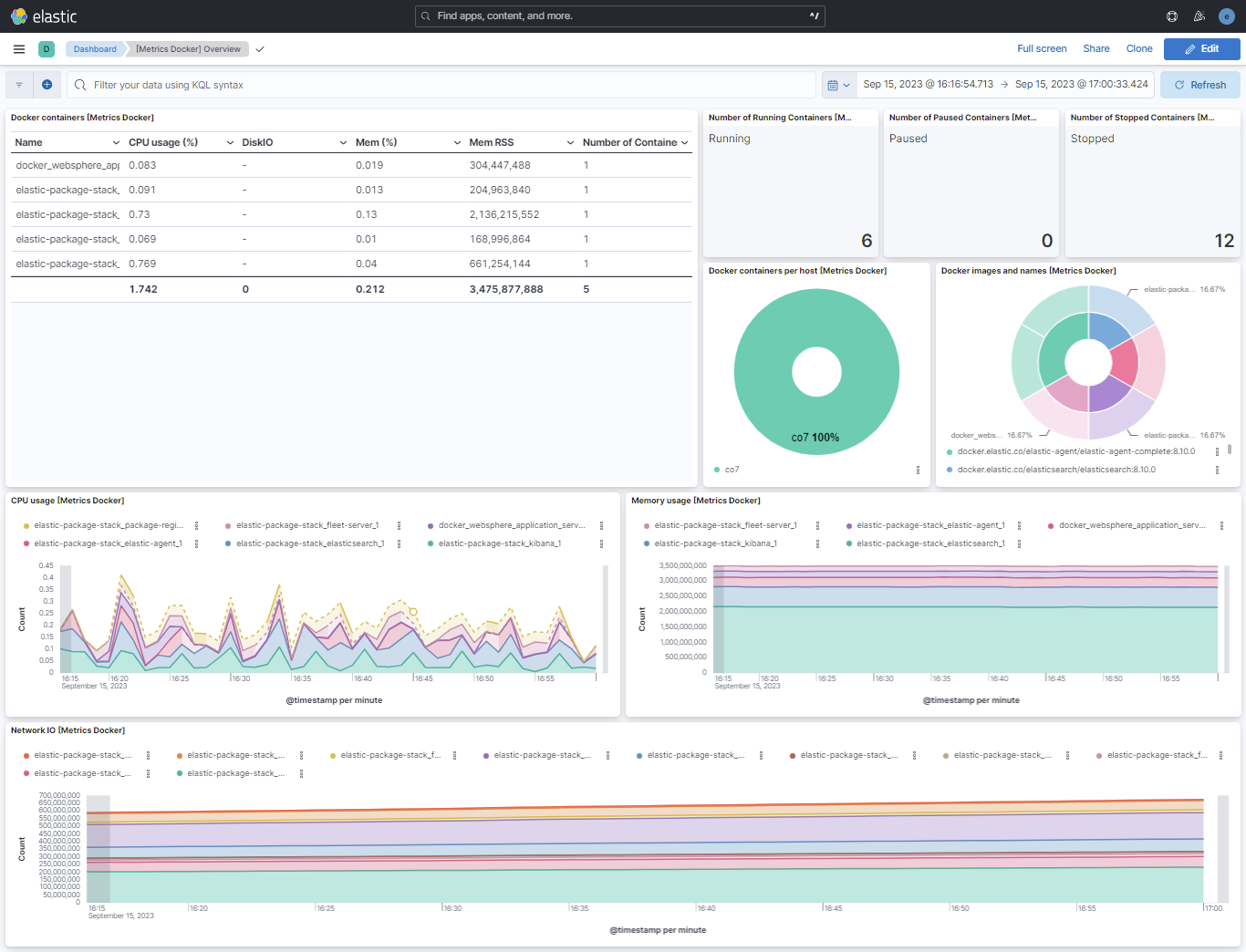
This integration includes one or more Kibana dashboards that visualizes the data collected by the integration. The screenshots below illustrate how the ingested data is displayed.
Changelog
| Version | Details | Minimum Kibana version | ||
|---|---|---|---|---|
| 2.16.0 | Enhancement (View pull request) Add Custom configurations option to the container_logs data stream so filestream settings such as close.on_state_change.removed can be set. |
9.0.0 8.16.2 |
||
| 2.15.3 | Enhancement (View pull request) Add group field to package manifest. |
9.0.0 8.16.2 |
||
| 2.15.2 | Enhancement (View pull request) Update package title and description to improve clarity of use. |
9.0.0 8.16.2 |
||
| 2.15.1 | Enhancement (View pull request) Improve documentation |
9.0.0 8.16.2 |
||
| 2.15.0 | Enhancement (View pull request) Improve documentation |
9.0.0 8.16.2 |
||
| 2.14.0 | Enhancement (View pull request) Add support for Kibana 9.0.0. |
9.0.0 8.16.2 |
||
| 2.13.1 | Enhancement (View pull request) Update documentation for podman metrics collection. |
8.16.2 | ||
| 2.13.0 | Enhancement (View pull request) Support for podman metrics collection. |
8.16.2 | ||
| 2.12.1 | Enhancement (View pull request) Update docker network fields. |
8.8.0 | ||
| 2.12.0 | Enhancement (View pull request) Use ecs definition of the 'event.dataset' field. |
8.8.0 | ||
| 2.11.0 | Enhancement (View pull request) Bump package-spec version to 3.2.2 to run on Serverless and stack version 9.0. |
8.8.0 | ||
| 2.10.0 | Enhancement (View pull request) Bump format version, fix definition of 'docker.container.labels.' fields |
8.8.0 | ||
| 2.9.0 | Enhancement (View pull request) Adapt fields for changes in file system info |
8.8.0 | ||
| 2.8.3 | Enhancement (View pull request) Migrate Docker Overview dashboard to lens. |
8.8.0 | ||
| 2.8.2 | Bug fix (View pull request) Fix mapping for message to align with ECS. |
8.8.0 | ||
| 2.8.1 | Enhancement (View pull request) Remove confusing documentation about Windows support. |
8.8.0 | ||
| 2.8.0 | Enhancement (View pull request) Enable time series data streams for the metrics datasets, except for event dataset. This improves storage usage and query performance. For more details, see https://www.elastic.co/guide/en/elasticsearch/reference/current/tsds.html |
8.8.0 | ||
| 2.7.0 | Enhancement (View pull request) Add network.interface as dimension |
8.2.0 | ||
| 2.6.0 | Enhancement (View pull request) Add permissions to reroute events to logs--* for container_logs datastream |
8.2.0 | ||
| 2.5.1 | Enhancement (View pull request) Set dimension fields to metrics data streams, except for event. |
8.2.0 | ||
| 2.5.0 | Enhancement (View pull request) Add metric type to diskio data stream. |
8.2.0 | ||
| 2.4.3 | Enhancement (View pull request) Added link to docs for condition filter |
8.2.0 | ||
| 2.4.2 | Enhancement (View pull request) Added categories and/or subcategories. |
8.2.0 | ||
| 2.4.1 | Enhancement (View pull request) Add link to docker available keys |
8.2.0 | ||
| 2.4.0 | Enhancement (View pull request) Improve package description and titles |
8.2.0 | ||
| 2.3.0 | Enhancement (View pull request) Add container_logs |
8.2.0 | ||
| 2.2.0 | Bug fix (View pull request) Add skip_major flag |
8.2.0 | ||
| 2.1.1 | Bug fix (View pull request) Fix missing dedot options |
— | ||
| 2.1.0 | Enhancement (View pull request) Add new ECS container fields |
— | ||
| 2.0.1 | Enhancement (View pull request) Add documentation for multi-fields |
— | ||
| 2.0.0 | Breaking change (View pull request) Remove deprecated fields |
— | ||
| 1.2.0 | Enhancement (View pull request) Release package for 8.0.0 |
8.0.0 7.14.0 |
||
| 1.1.1 | Enhancement (View pull request) Uniform with guidelines |
— | ||
| 1.1.0 | Enhancement (View pull request) Update to ECS 1.12.0 |
— | ||
| 1.0.0 | Enhancement (View pull request) Release Docker as GA |
7.14.0 | ||
| 0.5.1 | Enhancement (View pull request) Escape special characters in docs |
— | ||
| 0.5.0 | Enhancement (View pull request) Update documentation to fit mdx spec |
— | ||
| 0.4.0 | Enhancement (View pull request) Update integration description |
— | ||
| 0.3.0 | Enhancement (View pull request) Set "event.module" and "event.dataset" |
— | ||
| 0.2.1 | Bug fix (View pull request) Fix data types of some fields in the cpu data stream |
— | ||
| 0.2.0 | Enhancement (View pull request) Render units and metric types in exported fields table |
— | ||
| 0.1.1 | Enhancement (View pull request) Fix compatibility with Kibana |
— | ||
| 0.1.0 | Enhancement (View pull request) initial release |
— |