Tenable Vulnerability Management
Elastic Cloud Serverless projects are autoscaled environments, fully managed by Elastic and available on Elastic Cloud. Availability This functionality is generally available and ready for production usage. Elastic Cloud Serverless projects are autoscaled environments, fully managed by Elastic and available on Elastic Cloud. Availability This functionality is generally available and ready for production usage. The Elastic Stack includes Elastic's core products such as Elasticsearch, Kibana, Logstash, and Beats. Availability This functionality is generally available and ready for production usage. Unless stated otherwise on the page, this functionality is available when your Elastic Stack is deployed on Elastic Cloud Hosted, Elastic Cloud Enterprise, Elastic Cloud on Kubernetes, and self-managed environments. This documentation corresponds to the latest patch available for each minor version. If you're not using the latest patch, check the release notes for changes.
Serverless Observability
Generally available
Serverless Security
Generally available
Stack
9.1+
Generally available since 9.1
| Version | 4.15.0 (View all) |
| Managed integration release status | GA |
| Subscription level What's this? |
Basic |
| Developed by What's this? |
Elastic |
| Ingestion method(s) | API |
| Minimum Kibana version(s) | 9.1.0 8.19.0 |
You can use this integration as an Elastic Managed integration on Elastic Cloud Hosted deployments running this version or later.
The Tenable Vulnerability Management integration allows users to monitor asset, audit, plugin, scan and vulnerability activity. It provides the industry's most comprehensive vulnerability coverage with the ability to predict which security issues to remediate first. Tenable Vulnerability Management is the user's complete end-to-end vulnerability management solution.
Use the Tenable Vulnerability Management integration to collects and parses data from the REST APIs. Then visualize that data in Kibana.
The Tenable Vulnerability Management integration collects logs for five types of events: Asset, Audit, Plugin, Scan, and Vulnerability.
Asset is used to get details related to assets that belong to the user's organization. See more details in the API documentation here.
Audit is used to obtain details about when each activity occurred, the actions taken, the individuals involved, and other relevant information. See more details in the API documentation here.
Plugin is used to get detailed plugin information. See more details in the API documentation here.
Vulnerability is used to retrieve all vulnerabilities on each asset, including the vulnerability state. See more details in the API documentation here.
Scan is used to retrieve details about existing scans and scan details, including scan statuses, assigned targets, and more. See more details in the API documentation for Scan and Scan Details.
This module has been tested against Tenable Vulnerability Management release December 6, 2022.
Elastic Agent must be installed. For more details, check the Elastic Agent installation instructions.
Notes:
- In this integration, export and plugin endpoints of vulnerability management are used to fetch data.
- The default value is the recommended value for a batch size by Tenable. Using a smaller batch size can improve performance. A very large value might not work as intended depending on the API and instance limitations.
- If any long-running export jobs are stuck in the "PROCESSING" state and reach the user-provided timeout, the export job will be terminated, allowing for the initiation of a new export job after the specified interval.
- While an export job is queued or processing, its status is checked once every "Export Status Poll Interval" (default 30s). Export jobs that Tenable reports as "CANCELLED", "ERROR", or "FINISHED" with failed chunks are abandoned and reported as an error. The same data window is retried with a new export job at the next interval.
- "Maximum Pages Per Interval" bounds the total number of status checks and chunk downloads per interval. A 12h export status timeout at the default 30s poll interval alone accounts for 1440 of them.
Elastic Managed integrations are only supported on Elastic Cloud Serverless and Elastic Cloud Hosted deployments. An Elastic Managed integration lets you ingest data from a cloud source while avoiding the orchestration, management, and maintenance associated with standard ingest infrastructure. Elastic runs the collector for you, so you can focus on your data instead of the infrastructure that collects it.
For more information, refer to Elastic Managed integrations and the Elastic Managed integrations FAQ.
- Create a valid user account with appropriate permissions on Tenable Vulnerability Management.
- Generate the API keys for the account to access all Tenable Vulnerability Management APIs.
Note:
- For the Tenable Vulnerability Management asset and vulnerability API, ADMINISTRATOR [64] and Can View access control is required in created user's access key and secret key.
- For the Tenable Vulnerability Management plugin, BASIC [16] user permissions are required in created user's access key and secret key.
- For the Tenable Vulnerability Management audit, ADMINISTRATOR [64] user permissions are required in created user's access key and secret key.
- For more details related to permissions, refer to the link here.
- In Kibana navigate to Management > Integrations.
- In the search top bar, type Tenable Vulnerability Management.
- Select the Tenable Vulnerability Management integration and add it.
- Add all the required integration configuration parameters according to the enabled input type.
- Save the integration.
Version 4.0.0 of the Tenable Vulnerability Management integration adds support for Elastic Cloud Security workflow. The enhancement enables the users of Tenable Vulnerability Management integration to ingest their enriched asset vulnerabilities from Tenable platform into Elastic and get insights directly from Elastic Vulnerability Findings page.
This update adds Elastic Latest Transform which copies the latest vulnerability findings from source indices matching the pattern logs-tenable_io.vulnerability-* into new destination indices matching the pattern security_solution-tenable_io.vulnerability_latest-*. The Elastic Vulnerability Findings page will display vulnerabilities based on the destination indices.
For existing users of Tenable Vulnerability Management integration, before upgrading to 4.0.0 please ensure following requirements are met:
- Users need Elastic Security solution which has requirements documented here.
- To use transforms, users must have:
- at least one transform node,
- management features visible in the Kibana space, and
- security privileges that:
- grant use of transforms, and
- grant access to source and destination indices For more details on Transform Setup, refer to the link here
- Because the latest copy of vulnerabilities is now indexed in two places, i.e., in both source and destination indices, users must anticipate storage requirements accordingly.
This is the asset dataset.
Example
{
    "@timestamp": "2018-12-31T22:27:58.599Z",
    "agent": {
        "ephemeral_id": "97df4a41-a78e-442b-9212-d168b712f703",
        "id": "abcc7180-2171-4c1a-ad67-b74ebf2b8120",
        "name": "elastic-agent-10114",
        "type": "filebeat",
        "version": "8.19.0"
    },
    "cloud": {
        "availability_zone": "12",
        "instance": {
            "id": "12"
        },
        "project": {
            "id": "12"
        }
    },
    "data_stream": {
        "dataset": "tenable_io.asset",
        "namespace": "56701",
        "type": "logs"
    },
    "ecs": {
        "version": "8.11.0"
    },
    "elastic_agent": {
        "id": "abcc7180-2171-4c1a-ad67-b74ebf2b8120",
        "snapshot": false,
        "version": "8.19.0"
    },
    "event": {
        "agent_id_status": "verified",
        "category": [
            "host"
        ],
        "dataset": "tenable_io.asset",
        "ingested": "2026-07-28T09:04:45Z",
        "kind": "state",
        "original": "{\"acr_score\":\"3\",\"agent_names\":[],\"agent_uuid\":\"22\",\"aws_availability_zone\":null,\"aws_ec2_instance_ami_id\":\"12\",\"aws_ec2_instance_group_name\":null,\"aws_ec2_instance_id\":\"12\",\"aws_ec2_instance_state_name\":null,\"aws_ec2_instance_type\":null,\"aws_ec2_name\":null,\"aws_ec2_product_code\":null,\"aws_owner_id\":\"44\",\"aws_region\":null,\"aws_subnet_id\":null,\"aws_vpc_id\":null,\"azure_resource_id\":\"12\",\"azure_vm_id\":\"12\",\"bigfix_asset_id\":null,\"bios_uuid\":\"33\",\"created_at\":\"2017-12-31T20:40:44.535Z\",\"deleted_at\":\"2017-12-31T20:40:44.535Z\",\"deleted_by\":\"user\",\"exposure_score\":\"721\",\"first_scan_time\":\"2017-12-31T20:40:23.447Z\",\"first_seen\":\"2017-12-31T20:40:23.447Z\",\"fqdns\":[\"example.com\"],\"gcp_instance_id\":\"12\",\"gcp_project_id\":\"12\",\"gcp_zone\":\"12\",\"has_agent\":false,\"has_plugin_results\":true,\"hostnames\":[],\"id\":\"95c2725c-7298-4a44-8a1d-63131ca3f01f\",\"installed_software\":[\"cpe:/a:test:xyz:12.8\",\"cpe:/a:test:abc:7.7.3\",\"cpe:/a:test:pqr:6.9\",\"cpe:/a:test:xyz\"],\"ipv4s\":[\"89.160.20.112\"],\"ipv6s\":[],\"last_authenticated_scan_date\":\"2017-12-31T20:40:44.535Z\",\"last_licensed_scan_date\":\"2018-12-31T22:27:52.869Z\",\"last_scan_id\":\"00283024-afee-44ea-b467-db5a6ed9fd50ab8f7ecb158c480e\",\"last_scan_time\":\"2018-03-31T22:27:52.869Z\",\"last_schedule_id\":\"72284901-7c68-42b2-a0c4-c1e75568849df60557ee0e264228\",\"last_seen\":\"2018-12-31T22:27:52.869Z\",\"mac_addresses\":[],\"manufacturer_tpm_ids\":[],\"mcafee_epo_agent_guid\":null,\"mcafee_epo_guid\":null,\"netbios_names\":[],\"network_interfaces\":[{\"fqdns\":[\"example.com\"],\"ipv4s\":[\"89.160.20.112\",\"81.2.69.144\"],\"ipv6s\":[\"2a02:cf40::\"],\"mac_addresses\":[\"00-00-5E-00-53-00\",\"00-00-5E-00-53-FF\"],\"name\":\"test.0.1234\"}],\"operating_systems\":[],\"qualys_asset_ids\":[],\"qualys_host_ids\":[],\"servicenow_sysid\":null,\"sources\":[{\"first_seen\":\"2017-12-31T20:40:23.447Z\",\"last_seen\":\"2018-12-31T22:27:52.869Z\",\"name\":\"TEST_SCAN\"}],\"ssh_fingerprints\":[],\"symantec_ep_hardware_keys\":[],\"system_types\":[],\"tags\":[{\"added_at\":\"2018-12-31T14:53:13.817Z\",\"added_by\":\"ac2e7ef6-fac9-47bf-9170-617331322885\",\"key\":\"Geographic Area\",\"uuid\":\"47e7f5f6-1013-4401-a705-479bfadc7826\",\"value\":\"APAC\"}],\"terminated_at\":\"2017-12-31T20:40:44.535Z\",\"terminated_by\":\"user\",\"updated_at\":\"2018-12-31T22:27:58.599Z\"}",
        "type": [
            "info"
        ]
    },
    "host": {
        "domain": [
            "example.com"
        ],
        "id": "95c2725c-7298-4a44-8a1d-63131ca3f01f",
        "ip": [
            "89.160.20.112"
        ],
        "mac": [
            "00-00-5E-00-53-00",
            "00-00-5E-00-53-FF"
        ]
    },
    "input": {
        "type": "cel"
    },
    "related": {
        "hosts": [
            "example.com"
        ],
        "ip": [
            "89.160.20.112",
            "81.2.69.144",
            "2a02:cf40::"
        ]
    },
    "tags": [
        "preserve_original_event",
        "preserve_duplicate_custom_fields",
        "forwarded",
        "tenable_io-asset"
    ],
    "tenable_io": {
        "asset": {
            "acr_score": 3,
            "agent_uuid": "22",
            "aws": {
                "ec2_instance": {
                    "ami_id": "12",
                    "id": "12"
                },
                "owner_id": "44"
            },
            "azure": {
                "resource_id": "12",
                "vm_id": "12"
            },
            "bios_uuid": "33",
            "created_at": "2017-12-31T20:40:44.535Z",
            "deleted_at": "2017-12-31T20:40:44.535Z",
            "deleted_by": "user",
            "exposure_score": 721,
            "first_scan_time": "2017-12-31T20:40:23.447Z",
            "first_seen": "2017-12-31T20:40:23.447Z",
            "fqdns": [
                "example.com"
            ],
            "gcp": {
                "instance_id": "12",
                "project_id": "12",
                "zone": "12"
            },
            "has_agent": false,
            "has_plugin_results": true,
            "id": "95c2725c-7298-4a44-8a1d-63131ca3f01f",
            "installed_software": [
                "cpe:/a:test:xyz:12.8",
                "cpe:/a:test:abc:7.7.3",
                "cpe:/a:test:pqr:6.9",
                "cpe:/a:test:xyz"
            ],
            "ipv4s": [
                "89.160.20.112"
            ],
            "last_authenticated_scan_date": "2017-12-31T20:40:44.535Z",
            "last_licensed_scan_date": "2018-12-31T22:27:52.869Z",
            "last_scan_id": "00283024-afee-44ea-b467-db5a6ed9fd50ab8f7ecb158c480e",
            "last_scan_time": "2018-03-31T22:27:52.869Z",
            "last_schedule_id": "72284901-7c68-42b2-a0c4-c1e75568849df60557ee0e264228",
            "last_seen": "2018-12-31T22:27:52.869Z",
            "network_interfaces": [
                {
                    "fqdns": [
                        "example.com"
                    ],
                    "ipv4s": [
                        "89.160.20.112",
                        "81.2.69.144"
                    ],
                    "ipv6s": [
                        "2a02:cf40::"
                    ],
                    "mac_addresses": [
                        "00-00-5E-00-53-00",
                        "00-00-5E-00-53-FF"
                    ],
                    "name": "test.0.1234"
                }
            ],
            "sources": [
                {
                    "first_seen": "2017-12-31T20:40:23.447Z",
                    "last_seen": "2018-12-31T22:27:52.869Z",
                    "name": "TEST_SCAN"
                }
            ],
            "tags": [
                {
                    "added_at": "2018-12-31T14:53:13.817Z",
                    "added_by": "ac2e7ef6-fac9-47bf-9170-617331322885",
                    "key": "Geographic Area",
                    "uuid": "47e7f5f6-1013-4401-a705-479bfadc7826",
                    "value": "APAC"
                }
            ],
            "terminated_at": "2017-12-31T20:40:44.535Z",
            "terminated_by": "user",
            "updated_at": "2018-12-31T22:27:58.599Z"
        }
    }
}
Exported fields
| Field | Description | Type |
|---|---|---|
| @timestamp | Event timestamp. | date |
| cloud.image.id | Image ID for the cloud instance. | keyword |
| data_stream.dataset | Data stream dataset. | constant_keyword |
| data_stream.namespace | Data stream namespace. | constant_keyword |
| data_stream.type | Data stream type. | constant_keyword |
| event.dataset | Event dataset | constant_keyword |
| event.module | Event module | constant_keyword |
| host.containerized | If the host is a container. | boolean |
| host.os.build | OS build information. | keyword |
| host.os.codename | OS codename, if any. | keyword |
| input.type | Input type | keyword |
| log.offset | Log offset | long |
| tenable_io.asset.acr_score | The Asset Criticality Rating (ACR) for the asset. With Lumin, Tenable assigns an ACR to each asset on your network to represent the asset's relative risk as an integer from 1 to 10. | long |
| tenable_io.asset.agent_names | The names of any Nessus agents that scanned and identified the asset. | keyword |
| tenable_io.asset.agent_uuid | The unique identifier of the Nessus agent that identified the asset. | keyword |
| tenable_io.asset.aws.availability_zone | The availability zone where Amazon Web Services hosts the virtual machine instance, for example, `us-east-1a``. Availability zones are subdivisions of AWS regions. For more information, see "Regions and Availability Zones" in the AWS documentation. | keyword |
| tenable_io.asset.aws.ec2_instance.ami_id | The unique identifier of the Linux AMI image in Amazon Elastic Compute Cloud (Amazon EC2). For more information, see the Amazon Elastic Compute Cloud Documentation. | keyword |
| tenable_io.asset.aws.ec2_instance.group_name | The virtual machine instance's group in AWS. | keyword |
| tenable_io.asset.aws.ec2_instance.id | The unique identifier of the Linux instance in Amazon EC2. For more information, see the Amazon Elastic Compute Cloud Documentation. | keyword |
| tenable_io.asset.aws.ec2_instance.state_name | The state of the virtual machine instance in AWS at the time of the scan. | keyword |
| tenable_io.asset.aws.ec2_instance.type | The type of instance in AWS EC2. | keyword |
| tenable_io.asset.aws.ec2_name | The name of the virtual machine instance in AWS EC2. | keyword |
| tenable_io.asset.aws.ec2_product_code | The product code associated with the AMI used to launch the virtual machine instance in AWS EC2. | keyword |
| tenable_io.asset.aws.owner_id | he canonical user identifier for the AWS account associated with the virtual machine instance. For example, 79a59df900b949e55d96a1e698fbacedfd6e09d98eacf8f8d5218e7cd47ef2be | keyword |
| tenable_io.asset.aws.region | The region where AWS hosts the virtual machine instance, for example, us-east-1. For more information, see "Regions and Availability Zones" in the AWS documentation. | keyword |
| tenable_io.asset.aws.subnet_id | The unique identifier of the AWS subnet where the virtual machine instance was running at the time of the scan. | keyword |
| tenable_io.asset.aws.vpc_id | The unique identifier for the virtual public cloud that hosts the AWS virtual machine instance. For more information, see the Amazon Virtual Private Cloud User Guide. | keyword |
| tenable_io.asset.azure.resource_id | The unique identifier of the resource in the Azure Resource Manager. For more information, see the Azure Resource Manager Documentation. | keyword |
| tenable_io.asset.azure.vm_id | The unique identifier of the Microsoft Azure virtual machine instance. For more information, see "Accessing and Using Azure VM Unique ID" in the Microsoft Azure documentation. | keyword |
| tenable_io.asset.bigfix_asset_id | The unique identifiers of the asset in HCL BigFix. | keyword |
| tenable_io.asset.bios_uuid | The BIOS UUID of the asset. | keyword |
| tenable_io.asset.created_at | The time and date when Tenable Vulnerability Management created the asset record. | date |
| tenable_io.asset.deleted_at | The time and date when a user deleted the asset record. When a user deletes an asset record, Tenable Vulnerability Management retains the record until the asset ages out of the license count. | date |
| tenable_io.asset.deleted_by | The user who deleted the asset record. | keyword |
| tenable_io.asset.exposure_score | The Asset Exposure Score (AES) for the asset. | long |
| tenable_io.asset.first_scan_time | The time and date of the first scan run against the asset. | date |
| tenable_io.asset.first_seen | The time and date when a scan first identified the asset. | date |
| tenable_io.asset.fqdns | The fully-qualified domain names that scans have associated with the asset record. | keyword |
| tenable_io.asset.gcp.instance_id | The zone where the virtual machine instance runs in GCP. For more information, see "Regions and Zones" in the GCP documentation. | keyword |
| tenable_io.asset.gcp.project_id | The unique identifier of the virtual machine instance in Google Cloud Platform (GCP). | keyword |
| tenable_io.asset.gcp.zone | The customized name of the project to which the virtual machine instance belongs in GCP. | keyword |
| tenable_io.asset.has_agent | Specifies whether a Nessus agent scan identified the asset. | boolean |
| tenable_io.asset.has_plugin_results | Specifies whether the asset has plugin results associated with it. | boolean |
| tenable_io.asset.hostnames | The hostnames that scans have associated with the asset record. | keyword |
| tenable_io.asset.id | The UUID of the asset in Tenable Vulnerability Management. Use this value as the unique key for the asset. | keyword |
| tenable_io.asset.installed_software | A list of Common Platform Enumeration (CPE) values that represent software applications a scan identified as present on an asset. This attribute supports the CPE 2.2 format. | keyword |
| tenable_io.asset.ipv4s | The IPv4 addresses that scans have associated with the asset record. | ip |
| tenable_io.asset.ipv6s | The IPv6 addresses that scans have associated with the asset record. | ip |
| tenable_io.asset.last_authenticated_scan_date | The time and date of the last credentialed scan run on the asset. | date |
| tenable_io.asset.last_licensed_scan_date | The time and date of the last scan that identified the asset as licensed. Tenable Vulnerability Management categorizes an asset as licensed if a scan of that asset has returned results from a non-discovery plugin within the last 90 days. | date |
| tenable_io.asset.last_scan_id | The UUID of the scan configuration used during the last scan of the asset. | keyword |
| tenable_io.asset.last_scan_time | The time and date of the last scan run against the asset. | date |
| tenable_io.asset.last_schedule_id | The schedule_uuid for the last scan of the asset. | keyword |
| tenable_io.asset.last_seen | The time and date of the scan that most recently identified the asset. | date |
| tenable_io.asset.mac_addresses | The MAC addresses that scans have associated with the asset record. | keyword |
| tenable_io.asset.manufacturer_tpm_ids | The manufacturer's unique identifiers of the Trusted Platform Module (TPM) associated with the asset. | keyword |
| tenable_io.asset.mcafee_epo.agent_guid | The unique identifier of the McAfee ePO agent that identified the asset. For more information, see the McAfee documentation. | keyword |
| tenable_io.asset.mcafee_epo.guid | The unique identifier of the asset in McAfee ePolicy Orchestrator (ePO). For more information, see the McAfee documentation. | keyword |
| tenable_io.asset.netbios_names | The NetBIOS names that scans have associated with the asset record. | keyword |
| tenable_io.asset.network.id | The ID of the network object associated with scanners that identified the asset. The default network ID is 00000000-0000-0000-0000-000000000000 | keyword |
| tenable_io.asset.network.name | The ID of the network object associated with scanners that identified the asset. The default network name is Default. All other network names are user-defined | keyword |
| tenable_io.asset.network_interfaces.aliased | boolean | |
| tenable_io.asset.network_interfaces.fqdns | One or more FQDN belonging to the interface. | keyword |
| tenable_io.asset.network_interfaces.ipv4s | One or more IPv4 addresses belonging to the interface. | ip |
| tenable_io.asset.network_interfaces.ipv6s | One or more IPv6 addresses belonging to the interface. | ip |
| tenable_io.asset.network_interfaces.mac_addresses | The MAC addresses of the interface. | keyword |
| tenable_io.asset.network_interfaces.name | The name of the interface. | keyword |
| tenable_io.asset.network_interfaces.virtual | keyword | |
| tenable_io.asset.operating_systems | The operating systems that scans have associated with the asset record. | keyword |
| tenable_io.asset.qualys.asset_ids | The Asset ID of the asset in Qualys. | keyword |
| tenable_io.asset.qualys.host_ids | The Host ID of the asset in Qualys. | keyword |
| tenable_io.asset.ratings.acr.score | The Asset Criticality Rating (ACR) value. | long |
| tenable_io.asset.ratings.aes.score | The Asset Exposure Score (AES) value. | long |
| tenable_io.asset.serial_number | The serial number of the Asset. | keyword |
| tenable_io.asset.servicenow_sysid | The unique record identifier of the asset in ServiceNow. | keyword |
| tenable_io.asset.sources.first_seen | The ISO timestamp when the source first reported the asset. | date |
| tenable_io.asset.sources.last_seen | The ISO timestamp when the source last reported the asset. | date |
| tenable_io.asset.sources.name | The name of the entity that reported the asset details. Sources can include sensors, connectors, and API imports. Source names can be customized by your organization. | keyword |
| tenable_io.asset.ssh_fingerprints | The SSH key fingerprints that scans have associated with the asset record. | keyword |
| tenable_io.asset.symantec_ep_hardware_keys | The hardware keys for the asset in Symantec Endpoint Protection. | keyword |
| tenable_io.asset.system_types | The system types as reported by Plugin ID 54615. Possible values include router, general-purpose, scan-host, and embedded. | keyword |
| tenable_io.asset.tags.added_at | The ISO timestamp when the tag was assigned to the asset. | date |
| tenable_io.asset.tags.added_by | The UUID of the user who assigned the tag to the asset. | keyword |
| tenable_io.asset.tags.key | The tag category (the first half of the category:value pair). | keyword |
| tenable_io.asset.tags.uuid | The UUID of the tag. | keyword |
| tenable_io.asset.tags.value | The tag value (the second half of the category:value pair). | keyword |
| tenable_io.asset.terminated_at | The time and date when a user terminated the Amazon Web Service (AWS) virtual machine instance of the asset. | date |
| tenable_io.asset.terminated_by | The user who terminated the AWS instance of the asset. | keyword |
| tenable_io.asset.updated_at | The time and date when the asset record was last updated. | date |
This is the audit dataset.
Example
{
    "@timestamp": "2018-12-31T01:40:07.000Z",
    "agent": {
        "ephemeral_id": "4e2844f4-6e38-4c19-8fce-e954b0dcaced",
        "id": "ddff6cac-21d9-48eb-b6b1-89e57cb89e9e",
        "name": "elastic-agent-26479",
        "type": "filebeat",
        "version": "8.19.0"
    },
    "data_stream": {
        "dataset": "tenable_io.audit",
        "namespace": "18159",
        "type": "logs"
    },
    "ecs": {
        "version": "8.11.0"
    },
    "elastic_agent": {
        "id": "ddff6cac-21d9-48eb-b6b1-89e57cb89e9e",
        "snapshot": false,
        "version": "8.19.0"
    },
    "event": {
        "action": "session-delete",
        "agent_id_status": "verified",
        "category": [
            "session"
        ],
        "dataset": "tenable_io.audit",
        "id": "eaac53481de04f67bc7eeea07d2fb0f5",
        "ingested": "2026-07-28T09:05:32Z",
        "kind": "event",
        "original": "{\"action\":\"session.delete\",\"actor\":{\"id\":\"d2667922-5a27-4c4a-9207-f591fbdc9d23\",\"name\":\"user2@example.com\"},\"crud\":\"d\",\"description\":null,\"fields\":[{\"key\":\"message\",\"value\":\"session timeout\"}],\"id\":\"eaac53481de04f67bc7eeea07d2fb0f5\",\"is_anonymous\":null,\"is_failure\":false,\"received\":\"2018-12-31T01:40:07Z\",\"target\":{\"id\":\"12d024e\",\"name\":null,\"type\":\"Session\"}}",
        "outcome": "success",
        "type": [
            "end"
        ]
    },
    "input": {
        "type": "cel"
    },
    "related": {
        "user": [
            "d2667922-5a27-4c4a-9207-f591fbdc9d23",
            "user2",
            "user2@example.com"
        ]
    },
    "tags": [
        "preserve_original_event",
        "preserve_duplicate_custom_fields",
        "forwarded",
        "tenable_io-audit"
    ],
    "tenable_io": {
        "audit": {
            "action": "session.delete",
            "actor": {
                "id": "d2667922-5a27-4c4a-9207-f591fbdc9d23",
                "name": "user2@example.com"
            },
            "crud": "d",
            "fields": {
                "message": "session timeout"
            },
            "id": "eaac53481de04f67bc7eeea07d2fb0f5",
            "is_failure": false,
            "received": "2018-12-31T01:40:07.000Z",
            "target": {
                "id": "12d024e",
                "type": "Session"
            }
        }
    },
    "user": {
        "domain": "example.com",
        "email": "user2@example.com",
        "id": "d2667922-5a27-4c4a-9207-f591fbdc9d23",
        "name": "user2"
    }
}
Exported fields
| Field | Description | Type |
|---|---|---|
| @timestamp | Event timestamp. | date |
| data_stream.dataset | Data stream dataset. | constant_keyword |
| data_stream.namespace | Data stream namespace. | constant_keyword |
| data_stream.type | Data stream type. | constant_keyword |
| event.dataset | Event dataset. | constant_keyword |
| event.module | Event module. | constant_keyword |
| input.type | Type of filebeat input. | keyword |
| log.offset | Log offset. | long |
| tenable_io.audit.action | The action that was taken by the user. | keyword |
| tenable_io.audit.actor.id | The UUID of the user that took the action. | keyword |
| tenable_io.audit.actor.name | The username of the user that took the action. | keyword |
| tenable_io.audit.crud | Indicates whether the action taken was creating (c), reading (r), updating (u), or deleting (d) an entity. | keyword |
| tenable_io.audit.description | A description of the event. | keyword |
| tenable_io.audit.fields | object | |
| tenable_io.audit.id | The unique ID of the event. | keyword |
| tenable_io.audit.is_anonymous | Indicates whether the action was performed anonymously. | boolean |
| tenable_io.audit.is_failure | Indicates whether the action the user took succeeded or failed. Every event is logged regardless of whether a user action succeeds. | boolean |
| tenable_io.audit.received | The date and time the event occurred in ISO 8601 format. | date |
| tenable_io.audit.target.id | The UUID of the target entity. For example, a user UUID. | keyword |
| tenable_io.audit.target.name | The name of the target entity. For example, a username. | keyword |
| tenable_io.audit.target.type | The type of entity that was the target of the action. For example, a user. | keyword |
This is the plugin dataset.
Example
{
    "@timestamp": "2018-07-19T00:00:00.000Z",
    "agent": {
        "ephemeral_id": "7790c036-669f-4265-a0cb-18c576d12e43",
        "id": "6fbc20b0-db7c-40f2-899a-cf139a9f7053",
        "name": "elastic-agent-55932",
        "type": "filebeat",
        "version": "8.19.0"
    },
    "data_stream": {
        "dataset": "tenable_io.plugin",
        "namespace": "29095",
        "type": "logs"
    },
    "ecs": {
        "version": "8.11.0"
    },
    "elastic_agent": {
        "id": "6fbc20b0-db7c-40f2-899a-cf139a9f7053",
        "snapshot": false,
        "version": "8.19.0"
    },
    "event": {
        "agent_id_status": "verified",
        "dataset": "tenable_io.plugin",
        "ingested": "2026-07-28T09:06:21Z",
        "kind": "state",
        "original": "{\"attributes\":{\"cpe\":[\"p-cpe:/a:fedoraproject:fedora:kernel-source\",\"cpe:/o:fedoraproject:fedora_core:1\",\"p-cpe:/a:fedoraproject:fedora:kernel-BOOT\",\"p-cpe:/a:fedoraproject:fedora:kernel-debuginfo\",\"p-cpe:/a:fedoraproject:fedora:kernel\",\"p-cpe:/a:fedoraproject:fedora:kernel-doc\",\"p-cpe:/a:fedoraproject:fedora:kernel-smp\"],\"cve\":[\"CVE-2003-0984\"],\"cvss3_base_score\":0,\"cvss3_temporal_score\":0,\"cvss_base_score\":4.6,\"cvss_temporal_score\":0,\"cvss_vector\":{\"AccessComplexity\":\"Low\",\"AccessVector\":\"Local-access\",\"Authentication\":\"None required\",\"Availability-Impact\":\"Partial\",\"Confidentiality-Impact\":\"Partial\",\"Integrity-Impact\":\"Partial\",\"raw\":\"AV:L/AC:L/Au:N/C:P/I:P/A:P\"},\"default_account\":false,\"description\":\"Various RTC drivers had the potential to leak...\",\"exploit_available\":false,\"exploit_framework_canvas\":false,\"exploit_framework_core\":false,\"exploit_framework_d2_elliot\":false,\"exploit_framework_exploithub\":false,\"exploit_framework_metasploit\":false,\"exploited_by_malware\":false,\"exploited_by_nessus\":false,\"has_patch\":true,\"in_the_news\":false,\"malware\":false,\"patch_publication_date\":\"2004-01-07T00:00:00Z\",\"plugin_modification_date\":\"2018-07-19T00:00:00Z\",\"plugin_publication_date\":\"2004-07-23T00:00:00Z\",\"plugin_type\":\"local\",\"plugin_version\":\"1.17\",\"risk_factor\":\"Medium\",\"see_also\":[\"http://example.com/u?07bc9e7f\"],\"solution\":\"Update the affected packages.\",\"synopsis\":\"The remote Fedora Core host is missing a security update.\",\"unsupported_by_vendor\":false,\"vpr\":{\"drivers\":{\"age_of_vuln\":{\"lower_bound\":366,\"upper_bound\":730},\"cvss3_impact_score\":5.9,\"cvss_impact_score_predicted\":false,\"exploit_code_maturity\":\"UNPROVEN\",\"product_coverage\":\"LOW\",\"threat_intensity_last28\":\"VERY_LOW\",\"threat_recency\":{\"lower_bound\":366,\"upper_bound\":730},\"threat_sources_last28\":[\"No recorded events\"]},\"score\":5.5,\"updated\":\"2018-07-19T00:00:00Z\"},\"xref\":[\"FEDORA:2003-047\"],\"xrefs\":[{\"id\":\"2003-047\",\"type\":\"FEDORA\"}]},\"id\":13670,\"name\":\"Fedora Core 1 : kernel-2.4.22-1.2140.nptl (2003-047)\"}",
        "type": [
            "info"
        ]
    },
    "input": {
        "type": "cel"
    },
    "tags": [
        "preserve_original_event",
        "preserve_duplicate_custom_fields",
        "forwarded",
        "tenable_io-plugin"
    ],
    "tenable_io": {
        "plugin": {
            "attributes": {
                "cpe": [
                    "p-cpe:/a:fedoraproject:fedora:kernel-source",
                    "cpe:/o:fedoraproject:fedora_core:1",
                    "p-cpe:/a:fedoraproject:fedora:kernel-BOOT",
                    "p-cpe:/a:fedoraproject:fedora:kernel-debuginfo",
                    "p-cpe:/a:fedoraproject:fedora:kernel",
                    "p-cpe:/a:fedoraproject:fedora:kernel-doc",
                    "p-cpe:/a:fedoraproject:fedora:kernel-smp"
                ],
                "cve": [
                    "CVE-2003-0984"
                ],
                "cvss": {
                    "base_score": 4.6,
                    "temporal": {
                        "score": 0
                    },
                    "vector": {
                        "access": {
                            "complexity": "Low",
                            "vector": "Local-access"
                        },
                        "authentication": "None required",
                        "availability_impact": "Partial",
                        "confidentiality_impact": "Partial",
                        "integrity_impact": "Partial",
                        "raw": "AV:L/AC:L/Au:N/C:P/I:P/A:P"
                    }
                },
                "cvss3": {
                    "base_score": 0,
                    "temporal": {
                        "score": 0
                    }
                },
                "default_account": false,
                "description": "Various RTC drivers had the potential to leak...",
                "exploit_available": false,
                "exploit_framework": {
                    "canvas": false,
                    "core": false,
                    "d2_elliot": false,
                    "hub": false,
                    "metasploit": false
                },
                "exploited_by": {
                    "malware": false,
                    "nessus": false
                },
                "has_patch": true,
                "in_the_news": false,
                "malware": false,
                "patch_publication_date": "2004-01-07T00:00:00.000Z",
                "plugin": {
                    "modification_date": "2018-07-19T00:00:00.000Z",
                    "publication_date": "2004-07-23T00:00:00.000Z",
                    "type": "local",
                    "version": "1.17"
                },
                "risk_factor": "Medium",
                "see_also": [
                    "http://example.com/u?07bc9e7f"
                ],
                "solution": "Update the affected packages.",
                "synopsis": "The remote Fedora Core host is missing a security update.",
                "unsupported_by_vendor": false,
                "vpr": {
                    "drivers": {
                        "age_of_vuln": {
                            "lower_bound": 366,
                            "upper_bound": 730
                        },
                        "cvss3_impact_score": 5.9,
                        "cvss_impact_score_predicted": false,
                        "exploit_code_maturity": "UNPROVEN",
                        "product_coverage": "LOW",
                        "threat_intensity_last28": "VERY_LOW",
                        "threat_recency": {
                            "lower_bound": 366,
                            "upper_bound": 730
                        },
                        "threat_sources_last28": [
                            "No recorded events"
                        ]
                    },
                    "score": 5.5,
                    "updated": "2018-07-19T00:00:00.000Z"
                },
                "xref": [
                    "FEDORA:2003-047"
                ],
                "xrefs": [
                    {
                        "id": "2003-047",
                        "type": "FEDORA"
                    }
                ]
            },
            "id": "13670",
            "name": "Fedora Core 1 : kernel-2.4.22-1.2140.nptl (2003-047)"
        }
    },
    "vulnerability": {
        "id": [
            "CVE-2003-0984"
        ],
        "reference": [
            "http://example.com/u?07bc9e7f"
        ],
        "scanner": {
            "vendor": "Tenable"
        },
        "score": {
            "base": 0,
            "temporal": 0
        }
    }
}
Exported fields
| Field | Description | Type |
|---|---|---|
| @timestamp | Event timestamp. | date |
| cloud.image.id | Image ID for the cloud instance. | keyword |
| data_stream.dataset | Data stream dataset. | constant_keyword |
| data_stream.namespace | Data stream namespace. | constant_keyword |
| data_stream.type | Data stream type. | constant_keyword |
| event.dataset | Event dataset | constant_keyword |
| event.module | Event module | constant_keyword |
| host.containerized | If the host is a container. | boolean |
| host.os.build | OS build information. | keyword |
| host.os.codename | OS codename, if any. | keyword |
| input.type | Input type | keyword |
| log.offset | Log offset | long |
| tenable_io.plugin.attributes.always_run | boolean | |
| tenable_io.plugin.attributes.bid | long | |
| tenable_io.plugin.attributes.compliance | boolean | |
| tenable_io.plugin.attributes.cpe | A list of plugin target systems identified by Common Platform Enumeration (CPE). | keyword |
| tenable_io.plugin.attributes.cve | A list of Common Vulnerabilities and Exposures (CVE) IDs for vulnerabilities associated with the plugin. | keyword |
| tenable_io.plugin.attributes.cvss.base_score | The CVSSv2 base score (intrinsic and fundamental characteristics of a vulnerability that are constant over time and user environments). | double |
| tenable_io.plugin.attributes.cvss.temporal.score | The raw CVSSv2 temporal metrics for the vulnerability. | double |
| tenable_io.plugin.attributes.cvss.temporal.vector.exploitability | keyword | |
| tenable_io.plugin.attributes.cvss.temporal.vector.raw | keyword | |
| tenable_io.plugin.attributes.cvss.temporal.vector.remediation_level | keyword | |
| tenable_io.plugin.attributes.cvss.temporal.vector.report_confidence | keyword | |
| tenable_io.plugin.attributes.cvss.vector.access.complexity | This metric measures the complexity of the attack required to exploit the vulnerability once an attacker has gained access to the target system. The possible values for this metric are High (H), Medium (M), and Low (L). | keyword |
| tenable_io.plugin.attributes.cvss.vector.access.vector | This metric reflects how the vulnerability is exploited. The possible values for this metric are Local (L), Adjacent Network (A), and Network (N). | keyword |
| tenable_io.plugin.attributes.cvss.vector.authentication | This metric measures the number of times an attacker must authenticate to a target in order to exploit a vulnerability. The possible values for this metric are Multiple (M), Single (S) and None (N). | keyword |
| tenable_io.plugin.attributes.cvss.vector.availability_impact | This metric measures the impact to availability of a successfully exploited vulnerability. The possible values for this metric are None (N), Partial (P), and Complete (C). | keyword |
| tenable_io.plugin.attributes.cvss.vector.confidentiality_impact | This metric measures the impact on confidentiality of a successfully exploited vulnerability. The possible values for this metric are None (N), Partial (P), and Complete (C). | keyword |
| tenable_io.plugin.attributes.cvss.vector.integrity_impact | This metric measures the impact to integrity of a successfully exploited vulnerability. The possible values for this metric are None (N), Partial (P), and Complete (C). | keyword |
| tenable_io.plugin.attributes.cvss.vector.raw | keyword | |
| tenable_io.plugin.attributes.cvss3.base_score | The CVSSv3 base score (intrinsic and fundamental characteristics of a vulnerability that are constant over time and user environments). | double |
| tenable_io.plugin.attributes.cvss3.temporal.score | The CVSSv3 temporal metrics for the vulnerability. | double |
| tenable_io.plugin.attributes.cvss3.temporal.vector.exploit_code_maturity | keyword | |
| tenable_io.plugin.attributes.cvss3.temporal.vector.raw | keyword | |
| tenable_io.plugin.attributes.cvss3.temporal.vector.remediation_level | keyword | |
| tenable_io.plugin.attributes.cvss3.temporal.vector.report_confidence | keyword | |
| tenable_io.plugin.attributes.cvss3.vector.attack.complexity | This metric measures the complexity of the attack required to exploit the vulnerability once an attacker has gained access to the target system. The possible values for this metric are High (H), Medium (M), and Low (L). | keyword |
| tenable_io.plugin.attributes.cvss3.vector.attack.vector | This metric reflects how the vulnerability is exploited. The possible values for this metric are Local (L), Adjacent Network (A), and Network (N). | keyword |
| tenable_io.plugin.attributes.cvss3.vector.availability_impact | This metric measures the impact to availability of a successfully exploited vulnerability. The possible values for this metric are None (N), Partial (P), and Complete (C). | keyword |
| tenable_io.plugin.attributes.cvss3.vector.confidentiality_impact | This metric measures the impact on confidentiality of a successfully exploited vulnerability. The possible values for this metric are None (N), Partial (P), and Complete (C). | keyword |
| tenable_io.plugin.attributes.cvss3.vector.integrity_impact | This metric measures the impact to integrity of a successfully exploited vulnerability. The possible values for this metric are None (N), Partial (P), and Complete (C). | keyword |
| tenable_io.plugin.attributes.cvss3.vector.privileges_required | keyword | |
| tenable_io.plugin.attributes.cvss3.vector.raw | keyword | |
| tenable_io.plugin.attributes.cvss3.vector.scope | keyword | |
| tenable_io.plugin.attributes.cvss3.vector.user_interaction | keyword | |
| tenable_io.plugin.attributes.default_account | Indicates whether the plugin checks for default accounts requiring the use of credentials other than the credentials provided in the scan policy. | boolean |
| tenable_io.plugin.attributes.description | The extended description of the plugin. | keyword |
| tenable_io.plugin.attributes.exploit_available | Indicates whether a known public exploit exists for the vulnerability. | boolean |
| tenable_io.plugin.attributes.exploit_framework.canvas | Indicates whether an exploit exists in the Immunity CANVAS framework. | boolean |
| tenable_io.plugin.attributes.exploit_framework.core | Indicates whether an exploit exists in the CORE Impact framework. | boolean |
| tenable_io.plugin.attributes.exploit_framework.d2_elliot | Indicates an exploit exists in the D2 Elliot Web Exploitation framework. | boolean |
| tenable_io.plugin.attributes.exploit_framework.hub | Indicates whether an exploit exists in the ExploitHub framework. | boolean |
| tenable_io.plugin.attributes.exploit_framework.metasploit | Indicates whether an exploit exists in the Metasploit framework. | boolean |
| tenable_io.plugin.attributes.exploited_by.malware | Indicates whether the vulnerability discovered by this plugin is known to be exploited by malware. | boolean |
| tenable_io.plugin.attributes.exploited_by.nessus | Indicates whether Nessus exploited the vulnerability during the process of identification. | boolean |
| tenable_io.plugin.attributes.has_patch | Indicates whether the vendor has published a patch for the vulnerability. This attribute is true if there is a published patch for the vulnerability (that is, the patch_publication_date attribute contains data) and false if there is no published patch or a patch is not relevant to remediating the vulnerability (that is, patch_publication_date does not contain data). | boolean |
| tenable_io.plugin.attributes.in_the_news | Indicates whether this plugin has received media attention (for example, ShellShock, Meltdown). | boolean |
| tenable_io.plugin.attributes.intel_type | keyword | |
| tenable_io.plugin.attributes.malware | Indicates whether the plugin targets potentially malicious files or processes. | boolean |
| tenable_io.plugin.attributes.patch_publication_date | The date when the vendor published a patch for the vulnerability. | date |
| tenable_io.plugin.attributes.plugin.modification_date | The date when Tenable last updated the plugin. | date |
| tenable_io.plugin.attributes.plugin.publication_date | The date when Tenable originally published the plugin. | date |
| tenable_io.plugin.attributes.plugin.type | Plugin type, for example, local, remote, or combined. | keyword |
| tenable_io.plugin.attributes.plugin.version | The version of the plugin. | version |
| tenable_io.plugin.attributes.risk_factor | The risk factor associated with the plugin. Possible values are: Low (The vulnerability has a CVSS score between 0.1 and 3.9), Medium (The vulnerability has a CVSS score between 4.0 and 6.9), High (The vulnerability has a CVSS score between 7.0 and 9.9), or Critical (The vulnerability has a CVSS score of 10.0). | keyword |
| tenable_io.plugin.attributes.see_also | Links to external websites that contain helpful information about the vulnerability. | keyword |
| tenable_io.plugin.attributes.solution | Remediation information for the vulnerability. | keyword |
| tenable_io.plugin.attributes.synopsis | A brief summary of the vulnerability or vulnerabilities associated with the plugin. | keyword |
| tenable_io.plugin.attributes.unsupported_by_vendor | Indicates whether the software found by this plugin is unsupported by the software's vendor (for example, Windows 95 or Firefox 3). | boolean |
| tenable_io.plugin.attributes.vpr.drivers.age_of_vuln.lower_bound | The lower bound of the range. For example, for the 0-7 days range, this attribute is "0". For the highest range (more than 730 days), this value is "731". | long |
| tenable_io.plugin.attributes.vpr.drivers.age_of_vuln.upper_bound | The upper bound of the range. For example, for the 0-7 days range, this attribute is "7". For the highest range (more than 730 days), this value is "0", which signifies that there is no higher category. | long |
| tenable_io.plugin.attributes.vpr.drivers.cvss3_impact_score | The NVD-provided CVSSv3 impact score for the vulnerability. If the NVD did not provide a score, Tenable Vulnerability Management displays a Tenable-predicted score. | double |
| tenable_io.plugin.attributes.vpr.drivers.cvss_impact_score_predicted | A value specifying whether Tenable predicted the CVSSv3 impact score for the vulnerability because NVD did not provide one (true) or used the NVD-provided CVSSv3 impact score (false) when calculating the VPR. | boolean |
| tenable_io.plugin.attributes.vpr.drivers.exploit_code_maturity | The relative maturity of a possible exploit for the vulnerability based on the existence, sophistication, and prevalence of exploit intelligence from internal and external sources (for example, Reversinglabs, Exploit-db, Metasploit, etc.). The possible values ("High", "Functional", "PoC", or "Unproven") parallel the CVSS Exploit Code Maturity categories. | keyword |
| tenable_io.plugin.attributes.vpr.drivers.product_coverage | The relative number of unique products affected by the vulnerability: 'Low', 'Medium', 'High', or 'Very High'. | keyword |
| tenable_io.plugin.attributes.vpr.drivers.threat_intensity_last28 | The relative intensity based on the number and frequency of recently observed threat events related to this vulnerability: Very Low, Low, Medium, High, or Very High. | keyword |
| tenable_io.plugin.attributes.vpr.drivers.threat_recency.lower_bound | The lower bound of the range. For example, for the 0-7 days range, this attribute is "0". For the highest range (more than 365 days), this value is "366". | long |
| tenable_io.plugin.attributes.vpr.drivers.threat_recency.upper_bound | The upper bound of the range. For example, for the 0-7 days range, this attribute is "7". For the highest range (more than 730 days), this value is "0", which signifies that there is no higher category. | long |
| tenable_io.plugin.attributes.vpr.drivers.threat_sources_last28 | A list of all sources (for example, social media channels, the dark web, etc.) where threat events related to this vulnerability occurred. Item type: string. | keyword |
| tenable_io.plugin.attributes.vpr.score | The Vulnerability Priority Rating (VPR) for the vulnerability. If a plugin is designed to detect multiple vulnerabilities, the VPR represents the highest value calculated for a vulnerability associated with the plugin. | double |
| tenable_io.plugin.attributes.vpr.updated | The ISO timestamp when Tenable Vulnerability Management last imported the VPR for this vulnerability. Tenable Vulnerability Management imports updated VPR values every time you run a scan. | date |
| tenable_io.plugin.attributes.vuln_publication_date | date | |
| tenable_io.plugin.attributes.xref | References to third-party information about the vulnerability, exploit, or update associated with the plugin presented as an array of strings. Each reference includes a type, for example, "FEDORA", and an ID, for example, "2003-047". | keyword |
| tenable_io.plugin.attributes.xrefs.id | keyword | |
| tenable_io.plugin.attributes.xrefs.type | keyword | |
| tenable_io.plugin.id | The ID of the plugin. | keyword |
| tenable_io.plugin.name | The name of the plugin. | keyword |
This is the vulnerability dataset.
Example
{
    "@timestamp": "2026-06-28T09:07:58.000Z",
    "agent": {
        "ephemeral_id": "319bb7d2-e98b-4168-939a-c3dbd25a5a64",
        "id": "cee9069f-6bba-4ddf-b1c7-0ad94dad1005",
        "name": "elastic-agent-93689",
        "type": "filebeat",
        "version": "8.19.0"
    },
    "data_stream": {
        "dataset": "tenable_io.vulnerability",
        "namespace": "71261",
        "type": "logs"
    },
    "ecs": {
        "version": "8.11.0"
    },
    "elastic_agent": {
        "id": "cee9069f-6bba-4ddf-b1c7-0ad94dad1005",
        "snapshot": false,
        "version": "8.19.0"
    },
    "event": {
        "agent_id_status": "verified",
        "category": [
            "vulnerability"
        ],
        "created": "2026-06-29T09:07:58.000Z",
        "dataset": "tenable_io.vulnerability",
        "ingested": "2026-07-28T09:08:01Z",
        "kind": "state",
        "original": "{\"asset\":{\"fqdn\":\"example.com\",\"hostname\":\"89.160.20.112\",\"ipv4\":\"81.2.69.142\",\"network_id\":\"00000000-0000-0000-0000-000000000000\",\"operating_system\":[\"Test Demo OS X 10.5.8\"],\"tracked\":true,\"uuid\":\"cf165808-6a31-48e1-9cf3-c6c3174df51d\"},\"first_found\":\"2026-06-28T09:07:58Z\",\"indexed\":\"2026-06-29T09:07:58Z\",\"last_found\":\"2026-06-28T09:07:58Z\",\"output\":\"\\n  Path              : /opt/jdk-11.0.2/\\n  Installed version : 11.0.2\\n  Fixed version     : Upgrade to a version greater than 11.0.18\\n\\n\\n\\n  Path              : /usr/java/jdk1.8.0_232-cloudera/\\n  Installed version : 8.0.232\\n  Fixed version     : Upgrade to a version greater than 8u362\\n\",\"plugin\":{\"cve\":[\"CVE-2016-1620\",\"CVE-2016-1614\",\"CVE-2016-1613\",\"CVE-2016-1612\",\"CVE-2016-1618\",\"CVE-2016-1617\",\"CVE-2016-1616\",\"CVE-2016-1615\",\"CVE-2016-1619\"],\"cvss_base_score\":9.3,\"cvss_temporal_score\":6.9,\"cvss_temporal_vector\":{\"exploitability\":\"Unproven\",\"raw\":\"E:U/RL:OF/RC:C\",\"remediation_level\":\"Official-fix\",\"report_confidence\":\"Confirmed\"},\"cvss_vector\":{\"access_complexity\":\"Medium\",\"access_vector\":\"Network\",\"authentication\":\"None required\",\"availability_impact\":\"Complete\",\"confidentiality_impact\":\"Complete\",\"integrity_impact\":\"Complete\",\"raw\":\"AV:N/AC:M/Au:N/C:C/I:C/A:C\"},\"description\":\"The version of Test  on the remote host is prior to 48.0.2564.82 and is affected by the following vulnerabilities: \\n\\n - An unspecified vulnerability exists in Test V8 when handling compatible receiver checks hidden behind receptors.  An attacker can exploit this to have an unspecified impact.  No other details are available. (CVE-2016-1612)\\n - A use-after-free error exists in `PDFium` due to improper invalidation of `IPWL_FocusHandler` and `IPWL_Provider` upon destruction.  An attacker can exploit this to dereference already freed memory, resulting in the execution of arbitrary code. (CVE-2016-1613)\\n - An unspecified vulnerability exists in `Blink` that is related to the handling of bitmaps.  An attacker can exploit this to access sensitive information.  No other details are available. (CVE-2016-1614)\\n - An unspecified vulnerability exists in `omnibox` that is related to origin confusion.  An attacker can exploit this to have an unspecified impact.  No other details are available. (CVE-2016-1615)\\n - An unspecified vulnerability exists that allows an attacker to spoof a displayed URL.  No other details are available. (CVE-2016-1616)\\n - An unspecified vulnerability exists that is related to history sniffing with HSTS and CSP. No other details are available. (CVE-2016-1617)\\n - A flaw exists in `Blink` due to the weak generation of random numbers by the ARC4-based random number generator.  An attacker can exploit this to gain access to sensitive information.  No other details are available. (CVE-2016-1618)\\n - An out-of-bounds read error exists in `PDFium` in file `fx_codec_jpx_opj.cpp` in the `sycc4{22,44}_to_rgb()` functions. An attacker can exploit this to cause a denial of service by crashing the application linked using the library. (CVE-2016-1619)\\n - Multiple vulnerabilities exist, the most serious of which allow an attacker to execute arbitrary code via a crafted web page. (CVE-2016-1620)\\n - A flaw in `objects.cc` is triggered when handling cleared `WeakCells`, which may allow a context-dependent attacker to have an unspecified impact. No further details have been provided. (CVE-2016-2051)\",\"family\":\"Web Clients\",\"family_id\":1000020,\"has_patch\":false,\"id\":9062,\"name\":\"Test  \\u0026lt; 48.0.2564.82 Multiple Vulnerabilities\",\"risk_factor\":\"HIGH\",\"see_also\":[\"http://testreleases.blogspot.com/2016/01/beta-channel-update_20.html\"],\"solution\":\"Update the  browser to 48.0.2564.82 or later.\",\"synopsis\":\"The remote host is utilizing a web browser that is affected by multiple vulnerabilities.\",\"vpr\":{\"drivers\":{\"age_of_vuln\":{\"lower_bound\":366,\"upper_bound\":730},\"cvss3_impact_score\":5.9,\"cvss_impact_score_predicted\":false,\"exploit_code_maturity\":\"UNPROVEN\",\"product_coverage\":\"LOW\",\"threat_intensity_last28\":\"VERY_LOW\",\"threat_sources_last28\":[\"No recorded events\"]},\"score\":5.9,\"updated\":\"2019-12-31T10:08:58Z\"},\"vuln_publication_date\":\"2023-04-18T00:00:00Z\"},\"port\":{\"port\":\"0\",\"protocol\":\"TCP\"},\"scan\":{\"completed_at\":\"2018-12-31T20:59:47Z\",\"schedule_uuid\":\"6f7db010-9cb6-4870-b745-70a2aea2f81ce1b6640fe8a2217b\",\"started_at\":\"2018-12-31T20:59:47Z\",\"uuid\":\"0e55ec5d-c7c7-4673-a618-438a84e9d1b78af3a9957a077904\"},\"severity\":\"low\",\"severity_default_id\":3,\"severity_id\":3,\"severity_modification_type\":\"NONE\",\"state\":\"OPEN\"}",
        "type": [
            "info"
        ]
    },
    "host": {
        "domain": "com",
        "id": "cf165808-6a31-48e1-9cf3-c6c3174df51d",
        "ip": [
            "89.160.20.112",
            "81.2.69.142"
        ],
        "name": "example.com",
        "os": {
            "full": [
                "Test Demo OS X 10.5.8"
            ]
        }
    },
    "input": {
        "type": "cel"
    },
    "observer": {
        "vendor": "Tenable"
    },
    "package": {
        "fixed_version": [
            "Upgrade to a version greater than 11.0.18",
            "Upgrade to a version greater than 8u362"
        ],
        "name": [
            "jdk-11.0.2",
            "jdk1.8.0_232-cloudera"
        ],
        "path": [
            "/opt/jdk-11.0.2/",
            "/usr/java/jdk1.8.0_232-cloudera/"
        ],
        "version": [
            "11.0.2",
            "8.0.232"
        ]
    },
    "related": {
        "hosts": [
            "example.com"
        ],
        "ip": [
            "89.160.20.112",
            "81.2.69.142"
        ]
    },
    "resource": {
        "id": "cf165808-6a31-48e1-9cf3-c6c3174df51d",
        "name": "example.com"
    },
    "tags": [
        "preserve_original_event",
        "preserve_duplicate_custom_fields",
        "forwarded",
        "tenable_io-vulnerability"
    ],
    "tenable_io": {
        "vulnerability": {
            "asset": {
                "fqdn": "example.com",
                "ip_address": "89.160.20.112",
                "ipv4": "81.2.69.142",
                "network_id": "00000000-0000-0000-0000-000000000000",
                "operating_system": [
                    "Test Demo OS X 10.5.8"
                ],
                "tracked": true,
                "uuid": "cf165808-6a31-48e1-9cf3-c6c3174df51d"
            },
            "first_found": "2026-06-28T09:07:58.000Z",
            "indexed": "2026-06-29T09:07:58.000Z",
            "last_found": "2026-06-28T09:07:58.000Z",
            "output": "\n  Path              : /opt/jdk-11.0.2/\n  Installed version : 11.0.2\n  Fixed version     : Upgrade to a version greater than 11.0.18\n\n\n\n  Path              : /usr/java/jdk1.8.0_232-cloudera/\n  Installed version : 8.0.232\n  Fixed version     : Upgrade to a version greater than 8u362\n",
            "package_nested": [
                {
                    "fixed_version": "Upgrade to a version greater than 11.0.18",
                    "name": "jdk-11.0.2",
                    "path": "/opt/jdk-11.0.2/",
                    "version": "11.0.2"
                },
                {
                    "fixed_version": "Upgrade to a version greater than 8u362",
                    "name": "jdk1.8.0_232-cloudera",
                    "path": "/usr/java/jdk1.8.0_232-cloudera/",
                    "version": "8.0.232"
                }
            ],
            "plugin": {
                "cve": [
                    "CVE-2016-1620",
                    "CVE-2016-1614",
                    "CVE-2016-1613",
                    "CVE-2016-1612",
                    "CVE-2016-1618",
                    "CVE-2016-1617",
                    "CVE-2016-1616",
                    "CVE-2016-1615",
                    "CVE-2016-1619"
                ],
                "cvss": {
                    "base_score": 9.3,
                    "temporal": {
                        "score": 6.9,
                        "vector": {
                            "exploitability": "Unproven",
                            "raw": "E:U/RL:OF/RC:C",
                            "remediation_level": "Official-fix",
                            "report_confidence": "Confirmed"
                        }
                    },
                    "vector": {
                        "access": {
                            "complexity": "Medium",
                            "vector": "Network"
                        },
                        "authentication": "None required",
                        "availability_impact": "Complete",
                        "confidentiality_impact": "Complete",
                        "integrity_impact": "Complete",
                        "raw": "AV:N/AC:M/Au:N/C:C/I:C/A:C"
                    }
                },
                "description": "The version of Test  on the remote host is prior to 48.0.2564.82 and is affected by the following vulnerabilities: \n\n - An unspecified vulnerability exists in Test V8 when handling compatible receiver checks hidden behind receptors.  An attacker can exploit this to have an unspecified impact.  No other details are available. (CVE-2016-1612)\n - A use-after-free error exists in `PDFium` due to improper invalidation of `IPWL_FocusHandler` and `IPWL_Provider` upon destruction.  An attacker can exploit this to dereference already freed memory, resulting in the execution of arbitrary code. (CVE-2016-1613)\n - An unspecified vulnerability exists in `Blink` that is related to the handling of bitmaps.  An attacker can exploit this to access sensitive information.  No other details are available. (CVE-2016-1614)\n - An unspecified vulnerability exists in `omnibox` that is related to origin confusion.  An attacker can exploit this to have an unspecified impact.  No other details are available. (CVE-2016-1615)\n - An unspecified vulnerability exists that allows an attacker to spoof a displayed URL.  No other details are available. (CVE-2016-1616)\n - An unspecified vulnerability exists that is related to history sniffing with HSTS and CSP. No other details are available. (CVE-2016-1617)\n - A flaw exists in `Blink` due to the weak generation of random numbers by the ARC4-based random number generator.  An attacker can exploit this to gain access to sensitive information.  No other details are available. (CVE-2016-1618)\n - An out-of-bounds read error exists in `PDFium` in file `fx_codec_jpx_opj.cpp` in the `sycc4{22,44}_to_rgb()` functions. An attacker can exploit this to cause a denial of service by crashing the application linked using the library. (CVE-2016-1619)\n - Multiple vulnerabilities exist, the most serious of which allow an attacker to execute arbitrary code via a crafted web page. (CVE-2016-1620)\n - A flaw in `objects.cc` is triggered when handling cleared `WeakCells`, which may allow a context-dependent attacker to have an unspecified impact. No further details have been provided. (CVE-2016-2051)",
                "family": "Web Clients",
                "family_id": 1000020,
                "has_patch": false,
                "id": 9062,
                "name": "Test  < 48.0.2564.82 Multiple Vulnerabilities",
                "risk_factor": "HIGH",
                "see_also": [
                    "http://testreleases.blogspot.com/2016/01/beta-channel-update_20.html"
                ],
                "solution": "Update the  browser to 48.0.2564.82 or later.",
                "synopsis": "The remote host is utilizing a web browser that is affected by multiple vulnerabilities.",
                "vpr": {
                    "drivers": {
                        "age_of_vuln": {
                            "lower_bound": 366,
                            "upper_bound": 730
                        },
                        "cvss3_impact_score": 5.9,
                        "cvss_impact_score_predicted": false,
                        "exploit_code_maturity": "UNPROVEN",
                        "product_coverage": "LOW",
                        "threat_intensity_last28": "VERY_LOW",
                        "threat_sources_last28": [
                            "No recorded events"
                        ]
                    },
                    "score": 5.9,
                    "updated": "2019-12-31T10:08:58.000Z"
                },
                "vuln_publication_date": "2023-04-18T00:00:00.000Z"
            },
            "port": {
                "protocol": "TCP",
                "value": 0
            },
            "scan": {
                "completed_at": "2018-12-31T20:59:47.000Z",
                "schedule_uuid": "6f7db010-9cb6-4870-b745-70a2aea2f81ce1b6640fe8a2217b",
                "started_at": "2018-12-31T20:59:47.000Z",
                "uuid": "0e55ec5d-c7c7-4673-a618-438a84e9d1b78af3a9957a077904"
            },
            "severity": {
                "default_id": 3,
                "id": 3,
                "modification_type": "NONE",
                "value": "low"
            },
            "state": "OPEN"
        }
    },
    "vulnerability": {
        "category": [
            "Web Clients"
        ],
        "classification": "CVSS",
        "description": "The version of Test  on the remote host is prior to 48.0.2564.82 and is affected by the following vulnerabilities: \n\n - An unspecified vulnerability exists in Test V8 when handling compatible receiver checks hidden behind receptors.  An attacker can exploit this to have an unspecified impact.  No other details are available. (CVE-2016-1612)\n - A use-after-free error exists in `PDFium` due to improper invalidation of `IPWL_FocusHandler` and `IPWL_Provider` upon destruction.  An attacker can exploit this to dereference already freed memory, resulting in the execution of arbitrary code. (CVE-2016-1613)\n - An unspecified vulnerability exists in `Blink` that is related to the handling of bitmaps.  An attacker can exploit this to access sensitive information.  No other details are available. (CVE-2016-1614)\n - An unspecified vulnerability exists in `omnibox` that is related to origin confusion.  An attacker can exploit this to have an unspecified impact.  No other details are available. (CVE-2016-1615)\n - An unspecified vulnerability exists that allows an attacker to spoof a displayed URL.  No other details are available. (CVE-2016-1616)\n - An unspecified vulnerability exists that is related to history sniffing with HSTS and CSP. No other details are available. (CVE-2016-1617)\n - A flaw exists in `Blink` due to the weak generation of random numbers by the ARC4-based random number generator.  An attacker can exploit this to gain access to sensitive information.  No other details are available. (CVE-2016-1618)\n - An out-of-bounds read error exists in `PDFium` in file `fx_codec_jpx_opj.cpp` in the `sycc4{22,44}_to_rgb()` functions. An attacker can exploit this to cause a denial of service by crashing the application linked using the library. (CVE-2016-1619)\n - Multiple vulnerabilities exist, the most serious of which allow an attacker to execute arbitrary code via a crafted web page. (CVE-2016-1620)\n - A flaw in `objects.cc` is triggered when handling cleared `WeakCells`, which may allow a context-dependent attacker to have an unspecified impact. No further details have been provided. (CVE-2016-2051)",
        "enumeration": "CVE",
        "id": [
            "CVE-2016-1620",
            "CVE-2016-1614",
            "CVE-2016-1613",
            "CVE-2016-1612",
            "CVE-2016-1618",
            "CVE-2016-1617",
            "CVE-2016-1616",
            "CVE-2016-1615",
            "CVE-2016-1619"
        ],
        "published_date": "2023-04-18T00:00:00.000Z",
        "reference": [
            "http://testreleases.blogspot.com/2016/01/beta-channel-update_20.html"
        ],
        "report_id": "0e55ec5d-c7c7-4673-a618-438a84e9d1b78af3a9957a077904",
        "scanner": {
            "name": "Test  < 48.0.2564.82 Multiple Vulnerabilities",
            "vendor": "Tenable"
        },
        "score": {
            "version": "3.0"
        },
        "severity": "Low",
        "title": "The remote host is utilizing a web browser that is affected by multiple vulnerabilities."
    }
}
Exported fields
| Field | Description | Type |
|---|---|---|
| @timestamp | Date/time when the event originated. This is the date/time extracted from the event, typically representing when the event was generated by the source. If the event source has no original timestamp, this value is typically populated by the first time the event was received by the pipeline. Required field for all events. | date |
| cloud.image.id | Image ID for the cloud instance. | keyword |
| data_stream.dataset | The field can contain anything that makes sense to signify the source of the data. Examples include nginx.access, prometheus, endpoint etc. For data streams that otherwise fit, but that do not have dataset set we use the value "generic" for the dataset value. event.dataset should have the same value as data_stream.dataset. Beyond the Elasticsearch data stream naming criteria noted above, the dataset value has additional restrictions: * Must not contain - * No longer than 100 characters |
constant_keyword |
| data_stream.namespace | A user defined namespace. Namespaces are useful to allow grouping of data. Many users already organize their indices this way, and the data stream naming scheme now provides this best practice as a default. Many users will populate this field with default. If no value is used, it falls back to default. Beyond the Elasticsearch index naming criteria noted above, namespace value has the additional restrictions: * Must not contain - * No longer than 100 characters |
constant_keyword |
| data_stream.type | An overarching type for the data stream. Currently allowed values are "logs" and "metrics". We expect to also add "traces" and "synthetics" in the near future. | constant_keyword |
| event.dataset | Name of the dataset. If an event source publishes more than one type of log or events (e.g. access log, error log), the dataset is used to specify which one the event comes from. It's recommended but not required to start the dataset name with the module name, followed by a dot, then the dataset name. | constant_keyword |
| event.module | Name of the module this data is coming from. If your monitoring agent supports the concept of modules or plugins to process events of a given source (e.g. Apache logs), event.module should contain the name of this module. |
constant_keyword |
| host.containerized | If the host is a container. | boolean |
| host.os.build | OS build information. | keyword |
| host.os.codename | OS codename, if any. | keyword |
| input.type | Input type | keyword |
| log.offset | Log offset | long |
| observer.vendor | Vendor name of the observer. | constant_keyword |
| package.fixed_version | keyword | |
| package.name | Package name | keyword |
| package.path | Path where the package is installed. | keyword |
| package.version | Package version | keyword |
| resource.id | keyword | |
| resource.name | keyword | |
| tenable_io.vulnerability.asset.agent_uuid | The UUID of the agent that performed the scan where the vulnerability was found. | keyword |
| tenable_io.vulnerability.asset.bios_uuid | The BIOS UUID of the asset where the vulnerability was found. | keyword |
| tenable_io.vulnerability.asset.device_type | The type of asset where the vulnerability was found. | keyword |
| tenable_io.vulnerability.asset.fqdn | The fully-qualified domain name of the asset where a scan found the vulnerability. | keyword |
| tenable_io.vulnerability.asset.hostname | The host name of the asset where a scan found the vulnerability. | keyword |
| tenable_io.vulnerability.asset.ip_address | keyword | |
| tenable_io.vulnerability.asset.ipv4 | The IPv4 address of the asset where a scan found the vulnerability. | ip |
| tenable_io.vulnerability.asset.ipv6 | The IPv6 address of the asset where a scan found the vulnerability. | ip |
| tenable_io.vulnerability.asset.last_authenticated_results | The last date credentials were used successfully to scan the asset. | date |
| tenable_io.vulnerability.asset.last_unauthenticated_results | The last date when the asset was scanned without using credentials | date |
| tenable_io.vulnerability.asset.mac_address | The MAC address of the asset where a scan found the vulnerability. | keyword |
| tenable_io.vulnerability.asset.netbios.name | The NETBIOS name of the asset where a scan found the vulnerability. | keyword |
| tenable_io.vulnerability.asset.netbios.workgroup | The NETBIOS workgroup of the asset where a scan found the vulnerability. | keyword |
| tenable_io.vulnerability.asset.network_id | The ID of the network object associated with scanners that identified the asset. The default network ID is 00000000-0000-0000-0000-000000000000 | keyword |
| tenable_io.vulnerability.asset.operating_system | The operating system of the asset where a scan found the vulnerability. | keyword |
| tenable_io.vulnerability.asset.tracked | A value specifying whether Tenable Vulnerability Management tracks the asset in the asset management system. Tenable Vulnerability Management still assigns untracked assets identifiers in scan results, but these identifiers change with each new scan of the asset. This parameter is relevant to PCI-type scans and in certain cases where there is not enough information in a scan to identify the asset. Untracked assets appear in the scan history, but do not appear in workbenches or reports. | boolean |
| tenable_io.vulnerability.asset.uuid | The UUID of the asset where a scan found the vulnerability. | keyword |
| tenable_io.vulnerability.first_found | The ISO date when a scan first detected the vulnerability on the asset. | date |
| tenable_io.vulnerability.indexed | The date and time (in Unix time) when the vulnerability was indexed into Tenable Vulnerability Management. | date |
| tenable_io.vulnerability.last_fixed | The ISO date when a scan no longer detects the previously detected vulnerability on the asset. | date |
| tenable_io.vulnerability.last_found | The ISO date when a scan last detected the vulnerability on the asset. | date |
| tenable_io.vulnerability.output | The text output of the Nessus scanner. | keyword |
| tenable_io.vulnerability.package_nested | nested | |
| tenable_io.vulnerability.package_nested.fixed_version | keyword | |
| tenable_io.vulnerability.package_nested.name | keyword | |
| tenable_io.vulnerability.package_nested.path | keyword | |
| tenable_io.vulnerability.package_nested.version | keyword | |
| tenable_io.vulnerability.plugin.always_run | boolean | |
| tenable_io.vulnerability.plugin.bid | The Bugtraq ID for the plugin. | long |
| tenable_io.vulnerability.plugin.canvas_package | The name of the CANVAS exploit pack that includes the vulnerability. | keyword |
| tenable_io.vulnerability.plugin.checks_for_default_account | A value specifying whether the plugin checks for default accounts. | boolean |
| tenable_io.vulnerability.plugin.checks_for_malware | A value specifying whether the plugin checks for malware. | boolean |
| tenable_io.vulnerability.plugin.compliance | boolean | |
| tenable_io.vulnerability.plugin.cpe | The Common Platform Enumeration (CPE) number for the plugin. | keyword |
| tenable_io.vulnerability.plugin.cve | The Common Vulnerability and Exposure (CVE) ID for the plugin. | keyword |
| tenable_io.vulnerability.plugin.cvss.base_score | The CVSSv2 base score (intrinsic and fundamental characteristics of a vulnerability that are constant over time and user environments) | double |
| tenable_io.vulnerability.plugin.cvss.temporal.score | The CVSSv2 temporal score (characteristics of a vulnerability that change over time but not among user environments). | double |
| tenable_io.vulnerability.plugin.cvss.temporal.vector.exploitability | The CVSSv2 Exploitability (E) temporal metric for the vulnerability the plugin covers. Possible values include: U, POC, F, H and ND. | keyword |
| tenable_io.vulnerability.plugin.cvss.temporal.vector.raw | The complete cvss_temporal_vector metrics and result values for the vulnerability the plugin covers in a condensed and coded format. For example, E:U/RL:OF/RC:C. | keyword |
| tenable_io.vulnerability.plugin.cvss.temporal.vector.remediation_level | The CVSSv2 Remediation Level (RL) temporal metric for the vulnerability the plugin covers. Possible values include: OF, TF ,W, U and ND. | keyword |
| tenable_io.vulnerability.plugin.cvss.temporal.vector.report_confidence | The CVSSv2 Report Confidence (RC) temporal metric for the vulnerability the plugin covers. Possible values include: UC, UR, C and ND. | keyword |
| tenable_io.vulnerability.plugin.cvss.vector.access.complexity | The CVSSv2 Access Complexity (AC) metric for the vulnerability the plugin covers. Possible values include: H, M and L. | keyword |
| tenable_io.vulnerability.plugin.cvss.vector.access.vector | The CVSSv2 Access Vector (AV) metric for the vulnerability the plugin covers. Possible values include: L,A and N. | keyword |
| tenable_io.vulnerability.plugin.cvss.vector.authentication | The CVSSv2 Authentication (Au) metric for the vulnerability the plugin covers. Possible values include N, S and M. | keyword |
| tenable_io.vulnerability.plugin.cvss.vector.availability_impact | The CVSSv2 availability impact metric for the vulnerability the plugin covers. Possible values include N, P and C. | keyword |
| tenable_io.vulnerability.plugin.cvss.vector.confidentiality_impact | The CVSSv2 confidentiality impact metric for the vulnerability the plugin covers. Possible values include: N, P and C. | keyword |
| tenable_io.vulnerability.plugin.cvss.vector.integrity_impact | The CVSSv2 integrity impact metric for the vulnerability the plugin covers. Possible values include: N, P and C. | keyword |
| tenable_io.vulnerability.plugin.cvss.vector.raw | The complete cvss_vector metrics and result values for the vulnerability the plugin covers in a condensed and coded format. For example, AV:N/AC:M/Au:N/C:C/I:C/A:C. | keyword |
| tenable_io.vulnerability.plugin.cvss3.base_score | The CVSSv3 base score (intrinsic and fundamental characteristics of a vulnerability that are constant over time and user environments). | double |
| tenable_io.vulnerability.plugin.cvss3.temporal.score | The CVSSv3 temporal score (characteristics of a vulnerability that change over time but not among user environments). | double |
| tenable_io.vulnerability.plugin.cvss3.temporal.vector.exploit_code_maturity | keyword | |
| tenable_io.vulnerability.plugin.cvss3.temporal.vector.exploitability | The CVSSv3 Exploit Maturity Code (E) for the vulnerability the plugin covers. Possible values include: Unproven, Proof-of-concept, Functional, High and Not-defined. | keyword |
| tenable_io.vulnerability.plugin.cvss3.temporal.vector.raw | The complete cvss3_temporal_vector metrics and result values for the vulnerability the plugin covers in a condensed and coded format. For example, E:U/RL:OF/RC:C. | keyword |
| tenable_io.vulnerability.plugin.cvss3.temporal.vector.remediation_level | The CVSSv3 Remediation Level (RL) temporal metric for the vulnerability the plugin covers. Possible values include:O, T, W, U, X. | keyword |
| tenable_io.vulnerability.plugin.cvss3.temporal.vector.report_confidence | The CVSSv3 Report Confidence (RC) temporal metric for the vulnerability the plugin covers. Possible values include: U R, C, X. | keyword |
| tenable_io.vulnerability.plugin.cvss3.vector.access.complexity | The CVSSv3 Access Complexity (AC) metric for the vulnerability the plugin covers. Possible values include: H, M, L. | keyword |
| tenable_io.vulnerability.plugin.cvss3.vector.access.vector | The CVSSv2 Attack Vector (AV) metric for the vulnerability the plugin covers. Possible values include: Network ,Adjacent Network, Local. | keyword |
| tenable_io.vulnerability.plugin.cvss3.vector.attack.complexity | keyword | |
| tenable_io.vulnerability.plugin.cvss3.vector.attack.vector | keyword | |
| tenable_io.vulnerability.plugin.cvss3.vector.authentication | The CVSSv2 Authentication (Au) metric for the vulnerability the plugin covers. Possible values include: None required, Requires-single-instance, Requires-multiple-instances. | keyword |
| tenable_io.vulnerability.plugin.cvss3.vector.availability_impact | The CVSSv2 availability impact metric for the vulnerability the plugin covers. Possible values include: H, M, L. | keyword |
| tenable_io.vulnerability.plugin.cvss3.vector.confidentiality_impact | The CVSSv3 confidentiality impact metric of the vulnerability the plugin covers to the vulnerable component. Possible values include: H, M, L. | keyword |
| tenable_io.vulnerability.plugin.cvss3.vector.integrity_impact | The CVSSv3 integrity impact metric for the vulnerability the plugin covers. Possible values include: H. M, L. | keyword |
| tenable_io.vulnerability.plugin.cvss3.vector.privileges_required | keyword | |
| tenable_io.vulnerability.plugin.cvss3.vector.raw | The complete cvss3_vector metrics and result values for the vulnerability the plugin covers in a condensed and coded format. For example, AV:N/AC:M/Au:N/C:C/I:C/A:C. | keyword |
| tenable_io.vulnerability.plugin.cvss3.vector.scope | keyword | |
| tenable_io.vulnerability.plugin.cvss3.vector.user_interaction | keyword | |
| tenable_io.vulnerability.plugin.cvss4.base_score | The CVSS version 4 (CVSSv4) base score, representing the intrinsic and fundamental characteristics of a vulnerability that remain constant over time and across different user environments. The score ranges from 0 to 10, with higher values indicating greater severity. | double |
| tenable_io.vulnerability.plugin.cvss4.threat_vector.exploit_maturity | The CVSS v4.0 Exploit Maturity (E) metric, indicating the current development status of exploit techniques or code for the vulnerability. | keyword |
| tenable_io.vulnerability.plugin.cvss4.threat_vector.raw | The complete cvss4_threat_vector metrics and their result values for the vulnerability, expressed as a concise, coded string. This threat vector is typically appended to the CVSSv4 Base vector. For example, CVSS:4.0/E:U. | keyword |
| tenable_io.vulnerability.plugin.cvss4.threat_vector.threat_score | double | |
| tenable_io.vulnerability.plugin.cvss4.vector.attack_complexity | The CVSSv4 Attack Complexity (AC) metric, which indicates the conditions beyond the attacker's control that must exist to exploit the vulnerability. | keyword |
| tenable_io.vulnerability.plugin.cvss4.vector.attack_requirements | The CVSSv4 Attack Requirements (AR) metric specifies prerequisite conditions of the vulnerable component that must be met for an attack to succeed. | keyword |
| tenable_io.vulnerability.plugin.cvss4.vector.attack_vector | The CVSSv4 Attack Vector (AV) metric, which describes the context by which the vulnerability can be exploited. | keyword |
| tenable_io.vulnerability.plugin.cvss4.vector.privileges_required | The CVSSv4 Privileges Required (PR) metric indicates the level of privileges an attacker must have to successfully exploit the vulnerability. | keyword |
| tenable_io.vulnerability.plugin.cvss4.vector.raw | The complete CVSSv4 Base vector string representing all metric values in a compact, standardized format. This includes metrics such as Attack Vector, Attack Complexity, Privileges Required, and others. For example, AV:N/AC:L/AT:P/PR:H/UI:N/VC:N/VI:N/VA:H/SC:N/SI:N/SA:H. | keyword |
| tenable_io.vulnerability.plugin.cvss4.vector.subsequent_system_availability | The CVSSv4 Subsequent System Availability (SA) metric measures the impact on the availability of systems subsequent to the vulnerable component. | keyword |
| tenable_io.vulnerability.plugin.cvss4.vector.subsequent_system_confidentiality | The CVSSv4 Subsequent System Confidentiality (SC) metric measures the impact on the confidentiality of information on systems subsequent to the vulnerable component. | keyword |
| tenable_io.vulnerability.plugin.cvss4.vector.subsequent_system_integrity | The CVSSv4 Subsequent System Integrity (SI) metric measures the impact on the integrity of information on systems subsequent to the vulnerable component. | keyword |
| tenable_io.vulnerability.plugin.cvss4.vector.user_interaction | The CVSSv4 User Interaction (UI) metric describes the level of user interaction required for an attack to succeed. | keyword |
| tenable_io.vulnerability.plugin.cvss4.vector.vulnerable_system_availability | The CVSSv4 Vulnerable System Availability (VA) metric measures the impact on the availability of the vulnerable system. | keyword |
| tenable_io.vulnerability.plugin.cvss4.vector.vulnerable_system_confidentiality | The CVSSv4 Vulnerable System Confidentiality (VC) metric measures the impact on the confidentiality of information on the vulnerable system. | keyword |
| tenable_io.vulnerability.plugin.cvss4.vector.vulnerable_system_integrity | The CVSSv4 Vulnerable System Integrity (VI) metric measures the impact on the integrity of information on the vulnerable system. | keyword |
| tenable_io.vulnerability.plugin.d2_elliot_name | The name of the exploit in the D2 Elliot Web Exploitation framework. | keyword |
| tenable_io.vulnerability.plugin.description | Full text description of the vulnerability plugin. | text |
| tenable_io.vulnerability.plugin.epss_score | The Exploit Prediction Scoring System (EPSS) score estimates the likelihood (as a percentage) that a software vulnerability will be exploited in the wild within the next 30 days. The score ranges from 0 to 100, with higher values indicating a greater probability of exploitation. | double |
| tenable_io.vulnerability.plugin.exploit_available | A value specifying whether a public exploit exists for the vulnerability. | boolean |
| tenable_io.vulnerability.plugin.exploit_framework.canvas | A value specifying whether an exploit exists in the Immunity CANVAS framework. | boolean |
| tenable_io.vulnerability.plugin.exploit_framework.core | A value specifying whether an exploit exists in the CORE Impact framework. | boolean |
| tenable_io.vulnerability.plugin.exploit_framework.d2_elliot | A value specifying whether an exploit exists in the D2 Elliot Web Exploitation framework. | boolean |
| tenable_io.vulnerability.plugin.exploit_framework.hub | A value specifying whether an exploit exists in the ExploitHub framework. | boolean |
| tenable_io.vulnerability.plugin.exploit_framework.metasploit | A value specifying whether an exploit exists in the Metasploit framework. | boolean |
| tenable_io.vulnerability.plugin.exploitability_ease | Description of how easy it is to exploit the issue. | keyword |
| tenable_io.vulnerability.plugin.exploited_by.malware | The vulnerability discovered by this plugin is known to be exploited by malware. | boolean |
| tenable_io.vulnerability.plugin.exploited_by.nessus | A value specifying whether Nessus exploited the vulnerability during the process of identification. | boolean |
| tenable_io.vulnerability.plugin.exploithub_sku | The SKU number of the exploit in the ExploitHub framework. | keyword |
| tenable_io.vulnerability.plugin.family | The family to which plugin belongs. | keyword |
| tenable_io.vulnerability.plugin.family_id | The ID of the plugin family. | long |
| tenable_io.vulnerability.plugin.has_patch | A value specifying whether the vendor has published a patch for the vulnerability. | boolean |
| tenable_io.vulnerability.plugin.id | The ID of the plugin that identified the vulnerability. | long |
| tenable_io.vulnerability.plugin.in_the_news | A value specifying whether this plugin has received media attention (for example, ShellShock, Meltdown). | boolean |
| tenable_io.vulnerability.plugin.intel_type | keyword | |
| tenable_io.vulnerability.plugin.io_address | keyword | |
| tenable_io.vulnerability.plugin.metasploit_name | The name of the related exploit in the Metasploit framework. | keyword |
| tenable_io.vulnerability.plugin.modification_date | The date on which the plugin was last modified. | date |
| tenable_io.vulnerability.plugin.ms_bulletin | The Microsoft security bulletin that the plugin covers. | keyword |
| tenable_io.vulnerability.plugin.name | The name of the plugin that identified the vulnerability. | keyword |
| tenable_io.vulnerability.plugin.patch_publication_date | The date on which the vendor published a patch for the vulnerability. | date |
| tenable_io.vulnerability.plugin.plugin_modification_date | date | |
| tenable_io.vulnerability.plugin.plugin_publication_date | date | |
| tenable_io.vulnerability.plugin.publication_date | The date on which the plugin was published. | date |
| tenable_io.vulnerability.plugin.risk_factor | The risk factor associated with the plugin. Possible values are: Low, Medium, High, or Critical. | keyword |
| tenable_io.vulnerability.plugin.see_also | Links to external websites that contain helpful information about the vulnerability. | keyword |
| tenable_io.vulnerability.plugin.solution | Remediation information for the vulnerability. | keyword |
| tenable_io.vulnerability.plugin.stig_severity | Security Technical Implementation Guide (STIG) severity code for the vulnerability. | keyword |
| tenable_io.vulnerability.plugin.synopsis | Brief description of the plugin or vulnerability. | keyword |
| tenable_io.vulnerability.plugin.type | The general type of plugin check (for example, local or remote). | keyword |
| tenable_io.vulnerability.plugin.unsupported_by_vendor | Software found by this plugin is unsupported by the software's vendor (for example, Windows 95 or Firefox 3). | boolean |
| tenable_io.vulnerability.plugin.usn | Ubuntu security notice that the plugin covers. | keyword |
| tenable_io.vulnerability.plugin.version | The version of the plugin used to perform the check. | version |
| tenable_io.vulnerability.plugin.vpr.drivers.age_of_vuln.lower_bound | The lower bound of the range. For example, for the 0-7 days range, this attribute is "0". For the highest range (more than 730 days), this value is "731". | long |
| tenable_io.vulnerability.plugin.vpr.drivers.age_of_vuln.upper_bound | The upper bound of the range. For example, for the 0-7 days range, this attribute is "7". For the highest range (more than 730 days), this value is "0", which signifies that there is no higher category. | long |
| tenable_io.vulnerability.plugin.vpr.drivers.cvss3_impact_score | The NVD-provided CVSSv3 impact score for the vulnerability. If the NVD did not provide a score, Tenable Vulnerability Management displays a Tenable-predicted score. | double |
| tenable_io.vulnerability.plugin.vpr.drivers.cvss_impact_score_predicted | A value specifying whether Tenable predicted the CVSSv3 impact score for the vulnerability because NVD did not provide one (true) or used the NVD-provided CVSSv3 impact score (false) when calculating the VPR. | boolean |
| tenable_io.vulnerability.plugin.vpr.drivers.exploit_code_maturity | The relative maturity of a possible exploit for the vulnerability based on the existence, sophistication, and prevalence of exploit intelligence from internal and external sources (for example, Reversinglabs, Exploit-db, Metasploit, etc.). The possible values ('High', 'Functional', 'PoC', or 'Unproven') parallel the CVSS Exploit Code Maturity categories. | keyword |
| tenable_io.vulnerability.plugin.vpr.drivers.product_coverage | The relative number of unique products affected by the vulnerability: 'Low', 'Medium', 'High', or 'Very High'. | keyword |
| tenable_io.vulnerability.plugin.vpr.drivers.threat_intensity_last28 | The relative intensity based on the number and frequency of recently observed threat events related to this vulnerability: Very Low, Low, Medium, High, or Very High. | keyword |
| tenable_io.vulnerability.plugin.vpr.drivers.threat_recency.lower_bound | The lower bound of the range. For example, for the 0-7 days range, this attribute is "0". For the highest range (more than 365 days), this value is "366". | long |
| tenable_io.vulnerability.plugin.vpr.drivers.threat_recency.upper_bound | The upper bound of the range. For example, for the 0-7 days range, this attribute is "7". For the highest range (more than 730 days), this value is "0", which signifies that there is no higher category. | long |
| tenable_io.vulnerability.plugin.vpr.drivers.threat_sources_last28 | A list of all sources (for example, social media channels, the dark web, etc.) where threat events related to this vulnerability occurred. Item type: string. | keyword |
| tenable_io.vulnerability.plugin.vpr.score | The Vulnerability Priority Rating (VPR) for the vulnerability. If a plugin is designed to detect multiple vulnerabilities, the VPR represents the highest value calculated for a vulnerability associated with the plugin. | double |
| tenable_io.vulnerability.plugin.vpr.updated | The ISO timestamp when Tenable Vulnerability Management last imported the VPR for this vulnerability. Tenable Vulnerability Management imports updated VPR values every time you run a scan. | date |
| tenable_io.vulnerability.plugin.vpr_v2.cve_id | The Common Vulnerability and Exposure (CVE) identifier associated with the vulnerability that the Vulnerability Priority Rating (VPR) V2 score is based on. This standardized identifier allows for consistent reference across security tools and databases. | keyword |
| tenable_io.vulnerability.plugin.vpr_v2.exploit_chain | A list of Common Vulnerability and Exposure (CVE) identifiers representing vulnerabilities that are part of an exploit chain involving this vulnerability. | keyword |
| tenable_io.vulnerability.plugin.vpr_v2.exploit_code_maturity | The maturity level of publicly available exploit code for the vulnerability, as factored into the Vulnerability Priority Rating (VPR) V2. This metric helps assess how likely it is for the vulnerability to be actively exploited. | keyword |
| tenable_io.vulnerability.plugin.vpr_v2.exploit_probability | The likelihood (as a decimal value between 0 and 1) that this vulnerability will be exploited in the wild, as determined by the VPR v2 model. This value contributes to the overall VPR score and reflects real-world exploit potential based on threat intelligence and predictive analytics. | double |
| tenable_io.vulnerability.plugin.vpr_v2.in_the_news_intensity_last30 | Indicates the frequency and prominence of news coverage related to this vulnerability over the past 30 days. This metric reflects the level of public and media attention, which can correlate with increased exploitability and urgency for remediation. | keyword |
| tenable_io.vulnerability.plugin.vpr_v2.in_the_news_recency | Indicates how recently this vulnerability has appeared in news coverage or public discussions. A more recent mention suggests increased current attention and potential exploitation risk. | keyword |
| tenable_io.vulnerability.plugin.vpr_v2.in_the_news_sources_last30 | A list of source categories from trending vulnerability data where this CVE has been mentioned in the past 30 days. | keyword |
| tenable_io.vulnerability.plugin.vpr_v2.malware_observations_intensity_last30 | The intensity level of malware observations related to this vulnerability in the past 30 days. This metric reflects how actively malware exploiting this vulnerability has been detected during that period. | keyword |
| tenable_io.vulnerability.plugin.vpr_v2.malware_observations_recency | Indicates how recently malware exploiting this vulnerability has been observed. This value reflects the freshness of malware activity related to the vulnerability. | keyword |
| tenable_io.vulnerability.plugin.vpr_v2.on_cisa_kev | Indicates whether the vulnerability is listed in the Cybersecurity and Infrastructure Security Agency's (CISA) Known Exploited Vulnerabilities (KEV) catalog. Presence on the KEV list highlights critical vulnerabilities that are actively exploited and prioritized for remediation. | boolean |
| tenable_io.vulnerability.plugin.vpr_v2.remediation | Information and recommended actions for mitigating or resolving the vulnerability. This may include patches, configuration changes, or other remediation guidance. | flattened |
| tenable_io.vulnerability.plugin.vpr_v2.score | The Vulnerability Priority Rating (VPR) version 2 score assigned to the vulnerability. This enhanced version is labeled VPR (Beta) in the user interface. If a plugin detects multiple vulnerabilities, this score reflects the highest VPR among them. | double |
| tenable_io.vulnerability.plugin.vpr_v2.targeted_industries | A list of industries that have been targeted for exploitation via this CVE. | keyword |
| tenable_io.vulnerability.plugin.vpr_v2.targeted_regions | A list of geographic regions where this CVE has been targeted for exploitation. | keyword |
| tenable_io.vulnerability.plugin.vpr_v2.threat_summary | Summary information about the threat posed by the vulnerability, including relevant details that contribute to its Vulnerability Priority Rating (VPR) v2 score. | flattened |
| tenable_io.vulnerability.plugin.vpr_v2.vpr_percentile | The percentile ranking of the Vulnerability Priority Rating (VPR) v2 score, indicating how the vulnerability compares in severity to all other scored vulnerabilities. | double |
| tenable_io.vulnerability.plugin.vpr_v2.vpr_severity | The severity level associated with the Vulnerability Priority Rating (VPR) v2 score. This label reflects the relative risk of the vulnerability based on its VPR score. | keyword |
| tenable_io.vulnerability.plugin.vuln_publication_date | The publication date of the plugin. | date |
| tenable_io.vulnerability.plugin.xref.id | keyword | |
| tenable_io.vulnerability.plugin.xref.type | keyword | |
| tenable_io.vulnerability.plugin.xrefs.id | keyword | |
| tenable_io.vulnerability.plugin.xrefs.type | keyword | |
| tenable_io.vulnerability.port.protocol | The protocol the scanner used to communicate with the asset. | keyword |
| tenable_io.vulnerability.port.service | The service the scanner used to communicate with the asset. | keyword |
| tenable_io.vulnerability.port.value | The port the scanner used to communicate with the asset. | long |
| tenable_io.vulnerability.recast.reason | The text that appears in the Comment field of the recast rule in the Tenable Vulnerability Management user interface. | keyword |
| tenable_io.vulnerability.recast.rule_uuid | The UUID of the recast rule that applies to the plugin. | keyword |
| tenable_io.vulnerability.scan.completed_at | The ISO timestamp when the scan completed. | date |
| tenable_io.vulnerability.scan.schedule_uuid | The schedule UUID for the scan that found the vulnerability. | keyword |
| tenable_io.vulnerability.scan.started_at | The ISO timestamp when the scan started. | date |
| tenable_io.vulnerability.scan.uuid | The UUID of the scan that found the vulnerability. | keyword |
| tenable_io.vulnerability.severity.default_id | The code for the severity originally assigned to a vulnerability before a user recast the risk associated with the vulnerability. Possible values are the same as for the severity_id attribute. | long |
| tenable_io.vulnerability.severity.id | The code for the severity assigned when a user recast the risk associated with the vulnerability. Possible values include: 0,1,2,3 and 4. | long |
| tenable_io.vulnerability.severity.modification_type | The type of modification a user made to the vulnerability's severity. Possible values include:none, recasted and accepted. | keyword |
| tenable_io.vulnerability.severity.value | The severity of the vulnerability as defined using the Common Vulnerability Scoring System (CVSS) base score. Possible values include info, low, medium, high and critical. | keyword |
| tenable_io.vulnerability.source | The source of the scans that identified the vulnerability. Sources can include sensors, connectors, and API imports. The values in the source field correspond to the names of the sources as defined in your organization's implementation of Tenable Vulnerability Management. | keyword |
| tenable_io.vulnerability.state | The state of the vulnerability as determined by the Tenable Vulnerability Management state service. Possible values include: open, reopen and fixed. | keyword |
| vulnerability.published_date | date | |
| vulnerability.scanner.name | keyword | |
| vulnerability.scanner.vendor | The name of the vulnerability scanner vendor. | constant_keyword |
| vulnerability.scanner.version | keyword | |
| vulnerability.title | keyword |
This is the scan dataset.
Example
{
    "@timestamp": "2026-07-28T09:07:08.816Z",
    "agent": {
        "ephemeral_id": "5543741f-dde8-4cd3-adab-cf59a4a512b4",
        "id": "94af07a8-8731-4d68-b38e-85ad88dd5210",
        "name": "elastic-agent-59842",
        "type": "filebeat",
        "version": "8.19.0"
    },
    "data_stream": {
        "dataset": "tenable_io.scan",
        "namespace": "16247",
        "type": "logs"
    },
    "ecs": {
        "version": "8.11.0"
    },
    "elastic_agent": {
        "id": "94af07a8-8731-4d68-b38e-85ad88dd5210",
        "snapshot": false,
        "version": "8.19.0"
    },
    "event": {
        "agent_id_status": "verified",
        "category": [
            "configuration"
        ],
        "dataset": "tenable_io.scan",
        "ingested": "2026-07-28T09:07:11Z",
        "kind": "state",
        "original": "{\"control\":true,\"creation_date\":1683282785,\"enabled\":true,\"has_triggers\":false,\"id\":195,\"last_modification_date\":1683283158,\"legacy\":false,\"name\":\"Client Discovery\",\"owner\":\"jdoe@contoso.com\",\"permissions\":128,\"policy_id\":194,\"progress\":100,\"read\":false,\"rrules\":\"FREQ=WEEKLY;INTERVAL=1;BYDAY=FR\",\"scan_details\":{\"history\":[{\"alt_targets_used\":false,\"creation_date\":1683282785,\"history_id\":1000195,\"is_archived\":false,\"last_modification_date\":1683283158,\"owner_id\":1,\"scheduler\":0,\"status\":\"completed\",\"type\":\"remote\",\"uuid\":\"a456ef1c-cbd4-ad41-f654-119b766ff61f\"}],\"hosts\":[{\"asset_id\":5,\"critical\":0,\"high\":3,\"host_id\":5,\"host_index\":0,\"hostname\":\"192.0.2.57\",\"info\":156,\"low\":1,\"medium\":6,\"numchecksconsidered\":100,\"progress\":\"100-100/200-200\",\"scanprogresscurrent\":100,\"scanprogresstotal\":100,\"score\":3766,\"severity\":166,\"severitycount\":{\"item\":[{\"count\":156,\"severitylevel\":0},{\"count\":1,\"severitylevel\":1},{\"count\":6,\"severitylevel\":2},{\"count\":3,\"severitylevel\":3},{\"count\":0,\"severitylevel\":4}]},\"totalchecksconsidered\":100}],\"info\":{\"acls\":[{\"display_name\":\"jdoe@contoso.com\",\"id\":1,\"name\":\"jdoe@contoso.com\",\"owner\":1,\"permissions\":128,\"type\":\"user\"}],\"alt_targets_used\":false,\"control\":true,\"edit_allowed\":true,\"folder_id\":226,\"hasaudittrail\":true,\"haskb\":true,\"hostcount\":1,\"is_archived\":false,\"name\":\"Client Discovery\",\"no_target\":false,\"object_id\":195,\"owner\":\"jdoe@contoso.com\",\"pci-can-upload\":false,\"policy\":null,\"scan_end\":1683283158,\"scan_start\":1683282785,\"scan_type\":\"remote\",\"scanner_end\":null,\"scanner_name\":null,\"scanner_start\":null,\"schedule_uuid\":\"11c56dea-as5f-65ce-ad45-9978045df65ecade45b6e3a76871\",\"shared\":true,\"status\":\"completed\",\"tag_targets\":[],\"targets\":\"192.0.2.57\",\"timestamp\":1683283158,\"user_permissions\":128,\"uuid\":\"a456ef1c-cbd4-ad41-f654-119b766ff61f\"},\"vulnerabilities\":[{\"count\":3,\"plugin_family\":\"Port scanners\",\"plugin_id\":34220,\"plugin_name\":\"Netstat Portscanner (WMI)\",\"severity\":0,\"vuln_index\":1}]},\"schedule_uuid\":\"11c56dea-as5f-65ce-ad45-9978045df65ecade45b6e3a76871\",\"shared\":true,\"starttime\":\"20220708T033000\",\"status\":\"completed\",\"status_times\":{\"initializing\":2623,\"pending\":52799,\"processing\":1853,\"publishing\":300329,\"running\":15759},\"template_uuid\":\"a1efc3b4-cd45-a65d-fbc4-0079ebef4a56cd32a05ec2812bcf\",\"timezone\":\"America/Los_Angeles\",\"total_targets\":21,\"type\":\"remote\",\"user_permissions\":128,\"uuid\":\"a456ef1c-cbd4-ad41-f654-119b766ff61f\",\"wizard_uuid\":\"32cbd657-fe65-a45e-a45f-0079eb89e56a1c23fd5ec2812bcf\"}",
        "type": [
            "info"
        ]
    },
    "input": {
        "type": "cel"
    },
    "related": {
        "ip": [
            "192.0.2.57"
        ]
    },
    "tags": [
        "preserve_original_event",
        "forwarded",
        "tenable_io-scan"
    ],
    "tenable_io": {
        "scan": {
            "control": true,
            "creation_date": "2023-05-05T10:33:05.000Z",
            "enabled": true,
            "has_triggers": false,
            "id": 195,
            "last_modification_date": "2023-05-05T10:39:18.000Z",
            "legacy": false,
            "name": "Client Discovery",
            "owner": "jdoe@contoso.com",
            "permissions": 128,
            "policy_id": 194,
            "progress": 100,
            "read": false,
            "rrules": "FREQ=WEEKLY;INTERVAL=1;BYDAY=FR",
            "scan_details": {
                "history": [
                    {
                        "alt_targets_used": false,
                        "creation_date": "2023-05-05T10:33:05.000Z",
                        "history_id": 1000195,
                        "is_archived": false,
                        "last_modification_date": "2023-05-05T10:39:18.000Z",
                        "owner_id": 1,
                        "scheduler": 0,
                        "status": "completed",
                        "type": "remote",
                        "uuid": "a456ef1c-cbd4-ad41-f654-119b766ff61f"
                    }
                ],
                "hosts": [
                    {
                        "asset_id": 5,
                        "critical": 0,
                        "high": 3,
                        "host_id": 5,
                        "host_index": 0,
                        "hostname": "192.0.2.57",
                        "info": 156,
                        "low": 1,
                        "medium": 6,
                        "numchecksconsidered": 100,
                        "progress": "100-100/200-200",
                        "scanprogresscurrent": 100,
                        "scanprogresstotal": 100,
                        "score": 3766,
                        "severity": 166,
                        "severitycount": {
                            "item": [
                                {
                                    "count": 156,
                                    "severitylevel": 0
                                },
                                {
                                    "count": 1,
                                    "severitylevel": 1
                                },
                                {
                                    "count": 6,
                                    "severitylevel": 2
                                },
                                {
                                    "count": 3,
                                    "severitylevel": 3
                                },
                                {
                                    "count": 0,
                                    "severitylevel": 4
                                }
                            ]
                        },
                        "totalchecksconsidered": 100
                    }
                ],
                "info": {
                    "acls": [
                        {
                            "display_name": "jdoe@contoso.com",
                            "id": 1,
                            "name": "jdoe@contoso.com",
                            "owner": 1,
                            "permissions": 128,
                            "type": "user"
                        }
                    ],
                    "alt_targets_used": false,
                    "control": true,
                    "edit_allowed": true,
                    "folder_id": 226,
                    "hasaudittrail": true,
                    "haskb": true,
                    "hostcount": 1,
                    "is_archived": false,
                    "name": "Client Discovery",
                    "no_target": false,
                    "object_id": 195,
                    "owner": "jdoe@contoso.com",
                    "pci-can-upload": false,
                    "scan_end": "2023-05-05T10:39:18.000Z",
                    "scan_start": "2023-05-05T10:33:05.000Z",
                    "scan_type": "remote",
                    "schedule_uuid": "11c56dea-as5f-65ce-ad45-9978045df65ecade45b6e3a76871",
                    "shared": true,
                    "status": "completed",
                    "targets": "192.0.2.57",
                    "timestamp": "2023-05-05T10:39:18.000Z",
                    "user_permissions": 128,
                    "uuid": "a456ef1c-cbd4-ad41-f654-119b766ff61f"
                },
                "vulnerabilities": [
                    {
                        "count": 3,
                        "plugin_family": "Port scanners",
                        "plugin_id": 34220,
                        "plugin_name": "Netstat Portscanner (WMI)",
                        "severity": 0,
                        "vuln_index": 1
                    }
                ]
            },
            "schedule_uuid": "11c56dea-as5f-65ce-ad45-9978045df65ecade45b6e3a76871",
            "shared": true,
            "starttime": "2022-07-08T03:30:00.000Z",
            "status": "completed",
            "status_times": {
                "initializing": 2623,
                "pending": 52799,
                "processing": 1853,
                "publishing": 300329,
                "running": 15759
            },
            "template_uuid": "a1efc3b4-cd45-a65d-fbc4-0079ebef4a56cd32a05ec2812bcf",
            "timezone": "America/Los_Angeles",
            "total_targets": 21,
            "type": "remote",
            "user_permissions": 128,
            "uuid": "a456ef1c-cbd4-ad41-f654-119b766ff61f",
            "wizard_uuid": "32cbd657-fe65-a45e-a45f-0079eb89e56a1c23fd5ec2812bcf"
        }
    }
}
Exported fields
| Field | Description | Type |
|---|---|---|
| @timestamp | Event timestamp. | date |
| cloud.image.id | Image ID for the cloud instance. | keyword |
| data_stream.dataset | Data stream dataset. | constant_keyword |
| data_stream.namespace | Data stream namespace. | constant_keyword |
| data_stream.type | Data stream type. | constant_keyword |
| event.dataset | Event dataset | constant_keyword |
| event.module | Event module | constant_keyword |
| host.containerized | If the host is a container. | boolean |
| host.os.build | OS build information. | keyword |
| host.os.codename | OS codename, if any. | keyword |
| input.type | Input type | keyword |
| log.offset | Log offset | long |
| tenable_io.scan.control | If true, the scan has a schedule and can be launched. | boolean |
| tenable_io.scan.creation_date | For newly-created scans, the date on which the scan configuration was originally created. For scans that have been launched at least once, this attribute does not represent the date on which the scan configuration was originally created. Instead, it represents the date on which the scan was first launched, in Unix time format. | date |
| tenable_io.scan.enabled | Indicates whether the scan schedule is active (true) or inactive (false). | boolean |
| tenable_io.scan.has_triggers | boolean | |
| tenable_io.scan.id | The unique ID of the scan. | long |
| tenable_io.scan.last_modification_date | For newly-created scans, the date on which the scan configuration was created. For scans that have been launched at least once, this attribute does not represent the date on which the scan configuration was last modified. Instead, it represents the date on which the scan was last launched, in Unix time format. Tenable Vulnerability Management updates this attribute each time the scan launches. | date |
| tenable_io.scan.legacy | A value indicating whether the scan results were created before a change in storage method. If true, Tenable Vulnerability Management stores the results in the old storage method. If false, Tenable Vulnerability Management stores the results in the new storage method. | boolean |
| tenable_io.scan.name | The name of the scan. | keyword |
| tenable_io.scan.owner | The owner of the scan. | keyword |
| tenable_io.scan.permissions | The requesting user's permissions for the scan. | long |
| tenable_io.scan.policy_id | The unique ID of the user-defined template (policy) on which the scan configuration is based. | long |
| tenable_io.scan.progress | The progress of the scan ranging from 0 to 100. | long |
| tenable_io.scan.read | A value indicating whether the user account associated with the request message has viewed the scan in the Tenable Vulnerability Management user interface. If 1, the user account has viewed the scan results. | boolean |
| tenable_io.scan.rrules | The interval at which the scan repeats. The interval is formatted as a string of three values delimited by semi-colons. These values are the frequency (FREQ=ONETIME or DAILY or WEEKLY or MONTHLY or YEARLY), the interval (INTERVAL=1 or 2 or 3 ... x), and the days of the week (BYDAY=SU,MO,TU,WE,TH,FR,SA). For a scan that runs every three weeks on Monday Wednesday and Friday, the string would be FREQ=WEEKLY;INTERVAL=3;BYDAY=MO,WE,FR. If the scan is not scheduled to recur, this attribute is null. For more information, see rrules Format. | keyword |
| tenable_io.scan.scan_details.comphosts.asset_id | The unique ID of the asset. | long |
| tenable_io.scan.scan_details.comphosts.critical | The number of critical-severity findings on the host. | long |
| tenable_io.scan.scan_details.comphosts.high | The number of high-severity findings on the host. | long |
| tenable_io.scan.scan_details.comphosts.host_id | The unique ID of the host. | long |
| tenable_io.scan.scan_details.comphosts.host_index | The index for the host. | long |
| tenable_io.scan.scan_details.comphosts.hostname | The name of the host. | keyword |
| tenable_io.scan.scan_details.comphosts.info | The number of informational findings on the host. | long |
| tenable_io.scan.scan_details.comphosts.low | The number of low-severity findings on the host. | long |
| tenable_io.scan.scan_details.comphosts.medium | The number of medium-severity findings on the host. | long |
| tenable_io.scan.scan_details.comphosts.numchecksconsidered | The number of checks considered on the host. | long |
| tenable_io.scan.scan_details.comphosts.progress | The scan progress of the host. | keyword |
| tenable_io.scan.scan_details.comphosts.scanprogresscurrent | The current scan progress for the host. | long |
| tenable_io.scan.scan_details.comphosts.scanprogresstotal | The total scan progress for the host. | long |
| tenable_io.scan.scan_details.comphosts.score | The overall score for the host. | long |
| tenable_io.scan.scan_details.comphosts.severity | The total severity count for the host. | long |
| tenable_io.scan.scan_details.comphosts.severitycount.item.count | The number of findings at this severity level. | long |
| tenable_io.scan.scan_details.comphosts.severitycount.item.severitylevel | The severity level (0=info, 1=low, 2=medium, 3=high, 4=critical). | long |
| tenable_io.scan.scan_details.comphosts.totalchecksconsidered | The total number of checks considered on the host. | long |
| tenable_io.scan.scan_details.compliance.count | The number of findings. | long |
| tenable_io.scan.scan_details.compliance.host_id | The unique ID of the host. | long |
| tenable_io.scan.scan_details.compliance.hostname | The name of the host. | keyword |
| tenable_io.scan.scan_details.compliance.plugin_family | The parent family of the compliance plugin. | keyword |
| tenable_io.scan.scan_details.compliance.plugin_id | The unique ID of the compliance plugin (hash string). | keyword |
| tenable_io.scan.scan_details.compliance.plugin_name | The name of the compliance plugin. | keyword |
| tenable_io.scan.scan_details.compliance.severity | The severity rating of the plugin. | long |
| tenable_io.scan.scan_details.compliance.severity_index | The severity index order of the plugin. | long |
| tenable_io.scan.scan_details.history.alt_targets_used | If true, the scan was not launched with a target list. | boolean |
| tenable_io.scan.scan_details.history.creation_date | The creation date for the historical data in Unix time. | date |
| tenable_io.scan.scan_details.history.history_id | The unique ID of the historical data. | long |
| tenable_io.scan.scan_details.history.is_archived | Indicates whether the scan results are older than 35 days. | boolean |
| tenable_io.scan.scan_details.history.last_modification_date | The last modification date for the historical data in Unix time. | date |
| tenable_io.scan.scan_details.history.owner_id | The unique ID of the owner of the scan. | long |
| tenable_io.scan.scan_details.history.reporting_mode | Reporting mode for Nessus Agent scans (baseline, differential, or null). | keyword |
| tenable_io.scan.scan_details.history.scheduler | If true, Tenable Vulnerability Management launched the scan from a schedule. | long |
| tenable_io.scan.scan_details.history.status | The terminal status of the scan run. | keyword |
| tenable_io.scan.scan_details.history.type | The type of scan (local, remote, agent, or null). | keyword |
| tenable_io.scan.scan_details.history.uuid | The UUID of the historical data. | keyword |
| tenable_io.scan.scan_details.hosts.asset_id | The unique ID of the asset. | long |
| tenable_io.scan.scan_details.hosts.critical | The number of critical-severity findings on the host. | long |
| tenable_io.scan.scan_details.hosts.high | The number of high-severity findings on the host. | long |
| tenable_io.scan.scan_details.hosts.host_id | The unique ID of the host. | long |
| tenable_io.scan.scan_details.hosts.host_index | The index for the host. | long |
| tenable_io.scan.scan_details.hosts.hostname | The name of the host. | keyword |
| tenable_io.scan.scan_details.hosts.info | The number of informational findings on the host. | long |
| tenable_io.scan.scan_details.hosts.low | The number of low-severity findings on the host. | long |
| tenable_io.scan.scan_details.hosts.medium | The number of medium-severity findings on the host. | long |
| tenable_io.scan.scan_details.hosts.numchecksconsidered | The number of checks considered on the host. | long |
| tenable_io.scan.scan_details.hosts.progress | The scan progress of the host. | keyword |
| tenable_io.scan.scan_details.hosts.scanprogresscurrent | The current scan progress for the host. | long |
| tenable_io.scan.scan_details.hosts.scanprogresstotal | The total scan progress for the host. | long |
| tenable_io.scan.scan_details.hosts.score | The overall score for the host. | long |
| tenable_io.scan.scan_details.hosts.severity | The total severity count for the host. | long |
| tenable_io.scan.scan_details.hosts.severitycount.item.count | The number of findings at this severity level. | long |
| tenable_io.scan.scan_details.hosts.severitycount.item.severitylevel | The severity level (0=info, 1=low, 2=medium, 3=high, 4=critical). | long |
| tenable_io.scan.scan_details.hosts.totalchecksconsidered | The total number of checks considered on the host. | long |
| tenable_io.scan.scan_details.info.acls.display_name | The name of the user or group as it appears in the UI. | keyword |
| tenable_io.scan.scan_details.info.acls.id | A number representing the display order of the user or group. | long |
| tenable_io.scan.scan_details.info.acls.name | The name of the user or group granted the specified permissions. | keyword |
| tenable_io.scan.scan_details.info.acls.owner | Indicates whether the user or group owns the scan. | long |
| tenable_io.scan.scan_details.info.acls.permissions | The scan permission. | long |
| tenable_io.scan.scan_details.info.acls.type | The type of scan permissions (default, user, or group). | keyword |
| tenable_io.scan.scan_details.info.alt_targets_used | If true, Tenable Vulnerability Management did not launch the scan with a target list. | boolean |
| tenable_io.scan.scan_details.info.control | If true, the scan has a schedule and can be launched. | boolean |
| tenable_io.scan.scan_details.info.edit_allowed | If true, the requesting user can edit this scan configuration. | boolean |
| tenable_io.scan.scan_details.info.folder_id | The unique ID of the destination folder for the scan. | long |
| tenable_io.scan.scan_details.info.hasaudittrail | Indicates whether the scan is configured to create an audit trail. | boolean |
| tenable_io.scan.scan_details.info.haskb | Indicates whether a scan has a Knowledge Base (KB) associated with it. | boolean |
| tenable_io.scan.scan_details.info.hostcount | The total number of assets scanned for vulnerabilities. | long |
| tenable_io.scan.scan_details.info.is_archived | Indicates whether the scan results are older than 35 days. | boolean |
| tenable_io.scan.scan_details.info.name | The name of the scan. | keyword |
| tenable_io.scan.scan_details.info.no_target | Indicates whether the scan based on this policy can specify targets. | boolean |
| tenable_io.scan.scan_details.info.object_id | The unique ID of the scan result object. | long |
| tenable_io.scan.scan_details.info.owner | The owner of the scan. | keyword |
| tenable_io.scan.scan_details.info.pci-can-upload | If true, you can submit the results of the scan for PCI ASV review. | boolean |
| tenable_io.scan.scan_details.info.policy | The name of the scan template associated with the scan. | keyword |
| tenable_io.scan.scan_details.info.scan_end | The Unix timestamp when the scan run finished. | date |
| tenable_io.scan.scan_details.info.scan_start | The Unix timestamp when the scan run started. | date |
| tenable_io.scan.scan_details.info.scan_type | The type of scan (ps, remote, agent, or null). | keyword |
| tenable_io.scan.scan_details.info.scanner_end | The scan's end time, if the scan is imported. | date |
| tenable_io.scan.scan_details.info.scanner_name | The name of the scanner configured to run the scan. | keyword |
| tenable_io.scan.scan_details.info.scanner_start | The scan's start time, if the scan is imported. | date |
| tenable_io.scan.scan_details.info.schedule_uuid | The UUID for a specific instance in the scan schedule. | keyword |
| tenable_io.scan.scan_details.info.shared | If true, the scan is shared with users other than the owner. | boolean |
| tenable_io.scan.scan_details.info.status | The status of the scan. | keyword |
| tenable_io.scan.scan_details.info.tag_targets | The list of asset tag UUIDs the scan uses to determine which assets it evaluates. | keyword |
| tenable_io.scan.scan_details.info.targets | A comma-delimited list of IPv4 addresses configured as targets for the scan. | keyword |
| tenable_io.scan.scan_details.info.timestamp | The Unix timestamp when the scan run finished. | date |
| tenable_io.scan.scan_details.info.user_permissions | The sharing permissions for the scan. | long |
| tenable_io.scan.scan_details.info.uuid | The UUID of the scan. | keyword |
| tenable_io.scan.scan_details.notes.message | The specific message of the note. | keyword |
| tenable_io.scan.scan_details.notes.severity | The severity of the note. | long |
| tenable_io.scan.scan_details.notes.title | The title of the note. | keyword |
| tenable_io.scan.scan_details.progress | The progress of the scan ranging from 0 to 100. | long |
| tenable_io.scan.scan_details.remediations.num_cves | The number of CVEs addressed by the remediations. | long |
| tenable_io.scan.scan_details.remediations.num_hosts | The number of hosts with remediations. | long |
| tenable_io.scan.scan_details.remediations.num_impacted_hosts | The number of hosts impacted by the remediations. | long |
| tenable_io.scan.scan_details.remediations.num_remediated_cves | The number of CVEs that have been remediated. | long |
| tenable_io.scan.scan_details.remediations.remediations.hosts | The number of hosts affected by this remediation. | long |
| tenable_io.scan.scan_details.remediations.remediations.remediation | A description of the remediation action. | keyword |
| tenable_io.scan.scan_details.remediations.remediations.value | The unique identifier of the remediation. | keyword |
| tenable_io.scan.scan_details.remediations.remediations.vulns | The number of vulnerabilities addressed by this remediation. | long |
| tenable_io.scan.scan_details.vulnerabilities.count | The number of vulnerabilities found. | long |
| tenable_io.scan.scan_details.vulnerabilities.plugin_family | The parent family of the vulnerability plugin. | keyword |
| tenable_io.scan.scan_details.vulnerabilities.plugin_id | The unique ID of the vulnerability plugin. | long |
| tenable_io.scan.scan_details.vulnerabilities.plugin_name | The name of the vulnerability plugin. | keyword |
| tenable_io.scan.scan_details.vulnerabilities.severity | The severity rating of the plugin. | long |
| tenable_io.scan.scan_details.vulnerabilities.severity_index | The severity index order of the plugin. | long |
| tenable_io.scan.scan_details.vulnerabilities.vuln_index | The index of the vulnerability plugin. | long |
| tenable_io.scan.schedule_uuid | The UUID for a specific instance in the scan schedule. | keyword |
| tenable_io.scan.shared | If true, the scan is shared with users other than the scan owner. The level of sharing is specified in the acls attribute of the scan details. | boolean |
| tenable_io.scan.starttime | For one-time scans, the starting time and date for the scan. For recurrent scans, the first date on which the scan schedule is active and the time that recurring scans launch based on the rrules attribute. | date |
| tenable_io.scan.status | The status of the scan. Possible values are - aborted, canceled, completed, empty, imported, initializing, pausing, paused, pending, processing, publishing, resuming, running, stopped, stopping | keyword |
| tenable_io.scan.status_times.initializing | long | |
| tenable_io.scan.status_times.pending | long | |
| tenable_io.scan.status_times.processing | long | |
| tenable_io.scan.status_times.publishing | long | |
| tenable_io.scan.status_times.running | long | |
| tenable_io.scan.template_uuid | The UUID of the template. | keyword |
| tenable_io.scan.timezone | The timezone of the scheduled start time for the scan. | keyword |
| tenable_io.scan.total_targets | The total number of targets in the scan. | long |
| tenable_io.scan.type | The type of scan. | keyword |
| tenable_io.scan.user_permissions | The sharing permissions for the scan. | long |
| tenable_io.scan.uuid | The UUID of the scan. | keyword |
| tenable_io.scan.wizard_uuid | The UUID of the Tenable-provided template used to create either the scan or the user-defined template (policy) on which the scan configuration is based. | keyword |
This integration includes one or more Kibana dashboards that visualizes the data collected by the integration. The screenshots below illustrate how the ingested data is displayed.
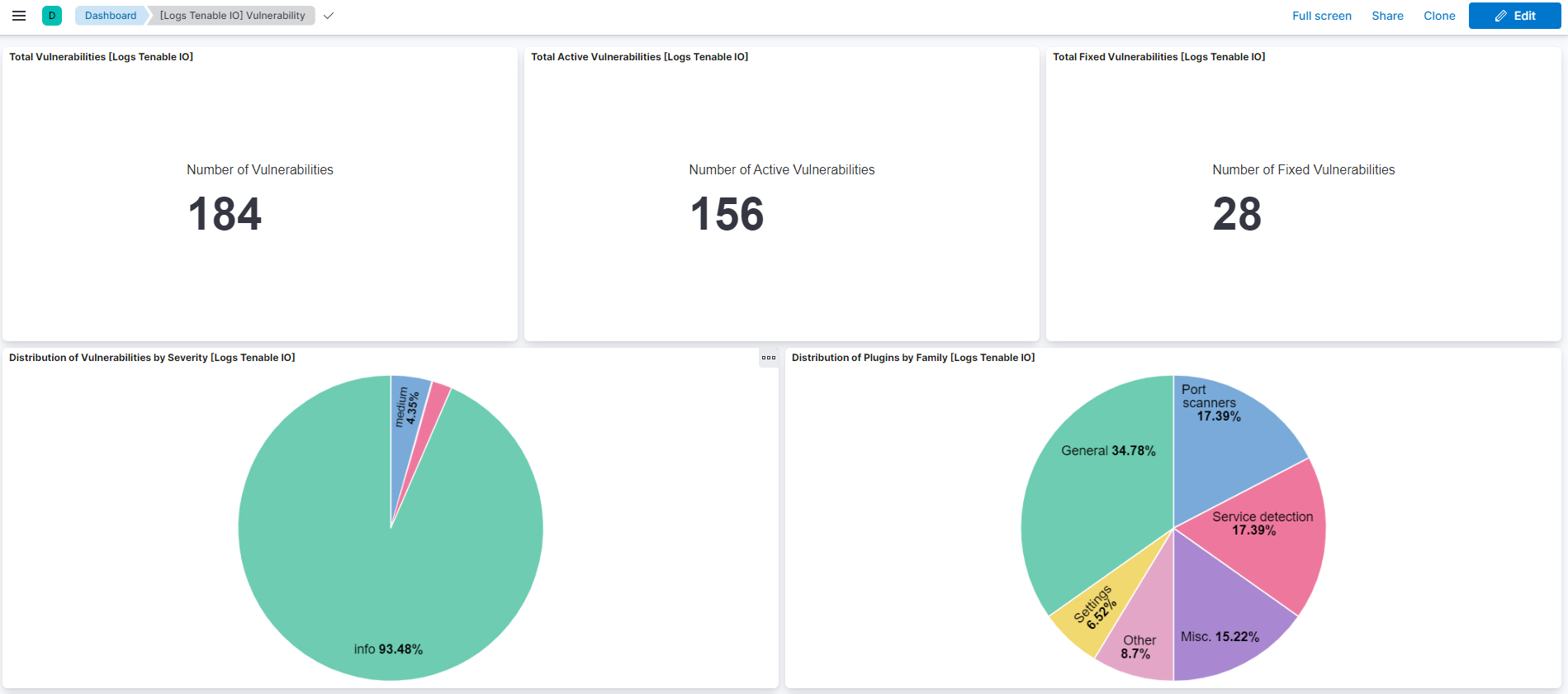
Changelog
| Version | Details | Minimum Kibana version |
|---|---|---|
| 4.15.0 | Enhancement (View pull request) Update Elastic Managed integration documentation to the current wording and docs links. |
9.1.0 8.19.0 |
| 4.14.1 | Bug fix (View pull request) In the asset data stream, skip null, empty or missing tags[].added_at, sources[].first_seen and sources[].last_seen values instead of setting event.kind to pipeline_error. |
9.1.0 8.19.0 |
| 4.14.0 | Enhancement (View pull request) Set number_of_shards: 3 on the latest_cdr_vulnerabilities transform destination index and bump its destination index version to avoid Elasticsearch shard-size warnings at scale. |
9.1.0 8.19.0 |
| 4.13.1 | Bug fix (View pull request) In the asset and vulnerability data streams, stop polling exports that are CANCELLED or ERROR, wait between export status checks, and only advance the cursor after all chunks of an export have been downloaded. |
9.1.0 8.19.0 |
| 4.13.0 | Enhancement (View pull request) Add tags to ingest pipeline processors and add preserve_original_event to pipeline-level on_failure handlers. |
9.1.0 8.19.0 |
| 4.12.2 | Enhancement (View pull request) Set agentless deployment mode release field to ga. |
9.1.0 8.19.0 |
| 4.12.1 | Bug fix (View pull request) Replace the scan details endpoint with GET /scans/{id} and remap the scan_details fields to the standard VM scan-details schema. |
9.1.0 8.19.0 |
| 4.12.0 | Enhancement (View pull request) Allow user configuration of maximum number of CEL executions for the asset, audit, plugin, and scan data streams. |
9.1.0 8.19.0 |
| 4.11.2 | Bug fix (View pull request) Preserve the severity_level filter across CEL export cycles in the vulnerability data stream so subsequent exports keep filtering by the configured severities. |
9.1.0 8.19.0 |
| 4.11.1 | Bug fix (View pull request) Use terminate processor to prevent agent error messages from being demoted in failure documents. |
9.1.0 8.19.0 |
| 4.11.0 | Enhancement (View pull request) Use new release field for agentless deployment mode to establish as beta. |
9.1.0 8.19.0 |
| 4.10.0 | Enhancement (View pull request) Add timestamp range filter and storage tier exclusion to latest transform source queries to reduce scan scope and improve performance. |
9.1.0 8.19.0 |
| 4.9.1 | Bug fix (View pull request) Drop empty vulnerability events in vulnerability data stream. |
9.1.0 8.19.0 |
| 4.9.0 | Enhancement (View pull request) Removed ECS field definitions from CDR transform destinations, now covered by ecs@mappings component template. Renamed overridden ECS fields files to ecs-overridden.yml. |
9.1.0 8.19.0 |
| 4.8.0 | Enhancement (View pull request) Add support for new ratings object in asset data stream and vulnerability scoring metrics in vulnerability data stream. |
9.1.0 8.19.0 |
| 4.7.0 | Enhancement (View pull request) Added scan details to the scan data stream from the WAS v2 scan details API. |
9.1.0 8.19.0 |
| 4.6.1 | Bug fix (View pull request) Remove duplicated field definitions in transform. |
9.1.0 8.19.0 |
| 4.6.0 | Enhancement (View pull request) Add cloudsecurity_cdr sub category label |
9.1.0 8.19.0 |
| 4.5.0 | Enhancement (View pull request) Allow user configuration of maximum number of CEL executions for the vulnerability data stream. |
9.1.0 8.19.0 |
| 4.4.1 | Bug fix (View pull request) Update transform to filter out documents containing an error.message from vulnerability latest index. |
9.1.0 8.19.0 |
| 4.4.0 | Enhancement (View pull request) Add vulnerability_workflow sub category label. |
9.1.0 8.19.0 |
| 4.3.0 | Enhancement (View pull request) Add a filter to select the severity level of collected vulnerabilites. |
9.1.0 8.19.0 |
| 4.2.1 | Bug fix (View pull request) Use painless script to convert strings to longs in the asset datastream instead of using convert due to the input potentially being a float representing a long instead of long. |
9.1.0 8.19.0 |
| 4.2.0 | Enhancement (View pull request) Use terminate processor instead of fail processor to handle agent errors. |
9.1.0 8.19.0 |
| 4.1.1 | Enhancement (View pull request) Remove duplicated installation instructions from the documentation |
9.1.0 8.19.0 |
| 4.1.0 | Enhancement (View pull request) Standardize user fields processing across integrations. |
9.1.0 8.19.0 |
| 4.0.2 | Bug fix (View pull request) Add temporary processor to remove the fields added by the Agentless policy. |
9.1.0 8.19.0 |
| 4.0.1 | Breaking change (View pull request) Document breaking-changes introduced in 4.0.0. |
9.1.0 8.19.0 |
| 4.0.0 | Breaking change (View pull request) Add mappings required for Cloud Detection and Response (CDR) vulnerability workflow. Enhancement (View pull request) Add latest transform for vulnerability. Enhancement (View pull request) Remove explicitly defined vulnerability.description field causing ECS conflict. |
9.1.0 8.19.0 |
| 3.10.1 | Bug fix (View pull request) Fix default request trace enabled behavior. |
9.0.0 8.18.0 |
| 3.10.0 | Enhancement (View pull request) Enable request trace log removal. |
9.0.0 8.18.0 |
| 3.9.0 | Enhancement (View pull request) Add Audit data-stream. |
9.0.0 8.18.0 |
| 3.8.0 | Enhancement (View pull request) Update Kibana constraint to support 9.0.0. |
9.0.0 8.18.0 |
| 3.7.0 | Enhancement (View pull request) Enable Agentless deployment. |
8.18.0 |
| 3.6.2 | Bug fix (View pull request) Updated SSL description in package manifest.yml to be uniform and to include links to documentation. |
8.13.0 |
| 3.6.1 | Enhancement (View pull request) Add "vulnerability_management" category. |
8.13.0 |
| 3.6.0 | Enhancement (View pull request) Include serial_number field for Asset events. |
8.13.0 |
| 3.5.0 | Enhancement (View pull request) Add "preserve_original_event" tag to documents with event.kind manually set to "pipeline_error". |
8.13.0 |
| 3.4.0 | Enhancement (View pull request) Do not remove event.original in main ingest pipeline. |
8.13.0 |
| 3.3.0 | Enhancement (View pull request) Add "preserve_original_event" tag to documents with event.kind set to "pipeline_error". |
8.13.0 |
| 3.2.1 | Bug fix (View pull request) Fix pagination progression logic. Bug fix (View pull request) Fix timestamp logic. |
8.13.0 |
| 3.2.0 | Enhancement (View pull request) Improve error reporting for API request failures. |
8.13.0 |
| 3.1.1 | Bug fix (View pull request) Include last_fixed date in the fingerprint to avoid duplicated entries. |
8.13.0 |
| 3.1.0 | Enhancement (View pull request) Update the kibana constraint to ^8.13.0. Modified the field definitions to remove ECS fields made redundant by the ecs@mappings component template. |
8.13.0 |
| 3.0.1 | Bug fix (View pull request) Resolved ignore_malformed issues with fields. |
8.12.0 |
| 3.0.0 | Enhancement (View pull request) Changed data collection input type of all the data streams from HTTPJSON to CEL. Bug fix (View pull request) Implemented a verification step to manage the timeout condition for exporting status and prevent simultaneous exports in assets and vulnerability data streams. |
8.12.0 |
| 2.9.0 | Enhancement (View pull request) Set sensitive values as secret. |
8.12.0 |
| 2.8.1 | Enhancement (View pull request) Changed owners |
8.7.1 |
| 2.8.0 | Enhancement (View pull request) Add request tracing to vulnerability datastream. Enhancement (View pull request) Add chain request/response tracers to asset and vulnerability. |
8.7.1 |
| 2.7.0 | Enhancement (View pull request) Limit request tracer log count to five. |
8.7.1 |
| 2.6.0 | Enhancement (View pull request) ECS version updated to 8.11.0. |
8.7.1 |
| 2.5.0 | Enhancement (View pull request) Improve 'event.original' check to avoid errors if set. |
8.7.1 |
| 2.4.0 | Enhancement (View pull request) Update interval and initial interval for asset, vulnerability and plugin data stream. |
8.7.1 |
| 2.3.0 | Enhancement (View pull request) ECS version updated to 8.10.0. |
8.7.1 |
| 2.2.0 | Enhancement (View pull request) The format_version in the package manifest changed from 2.11.0 to 3.0.0. Removed dotted YAML keys from package manifest. Added 'owner.type: elastic' to package manifest. |
8.7.1 |
| 2.1.1 | Enhancement (View pull request) Update interval for asset and vulnerability and enable plugin data stream. |
8.7.1 |
| 2.1.0 | Enhancement (View pull request) Add tags.yml file so that integration's dashboards and saved searches are tagged with "Security Solution" and displayed in the Security Solution UI. |
8.7.1 |
| 2.0.1 | Bug fix (View pull request) Update dashboards for 2.0 changes. Bug fix (View pull request) Fix timestamp to refer to last seen rather than indexed. Bug fix (View pull request) Improve fingerprinting behavior. |
8.7.1 |
| 2.0.0 | Enhancement (View pull request) Adjust default collection interval and remove Scanner data stream. |
8.7.1 |
| 1.3.0 | Enhancement (View pull request) Update package to ECS 8.9.0. |
8.7.1 |
| 1.2.0 | Enhancement (View pull request) Document duration units. |
8.7.1 |
| 1.1.0 | Enhancement (View pull request) Convert visualizations to lens. |
8.7.1 |
| 1.0.0 | Enhancement (View pull request) Release Tenable.io as GA. |
8.7.1 |
| 0.8.0 | Enhancement (View pull request) Update package to ECS 8.8.0. |
8.7.1 |
| 0.7.0 | Enhancement (View pull request) Update package-spec version to 2.7.0. |
8.7.1 |
| 0.6.1 | Bug fix (View pull request) Resolve customer suggested bugs. |
8.7.1 |
| 0.6.0 | Enhancement (View pull request) Added datasets for scanner and scan logs. |
8.7.1 |
| 0.5.0 | Enhancement (View pull request) Add a new flag to enable request tracing |
8.7.1 |
| 0.4.0 | Enhancement (View pull request) Update data collection and pipeline by adding state filter and ecs fields respectively. |
8.6.0 |
| 0.3.0 | Enhancement (View pull request) Update package to ECS 8.7.0. |
8.6.0 |
| 0.2.1 | Bug fix (View pull request) Added response.save_first_response parameter to hbs.yml files to support latest httpjson change. |
8.6.0 |
| 0.2.0 | Enhancement (View pull request) Add user-configurable Max Retries and Min Wait Time parameter. |
8.6.0 |
| 0.1.0 | Enhancement (View pull request) Initial Release. |
8.6.0 |