PingFederate
Elastic Cloud Serverless projects are autoscaled environments, fully managed by Elastic and available on Elastic Cloud. Availability This functionality is generally available and ready for production usage. Elastic Cloud Serverless projects are autoscaled environments, fully managed by Elastic and available on Elastic Cloud. Availability This functionality is generally available and ready for production usage. The Elastic Stack includes Elastic's core products such as Elasticsearch, Kibana, Logstash, and Beats. Availability This functionality is generally available and ready for production usage. Unless stated otherwise on the page, this functionality is available when your Elastic Stack is deployed on Elastic Cloud Hosted, Elastic Cloud Enterprise, Elastic Cloud on Kubernetes, and self-managed environments. This documentation corresponds to the latest patch available for each minor version. If you're not using the latest patch, check the release notes for changes.
Serverless Observability
Generally available
Serverless Security
Generally available
Stack
9.0+
Generally available since 9.0
| Version | 1.3.0 (View all) |
| Subscription level What's this? |
Basic |
| Developed by What's this? |
Elastic |
| Ingestion method(s) | File, Network Protocol |
| Minimum Kibana version(s) | 9.0.0 8.16.0 |
PingFederate is a key component of the PingIdentity platform, which is a suite of solutions for identity and access management (IAM). Specifically, Ping Federate is an enterprise-grade federated identity server designed to enable secure single sign-on (SSO), identity federation, and access management for applications and services.
This module has been tested with the latest version of PingFederate, 12.1.4(November 2024).
The PingFederate integration collects two types of logs:
Admin - Record actions performed within the PingFederate Administrative Console and via the Administrative API.
Audit - Provides a detailed record of authentication, authorization, and federation transactions.
Note:
- In the Admin datastream, only logs from the admin.log file are supported via filestream in the pipe format. The log pattern is as follows:
<pattern>%d | %X{user} | %X{roles} | %X{ip} | %X{component} | %X{event} | %X{eventdetailid} | %m%n</pattern>
Sample Log:
2024-11-28 5:58:55,832 | Administrator | UserAdmin,Admin,CryptoAdmin,ExpressionAdmin | 81.2.69.142 | A-rBnNPcJffxBiizBWDOWxq_Ek8cYxg3nxxxxyn6H4 | LICENSE | ROTATE | - Login was successful
- Audit logs are supported through filestream, TCP, and UDP in the CEF format. The log pattern is as follows:
<pattern>%escape{CEF}{CEF:0|Ping Identity|PingFederate|%X{pfversion}|%X{event}|%X{event}|0|rt=%d{MMM dd yyyy HH:mm:ss.SSS} duid=%X{subject} src=%X{ip} msg=%X{status} cs1Label=Target Application URL cs1=%X{app} cs2Label=Connection ID cs2=%X{connectionid} cs3Label=Protocol cs3=%X{protocol} dvchost=%X{host} cs4Label=Role cs4=%X{role} externalId=%X{trackingid} cs5Label=SP Local User ID cs5=%X{localuserid} cs6Label=Attributes cs6=%X{attributes} %n}</pattern>
Sample Log:
CEF:0|Ping Identity|PingFederate|6.4|AUTHN_SESSION_DELETED|AUTHN_SESSION_DELETED|0|rt=May 18 2012 11:41:48.452 duid=joe src=89.160.20.112 msg=failure cs1Label=Target Application URL cs1=http://www.google.ca&landingpage\=pageA cs2Label=Connection ID cs2=sp:cloud:saml2 cs3Label=Protocol cs3=SAML20 dvchost=hello cs4Label=Role cs4=IdP externalId=tid:ae14b5ce8 cs5Label=SP Local User ID cs5=idlocal cs6Label=Attributes cs6={SAML_SUBJECT\=joe, ognl\=tom}
Elastic Agent must be installed. For more details, check the Elastic Agent installation instructions. You can install only one Elastic Agent per host. Elastic Agent is required to stream data through the Filestream or TCP/UDP and ship the data to Elastic, where the events will then be processed via the integration's ingest pipelines.
- To configure log files in the PingFederate instance, check the Log4j 2 logging service and configuration guide.
- To write the audit logs in CEF format, check the Writing audit log in CEF guide.
- In Kibana go to Management > Integrations.
- In the search top bar, type PingFederate.
- Select the PingFederate integration and add it.
- Select the toggle for the data stream for which you want to collect logs.
- Enable the data collection mode: Filestream, TCP, or UDP. Admin logs are only supported through Filestream.
- Add all the required configuration parameters, such as paths for the filestream or listen address and listen port for the TCP and UDP.
- Save the integration.
This is the Admin dataset.
Example
{
    "@timestamp": "2024-11-28T16:58:55.832+11:00",
    "agent": {
        "ephemeral_id": "cc3c0dc0-25b3-472f-8434-111714ef6bcb",
        "id": "7cd150d8-eab1-4974-b83f-990dbb737cb8",
        "name": "docker-fleet-agent",
        "type": "filebeat",
        "version": "8.14.0"
    },
    "data_stream": {
        "dataset": "ping_federate.admin",
        "namespace": "75079",
        "type": "logs"
    },
    "ecs": {
        "version": "8.16.0"
    },
    "elastic_agent": {
        "id": "7cd150d8-eab1-4974-b83f-990dbb737cb8",
        "snapshot": false,
        "version": "8.14.0"
    },
    "event": {
        "action": "rotate",
        "agent_id_status": "verified",
        "category": [
            "configuration"
        ],
        "dataset": "ping_federate.admin",
        "id": "A-rBnNPcJffxBiizBWDOWxq_Ek8cYxg3nef5uKyn6H4",
        "ingested": "2024-12-19T12:19:22Z",
        "kind": "event",
        "original": "2024-11-28 5:58:55,832 | Administrator | UserAdmin,Admin,CryptoAdmin,ExpressionAdmin | 81.2.69.142 | A-rBnNPcJffxBiizBWDOWxq_Ek8cYxg3nef5uKyn6H4 | LICENSE | ROTATE | - Login was successful",
        "timezone": "+11:00",
        "type": [
            "change"
        ]
    },
    "input": {
        "type": "filestream"
    },
    "log": {
        "file": {
            "device_id": "64768",
            "inode": "8692415",
            "path": "/tmp/service_logs/test-admin.log"
        },
        "offset": 0
    },
    "message": "- Login was successful",
    "observer": {
        "product": "PingFederate",
        "vendor": "Ping Identity"
    },
    "ping_federate": {
        "admin": {
            "component": "LICENSE",
            "event": {
                "detail_id": "A-rBnNPcJffxBiizBWDOWxq_Ek8cYxg3nef5uKyn6H4",
                "type": "ROTATE"
            },
            "ip": "81.2.69.142",
            "message": "- Login was successful",
            "roles": [
                "UserAdmin",
                "Admin",
                "CryptoAdmin",
                "ExpressionAdmin"
            ],
            "timestamp": "2024-11-28T16:58:55.832+11:00",
            "user": "Administrator"
        }
    },
    "related": {
        "ip": [
            "81.2.69.142"
        ],
        "user": [
            "Administrator"
        ]
    },
    "source": {
        "geo": {
            "city_name": "London",
            "continent_name": "Europe",
            "country_iso_code": "GB",
            "country_name": "United Kingdom",
            "location": {
                "lat": 51.5142,
                "lon": -0.0931
            },
            "region_iso_code": "GB-ENG",
            "region_name": "England"
        },
        "ip": "81.2.69.142"
    },
    "tags": [
        "preserve_original_event",
        "preserve_duplicate_custom_fields",
        "forwarded",
        "ping_federate-admin"
    ],
    "user": {
        "name": "Administrator",
        "roles": [
            "UserAdmin",
            "Admin",
            "CryptoAdmin",
            "ExpressionAdmin"
        ]
    }
}
Exported fields
| Field | Description | Type |
|---|---|---|
| @timestamp | Event timestamp. | date |
| data_stream.dataset | Data stream dataset. | constant_keyword |
| data_stream.namespace | Data stream namespace. | constant_keyword |
| data_stream.type | Data stream type. | constant_keyword |
| event.dataset | Event dataset. | constant_keyword |
| event.module | Event module. | constant_keyword |
| input.type | Type of filebeat input. | keyword |
| log.file.device_id | ID of the device containing the filesystem where the file resides. | keyword |
| log.file.fingerprint | The sha256 fingerprint identity of the file when fingerprinting is enabled. | keyword |
| log.file.idxhi | The high-order part of a unique identifier that is associated with a file. (Windows-only) | keyword |
| log.file.idxlo | The low-order part of a unique identifier that is associated with a file. (Windows-only) | keyword |
| log.file.inode | Inode number of the log file. | keyword |
| log.file.vol | The serial number of the volume that contains a file. (Windows-only) | keyword |
| log.offset | Log offset. | long |
| log.source.address | Source address from which the log event was read / sent from. | keyword |
| ping_federate.admin.component | The PingFederate system component processing the request (e.g., SSO, OAuth). | keyword |
| ping_federate.admin.event.detail_id | A unique identifier for specific event details or associated sub-transactions. | keyword |
| ping_federate.admin.event.type | Describes the type of event (e.g., authentication attempt, token issuance). | keyword |
| ping_federate.admin.ip | The IP address of the client initiating the request. | ip |
| ping_federate.admin.message | The main message or details of the log entry. | keyword |
| ping_federate.admin.roles | Lists the roles or permissions associated with the user. | keyword |
| ping_federate.admin.timestamp | date | |
| ping_federate.admin.user | Represents the username or user identifier involved in the transaction. | keyword |
| tags | User defined tags. | keyword |
This is the Audit dataset.
Example
{
    "@timestamp": "2012-05-19T00:41:48.452+13:00",
    "agent": {
        "ephemeral_id": "f21cd0a8-ed07-4f2a-a1b7-c3a61d93dc64",
        "id": "7cd150d8-eab1-4974-b83f-990dbb737cb8",
        "name": "docker-fleet-agent",
        "type": "filebeat",
        "version": "8.14.0"
    },
    "data_stream": {
        "dataset": "ping_federate.audit",
        "namespace": "99086",
        "type": "logs"
    },
    "ecs": {
        "version": "8.16.0"
    },
    "elastic_agent": {
        "id": "7cd150d8-eab1-4974-b83f-990dbb737cb8",
        "snapshot": false,
        "version": "8.14.0"
    },
    "event": {
        "action": "authn_session_deleted",
        "agent_id_status": "verified",
        "category": [
            "session"
        ],
        "code": "AUTHN_SESSION_DELETED",
        "dataset": "ping_federate.audit",
        "ingested": "2024-12-19T12:23:19Z",
        "kind": "event",
        "original": "CEF:0|Ping Identity|PingFederate|6.4|AUTHN_SESSION_DELETED|AUTHN_SESSION_DELETED|0|rt=May 18 2012 11:41:48.452 duid=joe src=192.168.6.130 msg=failure cs1Label=Target Application URL cs1=http://www.google.ca&landingpage\\=pageA cs2Label=Connection ID cs2=sp:cloud:saml2 cs3Label=Protocol cs3=SAML20 dvchost=hello cs4Label=Role cs4=IdP externalId=tid:ae14b5ce8 cs5Label=SP Local User ID cs5=idlocal cs6Label=Attributes cs6={SAML_SUBJECT\\=joe, ognl\\=tom}",
        "outcome": "failure",
        "severity": 0,
        "timezone": "+13:00",
        "type": [
            "end"
        ]
    },
    "input": {
        "type": "udp"
    },
    "log": {
        "source": {
            "address": "192.168.246.7:58730"
        }
    },
    "observer": {
        "hostname": "hello",
        "product": "PingFederate",
        "vendor": "Ping Identity",
        "version": "6.4"
    },
    "ping_federate": {
        "audit": {
            "app": "http://www.google.ca&landingpage=pageA",
            "attributes": "{SAML_SUBJECT=joe, ognl=tom}",
            "connection_id": "sp:cloud:saml2",
            "event": "AUTHN_SESSION_DELETED",
            "host": {
                "name": "hello"
            },
            "ip": "192.168.6.130",
            "local_user_id": "idlocal",
            "protocol": "SAML20",
            "response_time": "2012-05-19T00:41:48.452+13:00",
            "role": "IdP",
            "severity": 0,
            "status": "failure",
            "subject": "joe",
            "tracking_id": "tid:ae14b5ce8"
        }
    },
    "related": {
        "hosts": [
            "hello"
        ],
        "ip": [
            "192.168.6.130"
        ],
        "user": [
            "idlocal",
            "joe"
        ]
    },
    "source": {
        "ip": "192.168.6.130"
    },
    "tags": [
        "preserve_original_event",
        "preserve_duplicate_custom_fields",
        "forwarded",
        "ping_federate-audit"
    ],
    "url": {
        "full": "http://www.google.ca&landingpage=pageA",
        "original": "http://www.google.ca&landingpage=pageA",
        "scheme": "http"
    },
    "user": {
        "name": "joe",
        "roles": [
            "IdP"
        ]
    }
}
Exported fields
| Field | Description | Type |
|---|---|---|
| @timestamp | Event timestamp. | date |
| data_stream.dataset | Data stream dataset. | constant_keyword |
| data_stream.namespace | Data stream namespace. | constant_keyword |
| data_stream.type | Data stream type. | constant_keyword |
| event.dataset | Event dataset. | constant_keyword |
| event.module | Event module. | constant_keyword |
| input.type | Type of filebeat input. | keyword |
| log.file.device_id | ID of the device containing the filesystem where the file resides. | keyword |
| log.file.fingerprint | The sha256 fingerprint identity of the file when fingerprinting is enabled. | keyword |
| log.file.idxhi | The high-order part of a unique identifier that is associated with a file. (Windows-only) | keyword |
| log.file.idxlo | The low-order part of a unique identifier that is associated with a file. (Windows-only) | keyword |
| log.file.inode | Inode number of the log file. | keyword |
| log.file.vol | The serial number of the volume that contains a file. (Windows-only) | keyword |
| log.offset | Log offset. | long |
| log.source.address | Source address from which the log event was read / sent from. | keyword |
| ping_federate.audit.app | Target application URL. | keyword |
| ping_federate.audit.attributes | A list of all attributes. | keyword |
| ping_federate.audit.connection_id | Partner ID. | keyword |
| ping_federate.audit.event | Event. | keyword |
| ping_federate.audit.host.ip | Device host IP. | ip |
| ping_federate.audit.host.name | Device hostname. | keyword |
| ping_federate.audit.ip | Client source IP. | ip |
| ping_federate.audit.local_user_id | SP local user ID (available only when account linking is used). | keyword |
| ping_federate.audit.protocol | Protocol (e.g. SAML20). | keyword |
| ping_federate.audit.response_time | date | |
| ping_federate.audit.role | Role (IdP, SP). | keyword |
| ping_federate.audit.severity | long | |
| ping_federate.audit.status | The status of the SSO request (success, failure, authn_attempt). | keyword |
| ping_federate.audit.subject | User name. | keyword |
| ping_federate.audit.tracking_id | Tracking ID which is unique for a user session. It is used for debugging purposes in the server log. | keyword |
| tags | User defined tags. | keyword |
This integration includes one or more Kibana dashboards that visualizes the data collected by the integration. The screenshots below illustrate how the ingested data is displayed.
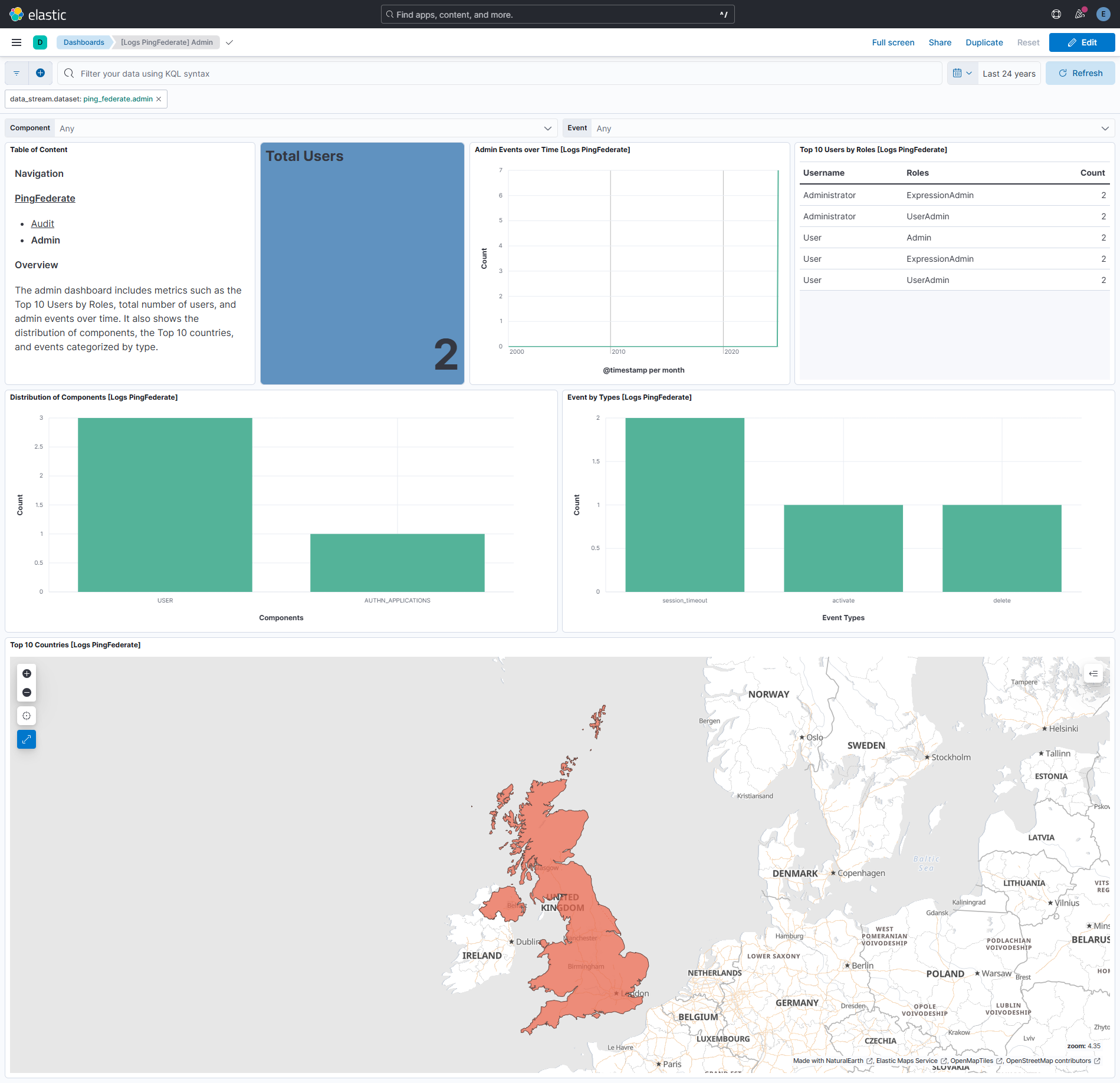
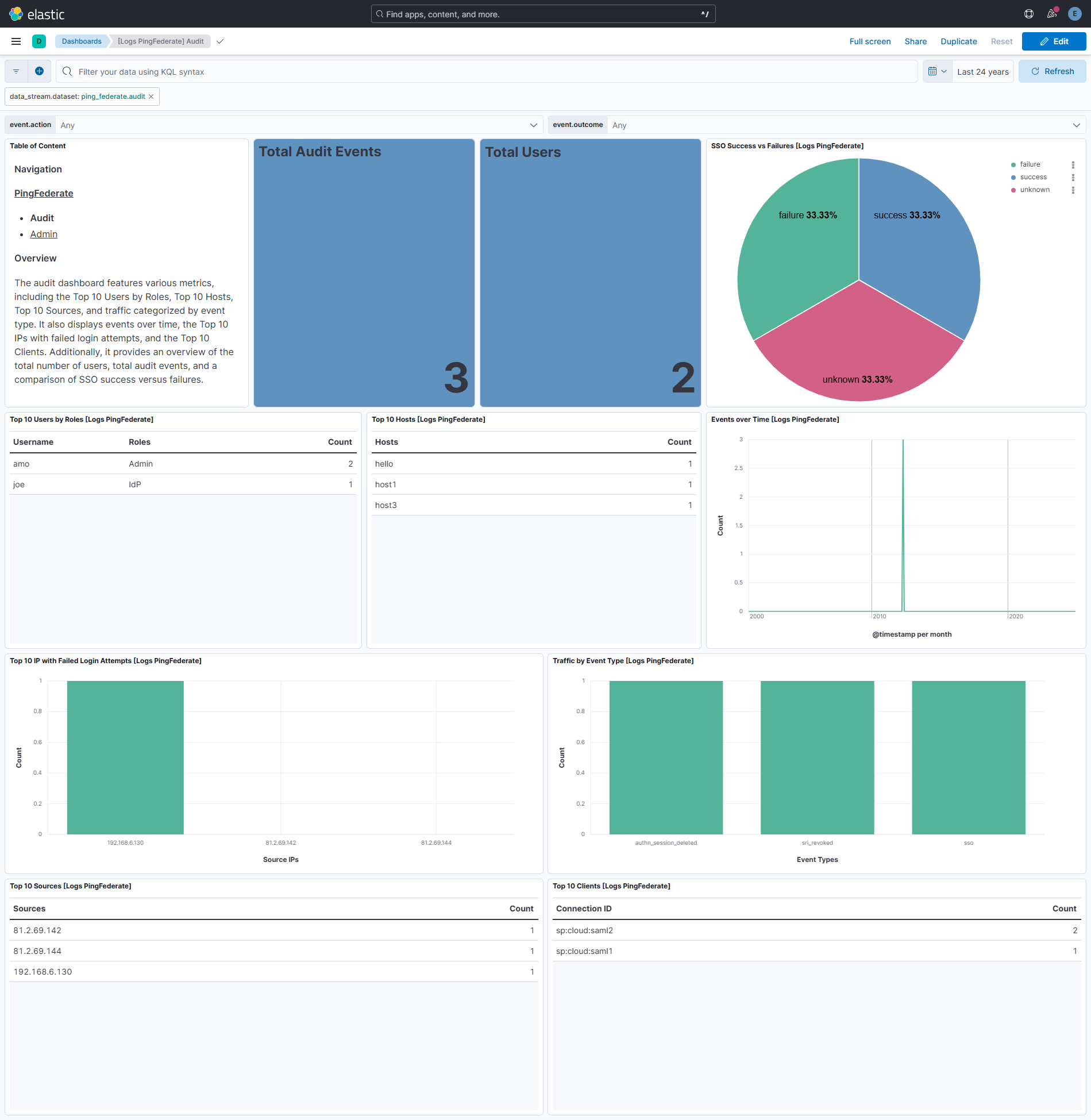
Changelog
| Version | Details | Minimum Kibana version |
|---|---|---|
| 1.3.0 | Enhancement (View pull request) Add tags to ingest pipeline processors. |
9.0.0 8.16.0 |
| 1.2.0 | Enhancement (View pull request) Support IPv6 source addresses with brackets in audit data stream. |
9.0.0 8.16.0 |
| 1.0.3 | Bug fix (View pull request) Remove duplicate security-solution-default tag references |
9.0.0 8.16.0 |
| 1.0.2 | Enhancement (View pull request) Remove duplicated installation instructions from the documentation. |
9.0.0 8.16.0 |
| 1.0.1 | Bug fix (View pull request) Apply timezone setting correctly in the audit data stream. |
9.0.0 8.16.0 |
| 1.0.0 | Enhancement (View pull request) Release package as GA. |
9.0.0 8.16.0 |
| 0.2.1 | Bug fix (View pull request) Check message status for null using contains |
9.0.0 8.16.0 |
| 0.2.0 | Enhancement (View pull request) Update Kibana constraint to support 9.0.0. |
9.0.0 8.16.0 |
| 0.1.1 | Bug fix (View pull request) Updated SSL description to be uniform and to include links to documentation. |
8.16.0 |
| 0.1.0 | Enhancement (View pull request) Initial Release. |
8.16.0 |