AWS CUR 2.0 Billing
Elastic Cloud Serverless projects are autoscaled environments, fully managed by Elastic and available on Elastic Cloud. Availability This functionality is in technical preview and is ready for evaluation. Use with caution in production; it is not recommended for mission-critical workloads. Elastic will work to fix any issues, but features in technical preview are not subject to the support SLA of official GA features. Specific Support terms apply. Elastic Cloud Serverless projects are autoscaled environments, fully managed by Elastic and available on Elastic Cloud. Availability This functionality is in technical preview and is ready for evaluation. Use with caution in production; it is not recommended for mission-critical workloads. Elastic will work to fix any issues, but features in technical preview are not subject to the support SLA of official GA features. Specific Support terms apply. The Elastic Stack includes Elastic's core products such as Elasticsearch, Kibana, Logstash, and Beats. Availability This functionality is in technical preview and is ready for evaluation. Use with caution in production; it is not recommended for mission-critical workloads. Elastic will work to fix any issues, but features in technical preview are not subject to the support SLA of official GA features. Specific Support terms apply. Unless stated otherwise on the page, this functionality is available when your Elastic Stack is deployed on Elastic Cloud Hosted, Elastic Cloud Enterprise, Elastic Cloud on Kubernetes, and self-managed environments. This documentation corresponds to the latest patch available for each minor version. If you're not using the latest patch, check the release notes for changes.
Serverless Observability
Preview
Preview
Serverless Security
Preview
Preview
Stack
Preview
9.0+
Preview since 9.0
| Version | 0.2.1 Availability Preview This functionality is in technical preview and is ready for evaluation. Use with caution in production; it is not recommended for mission-critical workloads. Elastic will work to fix any issues, but features in technical preview are not subject to the support SLA of official GA features. Specific Support terms apply. (View all) |
| Subscription level What's this? |
Basic |
| Developed by What's this? |
Elastic |
| Ingestion method(s) | AWS S3 |
| Minimum Kibana version(s) | 9.0.0 8.18.0 |
To use pre-release integrations, go to the Integrations page in Kibana, scroll down, and toggle on the Display beta integrations option.
Amazon Cost and Usage Reports (CUR) provide the most detailed information available about your AWS costs and usage. CUR 2.0 enhances this reporting format with greater structure and compatibility for analytics.
The AWS CUR 2.0 Billing integration allows you to seamlessly collect and ingest Cost and Usage Report (CUR) version 2.0 data exported to an Amazon S3 bucket, using the Elastic Agent. This enables you to monitor, analyze, and visualize AWS billing data with the power of the Elastic Stack.
This integration is designed specifically to support standard CUR 2.0 exports with predefined configuration requirements.
The integration currently supports only CUR 2.0 reports without resource IDs and split cost allocation data, and requires a very specific configuration of the CUR export.
This integration supports CUR 2.0 reports only with the specified configurations. If your report includes resource IDs or split allocation data, the integration will not work.
This integration collects data into a single stream:
billing: Contains all metrics from your CUR 2.0 billing reports.
You need Elasticsearch for storing and searching your data and Kibana for visualizing and managing it. You can use our hosted Elasticsearch Service on Elastic Cloud, which is recommended, or self-manage the Elastic Stack on your own hardware.
Before using any AWS integration you will need:
- AWS Credentials to connect with your AWS account.
- AWS Permissions to make sure the user you're using to connect has permission to share the relevant data.
For more details about these requirements, refer to the AWS integration documentation.
To collect AWS CUR reports, you would need specific AWS permissions to access the necessary data. Here's a list of permissions required for an IAM user to collect AWS CUR metrics:
s3:GetObjects3:ListBucket
To use this integration, you must create a standard CUR 2.0 data export in AWS. This will automatically create an S3 bucket if one does not already exist.
When creating your CUR export, the following configuration is required for compatibility:
Compression type and file format:
gzip - text/csvFile versioning:
Overwrite existing data export fileAdditional export content:
- Include resource IDs: ❌ Disabled
- Split cost allocation data: ❌ Disabled
- Include all available columns (113 total): ✅ Default
S3 bucket: Must exist and be accessible by the Elastic Agent.
You can follow AWS documentation for setup: 🔗 Creating Cost and Usage Reports in AWS
- Ensure the S3 bucket used for the CUR export is accessible via the credentials provided to the Elastic Agent.
- The integration requires ListBucket permission on the bucket.
CUR 2.0 reports are cumulative, meaning they are overwritten daily with the full billing data. Therefore, setting the bucket polling interval to less than 24 hours will result in duplicate ingestion of the same data.
✅ REQUIRED: Set the S3 polling interval to at least 24 hours to avoid duplicating report ingestion.
Learn more: 🔗 Understanding CUR Overwrite Behavior
- You must install and configure Elastic Agent to collect and ship data from the S3 bucket.
- Only one Elastic Agent should be installed per host.
- In AWS, create a CUR 2.0 export with the required settings.
- Ensure the report is stored in a reachable S3 bucket with proper permissions.
- Configure this integration in Elastic using the required AWS credentials or role.
- Set the S3 polling interval to 24h (minimum).
- Monitor the
billingdata stream in Kibana for insights and visualizations.
AWS CUR contains all metrics from your CUR 2.0 billing reports.
Example
{
    "aws_billing": {
        "cur": {
            "bill": {
                "billing_entity": "BillingEntity",
                "billing_period_end_date": "2025-08-01T00:00:00.000Z",
                "billing_period_start_date": "2025-07-01T00:00:00.000Z",
                "invoicing_entity": "Amazon Web Services, Inc.",
                "payer_account_id": "123456789012",
                "payer_account_name": "tech-innovators",
                "type": "Bill"
            },
            "cost_category": "{\"cloud_discount\":\"10%\"}",
            "discount": {
                "total_discount": 0.0
            },
            "identity": {
                "line_item_id": "abcdef12345ghjklmnpq789xyz",
                "time_interval": "2025-07-01T00:00:00Z/2025-08-01T00:00:00Z"
            },
            "line_item": {
                "blended_cost": 120.0,
                "currency_code": "USD",
                "description": "Tax for product code EC2 usage type APN2-EC2:Compute",
                "legal_entity": "Amazon Web Services, Inc.",
                "net_unblended_cost": 12.0,
                "normalization_factor": 120.0,
                "normalized_usage_amount": 12.0,
                "product_code": "AmazonEC2",
                "tax_type": "CT",
                "type": "Tax",
                "unblended_cost": 100.0,
                "usage_account_id": "450345623178",
                "usage_account_name": "tech-solutions",
                "usage_amount": 1.0,
                "usage_end_date": "2025-08-01T00:00:00.000Z",
                "usage_start_date": "2025-07-01T00:00:00.000Z",
                "usage_type": "APN2-EC2:Compute"
            },
            "pricing": {
                "public_on_demand_cost": 0.0
            },
            "product": {
                "product": "{\"product_name\":\"AmazonEC2\"}"
            },
            "reservation": {
                "amortized_upfront_cost_for_usage": 0.0,
                "amortized_upfront_fee_for_billing_period": 0.0,
                "effective_cost": 0.0,
                "net_amortized_upfront_cost_for_usage": 0.0,
                "net_amortized_upfront_fee_for_billing_period": 0.0,
                "net_effective_cost": 0.0,
                "net_recurring_fee_for_usage": 0.0,
                "net_unused_amortized_upfront_fee_for_billing_period": 0.0,
                "net_unused_recurring_fee": 0.0,
                "net_upfront_value": 0.0,
                "recurring_fee_for_usage": 0.0,
                "unused_amortized_upfront_fee_for_billing_period": 0.0,
                "unused_normalized_unit_quantity": 0.0,
                "unused_quantity": 0.0,
                "unused_recurring_fee": 0.0,
                "upfront_value": 0.0
            },
            "resource_tags": "{\"CostCenter\":\"AI-421\",\"Department\":\"AI Research\",\"Environment\":\"Production\",\"Owner\":\"alice.wang\",\"Project\":\"NeuralNet-ML\"}",
            "savings_plan": {
                "amortized_upfront_commitment_for_billing_period": 0.0,
                "effective_cost": 0.0,
                "net_amortized_upfront_commitment_for_billing_period": 0.0,
                "net_effective_cost": 0.0,
                "net_recurring_commitment_for_billing_period": 0.0,
                "rate": 0.0,
                "recurring_commitment_for_billing_period": 0.0,
                "total_commitment_to_date": 0.0,
                "used_commitment": 0.0
            }
        }
    },
    "cloud": {
        "provider": "aws"
    },
    "ecs": {
        "version": "8.11.0"
    },
    "event": {
        "category": [
            "web"
        ],
        "kind": "event",
        "original": "Bill,BillingEntity,2025-08-01T00:00:00.000Z,2025-07-01T00:00:00.000Z,,\"Amazon Web Services, Inc.\",123456789012,tech-innovators,\"{\"\"cloud_discount\"\":\"\"10%\"\"}\",\"{\"\"enterprise_rate\"\":\"\"15%\"\"}\",,0.0,abcdef12345ghjklmnpq789xyz,2025-07-01T00:00:00Z/2025-08-01T00:00:00Z,,120.0,,USD,\"Amazon Web Services, Inc.\",Tax for product code EC2 usage type APN2-EC2:Compute,Tax,12.0,,120.0,12.0,,AmazonEC2,CT,100.0,,450345623178,tech-solutions,1.0,2025-08-01T00:00:00.000Z,2025-07-01T00:00:00.000Z,APN2-EC2:Compute,,,,0.0,,,,,,,\"{\"\"product_name\"\":\"\"AmazonEC2\"\"}\",,,,,,,,,,,,,,,,,,,,,,0.0,0.0,,0.0,,,0.0,0.0,0.0,0.0,0.0,0.0,0.0,\"\",\"\",0.0,,,,\"\",\"\",\"\",0.0,0.0,0.0,0.0,0.0,\"{\"\"Environment\"\":\"\"Production\"\",\"\"Owner\"\":\"\"alice.wang\"\",\"\"Project\"\":\"\"NeuralNet-ML\"\",\"\"Department\"\":\"\"AI Research\"\",\"\"CostCenter\"\":\"\"AI-421\"\"}\",0.0,,,0.0,0.0,0.0,,,,0.0,,,0.0,0.0,,0.0,0.0"
    },
    "tags": [
        "preserve_original_event",
        "preserve_duplicate_custom_fields"
    ]
}
Exported fields
| Field | Description | Type |
|---|---|---|
| @timestamp | Date/time when the event originated. This is the date/time extracted from the event, typically representing when the event was generated by the source. If the event source has no original timestamp, this value is typically populated by the first time the event was received by the pipeline. Required field for all events. | date |
| aws.cloudwatch.message | CloudWatch log message. | text |
| aws.s3.bucket.arn | ARN of the S3 bucket that this log retrieved from. | keyword |
| aws.s3.bucket.name | Name of the S3 bucket that this log retrieved from. | keyword |
| aws.s3.object.key | Name of the S3 object that this log retrieved from. | keyword |
| aws_billing.cur.bill.billing_entity | Helps you identify whether your invoices or transactions are for AWS Marketplace or for purchases of other AWS services. | keyword |
| aws_billing.cur.bill.billing_period_end_date | The end date of the billing period that is covered by this report, in UTC. The format is YYYY-MM-DDTHH:mm:ssZ | date |
| aws_billing.cur.bill.billing_period_start_date | The start date of the billing period that is covered by this report, in UTC. The format is YYYY-MM-DDTHH:mm:ssZ | date |
| aws_billing.cur.bill.invoice_id | The ID associated with a specific line item. Until the report is final, the InvoiceId is blank | keyword |
| aws_billing.cur.bill.invoicing_entity | The AWS entity that issues the invoice | keyword |
| aws_billing.cur.bill.payer_account_id | The account ID of the paying account | keyword |
| aws_billing.cur.bill.payer_account_name | The account name of the paying account | keyword |
| aws_billing.cur.bill.type | The type of bill that this report covers | keyword |
| aws_billing.cur.bundled_discount | The bundled discount applied to the line item | double |
| aws_billing.cur.cost.amortized_cost | The effective cost of the upfront and monthly reservation fees spread across the billing period | double |
| aws_billing.cur.cost.net_amortized_cost | The actual after-discount amortized cost | double |
| aws_billing.cur.cost_category | Cost categories that apply to the line item - a map column containing key-value pairs of the cost categories and their values for a given line item | keyword |
| aws_billing.cur.discount | A map column containing key-value pairs of any specific discounts that apply to this line item | object |
| aws_billing.cur.identity.line_item_id | A unique identifier generated for each line item within a given partition. This does not guarantee uniqueness across an entire delivery of the AWS CUR | keyword |
| aws_billing.cur.identity.time_interval | The time interval that this line item applies to, in the format YYYY-MM-DDTHH:mm:ssZ/YYYY-MM-DDTHH:mm:ssZ. The time interval is in UTC and can be either daily or hourly | keyword |
| aws_billing.cur.line_item.availability_zone | The Availability Zone that hosts this line item | keyword |
| aws_billing.cur.line_item.blended_cost | The BlendedRate multiplied by the UsageAmount | double |
| aws_billing.cur.line_item.blended_rate | The average cost incurred for each SKU across an organization | double |
| aws_billing.cur.line_item.currency_code | The currency that this line item is shown in | keyword |
| aws_billing.cur.line_item.description | The description of the line item type | text |
| aws_billing.cur.line_item.legal_entity | The Seller of Record of a specific product or service | keyword |
| aws_billing.cur.line_item.net_unblended_cost | The actual after-discount cost that you're paying for the line item | double |
| aws_billing.cur.line_item.net_unblended_rate | The actual after-discount rate that you're paying for the line item | double |
| aws_billing.cur.line_item.normalization_factor | The normalization factor for the instance size for size-flexible RIs | double |
| aws_billing.cur.line_item.normalized_usage_amount | The amount of usage that you incurred, in normalized units, for size-flexible RIs | double |
| aws_billing.cur.line_item.operation | The specific AWS operation covered by this line item | keyword |
| aws_billing.cur.line_item.product_code | The code of the product measured. For example, AmazonEC2 is the product code for Amazon Elastic Compute Cloud | keyword |
| aws_billing.cur.line_item.resource_id | If you chose to include individual resource IDs in your report, this column contains the ID of the resource that you provisioned | keyword |
| aws_billing.cur.line_item.tax_type | The type of tax that AWS applied to this line item | keyword |
| aws_billing.cur.line_item.type | The type of charge covered by this line item | keyword |
| aws_billing.cur.line_item.unblended_cost | The UnblendedRate multiplied by the UsageAmount | double |
| aws_billing.cur.line_item.unblended_cost_str | String representation of the unblended cost | keyword |
| aws_billing.cur.line_item.unblended_rate | The rate associated with an individual account's service usage | double |
| aws_billing.cur.line_item.usage_account_id | The account ID of the account that used this line item | keyword |
| aws_billing.cur.line_item.usage_account_name | The name of the account that used this line item | keyword |
| aws_billing.cur.line_item.usage_amount | The amount of usage that you incurred during the specified time period | double |
| aws_billing.cur.line_item.usage_end_date | The end date and time for the corresponding line item in UTC, exclusive. The format is YYYY-MM-DDTHH:mm:ssZ | date |
| aws_billing.cur.line_item.usage_start_date | The start date and time for the line item in UTC, inclusive. The format is YYYY-MM-DDTHH:mm:ssZ | date |
| aws_billing.cur.line_item.usage_type | The usage details of the line item | keyword |
| aws_billing.cur.pricing.currency | The currency that the pricing data is shown in | keyword |
| aws_billing.cur.pricing.lease_contract_length | The length of time that your RI is reserved for | keyword |
| aws_billing.cur.pricing.offering_class | Describes the offering class of the Reserved Instance | keyword |
| aws_billing.cur.pricing.public_on_demand_cost | The total cost for the line item based on public On-Demand Instance rates | double |
| aws_billing.cur.pricing.public_on_demand_rate | The public On-Demand Instance rate in this billing period for the specific line item of usage | double |
| aws_billing.cur.pricing.purchase_option | How you chose to pay for this line item | keyword |
| aws_billing.cur.pricing.rate_code | A unique code for a product/offer/pricing-tier combination | keyword |
| aws_billing.cur.pricing.rate_id | The ID of the rate for a line item | keyword |
| aws_billing.cur.pricing.term | Whether your AWS usage is Reserved or On-Demand | keyword |
| aws_billing.cur.pricing.unit | The pricing unit that AWS used for calculating your usage cost | keyword |
| aws_billing.cur.product.comment | A comment regarding the product | text |
| aws_billing.cur.product.family | The category for the type of product | keyword |
| aws_billing.cur.product.fee_code | The code that refers to the fee | keyword |
| aws_billing.cur.product.fee_description | The description for the product fee | text |
| aws_billing.cur.product.from_location | Describes the location where the usage originated from | keyword |
| aws_billing.cur.product.from_location_type | Describes the location type where the usage originated from | keyword |
| aws_billing.cur.product.from_region_code | Describes the source Region code for the AWS service | keyword |
| aws_billing.cur.product.instance_family | Describes your Amazon EC2 instance family | keyword |
| aws_billing.cur.product.instance_type | Describes the instance type, size, and family, which define the CPU, networking, and storage capacity of your instance | keyword |
| aws_billing.cur.product.instancesku | The SKU of the product instance | keyword |
| aws_billing.cur.product.location | Describes the Region that your Amazon S3 bucket resides in | keyword |
| aws_billing.cur.product.location_type | Describes the endpoint of your task | keyword |
| aws_billing.cur.product.operation | Describes the specific AWS operation that this line item covers | keyword |
| aws_billing.cur.product.pricing_unit | The smallest billing unit for an AWS service | keyword |
| aws_billing.cur.product.product | A map column containing key-value pairs of multiple product attributes and their values for a given line item | keyword |
| aws_billing.cur.product.region_code | A Region is a physical location around the world where data centers are clustered | keyword |
| aws_billing.cur.product.servicecode | This identifies the specific AWS service to the customer as a unique short abbreviation | keyword |
| aws_billing.cur.product.sku | A unique code for a product | keyword |
| aws_billing.cur.product.to_location | Describes the location usage destination | keyword |
| aws_billing.cur.product.to_location_type | Describes the destination location of the service usage | keyword |
| aws_billing.cur.product.to_region_code | Describes the destination Region code for the AWS service | keyword |
| aws_billing.cur.product.usagetype | Describes the usage details of the line item | keyword |
| aws_billing.cur.reservation.a_r_n | The Amazon Resource Name (ARN) of the RI that this line item benefited from. Also called the RI Lease ID | keyword |
| aws_billing.cur.reservation.amortized_upfront_cost_for_usage | The initial upfront payment for all upfront RIs and partial upfront RIs amortized for usage time | double |
| aws_billing.cur.reservation.amortized_upfront_fee_for_billing_period | Describes how much of the upfront fee for this reservation is costing you for the billing period | double |
| aws_billing.cur.reservation.availability_zone | The Availability Zone of the resource that is associated with this line item | keyword |
| aws_billing.cur.reservation.effective_cost | The sum of both the upfront and hourly rate of your RI, averaged into an effective hourly rate | double |
| aws_billing.cur.reservation.end_time | The end date of the associated RI lease term | date |
| aws_billing.cur.reservation.modification_status | Shows whether the RI lease was modified or if it is unaltered. | keyword |
| aws_billing.cur.reservation.net_amortized_upfront_cost_for_usage | The initial upfront payment for All Upfront RIs and Partial Upfront RIs amortized for usage time, if applicable | double |
| aws_billing.cur.reservation.net_amortized_upfront_fee_for_billing_period | The cost of the reservation's upfront fee for the billing period with discounts applied | double |
| aws_billing.cur.reservation.net_effective_cost | The sum of both the upfront fee and the hourly rate of your RI, averaged into an effective hourly rate with discounts | double |
| aws_billing.cur.reservation.net_recurring_fee_for_usage | The after-discount cost of the recurring usage fee | double |
| aws_billing.cur.reservation.net_unused_amortized_upfront_fee_for_billing_period | The net unused amortized upfront fee for the billing period with discounts applied | double |
| aws_billing.cur.reservation.net_unused_recurring_fee | The recurring fees associated with unused reservation hours for Partial Upfront and No Upfront RIs after discounts | double |
| aws_billing.cur.reservation.net_upfront_value | The upfront value of the RI with discounts applied | double |
| aws_billing.cur.reservation.normalized_units_per_reservation | The number of normalized units for each instance of a reservation subscription | double |
| aws_billing.cur.reservation.number_of_reservations | The number of reservations that are covered by this subscription | double |
| aws_billing.cur.reservation.recurring_fee_for_usage | The recurring fee amortized for usage time, for partial upfront RIs and no upfront RIs | double |
| aws_billing.cur.reservation.start_time | The start date of the term of the associated Reserved Instance | date |
| aws_billing.cur.reservation.subscription_id | A unique identifier that maps a line item with the associated offer | keyword |
| aws_billing.cur.reservation.total_reserved_normalized_units | The total number of reserved normalized units for all instances for a reservation subscription | double |
| aws_billing.cur.reservation.total_reserved_units | For Fee line items - total units reserved for the entire term | double |
| aws_billing.cur.reservation.units_per_reservation | For Fee line items - total units reserved for the subscription term | double |
| aws_billing.cur.reservation.unused_amortized_upfront_fee_for_billing_period | The amortized portion of the initial upfront fee for all upfront RIs and partial upfront RIs | double |
| aws_billing.cur.reservation.unused_normalized_unit_quantity | The number of unused normalized units for a size-flexible Regional RI that you didn't use during this billing period | double |
| aws_billing.cur.reservation.unused_quantity | The number of RI hours that you didn't use during this billing period | double |
| aws_billing.cur.reservation.unused_recurring_fee | The recurring fees associated with your unused reservation hours for partial upfront and no upfront RIs | double |
| aws_billing.cur.reservation.upfront_value | The upfront price paid for your AWS Reserved Instance | double |
| aws_billing.cur.resource.tags | Resource tags that apply to the line item | keyword |
| aws_billing.cur.resource_tags | A map column containing key-value pairs of resource tags and their values for a given line item | keyword |
| aws_billing.cur.savings_plan.a_r_n | The unique Savings Plan identifier | keyword |
| aws_billing.cur.savings_plan.amortized_upfront_commitment_for_billing_period | The amount of upfront fee a Savings Plan subscription is costing you for the billing period | double |
| aws_billing.cur.savings_plan.effective_cost | The proportion of the Savings Plan monthly commitment amount allocated to each usage line | double |
| aws_billing.cur.savings_plan.end_time | The expiration date for the Savings Plan agreement | date |
| aws_billing.cur.savings_plan.instance_type_family | The instance family that is associated with the specified usage | keyword |
| aws_billing.cur.savings_plan.net_amortized_upfront_commitment_for_billing_period | The cost of a Savings Plan subscription upfront fee for the billing period with discounts applied | double |
| aws_billing.cur.savings_plan.net_effective_cost | The effective cost for Savings Plans with discounts applied, which is your usage divided by the fees | double |
| aws_billing.cur.savings_plan.net_recurring_commitment_for_billing_period | The net unblended cost of the Savings Plan fee with discounts applied | double |
| aws_billing.cur.savings_plan.offering_type | Describes the type of Savings Plan purchased | keyword |
| aws_billing.cur.savings_plan.payment_option | The payment options available for your Savings Plan | keyword |
| aws_billing.cur.savings_plan.purchase_term | Describes the duration, or term, of the Savings Plan | keyword |
| aws_billing.cur.savings_plan.rate | The Savings Plan rate for the usage | double |
| aws_billing.cur.savings_plan.recurring_commitment_for_billing_period | The monthly recurring fee for your Savings Plan subscriptions | double |
| aws_billing.cur.savings_plan.region | The AWS Region (geographic area) that hosts your AWS services | keyword |
| aws_billing.cur.savings_plan.start_time | The start date of the Savings Plan agreement | date |
| aws_billing.cur.savings_plan.total_commitment_to_date | The total amortized upfront commitment and recurring commitment to date, for that hour | double |
| aws_billing.cur.savings_plan.used_commitment | The total dollar amount of the Savings Plan commitment used (SavingsPlanRate multiplied by usage) | double |
| aws_billing.cur.total_discount | The sum of all the discount columns for the corresponding line item | double |
| data_stream.dataset | The field can contain anything that makes sense to signify the source of the data. Examples include nginx.access, prometheus, endpoint etc. For data streams that otherwise fit, but that do not have dataset set we use the value "generic" for the dataset value. event.dataset should have the same value as data_stream.dataset. Beyond the Elasticsearch data stream naming criteria noted above, the dataset value has additional restrictions: * Must not contain - * No longer than 100 characters |
constant_keyword |
| data_stream.namespace | A user defined namespace. Namespaces are useful to allow grouping of data. Many users already organize their indices this way, and the data stream naming scheme now provides this best practice as a default. Many users will populate this field with default. If no value is used, it falls back to default. Beyond the Elasticsearch index naming criteria noted above, namespace value has the additional restrictions: * Must not contain - * No longer than 100 characters |
constant_keyword |
| data_stream.type | An overarching type for the data stream. Currently allowed values are "logs" and "metrics". We expect to also add "traces" and "synthetics" in the near future. | constant_keyword |
| log.offset | Log offset | long |
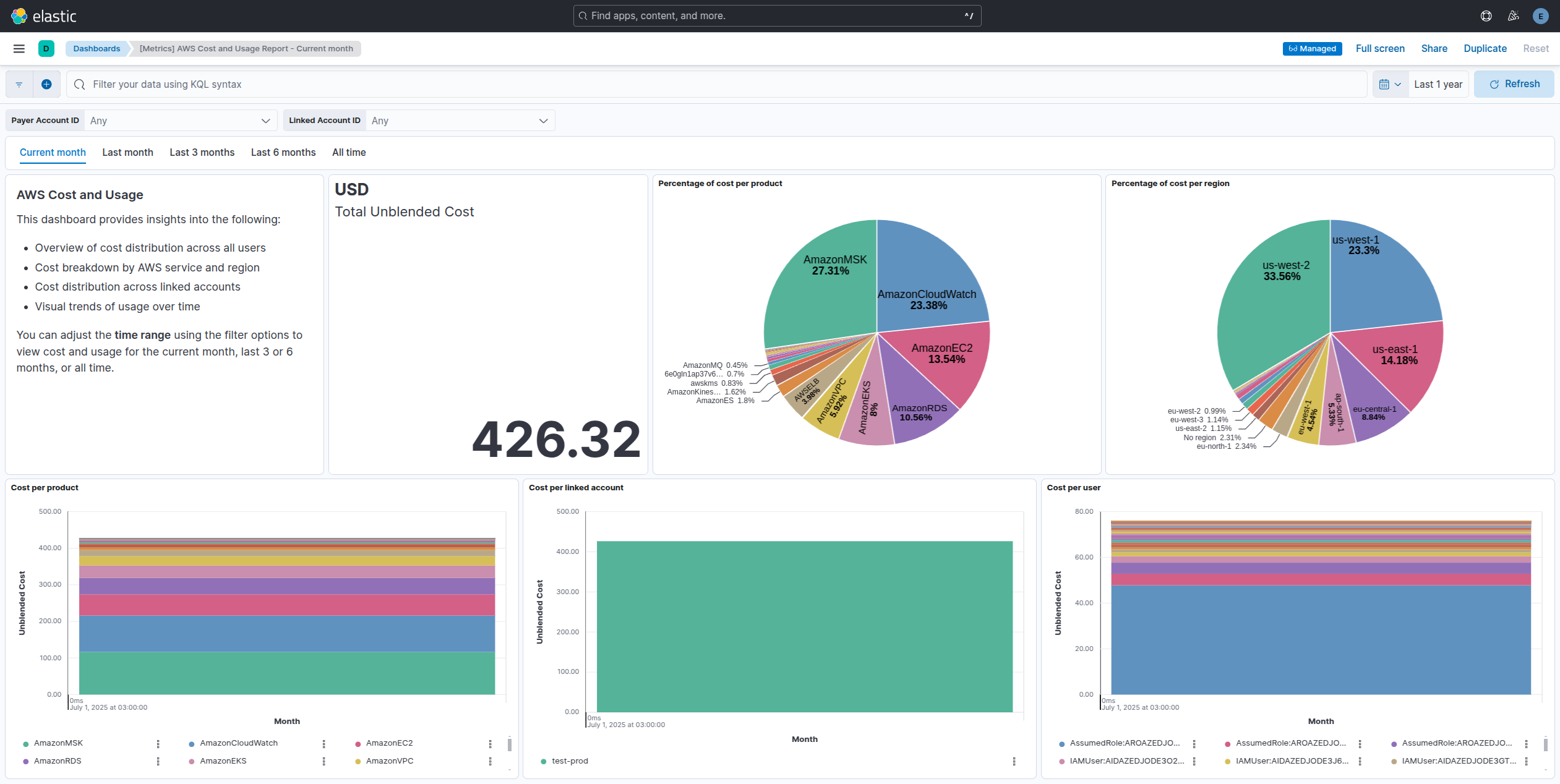
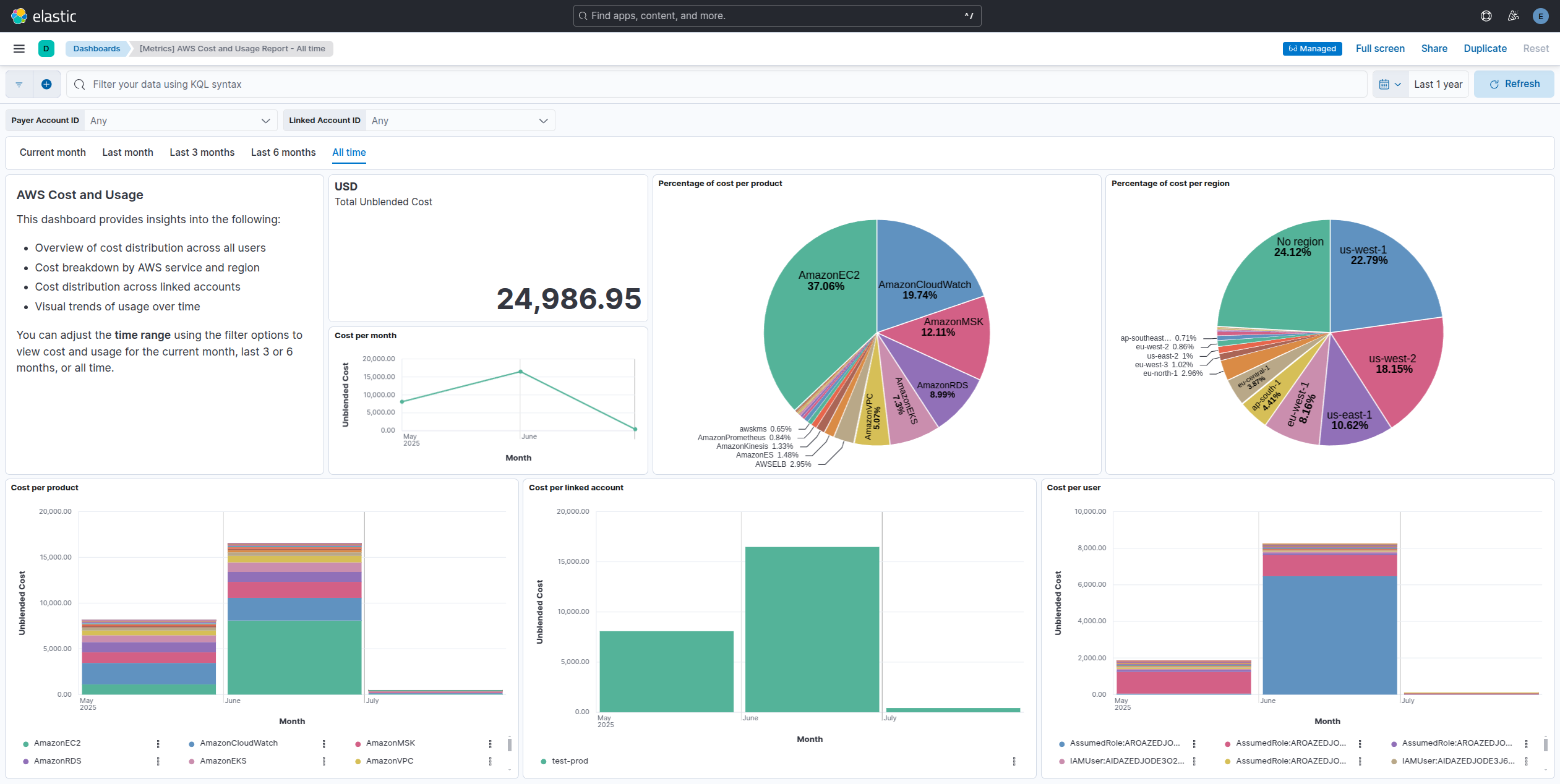
This integration includes one or more Kibana dashboards that visualizes the data collected by the integration. The screenshots below illustrate how the ingested data is displayed.
Changelog
| Version | Details | Minimum Kibana version |
|---|---|---|
| 0.2.1 | Bug fix (View pull request) Fixed ingest pipeline name used in transform |
9.0.0 8.18.0 |
| 0.2.0 | Enhancement (View pull request) Improve documentation to align with new guidelines. |
9.0.0 8.18.0 |
| 0.1.0 | Enhancement (View pull request) Initial draft of the package |
9.0.0 8.18.0 |