abuse.ch integration for Elastic
Elastic Cloud Serverless projects are autoscaled environments, fully managed by Elastic and available on Elastic Cloud. Availability This functionality is generally available and ready for production usage. Elastic Cloud Serverless projects are autoscaled environments, fully managed by Elastic and available on Elastic Cloud. Availability This functionality is generally available and ready for production usage. The Elastic Stack includes Elastic's core products such as Elasticsearch, Kibana, Logstash, and Beats. Availability This functionality is generally available and ready for production usage. Unless stated otherwise on the page, this functionality is available when your Elastic Stack is deployed on Elastic Cloud Hosted, Elastic Cloud Enterprise, Elastic Cloud on Kubernetes, and self-managed environments. This documentation corresponds to the latest patch available for each minor version. If you're not using the latest patch, check the release notes for changes.
Serverless Observability
Generally available
Serverless Security
Generally available
Stack
9.1+
Generally available since 9.1
| Version | 5.4.0 (View all) |
| Managed integration release status | Availability Beta This functionality is in beta and is not ready for production usage. For beta features, the design and code is less mature than official GA features and is being provided as-is with no warranties. Beta features are not subject to the support SLA of official GA features. Specific Support terms apply. |
| Subscription level What's this? |
Basic |
| Developed by What's this? |
Elastic |
| Ingestion method(s) | API |
| Minimum Kibana version(s) | 9.1.0 8.19.0 |
You can use this integration as an Elastic Managed integration on Elastic Cloud Hosted deployments running this version or later.
The abuse.ch integration for Elastic allows you to collect logs from abuse.ch, which provides actionable, community-driven threat intelligence data and helps identify, track, and mitigate malware and botnet-related cyber threats. With this integration, threat intelligence indicators can be ingested into Elastic for enhanced threat detection and event enrichment.
The abuse.ch integration is compatible with v1 version of abuse.ch URLhaus, MalwareBazaar, ThreatFox, SSLBL and YARAify APIs.
This integration periodically queries the abuse.ch APIs to retrieve threat intelligence indicators.
This integration collects threat intelligence indicators into the following datasets:
ja3_fingerprints: Collects JA3 fingerprint based threat indicators identified by SSLBL via SSLBL API endpoint.malware: Collects malware payloads from URLs tracked by URLhaus via URLhaus Bulk API.malwarebazaar: Collects malware payloads from MalwareBazaar via the Community MalwareBazaar API or the Commercial API (GET /malwarebazaar/v1/samples). Community API uses Auth Key; Commercial API requires username and password from the Spamhaus Customer Portal.sslblacklist: Collects SSL certificate based threat indicators blacklisted on SSLBL via SSLBL API endpoint.threatfox: Collects threat indicators from ThreatFox via ThreatFox API.url: Collects recently added malware URL based threat indicators from URLhaus via the Community URLhaus API or the Commercial API (GET /urlhaus/v1/urls). The Community API returns at most 1000 entries from the last 3 days. The Interval setting must be short enough to avoid exceeding the 1000-entry limit between polls; otherwise the oldest URLs added in that window will be lost. Community API uses Auth Key; Commercial API requires username and password from the Spamhaus Customer Portal.yaraify: Collects YARA rule metadata from YARAify via the Community YARAify API (POSTwithquery: recent_yararules) or the Commercial API (GET /yaraify/v1/rules). Community API uses Auth Key; Commercial API requires username and password from the Spamhaus Customer Portal.
The abuse.ch integration brings threat intel into Elastic Security, enabling detection alerts when Indicators of Compromise (IoCs) like malicious IPs, domains, or hashes match your event or alert data. This data can also support threat hunting, enrich alerts with threat context, and power dashboards to track known threats in your environment.
This integration installs Elastic latest transforms. For more details, check the Transform setup and requirements.
Which credentials you need depends on which datasets you enable, not on the integration as a whole:
- ThreatFox threat indicators (
threatfox), MalwareBazaar payloads (malwarebazaar), Malware URLs (url), and YARAify Rules (yaraify) can use either API, selected with the shared API Type setting. The Community API requires an Auth Key. The Commercial API requires Spamhaus username and password credentials, which the integration exchanges for a short-lived JWT. - Malware payloads (
malware) always query the URLhaus Community API and require an Auth Key regardless of API Type. Requests without the key are rejected. - SSL Blacklisted Certificates (
sslblacklist) and JA3 Fingerprints (ja3_fingerprints) read the SSLBL feeds and use neither credential.
Because API Type applies to the whole integration, selecting Commercial API does not remove the need for an Auth Key unless you also disable Malware URLs and Malware payloads.
- Sign up for a new account, or login into the abuse.ch authentication portal.
- Connect with at least one authentication provider: Google, Github, X, or LinkedIn.
- Select Save profile.
- In the Optional section, click the Generate Key button to generate Auth Key.
- Copy the generated Auth Key.
For more details, check the abuse.ch Community First - New Authentication blog.
Commercial API access uses JWT authentication. Create credentials in the Spamhaus Customer Portal, then configure the username and password in the integration. The integration authenticates to /v1/login and refreshes the JWT as needed.
- Log in to the Spamhaus Customer Portal.
- Navigate to Product > abuse.ch API.
- Under Generate new credentials for JWT authentication, fill out the required information and follow the on-screen instructions.
- Copy the generated username and password.
For more details, check the abuse.ch commercial API documentation on JWT authentication for endpoints available to query.
This integration supports both Elastic Managed and Agent-based installations.
Elastic Managed integrations are only supported on Elastic Cloud Serverless and Elastic Cloud Hosted deployments. An Elastic Managed integration lets you ingest data from a cloud source while avoiding the orchestration, management, and maintenance associated with standard ingest infrastructure. Elastic runs the collector for you, so you can focus on your data instead of the infrastructure that collects it. This functionality is in beta and is subject to change. Beta features are not subject to the support SLA of official GA features.
For more information, refer to Elastic Managed integrations and the Elastic Managed integrations FAQ.
Elastic Agent must be installed. For more details, check the Elastic Agent installation instructions. You can install only one Elastic Agent per host.
In the top search bar in Kibana, search for Integrations.
In the search bar, type abuse.ch.
Select the abuse.ch integration from the search results.
Select Add abuse.ch to add the integration.
Enable and configure only the collection methods which you will use.
To Collect abuse.ch logs via API, you'll need to:
- Configure Auth Key (Community) when API Type is Community API, and for the Malware payloads dataset which always uses the Community API.
- To use the Commercial API for ThreatFox threat indicators, MalwareBazaar payloads, Malware URLs, and YARAify Rules, set API Type to Commercial API and configure Username (Commercial) and Password (Commercial).
- Enable/Disable the required datasets.
- For each dataset, adjust the integration configuration parameters if required, including the URL, Interval, etc. to enable data collection.
Select Save and continue to save the integration.
- In Kibana, navigate to Dashboards.
- In the search bar, type abuse.ch.
- Select a dashboard for the dataset you are collecting, and verify the dashboard information is populated.
- In Kibana, navigate to Management > Stack Management.
- Under Data, select Transforms.
- In the search bar, type abuse.ch.
- All transforms from the search results should indicate Healthy under the Health column.
Upgrading to v5.0.0: Version 5.0.0 moves API Type, Username (Commercial), and Password (Commercial) from the MalwareBazaar data stream to the shared integration input. Fleet does not carry these values across that scope change. If you configured MalwareBazaar Commercial API on 4.2.0, re-enter the credentials after upgrade:
- In Kibana, navigate to Fleet > Agent policies.
- Select the policy containing the abuse.ch integration.
- Edit the abuse.ch integration.
- Set API Type to Commercial API, then enter Username (Commercial) and Password (Commercial) at the integration level (not under the MalwareBazaar data stream).
- Under the MalwareBazaar data stream, expand Advanced options and reset URL to
https://mb-api.abuse.ch/api/v1/if you had changed it tohttps://api.spamhaus.comfor the 4.2.0 Commercial API. The Commercial API base URL is now configured once at the integration level via Commercial API URL. - Select Save integration.
Community API users who only use an Auth Key are unaffected. After this change, the same Spamhaus credentials apply to all commercial datasets (MalwareBazaar, ThreatFox, Malware URLs, and YARAify).
Upgrading to v4.0.0: Version 4.0.0 switches the URL data stream from the full export ZIP endpoint (
/downloads/json) to the incremental JSON API (/v1/urls/recent/). When upgrading from a previous version, the URL setting in your integration policy retains the old value and must be updated manually:- In Kibana, navigate to Fleet > Agent policies.
- Select the policy containing the abuse.ch integration.
- Edit the abuse.ch integration.
- Under the Malware URLs data stream, change the URL setting from
https://urlhaus.abuse.ch/downloads/jsontohttps://urlhaus-api.abuse.ch/v1/urls/recent/. - Select Save integration.
If the URL is not updated, the integration will log an error:
the URL is set to the deprecated full export endpoint (/downloads/json) which is no longer supported. Additionally, thelabels.intervalfield has been removed from URL data stream documents. If you have saved queries, detection rules, or dashboards that reference this field, remove those references. A new IOC Expiration Duration setting (default90d) now controls how long indicators remain active. Review this value and adjust it to match your organization's retention requirements.When creating the Auth Key inside the abuse.ch authentication portal, make sure you connect at least one additional authentication provider to ensure seemless access to the abuse.ch platform.
Check for captured ingestion errors inside Kibana. Ingestion errors, including API errors, are captured into
error.messagefield.- Navigate to Analytics > Discover.
- In Search field names, search and add fields
error.messageanddata_stream.datasetinto the Discover view. For more details on adding fields inside Discover, check Discover getting started. - Search for the dataset(s) that are enabled by this integration. For example, in the KQL query bar, use the KQL query
data_stream.dataset: ti_abusech.urlto search on specific dataset or KQL querydata_stream.dataset: ti_abusech.*to search on all datasets. - Search for errors that are captured into
error.messagefield using KQL queryerror.message: *. You can combine queries using KQL boolean expressions, such asAND. For example, to search for errors insideurldataset, you can use KQL query:data_stream.dataset: ti_abusech.url AND error.message: *.
Common API errors: All the abusec.ch API errors are captured inside the
errorfields.- abuse.ch APIs return HTTP status
403 Forbiddenwhen the Auth Key is invalid. In such case, theerror.messagefield is populated with messagequery_status: unknown_auth_keyanderror.idwith403 Forbidden. To fix this, you need to regenerate the Auth Key in the abuse.ch authentication portal and update the integration policy with newly generated Auth Key. - abuse.ch APIs return HTTP status
500 Internal Server Errorwhen experiencing problem on the abuse.ch service. In such case,error.messagefield is populated with messagePOST:500 Internal Server Error (500)anderror.idwith500 Internal Server Error. This is likely a one-off scenario and the ingestion should resume normally in the subsequent request. - When API Type is Community API and Auth Key (Community) is not configured, MalwareBazaar, ThreatFox, Malware URLs, and YARAify log
api_type is 'community' but auth_key is not configuredinerror.messageandconfiguration_errorinerror.id. Add Auth Key (Community) at the integration level. - When API Type is Commercial API and Username (Commercial) or Password (Commercial) is not configured, MalwareBazaar, ThreatFox, Malware URLs, and YARAify log
api_type is 'commercial' but username/password are not configuredinerror.messageandconfiguration_errorinerror.id. Configure both fields at the integration level.
- abuse.ch APIs return HTTP status
Since this integration supports the expiration of Indicators of Compromise (IoCs) using Elastic latest transform, the threat indicators are present in both source and destination indices. While this may appear to be duplicate ingestion, it is an implementation detail necessary for properly expiring threat indicators.
Because the latest copy of threat indicators is now indexed in two places, that is, in both source and destination indices, users must anticipate storage requirements accordingly. See Data retention for how long source indices are kept and how to change it.
For help with Elastic ingest tools, check Common problems.
For more information on architectures that can be used for scaling this integration, check the Ingest Architectures documentation.
Exported fields
| Field | Description | Type |
|---|---|---|
| @timestamp | Event timestamp. | date |
| abusech.ja3_fingerprints.deleted_at | The timestamp when the indicator is (will be) deleted. | date |
| abusech.ja3_fingerprints.urlhaus_reference | Link to URLhaus entry. | keyword |
| cloud.image.id | Image ID for the cloud instance. | keyword |
| data_stream.dataset | Data stream dataset name. | constant_keyword |
| data_stream.namespace | Data stream namespace. | constant_keyword |
| data_stream.type | Data stream type. | constant_keyword |
| event.dataset | Event dataset | constant_keyword |
| event.module | Event module | constant_keyword |
| host.containerized | If the host is a container. | boolean |
| host.os.build | OS build information. | keyword |
| host.os.codename | OS codename, if any. | keyword |
| input.type | Type of Filebeat input. | keyword |
| labels.interval | User-configured value for Interval setting. This is used in calculation of indicator expiration time. |
keyword |
| labels.is_ioc_transform_source | Indicates whether an IOC is in the raw source data stream, or the in latest destination index. | constant_keyword |
| log.flags | Flags for the log file. | keyword |
| log.offset | Offset of the entry in the log file. | long |
| threat.feed.dashboard_id | Dashboard ID used for Kibana CTI UI | constant_keyword |
| threat.feed.name | Display friendly feed name | constant_keyword |
| threat.indicator.first_seen | The date and time when intelligence source first reported sighting this indicator. | date |
| threat.indicator.last_seen | The date and time when intelligence source last reported sighting this indicator. | date |
| threat.indicator.modified_at | The date and time when intelligence source last modified information for this indicator. | date |
Exported fields
| Field | Description | Type |
|---|---|---|
| @timestamp | Event timestamp. | date |
| abusech.malware.deleted_at | The indicator expiration timestamp. | date |
| abusech.malware.ioc_expiration_duration | The configured expiration duration. | keyword |
| abusech.malware.signature | Malware family. | keyword |
| abusech.malware.virustotal.link | Link to the Virustotal report. | keyword |
| abusech.malware.virustotal.percent | AV detection in percent. | float |
| abusech.malware.virustotal.result | AV detection ratio. | keyword |
| cloud.image.id | Image ID for the cloud instance. | keyword |
| data_stream.dataset | Data stream dataset name. | constant_keyword |
| data_stream.namespace | Data stream namespace. | constant_keyword |
| data_stream.type | Data stream type. | constant_keyword |
| event.dataset | Event dataset | constant_keyword |
| event.module | Event module | constant_keyword |
| host.containerized | If the host is a container. | boolean |
| host.os.build | OS build information. | keyword |
| host.os.codename | OS codename, if any. | keyword |
| input.type | Type of Filebeat input. | keyword |
| labels.is_ioc_transform_source | Indicates whether an IOC is in the raw source data stream, or the in latest destination index. | constant_keyword |
| log.flags | Flags for the log file. | keyword |
| log.offset | Offset of the entry in the log file. | long |
| threat.feed.dashboard_id | Dashboard ID used for Kibana CTI UI | constant_keyword |
| threat.feed.name | Display friendly feed name | constant_keyword |
| threat.indicator.first_seen | The date and time when intelligence source first reported sighting this indicator. | date |
| threat.indicator.last_seen | The date and time when intelligence source last reported sighting this indicator. | date |
| threat.indicator.modified_at | The date and time when intelligence source last modified information for this indicator. | date |
Exported fields
| Field | Description | Type |
|---|---|---|
| @timestamp | Event timestamp. | date |
| abusech.malwarebazaar.anonymous | Identifies if the sample was submitted anonymously. | long |
| abusech.malwarebazaar.archive_pw | Password to decrypt a password-protected archive sample. | keyword |
| abusech.malwarebazaar.code_sign.algorithm | Algorithm used to generate the public key. | keyword |
| abusech.malwarebazaar.code_sign.cscb_listed | Whether the certificate is present on the Code Signing Certificate Blocklist (CSCB). | boolean |
| abusech.malwarebazaar.code_sign.cscb_reason | Why the certificate is present on the Code Signing Certificate Blocklist (CSCB). | keyword |
| abusech.malwarebazaar.code_sign.issuer_cn | Common name (CN) of issuing certificate authority. | keyword |
| abusech.malwarebazaar.code_sign.serial_number | Unique serial number issued by the certificate authority. | keyword |
| abusech.malwarebazaar.code_sign.subject_cn | Common name (CN) of subject. | keyword |
| abusech.malwarebazaar.code_sign.thumbprint | Hash of certificate. | keyword |
| abusech.malwarebazaar.code_sign.thumbprint_algorithm | Algorithm used to create thumbprint. | keyword |
| abusech.malwarebazaar.code_sign.valid_from | Time at which the certificate is first considered valid. | date |
| abusech.malwarebazaar.code_sign.valid_to | Time at which the certificate is no longer considered valid. | keyword |
| abusech.malwarebazaar.comment | Comment provided by the submitter. | keyword |
| abusech.malwarebazaar.comments.comment | The escaped comment text itself. | keyword |
| abusech.malwarebazaar.comments.date_added | Timestamp when this comment has been made (RFC3339). | date |
| abusech.malwarebazaar.comments.display_name | Twitter display name. | keyword |
| abusech.malwarebazaar.comments.id | Unique ID that identifies this comment. | keyword |
| abusech.malwarebazaar.comments.twitter_handle | Twitter handle who wrote this comment. | keyword |
| abusech.malwarebazaar.deleted_at | The indicator expiration timestamp. | date |
| abusech.malwarebazaar.delivery_method | Delivery method used to spread the malware sample. | keyword |
| abusech.malwarebazaar.dhash_icon | In case the file is a PE executable: dhash of the samples icon. | keyword |
| abusech.malwarebazaar.file_information.context | The context type for the information value. | keyword |
| abusech.malwarebazaar.file_information.value | The contextual information value. | keyword |
| abusech.malwarebazaar.file_name | Name of the malware sample file. | keyword |
| abusech.malwarebazaar.file_size | Size of the file in bytes. | long |
| abusech.malwarebazaar.file_type | Type of the file. | keyword |
| abusech.malwarebazaar.file_type_mime | MIME type of the file. | keyword |
| abusech.malwarebazaar.gimphash | GIMP hash of the sample. | keyword |
| abusech.malwarebazaar.humanhash | The file's HumanHash - a human-readable representation of digests. | keyword |
| abusech.malwarebazaar.imphash | Import hash of the PE file. | keyword |
| abusech.malwarebazaar.intelligence.clamav | ClamAV detection name for the sample. | keyword |
| abusech.malwarebazaar.intelligence.downloads | Number of downloads from MalwareBazaar. | long |
| abusech.malwarebazaar.intelligence.mail.Generic | Malware seen in generic spam traffic. | keyword |
| abusech.malwarebazaar.intelligence.mail.IT | Malware seen in IT spam traffic. | keyword |
| abusech.malwarebazaar.intelligence.uploads | Number of uploads from MalwareBazaar. | long |
| abusech.malwarebazaar.ioc_expiration_duration | The configured expiration duration. | keyword |
| abusech.malwarebazaar.magika | Magika AI-powered file type identification result. | keyword |
| abusech.malwarebazaar.md5_hash | MD5 hash of the sample. | keyword |
| abusech.malwarebazaar.ole_information.oleid.application_name | The name of the application that created the file, if retrievable from metadata. | keyword |
| abusech.malwarebazaar.ole_information.oleid.encrypted | Indicates whether the file is encrypted or password-protected, which can hinder analysis of its content. | boolean |
| abusech.malwarebazaar.ole_information.oleid.excel | True if the file appears to be a Microsoft Excel workbook. | boolean |
| abusech.malwarebazaar.ole_information.oleid.flash_objects | True if the file contains embedded Flash objects, which are considered risky as they can execute code. | boolean |
| abusech.malwarebazaar.ole_information.oleid.has_summaryinfo_stream | Shows whether the file contains a SummaryInformation stream, which stores standard metadata such as title, author, and creation date. | boolean |
| abusech.malwarebazaar.ole_information.oleid.maldoc_score | A heuristic score from 0 to 100 reflecting how suspicious the document is for being a malicious document (maldoc). Higher scores mean higher risk. | long |
| abusech.malwarebazaar.ole_information.oleid.objectpool | Indicates if the file contains an ObjectPool storage, which holds embedded OLE objects. These can hide malicious payloads. | boolean |
| abusech.malwarebazaar.ole_information.oleid.ole_format | The overall file format. Common values include OLE, OpenXML, or Unknown. | keyword |
| abusech.malwarebazaar.ole_information.oleid.powerpoint | True if the file appears to be a Microsoft PowerPoint presentation. | boolean |
| abusech.malwarebazaar.ole_information.oleid.vba_macros | Shows whether the file contains VBA macros, which are often used for automation but also frequently exploited for malware. | boolean |
| abusech.malwarebazaar.ole_information.oleid.visio | True if the file appears to be a Microsoft Visio document. | boolean |
| abusech.malwarebazaar.ole_information.oleid.word | True if the file appears to be a Microsoft Word document. | boolean |
| abusech.malwarebazaar.ole_information.olevba.description | A description of the detection. | keyword |
| abusech.malwarebazaar.ole_information.olevba.keyword | The keyword that triggered the detection. | keyword |
| abusech.malwarebazaar.ole_information.olevba.type | The type of the detection. | keyword |
| abusech.malwarebazaar.reporter | Reporter who submitted the sample. | keyword |
| abusech.malwarebazaar.sha1_hash | SHA-1 hash of the sample. | keyword |
| abusech.malwarebazaar.sha256_hash | SHA-256 hash of the sample. | keyword |
| abusech.malwarebazaar.signature | Malware signature name. | keyword |
| abusech.malwarebazaar.ssdeep | SSDEEP hash of the sample. | keyword |
| abusech.malwarebazaar.telfhash | TLSH hash of the sample. | keyword |
| abusech.malwarebazaar.tlsh | TLSH hash of the sample. | keyword |
| abusech.malwarebazaar.trid | TrID file type identification results. | keyword |
| abusech.malwarebazaar.trid_percent | TRID file type identification confidence percentage. | float |
| abusech.malwarebazaar.vendor_intel.cape.detection | The detection name of the malware sample. | keyword |
| abusech.malwarebazaar.vendor_intel.cape.link | The URL to the analysis report. | keyword |
| abusech.malwarebazaar.vendor_intel.spamhaus_hbl.detection | The detection label. | keyword |
| abusech.malwarebazaar.vendor_intel.spamhaus_hbl.link | The link to the HBL. | keyword |
| cloud.image.id | Image ID for the cloud instance. | keyword |
| data_stream.dataset | Data stream dataset name. | constant_keyword |
| data_stream.namespace | Data stream namespace. | constant_keyword |
| data_stream.type | Data stream type. | constant_keyword |
| event.dataset | Event dataset | constant_keyword |
| event.module | Event module | constant_keyword |
| host.containerized | If the host is a container. | boolean |
| host.os.build | OS build information. | keyword |
| host.os.codename | OS codename, if any. | keyword |
| input.type | Type of Filebeat input. | keyword |
| labels.is_ioc_transform_source | Indicates whether an IOC is in the raw source data stream, or the in latest destination index. | constant_keyword |
| log.flags | Flags for the log file. | keyword |
| log.offset | Offset of the entry in the log file. | long |
| threat.feed.dashboard_id | Dashboard ID used for Kibana CTI UI | constant_keyword |
| threat.feed.name | Display friendly feed name | constant_keyword |
| threat.indicator.first_seen | The date and time when intelligence source first reported sighting this indicator. | date |
| threat.indicator.last_seen | The date and time when intelligence source last reported sighting this indicator. | date |
| threat.indicator.modified_at | The date and time when intelligence source last modified information for this indicator. | date |
Exported fields
| Field | Description | Type |
|---|---|---|
| @timestamp | Event timestamp. | date |
| abusech.sslblacklist.deleted_at | The timestamp when the indicator is (will be) deleted. | date |
| cloud.image.id | Image ID for the cloud instance. | keyword |
| data_stream.dataset | Data stream dataset name. | constant_keyword |
| data_stream.namespace | Data stream namespace. | constant_keyword |
| data_stream.type | Data stream type. | constant_keyword |
| event.dataset | Event dataset | constant_keyword |
| event.module | Event module | constant_keyword |
| host.containerized | If the host is a container. | boolean |
| host.os.build | OS build information. | keyword |
| host.os.codename | OS codename, if any. | keyword |
| input.type | Type of Filebeat input. | keyword |
| labels.interval | User-configured value for Interval setting. This is used in calculation of indicator expiration time. |
keyword |
| labels.is_ioc_transform_source | Indicates whether an IOC is in the raw source data stream, or the in latest destination index. | constant_keyword |
| log.flags | Flags for the log file. | keyword |
| log.offset | Offset of the entry in the log file. | long |
| threat.feed.dashboard_id | Dashboard ID used for Kibana CTI UI | constant_keyword |
| threat.feed.name | Display friendly feed name | constant_keyword |
| threat.indicator.first_seen | The date and time when intelligence source first reported sighting this indicator. | date |
| threat.indicator.last_seen | The date and time when intelligence source last reported sighting this indicator. | date |
| threat.indicator.modified_at | The date and time when intelligence source last modified information for this indicator. | date |
Exported fields
| Field | Description | Type |
|---|---|---|
| @timestamp | Event timestamp. | date |
| abusech.threatfox.comment | An optional comment from the reporter. | match_only_text |
| abusech.threatfox.confidence_level | Confidence level between 0-100. | long |
| abusech.threatfox.credits.credits_amount | The number of credits awarded. | long |
| abusech.threatfox.credits.credits_from | The platform that awarded the credits. | keyword |
| abusech.threatfox.deleted_at | The indicator expiration timestamp. | date |
| abusech.threatfox.ioc_expiration_duration | The configured expiration duration. | keyword |
| abusech.threatfox.is_compromised | Whether the shared IOC is a compromised resource. | boolean |
| abusech.threatfox.malware | The malware associated with the IOC. | keyword |
| abusech.threatfox.malware_samples.malware_bazaar | The community API URL to the sample on MalwareBazaar. | keyword |
| abusech.threatfox.malware_samples.malware_bazaar_url | The URL to the sample on MalwareBazaar. | keyword |
| abusech.threatfox.malware_samples.md5_hash | The MD5 hash of the sample. | keyword |
| abusech.threatfox.malware_samples.sha256_hash | The SHA256 hash of the sample. | keyword |
| abusech.threatfox.malware_samples.timestamp | The timestamp when the sample was seen. | date |
| abusech.threatfox.sightings | The number of sightings of the IOC. | long |
| abusech.threatfox.tags | A list of tags associated with the queried malware sample. | keyword |
| abusech.threatfox.threat_type | The type of threat. | keyword |
| abusech.threatfox.threat_type_desc | The threat descsription. | keyword |
| cloud.image.id | Image ID for the cloud instance. | keyword |
| data_stream.dataset | Data stream dataset name. | constant_keyword |
| data_stream.namespace | Data stream namespace. | constant_keyword |
| data_stream.type | Data stream type. | constant_keyword |
| event.dataset | Event dataset | constant_keyword |
| event.module | Event module | constant_keyword |
| host.containerized | If the host is a container. | boolean |
| host.os.build | OS build information. | keyword |
| host.os.codename | OS codename, if any. | keyword |
| input.type | Type of Filebeat input. | keyword |
| labels.is_ioc_transform_source | Indicates whether an IOC is in the raw source data stream, or the in latest destination index. | constant_keyword |
| log.flags | Flags for the log file. | keyword |
| log.offset | Offset of the entry in the log file. | long |
| threat.feed.dashboard_id | Dashboard ID used for Kibana CTI UI | constant_keyword |
| threat.feed.name | Display friendly feed name | constant_keyword |
| threat.indicator.first_seen | The date and time when intelligence source first reported sighting this indicator. | date |
| threat.indicator.last_seen | The date and time when intelligence source last reported sighting this indicator. | date |
| threat.indicator.modified_at | The date and time when intelligence source last modified information for this indicator. | date |
Exported fields
| Field | Description | Type |
|---|---|---|
| @timestamp | Event timestamp. | date |
| abusech.url.blacklists.spamhaus_dbl | If the indicator is listed on the spamhaus blacklist. | keyword |
| abusech.url.blacklists.surbl | If the indicator is listed on the surbl blacklist. | keyword |
| abusech.url.deleted_at | The timestamp when the indicator is (will be) deleted. | date |
| abusech.url.id | The ID of the indicator. | keyword |
| abusech.url.ioc_expiration_duration | The configured expiration duration. | keyword |
| abusech.url.larted | Indicates whether the malware URL has been reported to the hosting provider (true or false). | boolean |
| abusech.url.last_online | Last timestamp when the URL has been serving malware. | date |
| abusech.url.reporter | The Twitter handle of the reporter that has reported this malware URL (or anonymous). | keyword |
| abusech.url.tags | A list of tags associated with the queried malware URL. | keyword |
| abusech.url.takedown_time_seconds | The take down time in seconds (how long it took for the hosting provider to take down the malware site). Omitted if the malware URL has not been taken down. | long |
| abusech.url.threat | The threat corresponding to this malware URL. | keyword |
| abusech.url.url_status | The current status of the URL. Possible values are: online, offline and unknown. | keyword |
| abusech.url.urlhaus_reference | Link to URLhaus entry. | keyword |
| cloud.image.id | Image ID for the cloud instance. | keyword |
| data_stream.dataset | Data stream dataset name. | constant_keyword |
| data_stream.namespace | Data stream namespace. | constant_keyword |
| data_stream.type | Data stream type. | constant_keyword |
| event.dataset | Event dataset | constant_keyword |
| event.module | Event module | constant_keyword |
| host.containerized | If the host is a container. | boolean |
| host.os.build | OS build information. | keyword |
| host.os.codename | OS codename, if any. | keyword |
| input.type | Type of Filebeat input. | keyword |
| labels.is_ioc_transform_source | Indicates whether an IOC is in the raw source data stream, or the in latest destination index. | constant_keyword |
| log.flags | Flags for the log file. | keyword |
| log.offset | Offset of the entry in the log file. | long |
| threat.feed.dashboard_id | Dashboard ID used for Kibana CTI UI | constant_keyword |
| threat.feed.name | Display friendly feed name | constant_keyword |
| threat.indicator.first_seen | The date and time when intelligence source first reported sighting this indicator. | date |
| threat.indicator.last_seen | The date and time when intelligence source last reported sighting this indicator. | date |
| threat.indicator.modified_at | The date and time when intelligence source last modified information for this indicator. | date |
Exported fields
| Field | Description | Type |
|---|---|---|
| @timestamp | Date/time when the event originated. This is the date/time extracted from the event, typically representing when the event was generated by the source. If the event source has no original timestamp, this value is typically populated by the first time the event was received by the pipeline. Required field for all events. | date |
| abusech.yaraify.date | Date when the YARA rule was written (community API). Kept separate from date_written. | date |
| abusech.yaraify.date_written | Date when the YARA rule was written (commercial API). Kept separate from date. | date |
| abusech.yaraify.deleted_at | The indicator expiration timestamp. | date |
| abusech.yaraify.ioc_expiration_duration | The configured indicator expiration duration. | keyword |
| abusech.yaraify.malpedia_family | Malware family name using the Malpedia naming scheme. | keyword |
| abusech.yaraify.time_stamp | Timestamp when the YARA rule was observed (community API). Kept separate from first_seen. | date |
| abusech.yaraify.yarahub_author_twitter | Twitter handle of the YARA rule author on YARAhub. | keyword |
| abusech.yaraify.yarahub_license | License under which the YARA rule is shared. | keyword |
| abusech.yaraify.yarahub_rule_sharing_tlp | Traffic Light Protocol classification for sharing the YARA rule. | keyword |
| data_stream.dataset | The field can contain anything that makes sense to signify the source of the data. Examples include nginx.access, prometheus, endpoint etc. For data streams that otherwise fit, but that do not have dataset set we use the value "generic" for the dataset value. event.dataset should have the same value as data_stream.dataset. Beyond the Elasticsearch data stream naming criteria noted above, the dataset value has additional restrictions: * Must not contain - * No longer than 100 characters |
constant_keyword |
| data_stream.namespace | A user defined namespace. Namespaces are useful to allow grouping of data. Many users already organize their indices this way, and the data stream naming scheme now provides this best practice as a default. Many users will populate this field with default. If no value is used, it falls back to default. Beyond the Elasticsearch index naming criteria noted above, namespace value has the additional restrictions: * Must not contain - * No longer than 100 characters |
constant_keyword |
| data_stream.type | An overarching type for the data stream. Currently allowed values are "logs" and "metrics". We expect to also add "traces" and "synthetics" in the near future. | constant_keyword |
| event.dataset | Name of the dataset. If an event source publishes more than one type of log or events (e.g. access log, error log), the dataset is used to specify which one the event comes from. It's recommended but not required to start the dataset name with the module name, followed by a dot, then the dataset name. | constant_keyword |
| event.module | Name of the module this data is coming from. If your monitoring agent supports the concept of modules or plugins to process events of a given source (e.g. Apache logs), event.module should contain the name of this module. |
constant_keyword |
| input.type | Type of filebeat input. | keyword |
| labels.is_ioc_transform_source | Indicates whether an IOC is in the raw source data stream, or the in latest destination index. | constant_keyword |
| threat.feed.dashboard_id | The saved object ID of the dashboard belonging to the threat feed for displaying dashboard links to threat feeds in Kibana. | constant_keyword |
| threat.feed.name | The name of the threat feed in UI friendly format. | constant_keyword |
Example
{
    "@timestamp": "2025-07-31T05:12:01.523Z",
    "abusech": {
        "ja3_fingerprints": {
            "deleted_at": "2025-07-31T06:10:34.470Z"
        }
    },
    "agent": {
        "ephemeral_id": "9a4132fc-38d5-43ec-a459-0ef108d28187",
        "id": "28fe4213-ba33-434e-8815-6bbc80c646d0",
        "name": "elastic-agent-82406",
        "type": "filebeat",
        "version": "8.19.0"
    },
    "data_stream": {
        "dataset": "ti_abusech.ja3_fingerprints",
        "namespace": "86925",
        "type": "logs"
    },
    "ecs": {
        "version": "8.11.0"
    },
    "elastic_agent": {
        "id": "28fe4213-ba33-434e-8815-6bbc80c646d0",
        "snapshot": false,
        "version": "8.19.0"
    },
    "event": {
        "agent_id_status": "verified",
        "category": [
            "threat"
        ],
        "dataset": "ti_abusech.ja3_fingerprints",
        "ingested": "2025-07-31T05:12:04Z",
        "kind": "enrichment",
        "original": "{\"first_ts\":\"2017-07-14T18:08:15Z\",\"ja3\":\"b386946a5a44d1ddcc843bc75336dfce\",\"last_ts\":\"2019-07-27T20:42:54Z\",\"reason\":\"Dridex\"}",
        "type": [
            "indicator"
        ]
    },
    "input": {
        "type": "cel"
    },
    "labels": {
        "interval": "1h"
    },
    "related": {
        "hash": [
            "b386946a5a44d1ddcc843bc75336dfce"
        ]
    },
    "tags": [
        "preserve_original_event",
        "forwarded",
        "abusech-ja3_fingerprints"
    ],
    "threat": {
        "indicator": {
            "description": "Dridex",
            "first_seen": "2017-07-14T18:08:15.000Z",
            "last_seen": "2019-07-27T20:42:54.000Z",
            "name": "b386946a5a44d1ddcc843bc75336dfce",
            "type": "software"
        }
    }
}
Example
{
    "@timestamp": "2025-07-16T06:30:10.517Z",
    "abusech": {
        "malware": {
            "deleted_at": "2021-10-10T04:17:02.000Z",
            "ioc_expiration_duration": "5d"
        }
    },
    "agent": {
        "ephemeral_id": "c478eac0-6769-456a-8a26-d5d6cc86318d",
        "id": "5d0ab6a2-0351-4c94-8bfb-e268dee367e4",
        "name": "elastic-agent-40763",
        "type": "filebeat",
        "version": "8.18.0"
    },
    "data_stream": {
        "dataset": "ti_abusech.malware",
        "namespace": "70630",
        "type": "logs"
    },
    "ecs": {
        "version": "8.11.0"
    },
    "elastic_agent": {
        "id": "5d0ab6a2-0351-4c94-8bfb-e268dee367e4",
        "snapshot": true,
        "version": "8.18.0"
    },
    "event": {
        "agent_id_status": "verified",
        "category": [
            "threat"
        ],
        "dataset": "ti_abusech.malware",
        "ingested": "2025-07-16T06:30:13Z",
        "kind": "enrichment",
        "original": "{\"file_size\":\"1563\",\"file_type\":\"unknown\",\"firstseen\":\"2021-10-05 04:17:02\",\"imphash\":null,\"md5_hash\":\"9cd5a4f0231a47823c4adba7c8ef370f\",\"sha256_hash\":\"7c0852d514df7faf8fdbfa4f358cc235dd1b1a2d843cc65495d03b502e4099f2\",\"signature\":null,\"ssdeep\":\"48:yazkS7neW+mfe4CJjNXcq5Co4Fr1PpsHn:yrmGNt5mbP2n\",\"tlsh\":\"T109314C5E7822CA70B91AD69300C22D8C2F53EAF229E6686C3BDD4C86FA1344208CF1\",\"urlhaus_download\":\"https://urlhaus-api.abuse.ch/v1/download/7c0852d514df7faf8fdbfa4f358cc235dd1b1a2d843cc65495d03b502e4099f2/\",\"virustotal\":null}",
        "type": [
            "indicator"
        ]
    },
    "input": {
        "type": "cel"
    },
    "related": {
        "hash": [
            "9cd5a4f0231a47823c4adba7c8ef370f",
            "7c0852d514df7faf8fdbfa4f358cc235dd1b1a2d843cc65495d03b502e4099f2",
            "48:yazkS7neW+mfe4CJjNXcq5Co4Fr1PpsHn:yrmGNt5mbP2n",
            "T109314C5E7822CA70B91AD69300C22D8C2F53EAF229E6686C3BDD4C86FA1344208CF1"
        ]
    },
    "tags": [
        "preserve_original_event",
        "forwarded",
        "abusech-malware"
    ],
    "threat": {
        "indicator": {
            "confidence": "Not Specified",
            "file": {
                "hash": {
                    "md5": "9cd5a4f0231a47823c4adba7c8ef370f",
                    "sha256": "7c0852d514df7faf8fdbfa4f358cc235dd1b1a2d843cc65495d03b502e4099f2",
                    "ssdeep": "48:yazkS7neW+mfe4CJjNXcq5Co4Fr1PpsHn:yrmGNt5mbP2n",
                    "tlsh": "T109314C5E7822CA70B91AD69300C22D8C2F53EAF229E6686C3BDD4C86FA1344208CF1"
                },
                "size": 1563,
                "type": "unknown"
            },
            "first_seen": "2021-10-05T04:17:02.000Z",
            "name": "7c0852d514df7faf8fdbfa4f358cc235dd1b1a2d843cc65495d03b502e4099f2",
            "type": "file"
        }
    }
}
Example
{
    "@timestamp": "2026-07-21T06:07:08.418Z",
    "abusech": {
        "malwarebazaar": {
            "comment": "Commercial API test sample",
            "deleted_at": "2021-10-10T14:02:45.000Z",
            "delivery_method": "email_attachment",
            "intelligence": {
                "clamav": "Win.Trojan.RedLineStealer.UNOFFICIAL",
                "downloads": 11,
                "uploads": 1
            },
            "ioc_expiration_duration": "5d",
            "magika": "pebin"
        }
    },
    "agent": {
        "ephemeral_id": "566c9dd5-0925-4373-8f9e-afceddad643e",
        "id": "87f8e459-7960-4e81-8a78-4d7059ac2206",
        "name": "elastic-agent-97488",
        "type": "filebeat",
        "version": "8.19.0"
    },
    "data_stream": {
        "dataset": "ti_abusech.malwarebazaar",
        "namespace": "50283",
        "type": "logs"
    },
    "ecs": {
        "version": "8.11.0"
    },
    "elastic_agent": {
        "id": "87f8e459-7960-4e81-8a78-4d7059ac2206",
        "snapshot": false,
        "version": "8.19.0"
    },
    "event": {
        "agent_id_status": "verified",
        "category": [
            "threat"
        ],
        "dataset": "ti_abusech.malwarebazaar",
        "ingested": "2026-07-21T06:07:11Z",
        "kind": "enrichment",
        "module": "ti_abusech",
        "original": "{\"anonymous\":false,\"comment\":\"Commercial API test sample\",\"delivery_method\":\"email_attachment\",\"file_name\":\"7a6c03013a2f2ab8b9e8e7e5d226ea89e75da72c1519e78fd28b2253ea755c28.exe\",\"file_size\":432640,\"file_type\":\"exe\",\"file_type_mime\":\"application/x-dosexec\",\"first_seen\":\"2021-10-05T14:02:45Z\",\"imphash\":\"f34d5f2d4577ed6d9ceec516c1f5a744\",\"intelligence\":{\"clamav\":[\"Win.Trojan.RedLineStealer.UNOFFICIAL\"],\"downloads\":11,\"uploads\":1},\"magika\":\"pebin\",\"md5_hash\":\"1fc1c2997c8f55ac10496b88e23f5320\",\"origin_country\":\"FR\",\"reporter\":\"abuse_ch\",\"sha1_hash\":\"42c7153680d7402e56fe022d1024aab49a9901a0\",\"sha256_hash\":\"7a6c03013a2f2ab8b9e8e7e5d226ea89e75da72c1519e78fd28b2253ea755c28\",\"sha3_384_hash\":\"d63e73b68973bc73ab559549aeee2141a48b8a3724aabc0d81fb14603c163a098a5a10be9f6d33b888602906c0d89955\",\"signature\":\"RedLineStealer\",\"ssdeep\":\"12288:jhhl1Eo+iEXvpb1C7drqAd1uUaJvzXGyO2F5V3bS1jsTacr:7lL\",\"tags\":[\"exe\",\"RedLineStealer\"],\"tlsh\":\"T13794242864BFC05994E3EEA12DDCA8FBD99A55E3640C743301B4633B8B52B84DE4F479\"}",
        "type": [
            "indicator"
        ]
    },
    "input": {
        "type": "cel"
    },
    "labels": {
        "is_ioc_transform_source": "true"
    },
    "related": {
        "hash": [
            "42c7153680d7402e56fe022d1024aab49a9901a0",
            "d63e73b68973bc73ab559549aeee2141a48b8a3724aabc0d81fb14603c163a098a5a10be9f6d33b888602906c0d89955",
            "7a6c03013a2f2ab8b9e8e7e5d226ea89e75da72c1519e78fd28b2253ea755c28",
            "T13794242864BFC05994E3EEA12DDCA8FBD99A55E3640C743301B4633B8B52B84DE4F479",
            "12288:jhhl1Eo+iEXvpb1C7drqAd1uUaJvzXGyO2F5V3bS1jsTacr:7lL",
            "1fc1c2997c8f55ac10496b88e23f5320",
            "f34d5f2d4577ed6d9ceec516c1f5a744"
        ]
    },
    "tags": [
        "preserve_original_event",
        "forwarded",
        "abusech-malwarebazaar",
        "exe",
        "RedLineStealer"
    ],
    "threat": {
        "feed": {
            "dashboard_id": "ti_abusech-c0d8d1f0-3b20-11ec-ae50-2fdf1e96c6a6",
            "name": "AbuseCH MalwareBazaar"
        },
        "indicator": {
            "file": {
                "extension": "exe",
                "hash": {
                    "md5": "1fc1c2997c8f55ac10496b88e23f5320",
                    "sha1": "42c7153680d7402e56fe022d1024aab49a9901a0",
                    "sha256": "7a6c03013a2f2ab8b9e8e7e5d226ea89e75da72c1519e78fd28b2253ea755c28",
                    "sha384": "d63e73b68973bc73ab559549aeee2141a48b8a3724aabc0d81fb14603c163a098a5a10be9f6d33b888602906c0d89955",
                    "ssdeep": "12288:jhhl1Eo+iEXvpb1C7drqAd1uUaJvzXGyO2F5V3bS1jsTacr:7lL",
                    "tlsh": "T13794242864BFC05994E3EEA12DDCA8FBD99A55E3640C743301B4633B8B52B84DE4F479"
                },
                "mime_type": "application/x-dosexec",
                "name": "7a6c03013a2f2ab8b9e8e7e5d226ea89e75da72c1519e78fd28b2253ea755c28.exe",
                "pe": {
                    "imphash": "f34d5f2d4577ed6d9ceec516c1f5a744"
                },
                "size": 432640
            },
            "first_seen": "2021-10-05T14:02:45.000Z",
            "geo": {
                "country_iso_code": "FR"
            },
            "marking": {
                "tlp": "CLEAR"
            },
            "name": "7a6c03013a2f2ab8b9e8e7e5d226ea89e75da72c1519e78fd28b2253ea755c28",
            "provider": "abuse_ch",
            "type": "file"
        },
        "software": {
            "alias": [
                "RedLineStealer"
            ]
        }
    }
}
Example
{
    "@timestamp": "2025-07-31T05:15:00.672Z",
    "abusech": {
        "sslblacklist": {
            "deleted_at": "2025-07-31T06:13:33.669Z"
        }
    },
    "agent": {
        "ephemeral_id": "80e31fdd-70e8-4156-9a0d-ad6d0d853888",
        "id": "01f51d20-e150-4b4e-a036-1746eb0c7285",
        "name": "elastic-agent-47845",
        "type": "filebeat",
        "version": "8.19.0"
    },
    "data_stream": {
        "dataset": "ti_abusech.sslblacklist",
        "namespace": "19255",
        "type": "logs"
    },
    "ecs": {
        "version": "8.11.0"
    },
    "elastic_agent": {
        "id": "01f51d20-e150-4b4e-a036-1746eb0c7285",
        "snapshot": false,
        "version": "8.19.0"
    },
    "event": {
        "agent_id_status": "verified",
        "category": [
            "threat"
        ],
        "dataset": "ti_abusech.sslblacklist",
        "ingested": "2025-07-31T05:15:03Z",
        "kind": "enrichment",
        "original": "{\"reason\":\"HijackLoader C\\u0026C\",\"sha1\":\"029c128ec7f6c5a62ea19f5ad525cd1487971ce4\",\"ts\":\"2025-06-25T06:50:28Z\"}",
        "type": [
            "indicator"
        ]
    },
    "input": {
        "type": "cel"
    },
    "labels": {
        "interval": "1h"
    },
    "related": {
        "hash": [
            "029c128ec7f6c5a62ea19f5ad525cd1487971ce4"
        ]
    },
    "tags": [
        "preserve_original_event",
        "forwarded",
        "abusech-sslblacklist"
    ],
    "threat": {
        "indicator": {
            "description": "HijackLoader C&C",
            "first_seen": "2025-06-25T06:50:28.000Z",
            "name": "029c128ec7f6c5a62ea19f5ad525cd1487971ce4",
            "type": "x509-certificate"
        }
    }
}
Example
{
    "@timestamp": "2026-08-06T11:27:17.172Z",
    "abusech": {
        "threatfox": {
            "confidence_level": 100,
            "deleted_at": "2022-08-10T19:43:08.000Z",
            "ioc_expiration_duration": "5d",
            "malware": "win.asyncrat",
            "threat_type": "botnet_cc",
            "threat_type_desc": "Indicator that identifies a botnet command&control server (C&C)"
        }
    },
    "agent": {
        "ephemeral_id": "a6fdc71e-dcdc-496d-865e-6b937966c0e0",
        "id": "344ab28a-1271-4735-a3cf-68982b6783af",
        "name": "elastic-agent-56347",
        "type": "filebeat",
        "version": "9.1.0"
    },
    "data_stream": {
        "dataset": "ti_abusech.threatfox",
        "namespace": "66062",
        "type": "logs"
    },
    "ecs": {
        "version": "8.11.0"
    },
    "elastic_agent": {
        "id": "344ab28a-1271-4735-a3cf-68982b6783af",
        "snapshot": false,
        "version": "9.1.0"
    },
    "event": {
        "agent_id_status": "verified",
        "category": [
            "threat"
        ],
        "dataset": "ti_abusech.threatfox",
        "id": "841537",
        "ingested": "2026-08-06T11:27:20Z",
        "kind": "enrichment",
        "module": "ti_abusech",
        "original": "{\"confidence_level\":100,\"first_seen\":\"2022-08-05 19:43:08 UTC\",\"id\":\"841537\",\"ioc\":\"wizzy.hopto.org\",\"ioc_type\":\"domain\",\"ioc_type_desc\":\"Domain that is used for botnet Command\\u0026control (C\\u0026C)\",\"last_seen\":null,\"malware\":\"win.asyncrat\",\"malware_alias\":null,\"malware_malpedia\":\"https://malpedia.caad.fkie.fraunhofer.de/details/win.asyncrat\",\"malware_printable\":\"AsyncRAT\",\"reference\":\"https://tria.ge/220805-w57pxsgae2\",\"reporter\":\"test_reporter\",\"tags\":[\"asyncrat\"],\"threat_type\":\"botnet_cc\",\"threat_type_desc\":\"Indicator that identifies a botnet command\\u0026control server (C\\u0026C)\"}",
        "type": [
            "indicator"
        ]
    },
    "input": {
        "type": "cel"
    },
    "labels": {
        "is_ioc_transform_source": "true"
    },
    "tags": [
        "preserve_original_event",
        "forwarded",
        "abusech-threatfox",
        "asyncrat"
    ],
    "threat": {
        "feed": {
            "dashboard_id": "ti_abusech-c0d8d1f0-3b20-11ec-ae50-2fdf1e96c6a6",
            "name": "AbuseCH Threat Fox"
        },
        "indicator": {
            "confidence": "High",
            "description": "Domain that is used for botnet Command&control (C&C)",
            "first_seen": "2022-08-05T19:43:08.000Z",
            "marking": {
                "tlp": "WHITE"
            },
            "name": "wizzy.hopto.org",
            "provider": "test_reporter",
            "reference": "https://tria.ge/220805-w57pxsgae2",
            "type": "domain-name",
            "url": {
                "domain": "wizzy.hopto.org"
            }
        },
        "software": {
            "name": "AsyncRAT",
            "reference": "https://malpedia.caad.fkie.fraunhofer.de/details/win.asyncrat"
        }
    }
}
Example
{
    "@timestamp": "2026-07-29T05:58:47.965Z",
    "abusech": {
        "url": {
            "blacklists": {
                "spamhaus_dbl": "not listed",
                "surbl": "not listed"
            },
            "deleted_at": "2022-01-03T13:57:05.000Z",
            "id": "1656008",
            "ioc_expiration_duration": "90d",
            "larted": true,
            "threat": "malware_download",
            "url_status": "online"
        }
    },
    "agent": {
        "ephemeral_id": "6f3e0e60-187c-4e33-8d86-7cedd4918215",
        "id": "e20e15df-cdb6-4865-a35c-24fff0a8d7b9",
        "name": "elastic-agent-80664",
        "type": "filebeat",
        "version": "9.1.0"
    },
    "data_stream": {
        "dataset": "ti_abusech.url",
        "namespace": "69182",
        "type": "logs"
    },
    "ecs": {
        "version": "8.11.0"
    },
    "elastic_agent": {
        "id": "e20e15df-cdb6-4865-a35c-24fff0a8d7b9",
        "snapshot": false,
        "version": "9.1.0"
    },
    "event": {
        "agent_id_status": "verified",
        "category": [
            "threat"
        ],
        "dataset": "ti_abusech.url",
        "ingested": "2026-07-29T05:58:50Z",
        "kind": "enrichment",
        "module": "ti_abusech",
        "original": "{\"blacklists\":{\"spamhaus_dbl\":\"not listed\",\"surbl\":\"not listed\"},\"date_added\":\"2021-10-05 13:57:05 UTC\",\"host\":\"81.2.69.142\",\"id\":\"1656008\",\"larted\":\"true\",\"reporter\":\"tammeto\",\"tags\":null,\"threat\":\"malware_download\",\"url\":\"http://81.2.69.142:55871/mozi.m\",\"url_status\":\"online\",\"urlhaus_reference\":\"https://urlhaus.abuse.ch/url/1656008/\"}",
        "type": [
            "indicator"
        ]
    },
    "input": {
        "type": "cel"
    },
    "labels": {
        "is_ioc_transform_source": "true"
    },
    "tags": [
        "preserve_original_event",
        "forwarded",
        "abusech-url"
    ],
    "threat": {
        "feed": {
            "dashboard_id": "ti_abusech-c0d8d1f0-3b20-11ec-ae50-2fdf1e96c6a6",
            "name": "AbuseCH URL"
        },
        "indicator": {
            "first_seen": "2021-10-05T13:57:05.000Z",
            "ip": "81.2.69.142",
            "name": "http://81.2.69.142:55871/mozi.m",
            "provider": "tammeto",
            "reference": "https://urlhaus.abuse.ch/url/1656008/",
            "type": "url",
            "url": {
                "domain": "81.2.69.142",
                "extension": "m",
                "full": "http://81.2.69.142:55871/mozi.m",
                "original": "http://81.2.69.142:55871/mozi.m",
                "path": "/mozi.m",
                "port": 55871,
                "scheme": "http"
            }
        }
    }
}
Example
{
    "@timestamp": "2024-01-15T11:16:40.000Z",
    "abusech": {
        "yaraify": {
            "date": "2024-01-08T00:00:00.000Z",
            "deleted_at": "2024-01-20T11:16:40.000Z",
            "ioc_expiration_duration": "5d",
            "malpedia_family": "win.samplemw",
            "time_stamp": "2024-01-15T11:16:40.000Z",
            "yarahub_license": "CC BY-SA 4.0",
            "yarahub_rule_sharing_tlp": "TLP:WHITE"
        }
    },
    "agent": {
        "ephemeral_id": "64793051-55c6-4b81-957c-554985ee088b",
        "id": "6bebc018-1734-4daf-8e16-17cf7768ac39",
        "name": "elastic-agent-57391",
        "type": "filebeat",
        "version": "9.1.0"
    },
    "data_stream": {
        "dataset": "ti_abusech.yaraify",
        "namespace": "50080",
        "type": "logs"
    },
    "ecs": {
        "version": "8.11.0"
    },
    "elastic_agent": {
        "id": "6bebc018-1734-4daf-8e16-17cf7768ac39",
        "snapshot": false,
        "version": "9.1.0"
    },
    "event": {
        "agent_id_status": "verified",
        "category": [
            "threat"
        ],
        "dataset": "ti_abusech.yaraify",
        "id": "33333333-3333-4333-8333-333333333333",
        "ingested": "2026-07-27T12:01:28Z",
        "kind": "enrichment",
        "module": "ti_abusech",
        "original": "{\"author\":\"Third Author\",\"date\":\"2024-01-08\",\"description\":\"detects SampleMalware\",\"malpedia_family\":\"win.samplemw\",\"rule_name\":\"win_samplemw\",\"time_stamp\":\"2024-01-15 11:16:40 UTC\",\"yarahub_license\":\"CC BY-SA 4.0\",\"yarahub_rule_matching_tlp\":\"TLP:WHITE\",\"yarahub_rule_sharing_tlp\":\"TLP:WHITE\",\"yarahub_uuid\":\"33333333-3333-4333-8333-333333333333\"}",
        "type": [
            "indicator"
        ]
    },
    "input": {
        "type": "cel"
    },
    "labels": {
        "is_ioc_transform_source": "true"
    },
    "related": {
        "user": [
            "Third Author"
        ]
    },
    "rule": {
        "name": "win_samplemw"
    },
    "tags": [
        "preserve_original_event",
        "forwarded",
        "abusech-yaraify"
    ],
    "threat": {
        "feed": {
            "dashboard_id": "ti_abusech-c0d8d1f0-3b20-11ec-ae50-2fdf1e96c6a6",
            "name": "AbuseCH YARAify"
        },
        "indicator": {
            "description": "detects SampleMalware",
            "first_seen": "2024-01-15T11:16:40.000Z",
            "marking": {
                "tlp": "CLEAR"
            },
            "name": "win_samplemw"
        }
    },
    "user": {
        "name": "Third Author"
    }
}
These inputs can be used in this integration:
This integration datasets use the following APIs:
ja3_fingerprints: SSLBL API.malware: URLhaus Bulk API.malwarebazaar: MalwareBazaar Community API and abuse.ch Commercial API — MalwareBazaar (GET /malwarebazaar/v1/samples).sslblacklist: SSLBL API.threatfox: ThreatFox API.url: URLhaus Community API and abuse.ch Commercial API — URLhaus (GET /urlhaus/v1/urls).yaraify: YARAify Community API (recent_yararules) and abuse.ch Commercial API — YARAify (GET /yaraify/v1/rules).
All abuse.ch datasets now support indicator expiration. The URL, Malware, MalwareBazaar, ThreatFox and YARAify datasets expire threat indicators after the duration configured in the IOC Expiration Duration setting (default 90d). An Elastic Transform is created for every source index to make sure only active threat indicators are available to the end users. Each transform creates a destination index named logs-ti_abusech_latest.dest_* which only contains active and unexpired threat indicators. The indicator match rules and dashboards are updated to list only active threat indicators.
Destinations indices are aliased to logs-ti_abusech_latest.<data_stream_name>.
| Source Data stream | Destination Index Pattern | Destination Alias |
|---|---|---|
logs-ti_abusech.url-* |
logs-ti_abusech_latest.dest_url-* |
logs-ti_abusech_latest.url |
logs-ti_abusech.malware-* |
logs-ti_abusech_latest.dest_malware-* |
logs-ti_abusech_latest.malware |
logs-ti_abusech.malwarebazaar-* |
logs-ti_abusech_latest.dest_malwarebazaar-* |
logs-ti_abusech_latest.malwarebazaar |
logs-ti_abusech.threatfox-* |
logs-ti_abusech_latest.dest_threatfox-* |
logs-ti_abusech_latest.threatfox |
logs-ti_abusech.yaraify-* |
logs-ti_abusech_latest.dest_yaraify-* |
logs-ti_abusech_latest.yaraify |
Threat indicators are re-collected across polling intervals, and the latest transform keeps the active, deduplicated view in its destination index. The source data streams therefore hold repeated copies of the same indicators.
The package bounds the growth of these source data streams with a retention that depends on the deployment type:
| Data stream | Self-managed and Elastic Cloud Hosted (ILM policy) | Serverless (data stream lifecycle) |
|---|---|---|
logs-ti_abusech.ja3_fingerprints-* |
logs-ti_abusech.ja3_fingerprints-default_policy: roll over after 1d, delete 2d after rollover |
delete 5d after rollover |
logs-ti_abusech.malware-* |
logs-ti_abusech.malware-default_policy: roll over after 1d, delete 2d after rollover |
delete 5d after rollover |
logs-ti_abusech.malwarebazaar-* |
logs-ti_abusech.malwarebazaar-default_policy: roll over after 1d, delete 2d after rollover |
delete 5d after rollover |
logs-ti_abusech.sslblacklist-* |
logs-ti_abusech.sslblacklist-default_policy: roll over after 1d, delete 2d after rollover |
delete 5d after rollover |
logs-ti_abusech.threatfox-* |
logs-ti_abusech.threatfox-default_policy: roll over after 1d, delete 2d after rollover |
delete 5d after rollover |
logs-ti_abusech.url-* |
logs-ti_abusech.url-default_policy: roll over after 1d, delete 2d after rollover |
delete 5d after rollover |
logs-ti_abusech.yaraify-* |
logs-ti_abusech.yaraify-default_policy: roll over after 1d, delete 2d after rollover |
none |
On self-managed and Elastic Cloud Hosted deployments the ILM policy applies. The data stream lifecycle shipped with the package is not used there. ILM counts the delete age from the rollover of a backing index, so a document can remain for up to the rollover age plus the delete age. On Serverless, ILM is not available and the data stream lifecycle applies instead. It also works per backing index: Elasticsearch rolls the write index over automatically on age, size, or document count, and deletes a backing index once the retention has passed since it rolled over. A document therefore stays for the retention plus up to one rollover interval. The rollover age is derived from the retention and is an implementation detail that Elasticsearch may change. Where the package installs a transform, the transform's destination indices are not affected by either.
To keep data for a different period:
- Self-managed and Elastic Cloud Hosted: edit the ILM policy in Kibana under Stack Management → Index Lifecycle Policies, or with
PUT _ilm/policy/<policy name>. A package upgrade reinstalls the package's ILM policies, so check your change after upgrading. - Serverless: set the retention on the data stream, for example
PUT _data_stream/logs-ti_abusech.ja3_fingerprints-default/_lifecyclewith the body{"data_retention": "90d"}. Replacedefaultwith your namespace.
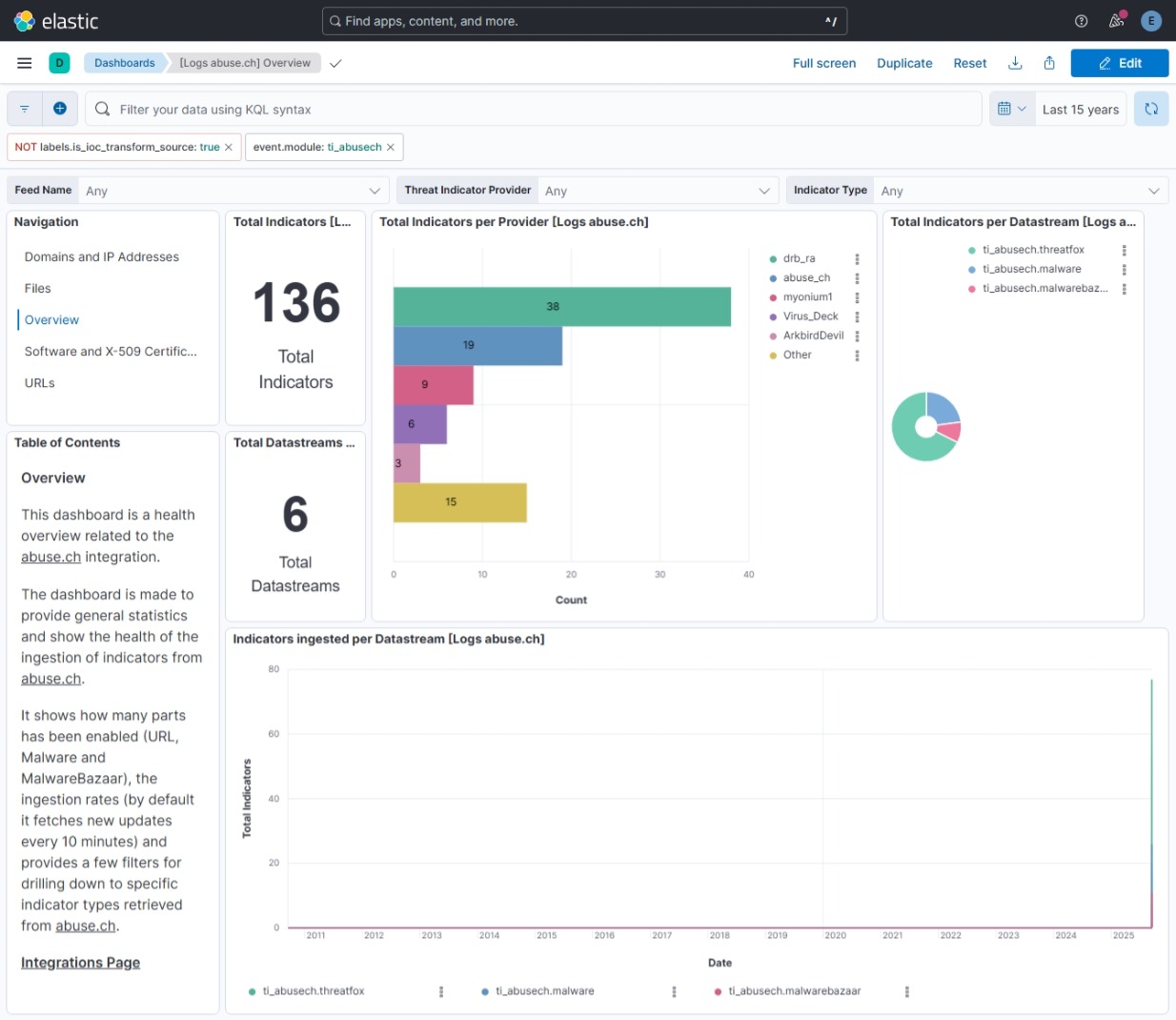
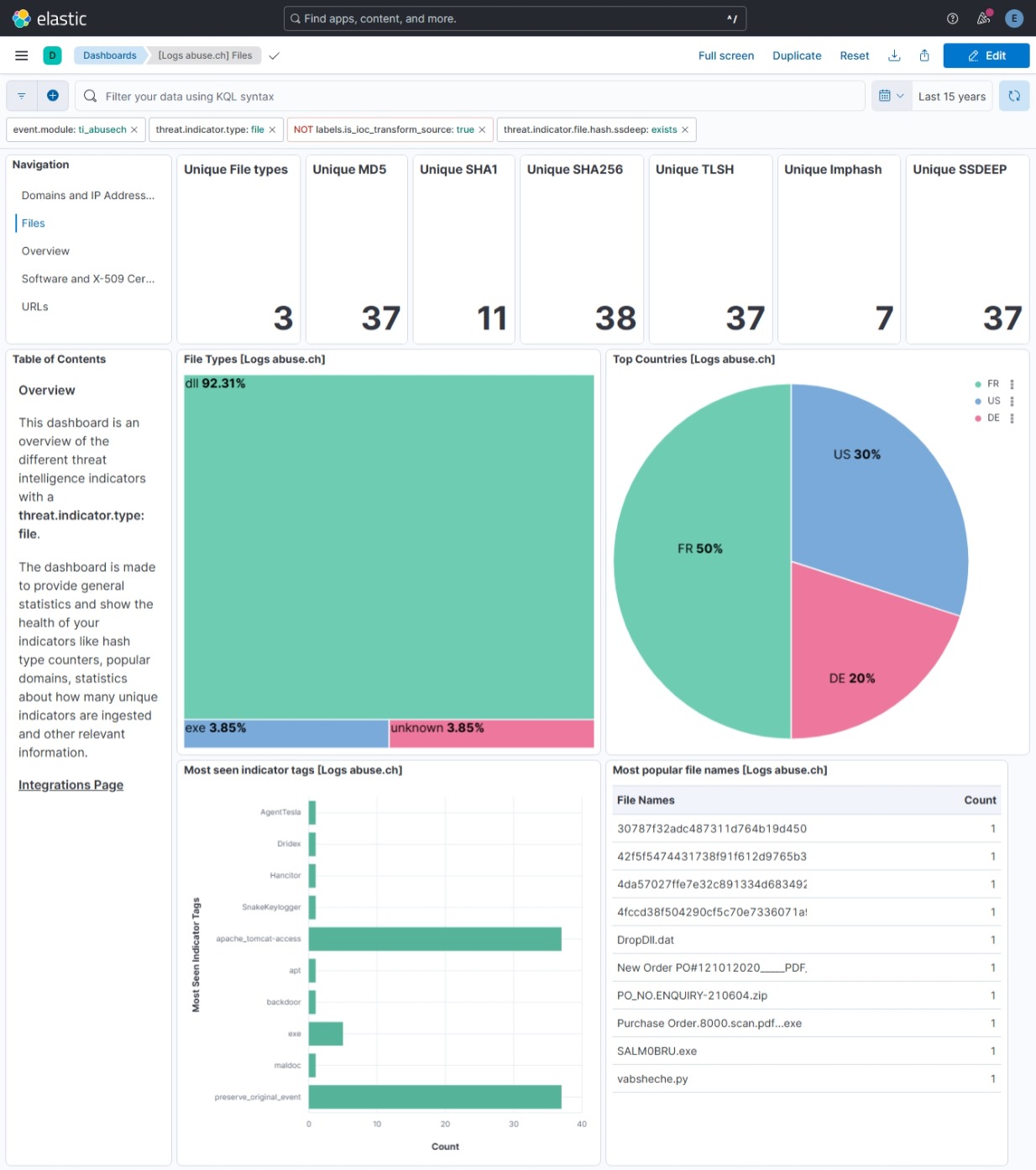
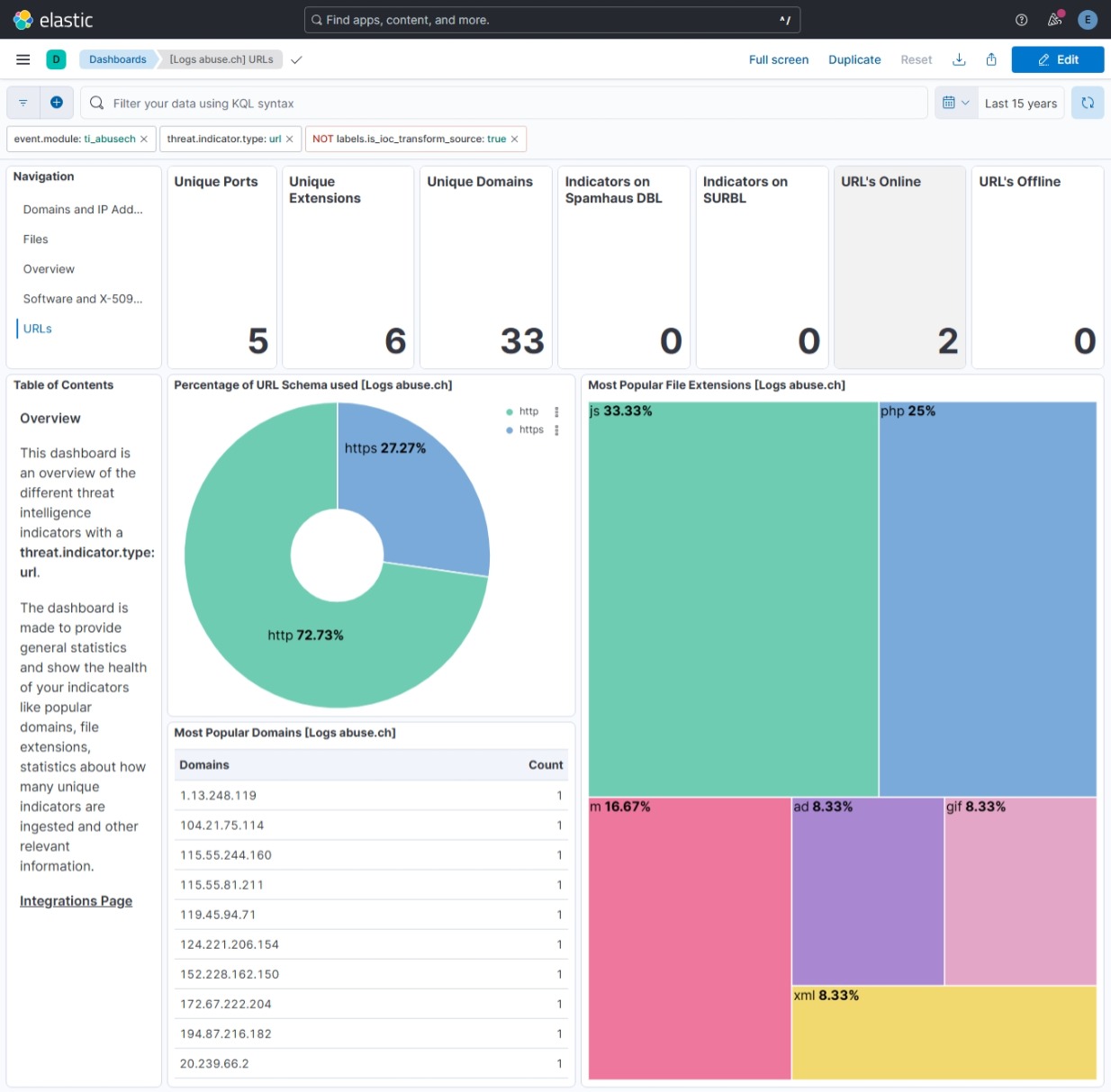
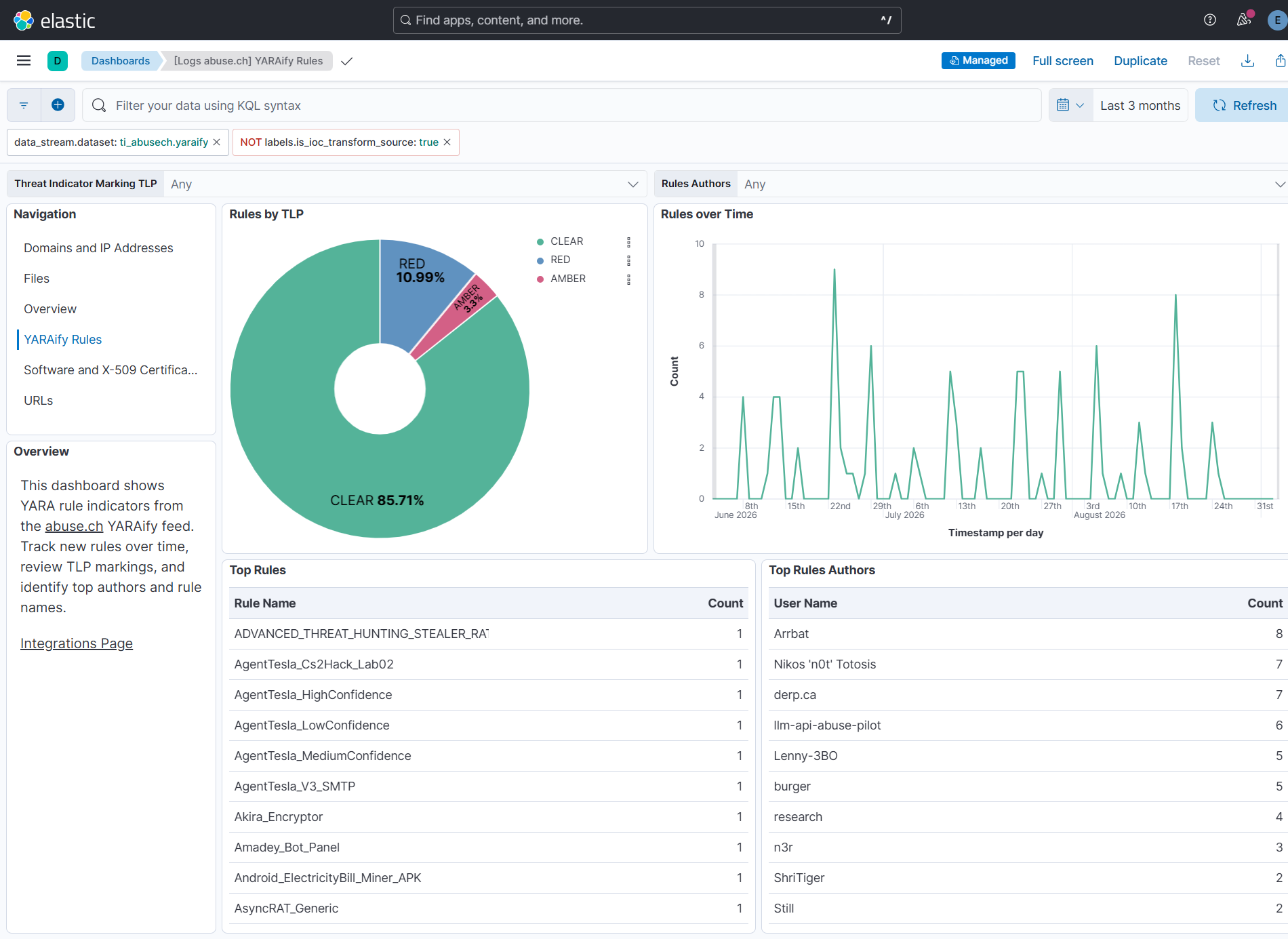
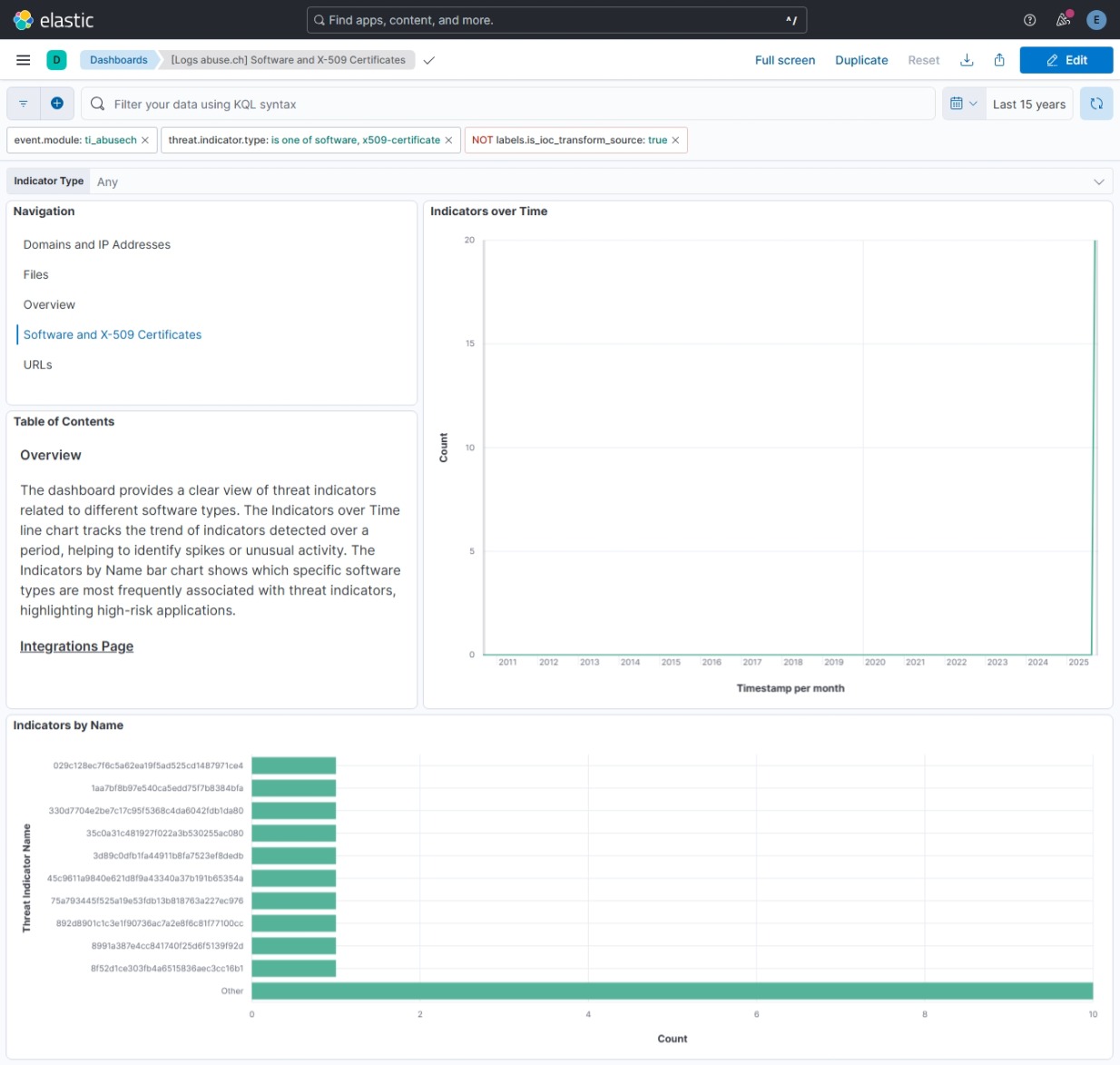
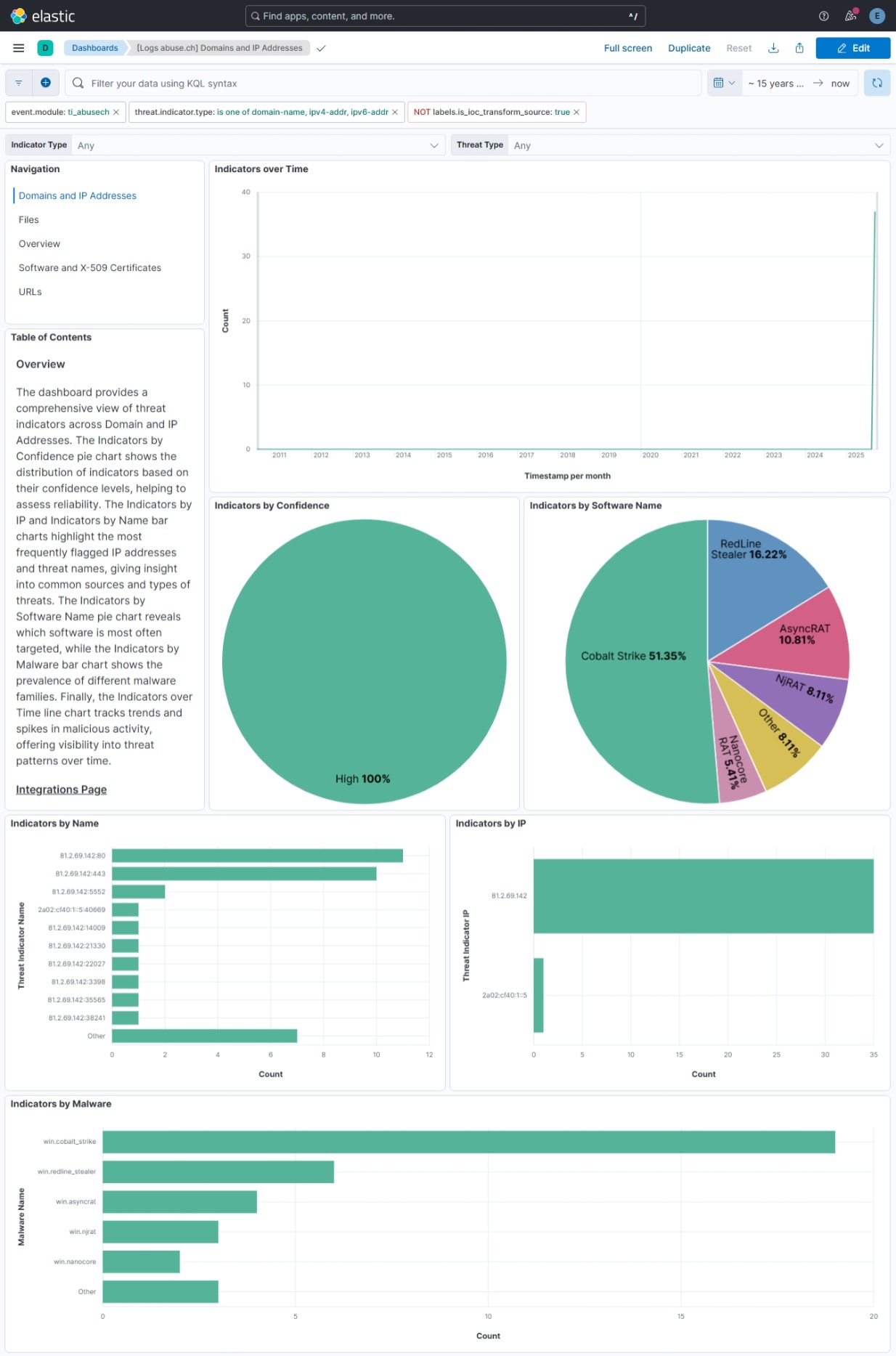
This integration includes one or more Kibana dashboards that visualizes the data collected by the integration. The screenshots below illustrate how the ingested data is displayed.
Changelog
| Version | Details | Minimum Kibana version |
|---|---|---|
| 5.4.0 | Enhancement (View pull request) Update Elastic Managed integration documentation to the current wording and docs links. |
9.1.0 8.19.0 |
| 5.3.1 | Bug fix (View pull request) Statically map event.ingested in transform destination indices so detection rules using it as the timestamp override do not report empty destination indices as missing the field. |
9.1.0 8.19.0 |
| 5.3.0 | Enhancement (View pull request) Document the retention applied to source data streams on stateful and Serverless deployments, and how to change it. |
9.1.0 8.19.0 |
| 5.2.0 | Enhancement (View pull request) Remove redundant ECS field definitions and the catch-all dynamic template from the transforms, relying on the ecs@mappings component template. |
9.1.0 8.19.0 |
| 5.1.1 | Bug fix (View pull request) Accept LogsDB flat source keys in the YARAify commercial token refresh script test. |
9.1.0 8.19.0 |
| 5.1.0 | Enhancement (View pull request) Add Commercial API support for the URLhaus data stream. Enhancement (View pull request) Add YARAify data stream with Community and Commercial API support. |
9.1.0 8.19.0 |
| 5.0.0 | Bug fix (View pull request) Emit a configuration error when the Auth Key is not set for the Malware URLs and Malware payloads datasets. Enhancement (View pull request) Add Commercial API support for the ThreatFox data stream. Breaking change (View pull request) Move API Type, Username, and Password from the MalwareBazaar data stream to the shared integration input so one Spamhaus credential pair covers all commercial datasets. Users who configured MalwareBazaar Commercial API on 4.2.0 must re-enter API Type, Username, and Password at the integration level after upgrade. See the Troubleshooting section in the README. |
9.1.0 8.19.0 |
| 4.2.0 | Enhancement (View pull request) Add Commercial API support for the MalwareBazaar data stream. |
9.1.0 8.19.0 |
| 4.1.2 | Bug fix (View pull request) Fix transform destination to use keyword for data_stream.namespace, allowing multi-namespace deployments. |
9.1.0 8.19.0 |
| 4.1.1 | Bug fix (View pull request) Guard deleted_at date processor and fall back to 90-day default expiration when ioc_expiration_duration is absent, fixing pipeline errors during upgrade from earlier versions. |
9.1.0 8.19.0 |
| 4.1.0 | Enhancement (View pull request) Use new release field for agentless deployment mode to establish as beta. |
9.1.0 8.19.0 |
| 4.0.0 | Enhancement (View pull request) Switch URL data stream from full export ZIP to incremental /v1/urls/recent/ API and add user-configurable ioc_expiration_duration setting (default 90d).Breaking change (View pull request) Users upgrading from a previous version must update the URL setting from the old full export endpoint ( /downloads/json) to https://urlhaus-api.abuse.ch/v1/urls/recent/ in their integration policy.The labels.interval field is removed from URL data stream documents; IOC expiration is now controlled by the new ioc_expiration_duration setting (default 90d). Users should remove any references to labels.interval in saved queries, detection rules, or dashboards, and review the IOC Expiration Duration setting to match their retention requirements. |
9.1.0 8.19.0 |
| 3.7.0 | Enhancement (View pull request) Use num_failure_retries instead of unattended mode for transform failure recovery. |
9.1.0 8.19.0 |
| 3.6.0 | Enhancement (View pull request) Add tags to ingest pipelines. |
9.1.0 8.19.0 |
| 3.5.2 | Bug fix (View pull request) Add intelligence.clamav and MalwareBazaar API fields |
9.1.0 8.19.0 |
| 3.5.1 | Bug fix (View pull request) Remove duplicate security-solution-default tag references |
9.1.0 8.19.0 |
| 3.5.0 | Enhancement (View pull request) Allow transforms to run in unattended mode. |
9.1.0 8.19.0 |
| 3.4.0 | Enhancement (View pull request) Add support for the 'Domain and IP Addresses' and 'Software and x509 Certificates' dashboards. Update deprecated visualization charts and implemented best practices in the existing Overview, Files, and URLs dashboards. |
9.1.0 8.19.0 |
| 3.3.0 | Enhancement (View pull request) Update documentation. |
9.1.0 8.19.0 |
| 3.2.0 | Enhancement (View pull request) Add ja3_fingerprints and sslblacklist data streams. |
9.1.0 8.19.0 |
| 3.1.0 | Enhancement (View pull request) Add terminate processor in ingest pipelines to filter out events containing CEL errors. Add threat.indicator.marking.tlp ECS field mapping in threatfox and malwarebazaar data streams. Add threat.indicator.confidence ECS field mapping in malware data stream. Improve system tests configuration. |
9.0.0 8.18.0 |
| 3.0.0 | Breaking change (View pull request) Auth Key (API Key) is now required for all AbuseCH API requests. Requests without authentication will be denied. See the official announcement: https://abuse.ch/blog/community-first/ |
9.0.0 8.18.0 |
| 2.10.1 | Bug fix (View pull request) Add temporary processor to remove the fields added by the Agentless policy. |
9.0.0 8.18.0 |
| 2.10.0 | Bug fix (View pull request) Increase memory for agentless deployment. |
9.0.0 8.18.0 |
| 2.9.2 | Bug fix (View pull request) Fix default request trace enabled behavior. |
9.0.0 8.18.0 |
| 2.9.1 | Bug fix (View pull request) Properly handle CEL errors. |
9.0.0 8.18.0 |
| 2.9.0 | Enhancement (View pull request) Enable request trace log removal. |
9.0.0 8.18.0 |
| 2.8.0 | Enhancement (View pull request) Add support for 'Auth-Key' in request header for all data streams. |
9.0.0 8.18.0 |
| 2.7.0 | Enhancement (View pull request) Enable Agentless deployment. |
9.0.0 8.18.0 |
| 2.6.1 | Bug fix (View pull request) Add support for 'Auth-Key' in request header for all data streams. |
9.0.0 8.13.0 |
| 2.6.0 | Enhancement (View pull request) Update Kibana constraint to support 9.0.0. |
9.0.0 8.13.0 |
| 2.5.1 | Bug fix (View pull request) Updated SSL description to be uniform and to include links to documentation. |
8.13.0 |
| 2.5.0 | Enhancement (View pull request) Do not remove event.original in main ingest pipeline. |
8.13.0 |
| 2.4.0 | Enhancement (View pull request) Add "preserve_original_event" tag to documents with event.kind set to "pipeline_error". |
8.13.0 |
| 2.3.5 | Bug fix (View pull request) Use triple-brace Mustache templating when referencing variables in ingest pipelines. |
8.13.0 |
| 2.3.4 | Bug fix (View pull request) Use triple-brace Mustache templating when referencing variables in ingest pipelines. |
8.13.0 |
| 2.3.3 | Bug fix (View pull request) Fix labels.is_ioc_transform_source values |
8.13.0 |
| 2.3.2 | Bug fix (View pull request) Add missing fields in transform |
8.13.0 |
| 2.3.1 | Bug fix (View pull request) Fix ECS date mapping on threat fields. |
8.13.0 |
| 2.3.0 | Enhancement (View pull request) Improve error reporting for API request failures. |
8.13.0 |
| 2.2.0 | Enhancement (View pull request) Update the kibana constraint to ^8.13.0. Modified the field definitions to remove ECS fields made redundant by the ecs@mappings component template. |
8.13.0 |
| 2.1.0 | Enhancement (View pull request) Improve error handling and reporting in malwarebazaar data stream. |
8.12.0 |
| 2.0.1 | Bug fix (View pull request) Adjust field mappings for transform destination index. |
8.12.0 |
| 2.0.0 | Enhancement (View pull request) Support IoC expiration |
8.12.0 |
| 1.25.0 | Enhancement (View pull request) Update manifest format version to v3.0.3. |
8.7.1 |
| 1.24.1 | Enhancement (View pull request) Changed owners |
8.7.1 |
| 1.24.0 | Enhancement (View pull request) Limit request tracer log count to five. |
8.7.1 |
| 1.23.0 | Enhancement (View pull request) ECS version updated to 8.11.0. |
8.7.1 |
| 1.22.0 | Enhancement (View pull request) Improve 'event.original' check to avoid errors if set. |
8.7.1 |
| 1.21.0 | Enhancement (View pull request) ECS version updated to 8.10.0. |
8.7.1 |
| 1.20.0 | Enhancement (View pull request) The format_version in the package manifest changed from 2.11.0 to 3.0.0. Removed dotted YAML keys from package manifest. Added 'owner.type: elastic' to package manifest. |
8.7.1 |
| 1.19.0 | Enhancement (View pull request) Add tags.yml file so that integration's dashboards and saved searches are tagged with "Security Solution" and displayed in the Security Solution UI. |
8.7.1 |
| 1.18.0 | Enhancement (View pull request) Update package-spec to 2.9.0. |
8.7.1 |
| 1.17.0 | Enhancement (View pull request) Update package to ECS 8.9.0. |
8.7.1 |
| 1.16.0 | Enhancement (View pull request) Document duration units. |
8.7.1 |
| 1.15.2 | Bug fix (View pull request) Change ThreatFox initial interval to integer and note valid values 1-7 |
8.7.1 |
| 1.15.1 | Bug fix (View pull request) Remove fields with empty string values |
8.7.1 |
| 1.15.0 | Enhancement (View pull request) Convert visualizations to lens. |
8.7.1 |
| 1.14.0 | Enhancement (View pull request) Document valid duration units. |
8.7.1 |
| 1.13.0 | Enhancement (View pull request) Ensure event.kind is correctly set for pipeline errors. |
8.7.1 |
| 1.12.0 | Enhancement (View pull request) Update package to ECS 8.8.0. |
8.7.1 |
| 1.11.0 | Enhancement (View pull request) Add a new flag to enable request tracing |
8.7.1 |
| 1.10.0 | Enhancement (View pull request) Update package to ECS 8.7.0. |
8.0.0 |
| 1.9.0 | Enhancement (View pull request) Update package to ECS 8.6.0. |
8.0.0 |
| 1.8.0 | Enhancement (View pull request) Update package to ECS 8.5.0. |
8.0.0 |
| 1.7.1 | Bug fix (View pull request) Change abusech.malwarebazaar.code_sign to Nested field |
8.0.0 |
| 1.7.0 | Enhancement (View pull request) Add Threat Fox datastream |
8.0.0 |
| 1.6.0 | Enhancement (View pull request) Update package to ECS 8.4.0 |
8.0.0 |
| 1.5.1 | Bug fix (View pull request) Fix proxy URL documentation rendering. |
8.0.0 |
| 1.5.0 | Enhancement (View pull request) Update categories to include threat_intel. |
8.0.0 |
| 1.4.0 | Enhancement (View pull request) Update package to ECS 8.3.0. |
8.0.0 |
| 1.3.2 | Enhancement (View pull request) Added link to AbuseCH documentation in readme |
8.0.0 |
| 1.3.1 | Enhancement (View pull request) Update package descriptions |
8.0.0 |
| 1.3.0 | Enhancement (View pull request) Update to ECS 8.2 |
8.0.0 |
| 1.2.3 | Enhancement (View pull request) Add mapping for event.created |
8.0.0 |
| 1.2.2 | Enhancement (View pull request) Add documentation for multi-fields |
8.0.0 |
| 1.2.1 | Bug fix (View pull request) Fix field mapping conflicts in threat.indicator.file.x509.not_before/not_after |
— |
| 1.2.0 | Enhancement (View pull request) Update to ECS 8.0 |
8.0.0 |
| 1.1.5 | Bug fix (View pull request) Removes extra tag from dashboards |
8.0.0 |
| 1.1.4 | Bug fix (View pull request) Regenerate test files using the new GeoIP database |
8.0.0 |
| 1.1.3 | Bug fix (View pull request) Change test public IPs to the supported subset |
— |
| 1.1.2 | Enhancement (View pull request) Fixing typo in base-fields.yml |
— |
| 1.1.1 | Enhancement (View pull request) Update ECS fields for threat.feed.name |
— |
| 1.1.0 | Enhancement (View pull request) Adding dashboards and adding minor tweaks to pipeline |
8.0.0 |
| 1.0.4 | Enhancement (View pull request) Bump minimum version in manifest |
8.0.0 |
| 1.0.3 | Enhancement (View pull request) Bump minimum version |
— |
| 1.0.2 | Enhancement (View pull request) Update title and description. |
— |
| 1.0.1 | Enhancement (View pull request) Fix invisible package icon |
— |
| 1.0.0 | Enhancement (View pull request) Initial Release |
— |