Tines Integration
Elastic Cloud Serverless projects are autoscaled environments, fully managed by Elastic and available on Elastic Cloud. Availability This functionality is generally available and ready for production usage. Elastic Cloud Serverless projects are autoscaled environments, fully managed by Elastic and available on Elastic Cloud. Availability This functionality is generally available and ready for production usage. The Elastic Stack includes Elastic's core products such as Elasticsearch, Kibana, Logstash, and Beats. Availability This functionality is generally available and ready for production usage. Unless stated otherwise on the page, this functionality is available when your Elastic Stack is deployed on Elastic Cloud Hosted, Elastic Cloud Enterprise, Elastic Cloud on Kubernetes, and self-managed environments. This documentation corresponds to the latest patch available for each minor version. If you're not using the latest patch, check the release notes for changes.
Serverless Observability
Generally available
Serverless Security
Generally available
Stack
9.1+
Generally available since 9.1
| Version | 1.20.0 (View all) |
| Managed integration release status | GA |
| Subscription level What's this? |
Basic |
| Developed by What's this? |
Community |
| Ingestion method(s) | API |
| Minimum Kibana version(s) | 9.1.4 9.0.7 8.19.4 |
You can use this integration as an Elastic Managed integration on Elastic Cloud Hosted deployments running this version or later.
Tines makes data, including logs, related to use and configuration of a Tines tenant available via a REST API.
This integration can be used to collect:
The Tines API documentation is available via this page.
Elastic Managed integrations are only supported on Elastic Cloud Serverless and Elastic Cloud Hosted deployments. An Elastic Managed integration lets you ingest data from a cloud source while avoiding the orchestration, management, and maintenance associated with standard ingest infrastructure. Elastic runs the collector for you, so you can focus on your data instead of the infrastructure that collects it.
For more information, refer to Elastic Managed integrations and the Elastic Managed integrations FAQ.
The package collects "audit log" events and "time saved" reports from the Tines API.
At present the only API version available, and hence the version assumed to be polled by this integration, is v1.
The audit logs list endpoint is documented here.
The time saved reporting endpoint is documented here.
This is available within the Tines web interface via the URL bar, e.g. https://your-tenant-1234.tines.com
the trailing domain may be tines.io for your particular tenant.
Refer to this documentation from Tines regarding how to create an API key.
The API key can be either a Personal or Tenant API key.
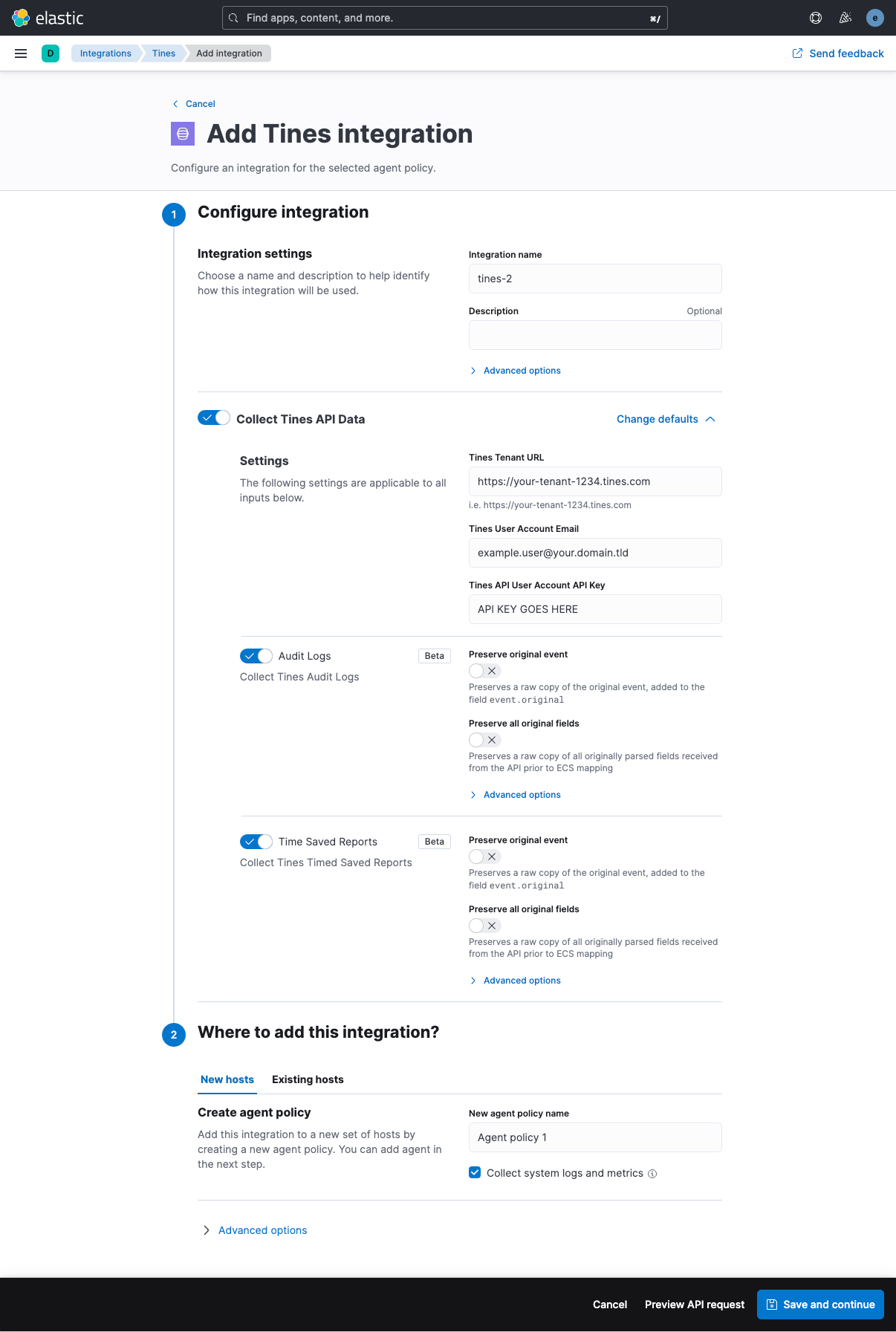
- In Kibana go to Management > Integrations
- In "Search for integrations" search bar type Tines
- Click on "Tines" integration from the search results.
- Click on Add Tines button to add the Tines integration.
- Modify the Tines Tenant URL as appropriate
- Insert your Tines API user email address
- Insert the Tines API key created associated with the API user email address
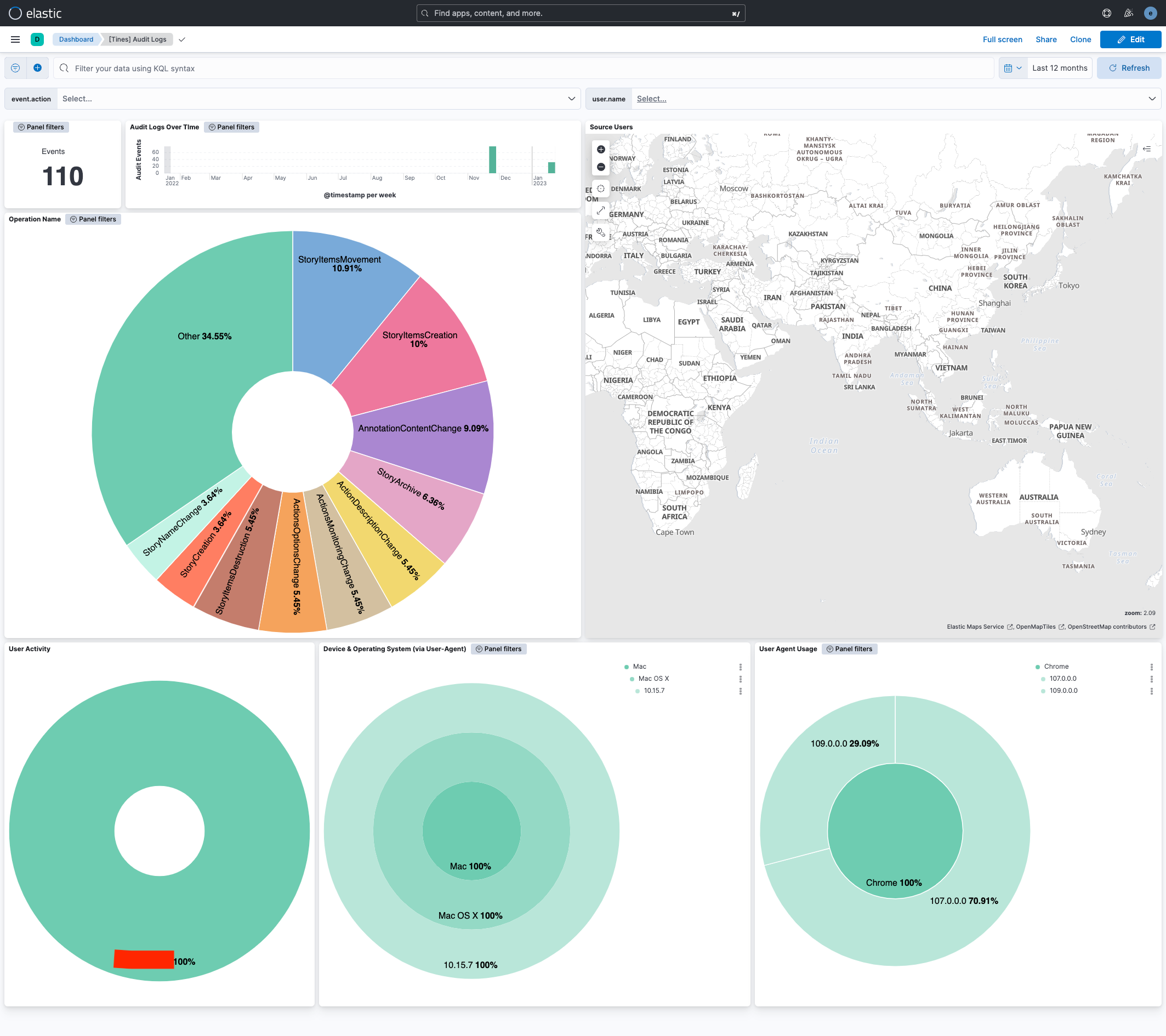
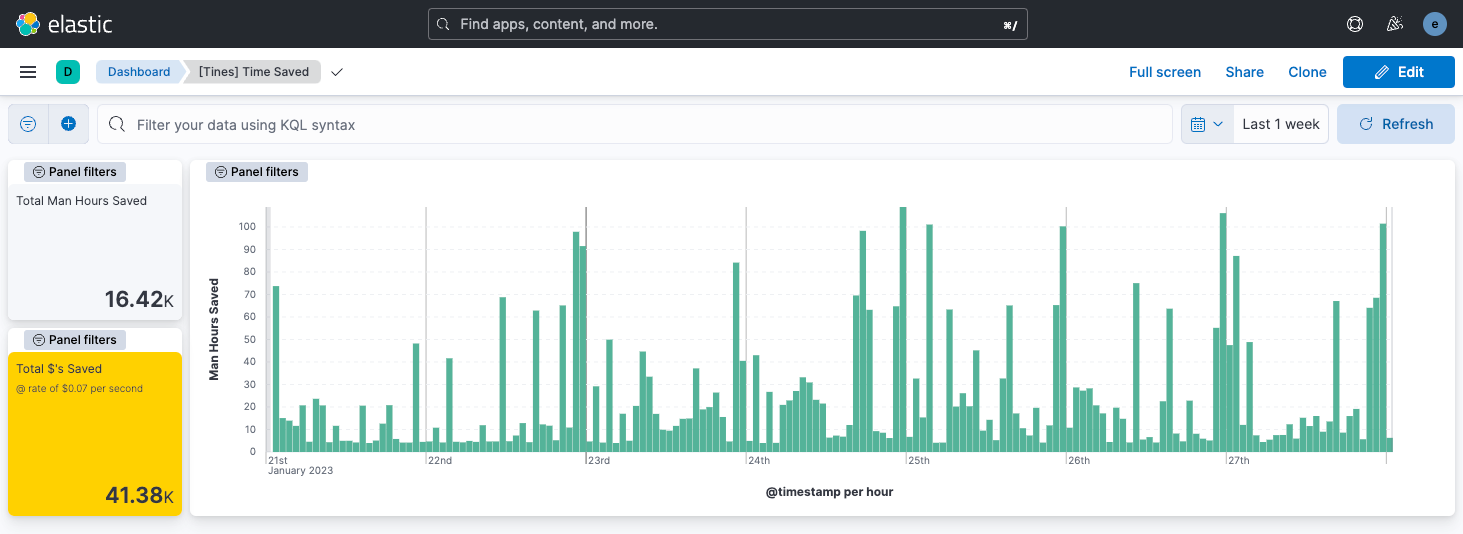
There are two dashboards immediately available as part of the integration.
The Tines Audit Logs summary dashboard,
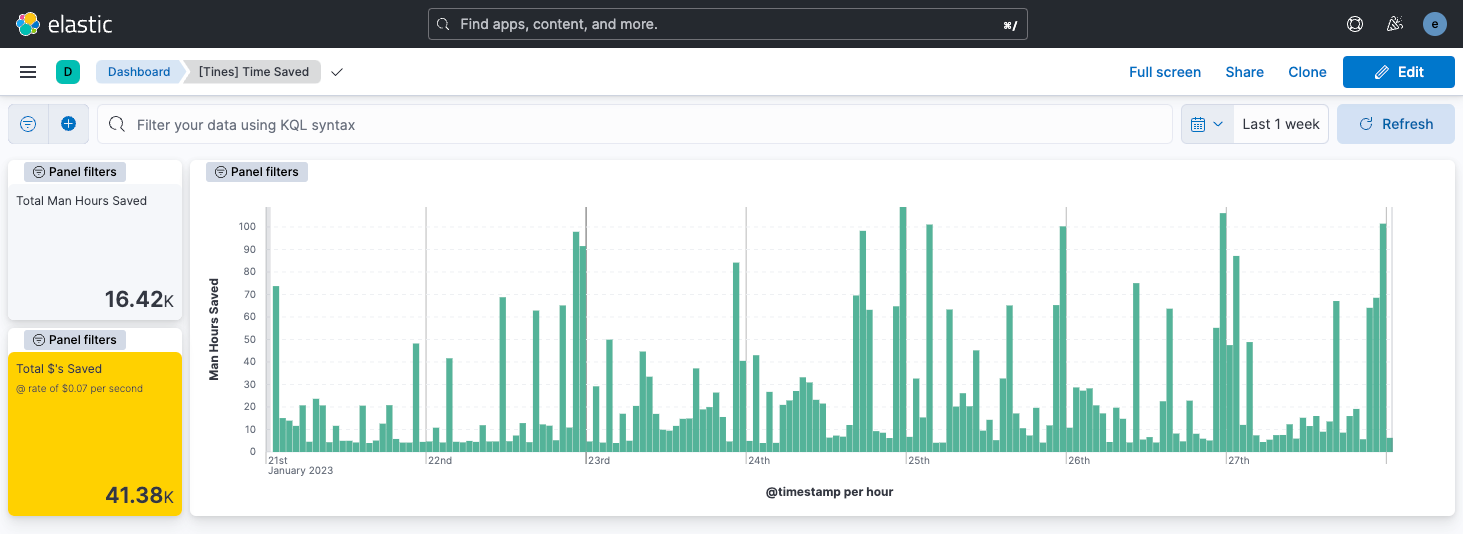
And the Tines Time Saved dashboard,
All fields ingested to this data stream are stored under tines.audit_log as each audit_log event is stored individually.
Exported fields
| Field | Description | Type |
|---|---|---|
| @timestamp | Date/time when the event originated. This is the date/time extracted from the event, typically representing when the event was generated by the source. If the event source has no original timestamp, this value is typically populated by the first time the event was received by the pipeline. Required field for all events. | date |
| data_stream.dataset | The field can contain anything that makes sense to signify the source of the data. Examples include nginx.access, prometheus, endpoint etc. For data streams that otherwise fit, but that do not have dataset set we use the value "generic" for the dataset value. event.dataset should have the same value as data_stream.dataset. Beyond the Elasticsearch data stream naming criteria noted above, the dataset value has additional restrictions: * Must not contain - * No longer than 100 characters |
constant_keyword |
| data_stream.namespace | A user defined namespace. Namespaces are useful to allow grouping of data. Many users already organize their indices this way, and the data stream naming scheme now provides this best practice as a default. Many users will populate this field with default. If no value is used, it falls back to default. Beyond the Elasticsearch index naming criteria noted above, namespace value has the additional restrictions: * Must not contain - * No longer than 100 characters |
constant_keyword |
| data_stream.type | An overarching type for the data stream. Currently allowed values are "logs" and "metrics". We expect to also add "traces" and "synthetics" in the near future. | constant_keyword |
| input.type | keyword | |
| tines.audit_log.created_at | The date and time that the audit log event occurred | date |
| tines.audit_log.id | A unique ID for the audit log event | long |
| tines.audit_log.inputs.actionIds | long | |
| tines.audit_log.inputs.diagramNoteIds | long | |
| tines.audit_log.inputs.fieldId | long | |
| tines.audit_log.inputs.inputs.* | keyword | |
| tines.audit_log.inputs.inputs.actionId | long | |
| tines.audit_log.inputs.inputs.actionIds | long | |
| tines.audit_log.inputs.inputs.actions.actionId | long | |
| tines.audit_log.inputs.inputs.actions.options | keyword | |
| tines.audit_log.inputs.inputs.actions.schedule.cron | keyword | |
| tines.audit_log.inputs.inputs.actions.schedule.timezone | keyword | |
| tines.audit_log.inputs.inputs.agents | flattened | |
| tines.audit_log.inputs.inputs.allowedHosts | keyword | |
| tines.audit_log.inputs.inputs.authenticationTokenId | long | |
| tines.audit_log.inputs.inputs.awsAccessKey | keyword | |
| tines.audit_log.inputs.inputs.awsAssumedRoleArn | keyword | |
| tines.audit_log.inputs.inputs.awsAssumedRoleExternalId | keyword | |
| tines.audit_log.inputs.inputs.awsAuthenticationType | keyword | |
| tines.audit_log.inputs.inputs.awsSecretKey | keyword | |
| tines.audit_log.inputs.inputs.content | match_only_text | |
| tines.audit_log.inputs.inputs.dateMode | keyword | |
| tines.audit_log.inputs.inputs.delta.x | long | |
| tines.audit_log.inputs.inputs.delta.y | long | |
| tines.audit_log.inputs.inputs.description | keyword | |
| tines.audit_log.inputs.inputs.diagramNoteIds | long | |
| tines.audit_log.inputs.inputs.diagramNotes | flattened | |
| tines.audit_log.inputs.inputs.editingSource | keyword | |
| tines.audit_log.inputs.inputs.eventName | keyword | |
| tines.audit_log.inputs.inputs.graphDirection | keyword | |
| tines.audit_log.inputs.inputs.graphType | keyword | |
| tines.audit_log.inputs.inputs.httpRequestLocationOfToken | keyword | |
| tines.audit_log.inputs.inputs.httpRequestOptions | keyword | |
| tines.audit_log.inputs.inputs.icon | keyword | |
| tines.audit_log.inputs.inputs.id | long | |
| tines.audit_log.inputs.inputs.isServiceToken | boolean | |
| tines.audit_log.inputs.inputs.jwtAlgorithm | keyword | |
| tines.audit_log.inputs.inputs.jwtAutoGenerateTimeClaims | keyword | |
| tines.audit_log.inputs.inputs.jwtHs256Secret | keyword | |
| tines.audit_log.inputs.inputs.jwtPayload | keyword | |
| tines.audit_log.inputs.inputs.jwtPrivateKey | keyword | |
| tines.audit_log.inputs.inputs.links | flattened | |
| tines.audit_log.inputs.inputs.mode | keyword | |
| tines.audit_log.inputs.inputs.mtlsClientCertificate | keyword | |
| tines.audit_log.inputs.inputs.mtlsClientPrivateKey | keyword | |
| tines.audit_log.inputs.inputs.mtlsRootCertificate | keyword | |
| tines.audit_log.inputs.inputs.multiSelect | boolean | |
| tines.audit_log.inputs.inputs.name | keyword | |
| tines.audit_log.inputs.inputs.oauthClientId | keyword | |
| tines.audit_log.inputs.inputs.oauthClientSecret | keyword | |
| tines.audit_log.inputs.inputs.oauthGrantType | keyword | |
| tines.audit_log.inputs.inputs.oauthPkceCodeChallengeMethod | keyword | |
| tines.audit_log.inputs.inputs.oauthScope | keyword | |
| tines.audit_log.inputs.inputs.oauthTokenUrl | keyword | |
| tines.audit_log.inputs.inputs.oauthUrl | keyword | |
| tines.audit_log.inputs.inputs.options.createFormEmptyState | boolean | |
| tines.audit_log.inputs.inputs.readAccess | keyword | |
| tines.audit_log.inputs.inputs.required | boolean | |
| tines.audit_log.inputs.inputs.sharedTeamSlugs | keyword | |
| tines.audit_log.inputs.inputs.source | keyword | |
| tines.audit_log.inputs.inputs.standardLibVersion | keyword | |
| tines.audit_log.inputs.inputs.storyId | long | |
| tines.audit_log.inputs.inputs.style | keyword | |
| tines.audit_log.inputs.inputs.teamId | long | |
| tines.audit_log.inputs.inputs.value | keyword | |
| tines.audit_log.inputs.linkIds | long | |
| tines.audit_log.inputs.storyId | long | |
| tines.audit_log.operation_name | The name of the operation | keyword |
| tines.audit_log.request_ip | The IP Address the operation was triggered from | keyword |
| tines.audit_log.request_user_agent | The user agent that the operation was triggered with | keyword |
| tines.audit_log.tenant_id | The ID of the tenant the operation was triggered on | long |
| tines.audit_log.updated_at | The date and time that the audit log event was updated | date |
| tines.audit_log.user_email | The email of the user who triggered the operation | keyword |
| tines.audit_log.user_id | The ID of the user who triggered the operation | long |
| tines.audit_log.user_name | The name of the user who triggered the operation | keyword |
| tines.tenant_url | The tenant URL associated that provided the event | keyword |
Example
{
    "@timestamp": "2023-01-22T11:33:22.000Z",
    "agent": {
        "ephemeral_id": "8a749c88-27ed-46c4-ab75-a44c014fb306",
        "id": "af1cd2d8-7b92-43ef-9ba7-0138ff3f3630",
        "name": "elastic-agent-40278",
        "type": "filebeat",
        "version": "8.19.4"
    },
    "data_stream": {
        "dataset": "tines.audit_logs",
        "namespace": "41598",
        "type": "logs"
    },
    "ecs": {
        "version": "8.0.0"
    },
    "elastic_agent": {
        "id": "af1cd2d8-7b92-43ef-9ba7-0138ff3f3630",
        "snapshot": false,
        "version": "8.19.4"
    },
    "event": {
        "action": "StoryItemsCreation",
        "agent_id_status": "verified",
        "category": [
            "configuration"
        ],
        "created": "2025-12-03T05:43:17.665Z",
        "dataset": "tines.audit_logs",
        "id": "3706009",
        "ingested": "2025-12-03T05:43:18Z",
        "original": "{\"created_at\":\"2023-01-22T11:33:22Z\",\"id\":3706009,\"inputs\":{\"inputs\":{\"agents\":[{\"form\":null,\"name\":\"HTTP Request Action\",\"position\":{\"x\":786,\"y\":331},\"timeSavedUnit\":\"minutes\",\"timeSavedValue\":0,\"type\":\"httpRequest\"}],\"diagramNotes\":[],\"links\":[],\"options\":[\"Option 1\",\"Option 2\"],\"storyId\":146411},\"liveEvents\":null},\"operation_name\":\"StoryItemsCreation\",\"request_ip\":\"216.160.83.56\",\"request_user_agent\":\"Mozilla/5.0 (Macintosh; Intel Mac OS X 10_15_7) AppleWebKit/537.36 (KHTML, like Gecko) Chrome/109.0.0.0 Safari/537.36\",\"tenant_id\":1234,\"updated_at\":\"2023-01-22T11:33:22Z\",\"user_email\":\"example.user@your.domain.tld\",\"user_id\":1234,\"user_name\":\"Example User\"}",
        "type": [
            "info"
        ]
    },
    "input": {
        "type": "httpjson"
    },
    "related": {
        "ip": [
            "216.160.83.56"
        ],
        "user": [
            "Example User"
        ]
    },
    "source": {
        "as": {
            "number": 209
        },
        "geo": {
            "city_name": "Milton",
            "continent_name": "North America",
            "country_iso_code": "US",
            "country_name": "United States",
            "location": {
                "lat": 47.2513,
                "lon": -122.3149
            },
            "region_iso_code": "US-WA",
            "region_name": "Washington"
        },
        "ip": "216.160.83.56"
    },
    "tags": [
        "preserve_original_event",
        "preserve_duplicate_custom_fields",
        "forwarded"
    ],
    "tines": {
        "audit_log": {
            "created_at": "2023-01-22T11:33:22Z",
            "id": 3706009,
            "inputs": {
                "inputs": {
                    "agents": [
                        {
                            "name": "HTTP Request Action",
                            "position": {
                                "x": 786,
                                "y": 331
                            },
                            "timeSavedUnit": "minutes",
                            "timeSavedValue": 0,
                            "type": "httpRequest"
                        }
                    ],
                    "options": [
                        "Option 1",
                        "Option 2"
                    ],
                    "storyId": 146411
                }
            },
            "operation_name": "StoryItemsCreation",
            "request_ip": "216.160.83.56",
            "request_user_agent": "Mozilla/5.0 (Macintosh; Intel Mac OS X 10_15_7) AppleWebKit/537.36 (KHTML, like Gecko) Chrome/109.0.0.0 Safari/537.36",
            "tenant_id": 1234,
            "updated_at": "2023-01-22T11:33:22Z",
            "user_email": "example.user@your.domain.tld",
            "user_id": 1234,
            "user_name": "Example User"
        },
        "tenant_url": "http://svc-tines_api_mock:8080"
    },
    "user": {
        "email": "example.user@your.domain.tld",
        "id": "1234",
        "name": "Example User"
    },
    "user_agent": {
        "device": {
            "name": "Mac"
        },
        "name": "Chrome",
        "original": "Mozilla/5.0 (Macintosh; Intel Mac OS X 10_15_7) AppleWebKit/537.36 (KHTML, like Gecko) Chrome/109.0.0.0 Safari/537.36",
        "os": {
            "full": "Mac OS X 10.15.7",
            "name": "Mac OS X",
            "version": "10.15.7"
        },
        "version": "109.0.0.0"
    }
}
All fields ingested to this data stream are stored under tines.time_saved as each time saved report event is stored individually.
Exported fields
| Field | Description | Type |
|---|---|---|
| @timestamp | Date/time when the event originated. This is the date/time extracted from the event, typically representing when the event was generated by the source. If the event source has no original timestamp, this value is typically populated by the first time the event was received by the pipeline. Required field for all events. | date |
| data_stream.dataset | The field can contain anything that makes sense to signify the source of the data. Examples include nginx.access, prometheus, endpoint etc. For data streams that otherwise fit, but that do not have dataset set we use the value "generic" for the dataset value. event.dataset should have the same value as data_stream.dataset. Beyond the Elasticsearch data stream naming criteria noted above, the dataset value has additional restrictions: * Must not contain - * No longer than 100 characters |
constant_keyword |
| data_stream.namespace | A user defined namespace. Namespaces are useful to allow grouping of data. Many users already organize their indices this way, and the data stream naming scheme now provides this best practice as a default. Many users will populate this field with default. If no value is used, it falls back to default. Beyond the Elasticsearch index naming criteria noted above, namespace value has the additional restrictions: * Must not contain - * No longer than 100 characters |
constant_keyword |
| data_stream.type | An overarching type for the data stream. Currently allowed values are "logs" and "metrics". We expect to also add "traces" and "synthetics" in the near future. | constant_keyword |
| input.type | keyword | |
| tines.tenant_url | The tenant URL associated that provided the event | keyword |
| tines.time_saved.date | The date and time for the time saved period | date |
| tines.time_saved.story_id | Story ID for time saved | long |
| tines.time_saved.team_id | Team ID for time saved | long |
| tines.time_saved.value | Time saved in seconds | long |
Example
{
    "@timestamp": "2022-06-01T00:00:00.000Z",
    "agent": {
        "ephemeral_id": "b0071421-fc01-439e-8635-18c67c09fe9b",
        "id": "a635f64c-6469-4624-8291-8d16476d7e6a",
        "name": "elastic-agent-55622",
        "type": "filebeat",
        "version": "8.19.4"
    },
    "data_stream": {
        "dataset": "tines.time_saved",
        "namespace": "47319",
        "type": "logs"
    },
    "ecs": {
        "version": "8.0.0"
    },
    "elastic_agent": {
        "id": "a635f64c-6469-4624-8291-8d16476d7e6a",
        "snapshot": false,
        "version": "8.19.4"
    },
    "event": {
        "agent_id_status": "verified",
        "created": "2025-12-03T05:45:07.961Z",
        "dataset": "tines.time_saved",
        "ingested": "2025-12-03T05:45:09Z",
        "original": "{\"date\":\"2022-06-01T00:00:00Z\",\"value\":35910}"
    },
    "input": {
        "type": "httpjson"
    },
    "tags": [
        "preserve_original_event",
        "preserve_duplicate_custom_fields",
        "forwarded"
    ],
    "tines": {
        "tenant_url": "http://svc-tines_api_mock:8080",
        "time_saved": {
            "date": "2022-06-01T00:00:00Z",
            "value": 35910
        }
    }
}
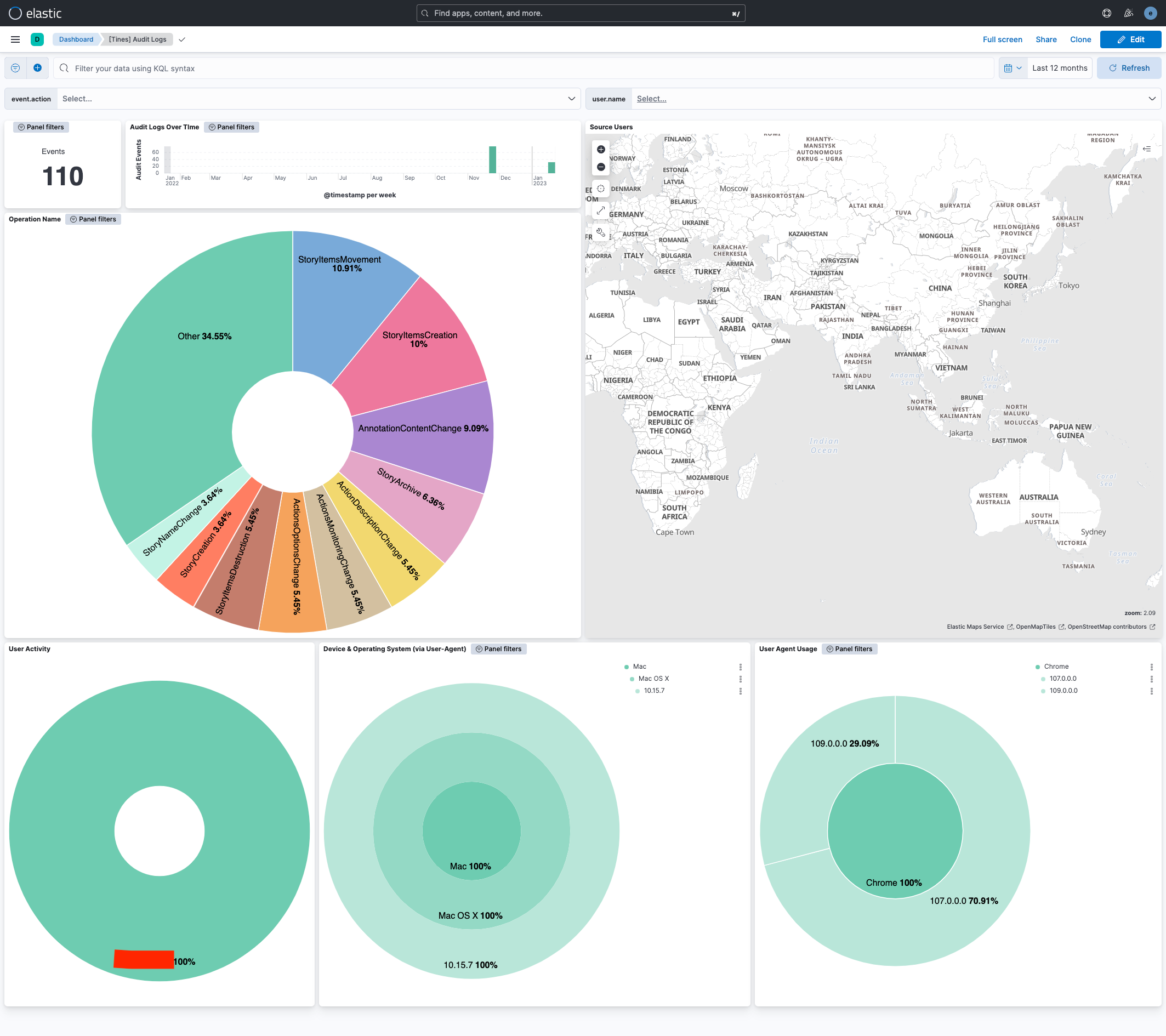
This integration includes one or more Kibana dashboards that visualizes the data collected by the integration. The screenshots below illustrate how the ingested data is displayed.
Changelog
| Version | Details | Minimum Kibana version |
|---|---|---|
| 1.20.0 | Enhancement (View pull request) Update Elastic Managed integration documentation to the current wording and docs links. |
9.1.4 9.0.7 8.19.4 |
| 1.19.0 | Enhancement (View pull request) Enable request trace log removal. |
9.1.4 9.0.7 8.19.4 |
| 1.18.0 | Enhancement (View pull request) Add tags to ingest pipeline processors and add preserve_original_event to pipeline-level on_failure handlers. |
9.1.4 9.0.7 8.19.4 |
| 1.17.1 | Enhancement (View pull request) Set agentless deployment mode release field to ga. |
9.1.4 9.0.7 8.19.4 |
| 1.17.0 | Enhancement (View pull request) Enable Agentless deployment. |
9.1.4 9.0.7 8.19.4 |
| 1.16.0 | Enhancement (View pull request) Prevent updating the fleet health status to degraded when the next_page is not present. |
9.1.4 9.0.7 8.19.4 |
| 1.15.0 | Enhancement (View pull request) Update Kibana constraint to support 9.0.0. |
9.0.0 8.14.0 |
| 1.14.2 | Bug fix (View pull request) Updated SSL description to be uniform and to include links to documentation. |
8.14.0 |
| 1.14.1 | Bug fix (View pull request) Workaround missing dynamic template for options fields. |
8.14.0 |
| 1.14.0 | Enhancement (View pull request) Do not remove event.original in main ingest pipeline. |
8.14.0 |
| 1.13.0 | Enhancement (View pull request) Add "preserve_original_event" tag to documents with event.kind set to "pipeline_error". |
8.14.0 |
| 1.12.3 | Bug fix (View pull request) Work around multimorphic tines.audit_log.inputs.inputs.options fields. |
8.14.0 |
| 1.12.2 | Bug fix (View pull request) Fix handling of multimorphic tines.audit_log.inputs.inputs.options fields. |
8.13.0 |
| 1.12.1 | Bug fix (View pull request) Fix template rendering error when there's no auth_email. |
8.13.0 |
| 1.12.0 | Enhancement (View pull request) Update the kibana constraint to ^8.13.0. Modified the field definitions to remove ECS fields made redundant by the ecs@mappings component template. |
8.13.0 |
| 1.11.0 | Enhancement (View pull request) Update manifest format version to v3.0.3. |
8.12.0 |
| 1.10.0 | Enhancement (View pull request) Set sensitive values as secret. |
8.12.0 |
| 1.9.1 | Enhancement (View pull request) Changed owners |
8.7.1 |
| 1.9.0 | Enhancement (View pull request) Limit request tracer log count to five. |
8.7.1 |
| 1.8.0 | Enhancement (View pull request) ECS version updated to 8.11.0. |
8.7.1 |
| 1.7.0 | Enhancement (View pull request) Improve 'event.original' check to avoid errors if set. |
8.7.1 |
| 1.6.0 | Enhancement (View pull request) Set 'community' owner type. |
8.7.1 |
| 1.5.0 | Enhancement (View pull request) ECS version updated to 8.10.0. |
8.7.1 |
| 1.4.0 | Enhancement (View pull request) The format_version in the package manifest changed from 2.11.0 to 3.0.0. Added 'owner.type: elastic' to package manifest. |
8.7.1 |
| 1.3.0 | Enhancement (View pull request) Add tags.yml file so that integration's dashboards and saved searches are tagged with "Security Solution" and displayed in the Security Solution UI. |
8.7.1 |
| 1.2.1 | Bug fix (View pull request) Remove version attribute from ingest node pipelines. |
8.7.1 |
| 1.2.0 | Enhancement (View pull request) Update package to ECS 8.9.0. |
8.7.1 |
| 1.1.0 | Enhancement (View pull request) Document valid duration units. |
8.7.1 |
| 1.0.0 | Enhancement (View pull request) Release Tines as GA. |
8.7.1 |
| 0.5.0 | Enhancement (View pull request) Ensure event.kind is correctly set for pipeline errors. |
8.7.1 |
| 0.4.0 | Enhancement (View pull request) Update package to ECS 8.8.0. |
8.7.1 |
| 0.3.0 | Enhancement (View pull request) Update package-spec version to 2.7.0. |
8.7.1 |
| 0.2.0 | Enhancement (View pull request) Add a new flag to enable request tracing |
8.7.1 |
| 0.1.0 | Enhancement (View pull request) Update package to ECS 8.7.0. |
8.6.1 |
| 0.0.4 | Bug fix (View pull request) Make input object arrays flattnened. |
8.6.1 |
| 0.0.3 | Bug fix (View pull request) Make email address optional for configuration. |
8.6.1 |
| 0.0.2 | Bug fix (View pull request) Fix img link in readme |
8.6.1 |
| 0.0.1 | Enhancement (View pull request) Initial draft of the package |
8.6.1 |