Microsoft Office 365 Integration
Elastic Cloud Serverless projects are autoscaled environments, fully managed by Elastic and available on Elastic Cloud. Availability This functionality is generally available and ready for production usage. Elastic Cloud Serverless projects are autoscaled environments, fully managed by Elastic and available on Elastic Cloud. Availability This functionality is generally available and ready for production usage. The Elastic Stack includes Elastic's core products such as Elasticsearch, Kibana, Logstash, and Beats. Availability This functionality is generally available and ready for production usage. Unless stated otherwise on the page, this functionality is available when your Elastic Stack is deployed on Elastic Cloud Hosted, Elastic Cloud Enterprise, Elastic Cloud on Kubernetes, and self-managed environments. This documentation corresponds to the latest patch available for each minor version. If you're not using the latest patch, check the release notes for changes.
Serverless Observability
Generally available
Serverless Security
Generally available
Stack
9.1+
Generally available since 9.1
| Version | 4.1.0 (View all) |
| Managed integration release status | GA |
| Subscription level What's this? |
Basic |
| Developed by What's this? |
Elastic |
| Ingestion method(s) | API |
| Minimum Kibana version(s) | 9.1.0 8.19.0 |
You can use this integration as an Elastic Managed integration on Elastic Cloud Hosted deployments running this version or later.
The Microsoft Office 365 integration for Elastic collects activity data using the Office 365 Management Activity API. This data enables monitoring, searching, and analyzing user and admin actions across Microsoft Office 365, including activity from services like SharePoint and Exchange.
The integration works by collecting user, admin, system, and policy actions, as well as events from Office 365 and Azure AD activity logs exposed by the Office 365 Management Activity API.
- API Version: The Microsoft Office 365 integration is compatible with version 1.0 of Microsoft Office 365 Management API.
- Supported Workloads: This integration supports the following Microsoft Office 365 workloads:
- Audit.AzureActiveDirectory
- Audit.Exchange
- Audit.SharePoint
- Audit.General
- DLP.All
For detailed information on the supported record types within these workloads, please refer to the AuditLogRecordType documentation.
This integration collects log messages of the following types:
Audit: Uses the Office 365 Management Activity API to retrieve audit messages from Office 365 and Azure AD activity logs. These are the same logs that are available under Audit Log Search in the Microsoft Purview portal.
Integrating Microsoft Office 365 with Elastic SIEM enables collection of audit logs for monitoring and analysis, which can then be visualized in Kibana.
To use this integration you need to enable Audit Log and register an application in Microsoft Entra ID (formerly known as Azure Active Directory).
Once the Microsoft Entra ID application is registered, you can set up its credentials and permissions, and gather the information needed by the Microsoft Office 365 Elastic integration, as follows:
- Note the
Application (client) IDandDirectory (tenant) IDin the registered application'sOverviewpage. - Create a new secret to configure the authentication of your application, as follows:
- Navigate to
Manage -> Certificates & Secretssection. - Click
New client secret, provide a description and create the new secret.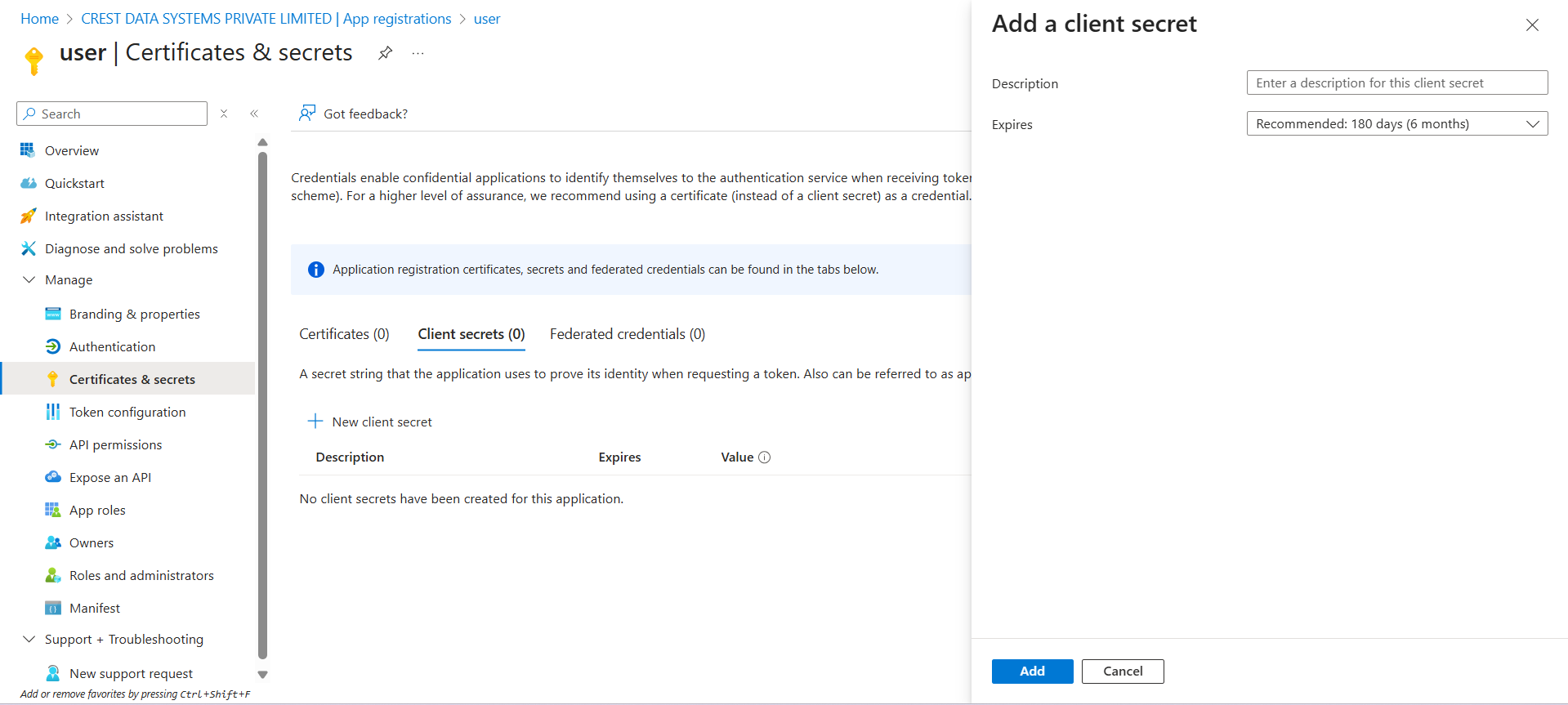
- Note the
Valuewhich is required for setup of the integration.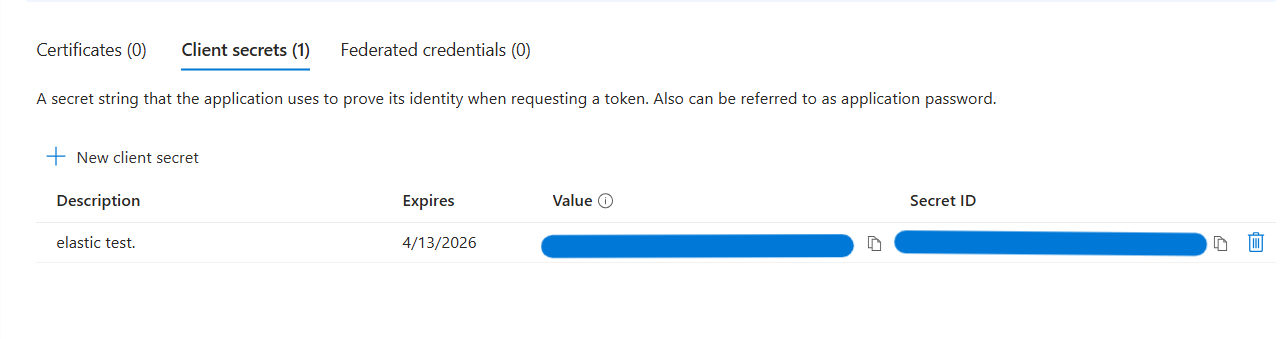
- Navigate to
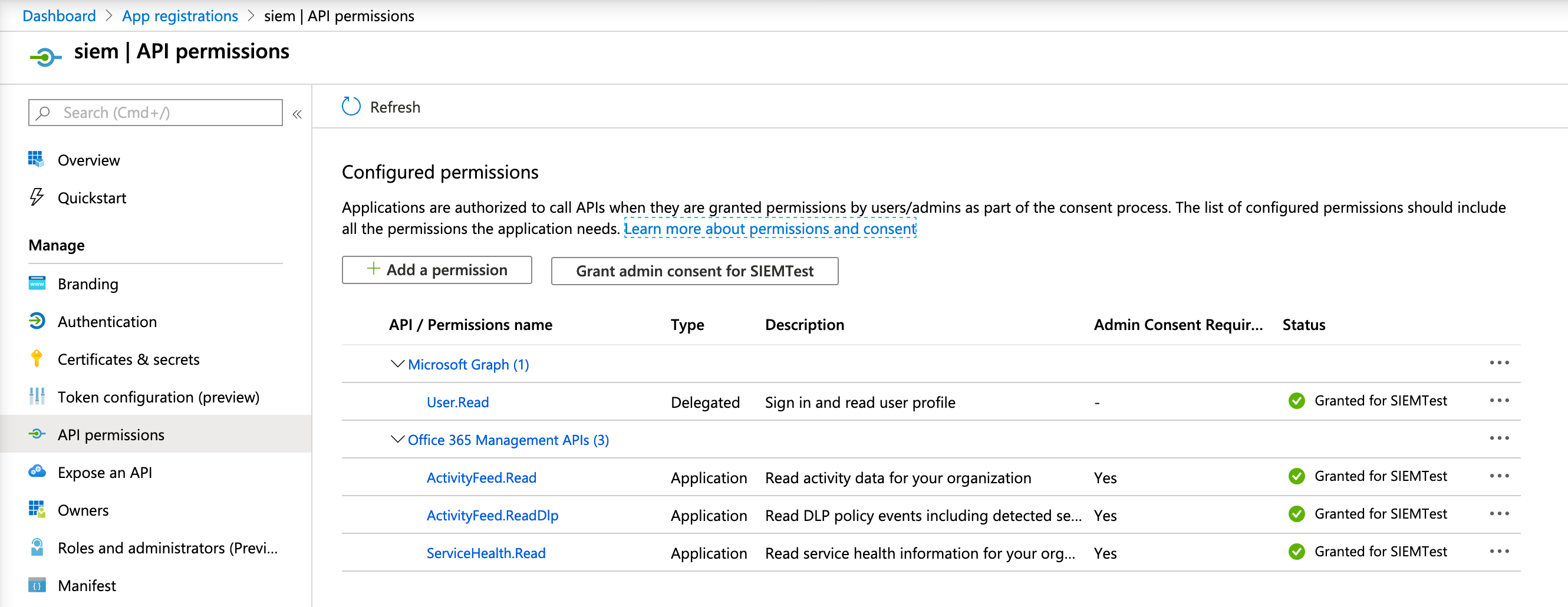
- Add permissions to your registered application. Please refer to the Office 365 Management API documentation for more details.
- Navigate to
Manage -> API permissionspage. Under Configured permissions clickAdd a permission. - Select
Office 365 Management APIstile from the listed tiles.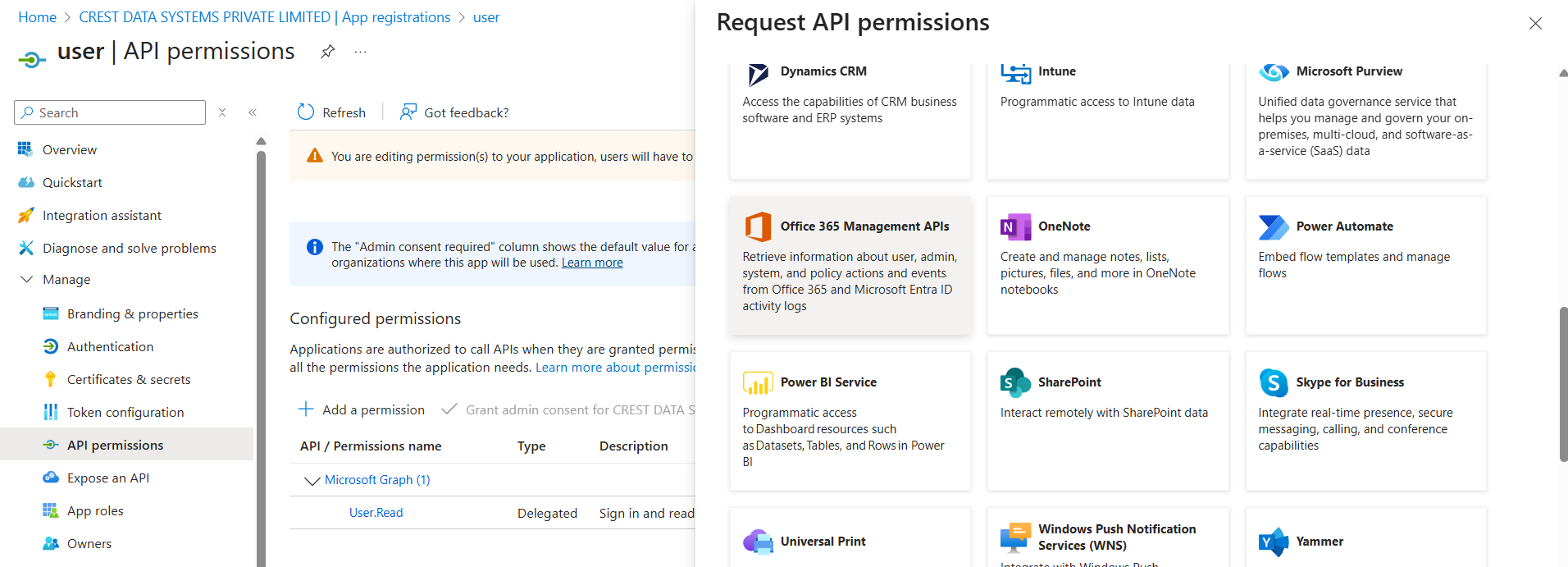
- Click
Application permissions.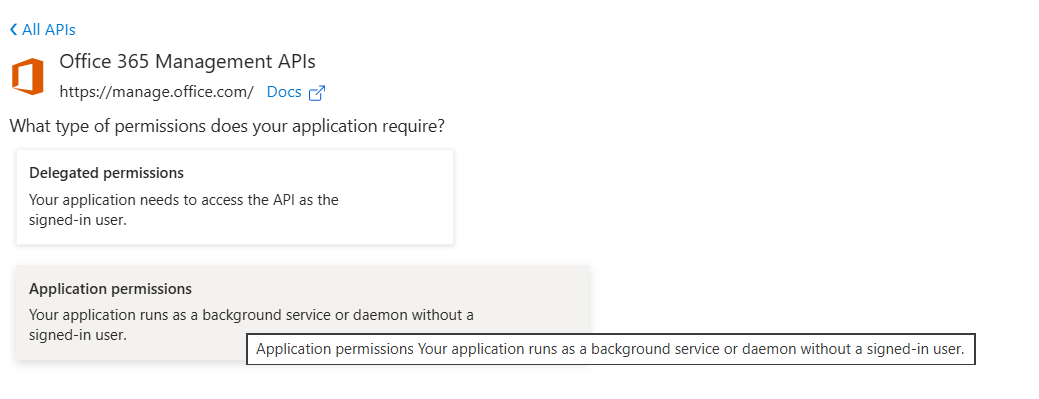
- Under
ActivityFeed, selectActivityFeed.Readpermission. This is minimum required permissions to read audit logs of your organization as provided in the documentation. Optionally, selectActivityFeed.ReadDlpto read DLP policy events. - Click
Add permissions.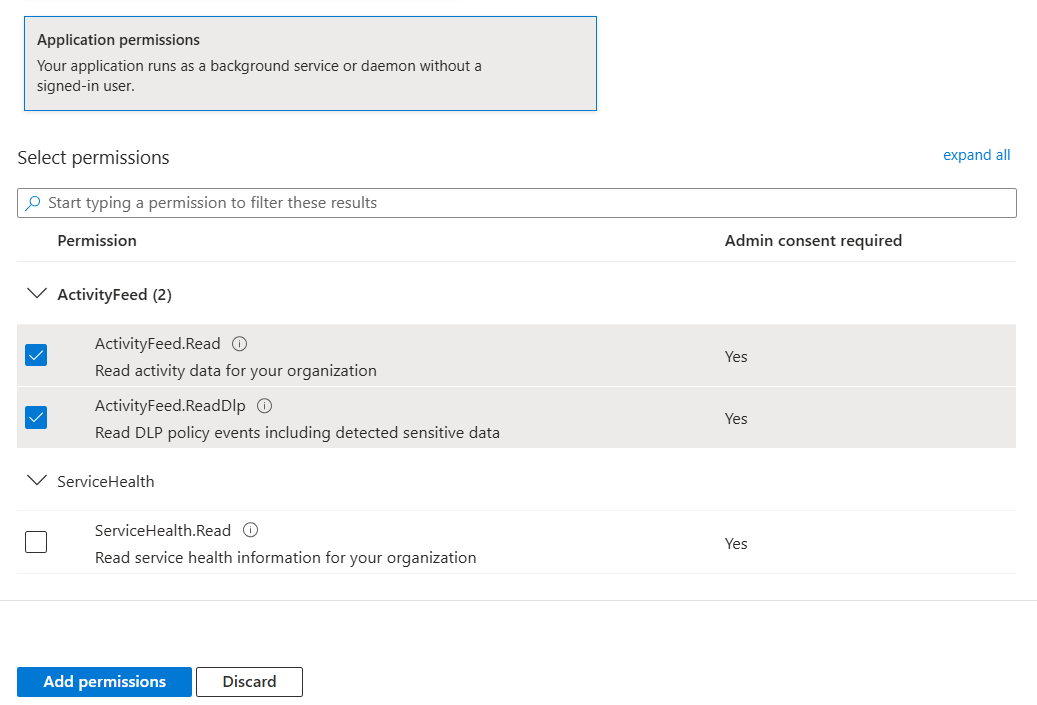
- If
User.Readpermission underMicrosoft.Graphtile is not added by default, add this permission. - After the permissions are added, the admin has to grant consent for these permissions.
- Navigate to
The instructions above assume that you wish to collect data from your own tenant. If that is not the case, additional steps are required to obtain tenant admin consent for the required permissions. The API documentation describes a method of gathering consent via redirect URLs, and other consent flows may be possible.
This integration supports both Elastic Managed and Agent-based installations.
Elastic Managed integrations are only supported on Elastic Cloud Serverless and Elastic Cloud Hosted deployments. An Elastic Managed integration lets you ingest data from a cloud source while avoiding the orchestration, management, and maintenance associated with standard ingest infrastructure. Elastic runs the collector for you, so you can focus on your data instead of the infrastructure that collects it.
For more information, refer to Elastic Managed integrations and the Elastic Managed integrations FAQ.
Elastic Agent must be installed. For more details, check the Elastic Agent installation instructions. You can install only one Elastic Agent per host.
- In the top search bar in Kibana, search for Integrations.
- In the search bar, type Microsoft Office 365.
- Select the Microsoft Office 365 integration from the search results.
- Select Add Microsoft Office 365 to add the integration.
- Enable and configure only the collection methods which you will use.
- To Collect audit logs, you'll need to configure Application (client) ID, Client Secret and Directory (tenant) ID.
- Do not use DEPRECATED - Collect audit logs as it's deprecated.
- Select Save and continue to save the integration.
- In the top search bar in Kibana, search for Dashboards.
- In the search bar, type Microsoft Office 365.
- Select a dashboard for the dataset you are collecting, and verify the dashboard information is populated.
- In the top search bar in Kibana, search for Transforms.
- Select the Data / Transforms from the search results.
- In the search bar, type o365.
- All transforms from the search results should indicate Healthy under the Health column.
Most issues fall into one of the scenarios below. For expected data delays (including the up-to-12-hour wait after first setup) and out-of-order delivery, see Data latency. To confirm the integration is working, see Validation.
When debugging a permissions issue or unexpected API responses, it can be useful to enable request tracing and inspect the request trace logs to see the interaction with the server. Token values can be decoded using https://jwt.ms/, and should include a roles section with the configured permissions.
For the full list of API error codes and their meanings, see the official Office 365 Management Activity API — Errors.
Security warning: request trace files are not redacted. They contain the Authorization header and, during OAuth2 token exchange, the client secret in clear text. Only enable request tracing in a controlled debugging session, restrict access to the trace files, disable it as soon as you are finished, and rotate the client secret if a trace file that may contain it was exposed. On Elastic Managed deployments this setting is not user-configurable.
The integration reports a degraded status in Fleet and logs OAuth2 token or subscription errors (for example, POST /activity/feed/subscriptions/start?contentType=...). Confirm that the client secret has not expired, that the Directory (tenant) ID and Application (client) ID are correct, and that admin consent is still granted. Generate a new client secret and update the integration if needed. The degraded status clears on the next successful poll.
A single content type returns 401 while the others keep working when a required API permission is missing. Ensure the Azure application has ActivityFeed.Read (and ActivityFeed.ReadDlp if the DLP.All content type is enabled), grant admin consent, and wait for the next poll. The integration logs the error and skips the affected content type until the permission is granted.
If the integration is healthy but no data appears: confirm that at least one content type is enabled, that you are past the initial latency window (see Data latency), and that there is audit activity in the tenant for the enabled workloads and time window. Check the logs for successful subscription start and content listing. Subscription start runs on every poll and is idempotent, so a 400 (already subscribed) response is expected and is treated as success.
On restart, the integration resumes from its saved position and backfills the missed window. Overlapping events are de-duplicated during ingest, so a resume does not create duplicates. The API retains data for a maximum of 7 days: outages shorter than that backfill automatically, but any window older than 7 days is purged by Microsoft and cannot be recovered.
If one integration policy reports a degraded status and stops collecting while others on the same agent stay healthy, check the logs for a persistent transport failure fetching error naming a URL whose host is not the configured Base URL of Office Management API — for example http://localhost/.... The API has occasionally returned a content URL built on a miscomputed base URL, which can never be fetched, and because it is saved in the integration's cursor, restarting the agent, re-enabling the integration and editing the policy all leave it in place. Version 3.11.1 rebuilds such URLs before use and repairs an affected cursor on the next poll, so upgrading is enough.
Repeated 429 responses indicate that the API's per-tenant rate limit has been reached. This is handled automatically by the built-in retry with exponential backoff. Persistent rate limiting across many tenants that share one Azure application may mean the application is over-subscribed; consider using separate application registrations.
If the o365 transforms do not show Healthy (see Validation), open the transform to check its messages for the underlying error (for example, permissions or mapping conflicts). Resolve the error, then stop and restart the transform and confirm that it returns to Healthy.
As Microsoft is no longer supporting Azure Active Directory Authentication Library (ADAL), the existing o365audit input has been deprecated in favor of the CEL input in version 1.18.0. Hence for versions >= 1.18.0, certificate based authentication (provided by earlier o365audit input) is no longer supported.
We request that users upgrading from integration version < 1.18.0 to >= 1.18.0 follow these steps:
- Upgrade the Elastic Stack version to
>= 8.7.1. - Upgrade the integration navigating via
Integrations -> Microsoft Office 365 -> Settings -> Upgrade - Upgrade the integration policy navigating via
Integrations -> Microsoft Office 365 -> integration policies -> Version (Upgrade). IfUpgradeoption doesn't appear under theVersion, that means the policy is already upgraded in the previous step. Please go to the next step. - Modify the integration policy:
- Disable existing configuration (marked as
Deprecated) and enableCollect Office 365 audit logs via CELconfiguration. - Add the required parameters such as
Directory (tenant) ID,Application (client) ID,Client Secretbased on the previous configuration. - Verify/Update
Initial Intervalconfiguration parameter to start fetching events from. This defaults to 7 days. Even if there is overlap in times, the events are not duplicated. - Update the other configuration parameters as required and hit
Save Integration.
- Disable existing configuration (marked as
Please refer Upgrade an integration in case of any issues while performing integration upgrade.
This integration works by creating a subscription for each enabled content type, checking each subscription for available data, and downloading any data that is available.
As discussed in Microsoft's Working with the Office 365 Management Activity API documentation, when a subscription is first created it can take up to 12 hours for the first data to become available. Users of this integration should expect to see that initial delay.
Data may become available out of order, so the earliest data will not necessarily be downloaded first. Data will be downloaded in the order in which it becomes available.
If a new integration policy is created to fetch data from existing subscriptions, earlier data may be available and the integration will try to fetch it. This can help to fill short gaps in data. The Initial Interval setting controls how far back it will look. By default it will check for data that became available in the last week, which is the maximum time range allowed by the API.
Example
{
    "@timestamp": "2020-02-07T16:43:53.000Z",
    "agent": {
        "ephemeral_id": "f173faa4-2d61-4c41-8670-06930fd22753",
        "id": "e9670ccb-33fc-41b0-90c1-b67dcf953c6a",
        "name": "elastic-agent-35357",
        "type": "filebeat",
        "version": "8.18.0"
    },
    "client": {
        "address": "213.97.47.133",
        "ip": "213.97.47.133"
    },
    "data_stream": {
        "dataset": "o365.audit",
        "namespace": "12427",
        "type": "logs"
    },
    "device": {
        "id": "62eedfc0-b73c-206c-a59d-16457c7ebcd8"
    },
    "ecs": {
        "version": "8.11.0"
    },
    "elastic_agent": {
        "id": "e9670ccb-33fc-41b0-90c1-b67dcf953c6a",
        "snapshot": false,
        "version": "8.18.0"
    },
    "event": {
        "action": "PageViewed",
        "agent_id_status": "verified",
        "category": [
            "web"
        ],
        "code": "SharePoint",
        "dataset": "o365.audit",
        "id": "99d005e6-a4c6-46fd-117c-08d7abeceab5",
        "ingested": "2025-12-15T13:36:59Z",
        "kind": "event",
        "original": "{\"ClientIP\":\"213.97.47.133\",\"CorrelationId\":\"622b339f-4000-a000-f25f-92b3478c7a25\",\"CreationTime\":\"2020-02-07T16:43:53\",\"CustomUniqueId\":true,\"EventSource\":\"SharePoint\",\"ExtendedProperties\":[{\"Name\":\"additionalDetails\",\"Value\":\"{\\\"DeviceId\\\":\\\"62eedfc0-b73c-206c-a59d-16457c7ebcd8\\\",\\\"DeviceOSType\\\":\\\"Linux\\\",\\\"DeviceTrustType\\\":\\\"\\\"}\"}],\"Id\":\"99d005e6-a4c6-46fd-117c-08d7abeceab5\",\"ItemType\":\"Page\",\"ListItemUniqueId\":\"59a8433d-9bb8-cfef-6edc-4c0fc8b86875\",\"ObjectId\":\"https://testsiem-my.sharepoint.com/personal/asr_testsiem_onmicrosoft_com/_layouts/15/onedrive.aspx\",\"Operation\":\"PageViewed\",\"OrganizationId\":\"b86ab9d4-fcf1-4b11-8a06-7a8f91b47fbd\",\"RecordType\":4,\"Site\":\"d5180cfc-3479-44d6-b410-8c985ac894e3\",\"UserAgent\":\"Mozilla/5.0 (Macintosh; Intel Mac OS X 10.14; rv:72.0) Gecko/20100101 Firefox/72.0\",\"UserId\":\"asr@testsiem.onmicrosoft.com\",\"UserKey\":\"i:0h.f|membership|1003200096971f55@live.com\",\"UserType\":0,\"Version\":1,\"WebId\":\"8c5c94bb-8396-470c-87d7-8999f440cd30\",\"Workload\":\"OneDrive\"}",
        "outcome": "success",
        "provider": "OneDrive",
        "type": [
            "info"
        ]
    },
    "host": {
        "id": "b86ab9d4-fcf1-4b11-8a06-7a8f91b47fbd",
        "name": "testsiem.onmicrosoft.com"
    },
    "input": {
        "type": "cel"
    },
    "network": {
        "type": "ipv4"
    },
    "o365": {
        "audit": {
            "CorrelationId": "622b339f-4000-a000-f25f-92b3478c7a25",
            "CreationTime": "2020-02-07T16:43:53",
            "CustomUniqueId": true,
            "EventSource": "SharePoint",
            "ExtendedProperties": {
                "additionalDetails": {
                    "DeviceId": "62eedfc0-b73c-206c-a59d-16457c7ebcd8",
                    "DeviceOSType": "Linux"
                }
            },
            "ItemType": "Page",
            "ListItemUniqueId": "59a8433d-9bb8-cfef-6edc-4c0fc8b86875",
            "ObjectId": "https://testsiem-my.sharepoint.com/personal/asr_testsiem_onmicrosoft_com/_layouts/15/onedrive.aspx",
            "RecordType": "4",
            "Site": "d5180cfc-3479-44d6-b410-8c985ac894e3",
            "UserId": "asr@testsiem.onmicrosoft.com",
            "UserKey": "i:0h.f|membership|1003200096971f55@live.com",
            "UserType": "0",
            "Version": "1",
            "WebId": "8c5c94bb-8396-470c-87d7-8999f440cd30"
        }
    },
    "organization": {
        "id": "b86ab9d4-fcf1-4b11-8a06-7a8f91b47fbd"
    },
    "related": {
        "hosts": [
            "testsiem.onmicrosoft.com"
        ],
        "ip": [
            "213.97.47.133"
        ],
        "user": [
            "asr",
            "asr@testsiem.onmicrosoft.com"
        ]
    },
    "source": {
        "ip": "213.97.47.133"
    },
    "tags": [
        "preserve_original_event",
        "forwarded",
        "o365-cel"
    ],
    "user": {
        "domain": "testsiem.onmicrosoft.com",
        "email": "asr@testsiem.onmicrosoft.com",
        "id": "asr@testsiem.onmicrosoft.com",
        "name": "asr"
    },
    "user_agent": {
        "device": {
            "name": "Mac"
        },
        "name": "Firefox",
        "original": "Mozilla/5.0 (Macintosh; Intel Mac OS X 10.14; rv:72.0) Gecko/20100101 Firefox/72.0",
        "os": {
            "full": "Mac OS X 10.14",
            "name": "Mac OS X",
            "version": "10.14"
        },
        "version": "72.0"
    }
}
Exported fields
| Field | Description | Type |
|---|---|---|
| @timestamp | Event timestamp. | date |
| application.name | Name of the application. | keyword |
| cloud.image.id | Image ID for the cloud instance. | keyword |
| data_stream.dataset | Data stream dataset name. | constant_keyword |
| data_stream.namespace | Data stream namespace. | constant_keyword |
| data_stream.type | Data stream type. | constant_keyword |
| email.attachments | A list of objects describing the attachment files sent along with an email message. | nested |
| email.attachments.file.extension | Attachment file extension, excluding the leading dot. | keyword |
| email.attachments.file.name | Name of the attachment file including the file extension. | keyword |
| email.attachments.file.size | Attachment file size in bytes. | long |
| event.dataset | Event dataset | constant_keyword |
| event.module | Event module | constant_keyword |
| file.size | File size in bytes. Only relevant when file.type is "file". |
long |
| host.containerized | If the host is a container. | boolean |
| host.os.build | OS build information. | keyword |
| host.os.codename | OS codename, if any. | keyword |
| input.type | Type of Filebeat input. | keyword |
| log.flags | Flags for the log file. | keyword |
| log.offset | Offset of the entry in the log file. | long |
| o365.audit.AadAppId | keyword | |
| o365.audit.Actions | flattened | |
| o365.audit.Activity | keyword | |
| o365.audit.Actor.ID | keyword | |
| o365.audit.Actor.Type | keyword | |
| o365.audit.ActorContextId | keyword | |
| o365.audit.ActorInfoString | keyword | |
| o365.audit.ActorIpAddress | keyword | |
| o365.audit.ActorUserId | keyword | |
| o365.audit.ActorYammerUserId | keyword | |
| o365.audit.AdditionalData.Name | keyword | |
| o365.audit.AdditionalData.Value | keyword | |
| o365.audit.AdditionalInfo.* | object | |
| o365.audit.AirAdminActionSource | keyword | |
| o365.audit.AirAdminActionType | keyword | |
| o365.audit.AlertEntityId | keyword | |
| o365.audit.AlertId | keyword | |
| o365.audit.AlertLinks | flattened | |
| o365.audit.AlertType | keyword | |
| o365.audit.AppAccessContext.* | object | |
| o365.audit.AppId | keyword | |
| o365.audit.Application | keyword | |
| o365.audit.ApplicationDisplayName | keyword | |
| o365.audit.ApplicationId | keyword | |
| o365.audit.Approver | keyword | |
| o365.audit.AttachmentData.FileName | keyword | |
| o365.audit.AttachmentData.FileType | keyword | |
| o365.audit.AttachmentData.FileVerdict | keyword | |
| o365.audit.AttachmentData.MalwareFamily | keyword | |
| o365.audit.AttachmentData.SHA256 | keyword | |
| o365.audit.AuthDetails.Name | keyword | |
| o365.audit.AuthDetails.Value | keyword | |
| o365.audit.AuthenticationType | keyword | |
| o365.audit.AzureActiveDirectoryEventType | keyword | |
| o365.audit.BCLValue | keyword | |
| o365.audit.BulkApprovalId | keyword | |
| o365.audit.Category | keyword | |
| o365.audit.ClientAppId | keyword | |
| o365.audit.ClientApplication | keyword | |
| o365.audit.ClientIP | keyword | |
| o365.audit.ClientIPAddress | keyword | |
| o365.audit.ClientInfoString | keyword | |
| o365.audit.ClientRequestId | keyword | |
| o365.audit.CmdletVersion | keyword | |
| o365.audit.Comments | text | |
| o365.audit.Connector | keyword | |
| o365.audit.CorrelationId | keyword | |
| o365.audit.CreationTime | keyword | |
| o365.audit.CustomUniqueId | boolean | |
| o365.audit.Data.ad | keyword | |
| o365.audit.Data.af | keyword | |
| o365.audit.Data.aii | keyword | |
| o365.audit.Data.ail | keyword | |
| o365.audit.Data.alk | keyword | |
| o365.audit.Data.als | keyword | |
| o365.audit.Data.an | keyword | |
| o365.audit.Data.at | date | |
| o365.audit.Data.cid | keyword | |
| o365.audit.Data.cpid | keyword | |
| o365.audit.Data.dm | keyword | |
| o365.audit.Data.dpn | keyword | |
| o365.audit.Data.eid | keyword | |
| o365.audit.Data.etps | keyword | |
| o365.audit.Data.etype | keyword | |
| o365.audit.Data.f3u | keyword | |
| o365.audit.Data.flattened | The full Data document. | flattened |
| o365.audit.Data.fvs | keyword | |
| o365.audit.Data.imsgid | keyword | |
| o365.audit.Data.lon | keyword | |
| o365.audit.Data.mat | keyword | |
| o365.audit.Data.md | date | |
| o365.audit.Data.ms | keyword | |
| o365.audit.Data.od | keyword | |
| o365.audit.Data.op | keyword | |
| o365.audit.Data.ot | keyword | |
| o365.audit.Data.plk | keyword | |
| o365.audit.Data.pud | keyword | |
| o365.audit.Data.reid | keyword | |
| o365.audit.Data.rid | keyword | |
| o365.audit.Data.sev | keyword | |
| o365.audit.Data.sict | keyword | |
| o365.audit.Data.sid | keyword | |
| o365.audit.Data.sip | ip | |
| o365.audit.Data.sitmi | keyword | |
| o365.audit.Data.srt | keyword | |
| o365.audit.Data.ssic | keyword | |
| o365.audit.Data.suid | keyword | |
| o365.audit.Data.tdc | keyword | |
| o365.audit.Data.te | date | |
| o365.audit.Data.thn | keyword | |
| o365.audit.Data.tht | keyword | |
| o365.audit.Data.tid | keyword | |
| o365.audit.Data.tpid | keyword | |
| o365.audit.Data.tpt | keyword | |
| o365.audit.Data.trc | keyword | |
| o365.audit.Data.ts | date | |
| o365.audit.Data.tsd | keyword | |
| o365.audit.Data.ttdt | date | |
| o365.audit.Data.ttr | keyword | |
| o365.audit.Data.upfc | keyword | |
| o365.audit.Data.upfv | keyword | |
| o365.audit.Data.ut | keyword | |
| o365.audit.Data.von | keyword | |
| o365.audit.Data.wl | keyword | |
| o365.audit.Data.zfh | keyword | |
| o365.audit.Data.zfn | keyword | |
| o365.audit.Data.zmfh | keyword | |
| o365.audit.Data.zmfn | keyword | |
| o365.audit.Data.zu | keyword | |
| o365.audit.DataType | keyword | |
| o365.audit.DatabaseType | keyword | |
| o365.audit.DeepLinkUrl | keyword | |
| o365.audit.DeliveryAction | keyword | |
| o365.audit.Description | match_only_text | |
| o365.audit.DetectionMethod | keyword | |
| o365.audit.DetectionType | keyword | |
| o365.audit.DeviceName | keyword | |
| o365.audit.Directionality | keyword | |
| o365.audit.EffectiveOrganization | keyword | |
| o365.audit.EndTimeUtc | date | |
| o365.audit.EntityType | keyword | |
| o365.audit.ErrorNumber | keyword | |
| o365.audit.EventData | keyword | |
| o365.audit.EventDeepLink | keyword | |
| o365.audit.EventSource | keyword | |
| o365.audit.ExceptionInfo.* | object | |
| o365.audit.ExchangeAggregatedFolders.FolderItems.Id | Item ID | keyword |
| o365.audit.ExchangeAggregatedFolders.FolderItems.ImmutableId | Immutable ID of the item | keyword |
| o365.audit.ExchangeAggregatedFolders.FolderItems.InternetMessageId | Internet message ID | keyword |
| o365.audit.ExchangeAggregatedFolders.FolderItems.SizeInBytes | Size of the item in bytes | long |
| o365.audit.ExchangeAggregatedFolders.Id | Folder ID | keyword |
| o365.audit.ExchangeAggregatedFolders.Path | Path of the folder | keyword |
| o365.audit.ExchangeAggregatedMessages.Id | Message ID | keyword |
| o365.audit.ExchangeAggregatedMessages.MessageItems.Id | Message item ID | keyword |
| o365.audit.ExchangeAggregatedMessages.MessageItems.SizeInBytes | Size of the message item in bytes | long |
| o365.audit.ExchangeAggregatedMessages.Path | Path of the message | keyword |
| o365.audit.ExchangeMetaData.* | long | |
| o365.audit.ExchangeMetaData.CC | keyword | |
| o365.audit.ExchangeMetaData.MessageID | keyword | |
| o365.audit.ExchangeMetaData.Sent | date | |
| o365.audit.ExchangeMetaData.Subject | keyword | |
| o365.audit.ExchangeMetaData.To | keyword | |
| o365.audit.ExchangeMetaData.UniqueID | keyword | |
| o365.audit.Experience | keyword | |
| o365.audit.ExtendedProperties.* | object | |
| o365.audit.ExtendedProperties.RequestType | keyword | |
| o365.audit.ExtendedProperties.additionalDetails | object | |
| o365.audit.ExternalAccess | boolean | |
| o365.audit.FileExtension | keyword | |
| o365.audit.FileSize | keyword | |
| o365.audit.FileSizeBytes | long | |
| o365.audit.FilteringDate | date | |
| o365.audit.GroupName | keyword | |
| o365.audit.Id | keyword | |
| o365.audit.ImplicitShare | keyword | |
| o365.audit.IncidentId | keyword | |
| o365.audit.InsightData.Type | keyword | |
| o365.audit.InsightId | keyword | |
| o365.audit.InterSystemsId | keyword | |
| o365.audit.InternalLogonType | keyword | |
| o365.audit.InternetMessageId | keyword | |
| o365.audit.IntraSystemId | keyword | |
| o365.audit.InvestigationId | keyword | |
| o365.audit.InvestigationName | keyword | |
| o365.audit.InvestigationType | keyword | |
| o365.audit.InvestigationUrn | keyword | |
| o365.audit.Item.* | object | |
| o365.audit.Item.*.* | object | |
| o365.audit.ItemName | keyword | |
| o365.audit.ItemType | keyword | |
| o365.audit.KesMailId | keyword | |
| o365.audit.Language | keyword | |
| o365.audit.LastUpdateTimeUtc | date | |
| o365.audit.LatestDeliveryLocation | keyword | |
| o365.audit.ListBaseType | keyword | |
| o365.audit.ListId | keyword | |
| o365.audit.ListItemUniqueId | keyword | |
| o365.audit.LogonError | keyword | |
| o365.audit.LogonType | keyword | |
| o365.audit.LogonUserSid | keyword | |
| o365.audit.MailboxGuid | keyword | |
| o365.audit.MailboxOwnerMasterAccountSid | keyword | |
| o365.audit.MailboxOwnerSid | keyword | |
| o365.audit.MailboxOwnerUPN | keyword | |
| o365.audit.Members | flattened | |
| o365.audit.Message | keyword | |
| o365.audit.MessageDate | keyword | |
| o365.audit.MessageObject | flattened | |
| o365.audit.MessageTime | keyword | |
| o365.audit.ModifiedProperties | object | |
| o365.audit.ModifiedProperties.*.* | object | |
| o365.audit.ModifiedProperties.Role_DisplayName.NewValue | keyword | |
| o365.audit.Name | keyword | |
| o365.audit.NetworkMessageId | keyword | |
| o365.audit.NewValue | keyword | |
| o365.audit.NonPIIParameters | keyword | |
| o365.audit.ObjectDisplayName | keyword | |
| o365.audit.ObjectId | keyword | |
| o365.audit.ObjectType | keyword | |
| o365.audit.Operation | keyword | |
| o365.audit.OperationCount | long | |
| o365.audit.OperationId | keyword | |
| o365.audit.OperationProperties | object | |
| o365.audit.OrganizationId | keyword | |
| o365.audit.OrganizationName | keyword | |
| o365.audit.OriginalDeliveryLocation | keyword | |
| o365.audit.OriginatingDomain | keyword | |
| o365.audit.OriginatingServer | keyword | |
| o365.audit.P1Sender | keyword | |
| o365.audit.P1SenderDomain | keyword | |
| o365.audit.P2Sender | keyword | |
| o365.audit.P2SenderDomain | keyword | |
| o365.audit.Parameters | object | |
| o365.audit.Parameters.* | object | |
| o365.audit.Parameters.AccessRights | keyword | |
| o365.audit.Parameters.AllowFederatedUsers | keyword | |
| o365.audit.Parameters.AllowGuestUser | keyword | |
| o365.audit.Parameters.Enabled | keyword | |
| o365.audit.Parameters.ForwardAsAttachmentTo | keyword | |
| o365.audit.Parameters.ForwardTo | keyword | |
| o365.audit.Parameters.From | keyword | |
| o365.audit.Parameters.RedirectTo | keyword | |
| o365.audit.PhishConfidenceLevel | keyword | |
| o365.audit.Platform | keyword | |
| o365.audit.Policy | keyword | |
| o365.audit.PolicyAction | keyword | |
| o365.audit.PolicyDetails | flattened | |
| o365.audit.PolicyId | keyword | |
| o365.audit.Recipients | keyword | |
| o365.audit.RecordType | keyword | |
| o365.audit.RelativeUrl | keyword | |
| o365.audit.RequestId | keyword | |
| o365.audit.RescanResult.Id | keyword | |
| o365.audit.RescanResult.RescanVerdict | keyword | |
| o365.audit.RescanResult.Timestamp | keyword | |
| o365.audit.ResultCount | keyword | |
| o365.audit.ResultStatus | keyword | |
| o365.audit.RunningTime | keyword | |
| o365.audit.SecurityComplianceCenterEventType | keyword | |
| o365.audit.Sender | keyword | |
| o365.audit.SenderEntity | object | |
| o365.audit.SenderIP | keyword | |
| o365.audit.SenderIp | keyword | |
| o365.audit.SensitiveInfoDetectionIsIncluded | boolean | |
| o365.audit.SensitivityLabelEventData.ActionSourceDetail | long | |
| o365.audit.SensitivityLabelEventData.ContentType | keyword | |
| o365.audit.SensitivityLabelEventData.LabelEventType | long | |
| o365.audit.SensitivityLabelEventData.SensitivityLabelId | keyword | |
| o365.audit.SessionId | keyword | |
| o365.audit.Severity | keyword | |
| o365.audit.Sha1 | keyword | |
| o365.audit.Sha256 | keyword | |
| o365.audit.SharePointMetaData.* | object | |
| o365.audit.Site | keyword | |
| o365.audit.SiteUrl | keyword | |
| o365.audit.Source | keyword | |
| o365.audit.SourceFileExtension | keyword | |
| o365.audit.SourceFileName | keyword | |
| o365.audit.SourceRelativeUrl | keyword | |
| o365.audit.StartTime | keyword | |
| o365.audit.StartTimeUtc | keyword | |
| o365.audit.Status | keyword | |
| o365.audit.SubAirAdminActionTypeMail | keyword | |
| o365.audit.Subject | keyword | |
| o365.audit.SubmissionConfidenceLevel | keyword | |
| o365.audit.SubmissionContentSubType | keyword | |
| o365.audit.SubmissionContentType | keyword | |
| o365.audit.SubmissionId | keyword | |
| o365.audit.SubmissionState | keyword | |
| o365.audit.SubmissionType | keyword | |
| o365.audit.Submitter | keyword | |
| o365.audit.SubmitterId | keyword | |
| o365.audit.SupportTicketId | keyword | |
| o365.audit.SystemOverrides.Details | keyword | |
| o365.audit.SystemOverrides.FinalOverride | keyword | |
| o365.audit.SystemOverrides.Result | keyword | |
| o365.audit.SystemOverrides.Source | keyword | |
| o365.audit.Target.ID | keyword | |
| o365.audit.Target.Type | keyword | |
| o365.audit.TargetContextId | keyword | |
| o365.audit.TargetFilePath | keyword | |
| o365.audit.TargetUserOrGroupName | keyword | |
| o365.audit.TargetUserOrGroupType | keyword | |
| o365.audit.TeamGuid | keyword | |
| o365.audit.TeamName | keyword | |
| o365.audit.ThreatDetectionMethods | keyword | |
| o365.audit.Timestamp | keyword | |
| o365.audit.TokenObjectId | keyword | |
| o365.audit.TokenTenantId | keyword | |
| o365.audit.UniqueSharingId | keyword | |
| o365.audit.UserAgent | keyword | |
| o365.audit.UserId | keyword | |
| o365.audit.UserKey | keyword | |
| o365.audit.UserType | keyword | |
| o365.audit.Verdict | keyword | |
| o365.audit.Version | keyword | |
| o365.audit.WebId | keyword | |
| o365.audit.Workload | keyword | |
| o365.audit.WorkspaceId | keyword | |
| o365.audit.WorkspaceName | keyword | |
| o365.audit.YammerNetworkId | keyword | |
| session.id | The unique identifier for the authentication session. | keyword |
| token.id | The unique token identifier of the API call used to make the audited change. | keyword |
These inputs are used in this integration:
This integration dataset uses the following APIs:
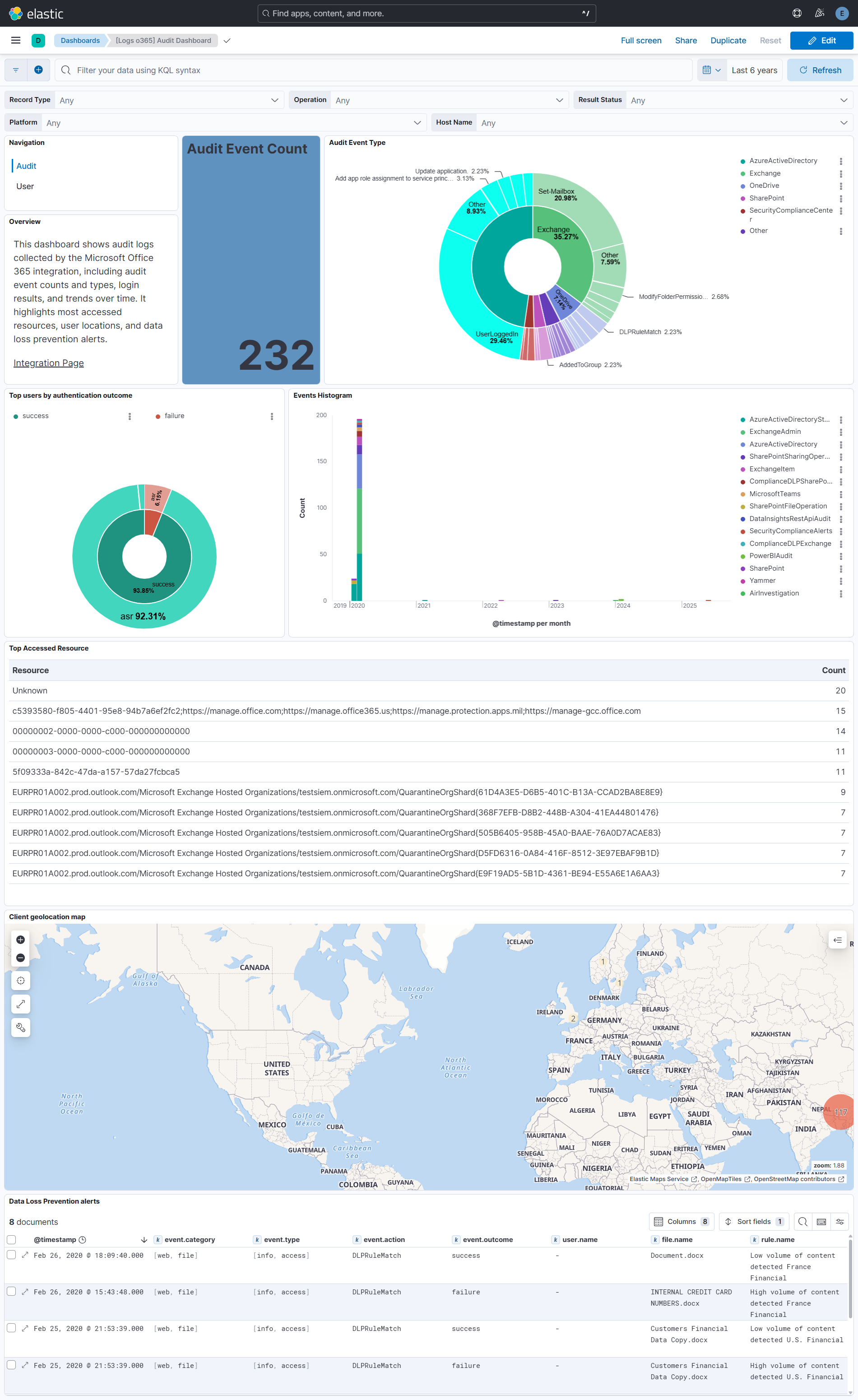
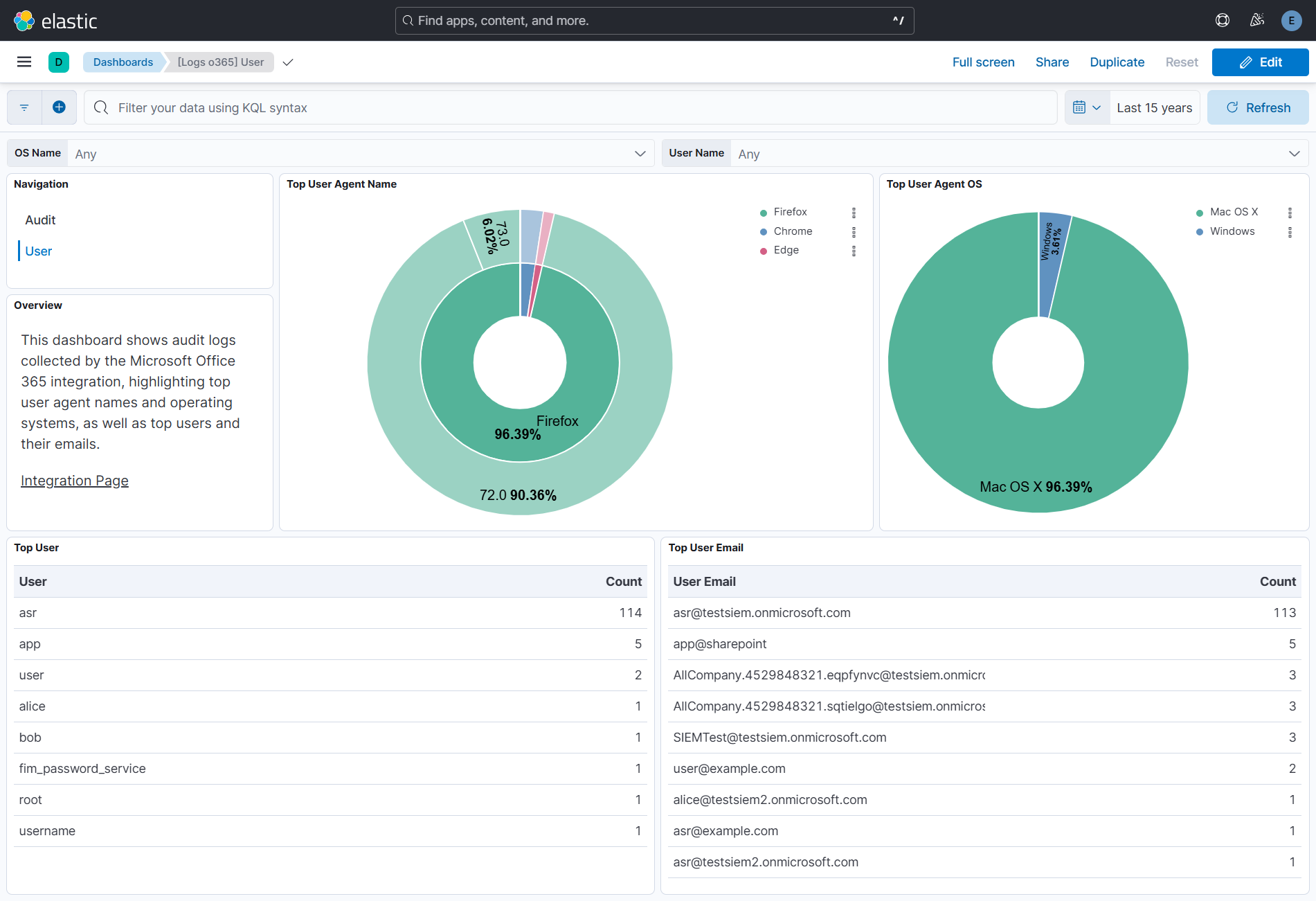
This integration includes one or more Kibana dashboards that visualizes the data collected by the integration. The screenshots below illustrate how the ingested data is displayed.
Changelog
| Version | Details | Minimum Kibana version |
|---|---|---|
| 4.1.0 | Enhancement (View pull request) Update Elastic Managed integration documentation to the current wording and docs links. |
9.1.0 8.19.0 |
| 4.0.2 | Bug fix (View pull request) Fix ingest pipeline failures, introduced in 4.0.0, on SharePoint and OneDrive list events whose ListBaseType is a name such as DocumentLibrary. These events were indexed as pipeline_error without any ECS fields. |
9.1.0 8.19.0 |
| 4.0.1 | Bug fix (View pull request) Add an explicit mapping for file.size in the audit data stream, to match the ECS field type. |
9.1.0 8.19.0 |
| 4.0.0 | Bug fix (View pull request) Restore number types in the _source of audit events. Values such as file sizes and counts, which had been strings since 3.8.2, are numbers again.Breaking change (View pull request) Some numeric fields in the _source of audit events change type from string back to number. Rules or queries that relied on the string values introduced in 3.8.2 may need updating. |
9.1.0 8.19.0 |
| 3.11.1 | Bug fix (View pull request) Rebuild audit content URLs that the Office 365 Management Activity API returns on a miscomputed base URL. A contentUri of the form http://localhost/<tenant>/activity/feed/audit/<id> can never be fetched, and because it is persisted in the cursor it stopped all collection for the affected tenant until the content expired up to two weeks later, surviving agent restarts, disabling and re-enabling the integration, and policy changes. Such URLs are now rebuilt from the configured resource URL before use, which also repairs cursors already affected before the upgrade.Bug fix (View pull request) Skip an audit content item the API rejects, instead of requesting it again on every evaluation. The branch meant to skip it returned its error in a form the runtime treats as an error condition, which discarded the cursor advance that would have dropped the item, so a permanently rejected item was retried up to max_executions times per polling interval and blocked everything queued behind it. |
9.1.0 8.19.0 |
| 3.11.0 | Enhancement (View pull request) Report the audit input as degraded after repeated consecutive transport-level request failures (for example an expired client secret failing OAuth 2.0 token acquisition) instead of reporting healthy while collection has silently stopped. Isolated transient failures below the new transport_failure_threshold keep the existing recover-and-continue behaviour, so a single unfetchable item still does not stall collection. |
9.1.0 8.19.0 |
| 3.10.8 | Enhancement (View pull request) Set agentless deployment mode release field to ga. |
9.1.0 8.19.0 |
| 3.10.7 | Bug fix (View pull request) Fix document_parsing_exception on o365.audit.Message for AIInteractionCreatedNotification events by moving object-typed values to o365.audit.MessageObject. |
9.1.0 8.19.0 |
| 3.10.6 | Bug fix (View pull request) Prevent the audit data stream from stalling when a content or listing request fails at the transport level (for example a dropped connection or a truncated response body). Such failures are now caught and advance the cursor instead of freezing it, so a single unfetchable item no longer blocks all further collection until the agent is restarted. |
9.1.0 8.19.0 |
| 3.10.5 | Enhancement (View pull request) Expand the README troubleshooting section with common scenarios (authentication failures, missing permissions, no data collected, outage recovery, rate limiting, and unhealthy transforms) and add a security note that request trace files are not redacted. |
9.1.0 8.19.0 |
| 3.10.4 | Bug fix (View pull request) Fix document_parsing_exception on o365.audit.Sender by reverting it to keyword and moving structured Sender objects to the new o365.audit.SenderEntity field. |
9.1.0 8.19.0 |
| 3.10.3 | Bug fix (View pull request) Fix script_item_attachments processor failing with a Painless regex character-limit error on long attachment filenames that contain parentheses. The regex is replaced with string operations that have no backtracking cost.Bug fix (View pull request) Set subobjects: false on o365.audit.Sender field to avoid document_parsing_exception when the field arrives as a structured object instead of a plain string. |
9.1.0 8.19.0 |
| 3.10.2 | Bug fix (View pull request) Use the ECS definition for email.attachments. |
9.1.0 8.19.0 |
| 3.10.1 | Bug fix (View pull request) Remove redundant filtering logic for non-cursor state. |
9.1.0 8.19.0 |
| 3.10.0 | Enhancement (View pull request) Use new release field for agentless deployment mode to establish as beta. |
9.1.0 8.19.0 |
| 3.9.0 | Enhancement (View pull request) Remove unnecessary event.original duplication from CEL program and gate pipeline serialization on preserve_original_event tag to reduce agent memory usage and avoid wasteful serialization that Fleet's final pipeline discards. |
9.1.0 8.19.0 |
| 3.8.3 | Bug fix (View pull request) Fix ambiguity in default value for resource_timeout setting. |
9.1.0 8.19.0 |
| 3.8.2 | Bug fix (View pull request) Keep numbers as strings through to Elasticsearch. |
9.1.0 8.19.0 |
| 3.8.1 | Bug fix (View pull request) Prune queued listing links whose startTime is already outside the API's accepted window so that prolonged periods without successful fetches (e.g. auth failures during a credential rotation, or agent downtime longer than seven days) self-heal on resume instead of looping on AF20055. |
9.0.0 8.18.0 |
| 3.8.0 | Enhancement (View pull request) Increase field limits to avoid unindexed ECS fields. |
9.0.0 8.18.0 |
| 3.7.1 | Bug fix (View pull request) Fix stale content types persisting in cursor after configuration changes in the audit dataset. |
9.0.0 8.18.0 |
| 3.7.0 | Enhancement (View pull request) Expand date format for the o365.audit.data.ts and o365.audit.data.te fields. |
9.0.0 8.18.0 |
| 3.6.0 | Enhancement (View pull request) Resize logo so it appears larger in Kibana. |
9.0.0 8.18.0 |
| 3.5.0 | Enhancement (View pull request) Add tags to ingest pipelines. |
9.0.0 8.18.0 |
| 3.4.0 | Enhancement (View pull request) Add support for email.message_id , email.subject and email.attachments.* in exchange item event. |
9.0.0 8.18.0 |
| 3.3.1 | Bug fix (View pull request) Remove duplicate security-solution-default tag references |
9.0.0 8.18.0 |
| 3.3.0 | Enhancement (View pull request) Add support for host.os.*, email.sender.address and destination.user.email field.Add event.category for ExchangeItem event.Expand coverage for related.* fields. |
9.0.0 8.18.0 |
| 3.2.0 | Enhancement (View pull request) Improve documentation to align with new guidelines. |
9.0.0 8.18.0 |
| 3.1.0 | Enhancement (View pull request) Simplifies data fetching logic. |
9.0.0 8.18.0 |
| 3.0.0 | Bug fix (View pull request) Fix dynamic mapping conflict for o365audit.ExtendedProperties.additionalDetails field by explicitly defining it as an object.Breaking change (View pull request) The o365audit.ExtendedProperties.additionalDetails_value field is no longer retained. |
9.0.0 8.18.0 |
| 2.33.1 | Enhancement (View pull request) Reverts earlier o365.audit.OperationCount mapping change to ensure that the field remains a long. |
9.0.0 8.18.0 |
| 2.33.0 | Enhancement (View pull request) Fix flattening errors in Action List items due to duplicate QueryTime fields by removing duplicate field.Bug fix (View pull request) Fixes undefined errors by adding fields ActorInfoString, OperationCount, TokenObjectId, TokenTenantIdBug fix (View pull request) Fixes errors due to SizeInBytes fields in Messages and Folders structures previously imported as long and then being sent as floats. Moves the fields to explicitly defined fields ExchangeAggregatedMessages and ExchangeAggregatedFoldersand explicitly converts SizeInBytes to long for record type 50: ExchangeItemAggregated. |
9.0.0 8.18.0 |
| 2.32.0 | Enhancement (View pull request) Add device.id and user_agent fields from ExtendedProperties.additionalDetails. |
9.0.0 8.18.0 |
| 2.31.0 | Enhancement (View pull request) Improve documentation. |
9.0.0 8.18.0 |
| 2.30.0 | Enhancement (View pull request) Audit event type visualization now breaks down by event.action and event.provider. [Logs O365] removed from all visualization titles. Added accessed resource visualization in the audit dashboard. Added user dashboard showing user info and user agent. |
9.0.0 8.18.0 |
| 2.29.3 | Bug fix (View pull request) Fix 429 due to multiple subscription start attempts. |
9.0.0 8.18.0 |
| 2.29.2 | Bug fix (View pull request) Fix handling of error propagation within agent CEL program. |
9.0.0 8.18.0 |
| 2.29.1 | Bug fix (View pull request) Fix handling of error conditions when requesting work continuation. |
9.0.0 8.18.0 |
| 2.29.0 | Enhancement (View pull request) Tolerate undocumented API changes in request parameter syntax. |
9.0.0 8.18.0 |
| 2.28.0 | Enhancement (View pull request) Improvements in the integration UI layout, highlight deprecated data stream. |
9.0.0 8.18.0 |
| 2.27.0 | Enhancement (View pull request) Improve permissions documentation. |
9.0.0 8.18.0 |
| 2.26.2 | Bug fix (View pull request) Tolerate missing cursor elements when advancing. |
9.0.0 8.18.0 |
| 2.26.1 | Bug fix (View pull request) Ensure that cursors are not updated to times in the future. |
9.0.0 8.18.0 |
| 2.26.0 | Enhancement (View pull request) Add field definitions for o365.audit.SensitivityLabelEventData.* fields. |
9.0.0 8.18.0 |
| 2.25.0 | Enhancement (View pull request) Revise agent collector code to reduce memory, CPU and network load and API brittleness. |
9.0.0 8.18.0 |
| 2.24.0 | Enhancement (View pull request) Tolerate string elements in Actions list. |
9.0.0 8.18.0 |
| 2.23.0 | Enhancement (View pull request) Reduce repeated work and memory allocations during agent processing. |
9.0.0 8.18.0 |
| 2.22.0 | Enhancement (View pull request) Add option to control all oauth2 endpoint_params. |
9.0.0 8.18.0 |
| 2.21.1 | Enhancement (View pull request) Add explicit mapping for AuthenticationType field to fix detection rule. |
9.0.0 8.18.0 |
| 2.21.0 | Enhancement (View pull request) Surface credential or subscription errors in Fleet status. |
9.0.0 8.18.0 |
| 2.20.0 | Enhancement (View pull request) Explain data latency in the documentation. |
9.0.0 8.18.0 |
| 2.19.0 | Enhancement (View pull request) Populate message field from the O365 Audit Log fields instead of Subject field in ComplianceDLPExchange events to better reflect Alert Titles. |
9.0.0 8.18.0 |
| 2.18.7 | Bug fix (View pull request) No delays until up-to-date. |
9.0.0 8.18.0 |
| 2.18.6 | Bug fix (View pull request) Stricter enforcement of maximum age limits. |
9.0.0 8.18.0 |
| 2.18.5 | Bug fix (View pull request) Ensure numeric Yammer IDs are not rendered with E-notation. |
9.0.0 8.18.0 |
| 2.18.4 | Bug fix (View pull request) Fix handling of floating point encoded file sizes. Bug fix (View pull request) Fix handling of numeric IDs. |
9.0.0 8.18.0 |
| 2.18.3 | Enhancement (View pull request) Report failures in rename processor that occur when the organization.* fields are already present. |
9.0.0 8.18.0 |
| 2.18.2 | Bug fix (View pull request) Add temporary processor to remove the fields added by the Agentless policy. |
9.0.0 8.18.0 |
| 2.18.1 | Bug fix (View pull request) Prevent convert processor failures with fields with empty string values. Bug fix (View pull request) Avoid script parameter allocations. |
9.0.0 8.18.0 |
| 2.18.0 | Enhancement (View pull request) ECS mapping improvements. |
9.0.0 8.18.0 |
| 2.17.1 | Bug fix (View pull request) Validate organization field type before accessing subfields. |
9.0.0 8.18.0 |
| 2.17.0 | Enhancement (View pull request) Set application.name, device.id, session.id, and token.id in audit dataset. |
9.0.0 8.18.0 |
| 2.16.1 | Bug fix (View pull request) Ignore failures in rename process for organization fields to avoid collision with Agentless organization field. This is a temporary workaround until https://github.com/elastic/kibana/issues/221312 is addressed. |
9.0.0 8.18.0 |
| 2.16.0 | Enhancement (View pull request) Populate message field from the O365 Audit Log Name field instead of Comments in SecurityComplianceAlerts events to better reflect Alert Titles. |
9.0.0 8.18.0 |
| 2.15.2 | Bug fix (View pull request) Set subobjects false to o365.audit.Parameters and o365.audit.ModifiedProperties to avoid mapping conflicts. |
9.0.0 8.18.0 |
| 2.15.1 | Bug fix (View pull request) Ensure that empty results do not lead to subsequent invalid API requests. |
9.0.0 8.18.0 |
| 2.15.0 | Enhancement (View pull request) Improve clarity of CEL agent collector code. |
9.0.0 8.18.0 |
| 2.14.1 | Bug fix (View pull request) Fix default request trace enabled behavior. |
9.0.0 8.18.0 |
| 2.14.0 | Enhancement (View pull request) Improve rendering of event.original in documents.Bug fix (View pull request) Prevent diagnostics rendering the CEL program as a double-quoted string. |
9.0.0 8.18.0 |
| 2.13.0 | Enhancement (View pull request) Enable request trace log removal. |
9.0.0 8.18.0 |
| 2.12.0 | Enhancement (View pull request) Enable Agentless deployments and updated default.yml to use package-spec 3.2.3. |
9.0.0 8.18.0 |
| 2.11.0 | Enhancement (View pull request) Update Kibana constraint to support 9.0.0. |
9.0.0 8.13.0 |
| 2.10.0 | Enhancement (View pull request) Extract ECS fields from Data and AttachmentData. |
8.13.0 |
| 2.9.0 | Enhancement (View pull request) Static fields for use by security rules. |
8.13.0 |
| 2.8.1 | Bug fix (View pull request) Silence absent URL complaints in debug logs. |
8.13.0 |
| 2.8.0 | Enhancement (View pull request) Do not remove event.original in main ingest pipeline. |
8.13.0 |
| 2.7.0 | Enhancement (View pull request) Add "preserve_original_event" tag to documents with event.kind set to "pipeline_error". |
8.13.0 |
| 2.6.5 | Bug fix (View pull request) Fix the processing of duplicated QueryTime in Data field. |
8.13.0 |
| 2.6.4 | Bug fix (View pull request) Remove in-program template snippets and format CEL code. |
8.13.0 |
| 2.6.3 | Bug fix (View pull request) Added guardrails to various array accessors to prevent out-of-bounds errors and cleaned up some existing code. |
8.13.0 |
| 2.6.2 | Bug fix (View pull request) Add missing resource_timeout to CEL input. |
8.13.0 |
| 2.6.1 | Bug fix (View pull request) Use triple-brace Mustache templating when referencing variables in ingest pipelines. |
8.13.0 |
| 2.6.0 | Enhancement (View pull request) Tighten IPv4 extraction from IPv4-mapped IPv6 addresses. |
8.13.0 |
| 2.5.2 | Bug fix (View pull request) Fix definition of ExchangeMetadata subfields. |
8.13.0 |
| 2.5.1 | Bug fix (View pull request) Add Office to titles and description to better align with integration purpose. |
8.13.0 |
| 2.5.0 | Enhancement (View pull request) Increase request tracer log count to ten. |
8.13.0 |
| 2.4.0 | Enhancement (View pull request) Update the kibana constraint to ^8.13.0. Modified the field definitions to remove ECS fields made redundant by the ecs@mappings component template. |
8.13.0 |
| 2.3.3 | Bug fix (View pull request) Improve handling of o365.audit.AdditionalInfo. |
8.12.0 |
| 2.3.2 | Bug fix (View pull request) Improve handling of o365.audit.OperationProperties. |
8.12.0 |
| 2.3.1 | Bug fix (View pull request) Check contentExpiration timestamp before requesting contents. |
8.12.0 |
| 2.3.0 | Enhancement (View pull request) Set sensitive values as secret and fix incorrect mappings. |
8.12.0 |
| 2.2.2 | Bug fix (View pull request) Fix dashboard panel filters |
8.10.1 |
| 2.2.1 | Bug fix (View pull request) Prevent tenant ID being rendered into debug logs. |
8.7.1 |
| 2.2.0 | Enhancement (View pull request) Expose OAuth2 token scopes configuration value. |
8.7.1 |
| 2.1.2 | Bug fix (View pull request) Add error.message ECS field mapping. |
8.7.1 |
| 2.1.1 | Enhancement (View pull request) Changed owners |
8.7.1 |
| 2.1.0 | Enhancement (View pull request) Add extra values to related.user. |
8.7.1 |
| 2.0.0 | Enhancement (View pull request) Mapping, parsing of o365.audit fields Platform and Data.*. |
8.7.1 |
| 1.29.2 | Enhancement (View pull request) Add note to docs about configuring the Token URL. |
8.7.1 |
| 1.29.1 | Enhancement (View pull request) Add required permissions to docs. |
8.7.1 |
| 1.29.0 | Enhancement (View pull request) Limit request tracer log count to five. |
8.7.1 |
| 1.28.0 | Enhancement (View pull request) ECS version updated to 8.11.0. |
8.7.1 |
| 1.27.0 | Enhancement (View pull request) Allow user configuration of API request batch size. |
8.7.1 |
| 1.26.0 | Bug fix (View pull request) Preserve 'event.original' from 'o365audit' field. |
8.7.1 |
| 1.25.2 | Bug fix (View pull request) Prevent initial API call failure when a delayed call would result in a start time before 168h in the past. |
8.7.1 |
| 1.25.1 | Bug fix (View pull request) Add start time fallback for responses that do not include the startTime query.Bug fix (View pull request) Add mappings for o365.audit.AdditionalInfo.* and o365.audit.AppAccessContext.*. |
8.7.1 |
| 1.25.0 | Enhancement (View pull request) Improve 'event.original' check to avoid errors if set. |
8.7.1 |
| 1.24.1 | Enhancement (View pull request) Fix mappings for dynamically mapped fields. |
8.7.1 |
| 1.24.0 | Enhancement (View pull request) ECS version updated to 8.10.0. |
8.7.1 |
| 1.23.0 | Enhancement (View pull request) The format_version in the package manifest changed from 2.11.0 to 3.0.0. Removed dotted YAML keys from package manifest. Added 'owner.type: elastic' to package manifest. |
8.7.1 |
| 1.22.0 | Enhancement (View pull request) Add tags.yml file so that integration's dashboards and saved searches are tagged with "Security Solution" and displayed in the Security Solution UI. |
8.7.1 |
| 1.21.0 | Enhancement (View pull request) Increase CEL resource.tracer.maxsize to prevent loss of trace responses. |
8.7.1 |
| 1.20.1 | Bug fix (View pull request) Fix timestamp error in CEL input |
8.7.1 |
| 1.20.0 | Enhancement (View pull request) Update package to ECS 8.9.0. |
8.7.1 |
| 1.19.0 | Enhancement (View pull request) Update package-spec to 2.9.0. |
8.7.1 |
| 1.18.0 | Enhancement (View pull request) Migrate to CEL input from o365audit input |
8.7.1 |
| 1.17.0 | Enhancement (View pull request) Convert visualizations to lens. |
8.7.1 |
| 1.16.0 | Enhancement (View pull request) Ensure event.kind is correctly set for pipeline errors. |
8.1.0 |
| 1.15.0 | Enhancement (View pull request) Update package to ECS 8.8.0. |
8.1.0 |
| 1.14.1 | Enhancement (View pull request) Add FileSizeBytes field in o365.audit |
8.1.0 |
| 1.14.0 | Enhancement (View pull request) Update package to ECS 8.7.0. |
8.1.0 |
| 1.13.1 | Enhancement (View pull request) Added categories and/or subcategories. |
8.1.0 |
| 1.13.0 | Enhancement (View pull request) Add NewValue field to o365.audit. |
8.1.0 |
| 1.12.0 | Enhancement (View pull request) Add NewValue field to o365.audit. |
8.1.0 |
| 1.11.0 | Enhancement (View pull request) Retain file, directory and URL details for SharePointSharingOperation. |
8.1.0 |
| 1.10.1 | Enhancement (View pull request) Add fingerprint processor to prevent ingestion of duplicate events. |
8.1.0 |
| 1.10.0 | Enhancement (View pull request) Update package to ECS 8.6.0. |
8.1.0 |
| 1.9.2 | Enhancement (View pull request) Migrate the visualizations to by value in dashboards to minimize the saved object clutter and reduce time to load |
8.1.0 |
| 1.9.1 | Bug fix (View pull request) Remove duplicate fields. |
8.0.0 7.14.0 |
| 1.9.0 | Enhancement (View pull request) Update package to ECS 8.5.0. |
8.0.0 7.14.0 |
| 1.8.2 | Enhancement (View pull request) Use ECS geo.location definition. |
8.0.0 7.14.0 |
| 1.8.1 | Enhancement (View pull request) Added link to Microsoft documentation. |
8.0.0 7.14.0 |
| 1.8.0 | Enhancement (View pull request) Update package to ECS 8.4.0 |
8.0.0 7.14.0 |
| 1.7.1 | Enhancement (View pull request) Update package name and description to align with standard wording |
8.0.0 7.14.0 |
| 1.7.0 | Enhancement (View pull request) Update package to ECS 8.3.0. |
8.0.0 7.14.0 |
| 1.6.0 | Enhancement (View pull request) Extend list of mapped record types |
8.0.0 7.14.0 |
| 1.5.1 | Bug fix (View pull request) Fix processing of ModifiedProperties when it is a list of strings |
8.0.0 7.14.0 |
| 1.5.0 | Enhancement (View pull request) Update to ECS 8.2 |
— |
| 1.4.3 | Enhancement (View pull request) Replace invalid field value |
8.0.0 7.14.0 |
| 1.4.2 | Enhancement (View pull request) Add documentation for multi-fields |
8.0.0 7.14.0 |
| 1.4.1 | Bug fix (View pull request) Fix grok parsing errors due to invalid IP addresses. |
8.0.0 7.14.0 |
| 1.4.0 | Enhancement (View pull request) Update to ECS 8.0 |
8.0.0 7.14.0 |
| 1.3.2 | Bug fix (View pull request) Regenerate test files using the new GeoIP database |
8.0.0 7.14.0 |
| 1.3.1 | Bug fix (View pull request) Change test public IPs to the supported subset |
— |
| 1.3.0 | Enhancement (View pull request) Add 8.0.0 version constraint |
8.0.0 7.14.0 |
| 1.2.4 | Enhancement (View pull request) Uniform with guidelines |
7.14.0 |
| 1.2.3 | Bug fix (View pull request) Fix processors configuration |
7.14.0 |
| 1.2.2 | Enhancement (View pull request) Update Title and Description. |
— |
| 1.2.1 | Bug fix (View pull request) Fix logic that checks for the 'forwarded' tag |
— |
| 1.2.0 | Enhancement (View pull request) Update to ECS 1.12.0 |
— |
| 1.1.4 | Bug fix (View pull request) additional type assertions in painless scripts |
7.14.0 |
| 1.1.3 | Enhancement (View pull request) Convert to generated ECS fields |
— |
| 1.1.2 | Enhancement (View pull request) update to ECS 1.11.0 |
— |
| 1.1.1 | Enhancement (View pull request) Escape special characters in docs |
— |
| 1.1.0 | Enhancement (View pull request) Update integration description |
— |
| 1.0.0 | Enhancement (View pull request) make GA Enhancement (View pull request) Set "event.module" and "event.dataset" |
7.14.0 |
| 0.6.2 | Enhancement (View pull request) Use wildcard field type for the relevant ECS fields. |
— |
| 0.6.1 | Enhancement (View pull request) small pipeline fix for parameters when they are string instead of objects |
— |
| 0.6.0 | Enhancement (View pull request) add system tests Enhancement (View pull request) fixes o365audit config file |
— |
| 0.5.0 | Enhancement (View pull request) update to ECS 1.10.0 and adding event.original options |
— |
| 0.4.0 | Enhancement (View pull request) moving edge processing to ingest pipelines |
— |
| 0.3.2 | Enhancement (View pull request) update to ECS 1.9.0 |
— |
| 0.3.1 | Bug fix (View pull request) Change kibana.version constraint to be more conservative. |
— |
| 0.3.0 | Enhancement (View pull request) Add changes to use ECS 1.8 fields. |
— |
| 0.1.0 | Enhancement (View pull request) initial release |
— |