Wiz
Elastic Cloud Serverless projects are autoscaled environments, fully managed by Elastic and available on Elastic Cloud. Availability This functionality is generally available and ready for production usage. Elastic Cloud Serverless projects are autoscaled environments, fully managed by Elastic and available on Elastic Cloud. Availability This functionality is generally available and ready for production usage. The Elastic Stack includes Elastic's core products such as Elasticsearch, Kibana, Logstash, and Beats. Availability This functionality is generally available and ready for production usage. Unless stated otherwise on the page, this functionality is available when your Elastic Stack is deployed on Elastic Cloud Hosted, Elastic Cloud Enterprise, Elastic Cloud on Kubernetes, and self-managed environments. This documentation corresponds to the latest patch available for each minor version. If you're not using the latest patch, check the release notes for changes.
Serverless Observability
Generally available
Serverless Security
Generally available
Stack
9.1+
Generally available since 9.1
| Version | 4.9.0 (View all) |
| Managed integration release status | GA |
| Subscription level What's this? |
Basic |
| Developed by What's this? |
Elastic |
| Ingestion method(s) | API, Webhook |
| Minimum Kibana version(s) | 9.1.2 8.19.2 |
You can use this integration as an Elastic Managed integration on Elastic Cloud Hosted deployments running this version or later.
Wiz continuously prioritizes critical risks based on a deep cloud analysis across misconfigurations, network exposure, secrets, vulnerabilities, malware, and identities to build a single prioritized view of risk for your cloud.
The Wiz integration enables you to consume and analyze Wiz data within Elastic Security including issues, audit events, misconfigurations vulnerabilities and defend which provides real-time threat detection based on runtime signals and cloud activity—giving you visibility and context for your cloud environments within Elastic Security.
The Wiz integration collects the following types of data:
Audit - The Audit log records key events within the Wiz platform, including logins and any mutation API calls executed in the Wiz portal (such as write, edit, delete, and save actions).
Cloud Configuration Finding - A Cloud Configuration Finding is a result generated when a cloud resource does not pass a specific Cloud Configuration Rule. Findings are collected as they change.
Cloud Configuration Finding Full Posture - A daily snapshot of all open and resolved Cloud Configuration Findings, used for the Findings > Misconfigurations view in Elastic Security.
Defend - Detects and alerts on real-time cloud threats using runtime signals, logs, and Wiz’s security graph, received through a webhook.
Defend v2 - Detections generated by Threat Detection Rules, which give enhanced granularity and visibility into network activities and potential security incidents, collected from the GraphQL API.
Issue - Issues represent active risks or threats identified in your cloud environment.
Vulnerability - Vulnerabilities are weaknesses in computer systems that can be exploited by malicious attackers.
The Defend and Defend v2 data streams both collect Wiz Defend detections: Defend receives them through a Wiz webhook, and Defend v2 pulls them from the Wiz GraphQL API. "v2" is only this integration's name for the second data stream.
This integration supports using Elastic Agent or Elastic Managed ingestion of data.
Elastic Agent must be installed. For more details, check the Elastic Agent installation instructions.
This module has been tested against the Wiz API Version v1.
Elastic Managed integrations are only supported on Elastic Cloud Serverless and Elastic Cloud Hosted deployments. An Elastic Managed integration lets you ingest data from a cloud source while avoiding the orchestration, management, and maintenance associated with standard ingest infrastructure. Elastic runs the collector for you, so you can focus on your data instead of the infrastructure that collects it.
When using this integration as an Elastic Managed integration, only the following data streams are available: Collect Audit logs from Wiz, Collect Cloud Configuration Finding logs from Wiz, Collect full Cloud Configuration Finding posture from Wiz, Collect Detection events from Wiz via API, Collect Issue logs from Wiz, and Collect Vulnerability logs from Wiz. These data streams use inputs compatible with the Elastic Managed deployment mode. Other data streams (Collect Detection events from Wiz Defend) require the HTTP Endpoint input, which is not supported in the Elastic Managed deployment mode. To collect data from these data streams, use Elastic Agent.
For more information, refer to Elastic Managed integrations and the Elastic Managed integrations FAQ.
These data streams collect from the Wiz GraphQL API: Audit, Cloud Configuration Finding, Cloud Configuration Finding Full Posture, Defend v2, Issue, and Vulnerability.
- In the Wiz portal, go to Settings → Integrations and add the Elastic integration using the Elastic integration tile. Follow the Wiz documentation for that integration.
- Copy the values Wiz provides for the following fields in the Elastic integration settings:
- Client ID - Client ID
- Client Secret - Client Secret
- API Endpoint URL - URL
- Authentication URL - Token URL. The default is
https://auth.app.wiz.io/oauth/token. Change it if your Wiz environment uses a different authentication URL, such as Wiz for Government (FedRAMP).
The Elastic integration tile in Wiz grants these scopes. They are listed here for reference.
| Data Stream | Scope |
|---|---|
| Audit | admin:audit |
| Cloud Configuration Finding | read:cloud_configuration |
| Cloud Configuration Finding Full Posture | read:cloud_configuration |
| Defend v2 | read:detections, read:cloud_events_cloud, read:cloud_events_sensor, read:security_scans |
| Issue | read:issues |
| Vulnerability | read:vulnerabilities |
- Obtain the webhook URL
- Generate a webhook URL for the third-party product.
- (Recommended) Obtain or generate authentication info for the third-party product, either a username/password or an authentication token.
- Add a webhook Integration in Wiz
- In Wiz, go to the Settings > Integrations page, then click Add Integration.
- Under SIEM & Automation Tools, click Webhook.
- On the New Integration page:
- Enter a meaningful Name.
- Set the Project Scope.
- Paste the URL you generated earlier.
- (Optional) Click Add Header, then enter the name and value of a custom header to add to every webhook.
- Choose the type of Authentication to use:
- None—Not recommended at all, but hey, it's your data.
- Basic—Provide the Username and Password associated with your HTTP endpoint.
- Token—Enter an authentication token generated by the application that will be called from the webhook.
- For a more secure connection, enter a Client Certificate Authority and/or a Client Certificate to use in addition to whatever Authentication method was selected in the previous step.
- Click Add Integration.
- For more details, go to this link.
- In Kibana navigate to Management > Integrations.
- In the search top bar, type Wiz.
- Select the Wiz integration and add it.
- Enable the input type corresponding to the log source you wish to collect from.
- Configure all the required integration parameters, including the listen address, listen port, and authentication method along with its corresponding required fields for the HTTP Endpoint input type. For the CEL input type, ensure you provide the Client ID, Client Secret, URL, and Token URL to successfully retrieve logs.
- Save the integration.
Note:
- Vulnerability data is fetched for the previous day.
- Custom headers are not supported in this integration. Only the standard Authorization header (for example, Bearer token) is used for API requests.
The Wiz integration creates transforms to support CDR, for the following data streams:
| Data stream name | Transform destination alias |
|---|---|
logs-wiz.vulnerability-* |
security_solution-wiz.vulnerability_latest |
logs-wiz.cloud_configuration_finding_full_posture-* |
security_solution-wiz.misconfiguration_latest |
The source data streams contain historical events and are suitable for most uses, while the aliased transform destination indexes provide a view of the current state of Wiz findings to support Elastic Security CDR workflows. The dashboards included in the Wiz integration use the source data streams.
The transforms use event.ingested as their sync field. Fleet-managed Elastic Agents add this field automatically but for other setups this field might need to be added separately.
This is the Audit dataset.
Example
{
    "@timestamp": "2023-07-21T07:07:21.105Z",
    "agent": {
        "ephemeral_id": "ea58853f-b6e9-4a45-86ba-9551c6aec28f",
        "id": "83d115a5-188d-46b5-95ce-7c8e49e04018",
        "name": "elastic-agent-37311",
        "type": "filebeat",
        "version": "8.18.0"
    },
    "data_stream": {
        "dataset": "wiz.audit",
        "namespace": "68164",
        "type": "logs"
    },
    "ecs": {
        "version": "8.11.0"
    },
    "elastic_agent": {
        "id": "83d115a5-188d-46b5-95ce-7c8e49e04018",
        "snapshot": true,
        "version": "8.18.0"
    },
    "event": {
        "action": "login",
        "agent_id_status": "verified",
        "category": [
            "authentication"
        ],
        "dataset": "wiz.audit",
        "id": "hhd8ab9c-f1bf-4a80-a1e1-13bc8769caf4",
        "ingested": "2025-04-22T09:53:49Z",
        "kind": "event",
        "original": "{\"action\":\"Login\",\"actionParameters\":{\"clientID\":\"afsdafasmdgj5c\",\"groups\":null,\"name\":\"example\",\"products\":[\"*\"],\"role\":\"\",\"scopes\":[\"read:issues\",\"read:reports\",\"read:vulnerabilities\",\"update:reports\",\"create:reports\",\"admin:audit\"],\"userEmail\":\"\",\"userID\":\"afsafasdghbhdfg5t35fdgs\",\"userpoolID\":\"us-east-2_GQ3gwvxsQ\"},\"id\":\"hhd8ab9c-f1bf-4a80-a1e1-13bc8769caf4\",\"requestId\":\"hhd8ab9c-f1bf-4a80-a1e1-13bc8769caf4\",\"serviceAccount\":{\"id\":\"mlipebtwsndhxdmnzdwrxzmiolvzt6topjvv4nugzctcsyarazrhg\",\"name\":\"elastic\"},\"sourceIP\":null,\"status\":\"SUCCESS\",\"timestamp\":\"2023-07-21T07:07:21.105685Z\",\"user\":null,\"userAgent\":null}",
        "outcome": "success",
        "type": [
            "info"
        ]
    },
    "http": {
        "request": {
            "id": "hhd8ab9c-f1bf-4a80-a1e1-13bc8769caf4"
        }
    },
    "input": {
        "type": "cel"
    },
    "related": {
        "user": [
            "afsafasdghbhdfg5t35fdgs",
            "us-east-2_GQ3gwvxsQ"
        ]
    },
    "tags": [
        "preserve_original_event",
        "preserve_duplicate_custom_fields",
        "forwarded",
        "wiz-audit"
    ],
    "wiz": {
        "audit": {
            "action": "Login",
            "action_parameters": {
                "client_id": "afsdafasmdgj5c",
                "name": "example",
                "products": [
                    "*"
                ],
                "scopes": [
                    "read:issues",
                    "read:reports",
                    "read:vulnerabilities",
                    "update:reports",
                    "create:reports",
                    "admin:audit"
                ],
                "user": {
                    "id": "afsafasdghbhdfg5t35fdgs"
                },
                "userpool_id": "us-east-2_GQ3gwvxsQ"
            },
            "id": "hhd8ab9c-f1bf-4a80-a1e1-13bc8769caf4",
            "request_id": "hhd8ab9c-f1bf-4a80-a1e1-13bc8769caf4",
            "service_account": {
                "id": "mlipebtwsndhxdmnzdwrxzmiolvzt6topjvv4nugzctcsyarazrhg",
                "name": "elastic"
            },
            "status": "SUCCESS",
            "timestamp": "2023-07-21T07:07:21.105Z"
        }
    }
}
Exported fields
| Field | Description | Type |
|---|---|---|
| @timestamp | Date/time when the event originated. This is the date/time extracted from the event, typically representing when the event was generated by the source. If the event source has no original timestamp, this value is typically populated by the first time the event was received by the pipeline. Required field for all events. | date |
| data_stream.dataset | The field can contain anything that makes sense to signify the source of the data. Examples include nginx.access, prometheus, endpoint etc. For data streams that otherwise fit, but that do not have dataset set we use the value "generic" for the dataset value. event.dataset should have the same value as data_stream.dataset. Beyond the Elasticsearch data stream naming criteria noted above, the dataset value has additional restrictions: * Must not contain - * No longer than 100 characters |
constant_keyword |
| data_stream.namespace | A user defined namespace. Namespaces are useful to allow grouping of data. Many users already organize their indices this way, and the data stream naming scheme now provides this best practice as a default. Many users will populate this field with default. If no value is used, it falls back to default. Beyond the Elasticsearch index naming criteria noted above, namespace value has the additional restrictions: * Must not contain - * No longer than 100 characters |
constant_keyword |
| data_stream.type | An overarching type for the data stream. Currently allowed values are "logs" and "metrics". We expect to also add "traces" and "synthetics" in the near future. | constant_keyword |
| event.dataset | Name of the dataset. If an event source publishes more than one type of log or events (e.g. access log, error log), the dataset is used to specify which one the event comes from. It's recommended but not required to start the dataset name with the module name, followed by a dot, then the dataset name. | constant_keyword |
| event.module | Name of the module this data is coming from. If your monitoring agent supports the concept of modules or plugins to process events of a given source (e.g. Apache logs), event.module should contain the name of this module. |
constant_keyword |
| input.type | Type of filebeat input. | keyword |
| log.offset | Log offset. | long |
| wiz.audit.action | keyword | |
| wiz.audit.action_parameters.client_id | keyword | |
| wiz.audit.action_parameters.groups | flattened | |
| wiz.audit.action_parameters.name | keyword | |
| wiz.audit.action_parameters.products | keyword | |
| wiz.audit.action_parameters.role | keyword | |
| wiz.audit.action_parameters.scopes | keyword | |
| wiz.audit.action_parameters.user.email | keyword | |
| wiz.audit.action_parameters.user.id | keyword | |
| wiz.audit.action_parameters.userpool_id | keyword | |
| wiz.audit.id | keyword | |
| wiz.audit.request_id | keyword | |
| wiz.audit.service_account.id | keyword | |
| wiz.audit.service_account.name | keyword | |
| wiz.audit.source_ip | ip | |
| wiz.audit.status | keyword | |
| wiz.audit.timestamp | date | |
| wiz.audit.user.id | keyword | |
| wiz.audit.user.name | keyword | |
| wiz.audit.user_agent | keyword |
This is the Cloud Configuration Finding dataset.
Example
{
    "@timestamp": "2024-08-07T12:55:52.012Z",
    "agent": {
        "ephemeral_id": "3fdb83a8-3bce-4186-8cee-72dd95c25b4d",
        "id": "4815c547-4daf-42b8-a256-e931be9bc655",
        "name": "elastic-agent-89828",
        "type": "filebeat",
        "version": "8.18.0"
    },
    "cloud": {
        "account": {
            "id": "998231069301",
            "name": "wiz-integrations"
        },
        "provider": "aws",
        "service": {
            "name": "eks"
        }
    },
    "data_stream": {
        "dataset": "wiz.cloud_configuration_finding",
        "namespace": "30878",
        "type": "logs"
    },
    "ecs": {
        "version": "8.11.0"
    },
    "elastic_agent": {
        "id": "4815c547-4daf-42b8-a256-e931be9bc655",
        "snapshot": true,
        "version": "8.18.0"
    },
    "event": {
        "agent_id_status": "verified",
        "category": [
            "configuration"
        ],
        "created": "2024-08-07T12:55:52.012Z",
        "dataset": "wiz.cloud_configuration_finding",
        "id": "1243196d-a365-589a-a8aa-13817c9877b2",
        "ingested": "2025-04-22T09:54:52Z",
        "kind": "state",
        "original": "{\"analyzedAt\":\"2024-08-07T12:55:52.012378Z\",\"updatedAt\":\"2024-08-07T12:55:52.012378Z\",\"id\":\"1243196d-a365-589a-a8aa-13817c9877b2\",\"remediation\":null,\"resource\":{\"cloudPlatform\":\"EKS\",\"id\":\"f0f4163d-cbd7-517c-ba9e-f96bb90ab5ea\",\"name\":\"Root user\",\"nativeType\":\"rootUser\",\"providerId\":\"arn:aws:iam::998231069301:root\",\"region\":null,\"subscription\":{\"cloudProvider\":\"AWS\",\"externalId\":\"998231069301\",\"id\":\"94e76baa-85fd-5928-b829-1669a2ca9660\",\"name\":\"wiz-integrations\"},\"tags\":[],\"type\":\"USER_ACCOUNT\"},\"result\":\"PASS\",\"rule\":{\"description\":\"This rule checks if the AWS Root Account has access keys. \\nThis rule fails if `AccountAccessKeysPresent` is not set to `0`. Note that it does not take into consideration the status of the keys if present. \\nThe root account should avoid using access keys. Since the root account has full permissions across the entire account, creating access keys for it increases the chance that they will be compromised. Instead, it is recommended to create IAM users with predefined roles.\\n\\u003e**Note** \\nSee Cloud Configuration Rule `IAM-207` to see if the Root account's access keys are active.\",\"id\":\"563ed717-4fb6-47fd-929e-9c794e201d0a\",\"name\":\"Root account access keys should not exist\",\"remediationInstructions\":\"Perform the following steps, while being signed in as the Root user, in order to delete the root user's access keys via AWS CLI: \\n1. Use the following command to list the Root user's access keys. \\nCopy the `AccessKeyId` from the output and paste it into the `access-key-id` value in the next step. \\n```\\naws iam list-access-keys\\n```\\n2. Use the following command to delete the access key(s). \\n```\\naws iam delete-access-key /\\n --access-key-id \\u003cvalue\\u003e\\n```\\n\\u003e**Note** \\nOnce an access key is removed, any application using it will not work until a new one is configured for it.\",\"shortId\":\"IAM-006\"},\"severity\":\"MEDIUM\"}",
        "outcome": "success",
        "type": [
            "info"
        ],
        "url": "https://app.wiz.io/findings/configuration-findings/cloud#~(filters~(status~()~rule~(equals~(~'563ed717-4fb6-47fd-929e-9c794e201d0a)))~groupBy~(~)~entity~(~'1243196d-a365-589a-a8aa-13817c9877b2*2cCONFIGURATION_FINDING))"
    },
    "input": {
        "type": "cel"
    },
    "message": "This rule checks if the AWS Root Account has access keys. \nThis rule fails if `AccountAccessKeysPresent` is not set to `0`. Note that it does not take into consideration the status of the keys if present. \nThe root account should avoid using access keys. Since the root account has full permissions across the entire account, creating access keys for it increases the chance that they will be compromised. Instead, it is recommended to create IAM users with predefined roles.\n>**Note** \nSee Cloud Configuration Rule `IAM-207` to see if the Root account's access keys are active.",
    "observer": {
        "vendor": "Wiz"
    },
    "resource": {
        "id": "arn:aws:iam::998231069301:root",
        "name": "Root user",
        "sub_type": "rootUser",
        "type": "USER_ACCOUNT"
    },
    "result": {
        "evaluation": "passed"
    },
    "rule": {
        "description": "This rule checks if the AWS Root Account has access keys. \nThis rule fails if `AccountAccessKeysPresent` is not set to `0`. Note that it does not take into consideration the status of the keys if present. \nThe root account should avoid using access keys. Since the root account has full permissions across the entire account, creating access keys for it increases the chance that they will be compromised. Instead, it is recommended to create IAM users with predefined roles.\n>**Note** \nSee Cloud Configuration Rule `IAM-207` to see if the Root account's access keys are active.",
        "id": "IAM-006",
        "name": "Root account access keys should not exist",
        "remediation": "Perform the following steps, while being signed in as the Root user, in order to delete the root user's access keys via AWS CLI: \n1. Use the following command to list the Root user's access keys. \nCopy the `AccessKeyId` from the output and paste it into the `access-key-id` value in the next step. \n```\naws iam list-access-keys\n```\n2. Use the following command to delete the access key(s). \n```\naws iam delete-access-key /\n --access-key-id <value>\n```\n>**Note** \nOnce an access key is removed, any application using it will not work until a new one is configured for it.",
        "uuid": "563ed717-4fb6-47fd-929e-9c794e201d0a"
    },
    "tags": [
        "preserve_original_event",
        "preserve_duplicate_custom_fields",
        "forwarded",
        "wiz-cloud_configuration_finding"
    ],
    "user": {
        "id": "arn:aws:iam::998231069301:root",
        "name": "Root user"
    },
    "wiz": {
        "cloud_configuration_finding": {
            "analyzed_at": "2024-08-07T12:55:52.012Z",
            "updated_at": "2024-08-07T12:55:52.012Z",
            "id": "1243196d-a365-589a-a8aa-13817c9877b2",
            "resource": {
                "cloud_platform": "EKS",
                "id": "f0f4163d-cbd7-517c-ba9e-f96bb90ab5ea",
                "name": "Root user",
                "native_type": "rootUser",
                "provider_id": "arn:aws:iam::998231069301:root",
                "subscription": {
                    "cloud_provider": "AWS",
                    "external_id": "998231069301",
                    "name": "wiz-integrations"
                },
                "type": "USER_ACCOUNT"
            },
            "result": "PASS",
            "rule": {
                "description": "This rule checks if the AWS Root Account has access keys. \nThis rule fails if `AccountAccessKeysPresent` is not set to `0`. Note that it does not take into consideration the status of the keys if present. \nThe root account should avoid using access keys. Since the root account has full permissions across the entire account, creating access keys for it increases the chance that they will be compromised. Instead, it is recommended to create IAM users with predefined roles.\n>**Note** \nSee Cloud Configuration Rule `IAM-207` to see if the Root account's access keys are active.",
                "id": "563ed717-4fb6-47fd-929e-9c794e201d0a",
                "name": "Root account access keys should not exist",
                "remediation_instructions": "Perform the following steps, while being signed in as the Root user, in order to delete the root user's access keys via AWS CLI: \n1. Use the following command to list the Root user's access keys. \nCopy the `AccessKeyId` from the output and paste it into the `access-key-id` value in the next step. \n```\naws iam list-access-keys\n```\n2. Use the following command to delete the access key(s). \n```\naws iam delete-access-key /\n --access-key-id <value>\n```\n>**Note** \nOnce an access key is removed, any application using it will not work until a new one is configured for it.",
                "short_id": "IAM-006"
            }
        }
    }
}
Exported fields
| Field | Description | Type |
|---|---|---|
| @timestamp | Date/time when the event originated. This is the date/time extracted from the event, typically representing when the event was generated by the source. If the event source has no original timestamp, this value is typically populated by the first time the event was received by the pipeline. Required field for all events. | date |
| data_stream.dataset | The field can contain anything that makes sense to signify the source of the data. Examples include nginx.access, prometheus, endpoint etc. For data streams that otherwise fit, but that do not have dataset set we use the value "generic" for the dataset value. event.dataset should have the same value as data_stream.dataset. Beyond the Elasticsearch data stream naming criteria noted above, the dataset value has additional restrictions: * Must not contain - * No longer than 100 characters |
constant_keyword |
| data_stream.namespace | A user defined namespace. Namespaces are useful to allow grouping of data. Many users already organize their indices this way, and the data stream naming scheme now provides this best practice as a default. Many users will populate this field with default. If no value is used, it falls back to default. Beyond the Elasticsearch index naming criteria noted above, namespace value has the additional restrictions: * Must not contain - * No longer than 100 characters |
constant_keyword |
| data_stream.type | An overarching type for the data stream. Currently allowed values are "logs" and "metrics". We expect to also add "traces" and "synthetics" in the near future. | constant_keyword |
| event.dataset | Name of the dataset. If an event source publishes more than one type of log or events (e.g. access log, error log), the dataset is used to specify which one the event comes from. It's recommended but not required to start the dataset name with the module name, followed by a dot, then the dataset name. | constant_keyword |
| event.module | Name of the module this data is coming from. If your monitoring agent supports the concept of modules or plugins to process events of a given source (e.g. Apache logs), event.module should contain the name of this module. |
constant_keyword |
| input.type | Type of filebeat input. | keyword |
| log.offset | Log offset. | long |
| resource.id | keyword | |
| resource.name | keyword | |
| resource.sub_type | keyword | |
| resource.type | keyword | |
| result.evaluation | keyword | |
| result.evidence.cloud_configuration_link | text | |
| result.evidence.configuration_path | text | |
| result.evidence.current_value | text | |
| result.evidence.expected_value | text | |
| rule.remediation | keyword | |
| tags | List of keywords used to tag each event. | keyword |
| wiz.cloud_configuration_finding.analyzed_at | date | |
| wiz.cloud_configuration_finding.evidence.cloud_configuration_link | text | |
| wiz.cloud_configuration_finding.evidence.configuration_path | text | |
| wiz.cloud_configuration_finding.evidence.current_value | text | |
| wiz.cloud_configuration_finding.evidence.expected_value | text | |
| wiz.cloud_configuration_finding.id | keyword | |
| wiz.cloud_configuration_finding.resource.cloud_platform | keyword | |
| wiz.cloud_configuration_finding.resource.id | keyword | |
| wiz.cloud_configuration_finding.resource.name | keyword | |
| wiz.cloud_configuration_finding.resource.native_type | keyword | |
| wiz.cloud_configuration_finding.resource.provider_id | keyword | |
| wiz.cloud_configuration_finding.resource.region | keyword | |
| wiz.cloud_configuration_finding.resource.subscription.cloud_provider | keyword | |
| wiz.cloud_configuration_finding.resource.subscription.external_id | keyword | |
| wiz.cloud_configuration_finding.resource.subscription.name | keyword | |
| wiz.cloud_configuration_finding.resource.type | keyword | |
| wiz.cloud_configuration_finding.result | keyword | |
| wiz.cloud_configuration_finding.rule.description | text | |
| wiz.cloud_configuration_finding.rule.id | keyword | |
| wiz.cloud_configuration_finding.rule.name | keyword | |
| wiz.cloud_configuration_finding.rule.remediation_instructions | text | |
| wiz.cloud_configuration_finding.rule.short_id | keyword | |
| wiz.cloud_configuration_finding.updated_at | date |
This is the Cloud Configuration Finding Full Posture dataset.
Example
{
    "@timestamp": "2025-04-22T09:55:55.722365112Z",
    "agent": {
        "ephemeral_id": "5f4b4a3b-5fe7-41c7-ae81-1859e2eb9fcf",
        "id": "54fad7af-68b0-41e9-ba13-01893279295d",
        "name": "elastic-agent-30873",
        "type": "filebeat",
        "version": "8.18.0"
    },
    "cloud": {
        "account": {
            "id": "998231069301",
            "name": "wiz-integrations"
        },
        "provider": "aws",
        "service": {
            "name": "eks"
        }
    },
    "data_stream": {
        "dataset": "wiz.cloud_configuration_finding_full_posture",
        "namespace": "26487",
        "type": "logs"
    },
    "ecs": {
        "version": "8.11.0"
    },
    "elastic_agent": {
        "id": "54fad7af-68b0-41e9-ba13-01893279295d",
        "snapshot": true,
        "version": "8.18.0"
    },
    "event": {
        "agent_id_status": "verified",
        "category": [
            "configuration"
        ],
        "created": "2024-08-07T12:55:52.012Z",
        "dataset": "wiz.cloud_configuration_finding_full_posture",
        "id": "1243196d-a365-589a-a8aa-13817c9877b2",
        "ingested": "2025-04-22T09:55:55Z",
        "kind": "state",
        "original": "{\"analyzedAt\":\"2024-08-07T12:55:52.012378Z\",\"updatedAt\":\"2024-08-07T12:55:52.012378Z\",\"id\":\"1243196d-a365-589a-a8aa-13817c9877b2\",\"remediation\":null,\"resource\":{\"cloudPlatform\":\"EKS\",\"id\":\"f0f4163d-cbd7-517c-ba9e-f96bb90ab5ea\",\"name\":\"Root user\",\"nativeType\":\"rootUser\",\"providerId\":\"arn:aws:iam::998231069301:root\",\"region\":null,\"subscription\":{\"cloudProvider\":\"AWS\",\"externalId\":\"998231069301\",\"id\":\"94e76baa-85fd-5928-b829-1669a2ca9660\",\"name\":\"wiz-integrations\"},\"tags\":[],\"type\":\"USER_ACCOUNT\"},\"result\":\"PASS\",\"rule\":{\"description\":\"description\",\"id\":\"563ed717-4fb6-47fd-929e-9c794e201d0a\",\"name\":\"Root account access keys should not exist\",\"remediationInstructions\":\"instructions\",\"shortId\":\"IAM-006\"},\"severity\":\"MEDIUM\"}",
        "outcome": "success",
        "type": [
            "info"
        ]
    },
    "input": {
        "type": "cel"
    },
    "observer": {
        "vendor": "Wiz"
    },
    "resource": {
        "id": "arn:aws:iam::998231069301:root",
        "name": "Root user",
        "sub_type": "rootUser",
        "type": "USER_ACCOUNT"
    },
    "result": {
        "evaluation": "passed"
    },
    "rule": {
        "description": "description",
        "id": "IAM-006",
        "name": "Root account access keys should not exist",
        "remediation": "instructions",
        "uuid": "563ed717-4fb6-47fd-929e-9c794e201d0a"
    },
    "tags": [
        "preserve_original_event",
        "preserve_duplicate_custom_fields",
        "forwarded",
        "wiz-cloud_configuration_finding_full_posture"
    ],
    "user": {
        "id": "arn:aws:iam::998231069301:root",
        "name": "Root user"
    },
    "wiz": {
        "cloud_configuration_finding_full_posture": {
            "analyzed_at": "2024-08-07T12:55:52.012Z",
            "updated_at": "2024-08-07T12:55:52.012Z",
            "id": "1243196d-a365-589a-a8aa-13817c9877b2",
            "resource": {
                "cloud_platform": "EKS",
                "id": "f0f4163d-cbd7-517c-ba9e-f96bb90ab5ea",
                "name": "Root user",
                "native_type": "rootUser",
                "provider_id": "arn:aws:iam::998231069301:root",
                "subscription": {
                    "cloud_provider": "AWS",
                    "external_id": "998231069301",
                    "name": "wiz-integrations"
                },
                "type": "USER_ACCOUNT"
            },
            "result": "PASS",
            "rule": {
                "description": "description",
                "id": "563ed717-4fb6-47fd-929e-9c794e201d0a",
                "name": "Root account access keys should not exist",
                "remediation_instructions": "instructions",
                "short_id": "IAM-006"
            }
        }
    }
}
Exported fields
| Field | Description | Type |
|---|---|---|
| @timestamp | Date/time when the event originated. This is the date/time extracted from the event, typically representing when the event was generated by the source. If the event source has no original timestamp, this value is typically populated by the first time the event was received by the pipeline. Required field for all events. | date |
| data_stream.dataset | The field can contain anything that makes sense to signify the source of the data. Examples include nginx.access, prometheus, endpoint etc. For data streams that otherwise fit, but that do not have dataset set we use the value "generic" for the dataset value. event.dataset should have the same value as data_stream.dataset. Beyond the Elasticsearch data stream naming criteria noted above, the dataset value has additional restrictions: * Must not contain - * No longer than 100 characters |
constant_keyword |
| data_stream.namespace | A user defined namespace. Namespaces are useful to allow grouping of data. Many users already organize their indices this way, and the data stream naming scheme now provides this best practice as a default. Many users will populate this field with default. If no value is used, it falls back to default. Beyond the Elasticsearch index naming criteria noted above, namespace value has the additional restrictions: * Must not contain - * No longer than 100 characters |
constant_keyword |
| data_stream.type | An overarching type for the data stream. Currently allowed values are "logs" and "metrics". We expect to also add "traces" and "synthetics" in the near future. | constant_keyword |
| event.dataset | Name of the dataset. If an event source publishes more than one type of log or events (e.g. access log, error log), the dataset is used to specify which one the event comes from. It's recommended but not required to start the dataset name with the module name, followed by a dot, then the dataset name. | constant_keyword |
| event.module | Name of the module this data is coming from. If your monitoring agent supports the concept of modules or plugins to process events of a given source (e.g. Apache logs), event.module should contain the name of this module. |
constant_keyword |
| input.type | Type of filebeat input. | keyword |
| log.offset | Log offset. | long |
| resource.id | keyword | |
| resource.name | keyword | |
| resource.sub_type | keyword | |
| resource.type | keyword | |
| result.evaluation | keyword | |
| result.evidence.cloud_configuration_link | text | |
| result.evidence.configuration_path | text | |
| result.evidence.current_value | text | |
| result.evidence.expected_value | text | |
| rule.remediation | keyword | |
| tags | List of keywords used to tag each event. | keyword |
| wiz.cloud_configuration_finding_full_posture.analyzed_at | date | |
| wiz.cloud_configuration_finding_full_posture.evidence.cloud_configuration_link | text | |
| wiz.cloud_configuration_finding_full_posture.evidence.configuration_path | text | |
| wiz.cloud_configuration_finding_full_posture.evidence.current_value | text | |
| wiz.cloud_configuration_finding_full_posture.evidence.expected_value | text | |
| wiz.cloud_configuration_finding_full_posture.id | keyword | |
| wiz.cloud_configuration_finding_full_posture.name | keyword | |
| wiz.cloud_configuration_finding_full_posture.resource.cloud_platform | keyword | |
| wiz.cloud_configuration_finding_full_posture.resource.id | keyword | |
| wiz.cloud_configuration_finding_full_posture.resource.name | keyword | |
| wiz.cloud_configuration_finding_full_posture.resource.native_type | keyword | |
| wiz.cloud_configuration_finding_full_posture.resource.provider_id | keyword | |
| wiz.cloud_configuration_finding_full_posture.resource.region | keyword | |
| wiz.cloud_configuration_finding_full_posture.resource.subscription.cloud_provider | keyword | |
| wiz.cloud_configuration_finding_full_posture.resource.subscription.external_id | keyword | |
| wiz.cloud_configuration_finding_full_posture.resource.subscription.name | keyword | |
| wiz.cloud_configuration_finding_full_posture.resource.type | keyword | |
| wiz.cloud_configuration_finding_full_posture.result | keyword | |
| wiz.cloud_configuration_finding_full_posture.rule.description | text | |
| wiz.cloud_configuration_finding_full_posture.rule.id | keyword | |
| wiz.cloud_configuration_finding_full_posture.rule.name | keyword | |
| wiz.cloud_configuration_finding_full_posture.rule.remediation_instructions | text | |
| wiz.cloud_configuration_finding_full_posture.rule.short_id | keyword | |
| wiz.cloud_configuration_finding_full_posture.status | keyword | |
| wiz.cloud_configuration_finding_full_posture.updated_at | date |
This is the defend dataset. It contains Wiz Defend detections received via webhook.
Example
{
    "@timestamp": "2025-01-21T18:52:15.838Z",
    "agent": {
        "ephemeral_id": "10c542b8-ed29-40a5-9d04-f32da0fef9bc",
        "id": "c4be22ec-fa52-4247-accb-8c8e1762c834",
        "name": "elastic-agent-50085",
        "type": "filebeat",
        "version": "8.18.0"
    },
    "cloud": {
        "provider": "AWS"
    },
    "data_stream": {
        "dataset": "wiz.defend",
        "namespace": "18676",
        "type": "logs"
    },
    "ecs": {
        "version": "8.17.0"
    },
    "elastic_agent": {
        "id": "c4be22ec-fa52-4247-accb-8c8e1762c834",
        "snapshot": true,
        "version": "8.18.0"
    },
    "event": {
        "action": "created",
        "agent_id_status": "verified",
        "category": [
            "threat"
        ],
        "dataset": "wiz.defend",
        "id": "2b46aa0d-9f46-5cb9-a6ae-e83ca514144a",
        "ingested": "2025-04-28T09:00:38Z",
        "kind": "event",
        "original": "{\"severity\":\"MEDIUM\",\"threatId\":\"733edfe5-db25-5b14-ac58-dc69d6005c81\",\"description\":\"Process executed the touch binary with the relevant command line flag used to modify files date information such as creation time, and last modification time. This could indicate the presence of a threat actor achieving defense evasion using the Timestomping technique.\",\"trigger\":{\"ruleName\":\"Detections Webhook Test Rule\",\"source\":\"DETECTIONS\",\"type\":\"Created\",\"ruleId\":\"a08fe977-3f54-48bf-adcf-f76994739c1f\"},\"tdrId\":\"46fd0cdc-252e-5e69-be6e-66e4851d7ae4\",\"title\":\"Timestomping technique was detected\",\"triggeringEventsCount\":2,\"tdrSource\":\"WIZ_SENSOR\",\"primaryResource\":{\"cloudAccount\":{\"cloudPlatform\":\"AWS\",\"externalId\":\"134653897021\",\"id\":\"5d67ed02-738e-5217-b065-d93642dd2629\"},\"nativeType\":\"ecs#containerinstance\",\"name\":\"test-container\",\"externalId\":\"test-container\",\"id\":\"da259b23-de77-5adb-8336-8c4071696305\",\"region\":\"us-east-1\",\"type\":\"CONTAINER\"},\"mitreTechniques\":[\"T1070.006\"],\"cloudAccounts\":[{\"cloudPlatform\":\"AWS\",\"externalId\":\"134653897021\",\"id\":\"5d67ed02-738e-5217-b065-d93642dd2629\"}],\"timeframe\":{\"start\":\"2025-01-21T18:52:15.838Z\",\"end\":\"2025-01-21T18:52:15.838Z\"},\"createdAt\":\"2025-01-21T18:52:16.819883668Z\",\"mitreTactics\":[\"TA0005\"],\"id\":\"6a440e9b-c8d8-5482-a0e9-da714359aecf\",\"threatURL\":\"https://test.wiz.io/issues#~(issue~'733edfe5-db25-5b14-ac58-dc69d6005c81)\",\"triggeringEvent\":{\"cloudPlatform\":\"AWS\",\"origin\":\"WIZ_SENSOR\",\"externalId\":\"Ptrace##test-container-SensorRuleEngine##sen-id-142-bd820642-34f2-4d3c-90b6-c384df0fd528\",\"description\":\"The program /usr/bin/bash executed the program /usr/bin/touch on container test-container\",\"resources\":[{\"cloudAccount\":{\"cloudPlatform\":\"AWS\",\"externalId\":\"134653897021\",\"id\":\"5d67ed02-738e-5217-b065-d93642dd2629\"},\"nativeType\":\"ecs#containerinstance\",\"name\":\"test-container\",\"externalId\":\"test-container\",\"id\":\"da259b23-de77-5adb-8336-8c4071696305\",\"region\":\"us-east-1\",\"type\":\"CONTAINER\"}],\"source\":\"WizSensorAlert##RuleEngine\",\"runtimeDetails\":{\"processTree\":[{\"container\":{\"imageId\":\"d18500ef-c0f7-5028-8c4c-1cd56c3a6652\",\"name\":\"test-container\",\"externalId\":\"test-container\",\"imageExternalId\":\"sha256:dcad76015854d8bcab3041a631d9d25d777325bb78abfa8ab0882e1b85ad84bb\",\"id\":\"da259b23-de77-5adb-8336-8c4071696305\"},\"executionTime\":\"2025-01-21T18:52:15.838Z\",\"path\":\"/usr/bin/touch\",\"size\":109616,\"id\":\"1560\",\"userId\":\"0\",\"hash\":\"a0d0c6248d07a8fa8e3b6a94e218ff9c8c372ad6\",\"command\":\"touch -r /usr/bin /tmp/uga\",\"username\":\"root\"},{\"container\":{\"imageId\":\"d18500ef-c0f7-5028-8c4c-1cd56c3a6652\",\"name\":\"test-container\",\"externalId\":\"test-container\",\"imageExternalId\":\"sha256:dcad76015854d8bcab3041a631d9d25d777325bb78abfa8ab0882e1b85ad84bb\",\"id\":\"da259b23-de77-5adb-8336-8c4071696305\"},\"executionTime\":\"2025-01-21T18:52:15.838Z\",\"path\":\"/usr/bin/bash\",\"size\":1265648,\"id\":\"1560\",\"userId\":\"0\",\"hash\":\"91fbd9d8c65de48dc82a1064b8a4fc89f5651778\",\"command\":\"/bin/bash -x -c touch -r /usr/bin /tmp/uga\",\"username\":\"root\"}]},\"cloudProviderUrl\":\"https://console.aws.amazon.com/cloudtrail/home?region=us-east-1#/events/Ptrace##test-container-SensorRuleEngine##sen-id-142-bd820642-34f2-4d3c-90b6-c384df0fd528\",\"actor\":{\"nativeType\":\"Microsoft Entra ID Application Service Principal\",\"name\":\"test-actor\",\"externalId\":\"test-actor\",\"id\":\"4e1bd57f-49b2-47a8-a4a7-0e66fe0b770e\",\"type\":\"SERVICE_ACCOUNT\"},\"actorIPMeta\":{\"reputationSource\":\"Recorded Future\",\"country\":\"United States\",\"isForeign\":true,\"reputation\":\"Benign\",\"autonomousSystemNumber\":8075,\"autonomousSystemOrganization\":\"MICROSOFT-CORP-MSN-AS-BLOCK\"},\"name\":\"Timestomping technique was detected\",\"eventTime\":\"2025-01-21T18:52:15.838Z\",\"id\":\"2b46aa0d-9f46-5cb9-a6ae-e83ca514144a\",\"category\":\"Detection\",\"status\":\"Success\",\"actorIP\":\"81.2.69.192\"},\"cloudOrganizations\":[]}",
        "outcome": "success",
        "provider": "WizSensorAlert##RuleEngine",
        "severity": 47,
        "type": [
            "indicator"
        ]
    },
    "input": {
        "type": "http_endpoint"
    },
    "message": "The program /usr/bin/bash executed the program /usr/bin/touch on container test-container",
    "observer": {
        "product": "Defend",
        "vendor": "Wiz"
    },
    "related": {
        "hash": [
            "a0d0c6248d07a8fa8e3b6a94e218ff9c8c372ad6",
            "91fbd9d8c65de48dc82a1064b8a4fc89f5651778"
        ],
        "ip": [
            "81.2.69.192"
        ],
        "user": [
            "4e1bd57f-49b2-47a8-a4a7-0e66fe0b770e",
            "test-actor",
            "0",
            "root"
        ]
    },
    "rule": {
        "id": "a08fe977-3f54-48bf-adcf-f76994739c1f",
        "name": "Detections Webhook Test Rule"
    },
    "source": {
        "as": {
            "number": 8075,
            "organization": {
                "name": "MICROSOFT-CORP-MSN-AS-BLOCK"
            }
        },
        "geo": {
            "city_name": "London",
            "continent_name": "Europe",
            "country_iso_code": "GB",
            "country_name": "United Kingdom",
            "location": {
                "lat": 51.5142,
                "lon": -0.0931
            },
            "region_iso_code": "GB-ENG",
            "region_name": "England"
        }
    },
    "tags": [
        "preserve_original_event",
        "preserve_duplicate_custom_fields",
        "forwarded",
        "wiz-defend"
    ],
    "threat": {
        "indicator": {
            "id": [
                "733edfe5-db25-5b14-ac58-dc69d6005c81"
            ],
            "reference": "https://test.wiz.io/issues#~(issue~'733edfe5-db25-5b14-ac58-dc69d6005c81)"
        },
        "tactic": {
            "id": [
                "TA0005"
            ]
        },
        "technique": {
            "id": [
                "T1070.006"
            ]
        }
    },
    "user": {
        "id": "4e1bd57f-49b2-47a8-a4a7-0e66fe0b770e",
        "name": "test-actor"
    },
    "wiz": {
        "defend": {
            "created_at": "2025-01-21T18:52:16.819Z",
            "description": "Process executed the touch binary with the relevant command line flag used to modify files date information such as creation time, and last modification time. This could indicate the presence of a threat actor achieving defense evasion using the Timestomping technique.",
            "friendly_name": "Detections Webhook Test Rule",
            "id": "6a440e9b-c8d8-5482-a0e9-da714359aecf",
            "mitreTactics": [
                "TA0005"
            ],
            "mitreTechniques": [
                "T1070.006"
            ],
            "primary_resource": {
                "cloud_account": {
                    "cloud_platform": "AWS",
                    "external_id": "134653897021",
                    "id": "5d67ed02-738e-5217-b065-d93642dd2629"
                },
                "external_id": "test-container",
                "id": "da259b23-de77-5adb-8336-8c4071696305",
                "name": "test-container",
                "native_type": "ecs#containerinstance",
                "region": "us-east-1",
                "type": "CONTAINER"
            },
            "severity": "MEDIUM",
            "tdr_id": "46fd0cdc-252e-5e69-be6e-66e4851d7ae4",
            "tdr_source": "WIZ_SENSOR",
            "threat_id": "733edfe5-db25-5b14-ac58-dc69d6005c81",
            "threat_url": "https://test.wiz.io/issues#~(issue~'733edfe5-db25-5b14-ac58-dc69d6005c81)",
            "timeframe": {
                "end": "2025-01-21T18:52:15.838Z",
                "start": "2025-01-21T18:52:15.838Z"
            },
            "title": "Timestomping technique was detected",
            "trigger": {
                "rule_id": "a08fe977-3f54-48bf-adcf-f76994739c1f",
                "rule_name": "Detections Webhook Test Rule",
                "source": "DETECTIONS",
                "type": "Created"
            },
            "triggering_event": {
                "actor": {
                    "external_id": "test-actor",
                    "id": "4e1bd57f-49b2-47a8-a4a7-0e66fe0b770e",
                    "name": "test-actor",
                    "native_type": "Microsoft Entra ID Application Service Principal",
                    "type": "SERVICE_ACCOUNT"
                },
                "actor_ip": "81.2.69.192",
                "actor_ip_meta": {
                    "autonomous_system_number": 8075,
                    "autonomous_system_organization": "MICROSOFT-CORP-MSN-AS-BLOCK",
                    "country": "United States",
                    "is_foreign": true,
                    "reputation": "Benign",
                    "reputation_source": "Recorded Future"
                },
                "category": "Detection",
                "cloud_platform": "AWS",
                "cloud_provider_url": "https://console.aws.amazon.com/cloudtrail/home?region=us-east-1#/events/Ptrace##test-container-SensorRuleEngine##sen-id-142-bd820642-34f2-4d3c-90b6-c384df0fd528",
                "description": "The program /usr/bin/bash executed the program /usr/bin/touch on container test-container",
                "event_time": "2025-01-21T18:52:15.838Z",
                "external_id": "Ptrace##test-container-SensorRuleEngine##sen-id-142-bd820642-34f2-4d3c-90b6-c384df0fd528",
                "id": "2b46aa0d-9f46-5cb9-a6ae-e83ca514144a",
                "name": "Timestomping technique was detected",
                "origin": "WIZ_SENSOR",
                "resources": [
                    {
                        "cloud_account": {
                            "cloud_platform": "AWS",
                            "external_id": "134653897021",
                            "id": "5d67ed02-738e-5217-b065-d93642dd2629"
                        },
                        "external_id": "test-container",
                        "id": "da259b23-de77-5adb-8336-8c4071696305",
                        "name": "test-container",
                        "native_type": "ecs#containerinstance",
                        "region": "us-east-1",
                        "type": "CONTAINER"
                    }
                ],
                "runtime_details": {
                    "process_tree": [
                        {
                            "command": "touch -r /usr/bin /tmp/uga",
                            "container": {
                                "external_id": "test-container",
                                "id": "da259b23-de77-5adb-8336-8c4071696305",
                                "image_external_id": "sha256:dcad76015854d8bcab3041a631d9d25d777325bb78abfa8ab0882e1b85ad84bb",
                                "image_id": "d18500ef-c0f7-5028-8c4c-1cd56c3a6652",
                                "name": "test-container"
                            },
                            "execution_time": "2025-01-21T18:52:15.838Z",
                            "hash": "a0d0c6248d07a8fa8e3b6a94e218ff9c8c372ad6",
                            "id": "1560",
                            "path": "/usr/bin/touch",
                            "size": 109616,
                            "user_id": "0",
                            "username": "root"
                        },
                        {
                            "command": "/bin/bash -x -c touch -r /usr/bin /tmp/uga",
                            "container": {
                                "external_id": "test-container",
                                "id": "da259b23-de77-5adb-8336-8c4071696305",
                                "image_external_id": "sha256:dcad76015854d8bcab3041a631d9d25d777325bb78abfa8ab0882e1b85ad84bb",
                                "image_id": "d18500ef-c0f7-5028-8c4c-1cd56c3a6652",
                                "name": "test-container"
                            },
                            "execution_time": "2025-01-21T18:52:15.838Z",
                            "hash": "91fbd9d8c65de48dc82a1064b8a4fc89f5651778",
                            "id": "1560",
                            "path": "/usr/bin/bash",
                            "size": 1265648,
                            "user_id": "0",
                            "username": "root"
                        }
                    ]
                },
                "source": "WizSensorAlert##RuleEngine",
                "status": "Success"
            },
            "triggering_events_count": 2
        }
    }
}
Exported fields
| Field | Description | Type |
|---|---|---|
| @timestamp | Event timestamp. | date |
| data_stream.dataset | Data stream dataset. | constant_keyword |
| data_stream.namespace | Data stream namespace. | constant_keyword |
| data_stream.type | Data stream type. | constant_keyword |
| event.dataset | Event dataset. | constant_keyword |
| event.module | Event module. | constant_keyword |
| input.type | Type of Filebeat input. | keyword |
| log.offset | Log offset. | long |
| wiz.defend.cloudOrganizations.cloudProvider | keyword | |
| wiz.defend.cloudOrganizations.externalId | keyword | |
| wiz.defend.cloudOrganizations.name | keyword | |
| wiz.defend.created_at | ISO8601 timestamp for when detection was created. | date |
| wiz.defend.description | Description providing more details on the detection. | keyword |
| wiz.defend.detection_url | URL linking to more details on the detection. | keyword |
| wiz.defend.friendly_name | keyword | |
| wiz.defend.id | Unique identifier for the detection. | keyword |
| wiz.defend.mitreTactics | keyword | |
| wiz.defend.mitreTechniques | keyword | |
| wiz.defend.primary_actor.email | Primary Actor Email. | keyword |
| wiz.defend.primary_actor.external_id | Primary Actor External ID. | keyword |
| wiz.defend.primary_actor.id | Primary Actor ID. | keyword |
| wiz.defend.primary_actor.name | Primary Actor Name. | keyword |
| wiz.defend.primary_actor.native_type | Primary Actor Native Type. | keyword |
| wiz.defend.primary_actor.type | Primary Actor Type. | keyword |
| wiz.defend.primary_resource.cloud_account.cloud_platform | Cloud Platform associated with Cloud Account for primary resource. | keyword |
| wiz.defend.primary_resource.cloud_account.external_id | External ID for cloud account for primary resource. | keyword |
| wiz.defend.primary_resource.cloud_account.id | ID for cloud account for primary resource. | keyword |
| wiz.defend.primary_resource.cloud_provider_url | URL to resource in cloud provider console for primary resource. | keyword |
| wiz.defend.primary_resource.external_id | External ID of primary resource. | keyword |
| wiz.defend.primary_resource.id | ID of primary resource. | keyword |
| wiz.defend.primary_resource.kubernetes_cluster_id | ID of the Kubernetes cluster for primary resource. | keyword |
| wiz.defend.primary_resource.kubernetes_cluster_name | Name of the Kubernetes cluster for primary resource. | keyword |
| wiz.defend.primary_resource.kubernetes_namespace_id | ID of the Kubernetes namespace for primary resource. | keyword |
| wiz.defend.primary_resource.kubernetes_namespace_name | Name of the Kubernetes namespace for primary resource. | keyword |
| wiz.defend.primary_resource.kubernetes_node_id | ID of the Kubernetes node for primary resource. | keyword |
| wiz.defend.primary_resource.kubernetes_node_name | Name of the Kubernetes node for primary resource. | keyword |
| wiz.defend.primary_resource.name | Name of the resource for primary resource. | keyword |
| wiz.defend.primary_resource.native_type | Native type classification for primary resource. | keyword |
| wiz.defend.primary_resource.provider_unique_id | Unique identifier from the provider for primary resource. | keyword |
| wiz.defend.primary_resource.region | Geographic region for primary resource. | keyword |
| wiz.defend.primary_resource.status | Current status of the resource for primary resource. | keyword |
| wiz.defend.primary_resource.type | Type of resource for primary resource. | keyword |
| wiz.defend.severity | Severity level of the detection. | keyword |
| wiz.defend.source | Source of the detection, will be "DETECTIONS". | keyword |
| wiz.defend.tdr_id | TDR identifier. | keyword |
| wiz.defend.tdr_source | TDR source. | keyword |
| wiz.defend.threat_id | ID of the associated threat. | keyword |
| wiz.defend.threat_url | URL linking to more details on the threat. | keyword |
| wiz.defend.timeframe.end | End timeframe for detection frametime. | date |
| wiz.defend.timeframe.start | Start timeframe for detection frametime. | date |
| wiz.defend.title | Title or summary of the detection. | keyword |
| wiz.defend.trigger.rule_id | Triggered Rule ID. | keyword |
| wiz.defend.trigger.rule_name | Triggered Rule Name. | keyword |
| wiz.defend.trigger.source | Triggered Source Name. | keyword |
| wiz.defend.trigger.type | Triggered Source Type. | keyword |
| wiz.defend.triggering_event.actor.acting_as.id | Actor ID. | keyword |
| wiz.defend.triggering_event.actor.acting_as.name | Name of the actor. | keyword |
| wiz.defend.triggering_event.actor.acting_as.native_type | Native type classification. | keyword |
| wiz.defend.triggering_event.actor.acting_as.type | Type of the actor. | keyword |
| wiz.defend.triggering_event.actor.external_id | External ID. | keyword |
| wiz.defend.triggering_event.actor.id | Actor ID. | keyword |
| wiz.defend.triggering_event.actor.name | Name of the actor. | keyword |
| wiz.defend.triggering_event.actor.native_type | Native type classification. | keyword |
| wiz.defend.triggering_event.actor.provider_unique_id | Unique identifier from the provider. | keyword |
| wiz.defend.triggering_event.actor.type | Type of the actor. | keyword |
| wiz.defend.triggering_event.actor_ip | IP address of the actor. | ip |
| wiz.defend.triggering_event.actor_ip_meta.autonomous_system_number | ASN number. | long |
| wiz.defend.triggering_event.actor_ip_meta.autonomous_system_organization | Organization associated with ASN (ASO). | keyword |
| wiz.defend.triggering_event.actor_ip_meta.country | Country of origin for IP. | keyword |
| wiz.defend.triggering_event.actor_ip_meta.is_foreign | Whether IP is from foreign source. | boolean |
| wiz.defend.triggering_event.actor_ip_meta.related_attack_group_names | Attack groups associated with IP. | keyword |
| wiz.defend.triggering_event.actor_ip_meta.reputation | IP reputation rating. | keyword |
| wiz.defend.triggering_event.actor_ip_meta.reputation_description | Description of IP reputation. | keyword |
| wiz.defend.triggering_event.actor_ip_meta.reputation_source | Source of reputation data. | keyword |
| wiz.defend.triggering_event.category | Event category. | keyword |
| wiz.defend.triggering_event.cloud_platform | Cloud platform where event occurred. | keyword |
| wiz.defend.triggering_event.cloud_provider_url | URL to event in cloud provider console. | keyword |
| wiz.defend.triggering_event.description | Description of the event. | keyword |
| wiz.defend.triggering_event.event_time | ISO8601 timestamp of when event occurred. | date |
| wiz.defend.triggering_event.external_id | Event External ID. | keyword |
| wiz.defend.triggering_event.id | Event ID. | keyword |
| wiz.defend.triggering_event.name | Name of the event. | keyword |
| wiz.defend.triggering_event.origin | Origin of the event. | keyword |
| wiz.defend.triggering_event.resources.cloud_account.cloud_platform | Cloud Platform associated with Cloud Account. | keyword |
| wiz.defend.triggering_event.resources.cloud_account.external_id | External ID for cloud account. | keyword |
| wiz.defend.triggering_event.resources.cloud_account.id | ID for cloud account. | keyword |
| wiz.defend.triggering_event.resources.cloud_provider_url | URL to resource in cloud provider console. | keyword |
| wiz.defend.triggering_event.resources.external_id | External ID. | keyword |
| wiz.defend.triggering_event.resources.id | Resource ID. | keyword |
| wiz.defend.triggering_event.resources.kubernetes_cluster_id | ID of the Kubernetes cluster. | keyword |
| wiz.defend.triggering_event.resources.kubernetes_cluster_name | Name of the Kubernetes cluster. | keyword |
| wiz.defend.triggering_event.resources.kubernetes_namespace_id | ID of the Kubernetes namespace. | keyword |
| wiz.defend.triggering_event.resources.kubernetes_namespace_name | Name of the Kubernetes namespace. | keyword |
| wiz.defend.triggering_event.resources.kubernetes_node_id | ID of the Kubernetes node. | keyword |
| wiz.defend.triggering_event.resources.kubernetes_node_name | Name of the Kubernetes node. | keyword |
| wiz.defend.triggering_event.resources.name | Name of the resource. | keyword |
| wiz.defend.triggering_event.resources.native_type | Native type classification. | keyword |
| wiz.defend.triggering_event.resources.provider_unique_id | Unique identifier from the provider. | keyword |
| wiz.defend.triggering_event.resources.region | Geographic region. | keyword |
| wiz.defend.triggering_event.resources.status | Current status of the resource. | keyword |
| wiz.defend.triggering_event.resources.type | Type of resource. | keyword |
| wiz.defend.triggering_event.runtime_details.process_tree.command | Process command line. | keyword |
| wiz.defend.triggering_event.runtime_details.process_tree.container.external_id | Container External ID. | keyword |
| wiz.defend.triggering_event.runtime_details.process_tree.container.id | Container ID. | keyword |
| wiz.defend.triggering_event.runtime_details.process_tree.container.image_external_id | Container Image External ID. | keyword |
| wiz.defend.triggering_event.runtime_details.process_tree.container.image_id | Container Image ID. | keyword |
| wiz.defend.triggering_event.runtime_details.process_tree.container.name | Container Name. | keyword |
| wiz.defend.triggering_event.runtime_details.process_tree.execution_time | ISO8601 timestamp when process executed. | date |
| wiz.defend.triggering_event.runtime_details.process_tree.hash | Executable SHA1 hash. | keyword |
| wiz.defend.triggering_event.runtime_details.process_tree.id | Process Tree ID. | keyword |
| wiz.defend.triggering_event.runtime_details.process_tree.path | Executable path. | keyword |
| wiz.defend.triggering_event.runtime_details.process_tree.size | Executable size in bytes. | long |
| wiz.defend.triggering_event.runtime_details.process_tree.user_id | User ID that executed process. | keyword |
| wiz.defend.triggering_event.runtime_details.process_tree.username | Username that executed process. | keyword |
| wiz.defend.triggering_event.source | Source of the event. | keyword |
| wiz.defend.triggering_event.status | Status of the event. | keyword |
| wiz.defend.triggering_event.subject_resource_id | ID of the primary affected resource. | keyword |
| wiz.defend.triggering_event.subject_resource_ip | IP of the primary affected resource. | ip |
| wiz.defend.triggering_events_count | Count of events that triggered detection. | long |
This is the defend_v2 dataset. It contains Wiz Defend detections collected via the GraphQL API.
Example
{
"@timestamp": "2026-07-01T15:13:36.318Z",
"cloud": {
"account": {
"id": [
"100000000001"
],
"name": [
"example-cloud-account"
]
},
"provider": [
"AWS"
],
"region": "us-east-2"
},
"ecs": {
"version": "8.17.0"
},
"event": {
"category": [
"threat"
],
"id": "edb74e2d-e1bd-49a6-bcd7-ec6b2f5e4980",
"kind": "alert",
"original": "{\"type\":\"MATCH_ONLY\",\"origins\":[\"AWS_GUARD_DUTY\"],\"actors\":[{\"id\":\"7b6ce9df-40e3-4b6f-a0a0-1238986a32a5\",\"name\":\"192.0.2.10\",\"externalId\":\"192.0.2.10\",\"providerUniqueId\":null,\"type\":\"NETWORK_ADDRESS\"}],\"resources\":[{\"id\":\"afd6a19a-3f4e-4a69-9faf-4c313217b0e2\",\"name\":\"example-vm-1\",\"externalId\":\"i-0000000000000001\",\"providerUniqueId\":null,\"type\":\"VIRTUAL_MACHINE\"}],\"cloudAccounts\":[{\"id\":\"32a7e699-c09f-4afc-abf2-1e00e2998350\",\"name\":\"example-cloud-account\",\"externalId\":\"100000000001\",\"cloudProvider\":\"AWS\"}],\"cloudOrganizations\":null,\"createdAt\":\"2026-07-01T15:12:18.1559021Z\",\"updatedAt\":\"2026-07-01T15:13:36.3181301Z\",\"id\":\"edb74e2d-e1bd-49a6-bcd7-ec6b2f5e4980\",\"severity\":\"LOW\",\"description\":\"An EC2 instance has been involved in SSH brute force attacks. This rule's final severity is assigned dynamically according to the severity assigned by GuardDuty.\",\"primaryResource\":{\"type\":\"VIRTUAL_MACHINE\",\"name\":\"example-vm-1\",\"externalId\":\"i-0000000000000001\",\"region\":\"us-east-2\",\"id\":\"afd6a19a-3f4e-4a69-9faf-4c313217b0e2\"},\"issue\":null,\"primaryActor\":{\"id\":\"7b6ce9df-40e3-4b6f-a0a0-1238986a32a5\",\"name\":\"192.0.2.10\",\"type\":\"NETWORK_ADDRESS\",\"nativeType\":null,\"email\":null,\"userAgent\":null,\"MFA\":null,\"federated\":false,\"friendlyName\":null,\"accessKeyId\":null,\"externalId\":\"192.0.2.10\",\"providerUniqueId\":null,\"hasHighPrivileges\":false,\"hasAdminPrivileges\":false,\"hasHighKubernetesPrivileges\":false,\"hasAdminKubernetesPrivileges\":false,\"inactiveInLast90Days\":false,\"actingAs\":null,\"cloudAccount\":null},\"triggeringEvents\":{\"totalCountV2\":1,\"nodes\":[{\"id\":\"031e0c27-55c2-4496-92d9-4b7a97324515\",\"description\":\"192.0.2.10 is performing SSH brute force attacks against i-0000000000000001. Brute force attacks are used to gain unauthorized access to your instance by guessing the SSH password.\",\"actorIP\":\"192.0.2.10\",\"timestamp\":\"2026-07-01T15:05:03.533Z\",\"rawAuditLogRecord\":{},\"commandLine\":null,\"runtimeProgram\":{\"name\":null},\"parentRuntimeProgram\":{\"name\":null}}]},\"ruleMatch\":{\"rule\":{\"id\":\"f0568339-eb51-486b-bac1-7a835689f051\",\"name\":\"UnauthorizedAccess:EC2/SSHBruteForce\",\"builtin\":true,\"securitySubCategories\":[{\"id\":\"wsct-id-3522\",\"title\":\"Brute Force\",\"category\":{\"id\":\"wct-id-822\",\"name\":\"Credential Access\",\"framework\":{\"id\":\"wf-id-34\"}}},{\"id\":\"wsct-id-3518\",\"title\":\"Brute Force: Password Guessing\",\"category\":{\"id\":\"wct-id-822\",\"name\":\"Credential Access\",\"framework\":{\"id\":\"wf-id-34\"}}},{\"id\":\"wsct-id-3517\",\"title\":\"Brute Force: Password Cracking\",\"category\":{\"id\":\"wct-id-822\",\"name\":\"Credential Access\",\"framework\":{\"id\":\"wf-id-34\"}}},{\"id\":\"wsct-id-3519\",\"title\":\"Brute Force: Password Spraying\",\"category\":{\"id\":\"wct-id-822\",\"name\":\"Credential Access\",\"framework\":{\"id\":\"wf-id-34\"}}},{\"id\":\"wsct-id-3524\",\"title\":\"Brute Force: Credential Stuffing\",\"category\":{\"id\":\"wct-id-822\",\"name\":\"Credential Access\",\"framework\":{\"id\":\"wf-id-34\"}}},{\"id\":\"wsct-id-6532\",\"title\":\"Generic malicious activity\",\"category\":{\"id\":\"wct-id-2116\",\"name\":\"Generic malicious activity\",\"framework\":{\"id\":\"wf-id-103\"}}},{\"id\":\"wsct-id-10678\",\"title\":\"Credentials guessing\",\"category\":{\"id\":\"wct-id-1854\",\"name\":\"Initial Access\",\"framework\":{\"id\":\"wf-id-83\"}}},{\"id\":\"wsct-id-10714\",\"title\":\"Abnormal-sourced communication\",\"category\":{\"id\":\"wct-id-1861\",\"name\":\"C2 & Exfiltration\",\"framework\":{\"id\":\"wf-id-83\"}}},{\"id\":\"wsct-id-20507\",\"title\":\"Brute Force\",\"category\":{\"id\":\"wct-id-2772\",\"name\":\"Credential Access\",\"framework\":{\"id\":\"wf-id-181\"}}},{\"id\":\"wsct-id-20508\",\"title\":\"Brute Force: Password Guessing\",\"category\":{\"id\":\"wct-id-2772\",\"name\":\"Credential Access\",\"framework\":{\"id\":\"wf-id-181\"}}},{\"id\":\"wsct-id-20509\",\"title\":\"Brute Force: Password Cracking\",\"category\":{\"id\":\"wct-id-2772\",\"name\":\"Credential Access\",\"framework\":{\"id\":\"wf-id-181\"}}},{\"id\":\"wsct-id-20510\",\"title\":\"Brute Force: Password Spraying\",\"category\":{\"id\":\"wct-id-2772\",\"name\":\"Credential Access\",\"framework\":{\"id\":\"wf-id-181\"}}},{\"id\":\"wsct-id-20511\",\"title\":\"Brute Force: Credential Stuffing\",\"category\":{\"id\":\"wct-id-2772\",\"name\":\"Credential Access\",\"framework\":{\"id\":\"wf-id-181\"}}}]}}}",
"severity": 21,
"type": [
"indicator"
],
"agent_id_status": "verified",
"dataset": "wiz.defend_v2",
"ingested": "2026-07-02T12:00:00.000Z"
},
"message": "An EC2 instance has been involved in SSH brute force attacks. This rule's final severity is assigned dynamically according to the severity assigned by GuardDuty.",
"observer": {
"product": "Defend",
"vendor": "Wiz"
},
"related": {
"ip": [
"192.0.2.10"
]
},
"rule": {
"category": [
"Credential Access",
"Generic malicious activity",
"Initial Access",
"C2 & Exfiltration"
],
"id": "f0568339-eb51-486b-bac1-7a835689f051",
"name": "UnauthorizedAccess:EC2/SSHBruteForce"
},
"source": {
"ip": [
"192.0.2.10"
]
},
"tags": [
"preserve_original_event",
"forwarded",
"wiz-defend-v2"
],
"wiz": {
"defend_v2": {
"actors": [
{
"external_id": "192.0.2.10",
"id": "7b6ce9df-40e3-4b6f-a0a0-1238986a32a5",
"name": "192.0.2.10",
"type": "NETWORK_ADDRESS"
}
],
"cloud_accounts": [
{
"cloud_provider": "AWS",
"external_id": "100000000001",
"id": "32a7e699-c09f-4afc-abf2-1e00e2998350",
"name": "example-cloud-account"
}
],
"created_at": "2026-07-01T15:12:18.155Z",
"origins": [
"AWS_GUARD_DUTY"
],
"primary_actor": {
"external_id": "192.0.2.10",
"federated": false,
"has_admin_kubernetes_privileges": false,
"has_admin_privileges": false,
"has_high_kubernetes_privileges": false,
"has_high_privileges": false,
"id": "7b6ce9df-40e3-4b6f-a0a0-1238986a32a5",
"inactive_in_last_90_days": false,
"name": "192.0.2.10",
"type": "NETWORK_ADDRESS"
},
"primary_resource": {
"external_id": "i-0000000000000001",
"id": "afd6a19a-3f4e-4a69-9faf-4c313217b0e2",
"name": "example-vm-1",
"type": "VIRTUAL_MACHINE"
},
"resources": [
{
"external_id": "i-0000000000000001",
"id": "afd6a19a-3f4e-4a69-9faf-4c313217b0e2",
"name": "example-vm-1",
"type": "VIRTUAL_MACHINE"
}
],
"rule_match": {
"rule": {
"builtin": true,
"security_sub_categories": [
{
"category": {
"framework": {
"id": "wf-id-34"
},
"id": "wct-id-822",
"name": "Credential Access"
},
"id": "wsct-id-3522",
"title": "Brute Force"
},
{
"category": {
"framework": {
"id": "wf-id-34"
},
"id": "wct-id-822",
"name": "Credential Access"
},
"id": "wsct-id-3518",
"title": "Brute Force: Password Guessing"
},
{
"category": {
"framework": {
"id": "wf-id-34"
},
"id": "wct-id-822",
"name": "Credential Access"
},
"id": "wsct-id-3517",
"title": "Brute Force: Password Cracking"
},
{
"category": {
"framework": {
"id": "wf-id-34"
},
"id": "wct-id-822",
"name": "Credential Access"
},
"id": "wsct-id-3519",
"title": "Brute Force: Password Spraying"
},
{
"category": {
"framework": {
"id": "wf-id-34"
},
"id": "wct-id-822",
"name": "Credential Access"
},
"id": "wsct-id-3524",
"title": "Brute Force: Credential Stuffing"
},
{
"category": {
"framework": {
"id": "wf-id-103"
},
"id": "wct-id-2116",
"name": "Generic malicious activity"
},
"id": "wsct-id-6532",
"title": "Generic malicious activity"
},
{
"category": {
"framework": {
"id": "wf-id-83"
},
"id": "wct-id-1854",
"name": "Initial Access"
},
"id": "wsct-id-10678",
"title": "Credentials guessing"
},
{
"category": {
"framework": {
"id": "wf-id-83"
},
"id": "wct-id-1861",
"name": "C2 & Exfiltration"
},
"id": "wsct-id-10714",
"title": "Abnormal-sourced communication"
},
{
"category": {
"framework": {
"id": "wf-id-181"
},
"id": "wct-id-2772",
"name": "Credential Access"
},
"id": "wsct-id-20507",
"title": "Brute Force"
},
{
"category": {
"framework": {
"id": "wf-id-181"
},
"id": "wct-id-2772",
"name": "Credential Access"
},
"id": "wsct-id-20508",
"title": "Brute Force: Password Guessing"
},
{
"category": {
"framework": {
"id": "wf-id-181"
},
"id": "wct-id-2772",
"name": "Credential Access"
},
"id": "wsct-id-20509",
"title": "Brute Force: Password Cracking"
},
{
"category": {
"framework": {
"id": "wf-id-181"
},
"id": "wct-id-2772",
"name": "Credential Access"
},
"id": "wsct-id-20510",
"title": "Brute Force: Password Spraying"
},
{
"category": {
"framework": {
"id": "wf-id-181"
},
"id": "wct-id-2772",
"name": "Credential Access"
},
"id": "wsct-id-20511",
"title": "Brute Force: Credential Stuffing"
}
]
}
},
"severity": "LOW",
"triggering_events": {
"nodes": [
{
"actor_ip": "192.0.2.10",
"description": "192.0.2.10 is performing SSH brute force attacks against i-0000000000000001. Brute force attacks are used to gain unauthorized access to your instance by guessing the SSH password.",
"id": "031e0c27-55c2-4496-92d9-4b7a97324515",
"timestamp": "2026-07-01T15:05:03.533Z"
}
],
"total_count": 1
},
"type": "MATCH_ONLY"
}
},
"agent": {
"ephemeral_id": "d95a7140-a5b6-418a-b00d-6bafacc2481e",
"id": "0059d5e7-da05-4e3e-becb-4c4d8eaa696c",
"name": "elastic-agent-41482",
"type": "filebeat",
"version": "8.19.2"
},
"data_stream": {
"dataset": "wiz.defend_v2",
"namespace": "91669",
"type": "logs"
},
"elastic_agent": {
"id": "0059d5e7-da05-4e3e-becb-4c4d8eaa696c",
"snapshot": false,
"version": "8.19.2"
},
"input": {
"type": "cel"
}
}
Exported fields
| Field | Description | Type |
|---|---|---|
| @timestamp | Date/time when the event originated. This is the date/time extracted from the event, typically representing when the event was generated by the source. If the event source has no original timestamp, this value is typically populated by the first time the event was received by the pipeline. Required field for all events. | date |
| data_stream.dataset | The field can contain anything that makes sense to signify the source of the data. Examples include nginx.access, prometheus, endpoint etc. For data streams that otherwise fit, but that do not have dataset set we use the value "generic" for the dataset value. event.dataset should have the same value as data_stream.dataset. Beyond the Elasticsearch data stream naming criteria noted above, the dataset value has additional restrictions: * Must not contain - * No longer than 100 characters |
constant_keyword |
| data_stream.namespace | A user defined namespace. Namespaces are useful to allow grouping of data. Many users already organize their indices this way, and the data stream naming scheme now provides this best practice as a default. Many users will populate this field with default. If no value is used, it falls back to default. Beyond the Elasticsearch index naming criteria noted above, namespace value has the additional restrictions: * Must not contain - * No longer than 100 characters |
constant_keyword |
| data_stream.type | An overarching type for the data stream. Currently allowed values are "logs" and "metrics". We expect to also add "traces" and "synthetics" in the near future. | constant_keyword |
| event.dataset | Name of the dataset. If an event source publishes more than one type of log or events (e.g. access log, error log), the dataset is used to specify which one the event comes from. It's recommended but not required to start the dataset name with the module name, followed by a dot, then the dataset name. | constant_keyword |
| event.module | Name of the module this data is coming from. If your monitoring agent supports the concept of modules or plugins to process events of a given source (e.g. Apache logs), event.module should contain the name of this module. |
constant_keyword |
| input.type | Type of filebeat input. | keyword |
| observer.product | The product name of the observer. | constant_keyword |
| observer.vendor | Vendor name of the observer. | constant_keyword |
| wiz.defend_v2.actors.external_id | The cloud provider's identifier for the actor. | keyword |
| wiz.defend_v2.actors.id | The unique identifier of the actor. | keyword |
| wiz.defend_v2.actors.name | The name of the actor. | keyword |
| wiz.defend_v2.actors.provider_unique_id | The globally unique identifier for the actor as assigned by the cloud provider. | keyword |
| wiz.defend_v2.actors.type | The type of actor. | keyword |
| wiz.defend_v2.cloud_accounts.cloud_provider | The cloud provider of the account. | keyword |
| wiz.defend_v2.cloud_accounts.external_id | The cloud provider's identifier for the account. | keyword |
| wiz.defend_v2.cloud_accounts.id | The unique identifier of the cloud account. | keyword |
| wiz.defend_v2.cloud_accounts.name | The name of the cloud account. | keyword |
| wiz.defend_v2.cloud_organizations.cloud_provider | The cloud provider of the organization. | keyword |
| wiz.defend_v2.cloud_organizations.external_id | The cloud provider's identifier for the organization. | keyword |
| wiz.defend_v2.cloud_organizations.id | The unique identifier of the cloud organization. | keyword |
| wiz.defend_v2.cloud_organizations.name | The name of the cloud organization. | keyword |
| wiz.defend_v2.created_at | The timestamp when the detection was created. | date |
| wiz.defend_v2.description | A Markdown-formatted description of the detection. | text |
| wiz.defend_v2.id | The unique identifier of the detection. | keyword |
| wiz.defend_v2.issue.id | The unique identifier of the linked issue. | keyword |
| wiz.defend_v2.origins | The data sources that contributed to the detection. | keyword |
| wiz.defend_v2.primary_actor.access_key_id | The access key ID used by the actor, if applicable. | keyword |
| wiz.defend_v2.primary_actor.acting_as.access_key_id | The access key ID associated with the assumed identity. | keyword |
| wiz.defend_v2.primary_actor.acting_as.external_id | The cloud provider's identifier for the assumed identity. | keyword |
| wiz.defend_v2.primary_actor.acting_as.friendly_name | A human-readable display name for the assumed identity. | keyword |
| wiz.defend_v2.primary_actor.acting_as.id | The unique identifier of the assumed identity. | keyword |
| wiz.defend_v2.primary_actor.acting_as.name | The name of the assumed identity. | keyword |
| wiz.defend_v2.primary_actor.acting_as.provider_unique_id | The globally unique identifier for the assumed identity as assigned by the cloud provider. | keyword |
| wiz.defend_v2.primary_actor.acting_as.type | The type of the assumed identity. | keyword |
| wiz.defend_v2.primary_actor.cloud_account.cloud_provider | The cloud provider of the account. | keyword |
| wiz.defend_v2.primary_actor.cloud_account.external_id | The cloud provider's identifier for the account. | keyword |
| wiz.defend_v2.primary_actor.cloud_account.id | The unique identifier of the cloud account. | keyword |
| wiz.defend_v2.primary_actor.cloud_account.name | The name of the cloud account. | keyword |
| wiz.defend_v2.primary_actor.email | The email address of the primary actor. | keyword |
| wiz.defend_v2.primary_actor.external_id | The cloud provider's identifier for the actor. | keyword |
| wiz.defend_v2.primary_actor.federated | Whether the actor authenticated via a federated identity provider. | boolean |
| wiz.defend_v2.primary_actor.friendly_name | A human-readable display name for the actor. | keyword |
| wiz.defend_v2.primary_actor.has_admin_kubernetes_privileges | Whether the actor has administrator-level access in Kubernetes. | boolean |
| wiz.defend_v2.primary_actor.has_admin_privileges | Whether the actor has administrator-level access. | boolean |
| wiz.defend_v2.primary_actor.has_high_kubernetes_privileges | Whether the actor has high-privilege access in Kubernetes. | boolean |
| wiz.defend_v2.primary_actor.has_high_privileges | Whether the actor has high-privilege access. | boolean |
| wiz.defend_v2.primary_actor.id | The unique identifier of the primary actor. | keyword |
| wiz.defend_v2.primary_actor.inactive_in_last_90_days | Whether the actor has been inactive for the last 90 days. | boolean |
| wiz.defend_v2.primary_actor.mfa | Whether the actor authenticated with multi-factor authentication. | boolean |
| wiz.defend_v2.primary_actor.name | The name of the primary actor. | keyword |
| wiz.defend_v2.primary_actor.native_type | The actor type as defined by the cloud provider. | keyword |
| wiz.defend_v2.primary_actor.provider_unique_id | The globally unique identifier for the actor as assigned by the cloud provider. | keyword |
| wiz.defend_v2.primary_actor.type | The type of the primary actor. | keyword |
| wiz.defend_v2.primary_actor.user_agent | The user agent string associated with the actor's actions. | keyword |
| wiz.defend_v2.primary_resource.external_id | The cloud provider's identifier for the primary resource. | keyword |
| wiz.defend_v2.primary_resource.id | The unique identifier of the primary resource. | keyword |
| wiz.defend_v2.primary_resource.name | The name of the primary resource. | keyword |
| wiz.defend_v2.primary_resource.region | The cloud region where the primary resource is located. | keyword |
| wiz.defend_v2.primary_resource.type | The type of the primary resource. | keyword |
| wiz.defend_v2.resources.external_id | The cloud provider's identifier for the resource. | keyword |
| wiz.defend_v2.resources.id | The unique identifier of the resource. | keyword |
| wiz.defend_v2.resources.name | The name of the resource. | keyword |
| wiz.defend_v2.resources.provider_unique_id | The globally unique identifier for the resource as assigned by the cloud provider. | keyword |
| wiz.defend_v2.resources.type | The type of resource. | keyword |
| wiz.defend_v2.rule_match.rule.builtin | Whether the rule is a built-in Wiz rule or a custom rule. | boolean |
| wiz.defend_v2.rule_match.rule.id | The unique identifier of the rule. | keyword |
| wiz.defend_v2.rule_match.rule.name | The name of the rule. | keyword |
| wiz.defend_v2.rule_match.rule.security_sub_categories.category.framework.id | The unique identifier of the framework. | keyword |
| wiz.defend_v2.rule_match.rule.security_sub_categories.category.id | The unique identifier of the category. | keyword |
| wiz.defend_v2.rule_match.rule.security_sub_categories.category.name | The name of the category. | keyword |
| wiz.defend_v2.rule_match.rule.security_sub_categories.id | The unique identifier of the sub-category. | keyword |
| wiz.defend_v2.rule_match.rule.security_sub_categories.title | The title of the sub-category. | keyword |
| wiz.defend_v2.severity | The severity of the detection. Possible values: CRITICAL, HIGH, MEDIUM, LOW, INFORMATIONAL. | keyword |
| wiz.defend_v2.triggering_events.nodes.actor_ip | The IP address of the actor that triggered the event. | ip |
| wiz.defend_v2.triggering_events.nodes.command_line | The command line executed during the event, if applicable. | keyword |
| wiz.defend_v2.triggering_events.nodes.description | A description of the event. | text |
| wiz.defend_v2.triggering_events.nodes.id | The unique identifier of the event. | keyword |
| wiz.defend_v2.triggering_events.nodes.parent_runtime_program.name | The name of the parent runtime program. | keyword |
| wiz.defend_v2.triggering_events.nodes.raw_audit_log_record | The raw audit log data associated with the event. The structure varies by event source. | flattened |
| wiz.defend_v2.triggering_events.nodes.runtime_program.name | The name of the runtime program. | keyword |
| wiz.defend_v2.triggering_events.nodes.timestamp | The timestamp when the event occurred. | date |
| wiz.defend_v2.triggering_events.total_count | The total number of triggering events. | long |
| wiz.defend_v2.type | The detection type. | keyword |
| wiz.defend_v2.updated_at | The timestamp when the detection was last updated. | date |
This is the Issue dataset.
Example
{
    "@timestamp": "2023-07-21T06:26:08.708Z",
    "agent": {
        "ephemeral_id": "8ed8aec5-5335-4510-a6b6-e98441f37b7a",
        "id": "07d85902-c982-4c69-8827-318fa4d8050f",
        "name": "elastic-agent-67496",
        "type": "filebeat",
        "version": "8.16.6"
    },
    "cloud": {
        "provider": "Kubernetes",
        "region": "us-01"
    },
    "data_stream": {
        "dataset": "wiz.issue",
        "namespace": "49382",
        "type": "logs"
    },
    "ecs": {
        "version": "8.11.0"
    },
    "elastic_agent": {
        "id": "07d85902-c982-4c69-8827-318fa4d8050f",
        "snapshot": false,
        "version": "8.16.6"
    },
    "event": {
        "agent_id_status": "verified",
        "category": [
            "configuration"
        ],
        "created": "2023-08-21T07:56:09.903Z",
        "dataset": "wiz.issue",
        "id": "ggf9cggd-64a7-412c-9445-cf837f4b0b10",
        "ingested": "2026-01-07T08:55:20Z",
        "kind": "event",
        "original": "{\"createdAt\":\"2023-08-21T07:56:09.903743Z\",\"dueAt\":\"2023-08-28T21:00:00Z\",\"entitySnapshot\":{\"cloudPlatform\":\"Kubernetes\",\"cloudProviderURL\":\"https://portal.az.com/#@sectest.on.com/resource//subscriptions/\",\"externalId\":\"k8s/clusterrole/aaa8e7ca2bf9bc85a75d5bbdd8ffd08d69f8852782a6341c3c3519sad45/system:aggregate-to-edit/12\",\"id\":\"f307d472-b7da-5t05-9b25-71a271336b14\",\"name\":\"system:aggregate-to-edit\",\"nativeType\":\"ClusterRole\",\"providerId\":\"k8s/clusterrole/aaa8e7ca2bf9bc85a75d5bbdd8ffd08d69f8852782a6341c3c3519bac0f24ae9/system:aggregate-to-edit/12\",\"region\":\"us-01\",\"resourceGroupExternalId\":\"/subscriptions/cfd132be-3bc7-4f86-8efd-ed53ae498fec/resourcegroups/test-selfmanaged-eastus\",\"status\":\"Active\",\"subscriptionExternalId\":\"998231069301\",\"subscriptionName\":\"demo-integrations\",\"subscriptionTags\":{},\"tags\":{\"kubernetes.io/bootstrapping\":\"rbac-defaults\",\"rbac.authorization.k8s.io/aggregate-to-edit\":\"true\"},\"type\":\"ACCESS_ROLE\"},\"id\":\"ggf9cggd-64a7-412c-9445-cf837f4b0b10\",\"notes\":[{\"createdAt\":\"2023-08-21T07:56:09.903743Z\",\"serviceAccount\":{\"name\":\"rev-ke\"},\"text\":\"updated\",\"updatedAt\":\"2023-09-09T23:10:22.588721Z\"},{\"createdAt\":\"2023-08-07T23:08:49.918941Z\",\"serviceAccount\":{\"name\":\"rev-ke2\"},\"text\":\"updated\",\"updatedAt\":\"2023-08-09T23:10:22.591487Z\"}],\"projects\":[{\"businessUnit\":\"\",\"id\":\"jf77n35n-a7b6-5762-8a53-8e8f59e68bd8\",\"name\":\"Project 2\",\"riskProfile\":{\"businessImpact\":\"MBI\"},\"slug\":\"project-2\"},{\"businessUnit\":\"Dev\",\"id\":\"af52828c-4eb1-5c4e-847c-ebc3a5ead531\",\"name\":\"project 4\",\"riskProfile\":{\"businessImpact\":\"MBI\"},\"slug\":\"project-4\"},{\"businessUnit\":\"Dev\",\"id\":\"d5h1545-aec0-52fc-80ab-bacd7b02f178\",\"name\":\"Project1\",\"riskProfile\":{\"businessImpact\":\"MBI\"},\"slug\":\"project1\"}],\"resolvedAt\":\"2023-08-09T23:10:22.588721Z\",\"serviceTickets\":[{\"externalId\":\"638361121bbfdd10f6c1cbf3604bcb7e\",\"name\":\"SIR0010002\",\"url\":\"https://ven05658.testing.com/nav_to.do?uri=%2Fsn_si_incident.do%3Fsys_id%3D6385248sdsae421\"}],\"severity\":\"INFORMATIONAL\",\"sourceRules\":[{\"__typename\":\"Control\",\"description\":\"These EKS principals assume roles that provide bind, escalate and impersonate permissions. \\n\\nThe `bind` permission allows users to create bindings to roles with rights they do not already have. The `escalate` permission allows users effectively escalate their privileges. The `impersonate` permission allows users to impersonate and gain the rights of other users in the cluster. Running containers with these permissions has the potential to effectively allow privilege escalation to the cluster-admin level.\",\"id\":\"wc-id-1335\",\"name\":\"EKS principals assume roles that provide bind, escalate and impersonate permissions\",\"resolutionRecommendation\":\"To follow the principle of least privilege and minimize the risk of unauthorized access and data breaches, it is recommended not to grant `bind`, `escalate` or `impersonate` permissions.\",\"risks\":[\"INSECURE_KUBERNETES_CLUSTER\",\"VULNERABILITY\"],\"securitySubCategories\":[{\"category\":{\"framework\":{\"name\":\"CIS EKS 1.2.0\"},\"name\":\"4.1 RBAC and Service Accounts\"},\"title\":\"4.1.8 Limit use of the Bind, Impersonate and Escalate permissions in the Kubernetes cluster - Level 1 (Manual)\"},{\"category\":{\"framework\":{\"name\":\"Wiz for Risk Assessment\"},\"name\":\"Identity Management\"},\"title\":\"Privileged principal\"},{\"category\":{\"framework\":{\"name\":\"Wiz\"},\"name\":\"9 Container Security\"},\"title\":\"Container Security\"},{\"category\":{\"framework\":{\"name\":\"Wiz for Risk Assessment\"},\"name\":\"Container \\u0026 Kubernetes Security\"},\"title\":\"Cluster misconfiguration\"}]},{\"__typename\":\"CloudEventRule\",\"description\":\"Process wrote to a security configuration file. This could indicate the presence of a threat actor tampering with security controls.\",\"id\":\"cer-sen-id-002\",\"name\":\"Security configuration file was modified\",\"risks\":[\"INSECURE_KUBERNETES_CLUSTER\",\"VULNERABILITY\"],\"securitySubCategories\":[{\"category\":{\"framework\":{\"name\":\"Wiz for Threat Detection\"},\"name\":\"Defense Evasion\"},\"title\":\"Security tool tampering\"}],\"sourceType\":\"WIZ_SENSOR\",\"type\":\"FILE_INTEGRITY_MONITORING_WORKLOAD_RUNTIME_RULE\"},{\"__typename\":\"CloudEventRule\",\"description\":\"Python process spawned interactive shell. This can indicate the presence of a malicious actor enhancing a basic reverse shell.\",\"id\":\"cer-sen-id-003\",\"name\":\"Python process spawned interactive shell\",\"risks\":[\"INSECURE_KUBERNETES_CLUSTER\",\"VULNERABILITY\"],\"securitySubCategories\":[{\"category\":{\"framework\":{\"name\":\"Wiz for Threat Detection\"},\"name\":\"C2 \\u0026 Exfiltration\"},\"title\":\"Remote shell\"}],\"sourceType\":\"WIZ_SENSOR\",\"type\":\"WORKLOAD_RUNTIME_RULE\"}],\"status\":\"IN_PROGRESS\",\"statusChangedAt\":\"2023-07-21T06:26:08.708199Z\",\"updatedAt\":\"2023-08-14T06:06:18.331647Z\"}",
        "type": [
            "info"
        ],
        "url": "https://app.wiz.io/issues#~(filters~(status~())~issue~'ggf9cggd-64a7-412c-9445-cf837f4b0b10)"
    },
    "input": {
        "type": "cel"
    },
    "message": "These EKS principals assume roles that provide bind, escalate and impersonate permissions. \n\nThe `bind` permission allows users to create bindings to roles with rights they do not already have. The `escalate` permission allows users effectively escalate their privileges. The `impersonate` permission allows users to impersonate and gain the rights of other users in the cluster. Running containers with these permissions has the potential to effectively allow privilege escalation to the cluster-admin level.",
    "tags": [
        "preserve_original_event",
        "preserve_duplicate_custom_fields",
        "forwarded",
        "wiz-issue"
    ],
    "url": {
        "domain": "portal.az.com",
        "fragment": "@sectest.on.com/resource//subscriptions/",
        "original": "https://portal.az.com/#@sectest.on.com/resource//subscriptions/",
        "path": "/",
        "scheme": "https"
    },
    "wiz": {
        "issue": {
            "created_at": "2023-08-21T07:56:09.903Z",
            "due_at": "2023-08-28T21:00:00.000Z",
            "entity_snapshot": {
                "cloud": {
                    "platform": "Kubernetes",
                    "provider_url": "https://portal.az.com/#@sectest.on.com/resource//subscriptions/"
                },
                "external_id": "k8s/clusterrole/aaa8e7ca2bf9bc85a75d5bbdd8ffd08d69f8852782a6341c3c3519sad45/system:aggregate-to-edit/12",
                "id": "f307d472-b7da-5t05-9b25-71a271336b14",
                "name": "system:aggregate-to-edit",
                "native_type": "ClusterRole",
                "provider_id": "k8s/clusterrole/aaa8e7ca2bf9bc85a75d5bbdd8ffd08d69f8852782a6341c3c3519bac0f24ae9/system:aggregate-to-edit/12",
                "region": "us-01",
                "resource_group_external_id": "/subscriptions/cfd132be-3bc7-4f86-8efd-ed53ae498fec/resourcegroups/test-selfmanaged-eastus",
                "status": "Active",
                "subscription": {
                    "external_id": "998231069301",
                    "name": "demo-integrations"
                },
                "tags": {
                    "kubernetes.io/bootstrapping": "rbac-defaults",
                    "rbac.authorization.k8s.io/aggregate-to-edit": "true"
                },
                "type": "ACCESS_ROLE"
            },
            "id": "ggf9cggd-64a7-412c-9445-cf837f4b0b10",
            "notes": [
                {
                    "created_at": "2023-08-21T07:56:09.903Z",
                    "service_account": {
                        "name": "rev-ke"
                    },
                    "text": "updated",
                    "updated_at": "2023-09-09T23:10:22.588Z"
                },
                {
                    "created_at": "2023-08-07T23:08:49.918Z",
                    "service_account": {
                        "name": "rev-ke2"
                    },
                    "text": "updated",
                    "updated_at": "2023-08-09T23:10:22.591Z"
                }
            ],
            "projects": [
                {
                    "id": "jf77n35n-a7b6-5762-8a53-8e8f59e68bd8",
                    "name": "Project 2",
                    "risk_profile": {
                        "business_impact": "MBI"
                    },
                    "slug": "project-2"
                },
                {
                    "business_unit": "Dev",
                    "id": "af52828c-4eb1-5c4e-847c-ebc3a5ead531",
                    "name": "project 4",
                    "risk_profile": {
                        "business_impact": "MBI"
                    },
                    "slug": "project-4"
                },
                {
                    "business_unit": "Dev",
                    "id": "d5h1545-aec0-52fc-80ab-bacd7b02f178",
                    "name": "Project1",
                    "risk_profile": {
                        "business_impact": "MBI"
                    },
                    "slug": "project1"
                }
            ],
            "resolved_at": "2023-08-09T23:10:22.588Z",
            "service_tickets": [
                {
                    "external_id": "638361121bbfdd10f6c1cbf3604bcb7e",
                    "name": "SIR0010002",
                    "url": "https://ven05658.testing.com/nav_to.do?uri=%2Fsn_si_incident.do%3Fsys_id%3D6385248sdsae421"
                }
            ],
            "severity": "INFORMATIONAL",
            "source_rules": [
                {
                    "__typename": "Control",
                    "description": "These EKS principals assume roles that provide bind, escalate and impersonate permissions. \n\nThe `bind` permission allows users to create bindings to roles with rights they do not already have. The `escalate` permission allows users effectively escalate their privileges. The `impersonate` permission allows users to impersonate and gain the rights of other users in the cluster. Running containers with these permissions has the potential to effectively allow privilege escalation to the cluster-admin level.",
                    "id": "wc-id-1335",
                    "name": "EKS principals assume roles that provide bind, escalate and impersonate permissions",
                    "resolution_recommendation": "To follow the principle of least privilege and minimize the risk of unauthorized access and data breaches, it is recommended not to grant `bind`, `escalate` or `impersonate` permissions.",
                    "risks": [
                        "INSECURE_KUBERNETES_CLUSTER",
                        "VULNERABILITY"
                    ],
                    "security_sub_categories": [
                        {
                            "category": {
                                "framework": {
                                    "name": "CIS EKS 1.2.0"
                                },
                                "name": "4.1 RBAC and Service Accounts"
                            },
                            "title": "4.1.8 Limit use of the Bind, Impersonate and Escalate permissions in the Kubernetes cluster - Level 1 (Manual)"
                        },
                        {
                            "category": {
                                "framework": {
                                    "name": "Wiz for Risk Assessment"
                                },
                                "name": "Identity Management"
                            },
                            "title": "Privileged principal"
                        },
                        {
                            "category": {
                                "framework": {
                                    "name": "Wiz"
                                },
                                "name": "9 Container Security"
                            },
                            "title": "Container Security"
                        },
                        {
                            "category": {
                                "framework": {
                                    "name": "Wiz for Risk Assessment"
                                },
                                "name": "Container & Kubernetes Security"
                            },
                            "title": "Cluster misconfiguration"
                        }
                    ]
                },
                {
                    "__typename": "CloudEventRule",
                    "description": "Process wrote to a security configuration file. This could indicate the presence of a threat actor tampering with security controls.",
                    "id": "cer-sen-id-002",
                    "name": "Security configuration file was modified",
                    "risks": [
                        "INSECURE_KUBERNETES_CLUSTER",
                        "VULNERABILITY"
                    ],
                    "security_sub_categories": [
                        {
                            "category": {
                                "framework": {
                                    "name": "Wiz for Threat Detection"
                                },
                                "name": "Defense Evasion"
                            },
                            "title": "Security tool tampering"
                        }
                    ],
                    "source_type": "WIZ_SENSOR",
                    "type": "FILE_INTEGRITY_MONITORING_WORKLOAD_RUNTIME_RULE"
                },
                {
                    "__typename": "CloudEventRule",
                    "description": "Python process spawned interactive shell. This can indicate the presence of a malicious actor enhancing a basic reverse shell.",
                    "id": "cer-sen-id-003",
                    "name": "Python process spawned interactive shell",
                    "risks": [
                        "INSECURE_KUBERNETES_CLUSTER",
                        "VULNERABILITY"
                    ],
                    "security_sub_categories": [
                        {
                            "category": {
                                "framework": {
                                    "name": "Wiz for Threat Detection"
                                },
                                "name": "C2 & Exfiltration"
                            },
                            "title": "Remote shell"
                        }
                    ],
                    "source_type": "WIZ_SENSOR",
                    "type": "WORKLOAD_RUNTIME_RULE"
                }
            ],
            "status": {
                "changed_at": "2023-07-21T06:26:08.708Z",
                "value": "IN_PROGRESS"
            },
            "updated_at": "2023-08-14T06:06:18.331Z"
        }
    }
}
Exported fields
| Field | Description | Type |
|---|---|---|
| @timestamp | Date/time when the event originated. This is the date/time extracted from the event, typically representing when the event was generated by the source. If the event source has no original timestamp, this value is typically populated by the first time the event was received by the pipeline. Required field for all events. | date |
| data_stream.dataset | The field can contain anything that makes sense to signify the source of the data. Examples include nginx.access, prometheus, endpoint etc. For data streams that otherwise fit, but that do not have dataset set we use the value "generic" for the dataset value. event.dataset should have the same value as data_stream.dataset. Beyond the Elasticsearch data stream naming criteria noted above, the dataset value has additional restrictions: * Must not contain - * No longer than 100 characters |
constant_keyword |
| data_stream.namespace | A user defined namespace. Namespaces are useful to allow grouping of data. Many users already organize their indices this way, and the data stream naming scheme now provides this best practice as a default. Many users will populate this field with default. If no value is used, it falls back to default. Beyond the Elasticsearch index naming criteria noted above, namespace value has the additional restrictions: * Must not contain - * No longer than 100 characters |
constant_keyword |
| data_stream.type | An overarching type for the data stream. Currently allowed values are "logs" and "metrics". We expect to also add "traces" and "synthetics" in the near future. | constant_keyword |
| event.dataset | Name of the dataset. If an event source publishes more than one type of log or events (e.g. access log, error log), the dataset is used to specify which one the event comes from. It's recommended but not required to start the dataset name with the module name, followed by a dot, then the dataset name. | constant_keyword |
| event.module | Name of the module this data is coming from. If your monitoring agent supports the concept of modules or plugins to process events of a given source (e.g. Apache logs), event.module should contain the name of this module. |
constant_keyword |
| input.type | Type of filebeat input. | keyword |
| log.offset | Log offset. | long |
| wiz.issue.created_at | date | |
| wiz.issue.due_at | date | |
| wiz.issue.entity_snapshot.cloud.platform | keyword | |
| wiz.issue.entity_snapshot.cloud.provider_url | keyword | |
| wiz.issue.entity_snapshot.external_id | keyword | |
| wiz.issue.entity_snapshot.id | keyword | |
| wiz.issue.entity_snapshot.name | keyword | |
| wiz.issue.entity_snapshot.native_type | keyword | |
| wiz.issue.entity_snapshot.provider_id | keyword | |
| wiz.issue.entity_snapshot.region | keyword | |
| wiz.issue.entity_snapshot.resource_group_external_id | keyword | |
| wiz.issue.entity_snapshot.status | keyword | |
| wiz.issue.entity_snapshot.subscription.external_id | keyword | |
| wiz.issue.entity_snapshot.subscription.name | keyword | |
| wiz.issue.entity_snapshot.subscription.tags | flattened | |
| wiz.issue.entity_snapshot.tags | flattened | |
| wiz.issue.entity_snapshot.type | keyword | |
| wiz.issue.id | keyword | |
| wiz.issue.notes.created_at | date | |
| wiz.issue.notes.service_account.name | keyword | |
| wiz.issue.notes.text | keyword | |
| wiz.issue.notes.updated_at | date | |
| wiz.issue.notes.user.email | keyword | |
| wiz.issue.notes.user.name | keyword | |
| wiz.issue.projects.business_unit | keyword | |
| wiz.issue.projects.id | keyword | |
| wiz.issue.projects.name | keyword | |
| wiz.issue.projects.risk_profile.business_impact | keyword | |
| wiz.issue.projects.slug | keyword | |
| wiz.issue.resolved_at | date | |
| wiz.issue.service_tickets.external_id | keyword | |
| wiz.issue.service_tickets.name | keyword | |
| wiz.issue.service_tickets.url | keyword | |
| wiz.issue.severity | keyword | |
| wiz.issue.source_rules.__typename | keyword | |
| wiz.issue.source_rules.description | keyword | |
| wiz.issue.source_rules.id | keyword | |
| wiz.issue.source_rules.name | keyword | |
| wiz.issue.source_rules.remediation_instructions | keyword | |
| wiz.issue.source_rules.resolution_recommendation | keyword | |
| wiz.issue.source_rules.risks | keyword | |
| wiz.issue.source_rules.security_sub_categories.category.framework.name | keyword | |
| wiz.issue.source_rules.security_sub_categories.category.name | keyword | |
| wiz.issue.source_rules.security_sub_categories.title | keyword | |
| wiz.issue.source_rules.service_type | keyword | |
| wiz.issue.source_rules.source_type | keyword | |
| wiz.issue.source_rules.type | keyword | |
| wiz.issue.status.changed_at | date | |
| wiz.issue.status.value | keyword | |
| wiz.issue.type | keyword | |
| wiz.issue.updated_at | date |
This is the Vulnerability dataset.
Example
{
    "@timestamp": "2023-08-16T18:40:57.000Z",
    "agent": {
        "ephemeral_id": "4c555afd-d62f-4893-8145-235a7a2aa42e",
        "id": "c3610579-6628-4346-bac5-22eb264323cb",
        "name": "elastic-agent-39585",
        "type": "filebeat",
        "version": "8.18.0"
    },
    "cloud": {
        "account": {
            "name": "wiz-integrations"
        },
        "provider": "AWS",
        "region": "us-east-1"
    },
    "data_stream": {
        "dataset": "wiz.vulnerability",
        "namespace": "50935",
        "type": "logs"
    },
    "device": {
        "id": "c828de0d-4c42-5b1c-946b-2edee094d0b3"
    },
    "ecs": {
        "version": "8.11.0"
    },
    "elastic_agent": {
        "id": "c3610579-6628-4346-bac5-22eb264323cb",
        "snapshot": true,
        "version": "8.18.0"
    },
    "event": {
        "agent_id_status": "verified",
        "category": [
            "vulnerability"
        ],
        "dataset": "wiz.vulnerability",
        "id": "5e95ff50-5490-514e-87f7-11e56f3230ff",
        "ingested": "2025-04-22T10:01:05Z",
        "kind": "alert",
        "original": "{\"CVEDescription\":\"In LibTIFF, there is a memory malloc failure in tif_pixarlog.c. A crafted TIFF document can lead to an abort, resulting in a remote denial of service attack.\",\"CVSSSeverity\":\"MEDIUM\",\"dataSourceName\":\"data Source\",\"description\":\"Thepackage`libtiff`version`4.0.3-35.amzn2`wasdetectedin`YUMpackagemanager`onamachinerunning`Amazon2(Karoo)`isvulnerableto`CVE-2020-35522`,whichexistsinversions`\\u003c4.0.3-35.amzn2.0.1`.\\n\\nThevulnerabilitywasfoundinthe[OfficialAmazonLinuxSecurityAdvisories](https://alas.aws.amazon.com/AL2/ALAS-2022-1780.html)withvendorseverity:`Medium`([NVD](https://nvd.nist.gov/vuln/detail/CVE-2020-35522)severity:`Medium`).\\n\\nThevulnerabilitycanberemediatedbyupdatingthepackagetoversion`4.0.3-35.amzn2.0.1`orhigher,using`yumupdatelibtiff`.\",\"detailedName\":\"libtiff\",\"detectionMethod\":\"PACKAGE\",\"epssPercentile\":46.2,\"epssProbability\":0.1,\"epssSeverity\":\"LOW\",\"exploitabilityScore\":1.8,\"firstDetectedAt\":\"2022-05-01T11:36:10.063767Z\",\"fixedVersion\":\"4.0.3-35.amzn2.0.1\",\"hasCisaKevExploit\":false,\"hasExploit\":false,\"id\":\"5e95ff50-5490-514e-87f7-11e56f3230ff\",\"ignoreRules\":{\"enabled\":true,\"expiredAt\":\"2023-08-16T18:40:57Z\",\"id\":\"aj3jqtvnaf\",\"name\":\"abc\"},\"impactScore\":3.6,\"lastDetectedAt\":\"2023-08-16T18:40:57Z\",\"layerMetadata\":{\"details\":\"xxxx\",\"id\":\"5e95ff50-5490-514e-87f7-11e56f3230ff\",\"isBaseLayer\":true},\"link\":\"https://alas.aws.amazon.com/AL2/ALAS-2022-1780.html\",\"locationPath\":\"package/library/file\",\"name\":\"CVE-2020-3333\",\"portalUrl\":\"https://app.wiz.io/explorer/vulnerability-findings#~(entity~(~'xxx-xxx*2cSECURITY_TOOL_FINDING))\",\"projects\":[{\"businessUnit\":\"\",\"id\":\"83b76efe-a7b6-5762-8a53-8e8f59e68bd8\",\"name\":\"Project2\",\"riskProfile\":{\"businessImpact\":\"MBI\"},\"slug\":\"project-2\"},{\"businessUnit\":\"Dev\",\"id\":\"af52828c-4eb1-5c4e-847c-ebc3a5ead531\",\"name\":\"project4\",\"riskProfile\":{\"businessImpact\":\"MBI\"},\"slug\":\"project-4\"},{\"businessUnit\":\"Dev\",\"id\":\"d6ac50bb-aec0-52fc-80ab-bacd7b02f178\",\"name\":\"Project1\",\"riskProfile\":{\"businessImpact\":\"MBI\"},\"slug\":\"project1\"}],\"remediation\":\"yumupdatelibtiff\",\"resolutionReason\":\"resolutionReason\",\"resolvedAt\":\"2023-08-16T18:40:57Z\",\"score\":5.5,\"status\":\"OPEN\",\"validatedInRuntime\":true,\"vendorSeverity\":\"MEDIUM\",\"version\":\"4.0.3-35.amzn2\",\"vulnerableAsset\":{\"cloudPlatform\":\"AWS\",\"cloudProviderURL\":\"https://us-east-1.console.aws.amazon.com/ec2/v2/home?region=us-east-1#InstanceDetails:instanceId=i-0a0f7e1451da5f4a3\",\"hasLimitedInternetExposure\":true,\"hasWideInternetExposure\":true,\"id\":\"c828de0d-4c42-5b1c-946b-2edee094d0b3\",\"ipAddresses\":[\"89.160.20.112\",\"89.160.20.128\"],\"isAccessibleFromOtherSubscriptions\":false,\"isAccessibleFromOtherVnets\":false,\"isAccessibleFromVPN\":false,\"name\":\"test-4\",\"operatingSystem\":\"Linux\",\"providerUniqueId\":\"arn:aws:ec2:us-east-1:998231069301:instance/i-0a0f7e1451da5f4a3\",\"region\":\"us-east-1\",\"status\":\"Active\",\"subscriptionExternalId\":\"998231069301\",\"subscriptionId\":\"94e76baa-85fd-5928-b829-1669a2ca9660\",\"subscriptionName\":\"wiz-integrations\",\"tags\":{\"Name\":\"test-4\"},\"type\":\"VIRTUAL_MACHINE\"}}",
        "type": [
            "info"
        ]
    },
    "host": {
        "name": "test-4",
        "os": {
            "family": "Linux"
        }
    },
    "input": {
        "type": "cel"
    },
    "message": "Thepackage`libtiff`version`4.0.3-35.amzn2`wasdetectedin`YUMpackagemanager`onamachinerunning`Amazon2(Karoo)`isvulnerableto`CVE-2020-35522`,whichexistsinversions`<4.0.3-35.amzn2.0.1`.\n\nThevulnerabilitywasfoundinthe[OfficialAmazonLinuxSecurityAdvisories](https://alas.aws.amazon.com/AL2/ALAS-2022-1780.html)withvendorseverity:`Medium`([NVD](https://nvd.nist.gov/vuln/detail/CVE-2020-35522)severity:`Medium`).\n\nThevulnerabilitycanberemediatedbyupdatingthepackagetoversion`4.0.3-35.amzn2.0.1`orhigher,using`yumupdatelibtiff`.",
    "observer": {
        "vendor": "Wiz"
    },
    "package": {
        "fixed_version": "4.0.3-35.amzn2.0.1",
        "name": "libtiff",
        "version": "4.0.3-35.amzn2"
    },
    "related": {
        "ip": [
            "89.160.20.112",
            "89.160.20.128"
        ]
    },
    "resource": {
        "id": "arn:aws:ec2:us-east-1:998231069301:instance/i-0a0f7e1451da5f4a3",
        "name": "test-4"
    },
    "tags": [
        "preserve_original_event",
        "preserve_duplicate_custom_fields",
        "forwarded",
        "wiz-vulnerability"
    ],
    "vulnerability": {
        "cwe": "CVE-2020-3333",
        "description": "In LibTIFF, there is a memory malloc failure in tif_pixarlog.c. A crafted TIFF document can lead to an abort, resulting in a remote denial of service attack.",
        "id": "CVE-2020-3333",
        "package": {
            "fixed_version": "4.0.3-35.amzn2.0.1",
            "name": "libtiff",
            "version": "4.0.3-35.amzn2"
        },
        "reference": "https://alas.aws.amazon.com/AL2/ALAS-2022-1780.html",
        "score": {
            "base": 5.5
        },
        "severity": "MEDIUM",
        "title": "Vulnerability found - CVE-2020-3333"
    },
    "wiz": {
        "vulnerability": {
            "cve_description": "In LibTIFF, there is a memory malloc failure in tif_pixarlog.c. A crafted TIFF document can lead to an abort, resulting in a remote denial of service attack.",
            "cvss_severity": "MEDIUM",
            "data_source_name": "data Source",
            "description": "Thepackage`libtiff`version`4.0.3-35.amzn2`wasdetectedin`YUMpackagemanager`onamachinerunning`Amazon2(Karoo)`isvulnerableto`CVE-2020-35522`,whichexistsinversions`<4.0.3-35.amzn2.0.1`.\n\nThevulnerabilitywasfoundinthe[OfficialAmazonLinuxSecurityAdvisories](https://alas.aws.amazon.com/AL2/ALAS-2022-1780.html)withvendorseverity:`Medium`([NVD](https://nvd.nist.gov/vuln/detail/CVE-2020-35522)severity:`Medium`).\n\nThevulnerabilitycanberemediatedbyupdatingthepackagetoversion`4.0.3-35.amzn2.0.1`orhigher,using`yumupdatelibtiff`.",
            "detailed_name": "libtiff",
            "detection_method": "PACKAGE",
            "epss": {
                "percentile": 46.2,
                "probability": 0.1,
                "severity": "LOW"
            },
            "exploitability_score": 1.8,
            "first_detected_at": "2022-05-01T11:36:10.063Z",
            "fixed_version": "4.0.3-35.amzn2.0.1",
            "has_cisa_kev_exploit": false,
            "has_exploit": false,
            "id": "5e95ff50-5490-514e-87f7-11e56f3230ff",
            "ignore_rules": {
                "enabled": true,
                "expired_at": "2023-08-16T18:40:57.000Z",
                "id": "aj3jqtvnaf",
                "name": "abc"
            },
            "impact_score": 3.6,
            "last_detected_at": "2023-08-16T18:40:57.000Z",
            "layer_metadata": {
                "details": "xxxx",
                "id": "5e95ff50-5490-514e-87f7-11e56f3230ff",
                "is_base_layer": true
            },
            "link": "https://alas.aws.amazon.com/AL2/ALAS-2022-1780.html",
            "location_path": "package/library/file",
            "name": "CVE-2020-3333",
            "portal_url": "https://app.wiz.io/explorer/vulnerability-findings#~(entity~(~'xxx-xxx*2cSECURITY_TOOL_FINDING))",
            "projects": [
                {
                    "id": "83b76efe-a7b6-5762-8a53-8e8f59e68bd8",
                    "name": "Project2",
                    "risk_profile": {
                        "business_impact": "MBI"
                    },
                    "slug": "project-2"
                },
                {
                    "business_unit": "Dev",
                    "id": "af52828c-4eb1-5c4e-847c-ebc3a5ead531",
                    "name": "project4",
                    "risk_profile": {
                        "business_impact": "MBI"
                    },
                    "slug": "project-4"
                },
                {
                    "business_unit": "Dev",
                    "id": "d6ac50bb-aec0-52fc-80ab-bacd7b02f178",
                    "name": "Project1",
                    "risk_profile": {
                        "business_impact": "MBI"
                    },
                    "slug": "project1"
                }
            ],
            "remedation": "yumupdatelibtiff",
            "resolution_reason": "resolutionReason",
            "resolved_at": "2023-08-16T18:40:57.000Z",
            "score": 5.5,
            "status": "OPEN",
            "validated_in_runtime": true,
            "vendor_severity": "MEDIUM",
            "version": "4.0.3-35.amzn2",
            "vulnerable_asset": {
                "cloud": {
                    "platform": "AWS",
                    "provider_url": "https://us-east-1.console.aws.amazon.com/ec2/v2/home?region=us-east-1#InstanceDetails:instanceId=i-0a0f7e1451da5f4a3"
                },
                "has_limited_internet_exposure": true,
                "has_wide_internet_exposure": true,
                "id": "c828de0d-4c42-5b1c-946b-2edee094d0b3",
                "ip_addresses": [
                    "89.160.20.112",
                    "89.160.20.128"
                ],
                "is_accessible_from": {
                    "other_subscriptions": false,
                    "other_vnets": false,
                    "vpn": false
                },
                "name": "test-4",
                "operating_system": "Linux",
                "provider_unique_id": "arn:aws:ec2:us-east-1:998231069301:instance/i-0a0f7e1451da5f4a3",
                "region": "us-east-1",
                "status": "Active",
                "subscription": {
                    "external_id": "998231069301",
                    "id": "94e76baa-85fd-5928-b829-1669a2ca9660",
                    "name": "wiz-integrations"
                },
                "tags": {
                    "name": "test-4"
                },
                "type": "VIRTUAL_MACHINE"
            }
        }
    }
}
Exported fields
| Field | Description | Type |
|---|---|---|
| @timestamp | Date/time when the event originated. This is the date/time extracted from the event, typically representing when the event was generated by the source. If the event source has no original timestamp, this value is typically populated by the first time the event was received by the pipeline. Required field for all events. | date |
| data_stream.dataset | The field can contain anything that makes sense to signify the source of the data. Examples include nginx.access, prometheus, endpoint etc. For data streams that otherwise fit, but that do not have dataset set we use the value "generic" for the dataset value. event.dataset should have the same value as data_stream.dataset. Beyond the Elasticsearch data stream naming criteria noted above, the dataset value has additional restrictions: * Must not contain - * No longer than 100 characters |
constant_keyword |
| data_stream.namespace | A user defined namespace. Namespaces are useful to allow grouping of data. Many users already organize their indices this way, and the data stream naming scheme now provides this best practice as a default. Many users will populate this field with default. If no value is used, it falls back to default. Beyond the Elasticsearch index naming criteria noted above, namespace value has the additional restrictions: * Must not contain - * No longer than 100 characters |
constant_keyword |
| data_stream.type | An overarching type for the data stream. Currently allowed values are "logs" and "metrics". We expect to also add "traces" and "synthetics" in the near future. | constant_keyword |
| event.dataset | Name of the dataset. If an event source publishes more than one type of log or events (e.g. access log, error log), the dataset is used to specify which one the event comes from. It's recommended but not required to start the dataset name with the module name, followed by a dot, then the dataset name. | constant_keyword |
| event.module | Name of the module this data is coming from. If your monitoring agent supports the concept of modules or plugins to process events of a given source (e.g. Apache logs), event.module should contain the name of this module. |
constant_keyword |
| input.type | Type of filebeat input. | keyword |
| log.offset | Log offset. | long |
| package.fixed_version | keyword | |
| resource.id | keyword | |
| resource.name | keyword | |
| vulnerability.cwe | keyword | |
| vulnerability.package.fixed_version | keyword | |
| vulnerability.package.name | keyword | |
| vulnerability.package.version | keyword | |
| vulnerability.title | keyword | |
| wiz.vulnerability.cve_description | keyword | |
| wiz.vulnerability.cvss_severity | keyword | |
| wiz.vulnerability.data_source_name | keyword | |
| wiz.vulnerability.description | keyword | |
| wiz.vulnerability.detailed_name | keyword | |
| wiz.vulnerability.detection_method | keyword | |
| wiz.vulnerability.epss.percentile | double | |
| wiz.vulnerability.epss.probability | double | |
| wiz.vulnerability.epss.severity | keyword | |
| wiz.vulnerability.exploitability_score | double | |
| wiz.vulnerability.first_detected_at | date | |
| wiz.vulnerability.fixed_version | keyword | |
| wiz.vulnerability.has_cisa_kev_exploit | boolean | |
| wiz.vulnerability.has_exploit | boolean | |
| wiz.vulnerability.id | keyword | |
| wiz.vulnerability.ignore_rules.enabled | boolean | |
| wiz.vulnerability.ignore_rules.expired_at | date | |
| wiz.vulnerability.ignore_rules.id | keyword | |
| wiz.vulnerability.ignore_rules.name | keyword | |
| wiz.vulnerability.impact_score | double | |
| wiz.vulnerability.last_detected_at | date | |
| wiz.vulnerability.layer_metadata.details | keyword | |
| wiz.vulnerability.layer_metadata.id | keyword | |
| wiz.vulnerability.layer_metadata.is_base_layer | boolean | |
| wiz.vulnerability.link | keyword | |
| wiz.vulnerability.location_path | keyword | |
| wiz.vulnerability.name | keyword | |
| wiz.vulnerability.portal_url | keyword | |
| wiz.vulnerability.projects.business_unit | keyword | |
| wiz.vulnerability.projects.id | keyword | |
| wiz.vulnerability.projects.name | keyword | |
| wiz.vulnerability.projects.risk_profile.business_impact | keyword | |
| wiz.vulnerability.projects.slug | keyword | |
| wiz.vulnerability.remedation | keyword | |
| wiz.vulnerability.resolution_reason | keyword | |
| wiz.vulnerability.resolved_at | date | |
| wiz.vulnerability.score | double | |
| wiz.vulnerability.status | keyword | |
| wiz.vulnerability.validated_in_runtime | boolean | |
| wiz.vulnerability.vendor_severity | keyword | |
| wiz.vulnerability.version | keyword | |
| wiz.vulnerability.vulnerable_asset.cloud.platform | keyword | |
| wiz.vulnerability.vulnerable_asset.cloud.provider_url | keyword | |
| wiz.vulnerability.vulnerable_asset.has_limited_internet_exposure | boolean | |
| wiz.vulnerability.vulnerable_asset.has_wide_internet_exposure | boolean | |
| wiz.vulnerability.vulnerable_asset.id | keyword | |
| wiz.vulnerability.vulnerable_asset.ip_addresses | ip | |
| wiz.vulnerability.vulnerable_asset.is_accessible_from.other_subscriptions | boolean | |
| wiz.vulnerability.vulnerable_asset.is_accessible_from.other_vnets | boolean | |
| wiz.vulnerability.vulnerable_asset.is_accessible_from.vpn | boolean | |
| wiz.vulnerability.vulnerable_asset.name | keyword | |
| wiz.vulnerability.vulnerable_asset.operating_system | keyword | |
| wiz.vulnerability.vulnerable_asset.provider_unique_id | keyword | |
| wiz.vulnerability.vulnerable_asset.region | keyword | |
| wiz.vulnerability.vulnerable_asset.status | keyword | |
| wiz.vulnerability.vulnerable_asset.subscription.external_id | keyword | |
| wiz.vulnerability.vulnerable_asset.subscription.id | keyword | |
| wiz.vulnerability.vulnerable_asset.subscription.name | keyword | |
| wiz.vulnerability.vulnerable_asset.tags.name | keyword | |
| wiz.vulnerability.vulnerable_asset.type | keyword |
This integration includes one or more Kibana dashboards that visualizes the data collected by the integration. The screenshots below illustrate how the ingested data is displayed.
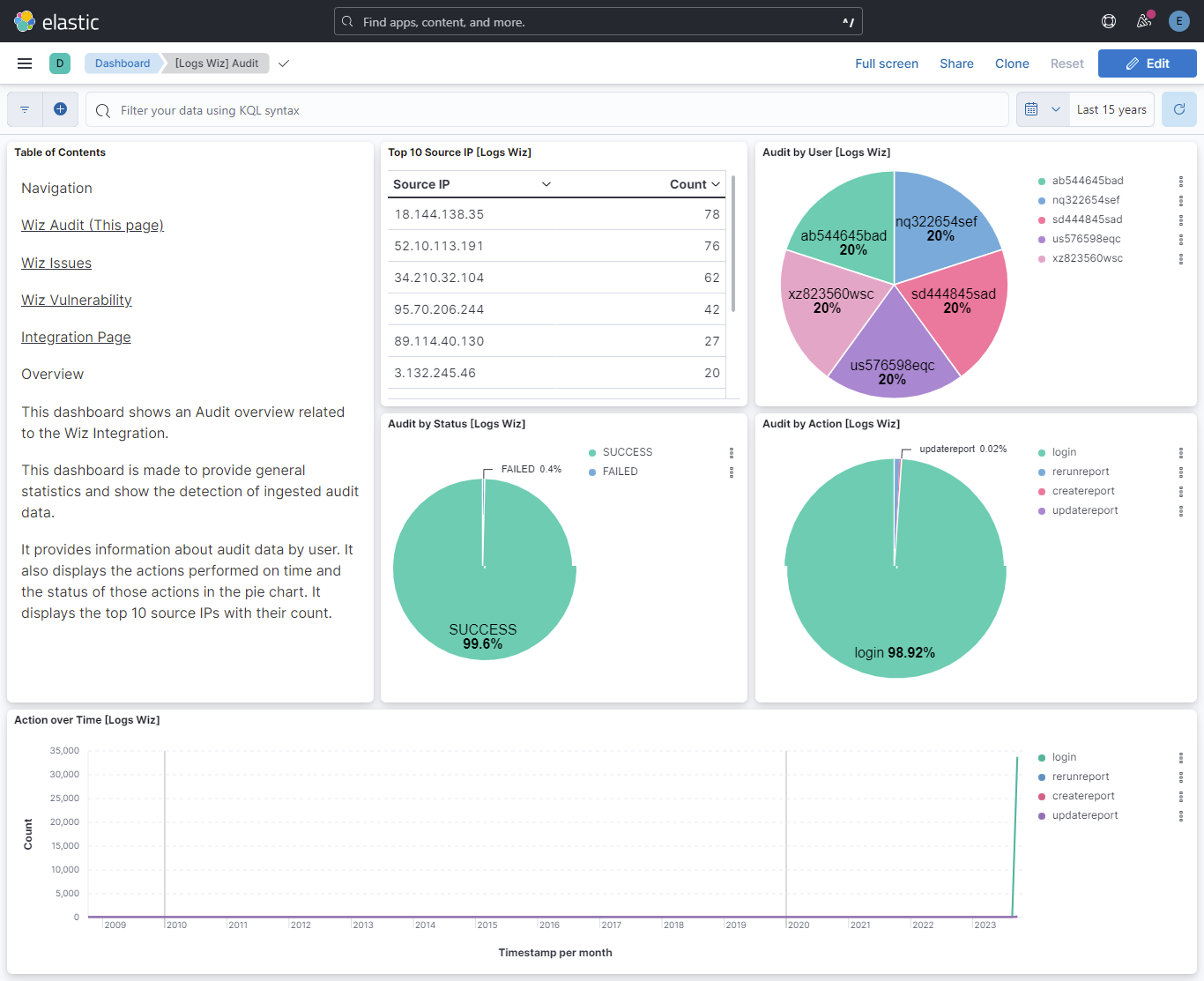
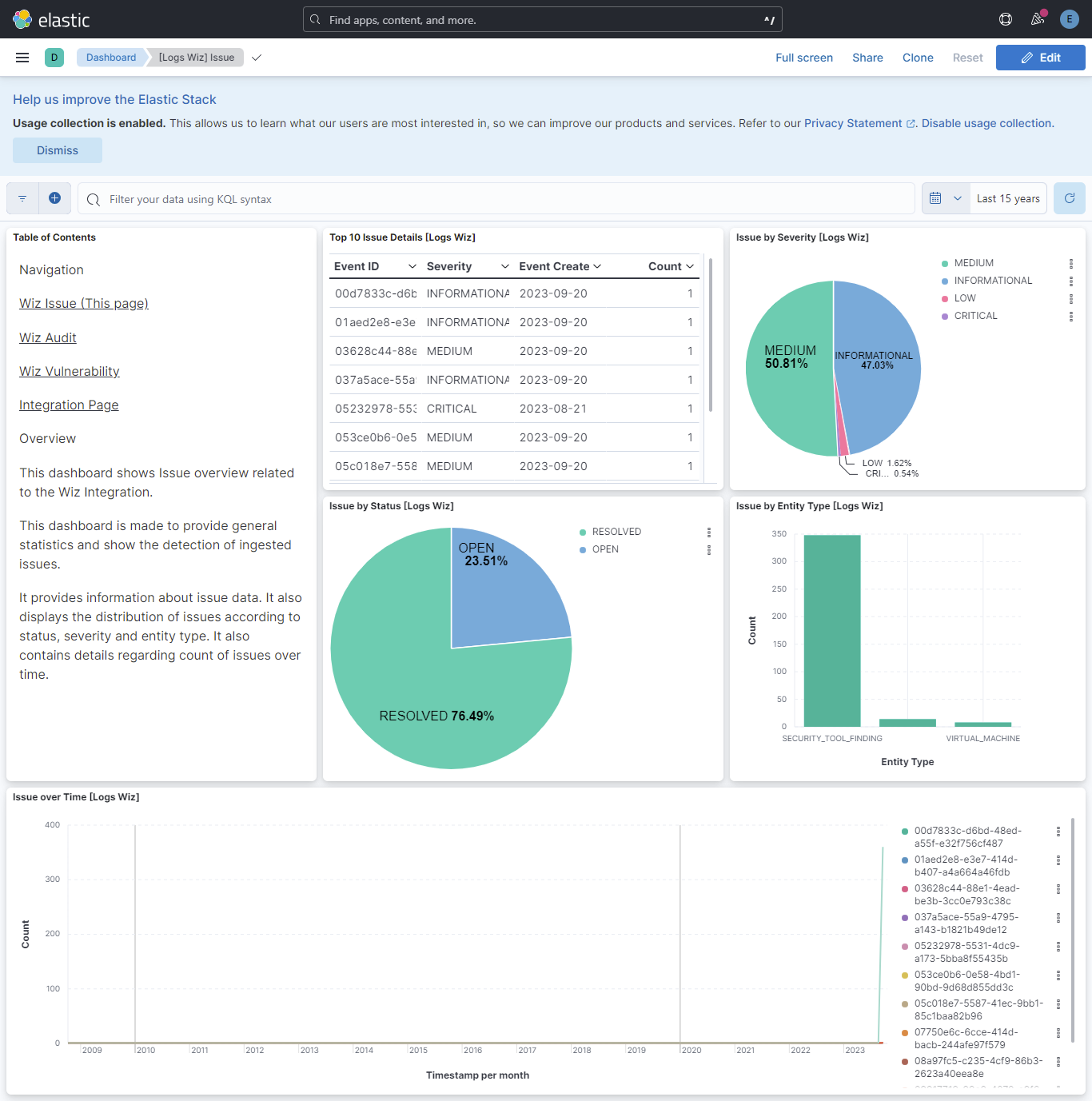
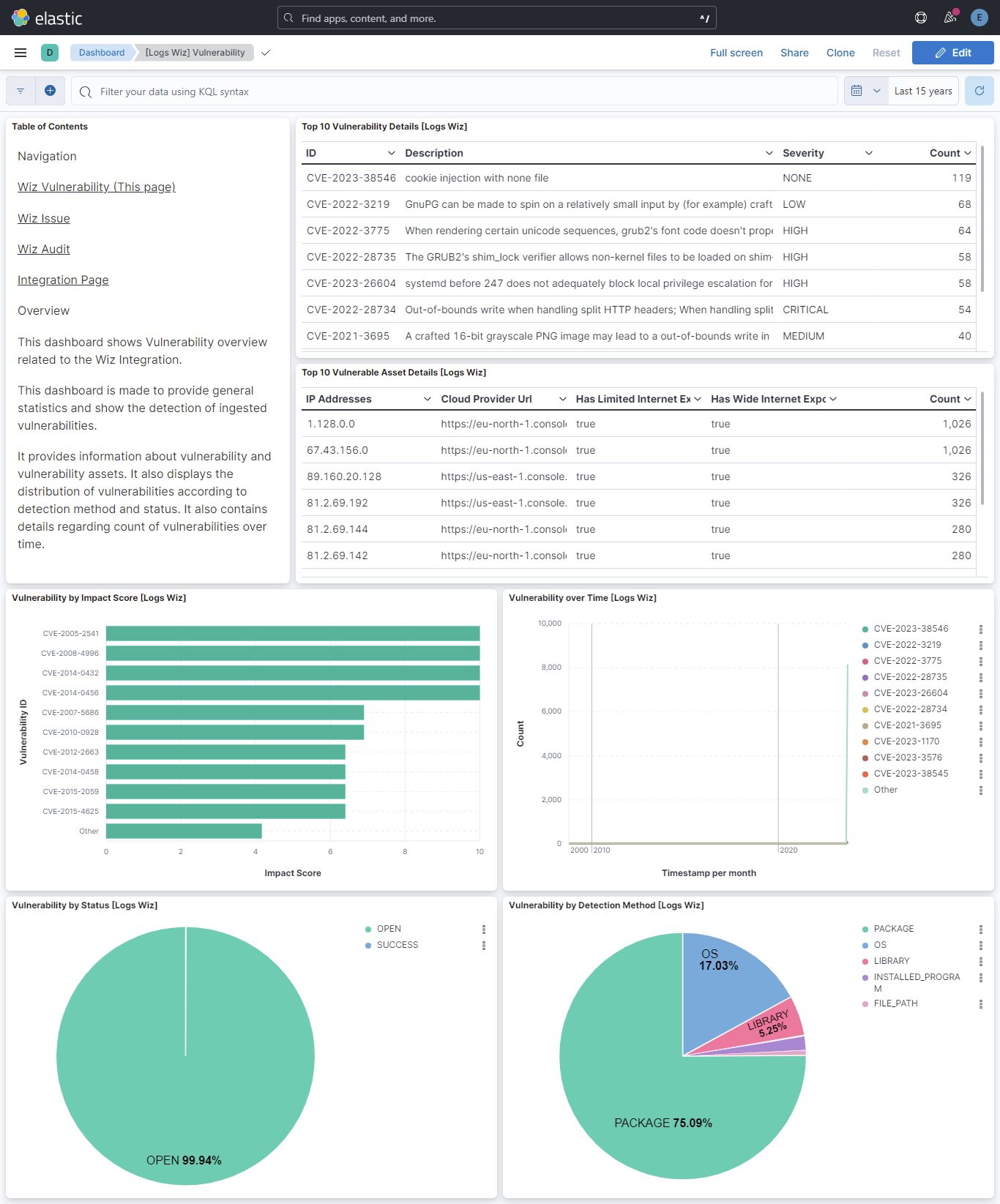
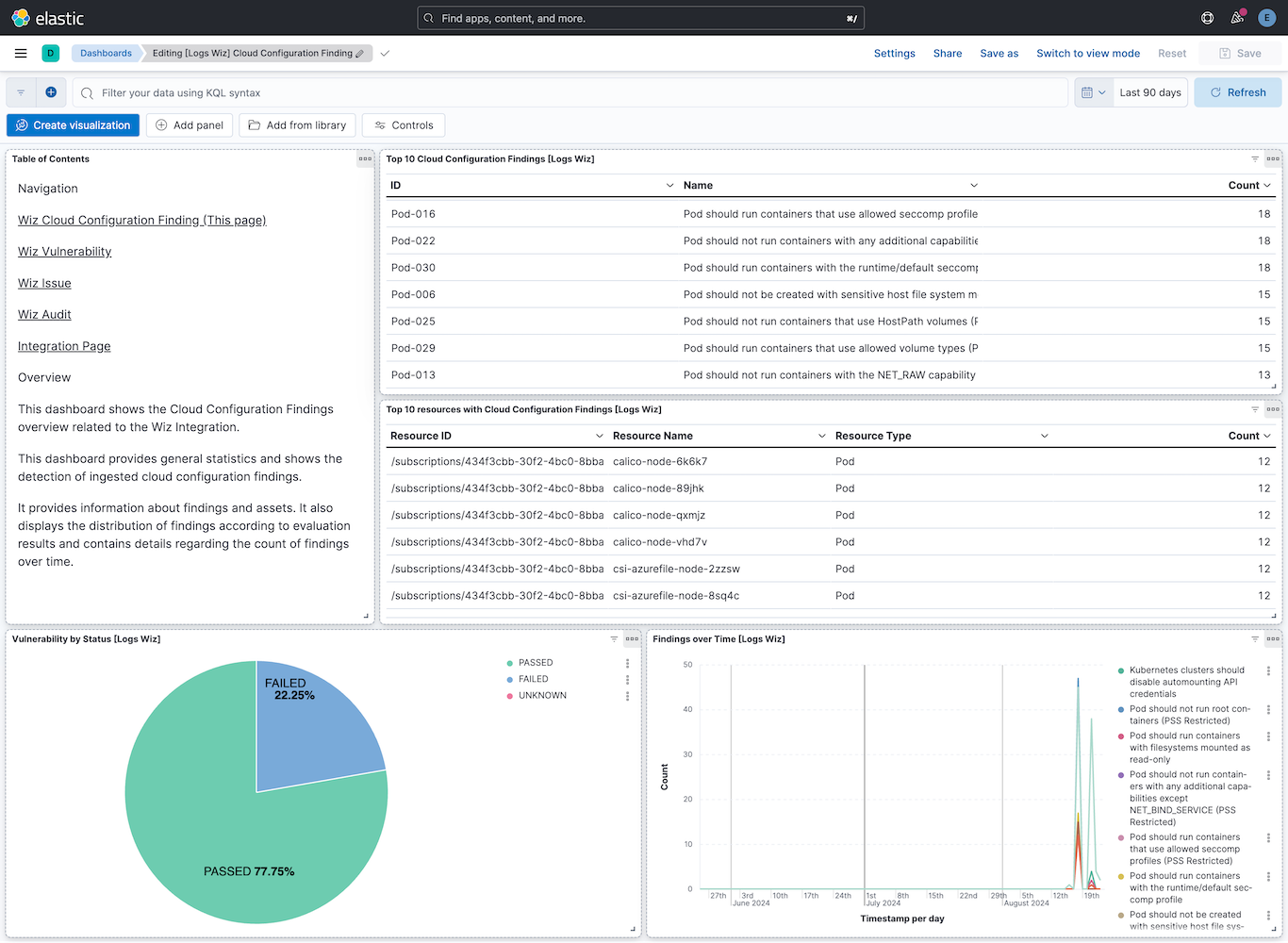
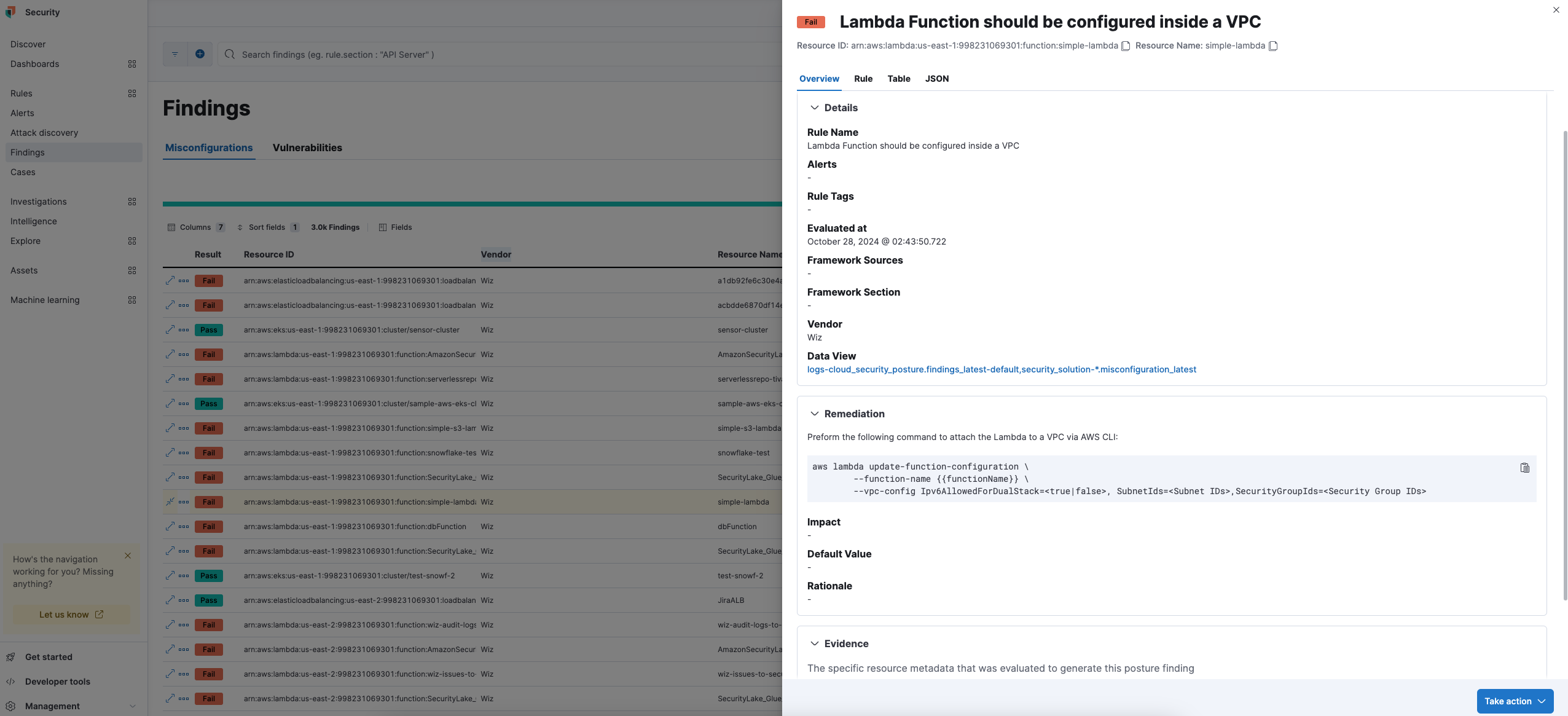
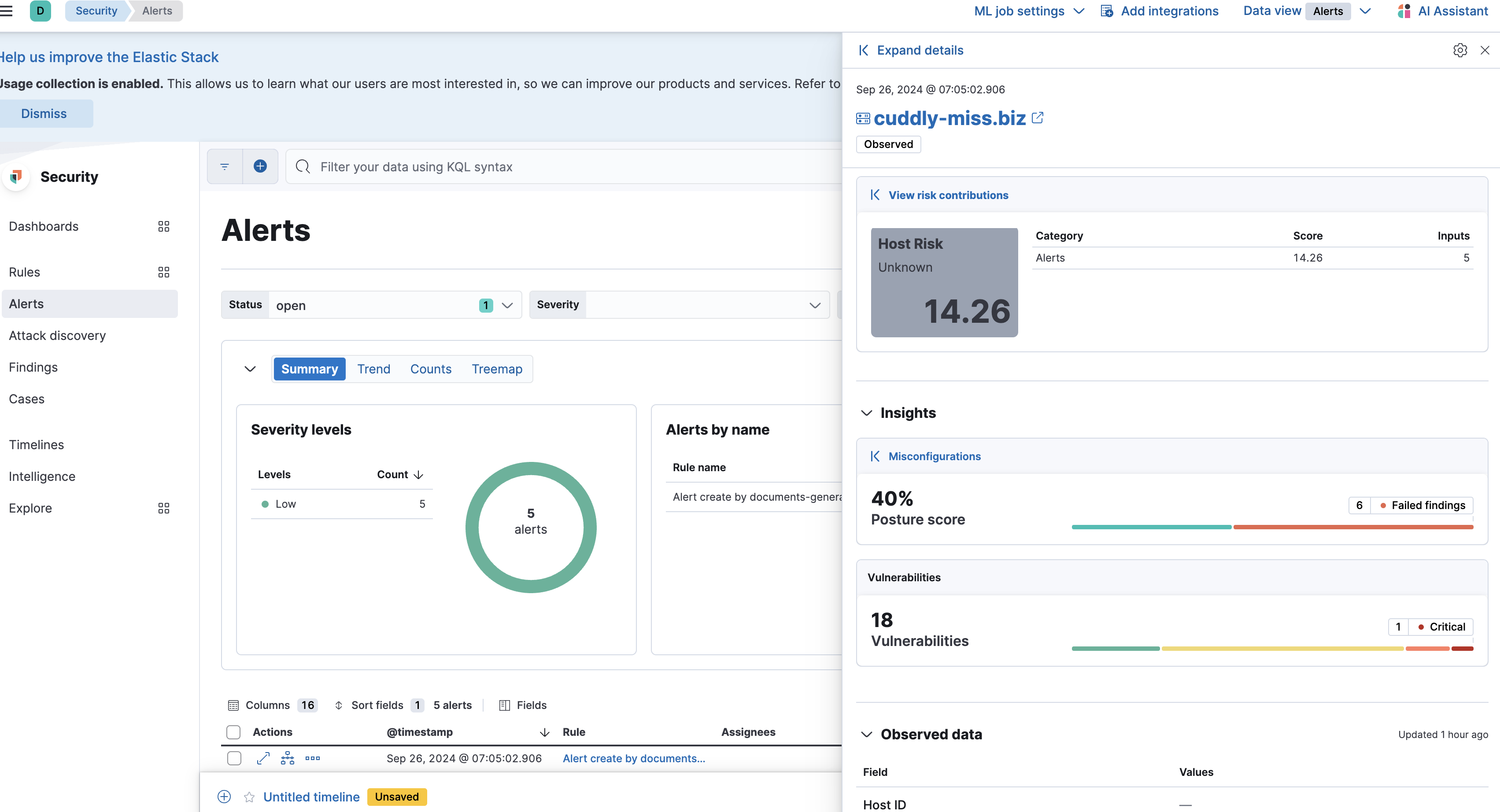
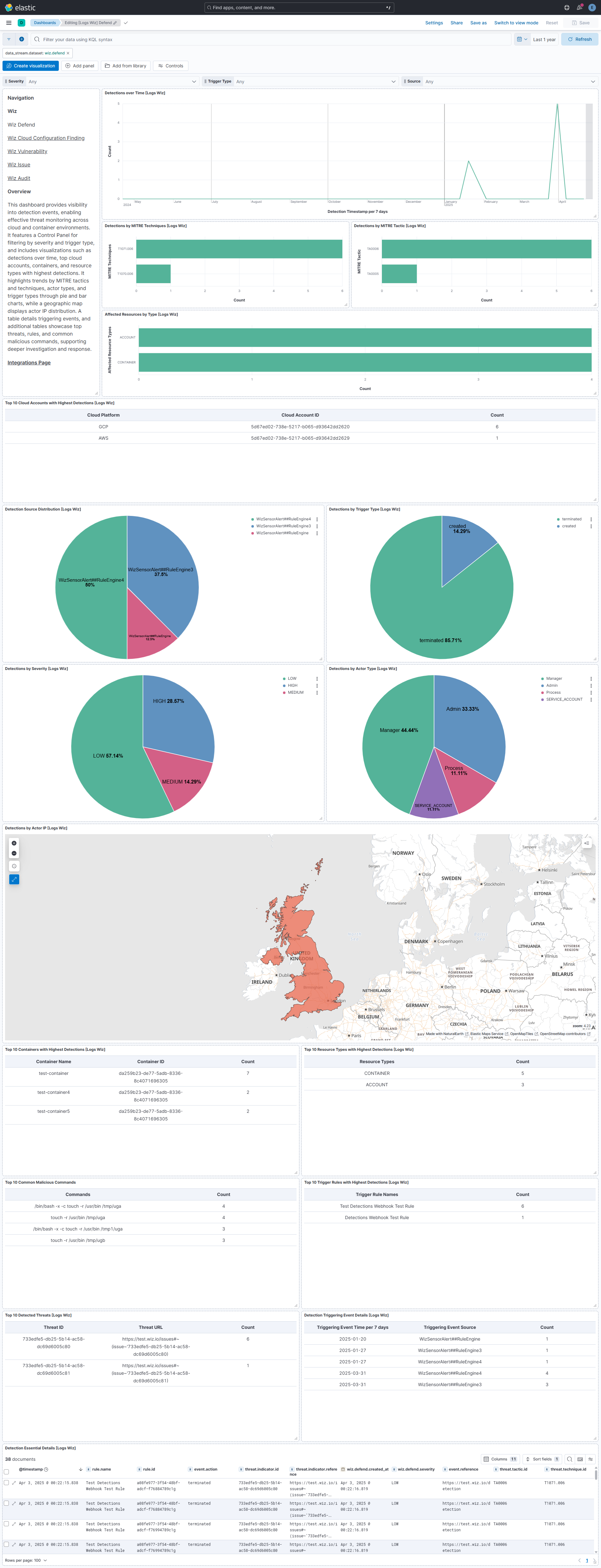
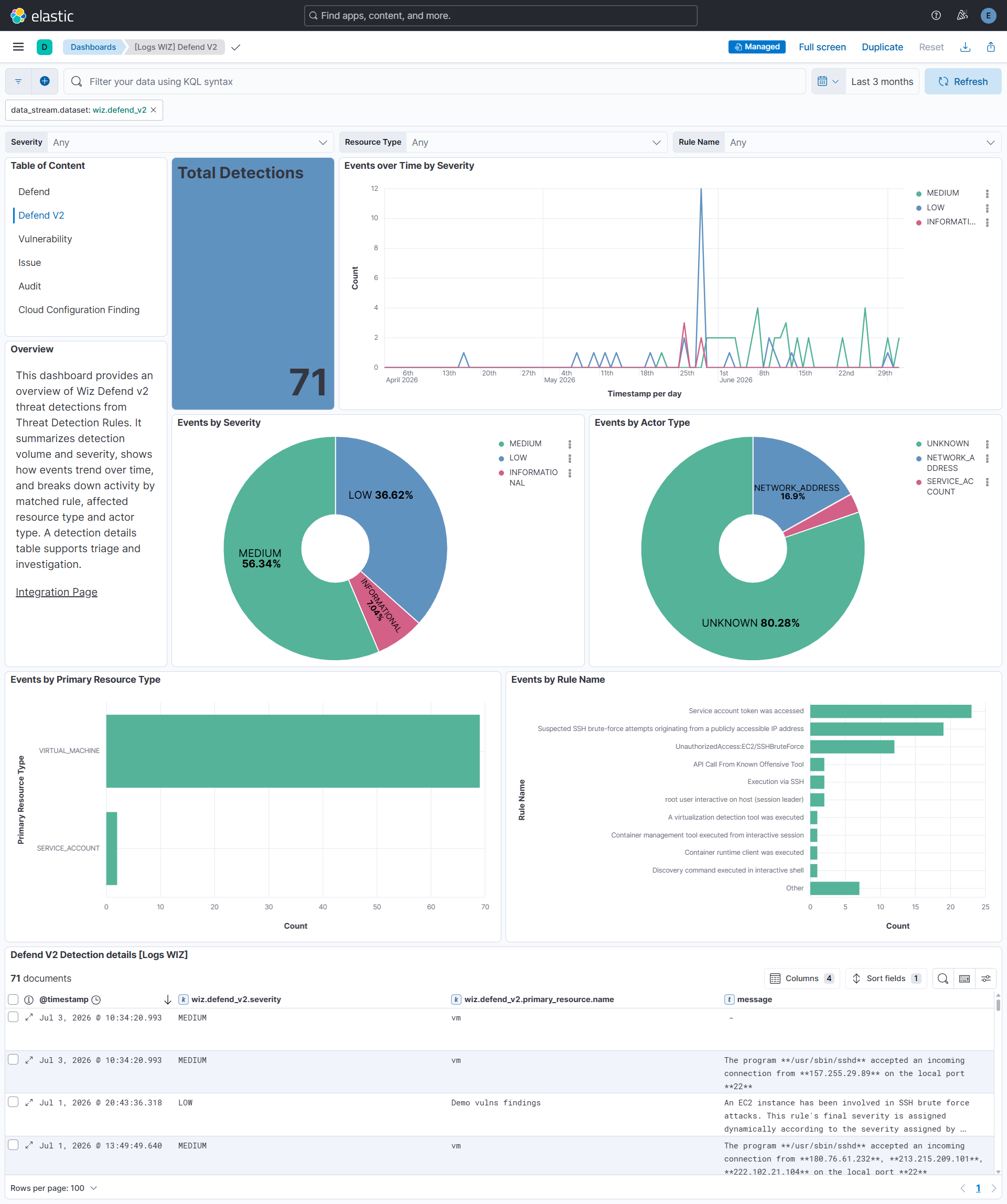
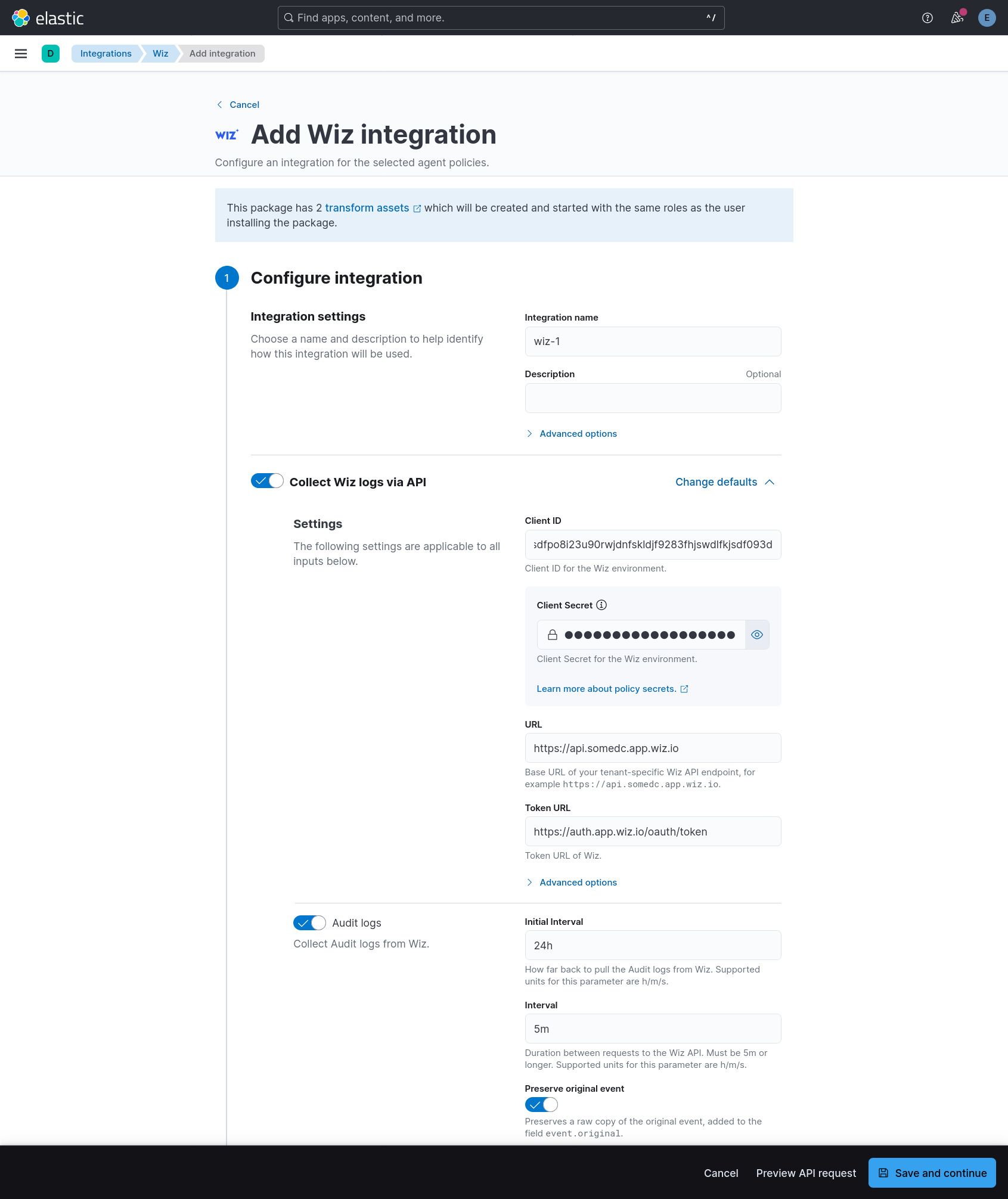
Changelog
| Version | Details | Minimum Kibana version |
|---|---|---|
| 4.9.0 | Enhancement (View pull request) Update Elastic Managed integration documentation to the current wording and docs links. |
9.1.2 8.19.2 |
| 4.8.1 | Bug fix (View pull request) Update the README to cover the defend_v2 data stream and Cloud Configuration Finding Full Posture, and to direct users to the Elastic integration tile in Wiz for credentials. |
9.1.2 8.19.2 |
| 4.8.0 | Enhancement (View pull request) Set the latest_cdr_vulnerabilities and latest_cdr_misconfigurations transform destination indices to 3 primary shards to avoid shard-size warnings at scale. The destination indices are re-created (-v3 and -v4 respectively). |
9.1.2 8.19.2 |
| 4.7.0 | Enhancement (View pull request) Add tags to ingest pipeline processors and add preserve_original_event to pipeline-level on_failure handlers.Bug fix (View pull request) Append to error.message in the cloud_configuration_finding and cloud_configuration_finding_full_posture pipeline-level on_failure handlers instead of overwriting messages recorded by processor-level handlers. error.message is now an array on failed documents. |
9.1.2 8.19.2 |
| 4.6.1 | Enhancement (View pull request) Set agentless deployment mode release field to ga. |
9.1.2 8.19.2 |
| 4.6.0 | Enhancement (View pull request) Add defend_v2 data stream for Wiz Detections API v2. Enhancement (View pull request) Remove the temporary processor that stripped the organization, division, and team fields added by the Agentless policy, as the Agentless platform no longer injects these fields. |
9.1.2 8.19.2 |
| 4.5.0 | Enhancement (View pull request) Note maximum historical data in setting descriptions. |
9.1.0 8.19.0 |
| 4.4.0 | Enhancement (View pull request) Use new release field for agentless deployment mode to establish as beta. |
9.1.0 8.19.0 |
| 4.3.0 | Bug fix (View pull request) Server interaction fix: Set the right User-Agent header value. Bug fix (View pull request) Server interaction fix: use updatedAt rather than analyzedAt in queries for cloud configuration finding data.Enhancement (View pull request) Server interaction improvements: Set a static request rate of 0.5 rps per data stream, increase retries. Enhancement (View pull request) Settings improvements: Clear the URL default value, tolerate URLs with a /graphql path, make cloud_configuration_finding_full_posture's 24h interval an advanced option for potential use in debugging or workarounds, make Token URL a non-advanced settings since it can vary, inform the user the interval settings must be 5m or longer.Enhancement (View pull request) Dashboard improvements: Use panel-level filters, fix the navigation/overview panel formatting. Enhancement (View pull request) Documentation improvements: Explain transforms better in the README, chang to a vector logo file, add a screenshot of the config UI. |
9.1.0 8.19.0 |
| 4.2.0 | Enhancement (View pull request) Add timestamp range filter and storage tier exclusion to latest transform source queries to reduce scan scope and improve performance. |
9.1.0 8.19.0 |
| 4.1.0 | Enhancement (View pull request) Removed ECS field definitions from misconfiguration transform, now covered by ecs@mappings component template on transform destination index templates. |
9.1.0 8.19.0 |
| 4.0.0 | Breaking change (View pull request) As sourceRule is deprecated by the Wiz Get Issue API, this version removes the deprecated source_rule field from the issue data stream.Previous versions added the new source_rules field to the issue data stream.Users should update their custom-user artifacts if they are using the deprecated source_rule field to use the new source_rules field. |
9.0.0 8.18.0 8.17.4 8.16.6 |
| 3.12.0 | Enhancement (View pull request) Add sourceRules field to the issue data stream.Deprecate sourceRule field, which will be removed in a future version.Any custom-user artifacts will need to be updated to use the new field. |
9.0.0 8.18.0 8.17.4 8.16.6 |
| 3.11.0 | Enhancement (View pull request) Add risks field to the sourceRule object in the issue data stream. |
9.0.0 8.18.0 8.17.4 8.16.6 |
| 3.10.0 | Enhancement (View pull request) Set event.kind to alert for the Wiz Defend data stream. |
9.0.0 8.18.0 8.17.4 8.16.6 |
| 3.9.2 | Bug fix (View pull request) Update transform to filter out documents containing an error.message from latest vulnerability and misconfiguration indexes. |
9.0.0 8.18.0 8.17.4 8.16.6 |
| 3.9.1 | Bug fix (View pull request) Downgrade the format_version to the minimum version that supports all the necessary features for the package. |
9.0.0 8.18.0 8.17.4 8.16.6 |
| 3.9.0 | Enhancement (View pull request) Add vulnerability_workflow and misconfiguration_workflow sub category labels. |
9.0.0 8.18.0 8.17.4 8.16.6 |
| 3.8.0 | Enhancement (View pull request) Add title to vulnerability mappings and ingest pipeline for better support in CDR. |
9.0.0 8.18.0 8.17.4 8.16.6 |
| 3.7.0 | Enhancement (View pull request) Add configurable toggle to include all vulnerability statuses in the vulnerability dataset. |
9.0.0 8.18.0 8.17.4 8.16.6 |
| 3.6.0 | Enhancement (View pull request) Add troubleshooting note in README on event.ingested requirement for standalone Elastic Agent. |
9.0.0 8.18.0 8.17.4 8.16.6 |
| 3.5.1 | Bug fix (View pull request) Update texts for the input fields helpers. |
9.0.0 8.18.0 8.17.4 8.16.6 |
| 3.5.0 | Enhancement (View pull request) Use terminate processor instead of fail processor to handle agent errors. |
9.0.0 8.18.0 8.17.4 8.16.6 |
| 3.4.0 | Enhancement (View pull request) Add maximum executions configuration option for API-based data streams. |
9.0.0 8.18.0 8.17.4 8.16.6 |
| 3.3.0 | Enhancement (View pull request) Remove duplicated installation instructions from the documentation. |
9.0.0 8.18.0 8.17.4 8.16.6 |
| 3.2.1 | Bug fix (View pull request) Add temporary processor to remove the fields added by the Agentless policy. |
9.0.0 8.18.0 8.17.4 8.16.6 |
| 3.2.0 | Enhancement (View pull request) Add support for Wiz Defend datastream. |
9.0.0 8.18.0 8.17.4 8.16.6 |
| 3.1.1 | Bug fix (View pull request) Fix default request trace enabled behavior. |
9.0.0 8.18.0 8.17.4 8.16.6 |
| 3.1.0 | Enhancement (View pull request) Add support of Event URL to investigate the wiz events. |
9.0.0 8.18.0 8.17.4 8.16.6 |
| 3.0.0 | Breaking change (View pull request) Add new Cloud Configuration Finding Full Posture data stream. If you rely on Findings > Misconfigurations view, enable this new data stream. |
9.0.0 8.18.0 8.17.4 8.16.6 |
| 2.10.0 | Enhancement (View pull request) Rely on external ecs for ESC fields. event.id changed from text to keyword |
9.0.0 8.18.0 |
| 2.9.3 | Bug fix (View pull request) Set event.id inside vulnerability data required for CDR workflow. |
9.0.0 8.18.0 |
| 2.9.2 | Bug fix (View pull request) Enable agentless for supported stack versions |
9.0.0 8.18.0 |
| 2.9.1 | Bug fix (View pull request) Remove agentless from unsupported stack versions |
9.0.0 8.16.0 |
| 2.9.0 | Enhancement (View pull request) Enable Agentless deployment. |
9.0.0 8.16.0 |
| 2.8.2 | Bug fix (View pull request) Add missing field mappings in transforms. |
9.0.0 8.16.0 |
| 2.8.1 | Bug fix (View pull request) Updated SSL description in package manifest.yml to be uniform and to include links to documentation. |
9.0.0 8.16.0 |
| 2.8.0 | Enhancement (View pull request) Update Kibana constraint to support 9.0.0. |
9.0.0 8.16.0 |
| 2.7.0 | Enhancement (View pull request) Add "preserve_original_event" tag to documents with event.kind manually set to "pipeline_error". |
8.16.0 |
| 2.6.0 | Enhancement (View pull request) Do not remove event.original in main ingest pipeline. |
8.16.0 |
| 2.5.1 | Bug fix (View pull request) Fix broken links in Security Service integrations packages. |
8.16.0 |
| 2.5.0 | Enhancement (View pull request) Add "preserve_original_event" tag to documents with event.kind set to "pipeline_error". |
8.16.0 |
| 2.4.0 | Enhancement (View pull request) Add support for deleting request trace files. |
8.16.0 |
| 2.3.0 | Enhancement (View pull request) Add tags.yml file so that integration's dashboards and saved searches are tagged with "Security Solution" and displayed in the Security Solution UI. |
8.16.0 |
| 2.2.0 | Enhancement (View pull request) Default to vulnerable asset id when provider_unique_id is missing for resource.id field in the vulnerability data stream.Enhancement (View pull request) Add missing fields to the list of fields to be removed when preserve_duplicate_custom_fields is disabled. |
8.16.0 |
| 2.1.0 | Enhancement (View pull request) Add field definitions for observer.vendor and cloud.provider in latest_cdr_vulnerability transform. |
8.16.0 |
| 2.0.1 | Bug fix (View pull request) Fix handling of missing wiz.vulnerability.detailed_name.Bug fix (View pull request) Fix handling of missing wiz.vulnerability.vulnerable_asset.name. |
8.16.0 |
| 2.0.0 | Bug fix (View pull request) Relax requirement for vulnerability score to be present. Enhancement (View pull request) Retain cloudConfigurationRuleDescription from sourceRule.Bug fix (View pull request) Add cloud.account.name mapping to latest_cdr_vulnerabilities transform destination. Enhancement (View pull request) Default to resource id when provider_id is missing for resource.id field in cloud_configuration_finding data stream. Breaking change (View pull request) Rely on external ecs for ESC fields. rule.reference, rule.descipriton and rule.remediation changed from text to keyword. Breaking change (View pull request) Remove rule.references field and its mapping. Please use the ECS rule.reference field instead. Enhancement (View pull request) Increase retention on transfroms to 90 days. Enhancement (View pull request) Update vulnerabilities mappings and ingest pipeline for better support in CDR. Enhancement (View pull request) Add latest Transform to cloud_configuration_finding data stream to support CDR. Bug fix (View pull request) Fix potential got types.Null, expected iterable type error.Enhancement (View pull request) Add latest Transform to vulnerability data stream to support CDR Bug fix (View pull request) Add Cloud Configuration Finding to the list of data streams in README |
8.16.0 |
| 1.8.4 | Bug fix (View pull request) Fix handling of missing wiz.vulnerability.vulnerable_asset.name. |
8.13.0 |
| 1.8.3 | Bug fix (View pull request) Add Cloud Configuration Finding to the list of data streams in README |
8.13.0 |
| 1.8.2 | Bug fix (View pull request) Relax requirement for vulnerability score to be present. Enhancement (View pull request) Retain cloudConfigurationRuleDescription from sourceRule. |
8.13.0 |
| 1.8.1 | Bug fix (View pull request) Fix potential got types.Null, expected iterable type error. |
8.13.0 |
| 1.8.0 | Enhancement (View pull request) Add host.name for the vulnerability data stream. |
8.13.0 |
| 1.7.2 | Enhancement (View pull request) Add cloud_configuration_finding dashboard screendshot. |
8.13.0 |
| 1.7.1 | Bug fix (View pull request) Lowercase result.evaluation values. |
8.13.0 |
| 1.7.0 | Enhancement (View pull request) Improve support for CDR in vulnerability data stream. |
8.13.0 |
| 1.6.0 | Enhancement (View pull request) Add cloud_configuration_finding data stream |
8.13.0 |
| 1.5.0 | Enhancement (View pull request) Add type field for issue datastream |
8.13.0 |
| 1.4.0 | Enhancement (View pull request) Improve error reporting for API request failures. |
8.13.0 |
| 1.3.2 | Bug fix (View pull request) Handle missing fields in API responses. |
8.13.0 |
| 1.3.1 | Bug fix (View pull request) Fix input error handling in ingest pipeline. Bug fix (View pull request) Suppress redundant redact warning in logs. |
8.13.0 |
| 1.3.0 | Enhancement (View pull request) Improve HTTP error handling and code clarity. Bug fix (View pull request) Fix state retention between iterations. |
8.13.0 |
| 1.2.0 | Enhancement (View pull request) Removed import_mappings. Update the kibana constraint to ^8.13.0. Modified the field definitions to remove ECS fields made redundant by the ecs@mappings component template. |
8.13.0 |
| 1.1.1 | Enhancement (View pull request) Add cloudsecurity_cdr sub category label |
8.12.0 |
| 1.1.0 | Enhancement (View pull request) Set sensitive values as secret. |
8.12.0 |
| 1.0.1 | Enhancement (View pull request) Changed owners |
8.10.1 |
| 1.0.0 | Enhancement (View pull request) Release package as GA. |
8.10.1 |
| 0.4.0 | Enhancement (View pull request) Limit request tracer log count to five. |
8.10.1 |
| 0.3.0 | Enhancement (View pull request) ECS version updated to 8.11.0. |
8.10.1 |
| 0.2.0 | Enhancement (View pull request) Add dashboards for all the data streams. |
8.10.1 |
| 0.1.0 | Enhancement (View pull request) Initial release. |
8.10.1 |