Palo Alto Networks Integration
Elastic Cloud Serverless projects are autoscaled environments, fully managed by Elastic and available on Elastic Cloud. Availability This functionality is in technical preview and is ready for evaluation. Use with caution in production; it is not recommended for mission-critical workloads. Elastic will work to fix any issues, but features in technical preview are not subject to the support SLA of official GA features. Specific Support terms apply. Elastic Cloud Serverless projects are autoscaled environments, fully managed by Elastic and available on Elastic Cloud. Availability This functionality is in technical preview and is ready for evaluation. Use with caution in production; it is not recommended for mission-critical workloads. Elastic will work to fix any issues, but features in technical preview are not subject to the support SLA of official GA features. Specific Support terms apply. The Elastic Stack includes Elastic's core products such as Elasticsearch, Kibana, Logstash, and Beats. Availability This functionality is in technical preview and is ready for evaluation. Use with caution in production; it is not recommended for mission-critical workloads. Elastic will work to fix any issues, but features in technical preview are not subject to the support SLA of official GA features. Specific Support terms apply. Unless stated otherwise on the page, this functionality is available when your Elastic Stack is deployed on Elastic Cloud Hosted, Elastic Cloud Enterprise, Elastic Cloud on Kubernetes, and self-managed environments. This documentation corresponds to the latest patch available for each minor version. If you're not using the latest patch, check the release notes for changes.
Serverless Observability
Preview
Preview
Serverless Security
Preview
Preview
Stack
Preview
9.0+
Preview since 9.0
| Version | 0.2.0 Availability Preview This functionality is in technical preview and is ready for evaluation. Use with caution in production; it is not recommended for mission-critical workloads. Elastic will work to fix any issues, but features in technical preview are not subject to the support SLA of official GA features. Specific Support terms apply. (View all) |
| Subscription level What's this? |
Basic |
| Developed by What's this? |
Elastic |
| Ingestion method(s) | API |
| Minimum Kibana version(s) | 9.0.0 8.15.2 |
To use pre-release integrations, go to the Integrations page in Kibana, scroll down, and toggle on the Display beta integrations option.
This integration periodically fetches metrics from Palo Alto Networks firewalls and management systems.
The integration uses the Pango library to collect metrics from Palo Alto Networks firewalls.
This integration is designed to work with a single firewall at a time. Support for multiple firewalls within one integration policy is not available and has not been tested with Panorama. To collect metrics from multiple firewalls, create a separate integration policy for each firewall, specifying the respective host IP and API key.
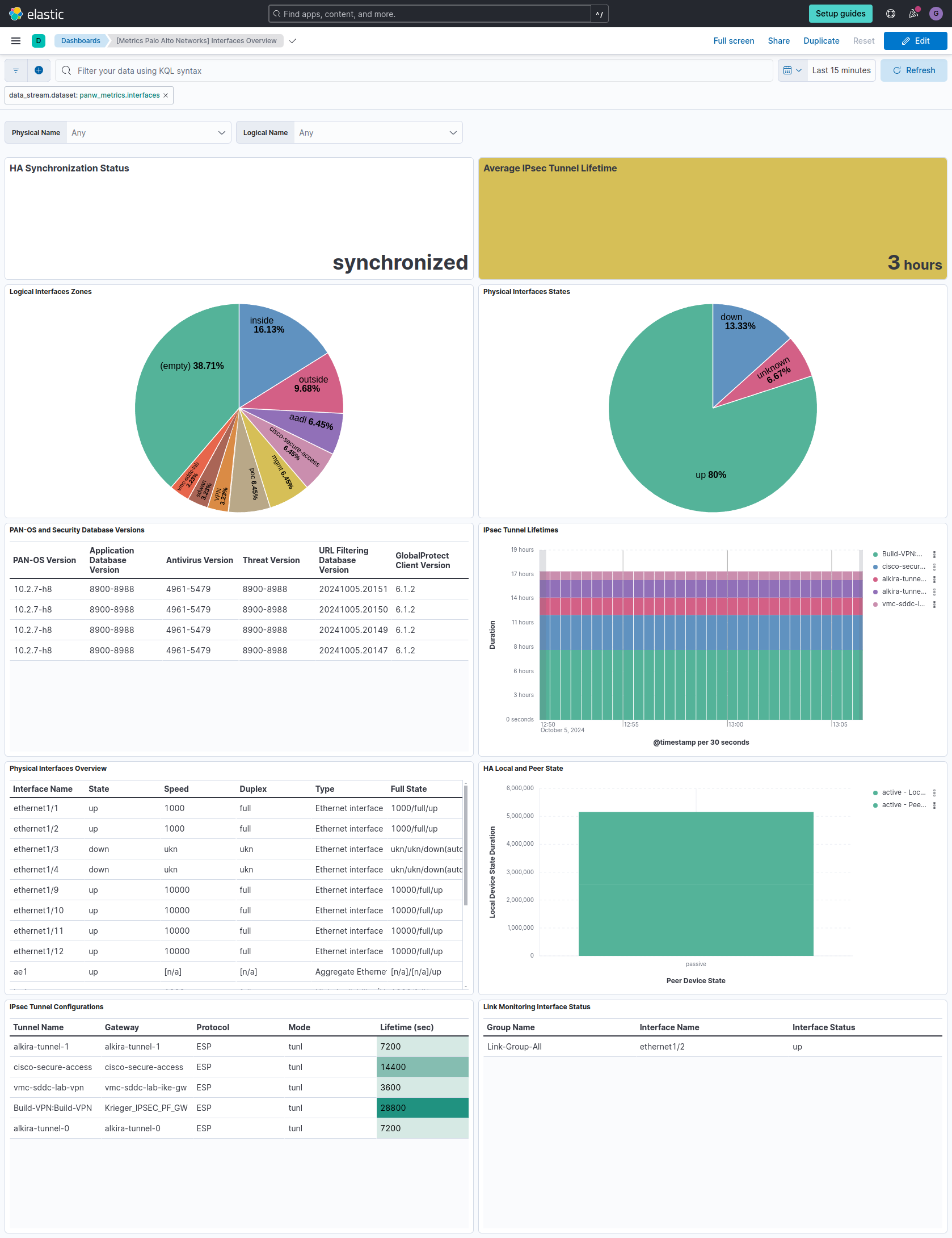
The interfaces dataset collects detailed network interface statistics from Palo Alto Networks firewalls. It provides information about interface status, traffic throughput, packet counts, error rates, and configuration details, including physical, logical, and high-availability (HA) interfaces.
Example
{
    "@timestamp": "2024-02-08T10:15:30.123Z",
    "agent": {
        "ephemeral_id": "a1b2c3d4-e5f6-4321-a987-1234567890ab",
        "id": "9876543210-abcdef-0987654321",
        "name": "panw-agent-01",
        "type": "metricbeat",
        "version": "8.16.0"
    },
    "data_stream": {
        "namespace": "default",
        "type": "metrics"
    },
    "ecs": {
        "version": "8.11.0"
    },
    "elastic_agent": {
        "id": "2ea50bee-9250-43d1-8d70-949f242aa275",
        "snapshot": false,
        "version": "8.16.0"
    },
    "event": {
        "agent_id_status": "verified",
        "duration": 1250000,
        "ingested": "2024-02-08T10:15:32Z"
    },
    "host": {
        "architecture": "x86_64",
        "containerized": false,
        "hostname": "docker-fleet-agent",
        "id": "28da52b32df94b50aff67dfb8f1be3d6",
        "ip": [
            "172.24.0.7"
        ],
        "mac": [
            "02-42-AC-18-00-07"
        ],
        "name": "docker-fleet-agent",
        "os": {
            "codename": "focal",
            "family": "debian",
            "kernel": "5.15.0-89-generic",
            "name": "Ubuntu",
            "platform": "ubuntu",
            "type": "linux",
            "version": "20.04.6 LTS (Focal Fossa)"
        }
    },
    "metricset": {
        "name": "interfaces",
        "period": 10000
    },
    "panw": {
        "interfaces": {
            "physical": {
                "name": "ethernet1/1",
                "id": "ethernet1/1",
                "type": "Ethernet interface",
                "mac": "00:1B:17:00:01:01",
                "speed": "1000Mbps",
                "duplex": "full",
                "state": "up",
                "mode": "autoneg",
                "full_state": "1000/full/up"
            },
            "logical": {
                "name": "ethernet1/1.100",
                "id": "ethernet1/1.100",
                "tag": 100,
                "vsys": 1,
                "zone": "trust",
                "fwd": "yes",
                "ip": "192.168.1.1/24"
            },
            "ha": {
                "enabled": true,
                "mode": "active-passive",
                "running_sync": "synchronized",
                "running_sync_enabled": true,
                "local_info": {
                    "state": "active",
                    "mgmt_ip": "10.0.0.1",
                    "platform_model": "PA-3260"
                },
                "peer_info": {
                    "conn_status": "up",
                    "state": "passive",
                    "mgmt_ip": "10.0.0.2",
                    "platform_model": "PA-3260"
                }
            },
            "ipsec_tunnel": {
                "id": "tunnel-001",
                "name": "Site-A-to-Site-B",
                "gw": "203.0.113.1",
                "TSi_ip": "10.0.0.0",
                "TSi_prefix": "24",
                "TSi_proto": "any",
                "TSi_port": 0,
                "TSr_ip": "192.168.0.0",
                "TSr_prefix": "24",
                "TSr_proto": "any",
                "TSr_port": 0,
                "proto": "ESP",
                "mode": "tunnel",
                "dh": "group14",
                "enc": "aes-256-cbc",
                "hash": "sha256",
                "life.sec": 28800,
                "kb": 102400
            }
        }
    }
}
The fields reported are:
ECS Field Reference
Please refer to the following document for detailed information on ECS fields.
Exported fields
| Field | Description | Type | Unit | Metric Type |
|---|---|---|---|---|
| @timestamp | Event timestamp. | date | ||
| agent.id | Unique identifier of this agent (if one exists). Example: For Beats this would be beat.id. | keyword | ||
| container.id | Unique container id. | keyword | ||
| data_stream.dataset | Data stream dataset. | constant_keyword | ||
| data_stream.namespace | Data stream namespace. | constant_keyword | ||
| data_stream.type | Data stream type. | constant_keyword | ||
| host.id | Unique host id. As hostname is not always unique, use values that are meaningful in your environment. Example: The current usage of beat.name. |
keyword | ||
| host.name | Name of the host. It can contain what hostname returns on Unix systems, the fully qualified domain name (FQDN), or a name specified by the user. The recommended value is the lowercase FQDN of the host. | keyword | ||
| panw.interfaces.ha.enabled | HA enabled | boolean | ||
| panw.interfaces.ha.link_monitoring.enabled | Indicates if link monitoring is enabled | boolean | ||
| panw.interfaces.ha.link_monitoring.failure_condition | Condition that triggers a link monitoring failure, e.g., "any" | keyword | ||
| panw.interfaces.ha.link_monitoring.group.enabled | Indicates if the link monitoring group is enabled | boolean | ||
| panw.interfaces.ha.link_monitoring.group.failure_condition | Condition that triggers a failure in the link monitoring group | keyword | ||
| panw.interfaces.ha.link_monitoring.group.interface.name | Name of the interface in the link monitoring group | keyword | ||
| panw.interfaces.ha.link_monitoring.group.interface.status | Status of the interface in the link monitoring group | keyword | ||
| panw.interfaces.ha.link_monitoring.group.name | Name of the link monitoring group | keyword | ||
| panw.interfaces.ha.local_info.app_version | The version of the application database | keyword | ||
| panw.interfaces.ha.local_info.av_version | The version of the antivirus database | keyword | ||
| panw.interfaces.ha.local_info.build_rel | The PAN-OS software version running on the firewall | keyword | ||
| panw.interfaces.ha.local_info.gp_client_version | Version of the GlobalProtect client software | keyword | ||
| panw.interfaces.ha.local_info.ha1_backup_gateway | Default gateway for the backup HA1 interface | keyword | ||
| panw.interfaces.ha.local_info.ha1_backup_ipaddr | The backup IP address for the HA1 interface, in CIDR format. | keyword | ||
| panw.interfaces.ha.local_info.ha1_backup_macaddr | HA local info HA1 backup MAC address | keyword | ||
| panw.interfaces.ha.local_info.ha1_backup_port | HA local info HA1 backup port, e.g. "management" | keyword | ||
| panw.interfaces.ha.local_info.ha1_ipaddr | IP Address of HA1 interface, used for heartbeat and management synchronization, in CIDR format. | keyword | ||
| panw.interfaces.ha.local_info.ha1_macaddr | HA local info HA1 MAC address | keyword | ||
| panw.interfaces.ha.local_info.ha1_port | Indicates which interface is used for HA1 traffic, e.g., "dedicated-ha1" | keyword | ||
| panw.interfaces.ha.local_info.ha2_ipaddr | HA local info HA2 IP address, in CIDR format. | keyword | ||
| panw.interfaces.ha.local_info.ha2_macaddr | HA local info HA2 MAC address | keyword | ||
| panw.interfaces.ha.local_info.ha2_port | Indicates which interface is used for HA1 traffic, e.g., "dedicated-ha2" | keyword | ||
| panw.interfaces.ha.local_info.iot_version | HA local info IoT database version | keyword | ||
| panw.interfaces.ha.local_info.mgmt_ip | HA local info management IP, in CIDR format. | keyword | ||
| panw.interfaces.ha.local_info.mode | HA mode, e.g., "active-active" or "active-passive" | keyword | ||
| panw.interfaces.ha.local_info.platform_model | Platform model of the local device | keyword | ||
| panw.interfaces.ha.local_info.preemptive | Indicates whether the firewall is configured to preemptively take over as the active unit in an HA setup. This is a yes/no value which the beat is not converting to a boolean, so it will be a keyword. | keyword | ||
| panw.interfaces.ha.local_info.state | HA state of the local device, e.g., "active" or "passive" | keyword | ||
| panw.interfaces.ha.local_info.state_duration | Duration in seconds of the current state | long | s | gauge |
| panw.interfaces.ha.local_info.state_sync | Status of HA synchronization, e.g., "complete" | keyword | ||
| panw.interfaces.ha.local_info.state_sync_type | Type of interface used for HA synchronization | keyword | ||
| panw.interfaces.ha.local_info.threat_version | HA local info threat version | keyword | ||
| panw.interfaces.ha.local_info.url_version | The version of the URL filtering database | keyword | ||
| panw.interfaces.ha.local_info.version | HA configuration info version | long | ||
| panw.interfaces.ha.local_info.vpn_client_version | Version of the VPN client (if installed) | keyword | ||
| panw.interfaces.ha.mode | HA mode, e.g., "active-active" or "active-passive" | keyword | ||
| panw.interfaces.ha.peer_info.conn_ha1.description | Description of the connection type ,e.g., "heartbeat status" | keyword | ||
| panw.interfaces.ha.peer_info.conn_ha1.primary | Specifies if the HA1 connection is primary | keyword | ||
| panw.interfaces.ha.peer_info.conn_ha1.status | Peer HA1 connection status, e.g., "up" | keyword | ||
| panw.interfaces.ha.peer_info.conn_ha1_backup.description | HA peer info connection HA1 backup description | keyword | ||
| panw.interfaces.ha.peer_info.conn_ha1_backup.status | HA peer info connection HA1 backup status, e.g., "up" means it is operational | keyword | ||
| panw.interfaces.ha.peer_info.conn_ha2.description | HA peer info connection HA2 description | keyword | ||
| panw.interfaces.ha.peer_info.conn_ha2.primary | Specifies if the HA2 connection is primary | keyword | ||
| panw.interfaces.ha.peer_info.conn_ha2.status | HA peer info connection HA2 status | keyword | ||
| panw.interfaces.ha.peer_info.conn_status | Overall status of the HA connections ("up" means all connections are operational) | keyword | ||
| panw.interfaces.ha.peer_info.ha1_backup_ipaddr | HA peer info HA1 backup IP address, in CIDR format. | ip | ||
| panw.interfaces.ha.peer_info.ha1_backup_macaddr | HA peer info HA1 backup MAC address | keyword | ||
| panw.interfaces.ha.peer_info.ha1_ipaddr | IP address of the HA1 interface on the peer, in CIDR format. | ip | ||
| panw.interfaces.ha.peer_info.ha1_macaddr | HA1 MAC address of the peer | keyword | ||
| panw.interfaces.ha.peer_info.ha2_ipaddr | HA peer info HA2 IP address, in CIDR format. | keyword | ||
| panw.interfaces.ha.peer_info.ha2_macaddr | HA peer info HA2 MAC address | keyword | ||
| panw.interfaces.ha.peer_info.mgmt_ip | Management IP address of the peer firewall. This is in CIDR format. | keyword | ||
| panw.interfaces.ha.peer_info.mode | HA mode configured on the peer firewall, e.g. "Active-Passive" | keyword | ||
| panw.interfaces.ha.peer_info.platform_model | Model of the peer firewall | keyword | ||
| panw.interfaces.ha.peer_info.preemptive | Indicates if preemption is enabled on the peer firewall | keyword | ||
| panw.interfaces.ha.peer_info.priority | HA priority value of the peer firewall | long | ||
| panw.interfaces.ha.peer_info.state | Current operational state of the peer firewall (passive means it is in standby mode and not handling traffic) | keyword | ||
| panw.interfaces.ha.peer_info.state_duration | How long the peer has been in the current state in seconds | long | s | gauge |
| panw.interfaces.ha.running_sync | Indicates the sychronization status of the HA pair, e.g., "synchronized", "not-synchronized", "synchronizing" | keyword | ||
| panw.interfaces.ha.running_sync_enabled | Indicates if running configuration synchronization is enabled | boolean | ||
| panw.interfaces.ipsec_tunnel.TSi_ip | Traffic Selector Initiator IP. This is the local IP (0.0.0.0 means any IP address) | ip | ||
| panw.interfaces.ipsec_tunnel.TSi_port | Port number associated with TSi (0 means any port) | long | ||
| panw.interfaces.ipsec_tunnel.TSi_prefix | Network prefix for the TSi IP, 0 means no specific network is defined. | keyword | ||
| panw.interfaces.ipsec_tunnel.TSi_proto | Protocol associated with the TSi (0 means any protocol) | keyword | ||
| panw.interfaces.ipsec_tunnel.TSr_ip | Traffic Selector Responder IP. | ip | ||
| panw.interfaces.ipsec_tunnel.TSr_port | TSr port of the IPsec tunnel | long | ||
| panw.interfaces.ipsec_tunnel.TSr_prefix | Network prefix for the TSr IP. Similar to TSi_prefix | keyword | ||
| panw.interfaces.ipsec_tunnel.TSr_proto | TSr protocol of the IPsec tunnel | keyword | ||
| panw.interfaces.ipsec_tunnel.dh | Diffie-Hellman group of the IPsec tunnel | keyword | ||
| panw.interfaces.ipsec_tunnel.enc | Encryption algorithm of the IPsec tunnel | keyword | ||
| panw.interfaces.ipsec_tunnel.gw | Gateway of the IPsec tunnel | keyword | ||
| panw.interfaces.ipsec_tunnel.hash | Hash algorithm of the IPsec tunnel | keyword | ||
| panw.interfaces.ipsec_tunnel.id | ID of the IPsec tunnel | keyword | ||
| panw.interfaces.ipsec_tunnel.kb | Traffic volume limit for SA rekeying | long | byte | gauge |
| panw.interfaces.ipsec_tunnel.life.sec | The lifetime of the IPsec Security Association (SA) in seconds | long | s | gauge |
| panw.interfaces.ipsec_tunnel.mode | This specifies the IPsec mode. e.g., 'tunl' | keyword | ||
| panw.interfaces.ipsec_tunnel.name | Name of the IPsec tunnel | keyword | ||
| panw.interfaces.ipsec_tunnel.proto | Protocol of the IPsec tunnel | keyword | ||
| panw.interfaces.logical.addr | Used to store additional static IP addresses | keyword | ||
| panw.interfaces.logical.addr6 | Logical IPv6 address | keyword | ||
| panw.interfaces.logical.dyn_addr | Dynamic addresses, e.g., generated by DHCP | keyword | ||
| panw.interfaces.logical.fwd | Indicates if the interface is used for forwarding | keyword | ||
| panw.interfaces.logical.id | Logical interface ID | keyword | ||
| panw.interfaces.logical.ip | Logical IP Address with subnet mask, e.g., 111.222.333.10/29. Can also be "N/A" | keyword | ||
| panw.interfaces.logical.name | Logical interface name | keyword | ||
| panw.interfaces.logical.tag | VLAN tag associated with this interface | integer | ||
| panw.interfaces.logical.vsys | Virtual system to which this interface belongs | integer | ||
| panw.interfaces.logical.zone | Logical zone, e.g., "inside" or "outside" | keyword | ||
| panw.interfaces.physical.ae_member | For aggregate interfaces, the array of member interfaces | keyword | ||
| panw.interfaces.physical.duplex | Duplex configuration, e.g., "full" or "half" | keyword | ||
| panw.interfaces.physical.full_state | Physical full state, speed/duplex/state, e.g., "1000/full/up" | keyword | ||
| panw.interfaces.physical.id | Physical interface ID | keyword | ||
| panw.interfaces.physical.mac | Physical MAC address | keyword | ||
| panw.interfaces.physical.mode | Physical interface mode, e.g., autoneg | keyword | ||
| panw.interfaces.physical.name | Physical interface name | keyword | ||
| panw.interfaces.physical.speed | Physical interface speed | keyword | ||
| panw.interfaces.physical.state | Physical interface state: up/down | keyword | ||
| panw.interfaces.physical.type | Physical interface type | keyword |
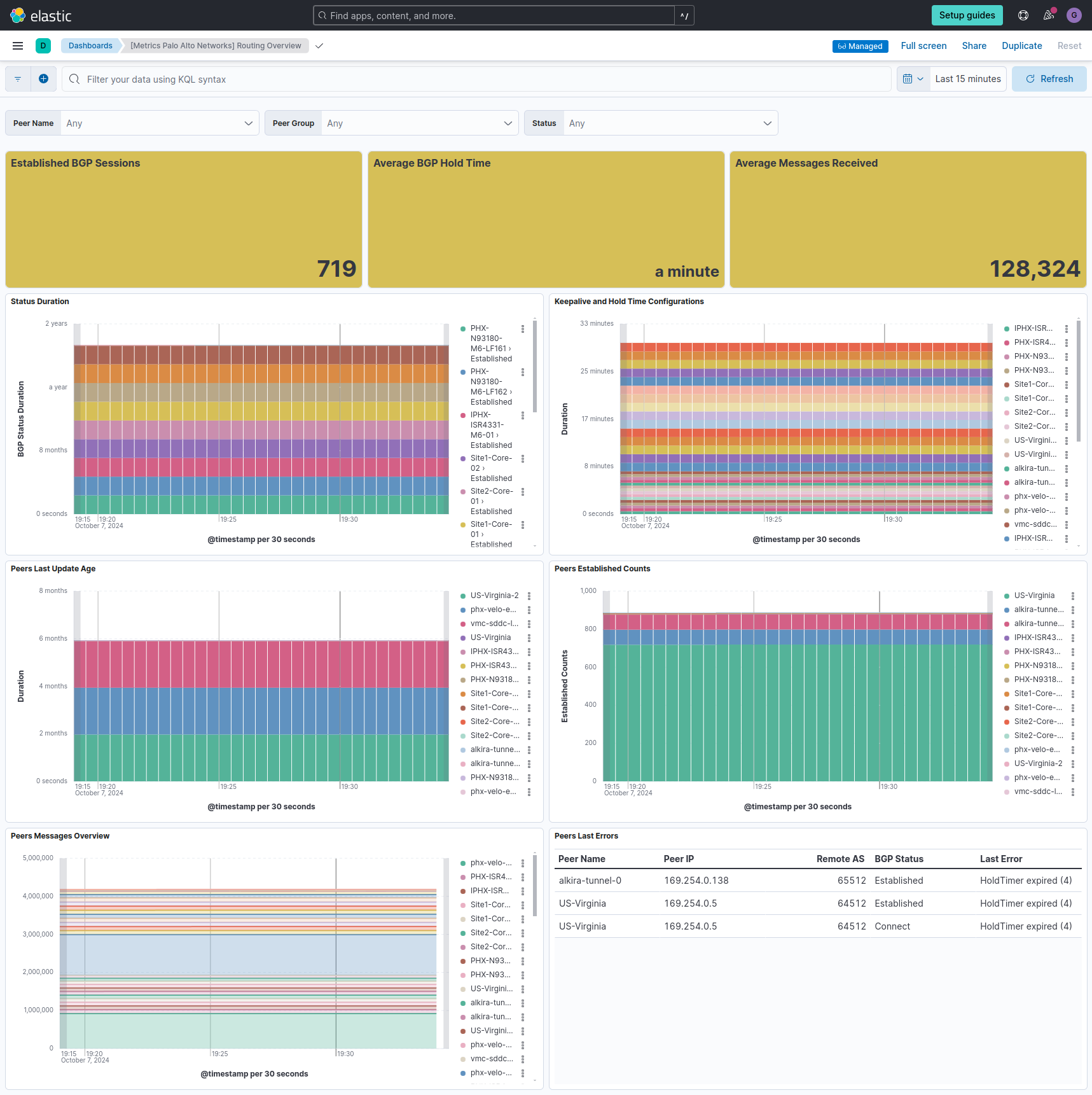
The routing dataset gathers comprehensive routing information from Palo Alto Networks devices. It includes details about routing protocols (with a focus on BGP), static and dynamic routes, next hops, AS numbers, and peer states. This dataset provides insights into the device's routing table and its interactions with other network devices.
Example
{
    "@timestamp": "2024-02-08T10:15:30.123Z",
    "agent": {
        "ephemeral_id": "a1b2c3d4-e5f6-4321-a987-1234567890ab",
        "id": "9876543210-abcdef-0987654321",
        "name": "paloalto-firewall-01",
        "type": "metricbeat",
        "version": "8.16.0"
    },
    "data_stream": {
        "namespace": "default",
        "type": "metrics"
    },
    "ecs": {
        "version": "8.11.0"
    },
    "elastic_agent": {
        "id": "2ea50bee-9250-43d1-8d70-949f242aa275",
        "snapshot": false,
        "version": "8.16.0"
    },
    "event": {
        "agent_id_status": "verified",
        "duration": 1250000,
        "ingested": "2024-02-08T10:15:32Z"
    },
    "host": {
        "architecture": "x86_64",
        "containerized": false,
        "hostname": "docker-fleet-agent",
        "id": "28da52b32df94b50aff67dfb8f1be3d6",
        "ip": [
            "172.24.0.7"
        ],
        "mac": [
            "02-42-AC-18-00-07"
        ],
        "name": "docker-fleet-agent",
        "os": {
            "codename": "focal",
            "family": "debian",
            "kernel": "5.15.0-89-generic",
            "name": "Ubuntu",
            "platform": "ubuntu",
            "type": "linux",
            "version": "20.04.6 LTS (Focal Fossa)"
        }
    },
    "metricset": {
        "name": "routing",
        "period": 10000
    },
    "panw": {
        "routing": {
            "bgp": {
                "peer_name": "ISP-A",
                "virtual_router": "default",
                "peer_group": "external_peers",
                "peer_router_id": "10.0.0.1",
                "remote_as_asn": 65001,
                "status": "Established",
                "status_duration": 3600,
                "password_set": true,
                "passive": false,
                "peering_type": "External BGP",
                "holdtime": 180,
                "keepalive": 60,
                "msg_update_in": 1000,
                "msg_update_out": 500,
                "msg_total_in": 5000,
                "msg_total_out": 4500,
                "last_update_age": 300,
                "status_flap_counts": 2,
                "established_counts": 10
            }
        }
    }
}
The fields reported are:
ECS Field Reference
Please refer to the following document for detailed information on ECS fields.
Exported fields
| Field | Description | Type | Unit | Metric Type |
|---|---|---|---|---|
| @timestamp | Event timestamp. | date | ||
| agent.id | Unique identifier of this agent (if one exists). Example: For Beats this would be beat.id. | keyword | ||
| container.id | Unique container id. | keyword | ||
| data_stream.dataset | Data stream dataset. | constant_keyword | ||
| data_stream.namespace | Data stream namespace. | constant_keyword | ||
| data_stream.type | Data stream type. | constant_keyword | ||
| host.id | Unique host id. As hostname is not always unique, use values that are meaningful in your environment. Example: The current usage of beat.name. |
keyword | ||
| host.name | Name of the host. It can contain what hostname returns on Unix systems, the fully qualified domain name (FQDN), or a name specified by the user. The recommended value is the lowercase FQDN of the host. | keyword | ||
| panw.routing.bgp.aggregate_confed_as | Indicates that Autonomous System (AS) aggregation is enabled for the confederation | boolean | ||
| panw.routing.bgp.connect_retry_interval | The interval between connection retries | long | s | gauge |
| panw.routing.bgp.established_counts | Number of times the BGP session has successfully transitioned to the "Established" state | long | gauge | |
| panw.routing.bgp.holdtime | Time in seconds that the BGP peer will wait for a keepalive message, negotiated between peers | long | s | gauge |
| panw.routing.bgp.holdtime_config | Represents the locally configured hold time on this peer | long | s | gauge |
| panw.routing.bgp.idle_hold | The idle hold time before retrying a connection after failure | long | s | gauge |
| panw.routing.bgp.keepalive | The interval at which BGP keepalive messages are sent, negotiated between peers | long | s | gauge |
| panw.routing.bgp.keepalive_config | The keepalive configured on this peer | long | s | gauge |
| panw.routing.bgp.last_error | The last BGP error message received from the peer | keyword | ||
| panw.routing.bgp.last_update_age | Time in seconds since the last update message was received from the peer | long | s | gauge |
| panw.routing.bgp.local_ip | Local ip address used for BGP connection | ip | ||
| panw.routing.bgp.local_port | Local port number used for BGP connection | long | ||
| panw.routing.bgp.msg_total_in | Total of all messages received from the peer | long | gauge | |
| panw.routing.bgp.msg_total_out | Total of all messages sent to the peer | long | gauge | |
| panw.routing.bgp.msg_update_in | The number of BGP UPDATE messages received by the router from this peer | long | gauge | |
| panw.routing.bgp.msg_update_out | The number of BGP UPDATE messages sent from the local router to the peer | long | gauge | |
| panw.routing.bgp.multi_hop_ttl | Time to Live (TTL) value for multi-hop BGP sessions. Units are the number of hops. | long | gauge | |
| panw.routing.bgp.nexthop_peer | Indicates whether the peer is being used as the next-hop for the routes received from this peerfields. | boolean | ||
| panw.routing.bgp.nexthop_self | Whether the router is configured to use itself as the next-hop for routes sent to this peer | boolean | ||
| panw.routing.bgp.nexthop_thirdparty | Third-party next-hop feature is enabled | boolean | ||
| panw.routing.bgp.open_delay | Delay before sending an Open message | long | s | gauge |
| panw.routing.bgp.orf_entry_received | Number of ORF (Outbound Route Filtering) entries received from the peer | long | gauge | |
| panw.routing.bgp.passive | Indicates if the BGP peer is in passive mode: if yes then router will not initiate a connection to the peer | boolean | ||
| panw.routing.bgp.password_set | Indicates whether a password is set for the BGP peer | boolean | ||
| panw.routing.bgp.peer_group | The name of the BGP peer group this peer belongs to | keyword | ||
| panw.routing.bgp.peer_ip | IP address of the peer | ip | ||
| panw.routing.bgp.peer_name | The name of the current peer in the BGP peer group | keyword | ||
| panw.routing.bgp.peer_port | Port number of the peer | long | ||
| panw.routing.bgp.peer_router_id | BGP peer router ID | ip | ||
| panw.routing.bgp.peering_type | Defines the type of relationship between peers, e.g., "External BGP", "Internal BGP", or "Unspecified" | keyword | ||
| panw.routing.bgp.prefix_limit | The maximum number of prefixes that can be received from the peer (0 = no limit) | long | gauge | |
| panw.routing.bgp.reflector_client | Specifies the BGP peer relationship to route reflectors, e.g. "client", "not-client", "meshed-client" | keyword | ||
| panw.routing.bgp.remote_as_asn | The remote Autonomous System (AS) number of the peer | long | ||
| panw.routing.bgp.same_confederation | Peers in the same confederation exchange routes using internal BGP (iBGP) instead of external BGP (eBGP) | boolean | ||
| panw.routing.bgp.status | The BGP session status, e.g., "Established" means the session is up and running | keyword | ||
| panw.routing.bgp.status_duration | Time in seconds since the current status was set | long | s | gauge |
| panw.routing.bgp.status_flap_counts | Indicates the number of times the BGP session has "flapped" or transitioned between up and down states | long | gauge | |
| panw.routing.bgp.virtual_router | The virtual router with which the BGP peer is associated | keyword |
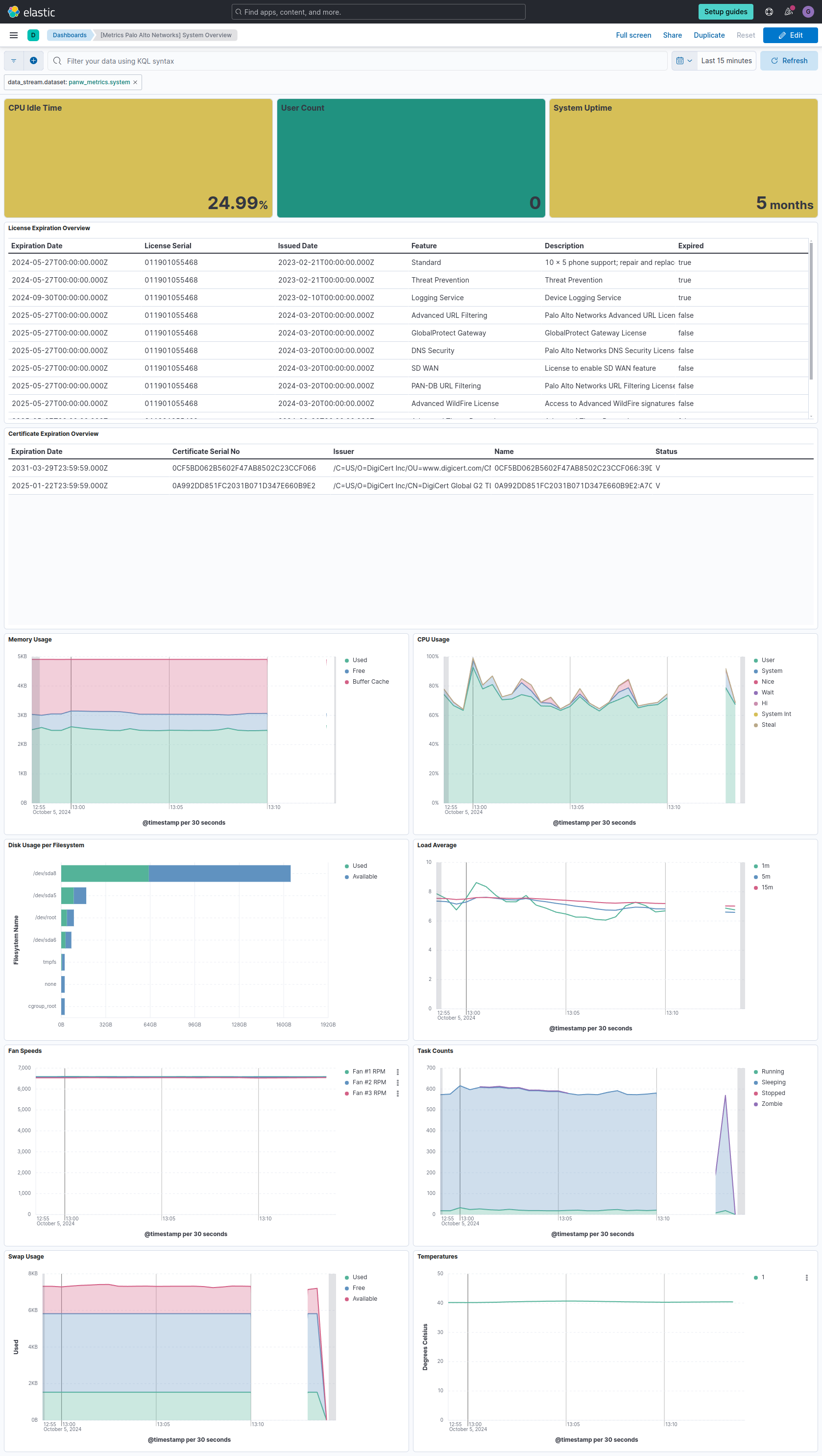
The system dataset collects a wide range of system-level metrics from Palo Alto Networks firewalls. This includes CPU usage, memory utilization, disk space, load averages, and process statistics. It also provides information about system uptime, licensed features, file system usage, and hardware component status (such as fans, thermal sensors, and power supplies).
Example
{
    "@timestamp": "2024-02-08T10:15:30.123Z",
    "agent": {
        "ephemeral_id": "a1b2c3d4-e5f6-4321-a987-1234567890ab",
        "id": "9876543210-abcdef-0987654321",
        "name": "panw-agent-01",
        "type": "metricbeat",
        "version": "8.16.0"
    },
    "data_stream": {
        "namespace": "default",
        "type": "metrics"
    },
    "ecs": {
        "version": "8.11.0"
    },
    "elastic_agent": {
        "id": "2ea50bee-9250-43d1-8d70-949f242aa275",
        "snapshot": false,
        "version": "8.16.0"
    },
    "event": {
        "agent_id_status": "verified",
        "duration": 1250000,
        "ingested": "2024-02-08T10:15:32Z"
    },
    "host": {
        "architecture": "x86_64",
        "containerized": false,
        "hostname": "docker-fleet-agent",
        "id": "28da52b32df94b50aff67dfb8f1be3d6",
        "ip": [
            "172.24.0.7"
        ],
        "mac": [
            "02-42-AC-18-00-07"
        ],
        "name": "docker-fleet-agent",
        "os": {
            "codename": "focal",
            "family": "debian",
            "kernel": "5.15.0-89-generic",
            "name": "Ubuntu",
            "platform": "ubuntu",
            "type": "linux",
            "version": "20.04.6 LTS (Focal Fossa)"
        }
    },
    "metricset": {
        "name": "system",
        "period": 10000
    },
    "panw": {
        "system": {
            "uptime": {
                "days": 15,
                "hours": 7,
                "minutes": 32
            },
            "user_count": 23,
            "load_average": {
                "1m": 0.75,
                "5m": 0.68,
                "15m": 0.62
            },
            "tasks": {
                "total": 245,
                "running": 3,
                "sleeping": 242
            },
            "cpu": {
                "user": 5.2,
                "system": 2.8,
                "idle": 92.0
            },
            "memory": {
                "total": 16106127360,
                "free": 8053063680,
                "used": 8053063680
            },
            "swap": {
                "total": 4294967296,
                "free": 4294967296,
                "used": 0
            }
        }
    },
    "service": {
        "type": "panw"
    }
}
The fields reported are:
ECS Field Reference
Please refer to the following document for detailed information on ECS fields.
Exported fields
| Field | Description | Type | Unit | Metric Type |
|---|---|---|---|---|
| @timestamp | Event timestamp. | date | ||
| agent.id | Unique identifier of this agent (if one exists). Example: For Beats this would be beat.id. | keyword | ||
| container.id | Unique container id. | keyword | ||
| data_stream.dataset | Data stream dataset. | constant_keyword | ||
| data_stream.namespace | Data stream namespace. | constant_keyword | ||
| data_stream.type | Data stream type. | constant_keyword | ||
| host.id | Unique host id. As hostname is not always unique, use values that are meaningful in your environment. Example: The current usage of beat.name. |
keyword | ||
| host.name | Name of the host. It can contain what hostname returns on Unix systems, the fully qualified domain name (FQDN), or a name specified by the user. The recommended value is the lowercase FQDN of the host. | keyword | ||
| panw.system.certificate.db_exp_date | Expiration date, format: 310329235959Z (Mar 29 23:59:59 2031 GMT) | keyword | ||
| panw.system.certificate.db_file | File name of the certificate database | keyword | ||
| panw.system.certificate.db_name | Name of the certificate database | keyword | ||
| panw.system.certificate.db_rev_date | Revision date of the certificate database | keyword | ||
| panw.system.certificate.db_serial_no | Serial number of the certificate database | keyword | ||
| panw.system.certificate.db_status | Status of the certificate database | keyword | ||
| panw.system.certificate.db_type | Type of the certificate database | keyword | ||
| panw.system.certificate.issuer | Issuer of the certificate database | keyword | ||
| panw.system.certificate.issuer_key_hash | Key hash of the issuer of the certificate database | keyword | ||
| panw.system.certificate.issuer_subject_hash | Subject hash of the issuer of the certificate database | keyword | ||
| panw.system.cpu.hi | CPU hardware interrupts | float | percent | gauge |
| panw.system.cpu.idle | CPU idle time | float | percent | gauge |
| panw.system.cpu.nice | CPU usage by processes with a positive nice value | float | percent | gauge |
| panw.system.cpu.steal | CPU steal time | float | percent | gauge |
| panw.system.cpu.system | CPU usage by system processes | float | percent | gauge |
| panw.system.cpu.system_int | CPU software interrupts | float | percent | gauge |
| panw.system.cpu.user | CPU usage by user processes | float | percent | gauge |
| panw.system.cpu.wait | CPU wait time | float | percent | gauge |
| panw.system.fan.alarm | Is there an alarm status of the fan | boolean | ||
| panw.system.fan.description | The description of the fan | keyword | ||
| panw.system.fan.min_rpm | The minimum speed of the fan in RPM | integer | gauge | |
| panw.system.fan.rpm | The speed of the fan in RPM | integer | gauge | |
| panw.system.fan.slot_number | The number of the hardware slot | integer | ||
| panw.system.filesystem.available | Disk space available on the filesystem | float | byte | gauge |
| panw.system.filesystem.mounted | Filesystem mount point | keyword | ||
| panw.system.filesystem.name | Filesystem name | keyword | ||
| panw.system.filesystem.size | Total size of the filesystem | float | byte | gauge |
| panw.system.filesystem.use_percent | Percent of filesystem used | float | percent | gauge |
| panw.system.filesystem.used | Amount used on the filesystem | float | byte | gauge |
| panw.system.license.auth_code | Authorization code to activate or install the license | keyword | ||
| panw.system.license.description | Description of the licensed feature | keyword | ||
| panw.system.license.expired | Indicates if the license is expired | boolean | ||
| panw.system.license.expires | Date the license expires - not set if license never expires | date | ||
| panw.system.license.feature | Feature licensed, e.g. Advanced Threat Prevention | keyword | ||
| panw.system.license.issued | Date the license was issued | date | ||
| panw.system.license.never_expires | Indicates if the license never expires | boolean | ||
| panw.system.license.serial | Serial number of license | keyword | ||
| panw.system.load_average.15m | Load average in 15 minutes | float | gauge | |
| panw.system.load_average.1m | Load average in 1 minute | float | gauge | |
| panw.system.load_average.5m | Load average in 5 minutes | float | gauge | |
| panw.system.memory.buffer_cache | Memory used for buffers and cache | float | byte | gauge |
| panw.system.memory.free | Free memory | float | byte | gauge |
| panw.system.memory.total | Total memory | float | byte | gauge |
| panw.system.memory.used | Used memory | float | byte | gauge |
| panw.system.power.alarm | Indicates if alarm is active | boolean | ||
| panw.system.power.description | Description field | text | ||
| panw.system.power.maximum_volts | Maximum volts recorded | float | gauge | |
| panw.system.power.minimum_volts | Minimum volts recorded | float | gauge | |
| panw.system.power.slot_number | Slot number field | integer | ||
| panw.system.power.volts | Current Volts | float | gauge | |
| panw.system.swap.available | Available swap space | float | byte | gauge |
| panw.system.swap.free | Free swap space | float | byte | gauge |
| panw.system.swap.total | Total swap space | float | byte | gauge |
| panw.system.swap.used | Used swap space | float | byte | gauge |
| panw.system.tasks.running | Number of running tasks | long | gauge | |
| panw.system.tasks.sleeping | Number of sleeping tasks | long | gauge | |
| panw.system.tasks.stopped | Number of stopped tasks | long | gauge | |
| panw.system.tasks.total | Total number of tasks | long | gauge | |
| panw.system.tasks.zombie | Number of zombie tasks | long | gauge | |
| panw.system.thermal.alarm | Alarm field | boolean | ||
| panw.system.thermal.degrees_celsius | Degrees Celsius field | float | gauge | |
| panw.system.thermal.description | Description field | text | ||
| panw.system.thermal.maximum_temp | Maximum temperature field | float | gauge | |
| panw.system.thermal.minimum_temp | Minimum temperature field | float | gauge | |
| panw.system.thermal.slot_number | Slot number field | integer | ||
| panw.system.uptime.days | Uptime in days | integer | d | gauge |
| panw.system.uptime.hours | Hours component of uptime | integer | h | gauge |
| panw.system.uptime.minutes | Minutes component of uptime | integer | m | gauge |
| panw.system.user_count | Number of users | long | gauge |
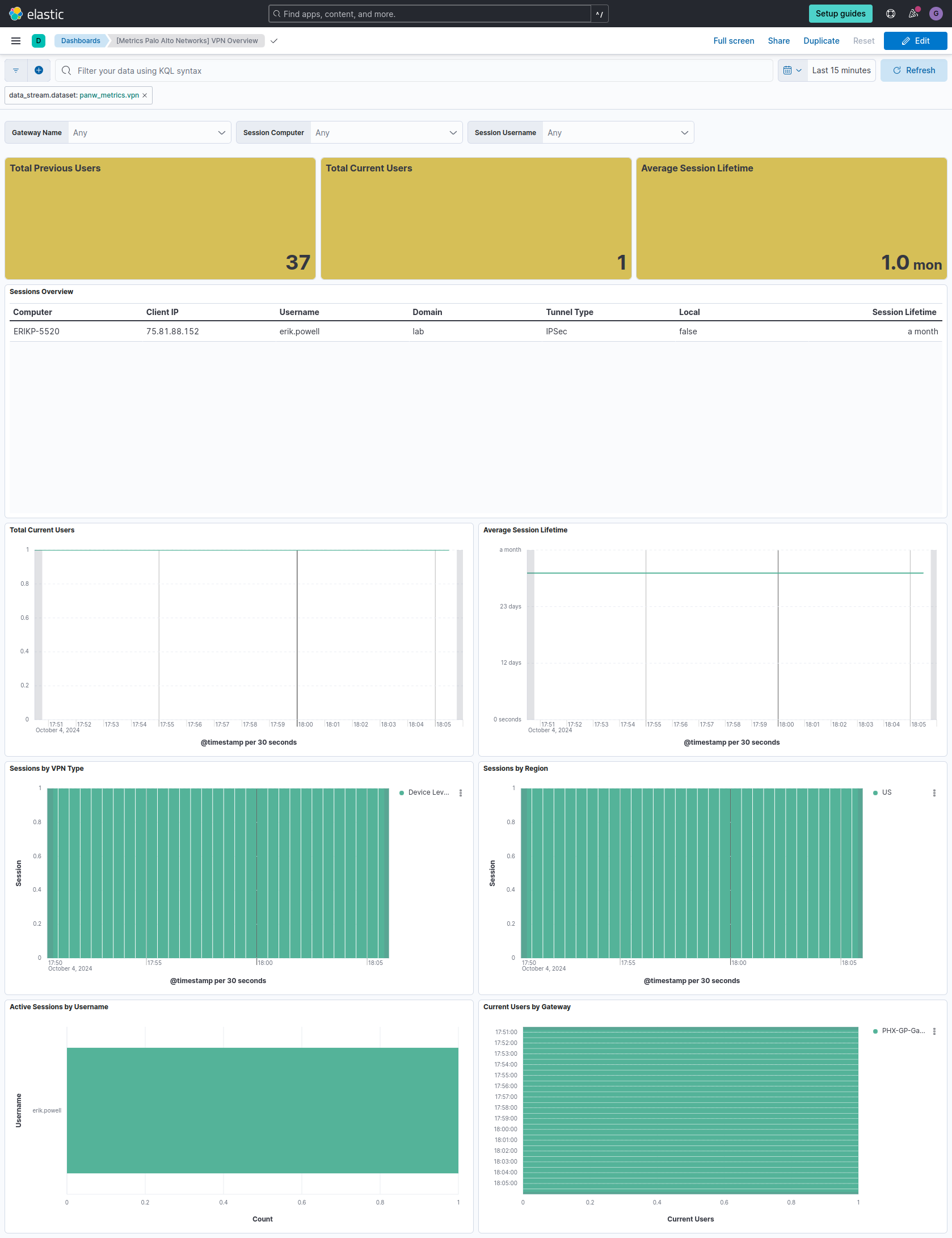
The vpn dataset gathers detailed Virtual Private Network (VPN) statistics from Palo Alto Networks devices. It covers both GlobalProtect and IPsec VPN technologies, providing information about active VPN sessions, user connections, tunnel status, encryption details, and performance metrics. This dataset offers insights into VPN usage, security, and performance.
Example
{
    "@timestamp": "2024-02-08T10:15:30.123Z",
    "agent": {
        "ephemeral_id": "a1b2c3d4-e5f6-4321-a987-1234567890ab",
        "id": "9876543210-abcdef-0987654321",
        "name": "panw-agent-01",
        "type": "metricbeat",
        "version": "8.16.0"
    },
    "data_stream": {
        "namespace": "default",
        "type": "metrics"
    },
    "ecs": {
        "version": "8.11.0"
    },
    "elastic_agent": {
        "id": "2ea50bee-9250-43d1-8d70-949f242aa275",
        "snapshot": false,
        "version": "8.16.0"
    },
    "event": {
        "agent_id_status": "verified",
        "duration": 1250000,
        "ingested": "2024-02-08T10:15:32Z"
    },
    "host": {
        "architecture": "x86_64",
        "containerized": false,
        "hostname": "docker-fleet-agent",
        "id": "28da52b32df94b50aff67dfb8f1be3d6",
        "ip": [
            "172.24.0.7"
        ],
        "mac": [
            "02-42-AC-18-00-07"
        ],
        "name": "docker-fleet-agent",
        "os": {
            "codename": "focal",
            "family": "debian",
            "kernel": "5.15.0-89-generic",
            "name": "Ubuntu",
            "platform": "ubuntu",
            "type": "linux",
            "version": "20.04.6 LTS (Focal Fossa)"
        }
    },
    "metricset": {
        "name": "vpn",
        "period": 10000
    },
    "panw": {
        "vpn": {
            "globalprotect": {
                "session": {
                    "domain": "example.com",
                    "is_local": true,
                    "username": "john.doe",
                    "primary_username": "john.doe",
                    "computer": "LAPTOP-ABC123",
                    "client": "GlobalProtect",
                    "vpn_type": "SSL",
                    "app_version": "5.2.8",
                    "virtual_ip": "10.0.0.5",
                    "public_ip": "203.0.113.45",
                    "tunnel_type": "IPSec",
                    "client_ip": "192.168.1.100",
                    "login_time": "2024-02-08T10:15:00.000Z",
                    "lifetime": 3600
                }
            }
        }
    }
}
The fields reported are:
ECS Field Reference
Please refer to the following document for detailed information on ECS fields.
Exported fields
| Field | Description | Type | Unit | Metric Type |
|---|---|---|---|---|
| @timestamp | Event timestamp. | date | ||
| agent.id | Unique identifier of this agent (if one exists). Example: For Beats this would be beat.id. | keyword | ||
| container.id | Unique container id. | keyword | ||
| data_stream.dataset | Data stream dataset. | constant_keyword | ||
| data_stream.namespace | Data stream namespace. | constant_keyword | ||
| data_stream.type | Data stream type. | constant_keyword | ||
| host.id | Unique host id. As hostname is not always unique, use values that are meaningful in your environment. Example: The current usage of beat.name. |
keyword | ||
| host.name | Name of the host. It can contain what hostname returns on Unix systems, the fully qualified domain name (FQDN), or a name specified by the user. The recommended value is the lowercase FQDN of the host. | keyword | ||
| panw.vpn.globalprotect.gateway.current_users | Current number of users connected to the GlobalProtect gateway | long | gauge | |
| panw.vpn.globalprotect.gateway.name | Name of the GlobalProtect gateway | keyword | ||
| panw.vpn.globalprotect.gateway.previous_users | Previous number of users connected to the GlobalProtect gateway | long | gauge | |
| panw.vpn.globalprotect.session.app_version | Application version used in the session | keyword | ||
| panw.vpn.globalprotect.session.client | Client information of the session | keyword | ||
| panw.vpn.globalprotect.session.client_ip | Client IP address of the session | ip | ||
| panw.vpn.globalprotect.session.computer | Computer name in the session | keyword | ||
| panw.vpn.globalprotect.session.domain | Domain of the GlobalProtect session | keyword | ||
| panw.vpn.globalprotect.session.host_id | Host ID of the session | keyword | ||
| panw.vpn.globalprotect.session.is_local | Indicates if the session is local | boolean | ||
| panw.vpn.globalprotect.session.lifetime | Lifetime of the session | long | s | |
| panw.vpn.globalprotect.session.login_time | Login time of the session | keyword | ||
| panw.vpn.globalprotect.session.login_time_utc | Login time in UTC of the session | date | ||
| panw.vpn.globalprotect.session.primary_username | Primary username of the session | keyword | ||
| panw.vpn.globalprotect.session.public_connection_ipv6 | Public connection IPv6 address of the session | keyword | ||
| panw.vpn.globalprotect.session.public_ip | Public IP address of the session | ip | ||
| panw.vpn.globalprotect.session.public_ipv6 | Public IPv6 address of the session | keyword | ||
| panw.vpn.globalprotect.session.region_for_config | Region for configuration | keyword | ||
| panw.vpn.globalprotect.session.request_get_config | Request get configuration information of the session | keyword | ||
| panw.vpn.globalprotect.session.request_login | Request login information of the session | keyword | ||
| panw.vpn.globalprotect.session.request_sslvpn_connect | Request SSL VPN connect information of the session | keyword | ||
| panw.vpn.globalprotect.session.source_region | Source region of the session | keyword | ||
| panw.vpn.globalprotect.session.tunnel_type | Type of tunnel used in the session | keyword | ||
| panw.vpn.globalprotect.session.username | Username of the session | keyword | ||
| panw.vpn.globalprotect.session.virtual_ip | Virtual IP address of the session | ip | ||
| panw.vpn.globalprotect.session.virtual_ipv6 | Virtual IPv6 address of the session | keyword | ||
| panw.vpn.globalprotect.session.vpn_type | Type of VPN used in the session | keyword | ||
| panw.vpn.globalprotect.total_current_users | Total current number of users connected to GlobalProtect gateway | long | gauge | |
| panw.vpn.globalprotect.total_previous_users | Total previous number of users connected to GlobalProtect gateway | long | gauge |
This integration includes one or more Kibana dashboards that visualizes the data collected by the integration. The screenshots below illustrate how the ingested data is displayed.
Changelog
| Version | Details | Minimum Kibana version |
|---|---|---|
| 0.2.0 | Enhancement (View pull request) Add support for Kibana 9.0.0. |
9.0.0 8.15.2 |
| 0.1.1 | Enhancement (View pull request) Add observability category. |
8.15.2 |
| 0.1.0 | Enhancement (View pull request) Initial draft of the package |
8.15.2 |