Memcached integration
Elastic Cloud Serverless projects are autoscaled environments, fully managed by Elastic and available on Elastic Cloud. Availability This functionality is generally available and ready for production usage. Elastic Cloud Serverless projects are autoscaled environments, fully managed by Elastic and available on Elastic Cloud. Availability This functionality is generally available and ready for production usage. The Elastic Stack includes Elastic's core products such as Elasticsearch, Kibana, Logstash, and Beats. Availability This functionality is generally available and ready for production usage. Unless stated otherwise on the page, this functionality is available when your Elastic Stack is deployed on Elastic Cloud Hosted, Elastic Cloud Enterprise, Elastic Cloud on Kubernetes, and self-managed environments. This documentation corresponds to the latest patch available for each minor version. If you're not using the latest patch, check the release notes for changes.
Serverless Observability
Generally available
Serverless Security
Generally available
Stack
9.0+
Generally available since 9.0
| Version | 1.8.0 (View all) |
| Subscription level What's this? |
Basic |
| Developed by What's this? |
Elastic |
| Ingestion method(s) | Database |
| Minimum Kibana version(s) | 9.0.0 8.13.0 |
Memcached is an in-memory key-value store for small chunks of arbitrary data (strings, objects) from results of database calls, API calls, or page rendering. As a result of its speed, scalability, simple design, efficient memory management and API support for most popular languages. Memcached is a popular choice for high-performance, large-scale caching use cases.
The Memcached integration has been tested with 1.5 and 1.6 versions of Memcached. It is expected to work with all versions >= 1.5
The following metrics are fetched from memcached:
ECS Field Reference
Refer to this document for detailed information on ECS fields.
Exported fields
| Field | Description | Type | Unit | Metric Type |
|---|---|---|---|---|
| @timestamp | Event timestamp. | date | ||
| agent.id | Unique identifier of this agent (if one exists). Example: For Beats this would be beat.id. | keyword | ||
| cloud.account.id | The cloud account or organization id used to identify different entities in a multi-tenant environment. Examples: AWS account id, Google Cloud ORG Id, or other unique identifier. | keyword | ||
| cloud.availability_zone | Availability zone in which this host, resource, or service is located. | keyword | ||
| cloud.instance.id | Instance ID of the host machine. | keyword | ||
| cloud.provider | Name of the cloud provider. Example values are aws, azure, gcp, or digitalocean. | keyword | ||
| cloud.region | Region in which this host, resource, or service is located. | keyword | ||
| container.id | Unique container id. | keyword | ||
| data_stream.dataset | Data stream dataset. | constant_keyword | ||
| data_stream.namespace | Data stream namespace. | constant_keyword | ||
| data_stream.type | Data stream type. | constant_keyword | ||
| event.dataset | Event module | constant_keyword | ||
| event.kind | Event kind | constant_keyword | ||
| event.module | Event module | constant_keyword | ||
| event.type | Event type | constant_keyword | ||
| host.name | Name of the host. It can contain what hostname returns on Unix systems, the fully qualified domain name (FQDN), or a name specified by the user. The recommended value is the lowercase FQDN of the host. | keyword | ||
| memcached.stats.cmd.get | Number of "get" commands received since server startup not counting if they were successful or not. | long | counter | |
| memcached.stats.cmd.set | Number of "set" commands serviced since server startup. | long | counter | |
| memcached.stats.connections.current | Number of open connections to this Memcached server, should be the same value on all servers during normal operation. | long | counter | |
| memcached.stats.connections.total | Numer of successful connection attempts to this server since it has been started. | long | counter | |
| memcached.stats.current.bytes | Number of bytes currently used for caching items. | long | byte | gauge |
| memcached.stats.evictions | Number of objects removed from the cache to free up memory for new items when Memcached reaches it's maximum memory setting (limit_maxbytes). | long | counter | |
| memcached.stats.get.hits | Cache HitRate: Its the ratio of number of successful "get" commands (cache hits) since startup and the "cmd_get" value. | long | gauge | |
| memcached.stats.get.misses | Number of failed "get" requests as nothing was cached for this key or the cached value was too old. | long | counter | |
| memcached.stats.items.current | Number of items currently in this server's cache. | long | gauge | |
| memcached.stats.items.total | Number of items ever stored on the server. The count increases by every new item stored in the cache. | long | counter | |
| memcached.stats.limit.bytes | Number of bytes the server is allowed to use for storage. | long | byte | gauge |
| memcached.stats.pid | Current process ID of the Memcached task. | long | ||
| memcached.stats.read.bytes | Total number of bytes received by the server from the network. | long | byte | counter |
| memcached.stats.threads | Number of threads used by the current Memcached server process. | long | counter | |
| memcached.stats.uptime.sec | Memcached server uptime. | long | s | gauge |
| memcached.stats.written.bytes | Total number of bytes sent to the network by the server. | long | byte | counter |
| service.address | Address where data about this service was collected from. This should be a URI, network address (ipv4:port or [ipv6]:port) or a resource path (sockets). | keyword |
Example
{
    "@timestamp": "2022-06-24T06:06:06.337Z",
    "agent": {
        "ephemeral_id": "5c05824c-146b-464f-9030-b1e1eccc7c36",
        "id": "a6434521-6e0b-4509-be07-c1591bcfe768",
        "name": "docker-fleet-agent",
        "type": "metricbeat",
        "version": "8.2.0"
    },
    "data_stream": {
        "dataset": "memcached.stats",
        "namespace": "ep",
        "type": "metrics"
    },
    "ecs": {
        "version": "8.11.0"
    },
    "elastic_agent": {
        "id": "a6434521-6e0b-4509-be07-c1591bcfe768",
        "snapshot": false,
        "version": "8.2.0"
    },
    "event": {
        "agent_id_status": "verified",
        "dataset": "memcached.stats",
        "duration": 9903333,
        "ingested": "2022-06-24T06:06:09Z",
        "kind": "metric",
        "module": "memcached"
    },
    "host": {
        "architecture": "x86_64",
        "containerized": false,
        "hostname": "docker-fleet-agent",
        "ip": [
            "192.168.112.7"
        ],
        "mac": [
            "02-42-AC-1F-00-07"
        ],
        "name": "docker-fleet-agent",
        "os": {
            "codename": "focal",
            "family": "debian",
            "kernel": "5.10.104-linuxkit",
            "name": "Ubuntu",
            "platform": "ubuntu",
            "type": "linux",
            "version": "20.04.4 LTS (Focal Fossa)"
        }
    },
    "memcached": {
        "stats": {
            "bytes": {},
            "cmd": {
                "get": 0,
                "set": 0
            },
            "connections": {
                "current": 2,
                "total": 24
            },
            "current": {
                "bytes": 0
            },
            "evictions": 0,
            "get": {
                "hits": 0,
                "misses": 0
            },
            "items": {
                "current": 0,
                "total": 0
            },
            "limit": {
                "bytes": 67108864
            },
            "pid": 1,
            "read": {
                "bytes": 12
            },
            "threads": 4,
            "uptime": {
                "sec": 28
            },
            "written": {
                "bytes": 2206
            }
        }
    },
    "metricset": {
        "name": "stats",
        "period": 10000
    },
    "service": {
        "address": "tcp://elastic-package-service-memcached-1:11211",
        "type": "memcached"
    },
    "tags": [
        "memcached_stats"
    ]
}
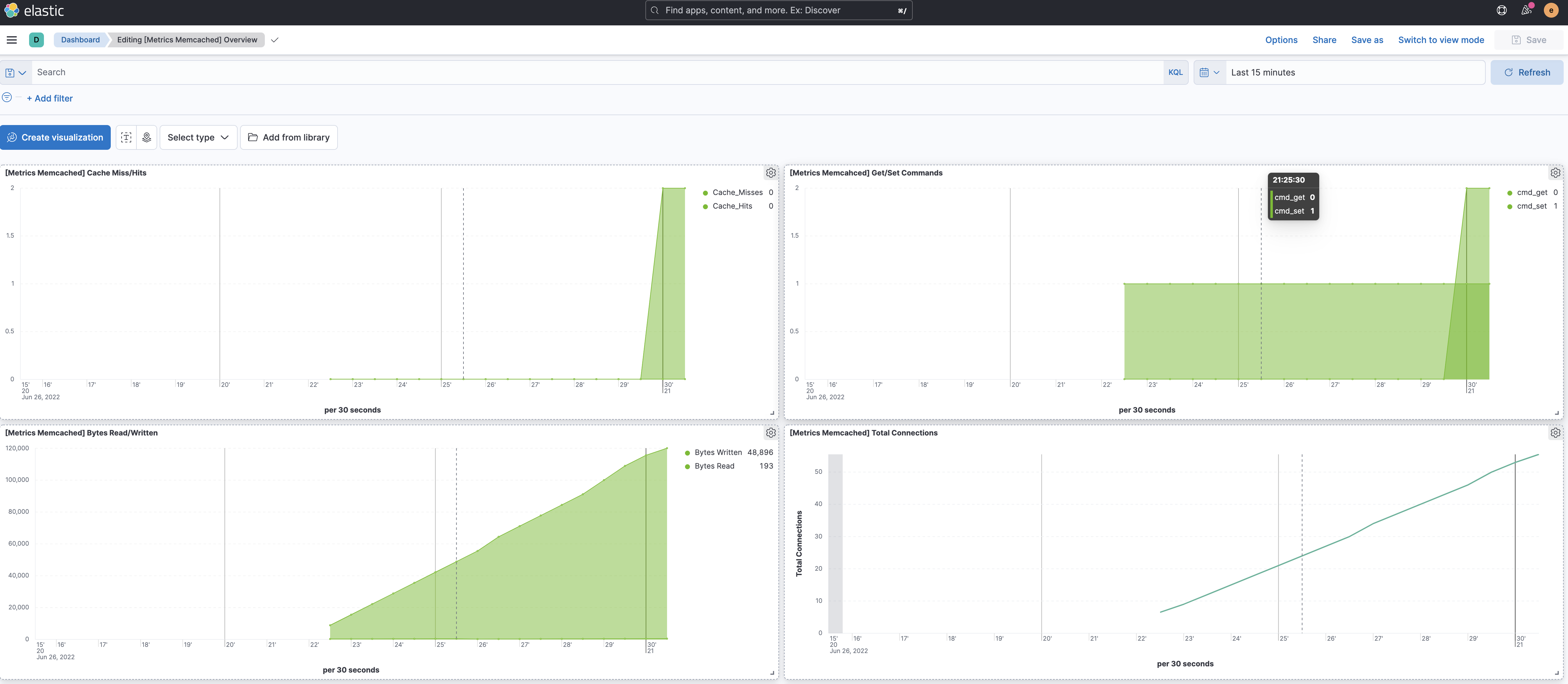
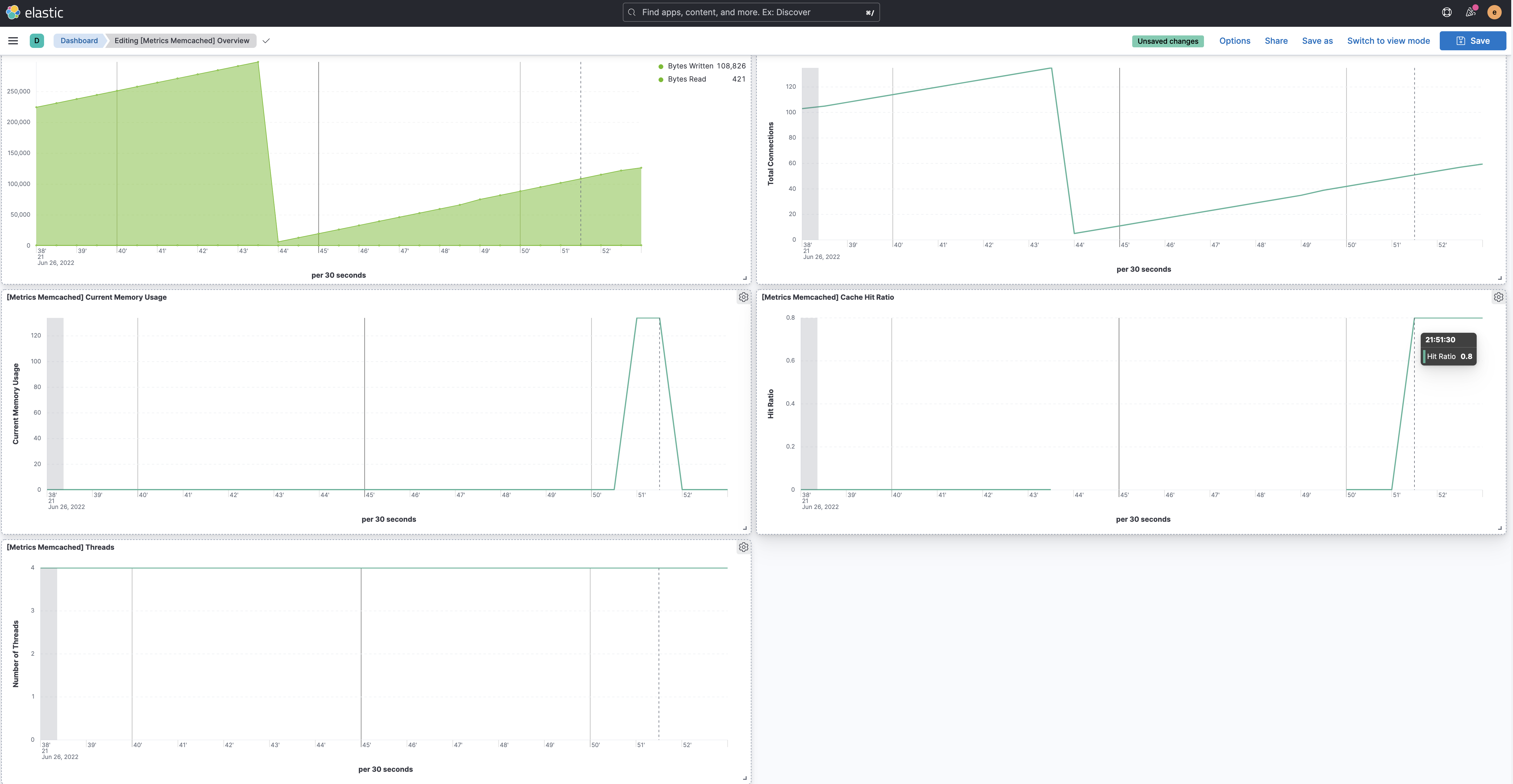
This integration includes one or more Kibana dashboards that visualizes the data collected by the integration. The screenshots below illustrate how the ingested data is displayed.
Changelog
| Version | Details | Minimum Kibana version |
|---|---|---|
| 1.8.0 | Enhancement (View pull request) Expose condition for metrics |
9.0.0 8.13.0 |
| 1.7.1 | Bug fix (View pull request) Update the Memcached integration documentation. |
9.0.0 8.13.0 |
| 1.7.0 | Enhancement (View pull request) Add support for Kibana 9.0.0. |
9.0.0 8.13.0 |
| 1.6.0 | Enhancement (View pull request) Add processor support for stats data stream. |
8.13.0 |
| 1.5.0 | Enhancement (View pull request) ECS version updated to 8.11.0. Update the kibana constraint to ^8.13.0. Modified the field definitions to remove ECS fields made redundant by the ecs@mappings component template. |
8.13.0 |
| 1.4.0 | Enhancement (View pull request) Add global filter on data_stream.dataset to improve performance. |
8.8.0 |
| 1.3.0 | Enhancement (View pull request) Update the package format_version to 3.0.0. |
8.8.0 |
| 1.2.0 | Enhancement (View pull request) Enable time series data streams for the metrics datasets. This dramatically reduces storage for metrics and is expected to progressively improve query performance. For more details, see https://www.elastic.co/guide/en/elasticsearch/reference/current/tsds.html. |
8.8.0 |
| 1.1.0 | Enhancement (View pull request) Add dimensions mapping for TSDB enablement. |
8.8.0 |
| 1.0.0 | Enhancement (View pull request) Make Memcached GA |
8.2.0 |
| 0.4.1 | Bug fix (View pull request) Updated documentation |
8.2.0 |
| 0.4.0 | Enhancement (View pull request) Rename ownership from obs-service-integrations to obs-infraobs-integrations |
8.2.0 |
| 0.3.1 | Enhancement (View pull request) Added categories and/or subcategories. |
8.2.0 |
| 0.3.0 | Enhancement (View pull request) Update ECS version to 8.5.1 |
8.2.0 |
| 0.2.0 | Enhancement (View pull request) Added infrastructure category. |
8.2.0 |
| 0.1.0 | Enhancement (View pull request) Initial integration package creation of Memcached |
8.2.0 |