Check Point Harmony Email & Collaboration
Elastic Cloud Serverless projects are autoscaled environments, fully managed by Elastic and available on Elastic Cloud. Availability This functionality is generally available and ready for production usage. Elastic Cloud Serverless projects are autoscaled environments, fully managed by Elastic and available on Elastic Cloud. Availability This functionality is generally available and ready for production usage. The Elastic Stack includes Elastic's core products such as Elasticsearch, Kibana, Logstash, and Beats. Availability This functionality is generally available and ready for production usage. Unless stated otherwise on the page, this functionality is available when your Elastic Stack is deployed on Elastic Cloud Hosted, Elastic Cloud Enterprise, Elastic Cloud on Kubernetes, and self-managed environments. This documentation corresponds to the latest patch available for each minor version. If you're not using the latest patch, check the release notes for changes.
Serverless Observability
Generally available
Serverless Security
Generally available
Stack
9.0+
Generally available since 9.0
| Version | 1.8.0 (View all) |
| Managed integration release status | GA |
| Subscription level What's this? |
Basic |
| Developed by What's this? |
Elastic |
| Ingestion method(s) | API |
| Minimum Kibana version(s) | 9.0.0 8.18.0 |
You can use this integration as an Elastic Managed integration on Elastic Cloud Hosted deployments running this version or later.
Check Point's Harmony Email & Collaboration monitors traffic across email platforms (Office 365, Gmail), file sharing services (OneDrive, SharePoint, Google Drive, Dropbox, Box, and Citrix ShareFile), and messaging applications (Teams and Slack). It scans emails, files, and messages for malware, DLP, and phishing indicators, and intercepts & quarantines potentially malicious emails before they are delivered.
The Check Point Harmony Email & Collaboration integration collects security event logs using REST API.
Elastic Managed integrations are only supported on Elastic Cloud Serverless and Elastic Cloud Hosted deployments. An Elastic Managed integration lets you ingest data from a cloud source while avoiding the orchestration, management, and maintenance associated with standard ingest infrastructure. Elastic runs the collector for you, so you can focus on your data instead of the infrastructure that collects it.
For more information, refer to Elastic Managed integrations and the Elastic Managed integrations FAQ.
This integration collects the following logs:
- Event - Get security event logs.
Elastic Agent must be installed. For more details, check the Elastic Agent installation instructions.
- In the Infinity Portal, go to Account Settings and click API Keys.
- Click New > New Account API key.
- In the Create a New API Key window, select Email & Collaboration as the service.
- (Optional) In the Expiration field, select an expiration date and time for the API key. By default, the expiration date is three months after the creation date.
- (Optional) In the Description field, enter a description for the API key.
- Click Create.
- Copy the Client ID and Secret Key.
- Note: You can always obtain the Client ID from the API Keys table, but you cannot retrieve the Secret Key after the Create a New API Key window is closed.
- Click Close.
For more details, see Documentation.
- In Kibana navigate to Management > Integrations.
- In the search bar, type Check Point Harmony Email & Collaboration.
- Select the Check Point Harmony Email & Collaboration integration and add it.
- Add all the required configuration parameters, including the URL, Client ID, Client Secret, Interval, and Initial Interval, to enable data collection.
- Save the integration.
The default URL is https://cloudinfra-gw.portal.checkpoint.com, but this may vary depending on your region. Please refer to the Documentation to find the correct URL for your region.
This is the event dataset.
Example
{
    "@timestamp": "2024-10-14T07:02:11.229Z",
    "agent": {
        "ephemeral_id": "4212f748-0155-47d2-9f8a-36005b5c9b5d",
        "id": "c7fe2335-91fd-4a8d-a52b-a5bc63c52933",
        "name": "elastic-agent-89980",
        "type": "filebeat",
        "version": "8.16.0"
    },
    "checkpoint_email": {
        "event": {
            "confidence_indicator": "detected",
            "created": "2024-10-14T07:02:11.229Z",
            "customer_id": "exampletest",
            "data": "#{\"entity_id\": \"a6d8674a04c30123456789e4d3ebd98\", \"entity_type\": \"google_mail_email\", \"label\": \"Shadow IT\"} - #{\"entity_id\": \"113012345678906535444\", \"entity_type\": \"google_user\", \"label\": \"john@example.com\"} is using #{\"entity_id\": \"google.com\", \"entity_type\": \"av_dns_info\", \"label\": \"google.com (Search Engine)\"}",
            "description": "Shadow IT - john@example.com is using google.com (Search Engine)",
            "entity_id": "25e0c50123456789e351b0dafa6aafa6",
            "entity_link": "https://in.portal.checkpoint.com/dashboard/email&collaboration/CGS1?route=cHJvZmlsZS9nsfhvbksdvnjhvdfVBsdbdfFbdbdBDBBdbrtHyujYJNtnhtnhtnOTIxZTM1MWIwZGFmYTZhYWZhNg==",
            "id": "a6d8674a04c30123456789e4d3ebd98",
            "saas": "google_mail",
            "sender_address": "google-workspace-alerts-noreply@google.com",
            "severity": 3,
            "severity_enum": "Medium",
            "state": "pending",
            "type": "shadow_it"
        }
    },
    "data_stream": {
        "dataset": "checkpoint_email.event",
        "namespace": "29281",
        "type": "logs"
    },
    "ecs": {
        "version": "8.17.0"
    },
    "elastic_agent": {
        "id": "c7fe2335-91fd-4a8d-a52b-a5bc63c52933",
        "snapshot": false,
        "version": "8.16.0"
    },
    "email": {
        "sender": {
            "address": "google-workspace-alerts-noreply@google.com"
        }
    },
    "event": {
        "agent_id_status": "verified",
        "category": [
            "email",
            "threat"
        ],
        "created": "2024-10-14T07:02:11.229Z",
        "dataset": "checkpoint_email.event",
        "id": "a6d8674a04c30123456789e4d3ebd98",
        "ingested": "2025-09-17T05:59:16Z",
        "kind": "alert",
        "original": "{\"actions\":[],\"additionalData\":null,\"availableEventActions\":null,\"confidenceIndicator\":\"detected\",\"customerId\":\"exampletest\",\"data\":\"#{\\\"entity_id\\\": \\\"a6d8674a04c30123456789e4d3ebd98\\\", \\\"entity_type\\\": \\\"google_mail_email\\\", \\\"label\\\": \\\"Shadow IT\\\"} - #{\\\"entity_id\\\": \\\"113012345678906535444\\\", \\\"entity_type\\\": \\\"google_user\\\", \\\"label\\\": \\\"john@example.com\\\"} is using #{\\\"entity_id\\\": \\\"google.com\\\", \\\"entity_type\\\": \\\"av_dns_info\\\", \\\"label\\\": \\\"google.com (Search Engine)\\\"}\",\"description\":\"Shadow IT - john@example.com is using google.com (Search Engine)\",\"entityId\":\"25e0c50123456789e351b0dafa6aafa6\",\"entityLink\":\"https://in.portal.checkpoint.com/dashboard/email\\u0026collaboration/CGS1?route=cHJvZmlsZS9nsfhvbksdvnjhvdfVBsdbdfFbdbdBDBBdbrtHyujYJNtnhtnhtnOTIxZTM1MWIwZGFmYTZhYWZhNg==\",\"eventCreated\":\"2024-10-14T07:02:11.229935+00:00\",\"eventId\":\"a6d8674a04c30123456789e4d3ebd98\",\"saas\":\"google_mail\",\"senderAddress\":\"google-workspace-alerts-noreply@google.com\",\"severity\":\"3\",\"state\":\"pending\",\"type\":\"shadow_it\"}",
        "severity": 3,
        "type": [
            "info",
            "indicator"
        ],
        "url": "https://in.portal.checkpoint.com/dashboard/email&collaboration/CGS1?route=cHJvZmlsZS9nsfhvbksdvnjhvdfVBsdbdfFbdbdBDBBdbrtHyujYJNtnhtnhtnOTIxZTM1MWIwZGFmYTZhYWZhNg=="
    },
    "input": {
        "type": "cel"
    },
    "message": "Shadow IT - john@example.com is using google.com (Search Engine)",
    "observer": {
        "product": "Harmony Email & Collaboration",
        "vendor": "Check Point"
    },
    "organization": {
        "name": "exampletest"
    },
    "related": {
        "user": [
            "google-workspace-alerts-noreply@google.com"
        ]
    },
    "source": {
        "user": {
            "domain": "google.com",
            "email": "google-workspace-alerts-noreply@google.com",
            "name": "google-workspace-alerts-noreply"
        }
    },
    "tags": [
        "preserve_original_event",
        "preserve_duplicate_custom_fields",
        "forwarded",
        "checkpoint_email-event"
    ]
}
Exported fields
| Field | Description | Type |
|---|---|---|
| @timestamp | Event timestamp. | date |
| checkpoint_email.event.actions.action_type | Name of performed action. | keyword |
| checkpoint_email.event.actions.create_time | Date when the action was performed. | date |
| checkpoint_email.event.actions.related_entity_id | Unique ID of the relevant SaaS entity. | keyword |
| checkpoint_email.event.available_event_actions.action_name | Name of available action. | keyword |
| checkpoint_email.event.available_event_actions.action_parameter.eventId | keyword | |
| checkpoint_email.event.available_event_actions.action_parameter.newSeverity | keyword | |
| checkpoint_email.event.confidence_indicator | Confidence Indicator. | keyword |
| checkpoint_email.event.created | Time the security event was created. | date |
| checkpoint_email.event.customer_id | Harmony Email & Collaboration customer ID. | keyword |
| checkpoint_email.event.data | Description in not resolved form. | keyword |
| checkpoint_email.event.description | Short explanation of the event. | keyword |
| checkpoint_email.event.destination_address | keyword | |
| checkpoint_email.event.email_subject | keyword | |
| checkpoint_email.event.entity_id | Unique ID of the relevant SaaS entity. | keyword |
| checkpoint_email.event.entity_link | keyword | |
| checkpoint_email.event.id | A unique ID used for scrolling. | keyword |
| checkpoint_email.event.saas | Name of the relevant SaaS. | keyword |
| checkpoint_email.event.scan_type | keyword | |
| checkpoint_email.event.sender_address | keyword | |
| checkpoint_email.event.severity | long | |
| checkpoint_email.event.severity_enum | Lowest, Low, Medium, High, Critical. | keyword |
| checkpoint_email.event.state | Current state of the security event. | keyword |
| checkpoint_email.event.type | Security event type. | keyword |
| checkpoint_email.event.user.action | keyword | |
| checkpoint_email.event.user.address | keyword | |
| checkpoint_email.event.user.country | keyword | |
| data_stream.dataset | Data stream dataset. | constant_keyword |
| data_stream.namespace | Data stream namespace. | constant_keyword |
| data_stream.type | Data stream type. | constant_keyword |
| event.dataset | Event dataset. | constant_keyword |
| event.module | Event module. | constant_keyword |
| input.type | Type of filebeat input. | keyword |
| log.offset | Log offset. | long |
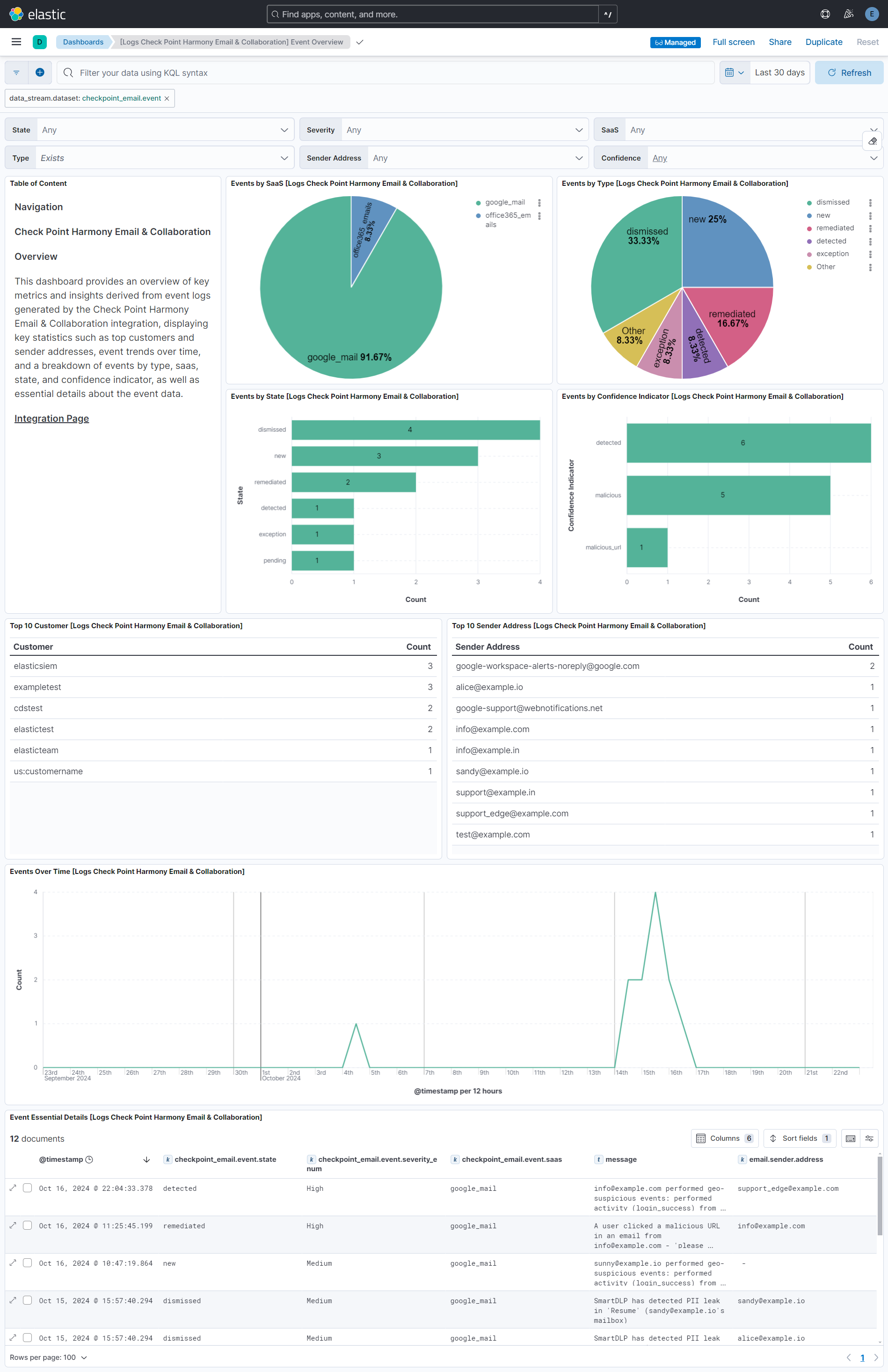
This integration includes one or more Kibana dashboards that visualizes the data collected by the integration. The screenshots below illustrate how the ingested data is displayed.
Changelog
| Version | Details | Minimum Kibana version |
|---|---|---|
| 1.8.0 | Enhancement (View pull request) Update Elastic Managed integration documentation to the current wording and docs links. |
9.0.0 8.18.0 |
| 1.7.1 | Bug fix (View pull request) Keep configuration in state after an authentication failure, and clear the scroll ID after any failed request, so later collection cycles do not fail with no such key: client_id or resend a stale scroll.Bug fix (View pull request) Include the request endpoint in error messages so authentication and event query failures can be told apart. |
9.0.0 8.18.0 |
| 1.7.0 | Enhancement (View pull request) Add tags to ingest pipeline processors. |
9.0.0 8.18.0 |
| 1.6.1 | Enhancement (View pull request) Set agentless deployment mode release field to ga. |
9.0.0 8.18.0 |
| 1.6.0 | Enhancement (View pull request) Publish Agentless to Elastic Managed integrations name change. |
9.0.0 8.18.0 |
| 1.5.0 | Enhancement (View pull request) Use new release field for agentless deployment mode to establish as beta. |
9.0.0 8.18.0 |
| 1.4.0 | Enhancement (View pull request) Shorten token expiry period to help avoid expiration races. |
9.0.0 8.18.0 |
| 1.3.3 | Bug fix (View pull request) Handle 401 on event query by clearing cached token to force re-authentication. |
9.0.0 8.18.0 |
| 1.3.2 | Bug fix (View pull request) Removed orphaned tag json file for security-solution-default. |
9.0.0 8.18.0 |
| 1.3.1 | Bug fix (View pull request) Remove duplicate security-solution-default tag references |
— |
| 1.3.0 | Enhancement (View pull request) Enable Agentless deployment. |
9.0.0 8.18.0 |
| 1.2.0 | Enhancement (View pull request) Populate additional ECS fields for the event types phishing, spam, and malicious_url. |
9.0.0 8.16.0 |
| 1.1.0 | Enhancement (View pull request) Use terminate processor instead of fail processor to handle agent errors. |
9.0.0 8.16.0 |
| 1.0.0 | Enhancement (View pull request) Release package as GA. Enhancement (View pull request) ECS version updated to 8.17.0. |
9.0.0 8.15.0 |
| 0.6.0 | Enhancement (View pull request) Remove redundant installation instructions. |
9.0.0 8.15.0 |
| 0.5.1 | Bug fix (View pull request) Fix default request trace enabled behavior. |
9.0.0 8.15.0 |
| 0.5.0 | Enhancement (View pull request) Update Kibana constraint to support 9.0.0. |
9.0.0 8.15.0 |
| 0.4.1 | Bug fix (View pull request) Updated SSL description in package manifest.yml to be uniform and to include links to documentation. |
8.15.0 |
| 0.4.0 | Enhancement (View pull request) Add "preserve_original_event" tag to documents with event.kind manually set to "pipeline_error". |
8.15.0 |
| 0.3.0 | Enhancement (View pull request) Add "preserve_original_event" tag to documents with event.kind set to "pipeline_error". |
8.15.0 |
| 0.2.0 | Enhancement (View pull request) Add support for deleting request trace files. |
8.15.0 |
| 0.1.0 | Enhancement (View pull request) Initial release. |
8.15.0 |