Elastic Cloud Serverless projects are autoscaled environments, fully managed by Elastic and available on Elastic Cloud.
Availability
Generally available
This functionality is generally available and ready for production usage.
Stack9.1+
The Elastic Stack includes Elastic's core products such as Elasticsearch, Kibana, Logstash, and Beats.
Availability
Generally available since 9.1
This functionality is generally available and ready for production usage.
Unless stated otherwise on the page, this functionality is available when your Elastic Stack is deployed on Elastic Cloud Hosted, Elastic Cloud Enterprise, Elastic Cloud on Kubernetes, and self-managed environments.
This documentation corresponds to the latest patch available for each minor version. If you're not using the latest patch, check the release notes for changes.
Important - Managed integrations on Elastic Cloud HostedThe Elastic Stack includes Elastic's core products such as Elasticsearch, Kibana, Logstash, and Beats.AvailabilityGenerally available since 9.5This functionality is generally available and ready for production usage.Unless stated otherwise on the page, this functionality is available when your Elastic Stack is deployed on Elastic Cloud Hosted, Elastic Cloud Enterprise, Elastic Cloud on Kubernetes, and self-managed environments.This documentation corresponds to the latest patch available for each minor version. If you're not using the latest patch, check the release notes for changes.
You can use this integration as an Elastic Managed integration on Elastic Cloud Hosted deployments running this version or later.
The Rapid7 Threat Command integration allows users to retrieve IOCs (Indicator of Compromises), organization-specific Threat Command alerts, and CVEs (Common Vulnerabilities and Exposures). Furthermore, the correlation between data collected from the Rapid7 Threat Command platform (IOCs and CVEs) and the user's environment helps to identify threats. Rapid7 Threat Command platform gives protectors the tools and clarity they need to assess their attack surface, detect suspicious behavior, and respond and remediate quickly with intelligent automation.
Elastic Managed integrations are only supported on Elastic Cloud Serverless and Elastic Cloud Hosted deployments. An Elastic Managed integration lets you ingest data from a cloud source while avoiding the orchestration, management, and maintenance associated with standard ingest infrastructure. Elastic runs the collector for you, so you can focus on your data instead of the infrastructure that collects it.
You need Elasticsearch for storing and searching your data and Kibana for visualizing and managing it. You can use our hosted Elasticsearch Service on Elastic Cloud, which is recommended, or self-manage the Elastic Stack on your own hardware.
This setting enforces all active Indicators of Compromise (IOCs) to expire after this duration since their last seen time indicated in the feed. Use Elasticsearch time units in days, hours, or minutes (e.g 10d). If invalid units are provided, default value 90d i.e., 90 days is used to expire the indicators. For more details on indicator expiration, check the Expiration of Indicators of Compromise (IOCs) documentation.
The integration versions until 1.16.0 added custom security detection rules for storing matching indicators and CVEs from user indices to those ingested from Rapid7 Threat Command integration. These rules are now replaced by one or more of Elastic prebuilt detection rules. Following are the changes:
Rule in <= v1.16.0
Replaced by Rule in v2.0.0
Rapid7 Threat Command IOCs Correlation
Threat Intel Hash Indicator Match, Threat Intel IP Address Indicator Match, Threat Intel URL Indicator Match, Threat Intel Windows Registry Indicator Match
Rapid7 Threat Command CVEs Correlation
Rapid7 Threat Command CVEs Correlation
After upgrading to 2.0.0, disable and delete old rules to avoid duplicate Security Alerts. You must also install and enable new rules in their place as documented here.
The integration until version 1.16.0 adds custom indices and Data Views namely rapid7-tc-ioc-correlations and rapid7-tc-cve-correlations to store matching indicators and CVEs from user indices with the help of custom rules. Since the custom rules are replaced with Elastic prebuilt rules, these custom views are deleted. Users can view the same matching indicators and CVEs by navigating to Security -> Alerts page. Read View Detection Alert for more details.
Some dashboards that depended on above custom views were also removed. These dashboards include IOC Correlation, IOC Correlation Details, Vulnerability Correlation, and Vulnerability Correlation Details. Users can view these correlations by navigating to the same Security -> Alerts page.
This integration versions until 1.16.0 guided users to create custom transforms on datasets IOC, Alert, and Vulnerability with the commands to execute from Kibana Dev Tools. Starting 2.0.0, the integration replaces them with fleet-managed transforms, which are automatically installed and started after upgrade. Following are the changes:
In versions <= v1.16.0, the transforms ti_rapid7_threat_command_ioc_rule_transform and ti_rapid7_threat_command_cve_rule_transform were used to index the security alerts generated from the custom rules into custom views. Since both custom rules and custom views are deleted, these transforms are no longer required.
If users are upgrading to any version after 1.16.0, it is advised to stop and delete all of the transforms used in older versions to avoid duplicate data and Security Alerts.
The threat landscape is always evolving and therefore the IOCs need to update to reflect the current state or expired when the indicators are no longer relevant.
The ingested indicators from the integration are expired after the duration configured by IOC Expiration Duration integration setting. This setting is required property and must be set by the users. Refer IOC Expiration Duration section for more details.
The Elastic Transform named logs-ti_rapid7_threat_command.latest_ioc-default-* is created to facilitate only active IOCs be available to the end users. This transform creates destination indices named logs-ti_rapid7_threat_command_latest.dest_ioc-* which only contains active and unexpired IOCs. This latest destination index also has an alias named logs-ti_rapid7_threat_command_latest.ioc. When querying for active indicators or setting up indicator match rules, only use the latest destination indices or the alias to avoid false positives from expired IOCs.
Dashboards are also pointing to the latest destination indices containing only active indicators.
A retention (see Data retention) is applied to avoid unbounded growth on source datastream .ds-logs-ti_rapid7_threat_command.ioc-* indices.
Threat indicators are re-collected across polling intervals, and the latest transform keeps the active, deduplicated view in its destination index. The source data streams therefore hold repeated copies of the same indicators. The alert and vulnerability data streams do not ship a retention.
The package bounds the growth of these source data streams with a retention that depends on the deployment type:
Data stream
Self-managed and Elastic Cloud Hosted (ILM policy)
Serverless (data stream lifecycle)
logs-ti_rapid7_threat_command.ioc-*
logs-ti_rapid7_threat_command.ioc-default_policy: roll over after 1d, delete 4d after rollover
delete 5d after rollover
On self-managed and Elastic Cloud Hosted deployments the ILM policy applies. The data stream lifecycle shipped with the package is not used there. ILM counts the delete age from the rollover of a backing index, so a document can remain for up to the rollover age plus the delete age. On Serverless, ILM is not available and the data stream lifecycle applies instead. It also works per backing index: Elasticsearch rolls the write index over automatically on age, size, or document count, and deletes a backing index once the retention has passed since it rolled over. A document therefore stays for the retention plus up to one rollover interval. The rollover age is derived from the retention and is an implementation detail that Elasticsearch may change. Where the package installs a transform, the transform's destination indices are not affected by either.
To keep data for a different period:
Self-managed and Elastic Cloud Hosted: edit the ILM policy in Kibana under Stack Management → Index Lifecycle Policies, or with PUT _ilm/policy/<policy name>. A package upgrade reinstalls the package's ILM policies, so check your change after upgrading.
Serverless: set the retention on the data stream, for example PUT _data_stream/logs-ti_rapid7_threat_command.ioc-default/_lifecycle with the body {"data_retention": "90d"}. Replace default with your namespace.
As noted in above sections, there are 5 prebuilt detection rules that are available and need to be added by the users. 4 rules are for matching indicators, while 1 rule is for matching vulnerabilities. Following are the rules:
{
    "@timestamp": "2022-11-02T10:12:46.260Z",
    "agent": {
        "ephemeral_id": "3e47ad8c-4007-42a2-9508-25461637a1a2",
        "id": "4f4859e9-b757-40fc-b94b-4402288f73ee",
        "name": "elastic-agent-26582",
        "type": "filebeat",
        "version": "8.19.4"
    },
    "data_stream": {
        "dataset": "ti_rapid7_threat_command.alert",
        "namespace": "85836",
        "type": "logs"
    },
    "ecs": {
        "version": "8.11.0"
    },
    "elastic_agent": {
        "id": "4f4859e9-b757-40fc-b94b-4402288f73ee",
        "snapshot": false,
        "version": "8.19.4"
    },
    "event": {
        "agent_id_status": "verified",
        "created": "2025-12-26T04:01:50.243Z",
        "dataset": "ti_rapid7_threat_command.alert",
        "id": "123456789zxcvbnmas8a8q60",
        "ingested": "2025-12-26T04:01:51Z",
        "kind": "alert",
        "module": "ti_rapid7_threat_command",
        "original": "{\"Assets\":[{\"Type\":\"Domains\",\"Value\":\"example.com\"}],\"Assignees\":[],\"Closed\":{\"IsClosed\":true},\"Details\":{\"Description\":\"A suspicious subdomain 'example.com' was found to have characteristics indicating it may be used to carry out phishing attacks. | Recommendations:  It is recommended to block the domain in your URL filtering and mail systems. This can prevent phishing emails being received by your employees and access to websites attempting to steal sensitive information. Click “Remediate” in order to initiate the takedown process for this domain.\",\"Images\":[],\"Severity\":\"Low\",\"Source\":{\"NetworkType\":\"ClearWeb\",\"Type\":\"WHOIS servers\",\"URL\":\"http://example.com\"},\"SubType\":\"RegisteredSuspiciousDomain\",\"Tags\":[{\"CreatedBy\":\"ProfilingRule\",\"Name\":\"Phishing Domain - Default Detection Rule\",\"_id\":\"1al3p6789z6c2b7m9s8a8q60\"}],\"Title\":\"Suspected Phishing Domain - 'example.com'\",\"Type\":\"Phishing\"},\"FoundDate\":\"2022-11-02T10:12:46.260Z\",\"IsFlagged\":false,\"RelatedIocs\":[\"example.com\"],\"RelatedThreatIDs\":[\"6a4e7t9a111bd0003bcc2a55\"],\"TakedownStatus\":\"NotSent\",\"UpdateDate\":\"2022-11-02T10:12:46.260Z\",\"_id\":\"123456789zxcvbnmas8a8q60\"}",
        "reference": "https://dashboard.ti.insight.rapid7.com/#/threat-command/alerts/?search=123456789zxcvbnmas8a8q60"
    },
    "input": {
        "type": "httpjson"
    },
    "rapid7": {
        "tc": {
            "alert": {
                "assets": [
                    {
                        "type": "Domains",
                        "value": "example.com"
                    }
                ],
                "details": {
                    "description": "A suspicious subdomain 'example.com' was found to have characteristics indicating it may be used to carry out phishing attacks. | Recommendations:  It is recommended to block the domain in your URL filtering and mail systems. This can prevent phishing emails being received by your employees and access to websites attempting to steal sensitive information. Click “Remediate” in order to initiate the takedown process for this domain.",
                    "severity": "Low",
                    "source": {
                        "network_type": "ClearWeb",
                        "type": "WHOIS servers",
                        "url": "http://example.com"
                    },
                    "subtype": "RegisteredSuspiciousDomain",
                    "tags": [
                        {
                            "created_by": "ProfilingRule",
                            "id": "1al3p6789z6c2b7m9s8a8q60",
                            "name": "Phishing Domain - Default Detection Rule"
                        }
                    ],
                    "title": "Suspected Phishing Domain - 'example.com'",
                    "type": "Phishing"
                },
                "found_date": "2022-11-02T10:12:46.260Z",
                "id": "123456789zxcvbnmas8a8q60",
                "is_closed": true,
                "is_flagged": false,
                "related_iocs": [
                    "example.com"
                ],
                "related_threat_ids": [
                    "6a4e7t9a111bd0003bcc2a55"
                ],
                "takedown_status": "NotSent",
                "update_date": "2022-11-02T10:12:46.260Z"
            }
        }
    },
    "tags": [
        "preserve_original_event",
        "forwarded",
        "rapid7-threat-command-alert",
        "Phishing Domain - Default Detection Rule"
    ]
}
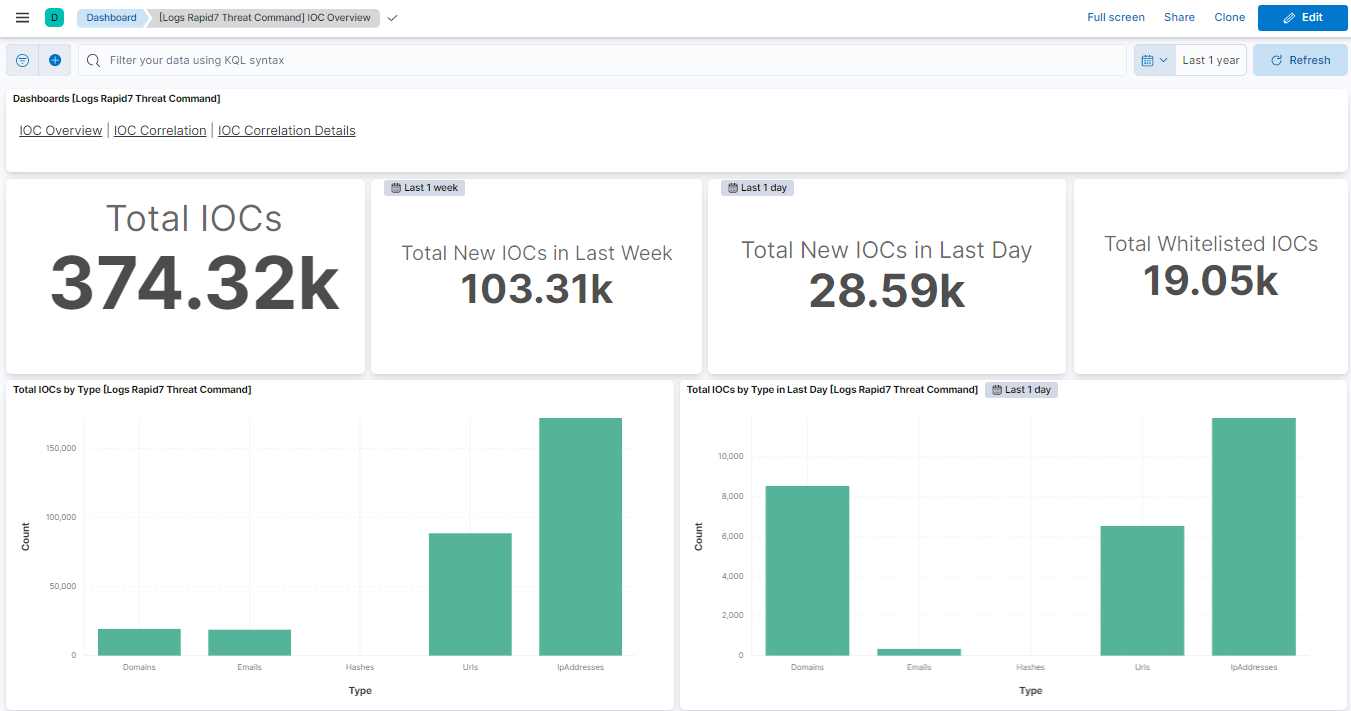
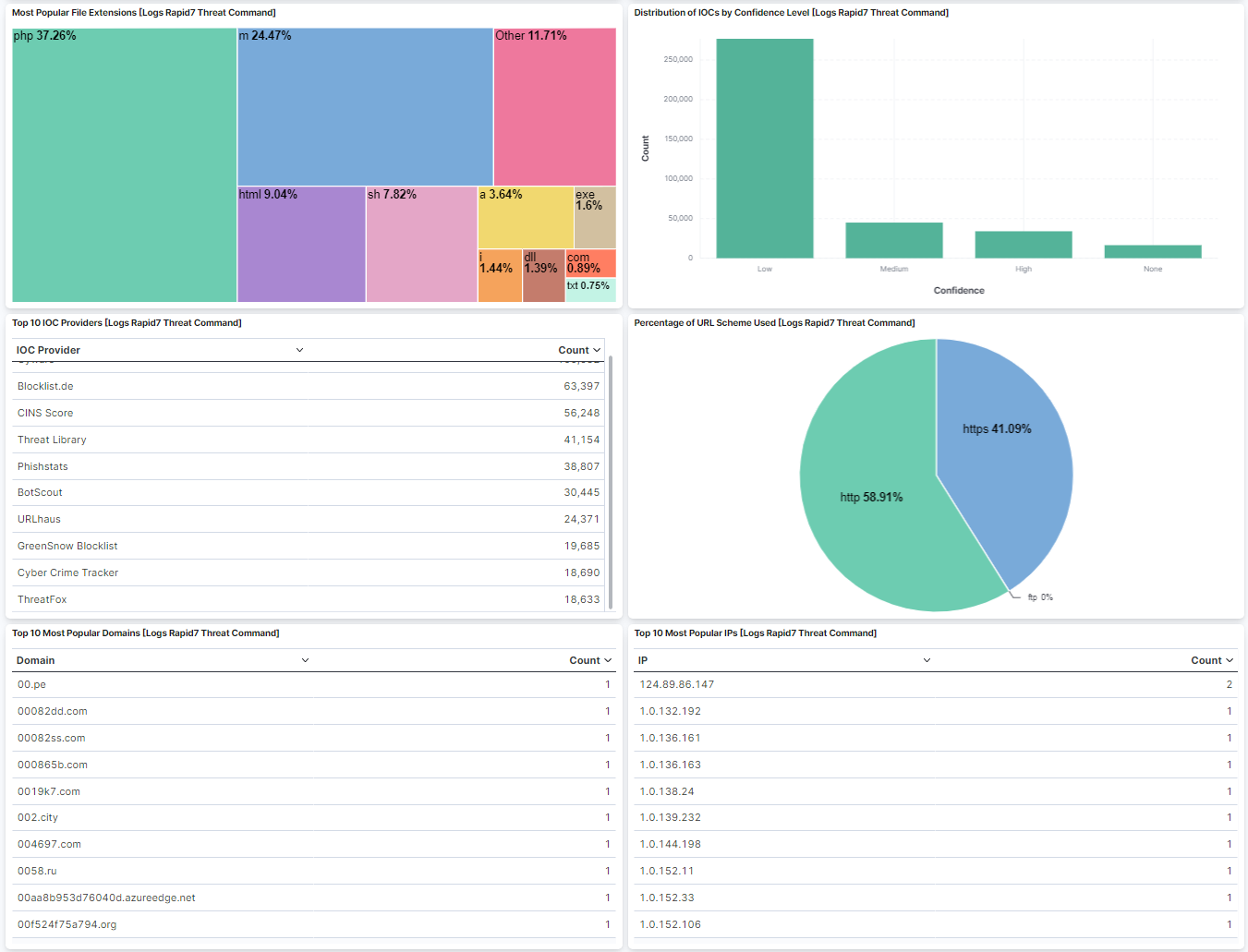
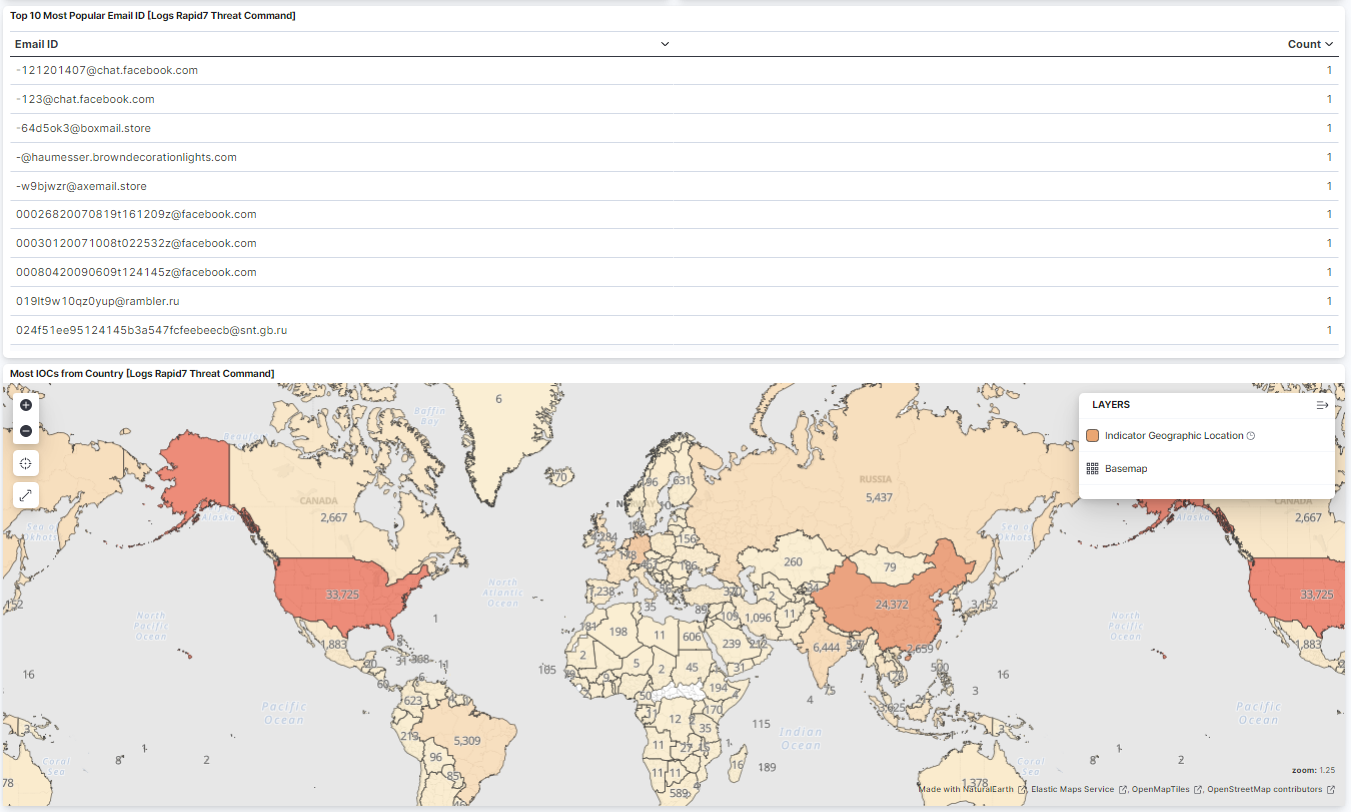
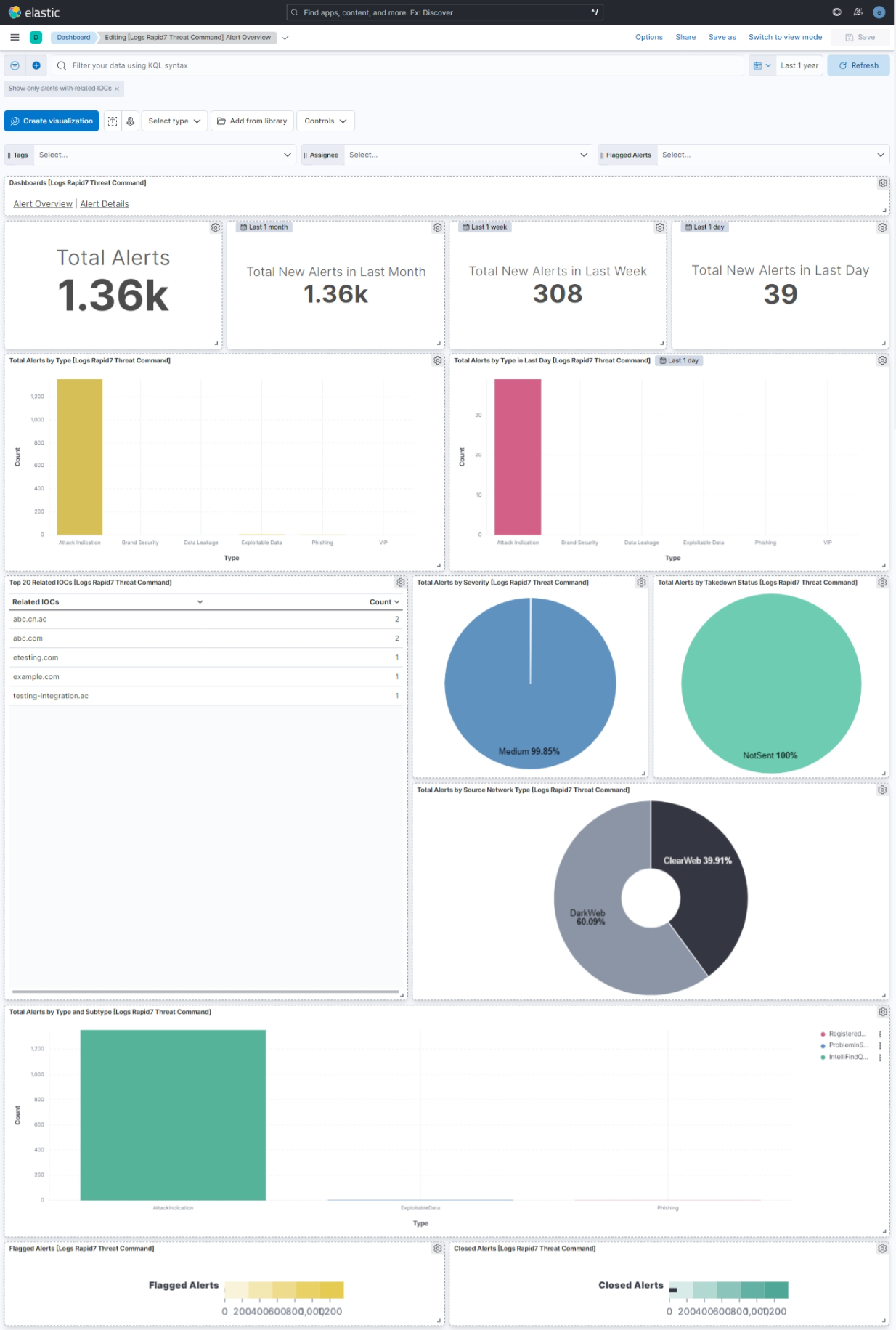
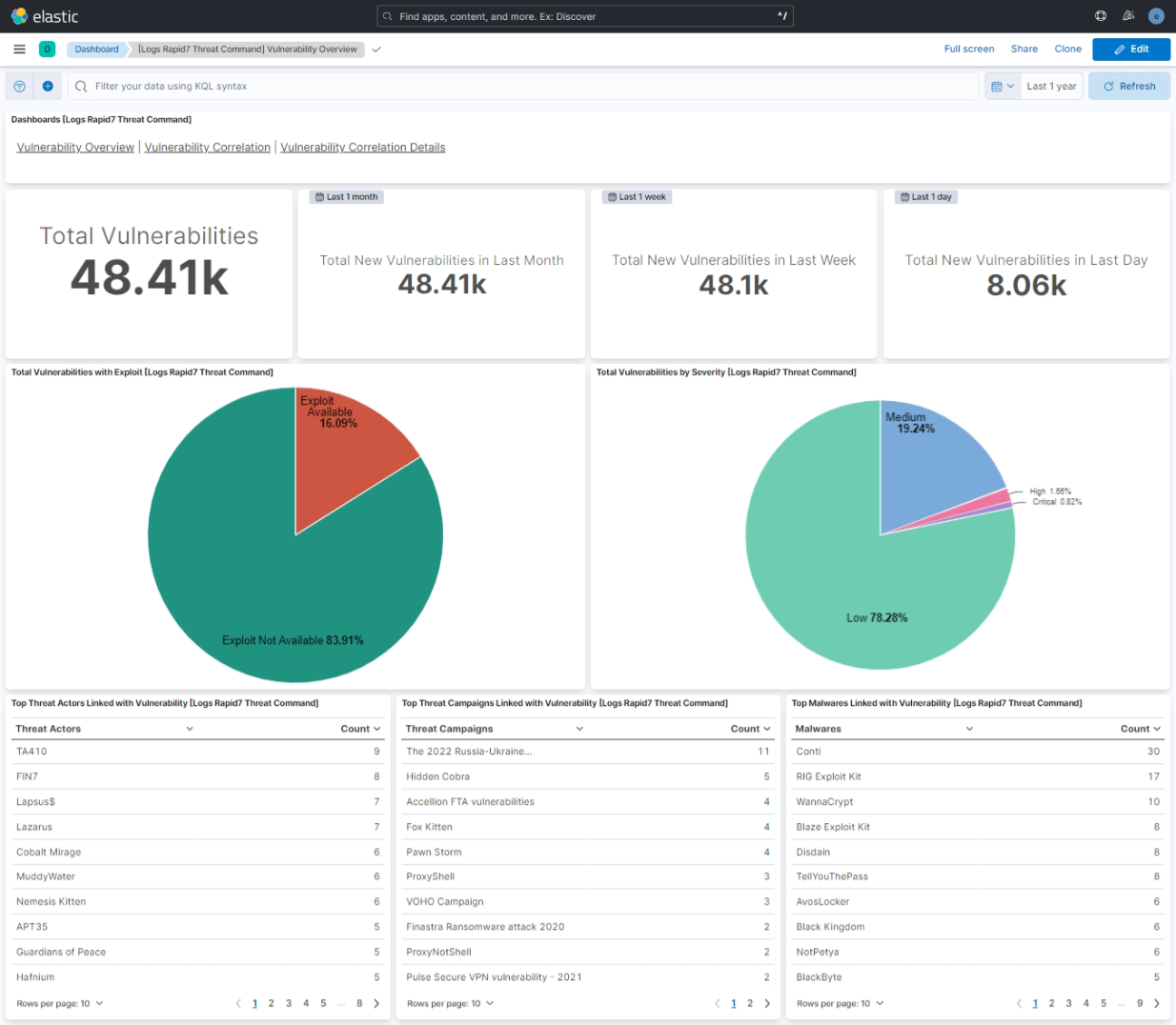
This integration includes one or more Kibana dashboards that visualizes the data collected by the integration. The screenshots below illustrate how the ingested data is displayed.
Enhancement (View pull request) Update Elastic Managed integration documentation to the current wording and docs links.
9.1.4 8.19.4
2.14.1
Bug fix (View pull request) Statically map event.ingested in transform destination indices so detection rules using it as the timestamp override do not report empty destination indices as missing the field.
9.1.4 8.19.4
2.14.0
Enhancement (View pull request) Document the retention applied to source data streams on stateful and Serverless deployments, and how to change it.
9.1.4 8.19.4
2.13.0
Enhancement (View pull request) Remove redundant ECS field definitions and the catch-all dynamic template from the transforms, relying on the ecs@mappings component template.
Enhancement (View pull request) Update the kibana constraint to ^8.13.0. Modified the field definitions to remove ECS fields made redundant by the ecs@mappings component template.
8.13.0
1.16.0
Enhancement (View pull request) Improve handling of empty responses.
Enhancement (View pull request) Update format version to 3.0.0. Add owner.type to package manifest.
Bug fix (View pull request) Change the ECS event.type value from 'info' to 'indicator' for the vulnerability data stream.
Bug fix (View pull request) Update indicator rules with predefined indices instead of all
—
1.9.0
Enhancement (View pull request) Update package to ECS 8.10.0 and align ECS categorization fields.
8.7.1
1.8.0
Enhancement (View pull request) Add tags.yml file so that integration's dashboards and saved searches are tagged with "Security Solution" and displayed in the Security Solution UI.
Enhancement (View pull request) Release Rapid7 Threat Command as GA.
8.4.0
0.1.0
Enhancement (View pull request) Initial draft for Rapid7 Threat Command integration along with "IOC", "Alert" and "Vulnerability" data stream and detection rule to correlate IOCs and Vulnerabilities against the user data.