Sailpoint Identity Security Cloud
Elastic Cloud Serverless projects are autoscaled environments, fully managed by Elastic and available on Elastic Cloud. Availability This functionality is generally available and ready for production usage. Elastic Cloud Serverless projects are autoscaled environments, fully managed by Elastic and available on Elastic Cloud. Availability This functionality is generally available and ready for production usage. The Elastic Stack includes Elastic's core products such as Elasticsearch, Kibana, Logstash, and Beats. Availability This functionality is generally available and ready for production usage. Unless stated otherwise on the page, this functionality is available when your Elastic Stack is deployed on Elastic Cloud Hosted, Elastic Cloud Enterprise, Elastic Cloud on Kubernetes, and self-managed environments. This documentation corresponds to the latest patch available for each minor version. If you're not using the latest patch, check the release notes for changes.
Serverless Observability
Generally available
Serverless Security
Generally available
Stack
9.0+
Generally available since 9.0
| Version | 2.1.0 (View all) |
| Managed integration release status | GA |
| Subscription level What's this? |
Basic |
| Developed by What's this? |
Elastic |
| Ingestion method(s) | API |
| Minimum Kibana version(s) | 9.0.5 8.19.2 |
You can use this integration as an Elastic Managed integration on Elastic Cloud Hosted deployments running this version or later.
The Elastic integration for Sailpoint Identity Security Cloud enables real-time monitoring and analysis of identity security events within the SailPoint platform. This integration collects, processes, and visualizes audit logs, access activities, and identity lifecycle events to enhance security posture, compliance, and operational efficiency.
Elastic Managed integrations are only supported on Elastic Cloud Serverless and Elastic Cloud Hosted deployments. An Elastic Managed integration lets you ingest data from a cloud source while avoiding the orchestration, management, and maintenance associated with standard ingest infrastructure. Elastic runs the collector for you, so you can focus on your data instead of the infrastructure that collects it.
For more information, refer to Elastic Managed integrations and the Elastic Managed integrations FAQ.
events: Provides audit data that includes actions such asUSER_MANAGEMENT,PASSWORD_ACTIVITY,PROVISIONING,ACCESS_ITEM,SOURCE_MANAGEMENT,CERTIFICATION,AUTH,SYSTEM_CONFIG,ACCESS_REQUEST,SSO,WORKFLOW,SEGMENTand more. Audit Events are records that a user took action in an IdentityNow tenant, or other service like IdentityAI. This data stream leverages the /v2026/search endpoint.identities: Collects human identity records (employees, contractors, and external users) governed by SailPoint ISC. Each document represents the current governance state of an identity including their access entitlements, owned governance objects, manager relationships, and segment memberships. Designed for entity analytics, user risk scoring, and identity-correlated security detections. Uses incremental collection via the Search API with asearchAftercursor so only identities modified since the last run are fetched.machine_identities: Collects machine/non-human identity records (service accounts, application accounts, bots, and AI agents) governed by SailPoint ISC. Each document represents a machine identity with its owner relationships and held entitlements. Uses the experimental Machine Identities API with a full offset-based scan each collection cycle. Note: This data stream depends on an experimental SailPoint API (X-SailPoint-Experimental: true). The API may change without notice in future SailPoint releases. HTTP 404 and 501 responses are treated as "feature not enabled" rather than errors.
This integration uses OAuth2 client_credentials to authenticate against the SailPoint ISC API.
- Log in to the SailPoint ISC admin console.
- Navigate to Admin → Security Settings → API Management.
- Click Create API Client, select Client Credentials as grant type, and grant the following scopes:
sp:search:read— required for theeventsandidentitiesdata streamsidn:mis-identity:readandidn:mis-identity:manage— required for themachine_identitiesdata stream (experimental API)
- Note the generated Client ID and Client Secret for use in the integration configuration.
For further details see the official Authentication documentation.
Event documents can be found by setting the following filter:
event.dataset : "sailpoint_identity_sc.events"
Example
{
    "@timestamp": "2024-12-12T10:58:27.962Z",
    "agent": {
        "ephemeral_id": "f7c9ed4a-2f7e-44b0-8b64-a860ca47b6de",
        "id": "b1537110-453a-4e7a-9523-15d60cb34be2",
        "name": "elastic-agent-35846",
        "type": "filebeat",
        "version": "9.4.4"
    },
    "data_stream": {
        "dataset": "sailpoint_identity_sc.events",
        "namespace": "19971",
        "type": "logs"
    },
    "ecs": {
        "version": "8.11.0"
    },
    "elastic_agent": {
        "id": "b1537110-453a-4e7a-9523-15d60cb34be2",
        "snapshot": false,
        "version": "9.4.4"
    },
    "event": {
        "agent_id_status": "verified",
        "category": [
            "iam"
        ],
        "dataset": "sailpoint_identity_sc.events",
        "ingested": "2026-08-27T07:08:39Z",
        "kind": "event",
        "module": "sailpoint_identity_sc",
        "type": [
            "info"
        ]
    },
    "host": {
        "geo": {
            "city_name": "Milton",
            "continent_name": "North America",
            "country_iso_code": "US",
            "country_name": "United States",
            "location": {
                "coordinates": [
                    -122.31490007601678,
                    47.25129998289049
                ],
                "type": "Point"
            },
            "region_iso_code": "US-WA",
            "region_name": "Washington"
        },
        "ip": [
            "216.160.83.56"
        ]
    },
    "input": {
        "type": "cel"
    },
    "related": {
        "hosts": [
            "216.160.83.56"
        ],
        "user": [
            "test.user"
        ]
    },
    "sailpoint_identity_sc": {
        "events": {
            "_type": "event",
            "_version": "v2",
            "action": "USER_PASSWORD_UPDATE_PASSED",
            "actor": {
                "name": "test.user"
            },
            "attributes": {
                "account_id": "test.user",
                "host_name": "216.160.83.56",
                "info": "Password workflow invoked successfully. Request Id :923169315cab448cac82091dc4827f38",
                "org": "ta-partner14055",
                "pod": "se01-useast1",
                "scope": "sp:scopes:all",
                "source_name": "IdentityNow"
            },
            "created": "2024-12-12T10:58:27.962Z",
            "details": "38eef046d4594d7e9186cee997232f3d",
            "id": "f514ad697321c49b61b65ec9b5099a192eb598d2c520d4e09f958f7abdfc16dd",
            "ip_address": "216.160.83.56",
            "name": "Update User Password Passed",
            "objects": [
                "USER",
                "PASSWORD"
            ],
            "operation": "UPDATE",
            "org": "ta-partner14055",
            "pod": "se01-useast1",
            "stack": "pigs",
            "status": "PASSED",
            "synced": "2024-12-23T10:58:32.977Z",
            "target": {
                "name": "test.user"
            },
            "technical_name": "USER_PASSWORD_UPDATE_PASSED",
            "tracking_number": "fb38cc3fb990451dab51133aed21268a",
            "type": "PASSWORD_ACTIVITY"
        }
    },
    "tags": [
        "forwarded",
        "sailpoint_identity_sc.events"
    ],
    "user": {
        "entity": {
            "lifecycle": {
                "last_activity": "2024-12-12T10:58:27.962Z"
            },
            "name": "test.user",
            "type": [
                "user"
            ]
        }
    }
}
ECS Field Reference
Refer to the following document for detailed information on ECS fields.
The following non-ECS fields are used in events documents:
Exported fields
| Field | Description | Type |
|---|---|---|
| @timestamp | Event timestamp. | date |
| data_stream.dataset | Data stream dataset. | constant_keyword |
| data_stream.namespace | Data stream namespace. | constant_keyword |
| data_stream.type | Data stream type. | constant_keyword |
| ecs.version | ECS version this event conforms to. ecs.version is a required field and must exist in all events. When querying across multiple indices -- which may conform to slightly different ECS versions -- this field lets integrations adjust to the schema version of the events. |
keyword |
| event.category | This is one of four ECS Categorization Fields, and indicates the second level in the ECS category hierarchy. event.category represents the "big buckets" of ECS categories. For example, filtering on event.category:process yields all events relating to process activity. This field is closely related to event.type, which is used as a subcategory. This field is an array. This will allow proper categorization of some events that fall in multiple categories. |
keyword |
| event.dataset | Name of the dataset. If an event source publishes more than one type of log or events (e.g. access log, error log), the dataset is used to specify which one the event comes from. It's recommended but not required to start the dataset name with the module name, followed by a dot, then the dataset name. | keyword |
| event.id | Unique ID to describe the event. | keyword |
| event.kind | This is one of four ECS Categorization Fields, and indicates the highest level in the ECS category hierarchy. event.kind gives high-level information about what type of information the event contains, without being specific to the contents of the event. For example, values of this field distinguish alert events from metric events. The value of this field can be used to inform how these kinds of events should be handled. They may warrant different retention, different access control, it may also help understand whether the data is coming in at a regular interval or not. |
keyword |
| event.module | Name of the module this data is coming from. If your monitoring agent supports the concept of modules or plugins to process events of a given source (e.g. Apache logs), event.module should contain the name of this module. |
keyword |
| event.original | Raw text message of entire event. Used to demonstrate log integrity or where the full log message (before splitting it up in multiple parts) may be required, e.g. for reindex. This field is not indexed and doc_values are disabled. It cannot be searched, but it can be retrieved from _source. If users wish to override this and index this field, please see Field data types in the Elasticsearch Reference. |
keyword |
| event.type | This is one of four ECS Categorization Fields, and indicates the third level in the ECS category hierarchy. event.type represents a categorization "sub-bucket" that, when used along with the event.category field values, enables filtering events down to a level appropriate for single visualization. This field is an array. This will allow proper categorization of some events that fall in multiple event types. |
keyword |
| host.geo.city_name | City name. | keyword |
| host.geo.continent_name | Name of the continent. | keyword |
| host.geo.country_iso_code | Country ISO code. | keyword |
| host.geo.country_name | Country name. | keyword |
| host.geo.location | Longitude and latitude. | geo_point |
| host.geo.region_iso_code | Region ISO code. | keyword |
| host.geo.region_name | Region name. | keyword |
| host.ip | Host ip addresses. | ip |
| input.type | Input type. | keyword |
| related.hosts | All hostnames or other host identifiers seen on your event. Example identifiers include FQDNs, domain names, workstation names, or aliases. | keyword |
| related.user | All the user names or other user identifiers seen on the event. | keyword |
| sailpoint_identity_sc.events._type | Document type of the access profile. This enum represents currently supported document types. Additional values may be introduced in the future without prior notice. | keyword |
| sailpoint_identity_sc.events._version | Version of the SailPoint events. Example: V2. | keyword |
| sailpoint_identity_sc.events.action | Event name as displayed in audit reports. | keyword |
| sailpoint_identity_sc.events.actor.display_name | Display name of the actor responsible for generating the event. | keyword |
| sailpoint_identity_sc.events.actor.id | Unique identifier of the actor responsible for generating the event. | keyword |
| sailpoint_identity_sc.events.actor.name | Name of the actor responsible for generating the event. Example: System. | keyword |
| sailpoint_identity_sc.events.attributes.access_profiles_after | Access profiles assigned after the event. | keyword |
| sailpoint_identity_sc.events.attributes.access_profiles_before | Access profiles assigned before the event. | keyword |
| sailpoint_identity_sc.events.attributes.account_id | Account identifier. | keyword |
| sailpoint_identity_sc.events.attributes.account_name | Name of the account. | keyword |
| sailpoint_identity_sc.events.attributes.account_source | Source of the account. | keyword |
| sailpoint_identity_sc.events.attributes.account_uuid | Unique identifier for the account. | keyword |
| sailpoint_identity_sc.events.attributes.app_id | Application identifier. | keyword |
| sailpoint_identity_sc.events.attributes.attribute_name | Name of the attribute. | keyword |
| sailpoint_identity_sc.events.attributes.attribute_value | Value of the attribute. | keyword |
| sailpoint_identity_sc.events.attributes.business_application | Name of the business application associated with the event. | keyword |
| sailpoint_identity_sc.events.attributes.cloud_app_name | Name of the cloud application. | keyword |
| sailpoint_identity_sc.events.attributes.description | Description of the entity. | keyword |
| sailpoint_identity_sc.events.attributes.duration | Duration of the process. | keyword |
| sailpoint_identity_sc.events.attributes.errors | Errors related to the event. | keyword |
| sailpoint_identity_sc.events.attributes.host_name | Hostname involved in the event. | ip |
| sailpoint_identity_sc.events.attributes.id | Unique identifier. | keyword |
| sailpoint_identity_sc.events.attributes.identities_processed | Identifier for processed identities. | keyword |
| sailpoint_identity_sc.events.attributes.identities_selected | Number of selected identities. | keyword |
| sailpoint_identity_sc.events.attributes.identities_total | Total number of identities involved. | keyword |
| sailpoint_identity_sc.events.attributes.identity_id | Identifier of the identity associated with the event. | keyword |
| sailpoint_identity_sc.events.attributes.identity_name | Name of the identity associated with the event. | keyword |
| sailpoint_identity_sc.events.attributes.info | Information related to the attribute in the event. Example: SailPoint. | keyword |
| sailpoint_identity_sc.events.attributes.interface | Interface associated with the event. | keyword |
| sailpoint_identity_sc.events.attributes.manually_created | Indicates whether the entity was created manually. | keyword |
| sailpoint_identity_sc.events.attributes.manually_edited | Indicates whether the entity was edited manually. | keyword |
| sailpoint_identity_sc.events.attributes.match_all_account | Criteria for matching all accounts. | keyword |
| sailpoint_identity_sc.events.attributes.match_all_accounts_after | Matching criteria for accounts after the event. | keyword |
| sailpoint_identity_sc.events.attributes.match_all_accounts_before | Matching criteria for accounts before the event. | keyword |
| sailpoint_identity_sc.events.attributes.modified_after | Last modification timestamp after the event. | keyword |
| sailpoint_identity_sc.events.attributes.modified_before | Last modification timestamp before the event. | keyword |
| sailpoint_identity_sc.events.attributes.name | Name of the entity. | keyword |
| sailpoint_identity_sc.events.attributes.operation | Type of operation. | keyword |
| sailpoint_identity_sc.events.attributes.org | Organization involved in the event. Example: acme. | keyword |
| sailpoint_identity_sc.events.attributes.owners | JSON-encoded array of owner references for the entity. | keyword |
| sailpoint_identity_sc.events.attributes.pod | Pod name involved in the event. Example: stg03-useast1. | keyword |
| sailpoint_identity_sc.events.attributes.process_id | Process identifier. | keyword |
| sailpoint_identity_sc.events.attributes.scope | Scope of the event. | keyword |
| sailpoint_identity_sc.events.attributes.segment | Segment associated with the event. | keyword |
| sailpoint_identity_sc.events.attributes.source_name | Name of the source involved in the event. | keyword |
| sailpoint_identity_sc.events.attributes.subtype | Subtype of the entity involved in the event. | keyword |
| sailpoint_identity_sc.events.attributes.user_entitlements | JSON-encoded array of entitlement identifiers granted to the identity. | keyword |
| sailpoint_identity_sc.events.attributes.user_id | User identifier. | keyword |
| sailpoint_identity_sc.events.attributes.users_added | Users added during the event. | keyword |
| sailpoint_identity_sc.events.created | ISO-8601 date-time indicating when the object was created. | date |
| sailpoint_identity_sc.events.details | Identifier for event details. | keyword |
| sailpoint_identity_sc.events.id | Unique identifier for the access profile. | keyword |
| sailpoint_identity_sc.events.ip_address | IP address of the target system. | ip |
| sailpoint_identity_sc.events.name | Name of the access profile. | keyword |
| sailpoint_identity_sc.events.objects | Objects affected by the event. | keyword |
| sailpoint_identity_sc.events.operation | Operation or action performed during the event. | keyword |
| sailpoint_identity_sc.events.org | Organization associated with the event. Example: acme. | keyword |
| sailpoint_identity_sc.events.pod | Name of the pod involved in the event. Example: stg03-useast1. | keyword |
| sailpoint_identity_sc.events.stack | The event stack. Example: Type. | keyword |
| sailpoint_identity_sc.events.status | Status of the event. | keyword |
| sailpoint_identity_sc.events.synced | ISO-8601 date-time indicating when the object was queued for synchronization into the search database for API use. | date |
| sailpoint_identity_sc.events.target.name | Name of the target or recipient of the event. | keyword |
| sailpoint_identity_sc.events.technical_name | Normalized event name following the pattern 'objects_operation_status'. | keyword |
| sailpoint_identity_sc.events.tracking_number | Identifier for the group of events. | keyword |
| sailpoint_identity_sc.events.type | Type of event. Refer to the Event Types list for more details. Example: "IDENTITY_PROCESSING". | keyword |
| tags | List of keywords used to tag each event. | keyword |
| user.entity.id | A unique identifier for the entity. When multiple identifiers exist, this should be the most stable and commonly used identifier that: 1) persists across the entity's lifecycle, 2) ensures uniqueness within its scope, 3) is commonly used for queries and correlation, and 4) is readily available in most observations (logs/events). For entities with dedicated field sets (for example, host, user), this value should match the corresponding *.id field. Alternative identifiers (for example, ARNs values in AWS, URLs) can be preserved in the raw field. | keyword |
| user.entity.lifecycle.last_activity | Timestamp of the most recent action performed by or attributed to this entity (active use). Distinct from entity.last_seen_timestamp, which records when the entity was last observed in data; last_activity implies the entity was active, not only seen. Typically applicable to User, Host, and Service entities. |
date |
| user.entity.name | The name of the entity. The keyword field enables exact matches for filtering and aggregations, while the text field enables full-text search. For entities with dedicated field sets (for example, host), this field should mirrors the corresponding *.name value. |
keyword |
| user.entity.name.text | Multi-field of user.entity.name. |
match_only_text |
| user.entity.type | A standardized high-level classification of the entity. This provides a normalized way to group similar entities across different providers or systems. Example values: bucket, database, container, function, queue, host, user, application, session, cloud, orchestrator, etc. If an entity is nested under a top-level namespace like host or cloud, or similar, its type array should include the matching value — for example, host or cloud. |
keyword |
Identity documents can be found by setting the following filter:
event.dataset : "sailpoint_identity_sc.identities"
Identity documents carry ECS entity fields (user.entity.*) that enable Entity Analytics, user risk scoring, and identity-correlated detections.
Example
{
    "@timestamp": "2025-01-10T00:00:00.000Z",
    "agent": {
        "ephemeral_id": "d7ae794a-742b-42e3-8a14-f50bd1f875bc",
        "id": "0d470254-5a34-419d-8c18-4b77c9f41faa",
        "name": "elastic-agent-69149",
        "type": "filebeat",
        "version": "9.5.3"
    },
    "data_stream": {
        "dataset": "sailpoint_identity_sc.identities",
        "namespace": "70818",
        "type": "logs"
    },
    "ecs": {
        "version": "9.4.0"
    },
    "elastic_agent": {
        "id": "0d470254-5a34-419d-8c18-4b77c9f41faa",
        "snapshot": false,
        "version": "9.5.3"
    },
    "event": {
        "agent_id_status": "verified",
        "category": [
            "iam"
        ],
        "dataset": "sailpoint_identity_sc.identities",
        "ingested": "2026-09-14T10:59:26Z",
        "kind": "asset",
        "module": "sailpoint_identity_sc",
        "original": "{\"_type\":\"identity\",\"created\":\"2024-04-04T21:36:00.000Z\",\"disabled\":false,\"displayName\":\"Alice Johnson\",\"email\":\"alice.johnson@example.com\",\"firstName\":\"Alice\",\"id\":\"identity-id-001\",\"inactive\":false,\"isManager\":true,\"lastName\":\"Johnson\",\"locked\":false,\"modified\":\"2025-01-10T00:00:00.000Z\",\"name\":\"alice.johnson\",\"protected\":false,\"status\":\"ACTIVE\",\"synced\":\"2025-01-10T01:00:00.000Z\",\"type\":\"identity\"}",
        "type": [
            "info"
        ]
    },
    "input": {
        "type": "cel"
    },
    "related": {
        "user": [
            "alice.johnson",
            "Alice Johnson"
        ]
    },
    "sailpoint_identity_sc": {
        "identity": {
            "created": "2024-04-04T21:36:00.000Z",
            "disabled": false,
            "inactive": false,
            "is_manager": true,
            "locked": false,
            "protected": false,
            "status": "ACTIVE"
        }
    },
    "tags": [
        "preserve_original_event",
        "forwarded",
        "sailpoint_identity_sc.identities"
    ],
    "user": {
        "domain": "example.com",
        "email": "alice.johnson@example.com",
        "entity": {
            "id": "identity-id-001",
            "name": "Alice Johnson",
            "type": [
                "user"
            ]
        },
        "full_name": "Alice Johnson",
        "id": "identity-id-001",
        "name": "alice.johnson"
    }
}
ECS Field Reference
Refer to the following document for detailed information on ECS fields.
The following non-ECS fields are used in identities documents:
Exported fields
| Field | Description | Type |
|---|---|---|
| @timestamp | Date/time when the event originated. This is the date/time extracted from the event, typically representing when the event was generated by the source. If the event source has no original timestamp, this value is typically populated by the first time the event was received by the pipeline. Required field for all events. | date |
| data_stream.dataset | The field can contain anything that makes sense to signify the source of the data. Examples include nginx.access, prometheus, endpoint etc. For data streams that otherwise fit, but that do not have dataset set we use the value "generic" for the dataset value. event.dataset should have the same value as data_stream.dataset. Beyond the Elasticsearch data stream naming criteria noted above, the dataset value has additional restrictions: * Must not contain - * No longer than 100 characters |
constant_keyword |
| data_stream.namespace | A user defined namespace. Namespaces are useful to allow grouping of data. Many users already organize their indices this way, and the data stream naming scheme now provides this best practice as a default. Many users will populate this field with default. If no value is used, it falls back to default. Beyond the Elasticsearch index naming criteria noted above, namespace value has the additional restrictions: * Must not contain - * No longer than 100 characters |
constant_keyword |
| data_stream.type | An overarching type for the data stream. Currently allowed values are "logs" and "metrics". We expect to also add "traces" and "synthetics" in the near future. | constant_keyword |
| ecs.version | ECS version this event conforms to. ecs.version is a required field and must exist in all events. When querying across multiple indices -- which may conform to slightly different ECS versions -- this field lets integrations adjust to the schema version of the events. |
keyword |
| error.message | Error message. | match_only_text |
| event.category | This is one of four ECS Categorization Fields, and indicates the second level in the ECS category hierarchy. event.category represents the "big buckets" of ECS categories. For example, filtering on event.category:process yields all events relating to process activity. This field is closely related to event.type, which is used as a subcategory. This field is an array. This will allow proper categorization of some events that fall in multiple categories. |
keyword |
| event.dataset | Name of the dataset. If an event source publishes more than one type of log or events (e.g. access log, error log), the dataset is used to specify which one the event comes from. It's recommended but not required to start the dataset name with the module name, followed by a dot, then the dataset name. | constant_keyword |
| event.kind | This is one of four ECS Categorization Fields, and indicates the highest level in the ECS category hierarchy. event.kind gives high-level information about what type of information the event contains, without being specific to the contents of the event. For example, values of this field distinguish alert events from metric events. The value of this field can be used to inform how these kinds of events should be handled. They may warrant different retention, different access control, it may also help understand whether the data is coming in at a regular interval or not. |
keyword |
| event.module | Name of the module this data is coming from. If your monitoring agent supports the concept of modules or plugins to process events of a given source (e.g. Apache logs), event.module should contain the name of this module. |
constant_keyword |
| event.original | Raw text message of entire event. Used to demonstrate log integrity or where the full log message (before splitting it up in multiple parts) may be required, e.g. for reindex. This field is not indexed and doc_values are disabled. It cannot be searched, but it can be retrieved from _source. If users wish to override this and index this field, please see Field data types in the Elasticsearch Reference. |
keyword |
| event.type | This is one of four ECS Categorization Fields, and indicates the third level in the ECS category hierarchy. event.type represents a categorization "sub-bucket" that, when used along with the event.category field values, enables filtering events down to a level appropriate for single visualization. This field is an array. This will allow proper categorization of some events that fall in multiple event types. |
keyword |
| input.type | Input type. | keyword |
| related.user | All the user names or other user identifiers seen on the event. | keyword |
| sailpoint_identity_sc.identity.access.attribute | Attribute name for entitlement-type access items. | keyword |
| sailpoint_identity_sc.identity.access.cloud_eligible | Indicates whether the access item is cloud-eligible. | boolean |
| sailpoint_identity_sc.identity.access.cloud_governed | Indicates whether the access item is cloud-governed. | boolean |
| sailpoint_identity_sc.identity.access.description | Description of the access item. | keyword |
| sailpoint_identity_sc.identity.access.disabled | Indicates whether the access item is disabled. | boolean |
| sailpoint_identity_sc.identity.access.display_name | Display name of the access item. | keyword |
| sailpoint_identity_sc.identity.access.enabled | Indicates whether the access item is enabled. | boolean |
| sailpoint_identity_sc.identity.access.id | Access item ID. | keyword |
| sailpoint_identity_sc.identity.access.name | Access item name. | keyword |
| sailpoint_identity_sc.identity.access.owner.display_name | Display name of the owner of this access item. | keyword |
| sailpoint_identity_sc.identity.access.owner.id | ID of the owner of this access item. | keyword |
| sailpoint_identity_sc.identity.access.owner.name | Username of the owner of this access item. | keyword |
| sailpoint_identity_sc.identity.access.privileged | Indicates whether the access item grants privileged access. | boolean |
| sailpoint_identity_sc.identity.access.request_comments_required | Indicates whether comments are required when requesting this access item. | boolean |
| sailpoint_identity_sc.identity.access.requestable | Indicates whether the access item can be requested. | boolean |
| sailpoint_identity_sc.identity.access.revocable | Indicates whether the access item can be revoked. | boolean |
| sailpoint_identity_sc.identity.access.schema | Schema name for entitlement-type access items. | keyword |
| sailpoint_identity_sc.identity.access.source.id | ID of the source system for this access item. | keyword |
| sailpoint_identity_sc.identity.access.source.name | Name of the source system for this access item. | keyword |
| sailpoint_identity_sc.identity.access.standalone | Indicates whether the access item is standalone. | boolean |
| sailpoint_identity_sc.identity.access.type | Type of access item (ENTITLEMENT, ROLE, ACCESS_PROFILE). | keyword |
| sailpoint_identity_sc.identity.access.value | Attribute value for entitlement-type access items. | keyword |
| sailpoint_identity_sc.identity.access_count | Number of access items assigned to this identity. | long |
| sailpoint_identity_sc.identity.access_profile_count | Number of access profiles assigned to this identity. | long |
| sailpoint_identity_sc.identity.account_count | Number of accounts associated with this identity. | long |
| sailpoint_identity_sc.identity.accounts.account_id | Account identifier on the source system. | keyword |
| sailpoint_identity_sc.identity.accounts.created | When the account was created. | date |
| sailpoint_identity_sc.identity.accounts.disabled | Indicates whether the account is disabled. | boolean |
| sailpoint_identity_sc.identity.accounts.entitlement_attributes | Entitlement attributes on the account (for example, memberOf groups). | flattened |
| sailpoint_identity_sc.identity.accounts.id | Account ID. | keyword |
| sailpoint_identity_sc.identity.accounts.locked | Indicates whether the account is locked. | boolean |
| sailpoint_identity_sc.identity.accounts.manually_correlated | Indicates whether the account was manually correlated to this identity. | boolean |
| sailpoint_identity_sc.identity.accounts.name | Account display name. | keyword |
| sailpoint_identity_sc.identity.accounts.password_last_set | When the account password was last set. | date |
| sailpoint_identity_sc.identity.accounts.privileged | Indicates whether the account has privileged access. | boolean |
| sailpoint_identity_sc.identity.accounts.source.id | ID of the source system for this account. | keyword |
| sailpoint_identity_sc.identity.accounts.source.name | Name of the source system for this account. | keyword |
| sailpoint_identity_sc.identity.accounts.source.type | Type of the source system for this account. | keyword |
| sailpoint_identity_sc.identity.accounts.supports_password_change | Indicates whether the account supports password changes. | boolean |
| sailpoint_identity_sc.identity.apps.account.account_id | Account identifier on the source system for this application. | keyword |
| sailpoint_identity_sc.identity.apps.account.id | ID of the account linked to this application. | keyword |
| sailpoint_identity_sc.identity.apps.id | Application ID. | keyword |
| sailpoint_identity_sc.identity.apps.name | Application name. | keyword |
| sailpoint_identity_sc.identity.apps.source.id | ID of the source associated with this application. | keyword |
| sailpoint_identity_sc.identity.apps.source.name | Name of the source associated with this application. | keyword |
| sailpoint_identity_sc.identity.attributes | Free-form identity attributes from the authoritative source (tenant-specific keys). | flattened |
| sailpoint_identity_sc.identity.created | When the identity was created in SailPoint Identity Security Cloud. | date |
| sailpoint_identity_sc.identity.disabled | Indicates whether this identity is disabled. | boolean |
| sailpoint_identity_sc.identity.employee_number | Employee number assigned to the identity. | keyword |
| sailpoint_identity_sc.identity.entitlement_count | Number of entitlements assigned to this identity. | long |
| sailpoint_identity_sc.identity.identity_profile.id | ID of the identity profile this identity belongs to. | keyword |
| sailpoint_identity_sc.identity.identity_profile.name | Name of the identity profile this identity belongs to. | keyword |
| sailpoint_identity_sc.identity.inactive | Indicates whether this identity is inactive. | boolean |
| sailpoint_identity_sc.identity.is_manager | Indicates whether this identity is a manager. | boolean |
| sailpoint_identity_sc.identity.locked | Indicates whether this identity account is locked. | boolean |
| sailpoint_identity_sc.identity.manager.display_name | Display name of the identity's manager. | keyword |
| sailpoint_identity_sc.identity.manager.id | ID of the identity's manager. | keyword |
| sailpoint_identity_sc.identity.manager.name | Username of the identity's manager. | keyword |
| sailpoint_identity_sc.identity.org | Organization (tenant) identifier for this identity. | keyword |
| sailpoint_identity_sc.identity.owns.access_profiles.id | ID of an owned access profile. | keyword |
| sailpoint_identity_sc.identity.owns.access_profiles.name | Name of an owned access profile. | keyword |
| sailpoint_identity_sc.identity.owns.apps.id | ID of an owned application. | keyword |
| sailpoint_identity_sc.identity.owns.apps.name | Name of an owned application. | keyword |
| sailpoint_identity_sc.identity.owns.entitlements.id | ID of an owned entitlement. | keyword |
| sailpoint_identity_sc.identity.owns.entitlements.name | Name of an owned entitlement. | keyword |
| sailpoint_identity_sc.identity.owns.governance_groups.id | ID of an owned governance group. | keyword |
| sailpoint_identity_sc.identity.owns.governance_groups.name | Name of an owned governance group. | keyword |
| sailpoint_identity_sc.identity.owns.roles.id | ID of an owned role. | keyword |
| sailpoint_identity_sc.identity.owns.roles.name | Name of an owned role. | keyword |
| sailpoint_identity_sc.identity.owns.sources.id | ID of an administered source. | keyword |
| sailpoint_identity_sc.identity.owns.sources.name | Name of an administered source. | keyword |
| sailpoint_identity_sc.identity.owns_count | Number of access items owned by this identity. | long |
| sailpoint_identity_sc.identity.pod | Pod (deployment region) where this identity is hosted. | keyword |
| sailpoint_identity_sc.identity.processing_state | Processing state of the identity (null when not in a special state). | keyword |
| sailpoint_identity_sc.identity.protected | Indicates whether this identity is protected from modification. | boolean |
| sailpoint_identity_sc.identity.role_count | Number of roles assigned to this identity. | long |
| sailpoint_identity_sc.identity.source.id | ID of the authoritative source for this identity. | keyword |
| sailpoint_identity_sc.identity.source.name | Name of the authoritative source for this identity. | keyword |
| sailpoint_identity_sc.identity.status | Identity lifecycle status (for example, ACTIVE). | keyword |
| sailpoint_identity_sc.identity.supervises_error | Error from the supervises enrichment call. Set when the direct reports lookup returned a non-200 response; absent when enrichment succeeded or was not attempted. | keyword |
| sailpoint_identity_sc.identity.tags | Tags applied to this identity. | keyword |
| sailpoint_identity_sc.identity.visible_segments | List of segment names visible to this identity. | keyword |
| tags | List of keywords used to tag each event. | keyword |
| user.domain | Name of the directory the user is a member of. For example, an LDAP or Active Directory domain name. | keyword |
| user.email | User email address. | keyword |
| user.entity.id | A unique identifier for the entity. When multiple identifiers exist, this should be the most stable and commonly used identifier that: 1) persists across the entity's lifecycle, 2) ensures uniqueness within its scope, 3) is commonly used for queries and correlation, and 4) is readily available in most observations (logs/events). For entities with dedicated field sets (for example, host, user), this value should match the corresponding *.id field. Alternative identifiers (for example, ARNs values in AWS, URLs) can be preserved in the raw field. | keyword |
| user.entity.name | The name of the entity. The keyword field enables exact matches for filtering and aggregations, while the text field enables full-text search. For entities with dedicated field sets (for example, host), this field should mirrors the corresponding *.name value. |
keyword |
| user.entity.name.text | Multi-field of user.entity.name. |
match_only_text |
| user.entity.relationships.administers.service.id | Referenced service ids. | keyword |
| user.entity.relationships.administers.service.name | Referenced service names. | keyword |
| user.entity.relationships.owns.service.id | Referenced service ids. | keyword |
| user.entity.relationships.owns.service.name | Referenced service names. | keyword |
| user.entity.relationships.supervises.user.email | Referenced user email addresses. | keyword |
| user.entity.relationships.supervises.user.id | Referenced user ids. | keyword |
| user.entity.relationships.supervises.user.name | Referenced user short names or logins. | keyword |
| user.entity.type | A standardized high-level classification of the entity. This provides a normalized way to group similar entities across different providers or systems. Example values: bucket, database, container, function, queue, host, user, application, session, cloud, orchestrator, etc. If an entity is nested under a top-level namespace like host or cloud, or similar, its type array should include the matching value — for example, host or cloud. |
keyword |
| user.full_name | User's full name, if available. | keyword |
| user.full_name.text | Multi-field of user.full_name. |
match_only_text |
| user.group.name | Name of the group. | keyword |
| user.id | Unique identifier of the user. | keyword |
| user.name | Short name or login of the user. | keyword |
| user.name.text | Multi-field of user.name. |
match_only_text |
| user.roles | Array of user roles at the time of the event. | keyword |
Machine identity documents can be found by setting the following filter:
event.dataset : "sailpoint_identity_sc.machine_identities"
Machine identity documents carry ECS entity fields (service.entity.*) that enable entity analytics for non-human identities such as service accounts, application accounts, bots, and AI agents.
Example
{
    "@timestamp": "2025-01-10T08:45:00.000Z",
    "agent": {
        "ephemeral_id": "652be181-cca8-45d2-9801-507f8e7398ce",
        "id": "1ddb6c40-b55a-42ce-9a31-1fd179a65c72",
        "name": "elastic-agent-23115",
        "type": "filebeat",
        "version": "9.5.3"
    },
    "data_stream": {
        "dataset": "sailpoint_identity_sc.machine_identities",
        "namespace": "22515",
        "type": "logs"
    },
    "ecs": {
        "version": "9.4.0"
    },
    "elastic_agent": {
        "id": "1ddb6c40-b55a-42ce-9a31-1fd179a65c72",
        "snapshot": false,
        "version": "9.5.3"
    },
    "event": {
        "agent_id_status": "verified",
        "category": [
            "iam"
        ],
        "dataset": "sailpoint_identity_sc.machine_identities",
        "ingested": "2026-09-14T11:00:06Z",
        "kind": "asset",
        "module": "sailpoint_identity_sc",
        "original": "{\"attributes\":{\"env\":\"production\",\"team\":\"Platform\"},\"created\":\"2024-01-15T10:30:00Z\",\"datasetId\":\"ds-id-aabbccdd-1111-2222-3333-000000000001\",\"description\":\"Example service account for integration tests.\",\"id\":\"mi-id-aabbccdd-1111-2222-3333-000000000001\",\"manuallyCreated\":false,\"manuallyEdited\":false,\"modified\":\"2025-01-10T08:45:00Z\",\"name\":\"svc-example-service\",\"nativeIdentity\":\"svc-example:prod:00001\",\"owners\":{\"primaryIdentity\":{\"id\":\"00000000000000000000000000000001\",\"name\":\"alice.example\",\"type\":\"IDENTITY\"},\"secondaryIdentities\":[]},\"source\":{\"id\":\"src-id-aabbccdd-1111-2222-3333-000000000001\",\"name\":\"Example Directory\",\"type\":\"SOURCE\"},\"sourceId\":\"src-id-aabbccdd-1111-2222-3333-000000000001\",\"subtype\":\"Application\",\"userEntitlements\":[],\"uuid\":\"uuid-aabbccdd-1111-2222-3333-000000000001\"}",
        "type": [
            "info"
        ]
    },
    "input": {
        "type": "cel"
    },
    "related": {
        "user": [
            "alice.example"
        ]
    },
    "sailpoint_identity_sc": {
        "machine_identity": {
            "attributes": {
                "env": "production",
                "team": "Platform"
            },
            "created": "2024-01-15T10:30:00.000Z",
            "dataset_id": "ds-id-aabbccdd-1111-2222-3333-000000000001",
            "description": "Example service account for integration tests.",
            "manually_created": false,
            "manually_edited": false,
            "modified": "2025-01-10T08:45:00.000Z",
            "native_identity": "svc-example:prod:00001",
            "owners": {
                "primary": {
                    "id": "00000000000000000000000000000001",
                    "name": "alice.example"
                }
            },
            "source": {
                "id": "src-id-aabbccdd-1111-2222-3333-000000000001",
                "name": "Example Directory"
            },
            "source_id": "src-id-aabbccdd-1111-2222-3333-000000000001",
            "uuid": "uuid-aabbccdd-1111-2222-3333-000000000001"
        }
    },
    "service": {
        "entity": {
            "id": "mi-id-aabbccdd-1111-2222-3333-000000000001",
            "name": "svc-example-service",
            "type": [
                "service"
            ]
        },
        "id": "mi-id-aabbccdd-1111-2222-3333-000000000001",
        "name": "svc-example-service",
        "type": "Application"
    },
    "tags": [
        "preserve_original_event",
        "forwarded",
        "sailpoint_identity_sc.machine_identities"
    ]
}
ECS Field Reference
Refer to the following document for detailed information on ECS fields.
The following non-ECS fields are used in identities documents:
Exported fields
| Field | Description | Type |
|---|---|---|
| @timestamp | Date/time when the event originated. This is the date/time extracted from the event, typically representing when the event was generated by the source. If the event source has no original timestamp, this value is typically populated by the first time the event was received by the pipeline. Required field for all events. | date |
| data_stream.dataset | The field can contain anything that makes sense to signify the source of the data. Examples include nginx.access, prometheus, endpoint etc. For data streams that otherwise fit, but that do not have dataset set we use the value "generic" for the dataset value. event.dataset should have the same value as data_stream.dataset. Beyond the Elasticsearch data stream naming criteria noted above, the dataset value has additional restrictions: * Must not contain - * No longer than 100 characters |
constant_keyword |
| data_stream.namespace | A user defined namespace. Namespaces are useful to allow grouping of data. Many users already organize their indices this way, and the data stream naming scheme now provides this best practice as a default. Many users will populate this field with default. If no value is used, it falls back to default. Beyond the Elasticsearch index naming criteria noted above, namespace value has the additional restrictions: * Must not contain - * No longer than 100 characters |
constant_keyword |
| data_stream.type | An overarching type for the data stream. Currently allowed values are "logs" and "metrics". We expect to also add "traces" and "synthetics" in the near future. | constant_keyword |
| ecs.version | ECS version this event conforms to. ecs.version is a required field and must exist in all events. When querying across multiple indices -- which may conform to slightly different ECS versions -- this field lets integrations adjust to the schema version of the events. |
keyword |
| event.category | This is one of four ECS Categorization Fields, and indicates the second level in the ECS category hierarchy. event.category represents the "big buckets" of ECS categories. For example, filtering on event.category:process yields all events relating to process activity. This field is closely related to event.type, which is used as a subcategory. This field is an array. This will allow proper categorization of some events that fall in multiple categories. |
keyword |
| event.dataset | Name of the dataset. If an event source publishes more than one type of log or events (e.g. access log, error log), the dataset is used to specify which one the event comes from. It's recommended but not required to start the dataset name with the module name, followed by a dot, then the dataset name. | constant_keyword |
| event.kind | This is one of four ECS Categorization Fields, and indicates the highest level in the ECS category hierarchy. event.kind gives high-level information about what type of information the event contains, without being specific to the contents of the event. For example, values of this field distinguish alert events from metric events. The value of this field can be used to inform how these kinds of events should be handled. They may warrant different retention, different access control, it may also help understand whether the data is coming in at a regular interval or not. |
keyword |
| event.module | Name of the module this data is coming from. If your monitoring agent supports the concept of modules or plugins to process events of a given source (e.g. Apache logs), event.module should contain the name of this module. |
constant_keyword |
| event.original | Raw text message of entire event. Used to demonstrate log integrity or where the full log message (before splitting it up in multiple parts) may be required, e.g. for reindex. This field is not indexed and doc_values are disabled. It cannot be searched, but it can be retrieved from _source. If users wish to override this and index this field, please see Field data types in the Elasticsearch Reference. |
keyword |
| event.type | This is one of four ECS Categorization Fields, and indicates the third level in the ECS category hierarchy. event.type represents a categorization "sub-bucket" that, when used along with the event.category field values, enables filtering events down to a level appropriate for single visualization. This field is an array. This will allow proper categorization of some events that fall in multiple event types. |
keyword |
| input.type | Input type. | keyword |
| related.user | All the user names or other user identifiers seen on the event. | keyword |
| sailpoint_identity_sc.machine_identity.attributes | Dynamic attribute map from the machine identity record (tenant-specific keys). | flattened |
| sailpoint_identity_sc.machine_identity.created | Timestamp when the machine identity was created. | date |
| sailpoint_identity_sc.machine_identity.dataset_id | Dataset ID associated with this machine identity record. | keyword |
| sailpoint_identity_sc.machine_identity.description | Free-text description of the machine identity. | text |
| sailpoint_identity_sc.machine_identity.manually_created | Indicates whether the machine identity was manually created. | boolean |
| sailpoint_identity_sc.machine_identity.manually_edited | Indicates whether the machine identity was manually edited. | boolean |
| sailpoint_identity_sc.machine_identity.modified | Timestamp when the machine identity was last modified. | date |
| sailpoint_identity_sc.machine_identity.native_identity | Account name assigned to the machine identity on the source system. | keyword |
| sailpoint_identity_sc.machine_identity.owners.primary.id | ID of the primary owner identity. | keyword |
| sailpoint_identity_sc.machine_identity.owners.primary.name | Account name of the primary owner identity. | keyword |
| sailpoint_identity_sc.machine_identity.owners.secondary.id | ID of the secondary owner identity. | keyword |
| sailpoint_identity_sc.machine_identity.owners.secondary.name | Account name of the secondary owner identity. | keyword |
| sailpoint_identity_sc.machine_identity.owners.secondary.type | Type of the secondary owner reference. | keyword |
| sailpoint_identity_sc.machine_identity.source.id | ID of the source system associated with this machine identity. | keyword |
| sailpoint_identity_sc.machine_identity.source.name | Name of the source system associated with this machine identity. | keyword |
| sailpoint_identity_sc.machine_identity.source_id | Plain source ID string from the machine identity record. | keyword |
| sailpoint_identity_sc.machine_identity.user_entitlements.display_name | Display name of the entitlement. | keyword |
| sailpoint_identity_sc.machine_identity.user_entitlements.entitlement_id | ID of the entitlement held by this machine identity. | keyword |
| sailpoint_identity_sc.machine_identity.user_entitlements.source.id | ID of the entitlement source. | keyword |
| sailpoint_identity_sc.machine_identity.user_entitlements.source.name | Name of the entitlement source. | keyword |
| sailpoint_identity_sc.machine_identity.user_entitlements.source.type | Type of the entitlement source. | keyword |
| sailpoint_identity_sc.machine_identity.user_entitlements.source_id | ID of the source system providing this entitlement. | keyword |
| sailpoint_identity_sc.machine_identity.uuid | UUID of the machine identity on the source system. | keyword |
| service.entity.id | A unique identifier for the entity. When multiple identifiers exist, this should be the most stable and commonly used identifier that: 1) persists across the entity's lifecycle, 2) ensures uniqueness within its scope, 3) is commonly used for queries and correlation, and 4) is readily available in most observations (logs/events). For entities with dedicated field sets (for example, host, user), this value should match the corresponding *.id field. Alternative identifiers (for example, ARNs values in AWS, URLs) can be preserved in the raw field. | keyword |
| service.entity.name | The name of the entity. The keyword field enables exact matches for filtering and aggregations, while the text field enables full-text search. For entities with dedicated field sets (for example, host), this field should mirrors the corresponding *.name value. |
keyword |
| service.entity.name.text | Multi-field of service.entity.name. |
match_only_text |
| service.entity.type | A standardized high-level classification of the entity. This provides a normalized way to group similar entities across different providers or systems. Example values: bucket, database, container, function, queue, host, user, application, session, cloud, orchestrator, etc. If an entity is nested under a top-level namespace like host or cloud, or similar, its type array should include the matching value — for example, host or cloud. |
keyword |
| service.id | Unique identifier of the running service. If the service is comprised of many nodes, the service.id should be the same for all nodes. This id should uniquely identify the service. This makes it possible to correlate logs and metrics for one specific service, no matter which particular node emitted the event. Note that if you need to see the events from one specific host of the service, you should filter on that host.name or host.id instead. |
keyword |
| service.name | Name of the service data is collected from. The name of the service is normally user given. This allows for distributed services that run on multiple hosts to correlate the related instances based on the name. In the case of Elasticsearch the service.name could contain the cluster name. For Beats the service.name is by default a copy of the service.type field if no name is specified. |
keyword |
| service.type | The type of the service data is collected from. The type can be used to group and correlate logs and metrics from one service type. Example: If logs or metrics are collected from Elasticsearch, service.type would be elasticsearch. |
keyword |
| tags | List of keywords used to tag each event. | keyword |
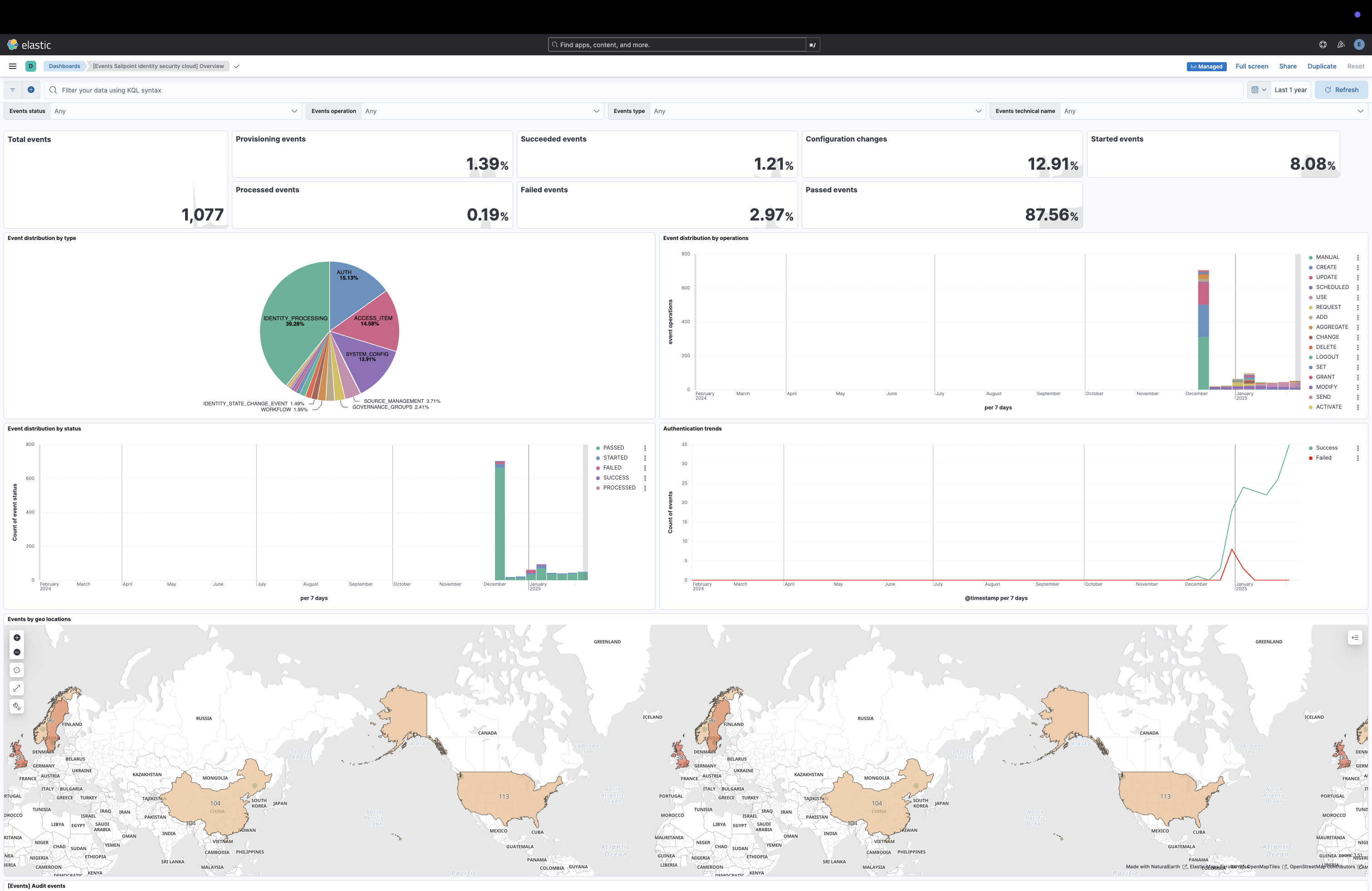
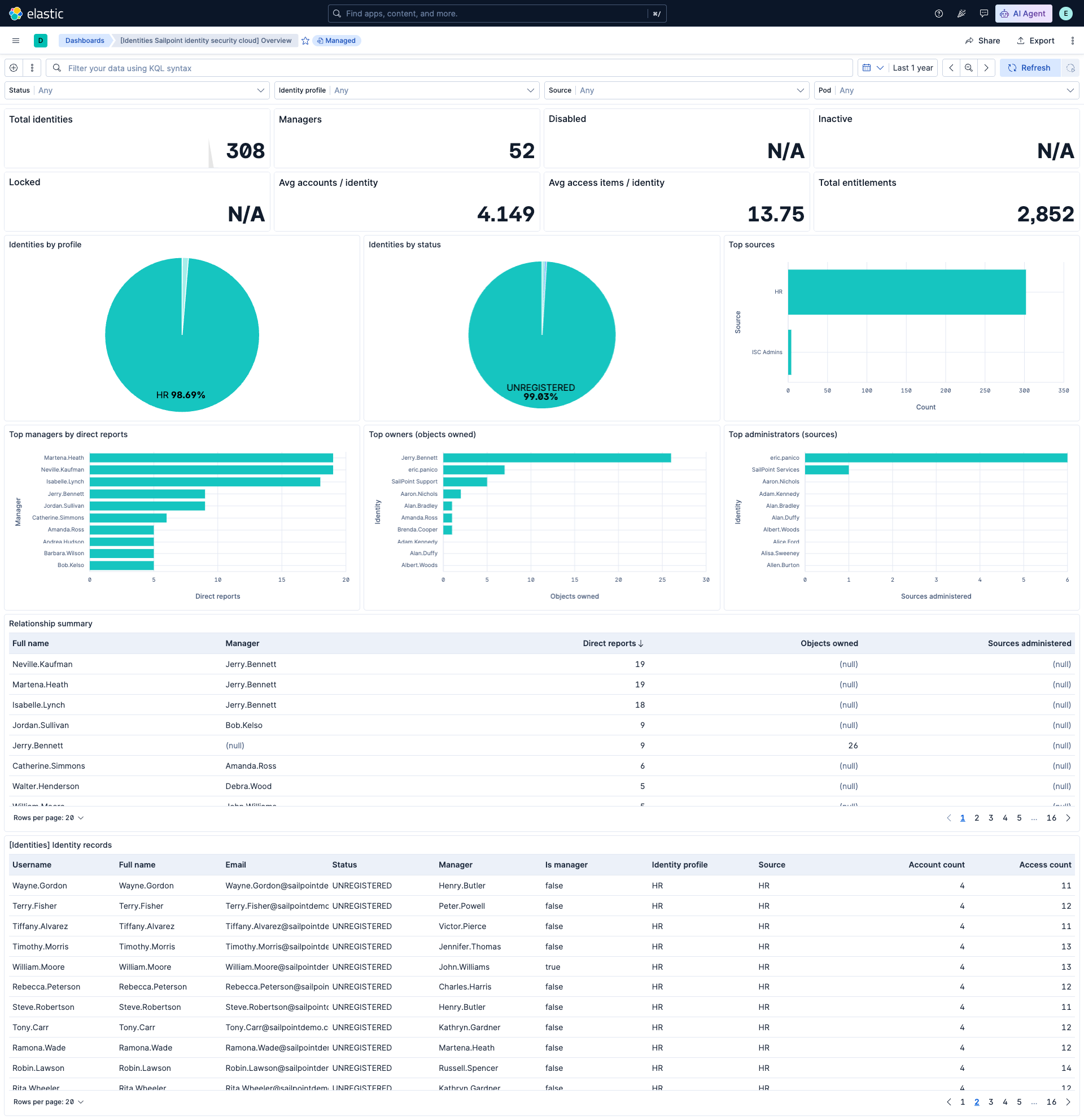
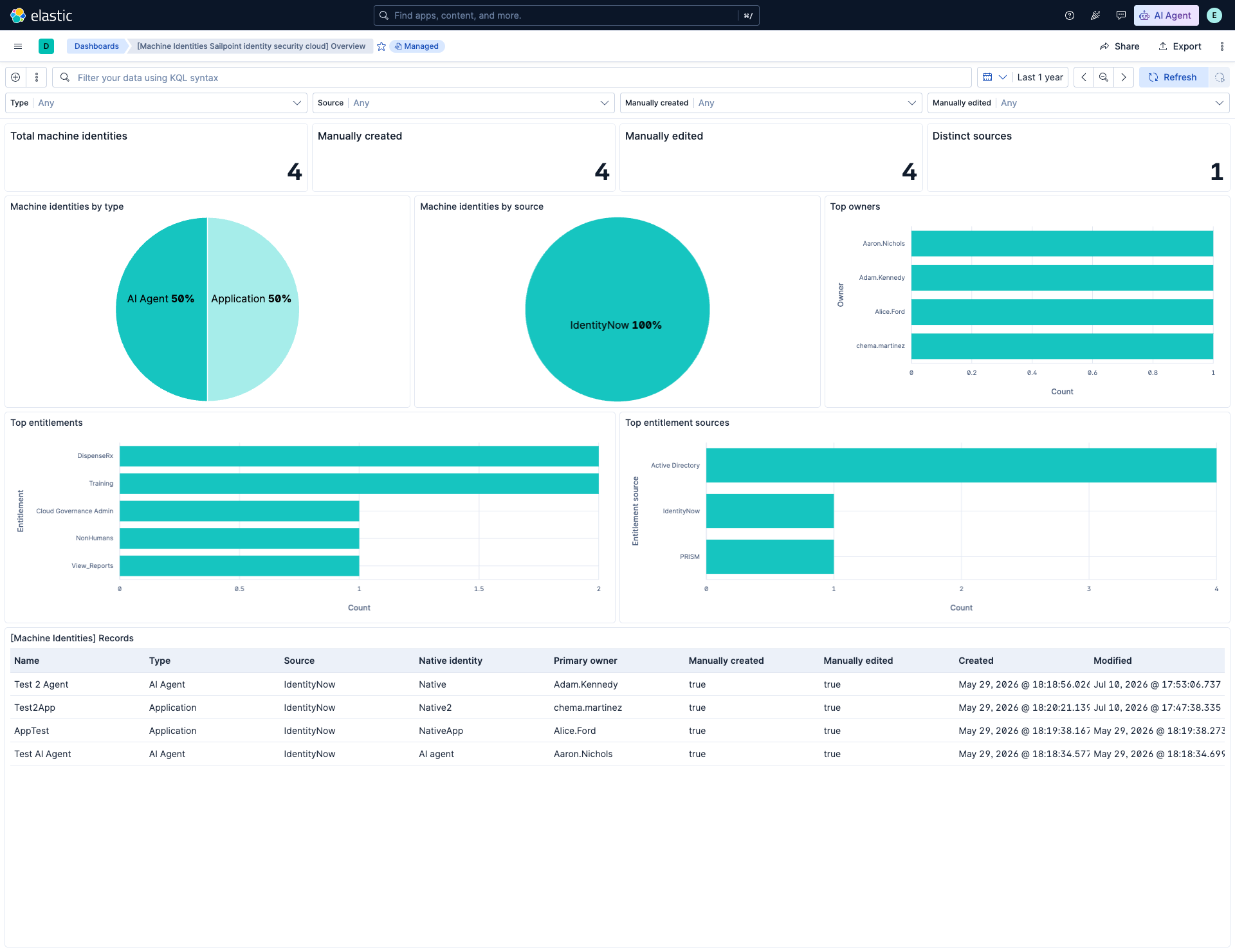
This integration includes one or more Kibana dashboards that visualizes the data collected by the integration. The screenshots below illustrate how the ingested data is displayed.
Changelog
| Version | Details | Minimum Kibana version |
|---|---|---|
| 2.1.0 | Enhancement (View pull request) Update Elastic Managed integration documentation to the current wording and docs links. |
9.0.5 8.19.2 |
| 2.0.1 | Bug fix (View pull request) Prevent pipeline errors when the events API response omits the id field.Bug fix (View pull request) Fix null-safety on related.user append condition to prevent errors when actor is absent.Bug fix (View pull request) Fix related.hosts append condition to correctly check attributes.host_name instead of a non-existent host_name field directly under events. |
9.0.5 8.19.2 |
| 2.0.0 | Enhancement (View pull request) Add ECS entity field mappings to the events data stream. Enhancement (View pull request) Add identities data stream for human identity records via the Search API.Enhancement (View pull request) Add machine_identities data stream for machine identity records via the Machine Identities API.Enhancement (View pull request) Add tags to ingest pipeline processors. Bug fix (View pull request) Remove two redundant no-op set processors for event.dataset and event.module in the events data stream.Enhancement (View pull request) Update default API version to v2026. Bug fix (View pull request) Disable request tracing by default. |
9.0.5 8.19.2 |
| 1.3.1 | Enhancement (View pull request) Set agentless deployment mode release field to ga. |
9.0.5 8.19.2 |
| 1.3.0 | Enhancement (View pull request) Enable Agentless deployment. |
9.0.5 8.19.2 |
| 1.2.0 | Enhancement (View pull request) Pass events from the agent as serialized JSON strings. Enhancement (View pull request) Improve ingest pipeline error handling. Enhancement (View pull request) Improve agent request error handling. |
9.0.0 8.16.1 |
| 1.1.0 | Enhancement (View pull request) Add option to select the API version to use. Bug fix (View pull request) Fix POST request format for events data stream. |
9.0.0 8.16.1 |
| 1.0.0 | Enhancement (View pull request) Release package as GA. |
9.0.0 8.16.1 |
| 0.3.1 | Bug fix (View pull request) Fix default request trace enabled behavior. |
9.0.0 8.16.1 |
| 0.3.0 | Enhancement (View pull request) Enable request trace log removal. |
9.0.0 8.16.1 |
| 0.2.1 | Bug fix (View pull request) Added description to ssl nodes in package level manifest.yml file to including links to documentation. |
9.0.0 8.16.1 |
| 0.2.0 | Enhancement (View pull request) Update Kibana constraint to support 9.0.0. |
9.0.0 8.16.1 |
| 0.1.0 | Enhancement (View pull request) Initial release. |
8.16.1 |