Cyberark Privileged Threat Analytics
Elastic Cloud Serverless projects are autoscaled environments, fully managed by Elastic and available on Elastic Cloud. Availability This functionality is generally available and ready for production usage. Elastic Cloud Serverless projects are autoscaled environments, fully managed by Elastic and available on Elastic Cloud. Availability This functionality is generally available and ready for production usage. The Elastic Stack includes Elastic's core products such as Elasticsearch, Kibana, Logstash, and Beats. Availability This functionality is generally available and ready for production usage. Unless stated otherwise on the page, this functionality is available when your Elastic Stack is deployed on Elastic Cloud Hosted, Elastic Cloud Enterprise, Elastic Cloud on Kubernetes, and self-managed environments. This documentation corresponds to the latest patch available for each minor version. If you're not using the latest patch, check the release notes for changes.
Serverless Observability
Generally available
Serverless Security
Generally available
Stack
9.0+
Generally available since 9.0
| Version | 1.16.0 (View all) |
| Subscription level What's this? |
Basic |
| Developed by What's this? |
Elastic |
| Ingestion method(s) | Network Protocol |
| Minimum Kibana version(s) | 9.0.0 8.13.0 |
CyberArk's Privileged Threat Analytics (PTA) continuously monitors the use of privileged accounts that are managed in the CyberArk Privileged Access Security (PAS) platform. This integration collects analytics from PTA's syslog via CEF-formatted logs.
Follow the steps described under Send PTA syslog records to SIEM documentation to setup the integration:
- Sample syslog configuration for
systemparm.properties:
[SYSLOG]
syslog_outbound=[{"siem": "Elastic", "format": "CEF", "host": "SIEM_MACHINE_ADDRESS", "port": 9301, "protocol": "TCP"}]
Example
{
    "@timestamp": "2014-01-01T12:05:00.000Z",
    "agent": {
        "ephemeral_id": "7c5b4bbe-bda4-4424-a4d6-cb9a317ec74b",
        "id": "63927886-dc21-452f-a202-81558cdffc59",
        "name": "elastic-agent-59956",
        "type": "filebeat",
        "version": "8.18.1"
    },
    "cef": {
        "device": {
            "event_class_id": "1",
            "product": "PTA",
            "vendor": "CyberArk",
            "version": "12.6"
        },
        "extensions": {
            "destinationAddress": "2.2.2.2",
            "destinationHostName": "dev1.example.com",
            "destinationUserName": "andy@dev1.example.com",
            "deviceCustomDate1": "2014-01-01T12:05:00.000Z",
            "deviceCustomDate1Label": "detectionDate",
            "deviceCustomString1": "None",
            "deviceCustomString1Label": "ExtraData",
            "deviceCustomString2": "52b06812ec3500ed864c461e",
            "deviceCustomString2Label": "EventID",
            "deviceCustomString3": "https://1.1.1.1/incidents/52b06812ec3500ed864c461e",
            "deviceCustomString3Label": "PTAlink",
            "deviceCustomString4": "None",
            "deviceCustomString4Label": "ExternalLink",
            "sourceAddress": "1.1.1.1",
            "sourceHostName": "prod1.example.com",
            "sourceUserName": "mike2@prod1.example.com"
        },
        "name": "Suspected credentials theft",
        "severity": "8",
        "version": "0"
    },
    "cyberark_pta": {
        "log": {
            "event_type": "1"
        }
    },
    "data_stream": {
        "dataset": "cyberark_pta.events",
        "namespace": "98495",
        "type": "logs"
    },
    "destination": {
        "domain": "dev1.example.com",
        "ip": "2.2.2.2",
        "user": {
            "domain": "dev1.example.com",
            "email": "andy@dev1.example.com",
            "name": "andy"
        }
    },
    "ecs": {
        "version": "8.11.0"
    },
    "elastic_agent": {
        "id": "63927886-dc21-452f-a202-81558cdffc59",
        "snapshot": false,
        "version": "8.18.1"
    },
    "event": {
        "agent_id_status": "verified",
        "code": "1",
        "dataset": "cyberark_pta.events",
        "id": "52b06812ec3500ed864c461e",
        "ingested": "2025-06-03T11:39:08Z",
        "original": "CEF:0|CyberArk|PTA|12.6|1|Suspected credentials theft|8|suser=mike2@prod1.example.com shost=prod1.example.com src=1.1.1.1 duser=andy@dev1.example.com dhost=dev1.example.com dst=2.2.2.2 cs1Label=ExtraData cs1=None cs2Label=EventID cs2=52b06812ec3500ed864c461e deviceCustomDate1Label=detectionDate deviceCustomDate1=1388577900000 cs3Label=PTAlink cs3=https://1.1.1.1/incidents/52b06812ec3500ed864c461e cs4Label=ExternalLink cs4=None",
        "reason": "Suspected credentials theft",
        "reference": "https://1.1.1.1/incidents/52b06812ec3500ed864c461e",
        "severity": 8,
        "timezone": "+00:00",
        "url": "None"
    },
    "input": {
        "type": "udp"
    },
    "log": {
        "source": {
            "address": "172.19.0.3:47033"
        }
    },
    "observer": {
        "product": "PTA",
        "vendor": "CyberArk",
        "version": "12.6"
    },
    "related": {
        "user": [
            "mike2",
            "mike2@prod1.example.com",
            "andy",
            "andy@dev1.example.com"
        ]
    },
    "source": {
        "domain": "prod1.example.com",
        "ip": "1.1.1.1",
        "user": {
            "domain": "prod1.example.com",
            "email": "mike2@prod1.example.com",
            "name": "mike2"
        }
    },
    "tags": [
        "preserve_original_event",
        "cyberark_pta",
        "forwarded"
    ]
}
Exported fields
| Field | Description | Type |
|---|---|---|
| @timestamp | Event timestamp. | date |
| cef.device.event_class_id | Unique identifier of the event type. | keyword |
| cef.device.product | Product of the device that produced the message. | keyword |
| cef.device.vendor | Vendor of the device that produced the message. | keyword |
| cef.device.version | Version of the product that produced the message. | keyword |
| cef.extensions.TrendMicroDsDetectionConfidence | keyword | |
| cef.extensions.TrendMicroDsFileMD5 | keyword | |
| cef.extensions.TrendMicroDsFileSHA1 | keyword | |
| cef.extensions.TrendMicroDsFileSHA256 | keyword | |
| cef.extensions.TrendMicroDsFrameType | keyword | |
| cef.extensions.TrendMicroDsMalwareTarget | keyword | |
| cef.extensions.TrendMicroDsMalwareTargetType | keyword | |
| cef.extensions.TrendMicroDsPacketData | keyword | |
| cef.extensions.TrendMicroDsRelevantDetectionNames | keyword | |
| cef.extensions.TrendMicroDsTenant | keyword | |
| cef.extensions.TrendMicroDsTenantId | keyword | |
| cef.extensions.ad | flattened | |
| cef.extensions.agentAddress | The IP address of the ArcSight connector that processed the event. | ip |
| cef.extensions.agentHostName | The hostname of the ArcSight connector that processed the event. | keyword |
| cef.extensions.agentId | The agent ID of the ArcSight connector that processed the event. | keyword |
| cef.extensions.agentMacAddress | The MAC address of the ArcSight connector that processed the event. | keyword |
| cef.extensions.agentReceiptTime | The time at which information about the event was received by the ArcSight connector. | date |
| cef.extensions.agentTimeZone | The agent time zone of the ArcSight connector that processed the event. | keyword |
| cef.extensions.agentType | The agent type of the ArcSight connector that processed the event. | keyword |
| cef.extensions.agentVersion | The version of the ArcSight connector that processed the event. | keyword |
| cef.extensions.agentZoneURI | keyword | |
| cef.extensions.aggregationType | keyword | |
| cef.extensions.applicationProtocol | Application level protocol, example values are HTTP, HTTPS, SSHv2, Telnet, POP, IMPA, IMAPS, and so on. | keyword |
| cef.extensions.assetCriticality | keyword | |
| cef.extensions.baseEventCount | A count associated with this event. How many times was this same event observed? Count can be omitted if it is 1. | long |
| cef.extensions.bytesIn | Number of bytes transferred inbound, relative to the source to destination relationship, meaning that data was flowing from source to destination. | long |
| cef.extensions.bytesOut | Number of bytes transferred outbound relative to the source to destination relationship. For example, the byte number of data flowing from the destination to the source. | long |
| cef.extensions.categoryBehavior | Action or a behavior associated with an event. It's what is being done to the object (ArcSight). | keyword |
| cef.extensions.categoryDeviceGroup | General device group like Firewall (ArcSight). | keyword |
| cef.extensions.categoryDeviceType | Device type. Examples - Proxy, IDS, Web Server (ArcSight). | keyword |
| cef.extensions.categoryObject | Object that the event is about. For example it can be an operating sytem, database, file, etc (ArcSight). | keyword |
| cef.extensions.categoryOutcome | Outcome of the event (e.g. sucess, failure, or attempt) (ArcSight). | keyword |
| cef.extensions.categorySignificance | Characterization of the importance of the event (ArcSight). | keyword |
| cef.extensions.categoryTechnique | Technique being used (e.g. /DoS) (ArcSight). | keyword |
| cef.extensions.cp_app_risk | keyword | |
| cef.extensions.cp_severity | keyword | |
| cef.extensions.destinationAddress | Identifies the destination address that the event refers to in an IP network. The format is an IPv4 address. | ip |
| cef.extensions.destinationHostName | Identifies the destination that an event refers to in an IP network. The format should be a fully qualified domain name (FQDN) associated with the destination node, when a node is available. | keyword |
| cef.extensions.destinationMacAddress | Six colon-separated hexadecimal numbers. | keyword |
| cef.extensions.destinationNtDomain | Outcome of the event (e.g. sucess, failure, or attempt) (ArcSight). | keyword |
| cef.extensions.destinationPort | The valid port numbers are between 0 and 65535. | long |
| cef.extensions.destinationServiceName | The service targeted by this event. | keyword |
| cef.extensions.destinationTranslatedAddress | Identifies the translated destination that the event refers to in an IP network. | ip |
| cef.extensions.destinationTranslatedPort | Port after it was translated; for example, a firewall. Valid port numbers are 0 to 65535. | long |
| cef.extensions.destinationUserName | Identifies the destination user by name. This is the user associated with the event's destination. Email addresses are often mapped into the UserName fields. The recipient is a candidate to put into this field. | keyword |
| cef.extensions.destinationUserPrivileges | The typical values are "Administrator", "User", and "Guest". This identifies the destination user's privileges. In UNIX, for example, activity executed on the root user would be identified with destinationUser Privileges of "Administrator". | keyword |
| cef.extensions.deviceAction | Action taken by the device. | keyword |
| cef.extensions.deviceAddress | Identifies the device address that an event refers to in an IP network. | ip |
| cef.extensions.deviceAssetId | keyword | |
| cef.extensions.deviceCustomDate1 | One of two timestamp fields available to map fields that do not apply to any other in this dictionary. | keyword |
| cef.extensions.deviceCustomDate1Label | All custom fields have a corresponding label field. Each of these fields is a string and describes the purpose of the custom field. | keyword |
| cef.extensions.deviceCustomDate2 | One of two timestamp fields available to map fields that do not apply to any other in this dictionary. | keyword |
| cef.extensions.deviceCustomDate2Label | All custom fields have a corresponding label field. Each of these fields is a string and describes the purpose of the custom field. | keyword |
| cef.extensions.deviceCustomIPv6Address1 | One of four IPv6 address fields available to map fields that do not apply to any other in this dictionary. | ip |
| cef.extensions.deviceCustomIPv6Address1Label | All custom fields have a corresponding label field. Each of these fields is a string and describes the purpose of the custom field. | keyword |
| cef.extensions.deviceCustomIPv6Address2 | One of four IPv6 address fields available to map fields that do not apply to any other in this dictionary. | ip |
| cef.extensions.deviceCustomIPv6Address2Label | All custom fields have a corresponding label field. Each of these fields is a string and describes the purpose of the custom field. | keyword |
| cef.extensions.deviceCustomIPv6Address3 | One of four IPv6 address fields available to map fields that do not apply to any other in this dictionary. | ip |
| cef.extensions.deviceCustomIPv6Address3Label | All custom fields have a corresponding label field. Each of these fields is a string and describes the purpose of the custom field. | keyword |
| cef.extensions.deviceCustomIPv6Address4 | One of four IPv6 address fields available to map fields that do not apply to any other in this dictionary. | ip |
| cef.extensions.deviceCustomIPv6Address4Label | All custom fields have a corresponding label field. Each of these fields is a string and describes the purpose of the custom field. | keyword |
| cef.extensions.deviceCustomNumber1 | One of three number fields available to map fields that do not apply to any other in this dictionary. Use sparingly and seek a more specific, dictionary supplied field when possible. | long |
| cef.extensions.deviceCustomNumber1Label | All custom fields have a corresponding label field. Each of these fields is a string and describes the purpose of the custom field. | keyword |
| cef.extensions.deviceCustomNumber2 | One of three number fields available to map fields that do not apply to any other in this dictionary. Use sparingly and seek a more specific, dictionary supplied field when possible. | long |
| cef.extensions.deviceCustomNumber2Label | All custom fields have a corresponding label field. Each of these fields is a string and describes the purpose of the custom field. | keyword |
| cef.extensions.deviceCustomNumber3 | One of three number fields available to map fields that do not apply to any other in this dictionary. Use sparingly and seek a more specific, dictionary supplied field when possible. | long |
| cef.extensions.deviceCustomNumber3Label | All custom fields have a corresponding label field. Each of these fields is a string and describes the purpose of the custom field. | keyword |
| cef.extensions.deviceCustomString1 | One of six strings available to map fields that do not apply to any other in this dictionary. Use sparingly and seek a more specific, dictionary supplied field when possible. | keyword |
| cef.extensions.deviceCustomString1Label | All custom fields have a corresponding label field. Each of these fields is a string and describes the purpose of the custom field. | keyword |
| cef.extensions.deviceCustomString2 | One of six strings available to map fields that do not apply to any other in this dictionary. Use sparingly and seek a more specific, dictionary supplied field when possible. | keyword |
| cef.extensions.deviceCustomString2Label | All custom fields have a corresponding label field. Each of these fields is a string and describes the purpose of the custom field. | keyword |
| cef.extensions.deviceCustomString3 | One of six strings available to map fields that do not apply to any other in this dictionary. Use sparingly and seek a more specific, dictionary supplied field when possible. | keyword |
| cef.extensions.deviceCustomString3Label | All custom fields have a corresponding label field. Each of these fields is a string and describes the purpose of the custom field. | keyword |
| cef.extensions.deviceCustomString4 | One of six strings available to map fields that do not apply to any other in this dictionary. Use sparingly and seek a more specific, dictionary supplied field when possible. | keyword |
| cef.extensions.deviceCustomString4Label | All custom fields have a corresponding label field. Each of these fields is a string and describes the purpose of the custom field. | keyword |
| cef.extensions.deviceCustomString5 | One of six strings available to map fields that do not apply to any other in this dictionary. Use sparingly and seek a more specific, dictionary supplied field when possible. | keyword |
| cef.extensions.deviceCustomString5Label | All custom fields have a corresponding label field. Each of these fields is a string and describes the purpose of the custom field. | keyword |
| cef.extensions.deviceCustomString6 | One of six strings available to map fields that do not apply to any other in this dictionary. Use sparingly and seek a more specific, dictionary supplied field when possible. | keyword |
| cef.extensions.deviceCustomString6Label | All custom fields have a corresponding label field. Each of these fields is a string and describes the purpose of the custom field. | keyword |
| cef.extensions.deviceDirection | Any information about what direction the observed communication has taken. The following values are supported - "0" for inbound or "1" for outbound. | long |
| cef.extensions.deviceEventCategory | Represents the category assigned by the originating device. Devices often use their own categorization schema to classify event. Example "/Monitor/Disk/Read". | keyword |
| cef.extensions.deviceExternalId | A name that uniquely identifies the device generating this event. | keyword |
| cef.extensions.deviceFacility | The facility generating this event. For example, Syslog has an explicit facility associated with every event. | keyword |
| cef.extensions.deviceHostName | The format should be a fully qualified domain name (FQDN) associated with the device node, when a node is available. | keyword |
| cef.extensions.deviceInboundInterface | Interface on which the packet or data entered the device. | keyword |
| cef.extensions.deviceOutboundInterface | Interface on which the packet or data left the device. | keyword |
| cef.extensions.deviceProcessName | Process name associated with the event. An example might be the process generating the syslog entry in UNIX. | keyword |
| cef.extensions.deviceReceiptTime | The time at which the event related to the activity was received. The format is MMM dd yyyy HH:mm:ss or milliseconds since epoch (Jan 1st 1970) | keyword |
| cef.extensions.deviceSeverity | keyword | |
| cef.extensions.deviceTimeZone | The time zone for the device generating the event. | keyword |
| cef.extensions.deviceZoneID | keyword | |
| cef.extensions.deviceZoneURI | Thee URI for the Zone that the device asset has been assigned to in ArcSight. | keyword |
| cef.extensions.dvc | This field is used by Trend Micro if the hostname is an IPv4 address. | ip |
| cef.extensions.dvchost | This field is used by Trend Micro for hostnames and IPv6 addresses. | keyword |
| cef.extensions.eventAnnotationAuditTrail | keyword | |
| cef.extensions.eventAnnotationEndTime | date | |
| cef.extensions.eventAnnotationFlags | keyword | |
| cef.extensions.eventAnnotationManagerReceiptTime | date | |
| cef.extensions.eventAnnotationModificationTime | date | |
| cef.extensions.eventAnnotationStageUpdateTime | date | |
| cef.extensions.eventAnnotationVersion | keyword | |
| cef.extensions.eventId | This is a unique ID that ArcSight assigns to each event. | long |
| cef.extensions.fileHash | Hash of a file. | keyword |
| cef.extensions.filePath | Full path to the file, including file name itself. | keyword |
| cef.extensions.fileSize | Size of the file. | long |
| cef.extensions.fileType | Type of file (pipe, socket, etc.) | keyword |
| cef.extensions.filename | Name of the file only (without its path). | keyword |
| cef.extensions.ifname | keyword | |
| cef.extensions.inzone | keyword | |
| cef.extensions.layer_name | keyword | |
| cef.extensions.layer_uuid | keyword | |
| cef.extensions.locality | keyword | |
| cef.extensions.logid | keyword | |
| cef.extensions.loguid | keyword | |
| cef.extensions.managerReceiptTime | When the Arcsight ESM received the event. | date |
| cef.extensions.match_id | keyword | |
| cef.extensions.message | An arbitrary message giving more details about the event. Multi-line entries can be produced by using \n as the new line separator. | keyword |
| cef.extensions.method | HTTP request method. The value should retain its casing from the original event. For example, GET, get, and GeT are all considered valid values for this field. |
keyword |
| cef.extensions.modelConfidence | keyword | |
| cef.extensions.nat_addtnl_rulenum | keyword | |
| cef.extensions.nat_rulenum | keyword | |
| cef.extensions.oldFileHash | Hash of the old file. | keyword |
| cef.extensions.origin | keyword | |
| cef.extensions.originalAgentAddress | keyword | |
| cef.extensions.originalAgentHostName | keyword | |
| cef.extensions.originalAgentId | keyword | |
| cef.extensions.originalAgentType | keyword | |
| cef.extensions.originalAgentVersion | keyword | |
| cef.extensions.originalAgentZoneURI | keyword | |
| cef.extensions.originsicname | keyword | |
| cef.extensions.outzone | keyword | |
| cef.extensions.parent_rule | keyword | |
| cef.extensions.priority | keyword | |
| cef.extensions.product | keyword | |
| cef.extensions.relevance | keyword | |
| cef.extensions.repeatCount | keyword | |
| cef.extensions.requestContext | Description of the content from which the request originated (for example, HTTP Referrer). | keyword |
| cef.extensions.requestMethod | The HTTP method used to access a URL. | keyword |
| cef.extensions.requestUrl | In the case of an HTTP request, this field contains the URL accessed. The URL should contain the protocol as well. | keyword |
| cef.extensions.requestUrlFileName | keyword | |
| cef.extensions.rule_action | keyword | |
| cef.extensions.rule_uid | keyword | |
| cef.extensions.sequencenum | keyword | |
| cef.extensions.service_id | keyword | |
| cef.extensions.severity | keyword | |
| cef.extensions.sourceAddress | Identifies the source that an event refers to in an IP network. | ip |
| cef.extensions.sourceGeoLatitude | long | |
| cef.extensions.sourceGeoLongitude | long | |
| cef.extensions.sourceHostName | Identifies the source that an event refers to in an IP network. The format should be a fully qualified domain name (FQDN) associated with the source node, when a mode is available. | keyword |
| cef.extensions.sourceMacAddress | Six colon-separated hexadecimal numbers. | keyword |
| cef.extensions.sourceNtDomain | The Windows domain name for the source address. | keyword |
| cef.extensions.sourcePort | The valid port numbers are 0 to 65535. | long |
| cef.extensions.sourceServiceName | The service that is responsible for generating this event. | keyword |
| cef.extensions.sourceTranslatedAddress | Identifies the translated source that the event refers to in an IP network. | ip |
| cef.extensions.sourceTranslatedPort | A port number after being translated by, for example, a firewall. Valid port numbers are 0 to 65535. | long |
| cef.extensions.sourceTranslatedZoneID | keyword | |
| cef.extensions.sourceTranslatedZoneURI | The URI for the Translated Zone that the destination asset has been assigned to in ArcSight. | keyword |
| cef.extensions.sourceUserId | Identifies the source user by ID. This is the user associated with the source of the event. For example, in UNIX, the root user is generally associated with user ID 0. | keyword |
| cef.extensions.sourceUserName | Identifies the source user by name. Email addresses are also mapped into the UserName fields. The sender is a candidate to put into this field. | keyword |
| cef.extensions.sourceUserPrivileges | The typical values are "Administrator", "User", and "Guest". It identifies the source user's privileges. In UNIX, for example, activity executed by the root user would be identified with "Administrator". | keyword |
| cef.extensions.sourceZoneID | Identifies the source user by ID. This is the user associated with the source of the event. For example, in UNIX, the root user is generally associated with user ID 0. | keyword |
| cef.extensions.sourceZoneURI | The URI for the Zone that the source asset has been assigned to in ArcSight. | keyword |
| cef.extensions.startTime | The time when the activity the event referred to started. The format is MMM dd yyyy HH:mm:ss or milliseconds since epoch (Jan 1st 1970). | date |
| cef.extensions.target | keyword | |
| cef.extensions.transportProtocol | Identifies the Layer-4 protocol used. The possible values are protocols such as TCP or UDP. | keyword |
| cef.extensions.type | 0 means base event, 1 means aggregated, 2 means correlation, and 3 means action. This field can be omitted for base events (type 0). | long |
| cef.extensions.version | keyword | |
| cef.name | keyword | |
| cef.severity | keyword | |
| cef.version | keyword | |
| cyberark_pta.log.event_type | A unique ID that identifies the event that is reported. | keyword |
| data_stream.dataset | Data stream dataset. | constant_keyword |
| data_stream.namespace | Data stream namespace. | constant_keyword |
| data_stream.type | Data stream type. | constant_keyword |
| destination.service.name | keyword | |
| event.dataset | Event dataset | constant_keyword |
| event.module | Event module | constant_keyword |
| input.type | Input type | keyword |
| log.source.address | Source address from which the log event was read / sent from. | keyword |
| source.service.name | keyword |
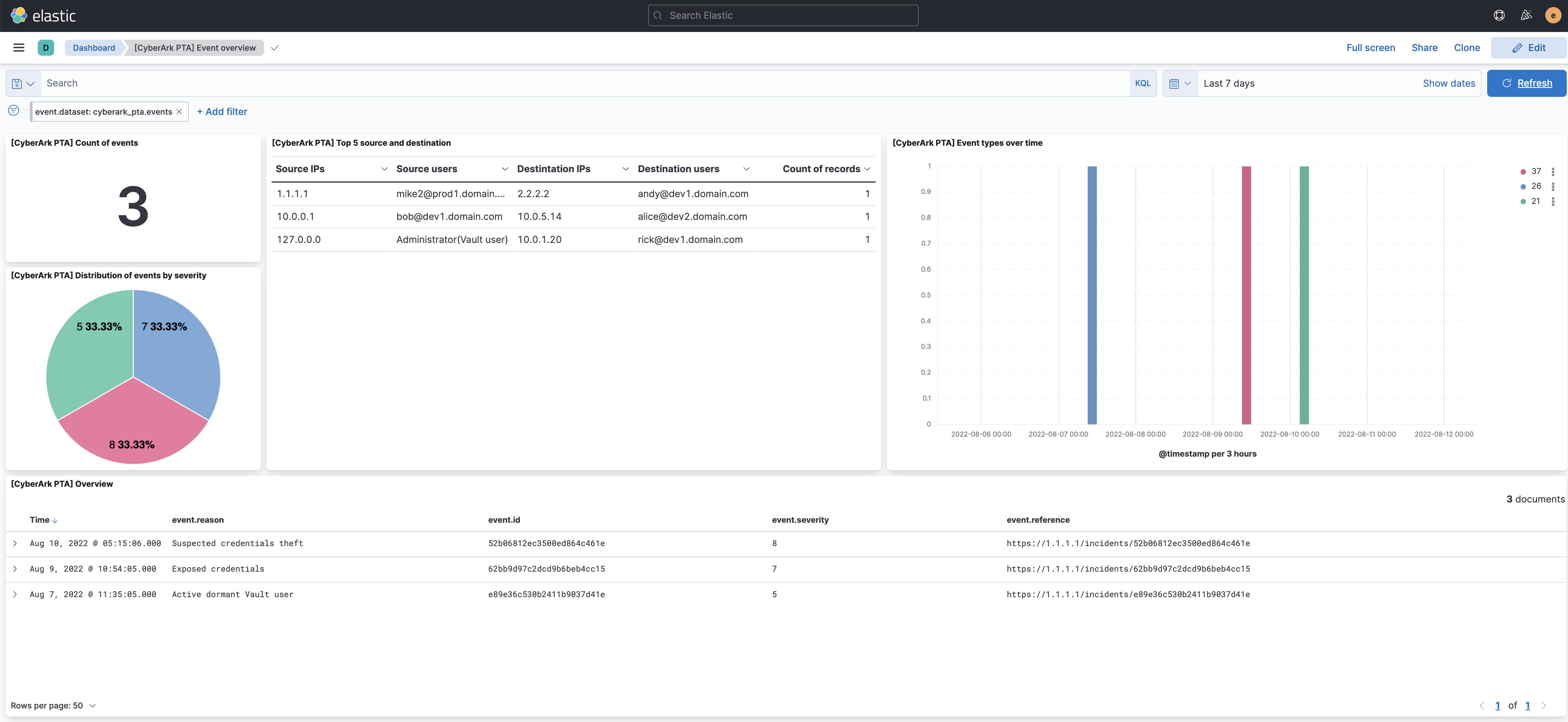
This integration includes one or more Kibana dashboards that visualizes the data collected by the integration. The screenshots below illustrate how the ingested data is displayed.
Changelog
| Version | Details | Minimum Kibana version |
|---|---|---|
| 1.16.0 | Enhancement (View pull request) Add tags to ingest pipeline processors. |
9.0.0 8.13.0 |
| 1.15.0 | Enhancement (View pull request) Add fingerprint processor to avoid duplicated events. |
9.0.0 8.13.0 |
| 1.14.0 | Enhancement (View pull request) Retain observer IP address or hostname if available from syslog message. |
9.0.0 8.13.0 |
| 1.13.0 | Enhancement (View pull request) Standardize user fields processing across integrations. |
9.0.0 8.13.0 |
| 1.12.0 | Enhancement (View pull request) Update Kibana constraint to support 9.0.0. |
9.0.0 8.13.0 |
| 1.11.0 | Enhancement (View pull request) Add "preserve_original_event" tag to documents with event.kind set to "pipeline_error". |
8.13.0 |
| 1.10.1 | Bug fix (View pull request) Use triple-brace Mustache templating when referencing variables in ingest pipelines. |
8.13.0 |
| 1.10.0 | Enhancement (View pull request) Update the kibana constraint to ^8.13.0. Modified the field definitions to remove ECS fields made redundant by the ecs@mappings component template. |
8.13.0 |
| 1.9.0 | Enhancement (View pull request) Update manifest format version to v3.0.3. |
8.0.0 7.17.0 |
| 1.8.1 | Enhancement (View pull request) Changed owners |
8.0.0 7.17.0 |
| 1.8.0 | Enhancement (View pull request) ECS version updated to 8.11.0. |
8.0.0 7.17.0 |
| 1.7.0 | Enhancement (View pull request) ECS version updated to 8.10.0. |
8.0.0 7.17.0 |
| 1.6.0 | Enhancement (View pull request) The format_version in the package manifest changed from 2.11.0 to 3.0.0. Removed dotted YAML keys from package manifest. Added 'owner.type: elastic' to package manifest. |
8.0.0 7.17.0 |
| 1.5.0 | Enhancement (View pull request) Add tags.yml file so that integration's dashboards and saved searches are tagged with "Security Solution" and displayed in the Security Solution UI. |
8.0.0 7.17.0 |
| 1.4.0 | Enhancement (View pull request) Update package to ECS 8.9.0. |
8.0.0 7.17.0 |
| 1.3.0 | Enhancement (View pull request) Update package to ECS 8.8.0. |
8.0.0 7.17.0 |
| 1.2.0 | Enhancement (View pull request) Update package-spec version to 2.7.0. |
8.0.0 7.17.0 |
| 1.1.0 | Enhancement (View pull request) Update package to ECS 8.7.0. |
8.0.0 7.17.0 |
| 1.0.0 | Enhancement (View pull request) Release Cyberark Privileged Threat Analytics as GA. |
8.0.0 7.17.0 |
| 0.4.1 | Enhancement (View pull request) Added categories and/or subcategories. |
8.0.0 7.17.0 |
| 0.4.0 | Enhancement (View pull request) Update package to ECS 8.6.0. |
8.0.0 7.17.0 |
| 0.3.0 | Enhancement (View pull request) Add udp_options to the UDP input. |
8.0.0 7.17.0 |
| 0.2.0 | Enhancement (View pull request) Update package to ECS 8.5.0. |
8.0.0 7.17.0 |
| 0.1.2 | Bug fix (View pull request) Remove duplicate fields. |
8.0.0 7.17.0 |
| 0.1.1 | Bug fix (View pull request) Remove duplicate field. |
8.0.0 7.17.0 |
| 0.1.0 | Enhancement (View pull request) initial beta release |
8.0.0 7.17.0 |