Prisma Cloud
Elastic Cloud Serverless projects are autoscaled environments, fully managed by Elastic and available on Elastic Cloud. Availability This functionality is generally available and ready for production usage. Elastic Cloud Serverless projects are autoscaled environments, fully managed by Elastic and available on Elastic Cloud. Availability This functionality is generally available and ready for production usage. The Elastic Stack includes Elastic's core products such as Elasticsearch, Kibana, Logstash, and Beats. Availability This functionality is generally available and ready for production usage. Unless stated otherwise on the page, this functionality is available when your Elastic Stack is deployed on Elastic Cloud Hosted, Elastic Cloud Enterprise, Elastic Cloud on Kubernetes, and self-managed environments. This documentation corresponds to the latest patch available for each minor version. If you're not using the latest patch, check the release notes for changes.
Serverless Observability
Generally available
Serverless Security
Generally available
Stack
9.3+
Generally available since 9.3
| Version | 4.5.0 (View all) |
| Managed integration release status | GA |
| Subscription level What's this? |
Basic |
| Developed by What's this? |
Elastic |
| Ingestion method(s) | API, Network Protocol |
| Minimum Kibana version(s) | 9.3.0 9.2.2 9.1.8 8.19.8 |
You can use this integration as an Elastic Managed integration on Elastic Cloud Hosted deployments running this version or later.
This Prisma Cloud is a cloud infrastructure security solution and a Security Operations Center (SOC) enablement tool that enables you to address risks and secure your workloads in a heterogeneous environment (hybrid and multi cloud) from a single console. It provides complete visibility and control over risks within your public cloud infrastructure—Amazon Web Services (AWS), Microsoft Azure, Google Cloud Platform (GCP), Oracle Cloud Infrastructure (OCI), Alibaba Cloud— and enables you to manage vulnerabilities, detect anomalies, ensure compliance, and provide runtime defense in heterogeneous environments, such as Windows, Linux, Kubernetes, Red Hat OpenShift, AWS Lambda, Azure Functions, and GCP Cloud Functions.
Single pane of glass for both CSPM (Cloud Security Posture Management) & CWPP (Cloud Workload Protection Platform). Compute (formerly Twistlock, a CWPP solution) is delivered as part of the larger Prisma Cloud system. Palo Alto Networks runs, manages, and updates Compute Console for you. You deploy and manage Defenders in your environment. You access the Compute Console from a tab within the Prisma Cloud user interface.
CSPM uses REST API mode to collect data. Elastic Agent fetches data via API endpoints.
Self-hosted, stand-alone, self-operated version of Compute (formerly Twistlock). Download the entire software suite, and run it in any environment. You deploy and manage both Console and Defenders.
CWP can be used in two different modes to collect data:
- REST API mode.
- Syslog mode: This includes TCP and UDP.
This module has been tested against the latest CSPM version v2 and CWP version v30.03.
The Prisma Cloud integration collects data for the following event types:
| Event Type |
|---|
| Alert |
| Audit |
| Host |
| Host Profile |
| Incident Audit |
| Misconfiguration |
| Vulnerability |
NOTE:
Alert, Audit, Misconfiguration, and Vulnerability data-streams are part of CSPM module, whereas Host, Host Profile and Incident Audit are part of CWP module.
Elastic Agent must be installed. For more details, check the Elastic Agent installation instructions. You can install only one Elastic Agent per host.
Elastic Managed integrations are only supported on Elastic Cloud Serverless and Elastic Cloud Hosted deployments. An Elastic Managed integration lets you ingest data from a cloud source while avoiding the orchestration, management, and maintenance associated with standard ingest infrastructure. Elastic runs the collector for you, so you can focus on your data instead of the infrastructure that collects it.
For more information, refer to Elastic Managed integrations and the Elastic Managed integrations FAQ.
- Assuming that you already have a Prisma Cloud account, to obtain an access key ID and secret access key from the Prisma Cloud system administrator, check how to create access keys.
- The base URL of your CSPM API request depends on the region of your Prisma Cloud tenant and is similar to your Prisma Cloud administrative console URL. Check your URL from the API URLs.
- Assuming that you've already generated your access key ID and secret access key from the Prisma Cloud Console; if not, check the CSPM section. The base URL of your CWP API request depends on the console path and the API version of your Prisma Cloud Compute console.
- To find your API version, log in to your Prisma Cloud Compute console and click the bell icon in the top right of the page.
- To get your console path, navigate to Compute > Manage > System > Downloads. Your console path is listed under Path to Console.
- Create your base URL in this format:
https://<CONSOLE>/api/v<VERSION>.
You can specify a date and time for the access key validity. If you do not select key expiry, the key is set to never expire; if you select it, but do not specify a date, the key expires in a month.
In Kibana navigate to Management > Integrations.
In the search top bar, type Palo Alto Prisma Cloud.
Select the Palo Alto Prisma Cloud integration and add it.
While adding the integration, if you want to collect Alert and Audit data via REST API, then you have to put the following details:
- username
- password
- url
- interval
- time amount
- time unit
- batch size
or if you want to collect Host, Host Profile and Incident Audit data via REST API, then you have to put the following details:
- username
- password
- url
- interval
- offset
- batch size
or if you want to collect Misconfiguration data via REST API, then you have to put the following details:
- username
- password
- url
- interval
- batch size
or if you want to collect Vulnerability data via REST API, then you have to put the following details:
- username
- password
- url
- interval
or if you want to collect Host, Host Profile and Incident Audit data via TCP/UDP, then you have to put the following details:
- listen address
- listen port
Your Access key ID is your username and the Secret Access key is your password.
This is the Alert dataset.
Example
{
    "@timestamp": "2023-09-06T12:30:41.966Z",
    "agent": {
        "ephemeral_id": "8db82bfd-5a45-438b-915d-0ea4d6dd65d9",
        "id": "8a9f6d90-bc0c-452f-9aee-216d0822ecfc",
        "name": "elastic-agent-54360",
        "type": "filebeat",
        "version": "8.13.0"
    },
    "cloud": {
        "account": {
            "id": "710002259376"
        },
        "provider": "aws",
        "service": {
            "name": "Amazon EC2"
        }
    },
    "data_stream": {
        "dataset": "prisma_cloud.alert",
        "namespace": "90378",
        "type": "logs"
    },
    "ecs": {
        "version": "8.11.0"
    },
    "elastic_agent": {
        "id": "8a9f6d90-bc0c-452f-9aee-216d0822ecfc",
        "snapshot": false,
        "version": "8.13.0"
    },
    "event": {
        "agent_id_status": "verified",
        "category": [
            "threat"
        ],
        "dataset": "prisma_cloud.alert",
        "end": "2023-09-06T12:30:41.966Z",
        "id": "N-3910",
        "ingested": "2025-02-11T03:11:16Z",
        "kind": "alert",
        "original": "{\"alertAdditionalInfo\":{\"scannerVersion\":\"CS_2.0\"},\"alertAttribution\":{\"attributionEventList\":[{\"event\":\"first_event\",\"event_ts\":1694003441966,\"username\":\"alex123\"}],\"resourceCreatedBy\":\"string\",\"resourceCreatedOn\":0},\"alertRules\":[],\"alertTime\":1694003441966,\"firstSeen\":1694003441966,\"history\":[{\"modifiedBy\":\"alex123\",\"modifiedOn\":\"1694003441966\",\"reason\":\"Reason1\",\"status\":\"OPEN\"}],\"id\":\"N-3910\",\"investigateOptions\":{\"alertId\":\"N-3910\"},\"lastSeen\":1694003441966,\"lastUpdated\":1694003441966,\"metadata\":null,\"policy\":{\"complianceMetadata\":[{\"complianceId\":\"qwer345bv\",\"customAssigned\":true,\"policyId\":\"werf435tr\",\"requirementDescription\":\"Description of policy compliance.\",\"requirementId\":\"req-123-xyz\",\"requirementName\":\"rigidity\",\"sectionDescription\":\"Description of section.\",\"sectionId\":\"sect-453-abc\",\"sectionLabel\":\"label-1\",\"standardDescription\":\"Description of standard.\",\"standardId\":\"stand-543-pqr\",\"standardName\":\"Class 1\"}],\"deleted\":false,\"description\":\"This policy identifies AWS EC2 instances that are internet reachable with unrestricted access (0.0.0.0/0). EC2 instances with unrestricted access to the internet may enable bad actors to use brute force on a system to gain unauthorised access to the entire network. As a best practice, restrict traffic from unknown IP addresses and limit the access to known hosts, services, or specific entities.\",\"findingTypes\":[],\"labels\":[\"Prisma_Cloud\",\"Attack Path Rule\"],\"lastModifiedBy\":\"template@redlock.io\",\"lastModifiedOn\":1687474999057,\"name\":\"AWS EC2 instance that is internet reachable with unrestricted access (0.0.0.0/0)\",\"policyId\":\"ad23603d-754e-4499-8988-b8017xxxx98\",\"policyType\":\"network\",\"recommendation\":\"The following steps are recommended to restrict unrestricted access from the Internet:\\n1. Visit the Network path Analysis from Source to Destination and review the network path components that allow internet access.\\n2. Identify the network component on which restrictive rules can be implemented.\\n3. Implement the required changes and make sure no other resources have been impacted due to these changes:\\n a) The overly permissive Security Group rules can be made more restrictive.\\n b) Move the instance inside a restrictive subnet if the instance does not need to be publicly accessible.\\n c) Define a NAT rule to restrict traffic coming from the Internet to the respective instance.\",\"remediable\":false,\"remediation\":{\"actions\":[{\"operation\":\"buy\",\"payload\":\"erefwsdf\"}],\"cliScriptTemplate\":\"temp1\",\"description\":\"Description of CLI Script Template.\"},\"severity\":\"high\",\"systemDefault\":true},\"policyId\":\"ad23603d-754e-4499-8988-b801xxx85898\",\"reason\":\"NEW_ALERT\",\"resource\":{\"account\":\"AWS Cloud Account\",\"accountId\":\"710002259376\",\"additionalInfo\":null,\"cloudAccountGroups\":[\"Default Account Group\"],\"cloudServiceName\":\"Amazon EC2\",\"cloudType\":\"aws\",\"data\":null,\"id\":\"i-04578exxxx8100947\",\"name\":\"IS-37133\",\"region\":\"AWS Virginia\",\"regionId\":\"us-east-1\",\"resourceApiName\":\"aws-ec2-describe-instances\",\"resourceConfigJsonAvailable\":false,\"resourceDetailsAvailable\":true,\"resourceTs\":1694003441915,\"resourceType\":\"INSTANCE\",\"rrn\":\"rrn:aws:instance:us-east-1:710000059376:e7ddce5a1ffcb47bxxxxxerf2635a3b4d9da3:i-04578e0008100947\",\"unifiedAssetId\":\"66c543b6261c4d9edxxxxxb42e15f4\",\"url\":\"https://console.aws.amazon.com/ec2/v2/home?region=us-east-1#Instances:instanceId=i-0457xxxxx00947\"},\"status\":\"open\"}",
        "start": "2023-09-06T12:30:41.966Z",
        "type": [
            "indicator"
        ]
    },
    "input": {
        "type": "cel"
    },
    "prisma_cloud": {
        "alert": {
            "additional_info": {
                "scanner_version": "CS_2.0"
            },
            "attribution": {
                "event_list": [
                    {
                        "ts": "2023-09-06T12:30:41.966Z",
                        "username": "alex123",
                        "value": "first_event"
                    }
                ],
                "resource": {
                    "created_by": "string",
                    "created_on": "1970-01-01T00:00:00.000Z"
                }
            },
            "first_seen": "2023-09-06T12:30:41.966Z",
            "history": [
                {
                    "modified_by": "alex123",
                    "modified_on": "2023-09-06T12:30:41.966Z",
                    "reason": "Reason1",
                    "status": "OPEN"
                }
            ],
            "id": "N-3910",
            "last": {
                "seen": "2023-09-06T12:30:41.966Z",
                "updated": "2023-09-06T12:30:41.966Z"
            },
            "policy": {
                "compliance_metadata": [
                    {
                        "compliance_id": "qwer345bv",
                        "custom_assigned": true,
                        "policy_id": "werf435tr",
                        "requirement": {
                            "description": "Description of policy compliance.",
                            "id": "req-123-xyz",
                            "name": "rigidity"
                        },
                        "section": {
                            "description": "Description of section.",
                            "id": "sect-453-abc",
                            "label": "label-1"
                        },
                        "standard": {
                            "description": "Description of standard.",
                            "id": "stand-543-pqr",
                            "name": "Class 1"
                        }
                    }
                ],
                "deleted": false,
                "description": "This policy identifies AWS EC2 instances that are internet reachable with unrestricted access (0.0.0.0/0). EC2 instances with unrestricted access to the internet may enable bad actors to use brute force on a system to gain unauthorised access to the entire network. As a best practice, restrict traffic from unknown IP addresses and limit the access to known hosts, services, or specific entities.",
                "id": "ad23603d-754e-4499-8988-b8017xxxx98",
                "labels": [
                    "Prisma_Cloud",
                    "Attack Path Rule"
                ],
                "last_modified_by": "template@redlock.io",
                "last_modified_on": "2023-06-22T23:03:19.057Z",
                "name": "AWS EC2 instance that is internet reachable with unrestricted access (0.0.0.0/0)",
                "recommendation": "The following steps are recommended to restrict unrestricted access from the Internet:\n1. Visit the Network path Analysis from Source to Destination and review the network path components that allow internet access.\n2. Identify the network component on which restrictive rules can be implemented.\n3. Implement the required changes and make sure no other resources have been impacted due to these changes:\n a) The overly permissive Security Group rules can be made more restrictive.\n b) Move the instance inside a restrictive subnet if the instance does not need to be publicly accessible.\n c) Define a NAT rule to restrict traffic coming from the Internet to the respective instance.",
                "remediable": false,
                "remediation": {
                    "actions": [
                        {
                            "operation": "buy",
                            "payload": "erefwsdf"
                        }
                    ],
                    "cli_script_template": "temp1",
                    "description": "Description of CLI Script Template."
                },
                "severity": "high",
                "system_default": true,
                "type": "network"
            },
            "policy_id": "ad23603d-754e-4499-8988-b801xxx85898",
            "reason": "NEW_ALERT",
            "resource": {
                "account": {
                    "id": "710002259376",
                    "value": "AWS Cloud Account"
                },
                "api_name": "aws-ec2-describe-instances",
                "cloud": {
                    "account": {
                        "groups": [
                            "Default Account Group"
                        ]
                    },
                    "service_name": "Amazon EC2",
                    "type": "aws"
                },
                "config_json_available": false,
                "details_available": true,
                "id": "i-04578exxxx8100947",
                "name": "IS-37133",
                "region": {
                    "id": "us-east-1",
                    "value": "AWS Virginia"
                },
                "rrn": "rrn:aws:instance:us-east-1:710000059376:e7ddce5a1ffcb47bxxxxxerf2635a3b4d9da3:i-04578e0008100947",
                "ts": "2023-09-06T12:30:41.915Z",
                "type": "INSTANCE",
                "unified_asset_id": "66c543b6261c4d9edxxxxxb42e15f4",
                "url": "https://console.aws.amazon.com/ec2/v2/home?region=us-east-1#Instances:instanceId=i-0457xxxxx00947"
            },
            "status": "open",
            "time": "2023-09-06T12:30:41.966Z"
        }
    },
    "related": {
        "user": [
            "alex123"
        ]
    },
    "tags": [
        "preserve_original_event",
        "preserve_duplicate_custom_fields",
        "forwarded",
        "prisma_cloud-alert"
    ],
    "url": {
        "domain": "console.aws.amazon.com",
        "fragment": "Instances:instanceId=i-0457xxxxx00947",
        "original": "https://console.aws.amazon.com/ec2/v2/home?region=us-east-1#Instances:instanceId=i-0457xxxxx00947",
        "path": "/ec2/v2/home",
        "query": "region=us-east-1",
        "scheme": "https"
    }
}
Exported fields
| Field | Description | Type |
|---|---|---|
| @timestamp | Event timestamp. | date |
| data_stream.dataset | Data stream dataset. | constant_keyword |
| data_stream.namespace | Data stream namespace. | constant_keyword |
| data_stream.type | Data stream type. | constant_keyword |
| event.dataset | Event dataset. | constant_keyword |
| event.module | Event module. | constant_keyword |
| input.type | Type of filebeat input. | keyword |
| log.offset | Log offset. | long |
| prisma_cloud.alert.additional_info.scanner_version | keyword | |
| prisma_cloud.alert.attribution.event_list.ts | date | |
| prisma_cloud.alert.attribution.event_list.username | keyword | |
| prisma_cloud.alert.attribution.event_list.value | keyword | |
| prisma_cloud.alert.attribution.resource.created_by | keyword | |
| prisma_cloud.alert.attribution.resource.created_on | date | |
| prisma_cloud.alert.count | long | |
| prisma_cloud.alert.dismissal.duration | keyword | |
| prisma_cloud.alert.dismissal.note | keyword | |
| prisma_cloud.alert.dismissal.until_ts | date | |
| prisma_cloud.alert.dismissed_by | keyword | |
| prisma_cloud.alert.event_occurred | Timestamp when the event occurred. Set only for Audit Event policies. | date |
| prisma_cloud.alert.first_seen | Timestamp of the first policy violation for the alert resource (i.e. the alert creation timestamp). | date |
| prisma_cloud.alert.history.modified_by | keyword | |
| prisma_cloud.alert.history.modified_on | date | |
| prisma_cloud.alert.history.reason | keyword | |
| prisma_cloud.alert.history.status | keyword | |
| prisma_cloud.alert.id | Alert ID. | keyword |
| prisma_cloud.alert.last.seen | Timestamp when alert status was last updated. | date |
| prisma_cloud.alert.last.updated | Timestamp when alert was last updated. Updates include but are not limited to resource updates, policy updates, alert rule updates, and alert status changes. | date |
| prisma_cloud.alert.metadata.save_search_id | keyword | |
| prisma_cloud.alert.policy.cloud_type | Possible values: [ALL, AWS, AZURE, GCP, ALIBABA_CLOUD, OCI, IBM] Cloud type (Required for config policies). Not case-sensitive. Default is ALL. | keyword |
| prisma_cloud.alert.policy.compliance_metadata.compliance_id | Compliance Section UUID. | keyword |
| prisma_cloud.alert.policy.compliance_metadata.custom_assigned | boolean | |
| prisma_cloud.alert.policy.compliance_metadata.policy_id | keyword | |
| prisma_cloud.alert.policy.compliance_metadata.requirement.description | keyword | |
| prisma_cloud.alert.policy.compliance_metadata.requirement.id | keyword | |
| prisma_cloud.alert.policy.compliance_metadata.requirement.name | keyword | |
| prisma_cloud.alert.policy.compliance_metadata.requirement.view_order | keyword | |
| prisma_cloud.alert.policy.compliance_metadata.section.description | keyword | |
| prisma_cloud.alert.policy.compliance_metadata.section.id | keyword | |
| prisma_cloud.alert.policy.compliance_metadata.section.label | keyword | |
| prisma_cloud.alert.policy.compliance_metadata.section.view_order | long | |
| prisma_cloud.alert.policy.compliance_metadata.standard.description | keyword | |
| prisma_cloud.alert.policy.compliance_metadata.standard.id | keyword | |
| prisma_cloud.alert.policy.compliance_metadata.standard.name | keyword | |
| prisma_cloud.alert.policy.compliance_metadata.system_default | boolean | |
| prisma_cloud.alert.policy.created_by | keyword | |
| prisma_cloud.alert.policy.created_on | date | |
| prisma_cloud.alert.policy.deleted | boolean | |
| prisma_cloud.alert.policy.description | match_only_text | |
| prisma_cloud.alert.policy.enabled | boolean | |
| prisma_cloud.alert.policy.finding_types | keyword | |
| prisma_cloud.alert.policy.id | keyword | |
| prisma_cloud.alert.policy.labels | keyword | |
| prisma_cloud.alert.policy.last_modified_by | keyword | |
| prisma_cloud.alert.policy.last_modified_on | date | |
| prisma_cloud.alert.policy.name | keyword | |
| prisma_cloud.alert.policy.name.text | Multi-field of prisma_cloud.alert.policy.name. |
match_only_text |
| prisma_cloud.alert.policy.recommendation | match_only_text | |
| prisma_cloud.alert.policy.remediable | boolean | |
| prisma_cloud.alert.policy.remediation.actions.operation | keyword | |
| prisma_cloud.alert.policy.remediation.actions.payload | keyword | |
| prisma_cloud.alert.policy.remediation.cli_script_template | keyword | |
| prisma_cloud.alert.policy.remediation.description | keyword | |
| prisma_cloud.alert.policy.rule.api_name | keyword | |
| prisma_cloud.alert.policy.rule.cloud.account | keyword | |
| prisma_cloud.alert.policy.rule.cloud.type | keyword | |
| prisma_cloud.alert.policy.rule.criteria | Saved search ID that defines the rule criteria. | keyword |
| prisma_cloud.alert.policy.rule.data_criteria.classification_result | Data policy. Required for DLP rule criteria. | keyword |
| prisma_cloud.alert.policy.rule.data_criteria.exposure | Possible values [private, public, conditional]. | keyword |
| prisma_cloud.alert.policy.rule.data_criteria.extension | keyword | |
| prisma_cloud.alert.policy.rule.last_modified_on | date | |
| prisma_cloud.alert.policy.rule.name | keyword | |
| prisma_cloud.alert.policy.rule.parameters | flattened | |
| prisma_cloud.alert.policy.rule.resource.id_path | keyword | |
| prisma_cloud.alert.policy.rule.resource.type | keyword | |
| prisma_cloud.alert.policy.rule.type | Possible values [Config, Network, AuditEvent, DLP, IAM, NetworkConfig] Type of rule or RQL query. | keyword |
| prisma_cloud.alert.policy.severity | Possible values [high, medium, low]. | keyword |
| prisma_cloud.alert.policy.system_default | boolean | |
| prisma_cloud.alert.policy.type | Possible values: [config, network, audit_event, anomaly, data, iam, workload_vulnerability, workload_incident, waas_event, attack_path] Policy type. Policy type anomaly is read-only. | keyword |
| prisma_cloud.alert.policy.upi | keyword | |
| prisma_cloud.alert.policy_id | keyword | |
| prisma_cloud.alert.reason | keyword | |
| prisma_cloud.alert.resource.account.id | keyword | |
| prisma_cloud.alert.resource.account.value | keyword | |
| prisma_cloud.alert.resource.additional_info | Additional info. | flattened |
| prisma_cloud.alert.resource.api_name | keyword | |
| prisma_cloud.alert.resource.cloud.account.ancestors | keyword | |
| prisma_cloud.alert.resource.cloud.account.groups | keyword | |
| prisma_cloud.alert.resource.cloud.account.owners | keyword | |
| prisma_cloud.alert.resource.cloud.service_name | keyword | |
| prisma_cloud.alert.resource.cloud.type | keyword | |
| prisma_cloud.alert.resource.config_json_available | boolean | |
| prisma_cloud.alert.resource.data | flattened | |
| prisma_cloud.alert.resource.details_available | boolean | |
| prisma_cloud.alert.resource.id | keyword | |
| prisma_cloud.alert.resource.name | keyword | |
| prisma_cloud.alert.resource.region.id | keyword | |
| prisma_cloud.alert.resource.region.value | keyword | |
| prisma_cloud.alert.resource.rrn | keyword | |
| prisma_cloud.alert.resource.tags | flattened | |
| prisma_cloud.alert.resource.ts | date | |
| prisma_cloud.alert.resource.type | keyword | |
| prisma_cloud.alert.resource.unified_asset_id | keyword | |
| prisma_cloud.alert.resource.url | keyword | |
| prisma_cloud.alert.risk_detail.policy_scores.cloud_type | keyword | |
| prisma_cloud.alert.risk_detail.policy_scores.compliance_metadata.compliance.id | keyword | |
| prisma_cloud.alert.risk_detail.policy_scores.compliance_metadata.compliance_id | keyword | |
| prisma_cloud.alert.risk_detail.policy_scores.compliance_metadata.custom_assigned | boolean | |
| prisma_cloud.alert.risk_detail.policy_scores.compliance_metadata.policy.id | keyword | |
| prisma_cloud.alert.risk_detail.policy_scores.compliance_metadata.requirement.description | keyword | |
| prisma_cloud.alert.risk_detail.policy_scores.compliance_metadata.requirement.id | keyword | |
| prisma_cloud.alert.risk_detail.policy_scores.compliance_metadata.requirement.name | keyword | |
| prisma_cloud.alert.risk_detail.policy_scores.compliance_metadata.section.description | keyword | |
| prisma_cloud.alert.risk_detail.policy_scores.compliance_metadata.section.id | keyword | |
| prisma_cloud.alert.risk_detail.policy_scores.compliance_metadata.section.label | keyword | |
| prisma_cloud.alert.risk_detail.policy_scores.compliance_metadata.standard.description | keyword | |
| prisma_cloud.alert.risk_detail.policy_scores.compliance_metadata.standard.id | keyword | |
| prisma_cloud.alert.risk_detail.policy_scores.compliance_metadata.standard.name | keyword | |
| prisma_cloud.alert.risk_detail.policy_scores.created.by | keyword | |
| prisma_cloud.alert.risk_detail.policy_scores.created.on | date | |
| prisma_cloud.alert.risk_detail.policy_scores.deleted | boolean | |
| prisma_cloud.alert.risk_detail.policy_scores.description | keyword | |
| prisma_cloud.alert.risk_detail.policy_scores.enabled | boolean | |
| prisma_cloud.alert.risk_detail.policy_scores.finding_types | keyword | |
| prisma_cloud.alert.risk_detail.policy_scores.labels | keyword | |
| prisma_cloud.alert.risk_detail.policy_scores.last_modified.by | keyword | |
| prisma_cloud.alert.risk_detail.policy_scores.last_modified.on | date | |
| prisma_cloud.alert.risk_detail.policy_scores.name | keyword | |
| prisma_cloud.alert.risk_detail.policy_scores.overridden | boolean | |
| prisma_cloud.alert.risk_detail.policy_scores.points | keyword | |
| prisma_cloud.alert.risk_detail.policy_scores.policy.id | keyword | |
| prisma_cloud.alert.risk_detail.policy_scores.policy.subtypes | keyword | |
| prisma_cloud.alert.risk_detail.policy_scores.policy.type | keyword | |
| prisma_cloud.alert.risk_detail.policy_scores.policy.upi | keyword | |
| prisma_cloud.alert.risk_detail.policy_scores.recommendation | keyword | |
| prisma_cloud.alert.risk_detail.policy_scores.remediable | boolean | |
| prisma_cloud.alert.risk_detail.policy_scores.remediation.actions.operation | keyword | |
| prisma_cloud.alert.risk_detail.policy_scores.remediation.actions.payload | keyword | |
| prisma_cloud.alert.risk_detail.policy_scores.remediation.cli_script_template | keyword | |
| prisma_cloud.alert.risk_detail.policy_scores.remediation.description | keyword | |
| prisma_cloud.alert.risk_detail.policy_scores.remediation.impact | keyword | |
| prisma_cloud.alert.risk_detail.policy_scores.restrict_alert_dismissal | boolean | |
| prisma_cloud.alert.risk_detail.policy_scores.risk_score.max | long | |
| prisma_cloud.alert.risk_detail.policy_scores.risk_score.value | long | |
| prisma_cloud.alert.risk_detail.policy_scores.rule.api_name | keyword | |
| prisma_cloud.alert.risk_detail.policy_scores.rule.cloud.account | keyword | |
| prisma_cloud.alert.risk_detail.policy_scores.rule.cloud.type | keyword | |
| prisma_cloud.alert.risk_detail.policy_scores.rule.criteria | keyword | |
| prisma_cloud.alert.risk_detail.policy_scores.rule.data_criteria.classification_result | keyword | |
| prisma_cloud.alert.risk_detail.policy_scores.rule.data_criteria.exposure | keyword | |
| prisma_cloud.alert.risk_detail.policy_scores.rule.data_criteria.extension | keyword | |
| prisma_cloud.alert.risk_detail.policy_scores.rule.last_modified_on | date | |
| prisma_cloud.alert.risk_detail.policy_scores.rule.name | keyword | |
| prisma_cloud.alert.risk_detail.policy_scores.rule.parameters | flattened | |
| prisma_cloud.alert.risk_detail.policy_scores.rule.resource.id_path | keyword | |
| prisma_cloud.alert.risk_detail.policy_scores.rule.resource.type | keyword | |
| prisma_cloud.alert.risk_detail.policy_scores.rule.type | keyword | |
| prisma_cloud.alert.risk_detail.policy_scores.severity | keyword | |
| prisma_cloud.alert.risk_detail.policy_scores.system_default | boolean | |
| prisma_cloud.alert.risk_detail.rating | keyword | |
| prisma_cloud.alert.risk_detail.risk_score.max | long | |
| prisma_cloud.alert.risk_detail.risk_score.value | long | |
| prisma_cloud.alert.risk_detail.score | keyword | |
| prisma_cloud.alert.save_search_id | keyword | |
| prisma_cloud.alert.status | keyword | |
| prisma_cloud.alert.time | Timestamp when alert was last reopened for resource update, or the same as firstSeen if there are no status changes. | date |
| prisma_cloud.alert.triggered_by | keyword |
This is the Audit dataset.
Example
{
    "@timestamp": "2023-09-13T08:40:39.068Z",
    "agent": {
        "ephemeral_id": "748799a0-a545-468b-9b86-764414774225",
        "id": "47449736-bd61-40ad-89a6-41d7f7acc093",
        "name": "docker-fleet-agent",
        "type": "filebeat",
        "version": "8.10.1"
    },
    "data_stream": {
        "dataset": "prisma_cloud.audit",
        "namespace": "ep",
        "type": "logs"
    },
    "ecs": {
        "version": "8.11.0"
    },
    "elastic_agent": {
        "id": "47449736-bd61-40ad-89a6-41d7f7acc093",
        "snapshot": false,
        "version": "8.10.1"
    },
    "event": {
        "action": "login",
        "agent_id_status": "verified",
        "category": [
            "authentication"
        ],
        "dataset": "prisma_cloud.audit",
        "ingested": "2023-11-27T09:09:44Z",
        "kind": "event",
        "original": "{\"action\":\"'john.user@google.com'(with role 'System Admin':'System Admin') logged in via access key.\",\"actionType\":\"LOGIN\",\"ipAddress\":\"81.2.69.192\",\"resourceName\":\"john.user@google.com\",\"resourceType\":\"Login\",\"result\":\"Successful\",\"timestamp\":1694594439068,\"user\":\"john.user@google.com\"}",
        "outcome": "success",
        "type": [
            "info"
        ]
    },
    "host": {
        "ip": [
            "81.2.69.192"
        ]
    },
    "input": {
        "type": "cel"
    },
    "prisma_cloud": {
        "audit": {
            "action": {
                "type": "LOGIN",
                "value": "'john.user@google.com'(with role 'System Admin':'System Admin') logged in via access key."
            },
            "ip_address": "81.2.69.192",
            "resource": {
                "name": "john.user@google.com",
                "type": "Login"
            },
            "result": "Successful",
            "timestamp": "2023-09-13T08:40:39.068Z",
            "user": "john.user@google.com"
        }
    },
    "related": {
        "ip": [
            "81.2.69.192"
        ],
        "user": [
            "john.user",
            "john.user@google.com"
        ]
    },
    "tags": [
        "preserve_original_event",
        "preserve_duplicate_custom_fields",
        "forwarded",
        "prisma_cloud-audit"
    ],
    "user": {
        "domain": "google.com",
        "email": "john.user@google.com",
        "name": "john.user"
    }
}
Exported fields
| Field | Description | Type |
|---|---|---|
| @timestamp | Event timestamp. | date |
| data_stream.dataset | Data stream dataset. | constant_keyword |
| data_stream.namespace | Data stream namespace. | constant_keyword |
| data_stream.type | Data stream type. | constant_keyword |
| event.dataset | Event dataset. | constant_keyword |
| event.module | Event module. | constant_keyword |
| input.type | Type of filebeat input. | keyword |
| log.offset | Log offset. | long |
| prisma_cloud.audit.action.type | Action Type. | keyword |
| prisma_cloud.audit.action.value | keyword | |
| prisma_cloud.audit.ip_address | IP Address. | ip |
| prisma_cloud.audit.resource.name | keyword | |
| prisma_cloud.audit.resource.type | keyword | |
| prisma_cloud.audit.result | keyword | |
| prisma_cloud.audit.timestamp | Timestamp. | date |
| prisma_cloud.audit.user | User. | keyword |
This is the Host dataset.
Example
{
"@timestamp": "2025-03-31T09:42:30.622Z",
"agent": {
"ephemeral_id": "c34501c1-1570-4a32-a35a-657647ca6308",
"id": "4b33b450-e455-4d8c-948b-3d59e881949b",
"name": "elastic-agent-82059",
"type": "filebeat",
"version": "8.18.0"
},
"cloud": {
"account": {
"id": "Non-onboarded cloud accounts"
},
"instance": {
"id": "string",
"name": "string"
},
"machine": {
"type": "string"
},
"provider": [
"aws"
],
"region": "string"
},
"data_stream": {
"dataset": "prisma_cloud.host",
"namespace": "10259",
"type": "logs"
},
"ecs": {
"version": "8.11.0"
},
"elastic_agent": {
"id": "4b33b450-e455-4d8c-948b-3d59e881949b",
"snapshot": true,
"version": "8.18.0"
},
"event": {
"agent_id_status": "verified",
"category": [
"host"
],
"dataset": "prisma_cloud.host",
"id": "DESKTOP-6PQXXMS",
"ingested": "2025-03-31T09:42:31Z",
"kind": "event",
"original": "{\"_id\":\"DESKTOP-6PQXXMS\",\"binaries\":[{\"altered\":true,\"cveCount\":0,\"deps\":[\"string\"],\"fileMode\":0,\"functionLayer\":\"string\",\"md5\":\"string\",\"missingPkg\":true,\"name\":\"string\",\"path\":\"string\",\"pkgRootDir\":\"string\",\"services\":[\"string\"],\"version\":\"string\"}],\"cloudMetadata\":{\"accountID\":\"Non-onboarded cloud accounts\",\"awsExecutionEnv\":\"string\",\"image\":\"string\",\"labels\":[{\"key\":\"string\",\"sourceName\":\"string\",\"sourceType\":[\"namespace\"],\"timestamp\":\"2023-09-08T04:01:49.949Z\",\"value\":\"string\"}],\"name\":\"string\",\"provider\":[\"aws\"],\"region\":\"string\",\"resourceID\":\"string\",\"resourceURL\":\"string\",\"type\":\"string\",\"vmID\":\"string\",\"vmImageID\":\"string\"},\"type\":\"host\",\"hostname\":\"DESKTOP-6PQXXMS\",\"scanTime\":\"2023-08-23T11:48:41.803Z\",\"Secrets\":[],\"osDistro\":\"windows\",\"osDistroVersion\":\"string\",\"osDistroRelease\":\"Windows\",\"distro\":\"Microsoft Windows [Version 10.0.19045.2006]\",\"packageManager\":true,\"packages\":[{\"pkgs\":[{\"binaryIdx\":[0],\"binaryPkgs\":[\"string\"],\"cveCount\":0,\"defaultGem\":true,\"files\":[{\"md5\":\"string\",\"path\":\"string\",\"sha1\":\"string\",\"sha256\":\"string\"}],\"functionLayer\":\"string\",\"goPkg\":true,\"jarIdentifier\":\"string\",\"layerTime\":0,\"license\":\"string\",\"name\":\"string\",\"osPackage\":true,\"path\":\"string\",\"version\":\"string\"}],\"pkgsType\":\"nodejs\"}],\"isARM64\":false,\"packageCorrelationDone\":true,\"redHatNonRPMImage\":false,\"image\":{\"created\":\"0001-01-01T00:00:00Z\",\"entrypoint\":[\"string\"],\"env\":[\"string\"],\"healthcheck\":true,\"id\":\"string\",\"labels\":{},\"layers\":[\"string\"],\"os\":\"string\",\"repoDigest\":[\"string\"],\"repoTags\":[\"string\"],\"user\":\"string\",\"workingDir\":\"string\"},\"allCompliance\":{\"compliance\":[{\"applicableRules\":[\"string\"],\"binaryPkgs\":[\"string\"],\"block\":true,\"cause\":\"string\",\"cri\":true,\"custom\":true,\"cve\":\"string\",\"cvss\":0,\"description\":\"string\",\"discovered\":\"2023-09-08T04:01:49.949Z\",\"exploit\":[\"exploit-db\"],\"fixDate\":0,\"fixLink\":\"string\",\"functionLayer\":\"string\",\"gracePeriodDays\":0,\"id\":0,\"layerTime\":0,\"link\":\"string\",\"packageName\":\"string\",\"packageVersion\":\"string\",\"published\":0,\"riskFactors\":{},\"severity\":\"string\",\"status\":\"string\",\"templates\":[[\"PCI\"]],\"text\":\"string\",\"title\":\"string\",\"twistlock\":true,\"type\":[\"container\"],\"vecStr\":\"string\",\"vulnTagInfos\":[{\"color\":\"string\",\"comment\":\"string\",\"name\":\"string\"}],\"wildfireMalware\":{\"md5\":\"string\",\"path\":\"string\",\"verdict\":\"string\"}}],\"enabled\":\"true\"},\"clusters\":[\"string\"],\"repoTag\":null,\"tags\":[{\"digest\":\"string\",\"id\":\"string\",\"registry\":\"string\",\"repo\":\"string\",\"tag\":\"string\"}],\"trustResult\":{\"hostsStatuses\":[{\"host\":\"string\",\"status\":\"trusted\"}]},\"repoDigests\":[],\"creationTime\":\"0001-01-01T00:00:00Z\",\"pushTime\":\"0001-01-01T00:00:00Z\",\"vulnerabilitiesCount\":0,\"complianceIssuesCount\":4,\"vulnerabilityDistribution\":{\"critical\":0,\"high\":0,\"medium\":0,\"low\":0,\"total\":0},\"complianceDistribution\":{\"critical\":4,\"high\":0,\"medium\":0,\"low\":0,\"total\":4},\"vulnerabilityRiskScore\":0,\"complianceRiskScore\":4000000,\"riskFactors\":{},\"firstScanTime\":\"2023-08-11T06:53:57.456Z\",\"history\":[{\"baseLayer\":true,\"created\":0,\"emptyLayer\":true,\"id\":\"string\",\"instruction\":\"string\",\"sizeBytes\":0,\"tags\":[\"string\"],\"vulnerabilities\":[{\"applicableRules\":[\"string\"],\"binaryPkgs\":[\"string\"],\"block\":true,\"cause\":\"string\",\"cri\":true,\"custom\":true,\"cve\":\"string\",\"cvss\":0,\"description\":\"string\",\"discovered\":\"2023-09-08T04:01:49.950Z\",\"exploit\":[\"exploit-db\"],\"exploits\":[{\"kind\":[\"poc\",\"in-the-wild\"],\"link\":\"string\",\"source\":[\"\",\"exploit-db\"]}],\"fixDate\":0,\"fixLink\":\"string\",\"functionLayer\":\"string\",\"gracePeriodDays\":0,\"id\":0,\"layerTime\":0,\"link\":\"string\",\"packageName\":\"string\",\"packageVersion\":\"string\",\"published\":0,\"riskFactors\":{},\"severity\":\"string\",\"status\":\"string\",\"templates\":[[\"PCI\"]],\"text\":\"string\",\"title\":\"string\",\"twistlock\":true,\"type\":[\"container\"],\"vecStr\":\"string\",\"vulnTagInfos\":[{\"color\":\"string\",\"comment\":\"string\",\"name\":\"string\"}],\"wildfireMalware\":{\"md5\":\"string\",\"path\":\"string\",\"verdict\":\"string\"}}]}],\"hostDevices\":[{\"ip\":\"0.0.0.0\",\"name\":\"string\"}],\"hosts\":{},\"id\":\"string\",\"err\":\"\",\"collections\":[\"All\"],\"instances\":[{\"host\":\"string\",\"image\":\"string\",\"modified\":\"2023-09-08T04:01:49.951Z\",\"registry\":\"string\",\"repo\":\"string\",\"tag\":\"string\"}],\"scanID\":0,\"trustStatus\":\"\",\"externalLabels\":[{\"key\":\"string\",\"sourceName\":\"string\",\"sourceType\":[\"namespace\"],\"timestamp\":\"2023-09-08T04:01:49.949Z\",\"value\":\"string\"}],\"files\":[{\"md5\":\"string\",\"path\":\"string\",\"sha1\":\"string\",\"sha256\":\"string\"}],\"firewallProtection\":{\"enabled\":false,\"supported\":false,\"outOfBandMode\":\"Observation\",\"ports\":[0],\"tlsPorts\":[0],\"unprotectedProcesses\":[{\"port\":0,\"process\":\"string\",\"tls\":true}]},\"applications\":[{\"installedFromPackage\":true,\"knownVulnerabilities\":0,\"layerTime\":0,\"name\":\"string\",\"path\":\"string\",\"service\":true,\"version\":\"string\"}],\"appEmbedded\":false,\"wildFireUsage\":null,\"agentless\":false,\"malwareAnalyzedTime\":\"0001-01-01T00:00:00Z\"}",
"start": "0001-01-01T00:00:00.000Z",
"type": [
"info"
]
},
"file": {
"hash": {
"md5": [
"string"
],
"sha1": [
"string"
],
"sha256": [
"string"
]
},
"path": [
"string"
]
},
"host": {
"hostname": "DESKTOP-6PQXXMS",
"ip": [
"0.0.0.0"
],
"type": "host"
},
"input": {
"type": "udp"
},
"log": {
"source": {
"address": "172.16.32.3:33428"
}
},
"os": {
"family": "windows",
"name": "Windows",
"version": "string"
},
"package": {
"license": [
"string"
],
"name": [
"string"
],
"path": [
"string"
],
"type": [
"nodejs"
],
"version": [
"string"
]
},
"prisma_cloud": {
"host": {
"_id": "DESKTOP-6PQXXMS",
"agentless": false,
"all_compliance": {
"data": {
"cve": [
"string"
]
},
"enabled": true
},
"app_embedded": false,
"applications": [
{
"installed_from_package": true,
"known_vulnerabilities": 0,
"layer_time": "1970-01-01T00:00:00.000Z",
"name": "string",
"path": "string",
"service": true,
"version": "string"
}
],
"binaries": [
{
"altered": true,
"cve_count": 0,
"deps": [
"string"
],
"file_mode": 0,
"function_layer": "string",
"md5": "string",
"missing_pkg": true,
"name": "string",
"path": "string",
"pkg_root_dir": "string",
"services": [
"string"
],
"version": "string"
}
],
"cloud_metadata": {
"account_id": "Non-onboarded cloud accounts",
"aws_execution_env": "string",
"image": "string",
"labels": [
{
"key": "string",
"source": {
"name": "string",
"type": [
"namespace"
]
},
"timestamp": "2023-09-08T04:01:49.949Z",
"value": "string"
}
],
"name": "string",
"provider": [
"aws"
],
"region": "string",
"resource": {
"id": "string",
"url": "string"
},
"type": "string",
"vm": {
"id": "string",
"image_id": "string"
}
},
"clusters": [
"string"
],
"collections": [
"All"
],
"compliance_distribution": {
"critical": 4,
"high": 0,
"low": 0,
"medium": 0,
"total": 4
},
"compliance_issues": {
"count": 4
},
"compliance_risk_score": 4000000,
"creation_time": "0001-01-01T00:00:00.000Z",
"devices": [
{
"ip": "0.0.0.0",
"name": "string"
}
],
"distro": "Microsoft Windows [Version 10.0.19045.2006]",
"external_labels": [
{
"key": "string",
"source": {
"name": "string",
"type": [
"namespace"
]
},
"timestamp": "2023-09-08T04:01:49.949Z",
"value": "string"
}
],
"files": [
{
"md5": "string",
"path": "string",
"sha1": "string",
"sha256": "string"
}
],
"firewall_protection": {
"enabled": false,
"out_of_band_mode": "Observation",
"ports": [
0
],
"supported": false,
"tls_ports": [
0
],
"unprotected_processes": [
{
"port": 0,
"process": "string",
"tls": true
}
]
},
"first_scan_time": "2023-08-11T06:53:57.456Z",
"history": [
{
"base_layer": true,
"created": "1970-01-01T00:00:00.000Z",
"empty_layer": true,
"id": "string",
"instruction": "string",
"size_bytes": 0,
"tags": [
"string"
],
"vulnerabilities": {
"cve": [
"string"
]
}
}
],
"hostname": "DESKTOP-6PQXXMS",
"id": "string",
"image": {
"created": "0001-01-01T00:00:00.000Z",
"entrypoint": [
"string"
],
"env": [
"string"
],
"healthcheck": true,
"id": "string",
"layers": [
"string"
],
"os": "string",
"repo": {
"digest": [
"string"
],
"tags": [
"string"
]
},
"user": "string",
"working_dir": "string"
},
"instances": [
{
"host": "string",
"image": "string",
"modified": "2023-09-08T04:01:49.951Z",
"registry": "string",
"repo": "string",
"tag": "string"
}
],
"is_arm64": false,
"malware_analyzed_time": "0001-01-01T00:00:00.000Z",
"os_distro": {
"release": "Windows",
"value": "windows",
"version": "string"
},
"package": {
"correlation_done": true,
"manager": true
},
"packages": [
{
"pkgs": [
{
"binary_idx": [
0
],
"binary_pkgs": [
"string"
],
"cve_count": 0,
"default_gem": true,
"files": [
{
"md5": "string",
"path": "string",
"sha1": "string",
"sha256": "string"
}
],
"function_layer": "string",
"go_pkg": true,
"jar_identifier": "string",
"layer_time": "1970-01-01T00:00:00.000Z",
"license": "string",
"name": "string",
"os_package": true,
"path": "string",
"version": "string"
}
],
"pkgs_type": "nodejs"
}
],
"push_time": "0001-01-01T00:00:00.000Z",
"red_hat_non_rpm_image": false,
"scan": {
"time": "2023-08-23T11:48:41.803Z"
},
"tags": [
{
"digest": "string",
"id": "string",
"registry": "string",
"repo": "string",
"tag": "string"
}
],
"trust_result": {
"hosts_statuses": [
{
"host": "string",
"status": "trusted"
}
]
},
"type": "host",
"vulnerabilities": {
"count": 0
},
"vulnerability": {
"distribution": {
"critical": 0,
"high": 0,
"low": 0,
"medium": 0,
"total": 0
},
"risk_score": 0
}
}
},
"related": {
"hash": [
"string"
],
"hosts": [
"string",
"DESKTOP-6PQXXMS"
],
"ip": [
"0.0.0.0"
]
},
"tags": [
"preserve_original_event",
"preserve_duplicate_custom_fields",
"forwarded",
"prisma_cloud-host"
],
"vulnerability": {
"id": [
"string"
],
"severity": [
"string"
]
}
}
Exported fields
| Field | Description | Type |
|---|---|---|
| @timestamp | Event timestamp. | date |
| data_stream.dataset | Data stream dataset. | constant_keyword |
| data_stream.namespace | Data stream namespace. | constant_keyword |
| data_stream.type | Data stream type. | constant_keyword |
| event.dataset | Event dataset. | constant_keyword |
| event.module | Event module. | constant_keyword |
| input.type | Type of filebeat input. | keyword |
| log.offset | Log offset. | long |
| log.source.address | Source address from which the log event was read / sent from. | keyword |
| prisma_cloud.host._id | Image identifier (image ID or repo:tag). | keyword |
| prisma_cloud.host.agentless | Agentless indicates that the host was scanned with the agentless scanner. | boolean |
| prisma_cloud.host.all_compliance.data.cve | CVE ID of the vulnerability (if applied). | keyword |
| prisma_cloud.host.all_compliance.enabled | Enabled indicates whether passed compliance checks is enabled by policy. | boolean |
| prisma_cloud.host.app_embedded | Indicates that this image was scanned by an App-Embedded Defender. | boolean |
| prisma_cloud.host.applications.installed_from_package | Indicates that the app was installed as an OS package. | boolean |
| prisma_cloud.host.applications.known_vulnerabilities | Total number of vulnerabilities for this application. | long |
| prisma_cloud.host.applications.layer_time | Image layer to which the application belongs - layer creation time. | date |
| prisma_cloud.host.applications.name | Name of the application. | keyword |
| prisma_cloud.host.applications.path | Path of the detected application. | keyword |
| prisma_cloud.host.applications.service | Service indicates whether the application is installed as a service. | boolean |
| prisma_cloud.host.applications.version | Version of the application. | keyword |
| prisma_cloud.host.base_image | Image’s base image name. Used when filtering the vulnerabilities by base images. | keyword |
| prisma_cloud.host.binaries.altered | Indicates if the binary was installed from a package manager and modified/replaced (true) or not (false). | boolean |
| prisma_cloud.host.binaries.cve_count | Total number of CVEs for this specific binary. | long |
| prisma_cloud.host.binaries.deps | Third-party package files which are used by the binary. | keyword |
| prisma_cloud.host.binaries.file_mode | Represents the file's mode and permission bits. | long |
| prisma_cloud.host.binaries.function_layer | ID of the serverless layer in which the package was discovered. | keyword |
| prisma_cloud.host.binaries.md5 | Md5 hashset of the binary. | keyword |
| prisma_cloud.host.binaries.missing_pkg | Indicates if this binary is not related to any package (true) or not (false). | boolean |
| prisma_cloud.host.binaries.name | Name of the binary. | keyword |
| prisma_cloud.host.binaries.path | Path is the path of the binary. | keyword |
| prisma_cloud.host.binaries.pkg_root_dir | Path for searching packages used by the binary. | keyword |
| prisma_cloud.host.binaries.services | Names of services which use the binary. | keyword |
| prisma_cloud.host.binaries.version | Version of the binary. | keyword |
| prisma_cloud.host.cloud_metadata.account_id | Cloud account ID. | keyword |
| prisma_cloud.host.cloud_metadata.aws_execution_env | AWS execution environment (e.g. EC2/Fargate). | keyword |
| prisma_cloud.host.cloud_metadata.image | Image name. | keyword |
| prisma_cloud.host.cloud_metadata.labels.key | Label key. | keyword |
| prisma_cloud.host.cloud_metadata.labels.source.name | Source name (e.g., for a namespace, the source name can be 'twistlock'). | keyword |
| prisma_cloud.host.cloud_metadata.labels.source.type | ExternalLabelSourceType indicates the source of the labels. | keyword |
| prisma_cloud.host.cloud_metadata.labels.timestamp | Time when the label was fetched. | date |
| prisma_cloud.host.cloud_metadata.labels.value | Value of the label. | keyword |
| prisma_cloud.host.cloud_metadata.name | Instance name. | keyword |
| prisma_cloud.host.cloud_metadata.provider | CloudProvider specifies the cloud provider name. | keyword |
| prisma_cloud.host.cloud_metadata.region | Instance region. | keyword |
| prisma_cloud.host.cloud_metadata.resource.id | Unique ID of the resource. | keyword |
| prisma_cloud.host.cloud_metadata.resource.url | Server-defined URL for the resource. | keyword |
| prisma_cloud.host.cloud_metadata.type | Instance type. | keyword |
| prisma_cloud.host.cloud_metadata.vm.id | Azure unique vm ID. | keyword |
| prisma_cloud.host.cloud_metadata.vm.image_id | VMImageID holds the VM image ID. | keyword |
| prisma_cloud.host.cluster_type | ClusterType is the cluster type. | keyword |
| prisma_cloud.host.clusters | Cluster names. | keyword |
| prisma_cloud.host.collections | Collections to which this result applies. | keyword |
| prisma_cloud.host.compliance_distribution.critical | long | |
| prisma_cloud.host.compliance_distribution.high | long | |
| prisma_cloud.host.compliance_distribution.low | long | |
| prisma_cloud.host.compliance_distribution.medium | long | |
| prisma_cloud.host.compliance_distribution.total | long | |
| prisma_cloud.host.compliance_issues.count | Number of compliance issues. | long |
| prisma_cloud.host.compliance_issues.data.cve | CVE ID of the vulnerability (if applied). | keyword |
| prisma_cloud.host.compliance_risk_score | Compliance risk score for the image. | float |
| prisma_cloud.host.creation_time | Specifies the time of creation for the latest version of the image. | date |
| prisma_cloud.host.devices.ip | Network device IPv4 address. | ip |
| prisma_cloud.host.devices.name | Network device name. | keyword |
| prisma_cloud.host.distro | Full name of the distribution. | keyword |
| prisma_cloud.host.ecs_cluster_name | ECS cluster name. | keyword |
| prisma_cloud.host.err | Description of an error that occurred during image health scan. | keyword |
| prisma_cloud.host.external_labels.key | Label key. | keyword |
| prisma_cloud.host.external_labels.source.name | Source name (e.g., for a namespace, the source name can be 'twistlock'). | keyword |
| prisma_cloud.host.external_labels.source.type | ExternalLabelSourceType indicates the source of the labels. | keyword |
| prisma_cloud.host.external_labels.timestamp | Time when the label was fetched. | keyword |
| prisma_cloud.host.external_labels.value | Value of the label. | keyword |
| prisma_cloud.host.files.md5 | Hash sum of the file using md5. | keyword |
| prisma_cloud.host.files.path | Path of the file. | keyword |
| prisma_cloud.host.files.sha1 | Hash sum of the file using SHA-1. | keyword |
| prisma_cloud.host.files.sha256 | Hash sum of the file using SHA256. | keyword |
| prisma_cloud.host.firewall_protection.enabled | Enabled indicates if WAAS proxy protection is enabled (true) or not (false). | boolean |
| prisma_cloud.host.firewall_protection.out_of_band_mode | OutOfBandMode holds the app firewall out-of-band mode. | keyword |
| prisma_cloud.host.firewall_protection.ports | Ports indicates http open ports associated with the container. | long |
| prisma_cloud.host.firewall_protection.supported | Supported indicates if WAAS protection is supported (true) or not (false). | boolean |
| prisma_cloud.host.firewall_protection.tls_ports | TLSPorts indicates https open ports associated with the container. | long |
| prisma_cloud.host.firewall_protection.unprotected_processes.port | Port is the process port. | long |
| prisma_cloud.host.firewall_protection.unprotected_processes.process | Process is the process name. | keyword |
| prisma_cloud.host.firewall_protection.unprotected_processes.tls | TLS is the port TLS indication. | boolean |
| prisma_cloud.host.first_scan_time | Specifies the time of the scan for the first version of the image. This time is preserved even after the version update. | date |
| prisma_cloud.host.history.base_layer | Indicates if this layer originated from the base image (true) or not (false). | boolean |
| prisma_cloud.host.history.created | Date/time when the image layer was created. | date |
| prisma_cloud.host.history.empty_layer | Indicates if this instruction didn't create a separate layer (true) or not. | boolean |
| prisma_cloud.host.history.id | ID of the layer. | keyword |
| prisma_cloud.host.history.instruction | Docker file instruction and arguments used to create this layer. | keyword |
| prisma_cloud.host.history.size_bytes | Size of the layer (in bytes). | long |
| prisma_cloud.host.history.tags | Holds the image tags. | keyword |
| prisma_cloud.host.history.vulnerabilities.cve | CVE ID of the vulnerability (if applied). | keyword |
| prisma_cloud.host.hostname | Name of the host that was scanned. | keyword |
| prisma_cloud.host.hosts | ImageHosts is a fast index for image scan results metadata per host. | flattened |
| prisma_cloud.host.id | Image ID. | keyword |
| prisma_cloud.host.image.created | Date/time when the image was created. | date |
| prisma_cloud.host.image.entrypoint | Combined entrypoint of the image (entrypoint + CMD). | keyword |
| prisma_cloud.host.image.env | Image environment variables. | keyword |
| prisma_cloud.host.image.healthcheck | Indicates if health checks are enabled (true) or not (false). | boolean |
| prisma_cloud.host.image.history.base_layer | Indicates if this layer originated from the base image (true) or not (false). | boolean |
| prisma_cloud.host.image.history.created | Date/time when the image layer was created. | date |
| prisma_cloud.host.image.history.empty_layer | Indicates if this instruction didn't create a separate layer (true) or not. | boolean |
| prisma_cloud.host.image.history.id | ID of the layer. | keyword |
| prisma_cloud.host.image.history.instruction | Docker file instruction and arguments used to create this layer. | keyword |
| prisma_cloud.host.image.history.size_bytes | Size of the layer (in bytes). | long |
| prisma_cloud.host.image.history.tags | Holds the image tags. | keyword |
| prisma_cloud.host.image.history.vulnerabilities.cve | CVE ID of the vulnerability (if applied). | keyword |
| prisma_cloud.host.image.id | ID of the image. | keyword |
| prisma_cloud.host.image.labels | Image labels. | flattened |
| prisma_cloud.host.image.layers | Image filesystem layers. | keyword |
| prisma_cloud.host.image.os | Image os type. | keyword |
| prisma_cloud.host.image.repo.digest | Image repo digests. | keyword |
| prisma_cloud.host.image.repo.tags | Image repo tags. | keyword |
| prisma_cloud.host.image.user | Image user. | keyword |
| prisma_cloud.host.image.working_dir | Base working directory of the image. | keyword |
| prisma_cloud.host.installed_products.agentless | Agentless indicates whether the scan was performed with agentless approach. | boolean |
| prisma_cloud.host.installed_products.apache | Apache indicates the apache server version, empty in case apache not running. | keyword |
| prisma_cloud.host.installed_products.aws_cloud | AWSCloud indicates whether AWS cloud is used. | boolean |
| prisma_cloud.host.installed_products.cluster_type | ClusterType is the cluster type. | keyword |
| prisma_cloud.host.installed_products.crio | CRI indicates whether the container runtime is CRI (and not docker). | boolean |
| prisma_cloud.host.installed_products.docker | Docker represents the docker daemon version. | keyword |
| prisma_cloud.host.installed_products.docker_enterprise | DockerEnterprise indicates whether the enterprise version of Docker is installed. | boolean |
| prisma_cloud.host.installed_products.has_package_manager | HasPackageManager indicates whether package manager is installed on the OS. | boolean |
| prisma_cloud.host.installed_products.k8s_api_server | K8sAPIServer indicates whether a kubernetes API server is running. | boolean |
| prisma_cloud.host.installed_products.k8s_controller_manager | K8sControllerManager indicates whether a kubernetes controller manager is running. | boolean |
| prisma_cloud.host.installed_products.k8s_etcd | K8sEtcd indicates whether etcd is running. | boolean |
| prisma_cloud.host.installed_products.k8s_federation_api_server | K8sFederationAPIServer indicates whether a federation API server is running. | boolean |
| prisma_cloud.host.installed_products.k8s_federation_controller_manager | K8sFederationControllerManager indicates whether a federation controller manager is running. | boolean |
| prisma_cloud.host.installed_products.k8s_kubelet | K8sKubelet indicates whether kubelet is running. | boolean |
| prisma_cloud.host.installed_products.k8s_proxy | K8sProxy indicates whether a kubernetes proxy is running. | boolean |
| prisma_cloud.host.installed_products.k8s_scheduler | K8sScheduler indicates whether the kubernetes scheduler is running. | boolean |
| prisma_cloud.host.installed_products.kubernetes | Kubernetes represents the kubernetes version. | keyword |
| prisma_cloud.host.installed_products.managed_cluster_version | ManagedClusterVersion is the version of the managed Kubernetes service, e.g. AKS/EKS/GKE/etc. | keyword |
| prisma_cloud.host.installed_products.openshift | Openshift indicates whether openshift is deployed. | boolean |
| prisma_cloud.host.installed_products.openshift_version | OpenshiftVersion represents the running openshift version. | keyword |
| prisma_cloud.host.installed_products.os_distro | OSDistro specifies the os distribution. | keyword |
| prisma_cloud.host.installed_products.serverless | Serverless indicates whether evaluated on a serverless environment. | boolean |
| prisma_cloud.host.installed_products.swarm.manager | SwarmManager indicates whether a swarm manager is running. | boolean |
| prisma_cloud.host.installed_products.swarm.node | SwarmNode indicates whether the node is part of an active swarm. | boolean |
| prisma_cloud.host.instances.host | keyword | |
| prisma_cloud.host.instances.image | keyword | |
| prisma_cloud.host.instances.modified | date | |
| prisma_cloud.host.instances.registry | keyword | |
| prisma_cloud.host.instances.repo | keyword | |
| prisma_cloud.host.instances.tag | keyword | |
| prisma_cloud.host.is_arm64 | IsARM64 indicates if the architecture of the image is aarch64. | boolean |
| prisma_cloud.host.k8s_cluster_addr | Endpoint of the Kubernetes API server. | keyword |
| prisma_cloud.host.labels | Image labels. | keyword |
| prisma_cloud.host.malware_analyzed_time | MalwareAnalyzedTime is the WildFire evaluator analyzing time shown as progress in UI and cannot to be overwritten by a new scan result. | date |
| prisma_cloud.host.missing_distro_vuln_coverage | Indicates if the image OS is covered in the IS (true) or not (false). | boolean |
| prisma_cloud.host.namespaces | k8s namespaces of all the containers running this image. | keyword |
| prisma_cloud.host.os_distro.release | OS distribution release. | keyword |
| prisma_cloud.host.os_distro.value | Name of the OS distribution. | keyword |
| prisma_cloud.host.os_distro.version | OS distribution version. | keyword |
| prisma_cloud.host.package.correlation_done | PackageCorrelationDone indicates that the correlation to OS packages has been done. | boolean |
| prisma_cloud.host.package.manager | Indicates if the package manager is installed for the OS. | boolean |
| prisma_cloud.host.packages.pkgs.binary_idx | Indexes of the top binaries which use the package. | long |
| prisma_cloud.host.packages.pkgs.binary_pkgs | Names of the distro binary packages (packages which are built on the source of the package). | keyword |
| prisma_cloud.host.packages.pkgs.cve_count | Total number of CVEs for this specific package. | long |
| prisma_cloud.host.packages.pkgs.default_gem | DefaultGem indicates this is a gem default package (and not a bundled package). | boolean |
| prisma_cloud.host.packages.pkgs.files.md5 | Hash sum of the file using md5. | keyword |
| prisma_cloud.host.packages.pkgs.files.path | Path of the file. | keyword |
| prisma_cloud.host.packages.pkgs.files.sha1 | Hash sum of the file using SHA-1. | keyword |
| prisma_cloud.host.packages.pkgs.files.sha256 | Hash sum of the file using SHA256. | keyword |
| prisma_cloud.host.packages.pkgs.function_layer | ID of the serverless layer in which the package was discovered. | keyword |
| prisma_cloud.host.packages.pkgs.go_pkg | GoPkg indicates this is a Go package (and not module). | boolean |
| prisma_cloud.host.packages.pkgs.jar_identifier | JarIdentifier holds an additional identification detail of a JAR package. | keyword |
| prisma_cloud.host.packages.pkgs.layer_time | Image layer to which the package belongs (layer creation time). | date |
| prisma_cloud.host.packages.pkgs.license | License information for the package. | keyword |
| prisma_cloud.host.packages.pkgs.name | Name of the package. | keyword |
| prisma_cloud.host.packages.pkgs.os_package | OSPackage indicates that a python/java package was installed as an OS package. | boolean |
| prisma_cloud.host.packages.pkgs.path | Full package path (e.g., JAR or Node.js package path). | keyword |
| prisma_cloud.host.packages.pkgs.version | Package version. | keyword |
| prisma_cloud.host.packages.pkgs_type | PackageType describes the package type. | keyword |
| prisma_cloud.host.pull_duration | PullDuration is the time it took to pull the image. | long |
| prisma_cloud.host.push_time | PushTime is the image push time to the registry. | date |
| prisma_cloud.host.red_hat_non_rpm_image | RedHatNonRPMImage indicates whether the image is a Red Hat image with non-RPM content. | boolean |
| prisma_cloud.host.registry.namespace | IBM cloud namespace to which the image belongs. | keyword |
| prisma_cloud.host.registry.tags | RegistryTags are the tags of the registry this image is stored. | keyword |
| prisma_cloud.host.registry.type | RegistryType indicates the registry type where the image is stored. | keyword |
| prisma_cloud.host.repo_digests | Digests of the image. Used for content trust (notary). Has one digest per tag. | keyword |
| prisma_cloud.host.repo_tag.digest | Image digest (requires V2 or later registry). | keyword |
| prisma_cloud.host.repo_tag.id | ID of the image. | keyword |
| prisma_cloud.host.repo_tag.registry | Registry name to which the image belongs. | keyword |
| prisma_cloud.host.repo_tag.repo | Repository name to which the image belongs. | keyword |
| prisma_cloud.host.repo_tag.value | Image tag. | keyword |
| prisma_cloud.host.rhel_repos | RhelRepositories are the (RPM) repositories IDs from which the packages in this image were installed Used for matching vulnerabilities by Red Hat CPEs. | keyword |
| prisma_cloud.host.risk_factors | RiskFactors maps the existence of vulnerability risk factors. | flattened |
| prisma_cloud.host.runtime_enabled | HostRuntimeEnabled indicates if any runtime rule applies to the host. | boolean |
| prisma_cloud.host.scan.build_date | Scanner build date that published the image. | date |
| prisma_cloud.host.scan.duration | ScanDuration is the total time it took to scan the image. | long |
| prisma_cloud.host.scan.id | ScanID is the ID of the scan. | keyword |
| prisma_cloud.host.scan.time | Specifies the time of the last scan of the image. | date |
| prisma_cloud.host.scan.version | Scanner version that published the image. | keyword |
| prisma_cloud.host.secrets | Secrets are paths to embedded secrets inside the image Note: capital letter JSON annotation is kept to avoid converting all images for backward-compatibility support. | keyword |
| prisma_cloud.host.startup_binaries.altered | Indicates if the binary was installed from a package manager and modified/replaced (true) or not (false). | boolean |
| prisma_cloud.host.startup_binaries.cve_count | Total number of CVEs for this specific binary. | long |
| prisma_cloud.host.startup_binaries.deps | Third-party package files which are used by the binary. | keyword |
| prisma_cloud.host.startup_binaries.file_mode | Represents the file's mode and permission bits. | long |
| prisma_cloud.host.startup_binaries.function_layer | ID of the serverless layer in which the package was discovered. | keyword |
| prisma_cloud.host.startup_binaries.md5 | Md5 hashset of the binary. | keyword |
| prisma_cloud.host.startup_binaries.missing_pkg | Indicates if this binary is not related to any package (true) or not (false). | boolean |
| prisma_cloud.host.startup_binaries.name | Name of the binary. | keyword |
| prisma_cloud.host.startup_binaries.path | Path is the path of the binary. | keyword |
| prisma_cloud.host.startup_binaries.pkg_root_dir | Path for searching packages used by the binary. | keyword |
| prisma_cloud.host.startup_binaries.services | Names of services which use the binary. | keyword |
| prisma_cloud.host.startup_binaries.version | Version of the binary. | keyword |
| prisma_cloud.host.stopped | Stopped indicates whether the host was running during the agentless scan. | boolean |
| prisma_cloud.host.tags.digest | Image digest (requires V2 or later registry). | keyword |
| prisma_cloud.host.tags.id | ID of the image. | keyword |
| prisma_cloud.host.tags.registry | Registry name to which the image belongs. | keyword |
| prisma_cloud.host.tags.repo | Repository name to which the image belongs. | keyword |
| prisma_cloud.host.tags.tag | Image tag. | keyword |
| prisma_cloud.host.top_layer | SHA256 of the image's last layer that is the last element of the Layers field. | keyword |
| prisma_cloud.host.trust_result.groups._id | Name of the group. | keyword |
| prisma_cloud.host.trust_result.groups.disabled | Indicates if the rule is currently disabled (true) or not (false). | boolean |
| prisma_cloud.host.trust_result.groups.images | Image names or IDs (e.g., docker.io/library/ubuntu:16.04 / SHA264@...). | keyword |
| prisma_cloud.host.trust_result.groups.layers | Filesystem layers. The image is trusted if its layers have a prefix of the trusted groups layer in the same order. | keyword |
| prisma_cloud.host.trust_result.groups.modified | Datetime when the rule was last modified. | date |
| prisma_cloud.host.trust_result.groups.name | Name of the rule. | keyword |
| prisma_cloud.host.trust_result.groups.notes | Free-form text. | keyword |
| prisma_cloud.host.trust_result.groups.owner | User who created or last modified the rule. | keyword |
| prisma_cloud.host.trust_result.groups.previous_name | Previous name of the rule. Required for rule renaming. | keyword |
| prisma_cloud.host.trust_result.hosts_statuses.host | Host name. | keyword |
| prisma_cloud.host.trust_result.hosts_statuses.status | Status is the trust status for an image. | keyword |
| prisma_cloud.host.trust_status | Status is the trust status for an image. | keyword |
| prisma_cloud.host.twistlock_image | Indicates if the image is a Twistlock image (true) or not (false). | boolean |
| prisma_cloud.host.type | ScanType displays the components for an ongoing scan. | keyword |
| prisma_cloud.host.vulnerabilities.count | Total number of vulnerabilities. | long |
| prisma_cloud.host.vulnerabilities.data.cve | CVE ID of the vulnerability (if applied). | keyword |
| prisma_cloud.host.vulnerability.distribution.critical | long | |
| prisma_cloud.host.vulnerability.distribution.high | long | |
| prisma_cloud.host.vulnerability.distribution.low | long | |
| prisma_cloud.host.vulnerability.distribution.medium | long | |
| prisma_cloud.host.vulnerability.distribution.total | long | |
| prisma_cloud.host.vulnerability.risk_score | Image's CVE risk score. | long |
| prisma_cloud.host.wild_fire_usage.bytes | Bytes is the total number of bytes uploaded to the WildFire API. | long |
| prisma_cloud.host.wild_fire_usage.queries | Queries is the number of queries to the WildFire API. | long |
| prisma_cloud.host.wild_fire_usage.uploads | Uploads is the number of uploads to the WildFire API. | long |
This is the Host Profile dataset.
Example
{
    "@timestamp": "2023-11-03T06:37:12.285Z",
    "agent": {
        "ephemeral_id": "3b83c31f-09ab-4ff3-b475-ecc8648c3ef9",
        "id": "f2974986-16b8-49d0-803d-316e0e9f4e94",
        "name": "docker-fleet-agent",
        "type": "filebeat",
        "version": "8.10.1"
    },
    "data_stream": {
        "dataset": "prisma_cloud.host_profile",
        "namespace": "ep",
        "type": "logs"
    },
    "ecs": {
        "version": "8.11.0"
    },
    "elastic_agent": {
        "id": "f2974986-16b8-49d0-803d-316e0e9f4e94",
        "snapshot": false,
        "version": "8.10.1"
    },
    "event": {
        "agent_id_status": "verified",
        "category": [
            "host"
        ],
        "created": "2023-08-11T06:53:48.855Z",
        "dataset": "prisma_cloud.host_profile",
        "ingested": "2023-11-03T06:37:13Z",
        "kind": "asset",
        "original": "{\"_id\":\"DESKTOP-6PXXAMS\",\"hash\":1,\"created\":\"2023-08-11T06:53:48.855Z\",\"time\":\"0001-01-01T00:00:00Z\",\"collections\":[\"All\"]}",
        "type": [
            "info"
        ]
    },
    "host": {
        "hostname": "DESKTOP-6PXXAMS"
    },
    "input": {
        "type": "tcp"
    },
    "log": {
        "source": {
            "address": "192.168.243.5:48144"
        }
    },
    "prisma_cloud": {
        "host_profile": {
            "_id": "DESKTOP-6PXXAMS",
            "collections": [
                "All"
            ],
            "created": "2023-08-11T06:53:48.855Z",
            "hash": "1",
            "time": "0001-01-01T00:00:00.000Z"
        }
    },
    "related": {
        "hash": [
            "1"
        ],
        "hosts": [
            "DESKTOP-6PXXAMS"
        ]
    },
    "tags": [
        "preserve_original_event",
        "preserve_duplicate_custom_fields",
        "forwarded",
        "prisma_cloud-host_profile"
    ]
}
Exported fields
| Field | Description | Type |
|---|---|---|
| @timestamp | Event timestamp. | date |
| data_stream.dataset | Data stream dataset. | constant_keyword |
| data_stream.namespace | Data stream namespace. | constant_keyword |
| data_stream.type | Data stream type. | constant_keyword |
| event.dataset | Event dataset. | constant_keyword |
| event.module | Event module. | constant_keyword |
| input.type | Type of filebeat input. | keyword |
| log.offset | Log offset. | long |
| log.source.address | Source address from which the log event was read / sent from. | keyword |
| prisma_cloud.host_profile._id | ID is the profile ID (hostname). | keyword |
| prisma_cloud.host_profile.account_id | AccountID is the cloud account ID associated with the profile. | keyword |
| prisma_cloud.host_profile.apps.listening_ports.command | Command represents the command that triggered the connection. | keyword |
| prisma_cloud.host_profile.apps.listening_ports.modified | Modified is a timestamp of when the event occurred. | date |
| prisma_cloud.host_profile.apps.listening_ports.port | Port is the port number. | long |
| prisma_cloud.host_profile.apps.listening_ports.process_path | ProcessPath represents the path to the process that uses the port. | keyword |
| prisma_cloud.host_profile.apps.name | Name is the app name. | keyword |
| prisma_cloud.host_profile.apps.outgoing_ports.command | Command represents the command that triggered the connection. | keyword |
| prisma_cloud.host_profile.apps.outgoing_ports.country | Country is the country ISO code for the given IP address. | keyword |
| prisma_cloud.host_profile.apps.outgoing_ports.ip | IP is the IP address captured over this port. | ip |
| prisma_cloud.host_profile.apps.outgoing_ports.modified | Modified is a timestamp of when the event occurred. | date |
| prisma_cloud.host_profile.apps.outgoing_ports.port | Port is the port number. | long |
| prisma_cloud.host_profile.apps.outgoing_ports.process_path | ProcessPath represents the path to the process that uses the port. | keyword |
| prisma_cloud.host_profile.apps.processes.command | Command represents the command that triggered the connection. | keyword |
| prisma_cloud.host_profile.apps.processes.interactive | Interactive indicates whether the process belongs to an interactive session. | boolean |
| prisma_cloud.host_profile.apps.processes.md5 | MD5 is the process binary MD5 sum. | keyword |
| prisma_cloud.host_profile.apps.processes.modified | Modified indicates the process binary was modified after the container has started. | boolean |
| prisma_cloud.host_profile.apps.processes.path | Path is the process binary path. | keyword |
| prisma_cloud.host_profile.apps.processes.ppath | PPath is the parent process path. | keyword |
| prisma_cloud.host_profile.apps.processes.time | Time is the time in which the process was added. If the process was modified, Time is the modification time. | date |
| prisma_cloud.host_profile.apps.processes.user | User represents the username that started the process. | keyword |
| prisma_cloud.host_profile.apps.startup_process.command | Command represents the command that triggered the connection. | keyword |
| prisma_cloud.host_profile.apps.startup_process.interactive | Interactive indicates whether the process belongs to an interactive session. | boolean |
| prisma_cloud.host_profile.apps.startup_process.md5 | MD5 is the process binary MD5 sum. | keyword |
| prisma_cloud.host_profile.apps.startup_process.modified | Modified is a timestamp of when the event occurred. | boolean |
| prisma_cloud.host_profile.apps.startup_process.path | Path is the process binary path. | keyword |
| prisma_cloud.host_profile.apps.startup_process.ppath | PPath is the parent process path. | keyword |
| prisma_cloud.host_profile.apps.startup_process.time | Time is the time in which the process was added. If the process was modified, Time is the modification time. | date |
| prisma_cloud.host_profile.apps.startup_process.user | User represents the username that started the process. | keyword |
| prisma_cloud.host_profile.collections | Collections is a list of collections to which this profile applies. | keyword |
| prisma_cloud.host_profile.created | Created is the profile creation time. | date |
| prisma_cloud.host_profile.geoip.countries.code | Code is the country iso code. | keyword |
| prisma_cloud.host_profile.geoip.countries.ip | Ip is the Ip address. | ip |
| prisma_cloud.host_profile.geoip.countries.modified | Modified is the last modified time of this entry. | date |
| prisma_cloud.host_profile.geoip.modified | Modified is the last modified time of the cache. | date |
| prisma_cloud.host_profile.hash | ProfileHash represents the profile hash It is allowed to contain up to uint32 numbers, and represented by int64 since mongodb does not support unsigned data types. | keyword |
| prisma_cloud.host_profile.labels | Labels are the labels associated with the profile. | keyword |
| prisma_cloud.host_profile.ssh_events.command | Command represents the command that triggered the connection. | keyword |
| prisma_cloud.host_profile.ssh_events.country | Country represents the SSH client's origin country. | keyword |
| prisma_cloud.host_profile.ssh_events.interactive | Interactive indicates whether the process belongs to an interactive session. | boolean |
| prisma_cloud.host_profile.ssh_events.ip | IP address represents the connection client IP address. | keyword |
| prisma_cloud.host_profile.ssh_events.login_time | LoginTime represents the SSH login time. | date |
| prisma_cloud.host_profile.ssh_events.md5 | MD5 is the process binary MD5 sum. | keyword |
| prisma_cloud.host_profile.ssh_events.modified | Modified indicates the process binary was modified after the container has started. | boolean |
| prisma_cloud.host_profile.ssh_events.path | Path is the process binary path. | keyword |
| prisma_cloud.host_profile.ssh_events.ppath | PPath is the parent process path. | keyword |
| prisma_cloud.host_profile.ssh_events.time | Time is the time in which the process was added. If the process was modified, Time is the modification time. | date |
| prisma_cloud.host_profile.ssh_events.user | User represents the username that started the process. | keyword |
| prisma_cloud.host_profile.time | Time is the last time when this profile was modified. | date |
This is the Incident Audit dataset.
Example
{
    "@timestamp": "2023-09-19T07:15:31.899Z",
    "agent": {
        "ephemeral_id": "2bcef8c2-6ed9-42d7-9dac-cba99dc89ea3",
        "id": "7bcfbb54-8fe1-48a5-85cd-23794e360014",
        "name": "elastic-agent-61906",
        "type": "filebeat",
        "version": "8.18.0"
    },
    "cloud": {
        "account": {
            "id": [
                "123abc",
                "abdcsfData"
            ]
        },
        "provider": [
            "alibaba",
            "oci"
        ],
        "region": "string"
    },
    "container": {
        "id": "container123",
        "image": {
            "name": [
                "docker.io/library/nginx:latest",
                "string"
            ]
        },
        "name": [
            "nginx",
            "Example Container"
        ]
    },
    "data_stream": {
        "dataset": "prisma_cloud.incident_audit",
        "namespace": "20978",
        "type": "logs"
    },
    "ecs": {
        "version": "8.11.0"
    },
    "elastic_agent": {
        "id": "7bcfbb54-8fe1-48a5-85cd-23794e360014",
        "snapshot": false,
        "version": "8.18.0"
    },
    "event": {
        "agent_id_status": "verified",
        "category": [
            "malware"
        ],
        "dataset": "prisma_cloud.incident_audit",
        "id": "651c46b145d15228585exxxx",
        "ingested": "2025-05-23T11:09:31Z",
        "kind": "event",
        "original": "{\"_id\":\"651c46b145d15228585exxxx\",\"accountID\":\"123abc\",\"acknowledged\":false,\"app\":\"string\",\"appID\":\"string\",\"audits\":[{\"_id\":\"651c46b145d15228585exxxx\",\"accountID\":\"abdcsfData\",\"app\":\"string\",\"appID\":\"abc123\",\"attackTechniques\":[\"exploitationForPrivilegeEscalation\"],\"attackType\":\"cloudMetadataProbing\",\"cluster\":\"string\",\"collections\":[\"string\"],\"command\":\"string\",\"container\":true,\"containerId\":\"5490e85a1a0c1c9f9c74591a9d3fcbf61beb84a952f14a17277be5fcf00xxxxx\",\"containerName\":\"nginx\",\"count\":0,\"country\":\"string\",\"domain\":\"string\",\"effect\":[\"block\",\"prevent\"],\"err\":\"string\",\"filepath\":\"string\",\"fqdn\":\"audits-fqdn-hostname\",\"function\":\"string\",\"functionID\":\"string\",\"hostname\":\"gke-tp-cluster-tp-pool1-9658xxxx-j87v\",\"imageId\":\"sha256:61395b4c586da2b9b3b7ca903ea6a448e6783dfdd7f768ff2c1a0f3360aaxxxx\",\"imageName\":\"docker.io/library/nginx:latest\",\"interactive\":true,\"ip\":\"0.0.0.0\",\"label\":\"string\",\"labels\":{},\"md5\":\"string\",\"msg\":\"string\",\"namespace\":\"string\",\"os\":\"Debian GNU/Linux 12 (bookworm)\",\"pid\":0,\"port\":0,\"processPath\":\"string\",\"profileId\":\"string\",\"provider\":\"alibaba\",\"rawEvent\":\"string\",\"region\":\"string\",\"requestID\":\"string\",\"resourceID\":\"string\",\"ruleName\":\"string\",\"runtime\":[\"python3.6\"],\"severity\":[\"low\",\"medium\",\"high\"],\"time\":\"2023-09-19T07:15:31.899Z\",\"type\":[\"processes\"],\"user\":\"string\",\"version\":\"string\",\"vmID\":\"string\",\"wildFireReportURL\":\"string\"}],\"category\":\"malware\",\"cluster\":\"string\",\"collections\":[\"string\"],\"containerID\":\"container123\",\"containerName\":\"Example Container\",\"customRuleName\":\"Rule xyz\",\"fqdn\":\"example.com\",\"function\":\"string\",\"functionID\":\"string\",\"hostname\":\"string\",\"imageID\":\"string\",\"imageName\":\"string\",\"labels\":{},\"namespace\":\"string\",\"profileID\":\"string\",\"provider\":\"oci\",\"region\":\"string\",\"resourceID\":\"string\",\"runtime\":\"string\",\"serialNum\":0,\"shouldCollect\":true,\"time\":\"2023-09-19T07:15:31.899Z\",\"type\":\"host\",\"vmID\":\"string\",\"windows\":true}",
        "type": [
            "info"
        ]
    },
    "host": {
        "domain": [
            "audits-fqdn-hostname",
            "example.com"
        ],
        "hostname": "string"
    },
    "input": {
        "type": "cel"
    },
    "os": {
        "full": [
            "Debian GNU/Linux 12 (bookworm)"
        ]
    },
    "prisma_cloud": {
        "incident_audit": {
            "_id": "651c46b145d15228585exxxx",
            "account_id": "123abc",
            "acknowledged": false,
            "app": {
                "id": "string",
                "value": "string"
            },
            "category": "malware",
            "cluster": "string",
            "collections": [
                "string"
            ],
            "container": {
                "id": "container123",
                "name": "Example Container"
            },
            "custom_rule_name": "Rule xyz",
            "data": [
                {
                    "_id": "651c46b145d15228585exxxx",
                    "account_id": "abdcsfData",
                    "app": {
                        "id": "abc123",
                        "value": "string"
                    },
                    "attack": {
                        "techniques": [
                            "exploitationForPrivilegeEscalation"
                        ],
                        "type": "cloudMetadataProbing"
                    },
                    "cluster": "string",
                    "collections": [
                        "string"
                    ],
                    "command": "string",
                    "container": {
                        "id": "5490e85a1a0c1c9f9c74591a9d3fcbf61beb84a952f14a17277be5fcf00xxxxx",
                        "name": "nginx",
                        "value": true
                    },
                    "count": 0,
                    "country": "string",
                    "domain": "string",
                    "effect": [
                        "block",
                        "prevent"
                    ],
                    "err": "string",
                    "filepath": "string",
                    "fqdn": "audits-fqdn-hostname",
                    "function": {
                        "id": "string",
                        "value": "string"
                    },
                    "hostname": "gke-tp-cluster-tp-pool1-9658xxxx-j87v",
                    "image": {
                        "id": "sha256:61395b4c586da2b9b3b7ca903ea6a448e6783dfdd7f768ff2c1a0f3360aaxxxx",
                        "name": "docker.io/library/nginx:latest"
                    },
                    "interactive": true,
                    "ip": "0.0.0.0",
                    "label": "string",
                    "md5": "string",
                    "msg": "string",
                    "namespace": "string",
                    "os": "Debian GNU/Linux 12 (bookworm)",
                    "pid": 0,
                    "port": 0,
                    "process_path": "string",
                    "profile_id": "string",
                    "provider": "alibaba",
                    "raw_event": "string",
                    "region": "string",
                    "request_id": "string",
                    "resource_id": "string",
                    "rule_name": "string",
                    "runtime": [
                        "python3.6"
                    ],
                    "severity": [
                        "low",
                        "medium",
                        "high"
                    ],
                    "time": "2023-09-19T07:15:31.899Z",
                    "type": [
                        "processes"
                    ],
                    "user": "string",
                    "version": "string",
                    "vm_id": "string",
                    "wild_fire_report_url": "string"
                }
            ],
            "fqdn": "example.com",
            "function": {
                "id": "string",
                "value": "string"
            },
            "hostname": "string",
            "image": {
                "id": "string",
                "name": "string"
            },
            "namespace": "string",
            "profile_id": "string",
            "provider": "oci",
            "region": "string",
            "resource_id": "string",
            "runtime": "string",
            "serial_num": 0,
            "should_collect": true,
            "time": "2023-09-19T07:15:31.899Z",
            "type": "host",
            "vm_id": "string",
            "windows": true
        }
    },
    "related": {
        "hosts": [
            "audits-fqdn-hostname",
            "gke-tp-cluster-tp-pool1-9658xxxx-j87v",
            "example.com",
            "string"
        ],
        "ip": [
            "0.0.0.0"
        ],
        "user": [
            "string"
        ]
    },
    "rule": {
        "name": [
            "string",
            "Rule xyz"
        ]
    },
    "tags": [
        "preserve_original_event",
        "preserve_duplicate_custom_fields",
        "forwarded",
        "prisma_cloud-incident_audit"
    ],
    "threat": {
        "technique": {
            "name": [
                "exploitationForPrivilegeEscalation"
            ],
            "subtechnique": {
                "name": [
                    "cloudMetadataProbing"
                ]
            }
        }
    }
}
Exported fields
| Field | Description | Type |
|---|---|---|
| @timestamp | Event timestamp. | date |
| data_stream.dataset | Data stream dataset. | constant_keyword |
| data_stream.namespace | Data stream namespace. | constant_keyword |
| data_stream.type | Data stream type. | constant_keyword |
| event.dataset | Event dataset. | constant_keyword |
| event.module | Event module. | constant_keyword |
| input.type | Type of filebeat input. | keyword |
| log.offset | Log offset. | long |
| log.source.address | Source address from which the log event was read / sent from. | keyword |
| prisma_cloud.incident_audit._id | Internal ID of the incident. | keyword |
| prisma_cloud.incident_audit.account_id | Cloud account ID. | keyword |
| prisma_cloud.incident_audit.acknowledged | Indicates if the incident has been acknowledged (true) or not (false). | boolean |
| prisma_cloud.incident_audit.app.id | Application Id. | keyword |
| prisma_cloud.incident_audit.app.value | Application that caused the incident. | keyword |
| prisma_cloud.incident_audit.category | keyword | |
| prisma_cloud.incident_audit.cluster | Cluster on which the incident was found. | keyword |
| prisma_cloud.incident_audit.collections | Collections to which this incident applies. | keyword |
| prisma_cloud.incident_audit.container.id | ID of the container that triggered the incident. | keyword |
| prisma_cloud.incident_audit.container.name | Container name. | keyword |
| prisma_cloud.incident_audit.custom_rule_name | Name of the custom runtime rule that triggered the incident. | keyword |
| prisma_cloud.incident_audit.data._id | Internal ID of the incident. | keyword |
| prisma_cloud.incident_audit.data.account_id | ID of the cloud account where the audit was generated. | keyword |
| prisma_cloud.incident_audit.data.app.id | Application id. | keyword |
| prisma_cloud.incident_audit.data.app.value | Name of the service which violated the host policy. | keyword |
| prisma_cloud.incident_audit.data.attack.techniques | Given list of techniques in documentation. | keyword |
| prisma_cloud.incident_audit.data.attack.type | Given list in documentation.RuntimeAttackType is the sub-category of the attack (e.g., malware process, process not in model, etc...). | keyword |
| prisma_cloud.incident_audit.data.cluster | Cluster name. | keyword |
| prisma_cloud.incident_audit.data.collections | Collections to which this audit applies. | keyword |
| prisma_cloud.incident_audit.data.command | ScrubbedCommand is the command executed by the process with scrubbed PII. | keyword |
| prisma_cloud.incident_audit.data.container.id | ID of the container that violates the rule. | keyword |
| prisma_cloud.incident_audit.data.container.name | Container name. | keyword |
| prisma_cloud.incident_audit.data.container.value | Indicates if this is a container audit (true) or host audit (false). | boolean |
| prisma_cloud.incident_audit.data.count | Attack type audits count. | long |
| prisma_cloud.incident_audit.data.country | Outbound country for outgoing network audits. | keyword |
| prisma_cloud.incident_audit.data.domain | Domain is the requested domain. | keyword |
| prisma_cloud.incident_audit.data.effect | Possible values: [block,prevent,alert,disable]RuleEffect is the effect that will be used in the runtime rule. | keyword |
| prisma_cloud.incident_audit.data.err | Unknown error in the audit process. | keyword |
| prisma_cloud.incident_audit.data.filepath | Filepath is the path of the modified file. | keyword |
| prisma_cloud.incident_audit.data.fqdn | Current full domain name used in audit alerts. | keyword |
| prisma_cloud.incident_audit.data.function.id | Id of function invoked. | keyword |
| prisma_cloud.incident_audit.data.function.value | Name of the serverless function that caused the audit. | keyword |
| prisma_cloud.incident_audit.data.hostname | current hostname. | keyword |
| prisma_cloud.incident_audit.data.image.id | Container image Id. | keyword |
| prisma_cloud.incident_audit.data.image.name | Container image name. | keyword |
| prisma_cloud.incident_audit.data.interactive | Indicates if the audit was triggered from a process that was spawned in interactive mode (e.g., docker exec ...) (true) or not (false). | boolean |
| prisma_cloud.incident_audit.data.ip | IP is the connection destination IP address. | ip |
| prisma_cloud.incident_audit.data.label | Container deployment label. | keyword |
| prisma_cloud.incident_audit.data.labels | flattened | |
| prisma_cloud.incident_audit.data.md5 | MD5 is the MD5 of the modified file (only for executables). | keyword |
| prisma_cloud.incident_audit.data.msg | Blocking message text. | keyword |
| prisma_cloud.incident_audit.data.namespace | K8s deployment namespace. | keyword |
| prisma_cloud.incident_audit.data.os | Operating system distribution. | keyword |
| prisma_cloud.incident_audit.data.pid | ID of the process that caused the audit event. | long |
| prisma_cloud.incident_audit.data.port | Port is the connection destination port. | long |
| prisma_cloud.incident_audit.data.process_path | Path of the process that caused the audit event. | keyword |
| prisma_cloud.incident_audit.data.profile_id | Profile ID of the audit. | keyword |
| prisma_cloud.incident_audit.data.provider | Possible values: [aws,azure,gcp,alibaba,oci,others]. CloudProvider specifies the cloud provider name. | keyword |
| prisma_cloud.incident_audit.data.raw_event | Unparsed function handler event input. | keyword |
| prisma_cloud.incident_audit.data.region | Region of the resource where the audit was generated. | keyword |
| prisma_cloud.incident_audit.data.request_id | ID of the lambda function invocation request. | keyword |
| prisma_cloud.incident_audit.data.resource_id | Unique ID of the resource where the audit was generated. | keyword |
| prisma_cloud.incident_audit.data.rule_name | Name of the rule that was applied, if blocked. | keyword |
| prisma_cloud.incident_audit.data.runtime | [python,python3.6,python3.7,python3.8,python3.9,nodejs12.x,nodejs14.x,dotnetcore2.1,dotnetcore3.1,dotnet6,java8,java11,ruby2.7]. | keyword |
| prisma_cloud.incident_audit.data.severity | Possible value [high, low, medium]. | keyword |
| prisma_cloud.incident_audit.data.time | Time of the audit event (in UTC time). | date |
| prisma_cloud.incident_audit.data.type | Possible values: [processes,network,kubernetes,filesystem] | |
| RuntimeType represents the runtime protection type. | keyword | |
| prisma_cloud.incident_audit.data.user | Service user. | keyword |
| prisma_cloud.incident_audit.data.version | Defender version. | keyword |
| prisma_cloud.incident_audit.data.vm_id | Azure unique VM ID where the audit was generated. | keyword |
| prisma_cloud.incident_audit.data.wild_fire_report_url | WildFireReportURL is a URL link of the report generated by wildFire. | keyword |
| prisma_cloud.incident_audit.fqdn | Current hostname's full domain name. | keyword |
| prisma_cloud.incident_audit.function.id | ID of the function that triggered the incident. | keyword |
| prisma_cloud.incident_audit.function.value | Name of the serverless function. | keyword |
| prisma_cloud.incident_audit.hostname | Current hostname. | keyword |
| prisma_cloud.incident_audit.image.id | Container image id. | keyword |
| prisma_cloud.incident_audit.image.name | Container image name. | keyword |
| prisma_cloud.incident_audit.labels | flattened | |
| prisma_cloud.incident_audit.namespace | k8s deployment namespace. | keyword |
| prisma_cloud.incident_audit.profile_id | Runtime profile ID. | keyword |
| prisma_cloud.incident_audit.provider | Possible values: [aws,azure,gcp,alibaba,oci,others]. | keyword |
| prisma_cloud.incident_audit.region | Region of the resource on which the incident was found. | keyword |
| prisma_cloud.incident_audit.resource_id | Unique ID of the resource on which the incident was found. | keyword |
| prisma_cloud.incident_audit.runtime | Runtime of the serverless function. | keyword |
| prisma_cloud.incident_audit.serial_num | Serial number of incident. | long |
| prisma_cloud.incident_audit.should_collect | Indicates if this incident should be collected (true) or not (false). | boolean |
| prisma_cloud.incident_audit.time | Time of the incident (in UTC time). | date |
| prisma_cloud.incident_audit.type | Possible values: [host,container,function,appEmbedded,fargate]. | keyword |
| prisma_cloud.incident_audit.vm_id | Azure unique VM ID on which the incident was found. | keyword |
| prisma_cloud.incident_audit.windows | Windows indicates if defender OS type is Windows. | boolean |
This is the Misconfiguration dataset.
Example
{
    "@timestamp": "2025-11-27T07:15:31.063Z",
    "agent": {
        "ephemeral_id": "10e6dcfd-2426-449c-ad88-dd7b950c6ff6",
        "id": "ef0fcaa5-8765-4499-86d8-6dd2bc23a7fe",
        "name": "elastic-agent-53293",
        "type": "filebeat",
        "version": "8.19.4"
    },
    "cloud": {
        "account": {
            "id": "aa88885-8888-4444-8fd2-00000000efc3",
            "name": "Azure Account"
        },
        "provider": "azure",
        "region": "westeurope"
    },
    "data_stream": {
        "dataset": "prisma_cloud.misconfiguration",
        "namespace": "89870",
        "type": "logs"
    },
    "ecs": {
        "version": "8.11.0"
    },
    "elastic_agent": {
        "id": "ef0fcaa5-8765-4499-86d8-6dd2bc23a7fe",
        "snapshot": false,
        "version": "8.19.4"
    },
    "event": {
        "agent_id_status": "verified",
        "category": [
            "configuration"
        ],
        "dataset": "prisma_cloud.misconfiguration",
        "id": "4b000a6af8c000b000ecd6c91c0000bd|463d8b58-1f01-462c-9e30-eca36d8fa11d",
        "ingested": "2025-11-27T07:15:34Z",
        "kind": [
            "state"
        ],
        "original": "{\"accountId\":\"aa88885-8888-4444-8fd2-00000000efc3\",\"accountName\":\"Azure Account\",\"alertStatus\":{\"critical\":0,\"high\":0,\"informational\":0,\"low\":0,\"medium\":1},\"appNames\":[\"CSPM\"],\"assetType\":\"Azure Log Analytics Workspace\",\"cloudType\":\"azure\",\"id\":\"/subscriptions/aa88885-8888-4444-8fd2-00000000efc3/resourceGroups/grpc/providers/Microsoft.OperationalInsights/workspaces/sampleworkpace\",\"name\":\"sampleworkpace\",\"overallPassed\":false,\"regionId\":\"westeurope\",\"regionName\":\"Azure West Europe\",\"resourceConfigJsonAvailable\":true,\"resourceDetailsAvailable\":true,\"rrn\":\"rrn:azure:other:westeurope:aa88885-8888-4444-8fd2-00000000efc3:b3b5eadac382f498db09acc473e5c20a281d420b:%2Fsubscriptions%2Faa88885-8888-4444-8fd2-00000000efc3%2FresourceGroups%2Fgrpc%2Fproviders%2FMicrosoft.OperationalInsights%2Fworkspaces%2Fsampleworkpace\",\"scannedPolicy\":{\"id\":\"463d8b58-1f01-462c-9e30-eca36d8fa11d\",\"labels\":[],\"name\":\"Azure Log Analytics workspace configured with overly permissive network access\",\"passed\":false,\"severity\":\"medium\"},\"unifiedAssetId\":\"4b000a6af8c000b000ecd6c91c0000bd\"}",
        "outcome": "failure",
        "severity": 47,
        "type": [
            "info"
        ]
    },
    "input": {
        "type": "cel"
    },
    "observer": {
        "product": "Prisma Cloud",
        "vendor": "Palo Alto Networks"
    },
    "prisma_cloud": {
        "misconfiguration": {
            "account_id": "aa88885-8888-4444-8fd2-00000000efc3",
            "account_name": "Azure Account",
            "alert_status": {
                "critical": 0,
                "high": 0,
                "informational": 0,
                "low": 0,
                "medium": 1
            },
            "app_names": [
                "CSPM"
            ],
            "asset_type": "Azure Log Analytics Workspace",
            "cloud_type": "azure",
            "id": "/subscriptions/aa88885-8888-4444-8fd2-00000000efc3/resourceGroups/grpc/providers/Microsoft.OperationalInsights/workspaces/sampleworkpace",
            "name": "sampleworkpace",
            "overall_passed": false,
            "region_id": "westeurope",
            "region_name": "Azure West Europe",
            "resource_config_json_available": true,
            "resource_details_available": true,
            "rrn": "rrn:azure:other:westeurope:aa88885-8888-4444-8fd2-00000000efc3:b3b5eadac382f498db09acc473e5c20a281d420b:%2Fsubscriptions%2Faa88885-8888-4444-8fd2-00000000efc3%2FresourceGroups%2Fgrpc%2Fproviders%2FMicrosoft.OperationalInsights%2Fworkspaces%2Fsampleworkpace",
            "scanned_policy": {
                "id": "463d8b58-1f01-462c-9e30-eca36d8fa11d",
                "name": "Azure Log Analytics workspace configured with overly permissive network access",
                "passed": false,
                "severity": "medium"
            },
            "unified_asset_id": "4b000a6af8c000b000ecd6c91c0000bd"
        }
    },
    "resource": {
        "id": "4b000a6af8c000b000ecd6c91c0000bd",
        "name": "sampleworkpace",
        "type": "Azure Log Analytics Workspace"
    },
    "result": {
        "evaluation": "failed"
    },
    "rule": {
        "id": "463d8b58-1f01-462c-9e30-eca36d8fa11d",
        "name": "Azure Log Analytics workspace configured with overly permissive network access",
        "uuid": "463d8b58-1f01-462c-9e30-eca36d8fa11d"
    },
    "tags": [
        "preserve_original_event",
        "preserve_duplicate_custom_fields",
        "forwarded",
        "prisma_cloud-misconfiguration"
    ]
}
Exported fields
| Field | Description | Type |
|---|---|---|
| @timestamp | Date/time when the event originated. This is the date/time extracted from the event, typically representing when the event was generated by the source. If the event source has no original timestamp, this value is typically populated by the first time the event was received by the pipeline. Required field for all events. | date |
| data_stream.dataset | The field can contain anything that makes sense to signify the source of the data. Examples include nginx.access, prometheus, endpoint etc. For data streams that otherwise fit, but that do not have dataset set we use the value "generic" for the dataset value. event.dataset should have the same value as data_stream.dataset. Beyond the Elasticsearch data stream naming criteria noted above, the dataset value has additional restrictions: * Must not contain - * No longer than 100 characters |
constant_keyword |
| data_stream.namespace | A user defined namespace. Namespaces are useful to allow grouping of data. Many users already organize their indices this way, and the data stream naming scheme now provides this best practice as a default. Many users will populate this field with default. If no value is used, it falls back to default. Beyond the Elasticsearch index naming criteria noted above, namespace value has the additional restrictions: * Must not contain - * No longer than 100 characters |
constant_keyword |
| data_stream.type | An overarching type for the data stream. Currently allowed values are "logs" and "metrics". We expect to also add "traces" and "synthetics" in the near future. | constant_keyword |
| event.dataset | Name of the dataset. If an event source publishes more than one type of log or events (e.g. access log, error log), the dataset is used to specify which one the event comes from. It's recommended but not required to start the dataset name with the module name, followed by a dot, then the dataset name. | constant_keyword |
| event.module | Name of the module this data is coming from. If your monitoring agent supports the concept of modules or plugins to process events of a given source (e.g. Apache logs), event.module should contain the name of this module. |
constant_keyword |
| input.type | Type of filebeat input. | keyword |
| log.offset | Log offset. | long |
| observer.vendor | Vendor name of the observer. | constant_keyword |
| prisma_cloud.misconfiguration.account_id | Cloud account ID. | keyword |
| prisma_cloud.misconfiguration.account_name | Cloud account name. | keyword |
| prisma_cloud.misconfiguration.alert_status.critical | long | |
| prisma_cloud.misconfiguration.alert_status.high | long | |
| prisma_cloud.misconfiguration.alert_status.informational | long | |
| prisma_cloud.misconfiguration.alert_status.low | long | |
| prisma_cloud.misconfiguration.alert_status.medium | long | |
| prisma_cloud.misconfiguration.app_names | Application names. | keyword |
| prisma_cloud.misconfiguration.asset_type | Asset type. | keyword |
| prisma_cloud.misconfiguration.cloud_type | Cloud type. | keyword |
| prisma_cloud.misconfiguration.id | Resource ID | keyword |
| prisma_cloud.misconfiguration.name | Resource name. | keyword |
| prisma_cloud.misconfiguration.overall_passed | Whether all policies for the resource passed. | boolean |
| prisma_cloud.misconfiguration.region_id | Region ID. | keyword |
| prisma_cloud.misconfiguration.region_name | Region name. | keyword |
| prisma_cloud.misconfiguration.resource_config_json_available | Whether the resource config JSON is available. | boolean |
| prisma_cloud.misconfiguration.resource_details_available | Whether the resource details are available. | boolean |
| prisma_cloud.misconfiguration.rrn | RRN of the resource. | keyword |
| prisma_cloud.misconfiguration.scanned_policy.id | keyword | |
| prisma_cloud.misconfiguration.scanned_policy.labels | keyword | |
| prisma_cloud.misconfiguration.scanned_policy.name | keyword | |
| prisma_cloud.misconfiguration.scanned_policy.passed | boolean | |
| prisma_cloud.misconfiguration.scanned_policy.severity | keyword | |
| prisma_cloud.misconfiguration.unified_asset_id | Unified asset ID. | keyword |
| resource.id | The ID of the resource. | keyword |
| resource.name | The name of the resource. | keyword |
| resource.type | The type of the resource. | keyword |
| result.evaluation | The result of the evaluation. | keyword |
| rule.tags | The tags of the rule. | keyword |
This is the Vulnerability dataset.
Example
{
    "@timestamp": "2025-11-24T11:14:27.343Z",
    "agent": {
        "ephemeral_id": "ff38bb76-0d40-45d4-be98-c2d9b41abab6",
        "id": "d5069261-976a-41c4-aa9b-2213f41fc950",
        "name": "elastic-agent-54334",
        "type": "filebeat",
        "version": "8.19.4"
    },
    "cloud": {
        "account": {
            "id": "aa8f0000-0000-0000-8fd1-00100000efc3"
        },
        "provider": "azure"
    },
    "data_stream": {
        "dataset": "prisma_cloud.vulnerability",
        "namespace": "86934",
        "type": "logs"
    },
    "ecs": {
        "version": "8.11.0"
    },
    "elastic_agent": {
        "id": "d5069261-976a-41c4-aa9b-2213f41fc950",
        "snapshot": false,
        "version": "8.19.4"
    },
    "event": {
        "agent_id_status": "verified",
        "category": [
            "vulnerability"
        ],
        "dataset": "prisma_cloud.vulnerability",
        "id": "bb000aa950d40000d5b000a6b0c3a2f|CVE-2024-39298",
        "ingested": "2025-11-24T11:14:30Z",
        "kind": [
            "event"
        ],
        "original": "{\"3RD_PARTY_EXPLOIT_SOURCE\":\"N/A\",\"ASSET_ID\":\"bb000aa950d40000d5b000a6b0c3a2f\",\"ASSET_TYPE\":\"host\",\"ATTACK_COMPLEXITY\":\"Low\",\"ATTACK_VECTOR\":\"Local\",\"AT_RISK\":\"N\",\"CISA_KEV\":\"N\",\"CLOUD_ACCOUNT_ID\":\"aa8f0000-0000-0000-8fd1-00100000efc3\",\"CVE_ID\":\"CVE-2024-39298\",\"CVE_LINK\":\"https://nvd.nist.gov/vuln/detail/CVE-2024-39298\",\"CVSS_BASE_SCORE\":\"5.5\",\"DISCOVERED_DATE\":\"Oct 31 2025\",\"DISTRIBUTION\":\"ubuntu\",\"DOS\":\"high\",\"EPSS_SCORE\":\"8.8E-4\",\"EXPLOITABLE\":\"N\",\"FIX_DATE\":\"N/A\",\"FIX_VERSION\":\"[N/A]\",\"INSTALLED_VERSIONS\":\"[5.15.0-161.171]\",\"INTERNET_EXPOSED\":\"Y\",\"OS_RELEASE\":\"jammy\",\"PACKAGE_IN_USE\":\"false\",\"PACKAGE_NAME\":\"linux\",\"PATCHABLE\":\"N\",\"PRIVILEGES_REQUIRED\":\"Low\",\"PUBLISHED_DATE\":\"N/A\",\"REGISTRY\":\"N/A\",\"SERVICE_PROVIDER\":\"azure\",\"SEVERITY\":\"medium\",\"USER_INTERACTION\":\"None\"}",
        "type": [
            "info"
        ]
    },
    "host": {
        "id": "bb000aa950d40000d5b000a6b0c3a2f",
        "os": {
            "platform": "ubuntu"
        }
    },
    "input": {
        "type": "cel"
    },
    "observer": {
        "product": "Prisma Cloud",
        "vendor": "Palo Alto Networks"
    },
    "package": {
        "name": "linux",
        "version": [
            "5.15.0-161.171"
        ]
    },
    "prisma_cloud": {
        "vulnerability": {
            "asset_id": "bb000aa950d40000d5b000a6b0c3a2f",
            "asset_type": "host",
            "at_risk": "N",
            "attack_complexity": "Low",
            "attack_vector": "Local",
            "cisa_kev": "N",
            "cloud_account_id": "aa8f0000-0000-0000-8fd1-00100000efc3",
            "cve_id": "CVE-2024-39298",
            "cve_link": "https://nvd.nist.gov/vuln/detail/CVE-2024-39298",
            "cvss_base_score": 5.5,
            "discovered_date": "2025-10-31T00:00:00.000Z",
            "distribution": "ubuntu",
            "dos": "high",
            "epss_score": 0.00088,
            "exploitable": "N",
            "installed_versions": [
                "5.15.0-161.171"
            ],
            "internet_exposed": "Y",
            "os_release": "jammy",
            "package_in_use": false,
            "package_name": "linux",
            "patchable": "N",
            "privileges_required": "Low",
            "service_provider": "azure",
            "severity": "medium",
            "user_interaction": "None"
        }
    },
    "related": {
        "hosts": [
            "bb000aa950d40000d5b000a6b0c3a2f"
        ]
    },
    "resource": {
        "id": "bb000aa950d40000d5b000a6b0c3a2f"
    },
    "tags": [
        "preserve_original_event",
        "preserve_duplicate_custom_fields",
        "forwarded",
        "prisma_cloud-vulnerability"
    ],
    "vulnerability": {
        "classification": "CVSS",
        "cve": "CVE-2024-39298",
        "enumeration": "CVE",
        "id": "CVE-2024-39298",
        "reference": "https://nvd.nist.gov/vuln/detail/CVE-2024-39298",
        "scanner": {
            "vendor": "Palo Alto Networks"
        },
        "score": {
            "base": 5.5
        },
        "severity": "Medium",
        "title": "Vulnerability found in linux versions [5.15.0-161.171] - CVE-2024-39298"
    }
}
Exported fields
| Field | Description | Type |
|---|---|---|
| @timestamp | Date/time when the event originated. This is the date/time extracted from the event, typically representing when the event was generated by the source. If the event source has no original timestamp, this value is typically populated by the first time the event was received by the pipeline. Required field for all events. | date |
| data_stream.dataset | The field can contain anything that makes sense to signify the source of the data. Examples include nginx.access, prometheus, endpoint etc. For data streams that otherwise fit, but that do not have dataset set we use the value "generic" for the dataset value. event.dataset should have the same value as data_stream.dataset. Beyond the Elasticsearch data stream naming criteria noted above, the dataset value has additional restrictions: * Must not contain - * No longer than 100 characters |
constant_keyword |
| data_stream.namespace | A user defined namespace. Namespaces are useful to allow grouping of data. Many users already organize their indices this way, and the data stream naming scheme now provides this best practice as a default. Many users will populate this field with default. If no value is used, it falls back to default. Beyond the Elasticsearch index naming criteria noted above, namespace value has the additional restrictions: * Must not contain - * No longer than 100 characters |
constant_keyword |
| data_stream.type | An overarching type for the data stream. Currently allowed values are "logs" and "metrics". We expect to also add "traces" and "synthetics" in the near future. | constant_keyword |
| event.dataset | Name of the dataset. If an event source publishes more than one type of log or events (e.g. access log, error log), the dataset is used to specify which one the event comes from. It's recommended but not required to start the dataset name with the module name, followed by a dot, then the dataset name. | constant_keyword |
| event.module | Name of the module this data is coming from. If your monitoring agent supports the concept of modules or plugins to process events of a given source (e.g. Apache logs), event.module should contain the name of this module. |
constant_keyword |
| input.type | Type of filebeat input. | keyword |
| log.offset | Log offset. | long |
| log.source.address | keyword | |
| observer.vendor | Vendor name of the observer. | constant_keyword |
| package.fixed_version | In which version of the package the vulnerability was fixed. | keyword |
| prisma_cloud.vulnerability.3rd_party_exploit_source | keyword | |
| prisma_cloud.vulnerability.asset_id | keyword | |
| prisma_cloud.vulnerability.asset_type | keyword | |
| prisma_cloud.vulnerability.at_risk | keyword | |
| prisma_cloud.vulnerability.attack_complexity | keyword | |
| prisma_cloud.vulnerability.attack_vector | keyword | |
| prisma_cloud.vulnerability.cisa_kev | keyword | |
| prisma_cloud.vulnerability.cloud_account_id | keyword | |
| prisma_cloud.vulnerability.cve_id | keyword | |
| prisma_cloud.vulnerability.cve_link | keyword | |
| prisma_cloud.vulnerability.cvss_base_score | double | |
| prisma_cloud.vulnerability.discovered_date | date | |
| prisma_cloud.vulnerability.distribution | keyword | |
| prisma_cloud.vulnerability.dos | keyword | |
| prisma_cloud.vulnerability.epss_score | double | |
| prisma_cloud.vulnerability.exploitable | keyword | |
| prisma_cloud.vulnerability.fix_date | date | |
| prisma_cloud.vulnerability.fix_version | keyword | |
| prisma_cloud.vulnerability.installed_versions | keyword | |
| prisma_cloud.vulnerability.internet_exposed | keyword | |
| prisma_cloud.vulnerability.os_release | keyword | |
| prisma_cloud.vulnerability.package_in_use | boolean | |
| prisma_cloud.vulnerability.package_name | keyword | |
| prisma_cloud.vulnerability.patchable | keyword | |
| prisma_cloud.vulnerability.privileges_required | keyword | |
| prisma_cloud.vulnerability.published_date | date | |
| prisma_cloud.vulnerability.service_provider | keyword | |
| prisma_cloud.vulnerability.severity | keyword | |
| prisma_cloud.vulnerability.user_interaction | keyword | |
| resource.id | The ID of the resource. | keyword |
| resource.name | The name of the resource. | keyword |
| resource.type | The type of the resource. | keyword |
| vulnerability.cve | The CVE id of the vulnerability. | keyword |
| vulnerability.published_date | When the vulnerability was published. | date |
| vulnerability.scanner.vendor | The name of the vulnerability scanner vendor. | constant_keyword |
| vulnerability.title | The human readeable title of the vulnerability. | keyword |
This integration includes one or more Kibana dashboards that visualizes the data collected by the integration. The screenshots below illustrate how the ingested data is displayed.
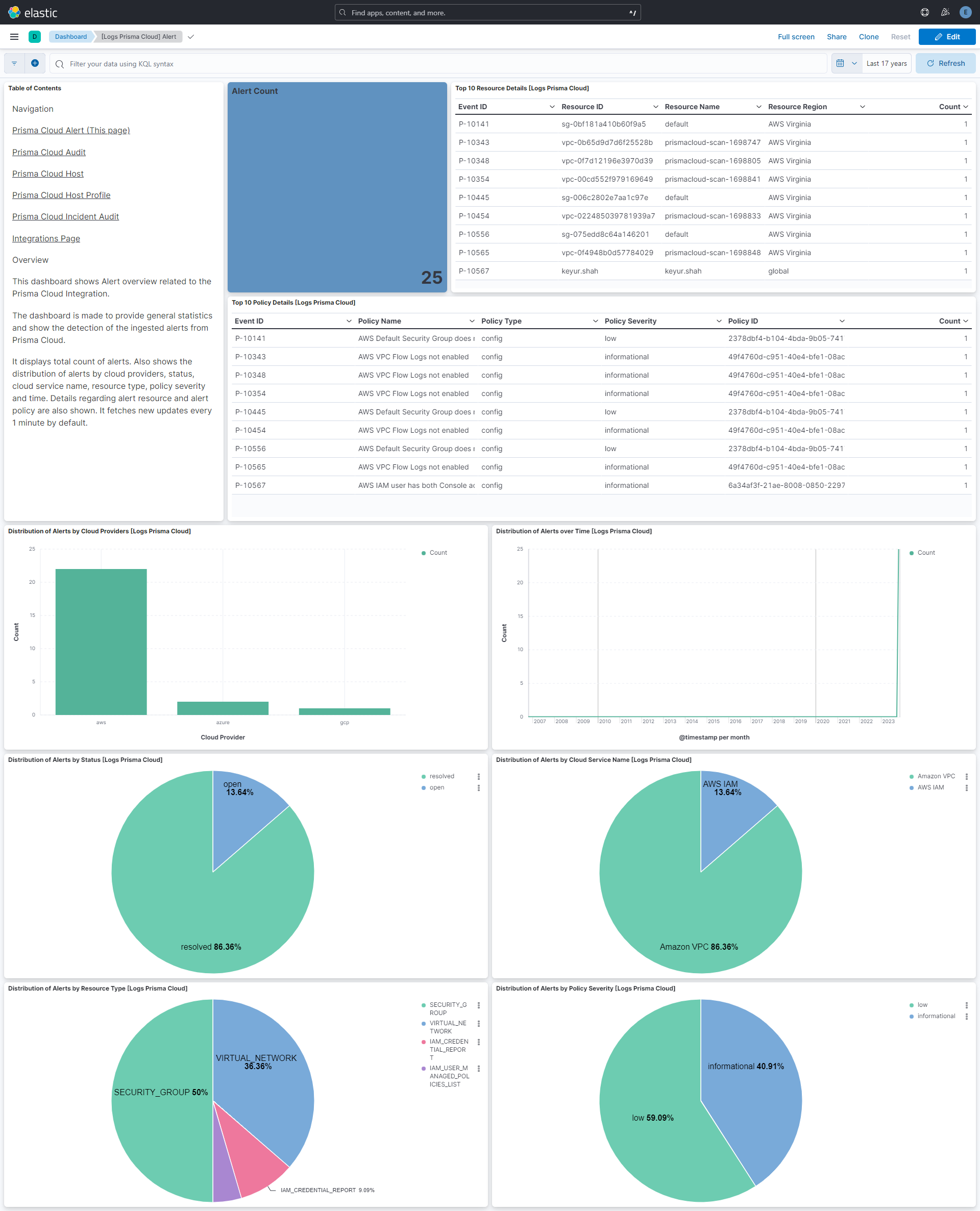
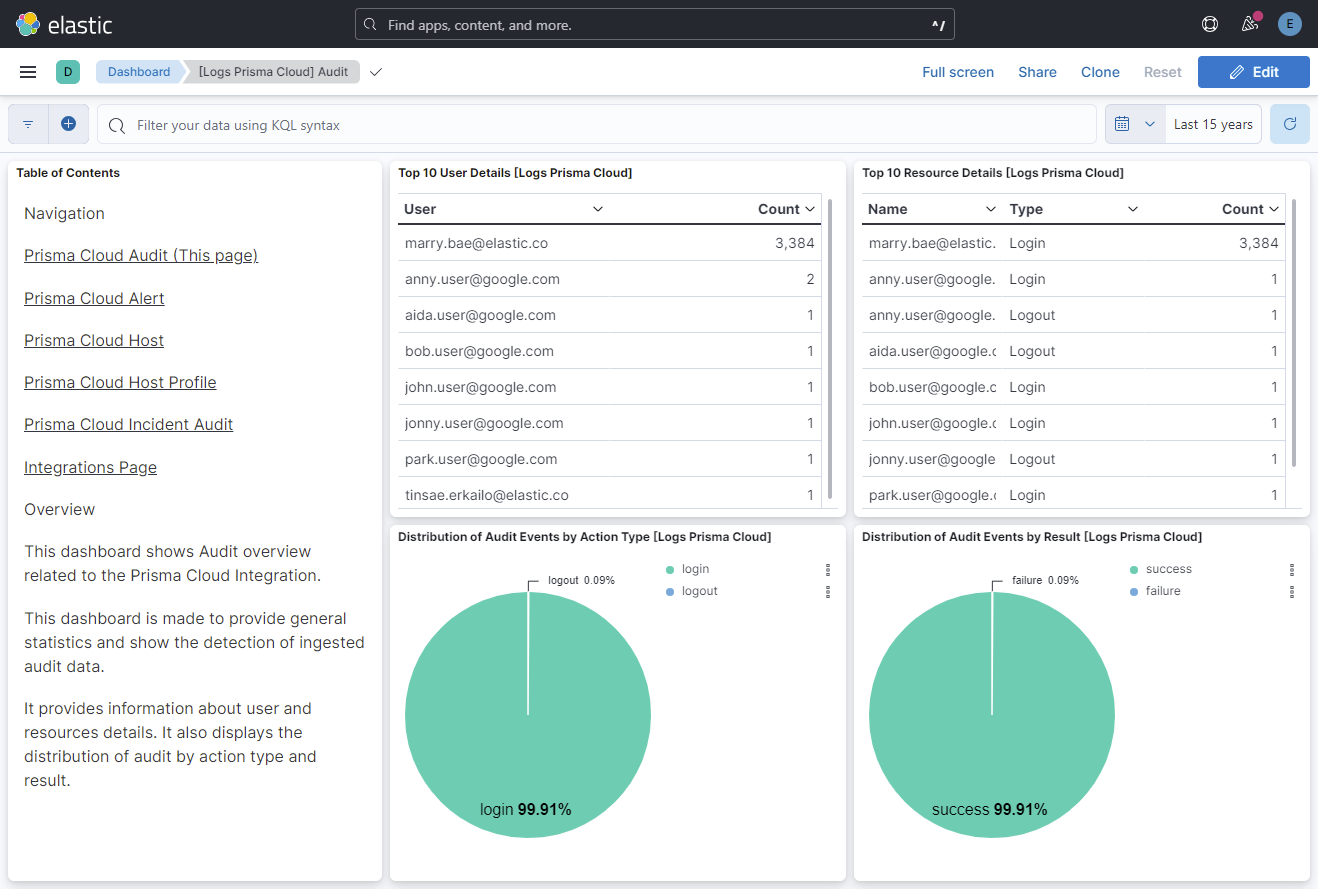
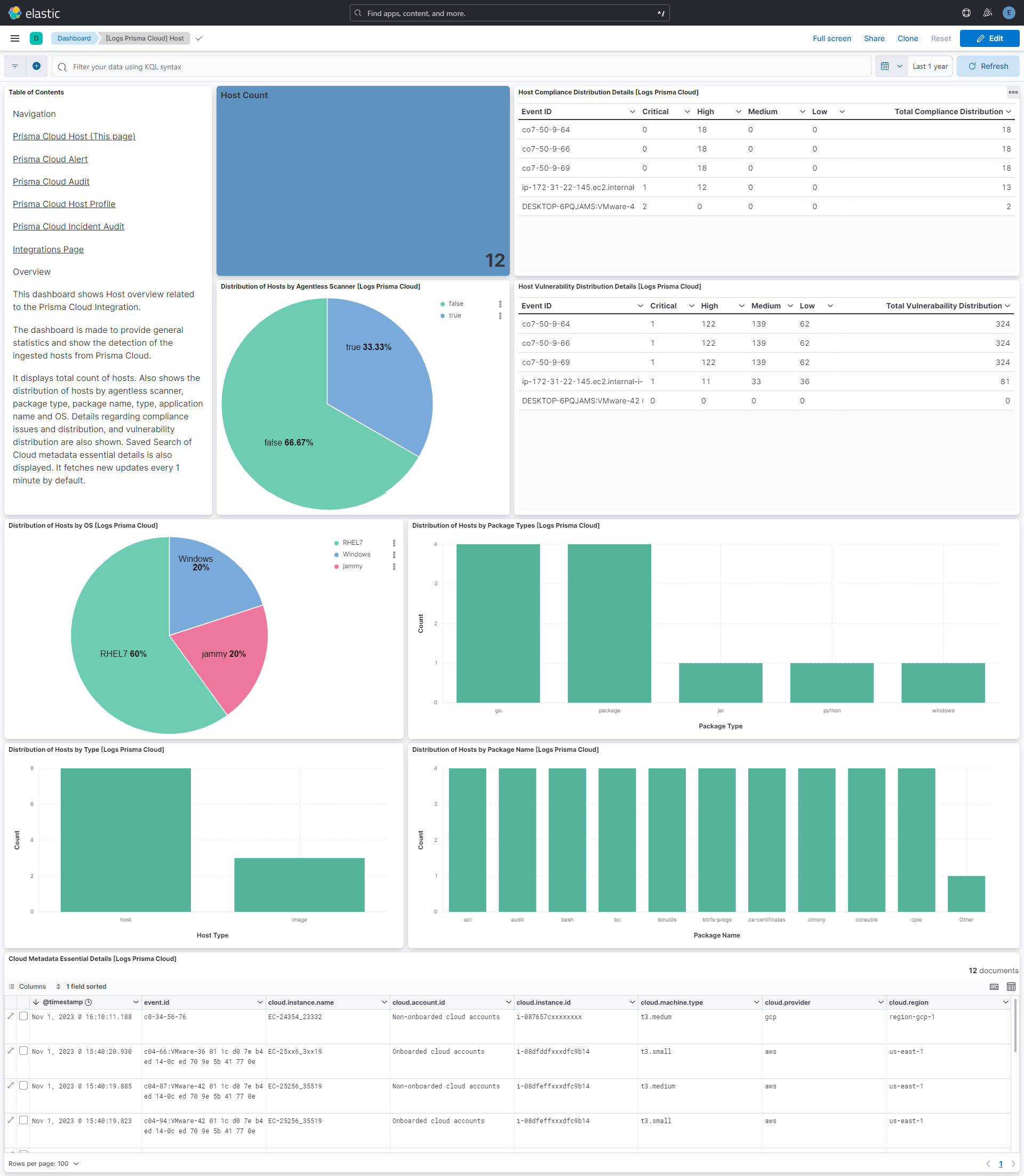
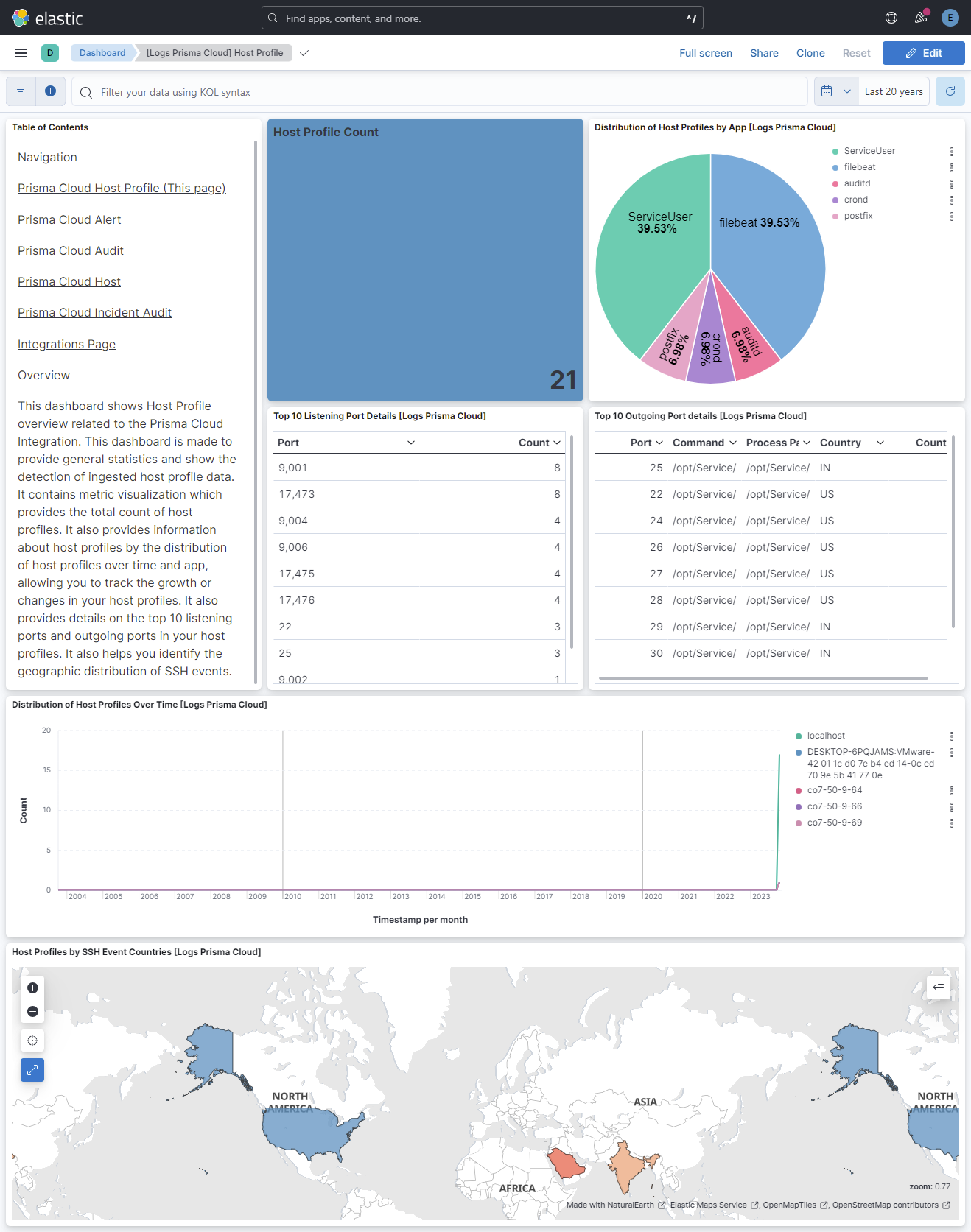
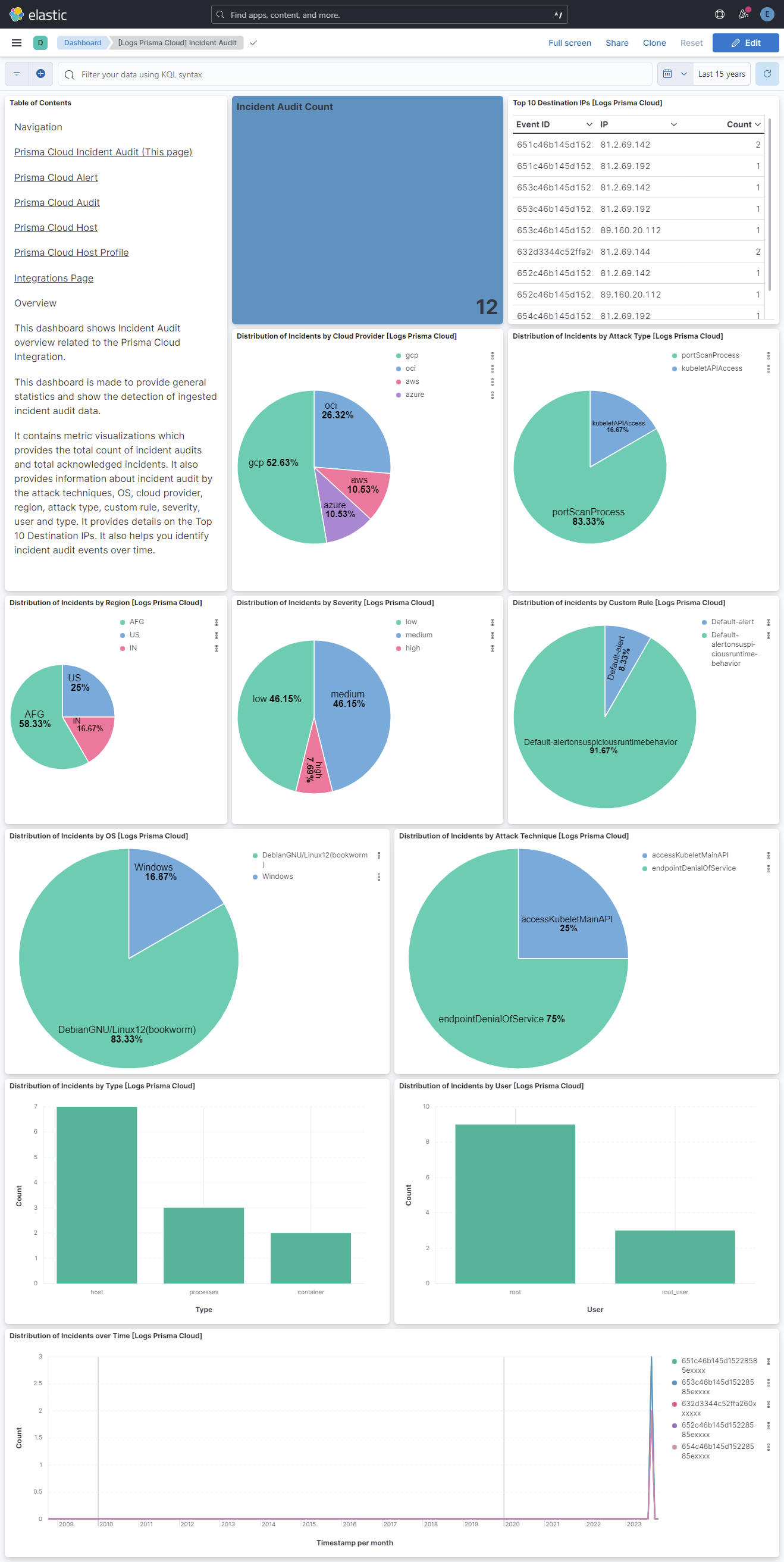
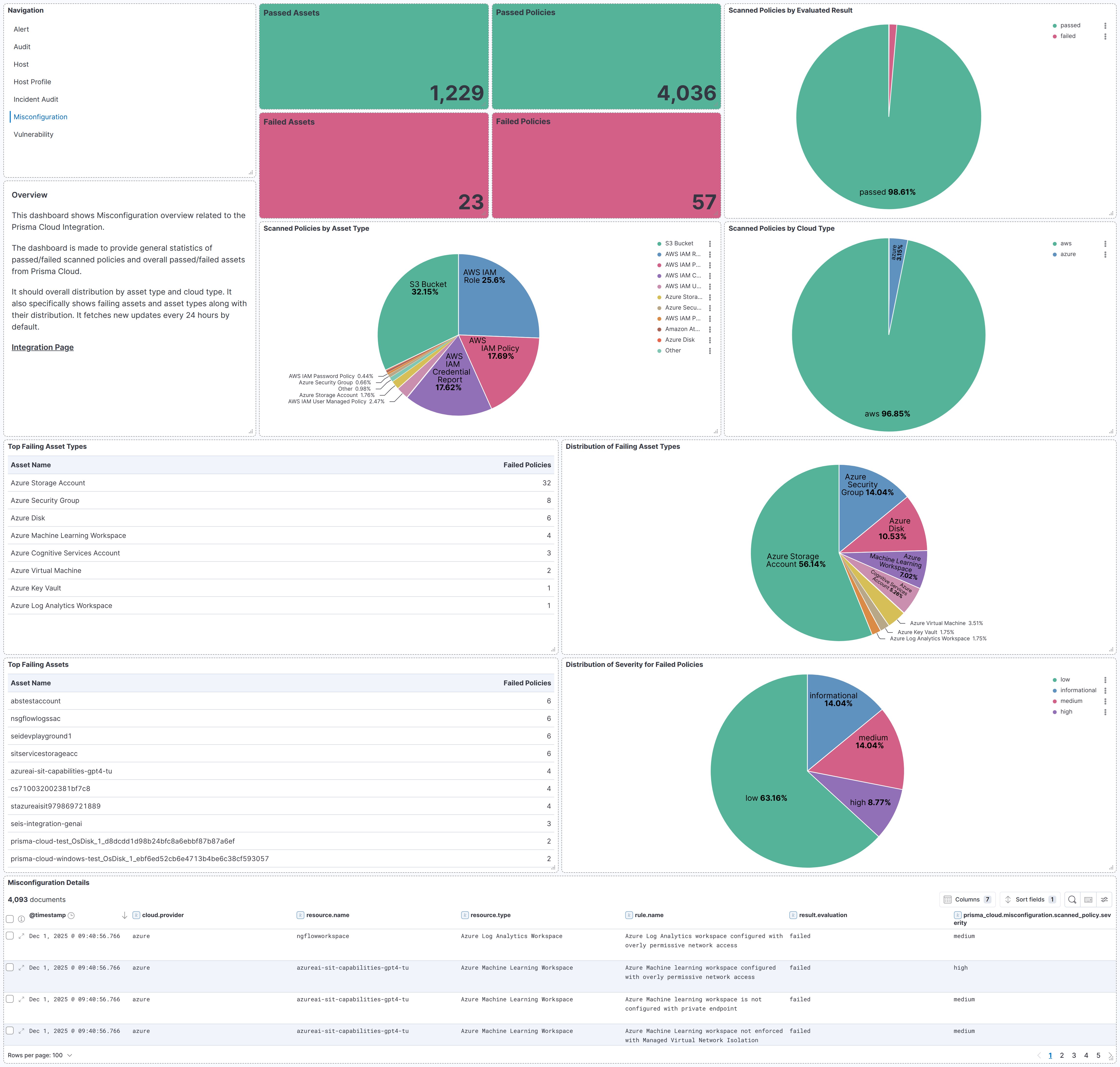
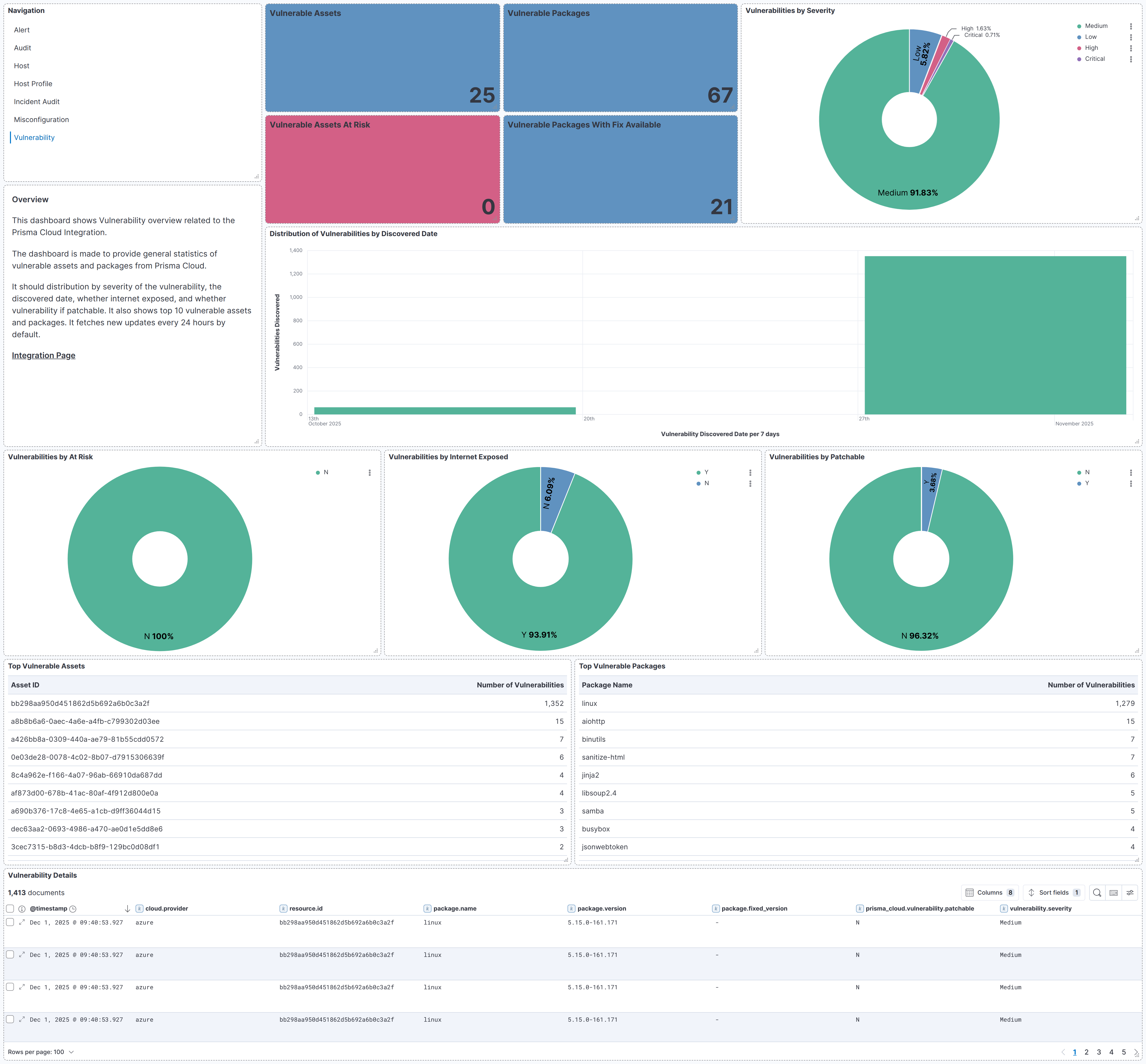
Changelog
| Version | Details | Minimum Kibana version |
|---|---|---|
| 4.5.0 | Enhancement (View pull request) Update Elastic Managed integration documentation to the current wording and docs links. |
9.3.0 9.2.2 9.1.8 8.19.8 |
| 4.4.0 | Enhancement (View pull request) Set number_of_shards: 3 on the misconfiguration and vulnerability transform destination indices and bump their destination index version to avoid Elasticsearch shard-size warnings at scale. |
9.3.0 9.2.2 9.1.8 8.19.8 |
| 4.3.3 | Bug fix (View pull request) Fix alert data stream not advancing its cursor and dropping paginated results because each poll fetched a trailing empty page. Pagination now stops once totalRows are collected instead of following nextPageToken into the empty page. |
9.3.0 9.2.2 9.1.8 8.19.8 |
| 4.3.2 | Bug fix (View pull request) Fix alert data stream pagination by switching /v2/alert collection to POST with the query and pageToken in the request body. The previous GET approach put the large pageToken in the URL, causing HTTP 414 errors and dropped alerts on paginated responses. |
9.3.0 9.2.2 9.1.8 8.19.8 |
| 4.3.1 | Bug fix (View pull request) Fix alert data stream sending an invalid timeAmount=null request during pagination.Bug fix (View pull request) Guard the alert data stream against non-JSON or empty API responses so they no longer break ingestion.Bug fix (View pull request) Re-authenticate the alert data stream based on a token deadline to avoid stale-token loops. |
9.3.0 9.2.2 9.1.8 8.19.8 |
| 4.3.0 | Enhancement (View pull request) Add tags to ingest pipeline processors. Bug fix (View pull request) Remove a redundant no-op foreach processor appending to related.ip in the host data stream. |
9.3.0 9.2.2 9.1.8 8.19.8 |
| 4.2.1 | Enhancement (View pull request) Set agentless deployment mode release field to ga. |
9.3.0 9.2.2 9.1.8 8.19.8 |
| 4.2.0 | Enhancement (View pull request) Use new release field for agentless deployment mode to establish as beta. |
9.3.0 9.2.2 9.1.8 8.19.8 |
| 4.1.0 | Enhancement (View pull request) Add timestamp range filter and storage tier exclusion to latest transform source queries to reduce scan scope and improve performance. |
9.3.0 9.2.2 9.1.8 8.19.8 |
| 4.0.2 | Bug fix (View pull request) Always generate auth token - even during pagination to avoid 401s after token expiry. |
9.3.0 9.2.2 9.1.8 8.19.8 |
| 4.0.1 | Bug fix (View pull request) Remove duplicate security-solution-default tag references |
9.3.0 9.2.2 9.1.8 8.19.8 |
| 4.0.0 | Breaking change (View pull request) Add misconfiguration and vulnerability data streams support for the Cloud Detection and Response (CDR) workflow.This will require a transform node, the necessary permissions to use the transform, and specified source and destination indices. It also stores the latest copy of vulnerabilities and misconfigurations in the destination indices, which will require additional storage. Enhancement (View pull request) Add links panel widget in dashboards. |
9.3.0 9.2.2 9.1.8 8.19.8 |
| 3.3.0 | Enhancement (View pull request) Remove duplicated installation instructions from the documentation |
9.0.0 8.18.0 |
| 3.2.1 | Bug fix (View pull request) Add temporary processor to remove the fields added by the Agentless policy. |
9.0.0 8.18.0 |
| 3.2.0 | Enhancement (View pull request) Add support for REST API input to the Incident Audit data stream. |
9.0.0 8.18.0 |
| 3.1.1 | Bug fix (View pull request) Fix default request trace enabled behavior. |
9.0.0 8.18.0 |
| 3.1.0 | Enhancement (View pull request) Enable request trace log removal. |
9.0.0 8.18.0 |
| 3.0.0 | Bug fix (View pull request) Remove generic vulnerability info from host data stream |
9.0.0 8.18.0 |
| 2.2.0 | Enhancement (View pull request) Add agentless deployment. |
9.0.0 8.18.0 |
| 2.1.0 | Enhancement (View pull request) Update Kibana constraint to support 9.0.0. |
9.0.0 8.13.0 |
| 2.0.2 | Bug fix (View pull request) Updated SSL description in package manifest.yml to be uniform and to include links to documentation. |
8.13.0 |
| 2.0.1 | Bug fix (View pull request) Fix ingest pipeline processors with tags create_user_name_and_user_domain and convert_ip_address_to_ip that fails for some values. |
8.13.0 |
| 2.0.0 | Breaking change (View pull request) Map prisma_cloud.alert.policy.description and prisma_cloud.alert.policy.recommendation as text and prisma_cloud.alert.policy.name as multi_field text. |
8.13.0 |
| 1.7.1 | Bug fix (View pull request) Fix handle of arrays in host ingest pipeline. |
8.13.0 |
| 1.7.0 | Enhancement (View pull request) Add "preserve_original_event" tag to documents with event.kind manually set to "pipeline_error". |
8.13.0 |
| 1.6.0 | Enhancement (View pull request) Do not remove event.original in main ingest pipeline. |
8.13.0 |
| 1.5.0 | Enhancement (View pull request) Add "preserve_original_event" tag to documents with event.kind set to "pipeline_error". |
8.13.0 |
| 1.4.2 | Bug fix (View pull request) Revert: Fix path to API login for host data sources. |
8.13.0 |
| 1.4.1 | Bug fix (View pull request) Don't leak access token into debug logs. Bug fix (View pull request) Fix location for placing request trace logs. Bug fix (View pull request) Fix path to API login for host data sources. |
8.13.0 |
| 1.4.0 | Enhancement (View pull request) Add tags.yml file so that integration's dashboards and saved searches are tagged with "Security Solution" and displayed in the Security Solution UI. |
8.13.0 |
| 1.3.1 | Bug fix (View pull request) Fix null checks in the host_profile CEL program, simplify the host CEL expression. |
8.13.0 |
| 1.3.0 | Enhancement (View pull request) Removed import_mappings. Update the kibana constraint to ^8.13.0. Modified the field definitions to remove ECS fields made redundant by the ecs@mappings component template. |
8.13.0 |
| 1.2.0 | Enhancement (View pull request) Update manifest format version to v3.0.3. |
8.12.0 |
| 1.1.1 | Enhancement (View pull request) Add cloudsecurity_cdr sub category label |
8.12.0 |
| 1.1.0 | Enhancement (View pull request) Set sensitive values as secret. |
8.12.0 |
| 1.0.1 | Enhancement (View pull request) Changed owners |
8.10.1 |
| 1.0.0 | Enhancement (View pull request) Release package as GA. |
8.10.1 |
| 0.6.0 | Bug fix (View pull request) Update the cursor in data collection of the alert data stream and the default value of HTTP Client Timeout. |
8.10.1 |
| 0.5.0 | Enhancement (View pull request) Limit request tracer log count to five. |
8.10.1 |
| 0.4.0 | Enhancement (View pull request) Update sample logs for the Incident Audit data stream and add dashboards for all the data streams. |
8.10.1 |
| 0.3.0 | Enhancement (View pull request) ECS version updated to 8.11.0. |
8.10.1 |
| 0.2.0 | Enhancement (View pull request) Extract user.name from user.email |
8.10.1 |
| 0.1.0 | Enhancement (View pull request) Initial release. |
8.10.1 |