OSQuery Integration
Elastic Cloud Serverless projects are autoscaled environments, fully managed by Elastic and available on Elastic Cloud. Availability This functionality is generally available and ready for production usage. Elastic Cloud Serverless projects are autoscaled environments, fully managed by Elastic and available on Elastic Cloud. Availability This functionality is generally available and ready for production usage. The Elastic Stack includes Elastic's core products such as Elasticsearch, Kibana, Logstash, and Beats. Availability This functionality is generally available and ready for production usage. Unless stated otherwise on the page, this functionality is available when your Elastic Stack is deployed on Elastic Cloud Hosted, Elastic Cloud Enterprise, Elastic Cloud on Kubernetes, and self-managed environments. This documentation corresponds to the latest patch available for each minor version. If you're not using the latest patch, check the release notes for changes.
Serverless Observability
Generally available
Serverless Security
Generally available
Stack
9.0+
Generally available since 9.0
| Version | 1.24.2 (View all) |
| Subscription level What's this? |
Basic |
| Developed by What's this? |
Elastic |
| Ingestion method(s) | File |
| Minimum Kibana version(s) | 9.0.0 8.11.0 |
The OSQuery integration collects and decodes the result logs written by
osqueryd
in the JSON format. To set up osqueryd follow the osquery installation
instructions for your operating system and configure the filesystem logging
driver (the default). Make sure UTC timestamps are enabled.
The OSQuery integration was tested with logs from osquery version 2.10.2. Since the results are written in the JSON format, it is likely that this module works with any version of osquery.
This module is available on Linux, macOS, and Windows.
This is the OSQuery result dataset.
Example
{
    "@timestamp": "2018-01-08T14:51:55.000Z",
    "agent": {
        "ephemeral_id": "207a0fe6-de4f-434f-9c34-d0898df6ac96",
        "id": "eaaf0f0c-2e54-4bd7-a0cc-9968349277bc",
        "name": "docker-fleet-agent",
        "type": "filebeat",
        "version": "8.1.0"
    },
    "data_stream": {
        "dataset": "osquery.result",
        "namespace": "ep",
        "type": "logs"
    },
    "ecs": {
        "version": "8.17.0"
    },
    "elastic_agent": {
        "id": "eaaf0f0c-2e54-4bd7-a0cc-9968349277bc",
        "snapshot": false,
        "version": "8.1.0"
    },
    "event": {
        "action": "added",
        "agent_id_status": "verified",
        "created": "2022-11-22T19:16:32.440Z",
        "dataset": "osquery.result",
        "ingested": "2022-11-22T19:16:35Z",
        "kind": "event",
        "type": "info"
    },
    "host": {
        "architecture": "x86_64",
        "containerized": false,
        "hostname": "ubuntu-xenial",
        "id": "72E1287B-D1BC-4FC6-B9D8-64F4352776A9",
        "ip": [
            "172.25.0.7"
        ],
        "mac": [
            "02:42:ac:19:00:07"
        ],
        "name": "docker-fleet-agent",
        "os": {
            "codename": "focal",
            "family": "debian",
            "kernel": "5.10.104-linuxkit",
            "name": "Ubuntu",
            "platform": "ubuntu",
            "type": "linux",
            "version": "20.04.3 LTS (Focal Fossa)"
        }
    },
    "input": {
        "type": "log"
    },
    "log": {
        "file": {
            "path": "/tmp/service_logs/osquery.log"
        },
        "offset": 0
    },
    "osquery": {
        "result": {
            "action": "added",
            "calendar_time": "Mon Jan  8 14:51:55 2018 UTC",
            "columns": {
                "average_memory": "0",
                "avg_system_time": "0",
                "avg_user_time": "0",
                "executions": "38",
                "interval": "60",
                "last_executed": "1515423094",
                "name": "pack_ossec-rootkit_55808.a_worm",
                "output_size": "0",
                "wall_time": "0"
            },
            "counter": "0",
            "decorations": {
                "host_uuid": "72E1287B-D1BC-4FC6-B9D8-64F4352776A9",
                "username": "ubuntu"
            },
            "epoch": "0",
            "host_identifier": "ubuntu-xenial",
            "name": "pack_osquery-monitoring_schedule",
            "unix_time": "1515423115"
        }
    },
    "related": {
        "hosts": [
            "ubuntu-xenial"
        ],
        "user": [
            "ubuntu"
        ]
    },
    "rule": {
        "name": "pack_osquery-monitoring_schedule"
    },
    "tags": [
        "osquery"
    ],
    "user": {
        "name": "ubuntu"
    }
}
Exported fields
| Field | Description | Type |
|---|---|---|
| @timestamp | Event timestamp. | date |
| cloud.account.id | The cloud account or organization id used to identify different entities in a multi-tenant environment. Examples: AWS account id, Google Cloud ORG Id, or other unique identifier. | keyword |
| cloud.availability_zone | Availability zone in which this host is running. | keyword |
| cloud.image.id | Image ID for the cloud instance. | keyword |
| cloud.instance.id | Instance ID of the host machine. | keyword |
| cloud.instance.name | Instance name of the host machine. | keyword |
| cloud.machine.type | Machine type of the host machine. | keyword |
| cloud.project.id | Name of the project in Google Cloud. | keyword |
| cloud.provider | Name of the cloud provider. Example values are aws, azure, gcp, or digitalocean. | keyword |
| cloud.region | Region in which this host is running. | keyword |
| container.id | Unique container id. | keyword |
| container.image.name | Name of the image the container was built on. | keyword |
| container.labels | Image labels. | object |
| container.name | Container name. | keyword |
| data_stream.dataset | Data stream dataset. | constant_keyword |
| data_stream.namespace | Data stream namespace. | constant_keyword |
| data_stream.type | Data stream type. | constant_keyword |
| ecs.version | ECS version this event conforms to. ecs.version is a required field and must exist in all events. When querying across multiple indices -- which may conform to slightly different ECS versions -- this field lets integrations adjust to the schema version of the events. |
keyword |
| event.dataset | Event dataset | constant_keyword |
| event.ingested | Timestamp when an event arrived in the central data store. This is different from @timestamp, which is when the event originally occurred. It's also different from event.created, which is meant to capture the first time an agent saw the event. In normal conditions, assuming no tampering, the timestamps should chronologically look like this: @timestamp < event.created < event.ingested. |
date |
| event.module | Event module | constant_keyword |
| file.accessed | Last time the file was accessed. Note that not all filesystems keep track of access time. | date |
| file.created | File creation time. Note that not all filesystems store the creation time. | date |
| file.directory | Directory where the file is located. It should include the drive letter, when appropriate. | keyword |
| file.gid | Primary group ID (GID) of the file. | keyword |
| file.inode | Inode representing the file in the filesystem. | keyword |
| file.mode | Mode of the file in octal representation. | keyword |
| file.mtime | Last time the file content was modified. | date |
| file.name | Name of the file including the extension, without the directory. | keyword |
| file.path | Full path to the file, including the file name. It should include the drive letter, when appropriate. | keyword |
| file.path.text | Multi-field of file.path. |
match_only_text |
| file.size | File size in bytes. Only relevant when file.type is "file". |
long |
| file.type | File type (file, dir, or symlink). | keyword |
| file.uid | The user ID (UID) or security identifier (SID) of the file owner. | keyword |
| host.architecture | Operating system architecture. | keyword |
| host.containerized | If the host is a container. | boolean |
| host.domain | Name of the domain of which the host is a member. For example, on Windows this could be the host's Active Directory domain or NetBIOS domain name. For Linux this could be the domain of the host's LDAP provider. | keyword |
| host.hostname | Hostname of the host. It normally contains what the hostname command returns on the host machine. |
keyword |
| host.id | Unique host id. As hostname is not always unique, use values that are meaningful in your environment. Example: The current usage of beat.name. |
keyword |
| host.ip | Host ip addresses. | ip |
| host.mac | Host mac addresses. | keyword |
| host.name | Name of the host. It can contain what hostname returns on Unix systems, the fully qualified domain name, or a name specified by the user. The sender decides which value to use. |
keyword |
| host.os.build | OS build information. | keyword |
| host.os.codename | OS codename, if any. | keyword |
| host.os.family | OS family (such as redhat, debian, freebsd, windows). | keyword |
| host.os.kernel | Operating system kernel version as a raw string. | keyword |
| host.os.name | Operating system name, without the version. | keyword |
| host.os.name.text | Multi-field of host.os.name. |
text |
| host.os.platform | Operating system platform (such centos, ubuntu, windows). | keyword |
| host.os.version | Operating system version as a raw string. | keyword |
| host.type | Type of host. For Cloud providers this can be the machine type like t2.medium. If vm, this could be the container, for example, or other information meaningful in your environment. |
keyword |
| input.type | Input type | keyword |
| log.file.path | Full path to the log file this event came from, including the file name. It should include the drive letter, when appropriate. If the event wasn't read from a log file, do not populate this field. | keyword |
| log.level | Original log level of the log event. If the source of the event provides a log level or textual severity, this is the one that goes in log.level. If your source doesn't specify one, you may put your event transport's severity here (e.g. Syslog severity). Some examples are warn, err, i, informational. |
keyword |
| log.offset | Log offset | long |
| osquery.result.action | keyword | |
| osquery.result.calendar_time | String representation of the collection time, as formatted by osquery. | keyword |
| osquery.result.columns.active | keyword | |
| osquery.result.columns.address | keyword | |
| osquery.result.columns.allow_signed_enabled | keyword | |
| osquery.result.columns.applescript_enabled | keyword | |
| osquery.result.columns.arch | keyword | |
| osquery.result.columns.arguments | keyword | |
| osquery.result.columns.atime | keyword | |
| osquery.result.columns.author | keyword | |
| osquery.result.columns.autoupdate | keyword | |
| osquery.result.columns.average_memory | keyword | |
| osquery.result.columns.avg_system_time | keyword | |
| osquery.result.columns.avg_user_time | keyword | |
| osquery.result.columns.block_size | keyword | |
| osquery.result.columns.blocks | keyword | |
| osquery.result.columns.blocks_available | keyword | |
| osquery.result.columns.blocks_free | keyword | |
| osquery.result.columns.blocks_size | keyword | |
| osquery.result.columns.btime | keyword | |
| osquery.result.columns.build | keyword | |
| osquery.result.columns.build_distro | keyword | |
| osquery.result.columns.build_platform | keyword | |
| osquery.result.columns.bundle_executable | keyword | |
| osquery.result.columns.bundle_identifier | keyword | |
| osquery.result.columns.bundle_name | keyword | |
| osquery.result.columns.bundle_package_type | keyword | |
| osquery.result.columns.bundle_short_version | keyword | |
| osquery.result.columns.bundle_version | keyword | |
| osquery.result.columns.category | keyword | |
| osquery.result.columns.class | keyword | |
| osquery.result.columns.codename | keyword | |
| osquery.result.columns.comment | keyword | |
| osquery.result.columns.compiler | keyword | |
| osquery.result.columns.config_flag | keyword | |
| osquery.result.columns.config_hash | keyword | |
| osquery.result.columns.config_valid | keyword | |
| osquery.result.columns.copyright | keyword | |
| osquery.result.columns.cpu_brand | keyword | |
| osquery.result.columns.created | keyword | |
| osquery.result.columns.creator | keyword | |
| osquery.result.columns.ctime | keyword | |
| osquery.result.columns.datetime | keyword | |
| osquery.result.columns.day | keyword | |
| osquery.result.columns.description | keyword | |
| osquery.result.columns.development | keyword | |
| osquery.result.columns.development_region | keyword | |
| osquery.result.columns.device | keyword | |
| osquery.result.columns.device_alias | keyword | |
| osquery.result.columns.directory | keyword | |
| osquery.result.columns.disabled | keyword | |
| osquery.result.columns.display_name | keyword | |
| osquery.result.columns.element | keyword | |
| osquery.result.columns.enabled | keyword | |
| osquery.result.columns.enabled_nvram | keyword | |
| osquery.result.columns.encrypted | keyword | |
| osquery.result.columns.environment | keyword | |
| osquery.result.columns.executions | keyword | |
| osquery.result.columns.extensions | keyword | |
| osquery.result.columns.filename | keyword | |
| osquery.result.columns.firewall_unload | keyword | |
| osquery.result.columns.flags | keyword | |
| osquery.result.columns.gid | keyword | |
| osquery.result.columns.gid_signed | keyword | |
| osquery.result.columns.global_state | keyword | |
| osquery.result.columns.groupname | keyword | |
| osquery.result.columns.hard_links | keyword | |
| osquery.result.columns.hostname | keyword | |
| osquery.result.columns.hour | keyword | |
| osquery.result.columns.identifier | keyword | |
| osquery.result.columns.inetd_compatibility | keyword | |
| osquery.result.columns.info_string | keyword | |
| osquery.result.columns.inode | keyword | |
| osquery.result.columns.inodes | keyword | |
| osquery.result.columns.inodes_free | keyword | |
| osquery.result.columns.install_time | keyword | |
| osquery.result.columns.installer_name | keyword | |
| osquery.result.columns.instance_id | keyword | |
| osquery.result.columns.interval | keyword | |
| osquery.result.columns.iso_8601 | keyword | |
| osquery.result.columns.keep_alive | keyword | |
| osquery.result.columns.label | keyword | |
| osquery.result.columns.last_executed | keyword | |
| osquery.result.columns.last_opened_time | keyword | |
| osquery.result.columns.local_time | keyword | |
| osquery.result.columns.local_timezone | keyword | |
| osquery.result.columns.locale | keyword | |
| osquery.result.columns.location | keyword | |
| osquery.result.columns.logging_enabled | keyword | |
| osquery.result.columns.logging_option | keyword | |
| osquery.result.columns.major | keyword | |
| osquery.result.columns.minimum_system_version | keyword | |
| osquery.result.columns.minor | keyword | |
| osquery.result.columns.minutes | keyword | |
| osquery.result.columns.mode | keyword | |
| osquery.result.columns.model | keyword | |
| osquery.result.columns.model_id | keyword | |
| osquery.result.columns.modified | keyword | |
| osquery.result.columns.month | keyword | |
| osquery.result.columns.mtime | keyword | |
| osquery.result.columns.name | keyword | |
| osquery.result.columns.native | keyword | |
| osquery.result.columns.on_demand | keyword | |
| osquery.result.columns.output_size | keyword | |
| osquery.result.columns.package_id | keyword | |
| osquery.result.columns.patch | keyword | |
| osquery.result.columns.path | keyword | |
| osquery.result.columns.persistent | keyword | |
| osquery.result.columns.physical_memory | keyword | |
| osquery.result.columns.pid | keyword | |
| osquery.result.columns.platform | keyword | |
| osquery.result.columns.platform_like | keyword | |
| osquery.result.columns.process | keyword | |
| osquery.result.columns.process_type | keyword | |
| osquery.result.columns.program | keyword | |
| osquery.result.columns.program_arguments | keyword | |
| osquery.result.columns.protocol | keyword | |
| osquery.result.columns.queue_directories | keyword | |
| osquery.result.columns.removable | keyword | |
| osquery.result.columns.revision | keyword | |
| osquery.result.columns.root_directory | keyword | |
| osquery.result.columns.run_at_load | keyword | |
| osquery.result.columns.sdk | keyword | |
| osquery.result.columns.seconds | keyword | |
| osquery.result.columns.serial | keyword | |
| osquery.result.columns.service | keyword | |
| osquery.result.columns.shell | keyword | |
| osquery.result.columns.size | keyword | |
| osquery.result.columns.source | keyword | |
| osquery.result.columns.source_url | keyword | |
| osquery.result.columns.start_interval | keyword | |
| osquery.result.columns.start_on_mount | keyword | |
| osquery.result.columns.start_time | keyword | |
| osquery.result.columns.state | keyword | |
| osquery.result.columns.status | keyword | |
| osquery.result.columns.stderr_path | keyword | |
| osquery.result.columns.stdout_path | keyword | |
| osquery.result.columns.stealth_enabled | keyword | |
| osquery.result.columns.subclass | keyword | |
| osquery.result.columns.symlink | keyword | |
| osquery.result.columns.timestamp | keyword | |
| osquery.result.columns.timezone | keyword | |
| osquery.result.columns.type | keyword | |
| osquery.result.columns.uid | keyword | |
| osquery.result.columns.uid_signed | keyword | |
| osquery.result.columns.unix_time | keyword | |
| osquery.result.columns.update_url | keyword | |
| osquery.result.columns.usb_address | keyword | |
| osquery.result.columns.usb_port | keyword | |
| osquery.result.columns.used_by | keyword | |
| osquery.result.columns.user_uuid | keyword | |
| osquery.result.columns.username | keyword | |
| osquery.result.columns.uuid | keyword | |
| osquery.result.columns.vendor | keyword | |
| osquery.result.columns.vendor_id | keyword | |
| osquery.result.columns.version | keyword | |
| osquery.result.columns.visible | keyword | |
| osquery.result.columns.wall_time | keyword | |
| osquery.result.columns.watch_paths | keyword | |
| osquery.result.columns.watcher | keyword | |
| osquery.result.columns.weekday | keyword | |
| osquery.result.columns.working_directory | keyword | |
| osquery.result.columns.year | keyword | |
| osquery.result.counter | keyword | |
| osquery.result.decorations.host_uuid | keyword | |
| osquery.result.decorations.name | keyword | |
| osquery.result.decorations.path | keyword | |
| osquery.result.decorations.pid | keyword | |
| osquery.result.decorations.username | keyword | |
| osquery.result.epoch | keyword | |
| osquery.result.host_identifier | The identifier for the host on which the osquery agent is running. Normally the hostname. | keyword |
| osquery.result.name | The name of the query that generated this event. | keyword |
| osquery.result.unix_time | Unix timestamp of the event, in seconds since the epoch. Used for computing the @timestamp column. |
keyword |
| process.name | Process name. Sometimes called program name or similar. | keyword |
| process.name.text | Multi-field of process.name. |
match_only_text |
| related.hosts | All hostnames or other host identifiers seen on your event. Example identifiers include FQDNs, domain names, workstation names, or aliases. | keyword |
| related.user | All the user names or other user identifiers seen on the event. | keyword |
| rule.name | The name of the rule or signature generating the event. | keyword |
| tags | List of keywords used to tag each event. | keyword |
| url.full | If full URLs are important to your use case, they should be stored in url.full, whether this field is reconstructed or present in the event source. |
wildcard |
| url.full.text | Multi-field of url.full. |
match_only_text |
| user.name | Short name or login of the user. | keyword |
| user.name.text | Multi-field of user.name. |
match_only_text |
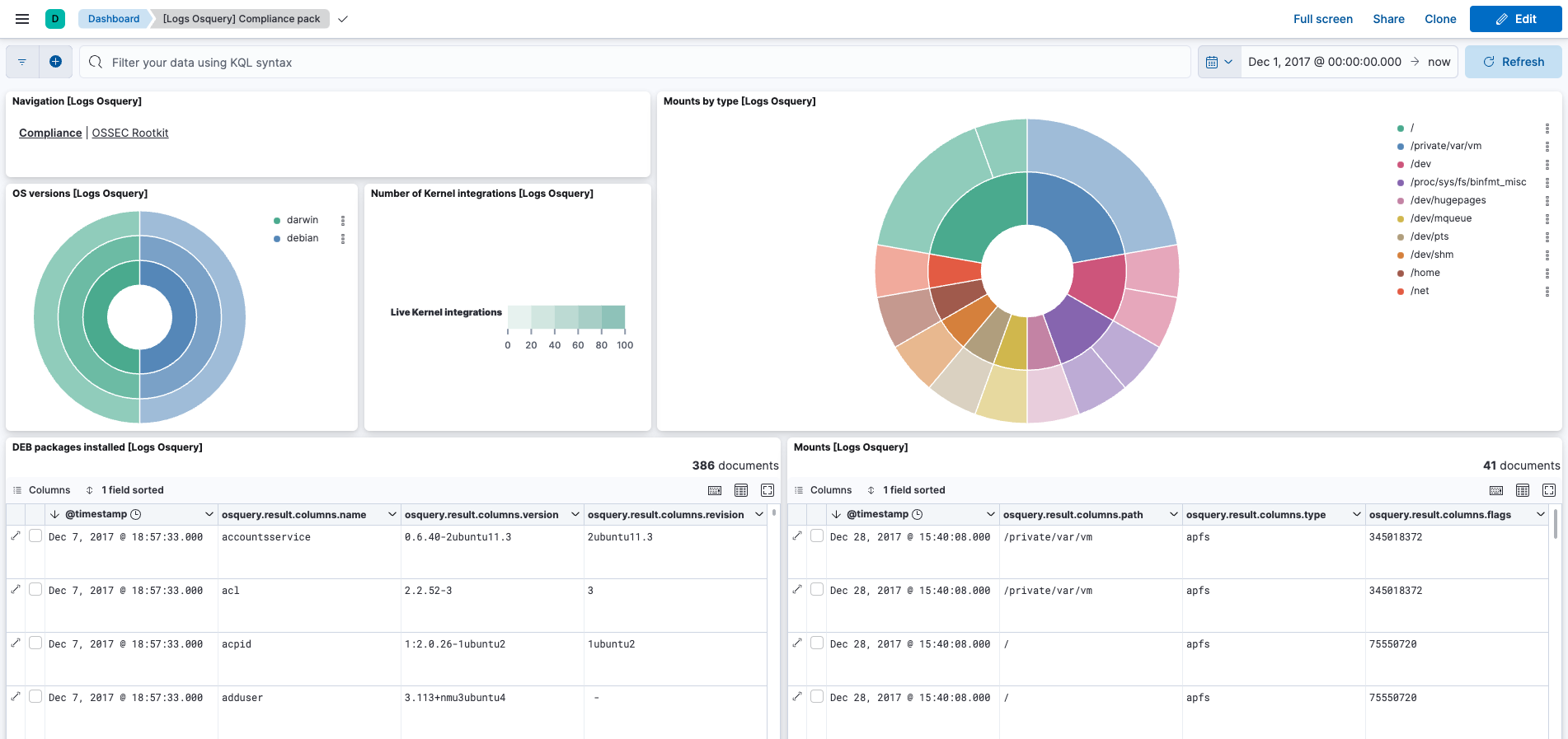
This integration includes one or more Kibana dashboards that visualizes the data collected by the integration. The screenshots below illustrate how the ingested data is displayed.
Changelog
| Version | Details | Minimum Kibana version |
|---|---|---|
| 1.24.2 | Enhancement (View pull request) Transfer package ownership to elastic/security-service-integrations. |
9.0.0 8.11.0 |
| 1.24.1 | Bug fix (View pull request) Remove duplicate security-solution-default tag references |
9.0.0 8.11.0 |
| 1.24.0 | Enhancement (View pull request) Replace navigation with links panels. |
9.0.0 8.11.0 |
| 1.23.1 | Enhancement (View pull request) Changed owners. |
9.0.0 8.11.0 |
| 1.23.0 | Enhancement (View pull request) Allow @custom pipeline access to event.original without setting preserve_original_event. |
9.0.0 8.11.0 |
| 1.22.1 | Bug fix (View pull request) Ensure event.type is an array. |
9.0.0 8.7.1 |
| 1.22.0 | Enhancement (View pull request) Support stack version 9.0. |
9.0.0 8.7.1 |
| 1.21.0 | Enhancement (View pull request) Allow the usage of deprecated log input and support for stack 9.0 |
8.7.1 |
| 1.20.0 | Enhancement (View pull request) ECS version updated to 8.17.0. |
8.7.1 |
| 1.19.1 | Bug fix (View pull request) Use triple-brace Mustache templating when referencing variables in ingest pipelines. |
8.7.1 |
| 1.19.0 | Enhancement (View pull request) Update package spec to 3.0.3. |
8.7.1 |
| 1.18.2 | Enhancement (View pull request) Changed owners |
8.7.1 |
| 1.18.1 | Bug fix (View pull request) Fix exclude_files pattern. |
8.7.1 |
| 1.18.0 | Enhancement (View pull request) ECS version updated to 8.11.0. |
8.7.1 |
| 1.17.0 | Enhancement (View pull request) Improve 'event.original' check to avoid errors if set. |
8.7.1 |
| 1.16.0 | Enhancement (View pull request) ECS version updated to 8.10.0. |
8.7.1 |
| 1.15.0 | Enhancement (View pull request) The format_version in the package manifest changed from 2.11.0 to 3.0.0. Removed dotted YAML keys from package manifest. Added 'owner.type: elastic' to package manifest. |
8.7.1 |
| 1.14.0 | Enhancement (View pull request) Add tags.yml file so that integration's dashboards and saved searches are tagged with "Security Solution" and displayed in the Security Solution UI. |
8.7.1 |
| 1.13.0 | Enhancement (View pull request) Update package to ECS 8.9.0. |
8.7.1 |
| 1.12.0 | Enhancement (View pull request) Convert dashboards to Lens. |
8.7.1 |
| 1.11.0 | Enhancement (View pull request) Ensure event.kind is correctly set for pipeline errors. |
8.1.0 |
| 1.10.0 | Enhancement (View pull request) Update package to ECS 8.8.0. |
8.1.0 |
| 1.9.0 | Enhancement (View pull request) Update package-spec version to 2.7.0. |
8.1.0 |
| 1.8.0 | Enhancement (View pull request) Update package to ECS 8.7.0. |
8.1.0 |
| 1.7.1 | Enhancement (View pull request) Added categories and/or subcategories. |
8.1.0 |
| 1.7.0 | Enhancement (View pull request) Update package to ECS 8.6.0. |
8.1.0 |
| 1.6.1 | Enhancement (View pull request) Migrate the visualizations to by value in dashboards to minimize the saved object clutter and reduce time to load |
8.1.0 |
| 1.6.0 | Enhancement (View pull request) Update package to ECS 8.5.0. |
8.0.0 7.14.0 |
| 1.5.0 | Enhancement (View pull request) Update package to ECS 8.4.0 |
8.0.0 7.14.0 |
| 1.4.1 | Enhancement (View pull request) Update package name and description to align with standard wording |
8.0.0 7.14.0 |
| 1.4.0 | Enhancement (View pull request) Update package to ECS 8.3.0. |
8.0.0 7.14.0 |
| 1.3.0 | Enhancement (View pull request) Update to ECS 8.2 |
8.0.0 7.14.0 |
| 1.2.1 | Enhancement (View pull request) Add documentation for multi-fields |
8.0.0 7.14.0 |
| 1.2.0 | Enhancement (View pull request) Update to ECS 8.0 |
8.0.0 7.14.0 |
| 1.1.0 | Enhancement (View pull request) Add 8.0.0 version constraint |
8.0.0 7.14.0 |
| 1.0.3 | Enhancement (View pull request) Uniform with guidelines |
7.14.0 |
| 1.0.2 | Enhancement (View pull request) Update Title and Description. |
— |
| 1.0.1 | Bug fix (View pull request) Fix logic that checks for the 'forwarded' tag |
— |
| 1.0.0 | Enhancement (View pull request) GA package |
— |
| 0.6.0 | Enhancement (View pull request) Update to ECS 1.12.0 |
— |
| 0.5.2 | Enhancement (View pull request) Convert to generated ECS fields |
— |
| 0.5.1 | Enhancement (View pull request) update to ECS 1.11.0 |
— |
| 0.5.0 | Enhancement (View pull request) Update integration description |
— |
| 0.4.0 | Enhancement (View pull request) Set "event.module" and "event.dataset" |
— |
| 0.3.0 | Enhancement (View pull request) Bump ECS version, add custom processors and make event.original optional. |
— |
| 0.2.2 | Enhancement (View pull request) Update README with docs |
— |
| 0.2.1 | Enhancement (View pull request) Update osquery_manager package to beta and add config_management category |
— |
| 0.1.2 | Enhancement (View pull request) update to ECS 1.9.0 Enhancement (View pull request) Update description to reflect Log Collection |
— |
| 0.1.1 | Enhancement (View pull request) Fix compatibility with Kibana |
— |
| 0.0.1 | Enhancement (View pull request) initial release |
— |