Admin By Request EPM integration
Elastic Cloud Serverless projects are autoscaled environments, fully managed by Elastic and available on Elastic Cloud. Availability This functionality is generally available and ready for production usage. Elastic Cloud Serverless projects are autoscaled environments, fully managed by Elastic and available on Elastic Cloud. Availability This functionality is generally available and ready for production usage. The Elastic Stack includes Elastic's core products such as Elasticsearch, Kibana, Logstash, and Beats. Availability This functionality is generally available and ready for production usage. Unless stated otherwise on the page, this functionality is available when your Elastic Stack is deployed on Elastic Cloud Hosted, Elastic Cloud Enterprise, Elastic Cloud on Kubernetes, and self-managed environments. This documentation corresponds to the latest patch available for each minor version. If you're not using the latest patch, check the release notes for changes.
Serverless Observability
Generally available
Serverless Security
Generally available
Stack
9.0+
Generally available since 9.0
| Version | 1.6.0 (View all) |
| Managed integration release status | GA |
| Subscription level What's this? |
Basic |
| Developed by What's this? |
Elastic |
| Ingestion method(s) | API |
| Minimum Kibana version(s) | 9.0.5 8.19.2 |
You can use this integration as an Elastic Managed integration on Elastic Cloud Hosted deployments running this version or later.
The Elastic integration for Admin By Request EPM enables real-time monitoring and analysis of audit logging of privilege elevations, software installations and administrative actions through user portal. This integration collects, processes, and visualizes audit logs and events to enhance security posture, compliance, and operational efficiency.
auditlog: Provides audit data that includes elevation requests, approvals, application installations, and scan results.Auditlog are records generated when user takes action such as installing a software, running an application with admin privileges, requesting for admin session, approval or denial of requests and scan results.
This data stream leverages the Admin By Request EPM API
/auditlog/deltaendpoint to retrieve data.events: Provides system security events and administrative changes, including group modifications, policy changes and security violations. This allows tracking of administrative activities and security-critical events. Some events have corresponding audit log entries.Events are records that are generated on various actions done by users and administrators. These include group modifications, policy changes, security violations, and other administrative activities.
This data stream leverages the Admin By Request EPM API
/eventsendpoint to retrieve data.
Elastic Agent must be installed. For more details, check the Elastic Agent installation instructions.
This integration supports both Elastic Managed and Agent-based installations.
Elastic Managed integrations are only supported on Elastic Cloud Serverless and Elastic Cloud Hosted deployments. An Elastic Managed integration lets you ingest data from a cloud source while avoiding the orchestration, management, and maintenance associated with standard ingest infrastructure. Elastic runs the collector for you, so you can focus on your data instead of the infrastructure that collects it.
For more information, refer to Elastic Managed integrations and the Elastic Managed integrations FAQ.
Elastic Agent must be installed. For more details, check the Elastic Agent installation instructions. You can install only one Elastic Agent per host.
For step-by-step instructions on how to set up an integration, check the Getting started.
Log in to the Cloud portal, enable the API access, and set up an API key. Generated API Key is used to access data through APIs. To create an API Key, follow the instructions provided in the Public API - API Overview documentation.
Auditlog documents can be found by setting the following filter:
event.dataset : "admin_by_request_epm.auditlog"
Example
{
    "@timestamp": "2020-04-01T12:03:00",
    "admin_by_request_epm": {
        "auditlog": {
            "approved_by": "Jim Kerr",
            "auditlog_link": "https://www.example.com/AuditLog?Page=AppElevations&ID=579&ShowFilter=false",
            "computer": {
                "make": "Dell Inc.",
                "model": "XPS 15 9550",
                "name": "W1005623",
                "platform": "Windows",
                "platform_code": 0
            },
            "end_time_utc": "2020-04-01T12:09:11",
            "id": 1,
            "reason": "Need to update reader. It says out of date when trying to open PDF files from our supplier.",
            "request_time_utc": "2020-04-01T12:03:00",
            "response_time": "00:00:05.4100000",
            "response_time_in_seconds": 5.41,
            "settings_name": "Global",
            "sso_validated": false,
            "start_time_utc": "2020-04-01T12:03:30",
            "status": "Finished",
            "status_code": 2,
            "trace_no": "34376579",
            "type": "Run As Admin",
            "type_code": 0,
            "user": {
                "account": "ACMEPDH",
                "email": "pdh@acme.com",
                "full_name": "Paul David Hewson",
                "is_admin": false,
                "phone": "555.345.6789"
            }
        }
    },
    "agent": {
        "ephemeral_id": "91715040-1dc9-4329-8fe1-050e29aaa4d8",
        "id": "bee69cfe-f26d-4f86-929c-e77098f5e1b0",
        "name": "elastic-agent-65156",
        "type": "filebeat",
        "version": "8.15.3"
    },
    "data_stream": {
        "dataset": "admin_by_request_epm.auditlog",
        "namespace": "37799",
        "type": "logs"
    },
    "ecs": {
        "version": "8.11.0"
    },
    "elastic_agent": {
        "id": "bee69cfe-f26d-4f86-929c-e77098f5e1b0",
        "snapshot": false,
        "version": "8.15.3"
    },
    "event": {
        "agent_id_status": "verified",
        "category": [
            "configuration"
        ],
        "dataset": "admin_by_request_epm.auditlog",
        "ingested": "2025-02-20T16:10:09Z",
        "kind": "event",
        "module": "admin_by_request_epm",
        "type": [
            "info"
        ]
    },
    "host": {
        "hostname": "W1005623"
    },
    "input": {
        "type": "cel"
    },
    "os": {
        "platform": "Windows"
    },
    "related": {
        "hosts": [
            "W1005623"
        ],
        "user": [
            "Paul David Hewson",
            "pdh@acme.com"
        ]
    },
    "tags": [
        "forwarded",
        "admin_by_request_epm.auditlog"
    ],
    "user": {
        "email": "pdh@acme.com",
        "full_name": "Paul David Hewson"
    }
}
ECS Field Reference
Refer to the following document for detailed information on ECS fields.
The following non-ECS fields are used in events documents:
Exported fields
| Field | Description | Type |
|---|---|---|
| @timestamp | Event timestamp. | date |
| admin_by_request_epm.auditlog.application.file | The file name of the file executed using Run As Admin | keyword |
| admin_by_request_epm.auditlog.application.name | The name of the application (description property of file) | keyword |
| admin_by_request_epm.auditlog.application.path | The file path of the executed application | keyword |
| admin_by_request_epm.auditlog.application.preapproved | If the file was pre-approved to run | boolean |
| admin_by_request_epm.auditlog.application.scan_result | Malware scan result (possible values - Clean, Malicious, Suspicious) | keyword |
| admin_by_request_epm.auditlog.application.scan_result_code | 0 = Clean, 1 = Malicious, 2 = Suspicious | keyword |
| admin_by_request_epm.auditlog.application.sha256 | The checksum of the file | keyword |
| admin_by_request_epm.auditlog.application.threat | Name of malware, if file is malicious or suspicious | keyword |
| admin_by_request_epm.auditlog.application.vendor | The vendor of the application | keyword |
| admin_by_request_epm.auditlog.application.version | The version of the file | keyword |
| admin_by_request_epm.auditlog.application.virustotal_link | Link to the file (checksum) on virustotal.com | keyword |
| admin_by_request_epm.auditlog.approved_by | Name of person that approved the request | keyword |
| admin_by_request_epm.auditlog.auditlog_link | Link to this request in the auditlog on www.adminbyrequest.com | keyword |
| admin_by_request_epm.auditlog.computer.make | The vendor of the machine, as it appears in the inventory | keyword |
| admin_by_request_epm.auditlog.computer.model | The model of the machine, as it appears in the inventory | keyword |
| admin_by_request_epm.auditlog.computer.name | The name of the computer executing the request | keyword |
| admin_by_request_epm.auditlog.computer.platform | Operating system platform (possible values Windows, Mac, Server) | keyword |
| admin_by_request_epm.auditlog.computer.platform_code | 0 = Windows, 1 = Mac, 2 = Server | keyword |
| admin_by_request_epm.auditlog.denied_by | Name of person denying the request | keyword |
| admin_by_request_epm.auditlog.denied_reason | Reason for denying the request supplied by an administrator | text |
| admin_by_request_epm.auditlog.elevated_applications.file | The file name of the file executed | keyword |
| admin_by_request_epm.auditlog.elevated_applications.name | The name of the application (description property of file) | keyword |
| admin_by_request_epm.auditlog.elevated_applications.path | The file path of the executed application | keyword |
| admin_by_request_epm.auditlog.elevated_applications.scan_result | Malware scan result (possible values - Clean, Malicious, Suspicious) | keyword |
| admin_by_request_epm.auditlog.elevated_applications.scan_result_code | 0 = Clean, 1 = Malicious, 2 = Suspicious | keyword |
| admin_by_request_epm.auditlog.elevated_applications.sha256 | The checksum of the file | keyword |
| admin_by_request_epm.auditlog.elevated_applications.threat | Name of malware, if file is malicious or suspicious | keyword |
| admin_by_request_epm.auditlog.elevated_applications.vendor | The vendor of the application | keyword |
| admin_by_request_epm.auditlog.elevated_applications.version | The version of the file | keyword |
| admin_by_request_epm.auditlog.elevated_applications.virustotal_link | Link to the file (checksum) on virustotal.com | keyword |
| admin_by_request_epm.auditlog.end_time_utc | End time in Coordinated Universal Time (UTC) | date |
| admin_by_request_epm.auditlog.id | The unique ID of this entry. This ID can be used to query updated information on this entry by appending it to the url to request this resource only | keyword |
| admin_by_request_epm.auditlog.installs.application | The name of the application (description property of file) | keyword |
| admin_by_request_epm.auditlog.installs.vendor | The vendor of the application | keyword |
| admin_by_request_epm.auditlog.installs.version | The version of the application | keyword |
| admin_by_request_epm.auditlog.reason | Reason supplied by end user | text |
| admin_by_request_epm.auditlog.request_time_utc | Request time in Coordinated Universal Time (UTC) | date |
| admin_by_request_epm.auditlog.response_time | Time between a request and approval by an administrator | keyword |
| admin_by_request_epm.auditlog.response_time_in_seconds | Response time in seconds | long |
| admin_by_request_epm.auditlog.scan_results.engine | Name of the antivirus engine with this result | keyword |
| admin_by_request_epm.auditlog.scan_results.scan_result | Malware scan result (possible values - Clean, Malicious, Suspicious) | keyword |
| admin_by_request_epm.auditlog.scan_results.scan_result_code | 0 = Clean, 1 = Malicious, 2 = Suspicious | keyword |
| admin_by_request_epm.auditlog.scan_results.threat | Name of malware, if file is malicious or suspicious | keyword |
| admin_by_request_epm.auditlog.settings_name | The name of the matching subsettings or "Global" if no subsetting was matched | keyword |
| admin_by_request_epm.auditlog.sso_validated | If the request was validated by Single Sign-On (SSO) on the endpoint | boolean |
| admin_by_request_epm.auditlog.start_time_utc | Start time in Coordinated Universal Time (UTC) | date |
| admin_by_request_epm.auditlog.status | Status of the request (possible values - Open, Running, Finished, Denied, Pending approval, Quarantined) | keyword |
| admin_by_request_epm.auditlog.status_code | 0 = Open, 1 = Running, 2 = Finished, 3 = Denied, 4 = Pending Approval, 5 = Quarantined, 6 = Expired | keyword |
| admin_by_request_epm.auditlog.trace_no | The trace number to find this entry in the portal auditlog | keyword |
| admin_by_request_epm.auditlog.type | Type of request (possible values - Run As Admin, Admin Session, Server Session) | keyword |
| admin_by_request_epm.auditlog.type_code | 0 = Run As Admin, 1 = Admin Session, 2 = Server Session | keyword |
| admin_by_request_epm.auditlog.uninstalls.application | The name of the application (description property of file) | keyword |
| admin_by_request_epm.auditlog.uninstalls.vendor | The vendor of the application | keyword |
| admin_by_request_epm.auditlog.uninstalls.version | The version of the application | keyword |
| admin_by_request_epm.auditlog.user.account | The user account the end user used to log on to the computer | keyword |
| admin_by_request_epm.auditlog.user.email | The user's email address supplied on the request form | keyword |
| admin_by_request_epm.auditlog.user.full_name | The full name of the user | keyword |
| admin_by_request_epm.auditlog.user.is_admin | Determines if the user is an administrator | boolean |
| admin_by_request_epm.auditlog.user.phone | The user's phone number supplied on the request form | keyword |
| data_stream.dataset | Data stream dataset. | constant_keyword |
| data_stream.namespace | Data stream namespace. | constant_keyword |
| data_stream.type | Data stream type. | constant_keyword |
| event.dataset | constant_keyword | |
| event.module | constant_keyword | |
| input.type | Input type | keyword |
Event documents can be found by setting the following filter:
event.dataset : "admin_by_request_epm.events"
Example
{
    "@timestamp": "2025-02-20T16:12:05.135Z",
    "admin_by_request_epm": {
        "events": {
            "application": {
                "file": "msedge.exe",
                "name": "Microsoft Edge",
                "path": "C:\\Program Files (x86)\\Microsoft\\Edge\\Application",
                "sha256": "3BC499B8B30FE66A91FABC2FF5AE6E6A9452C116AEDCAC7DBC5AEEEAEED2EB9C",
                "vendor": "Microsoft Corporation",
                "version": "msedge.exe"
            },
            "computer_name": "FTWIN11",
            "event_code": 92,
            "event_level": 0,
            "event_text": "Execution of file blocked by policy",
            "event_time": "2022-01-27T12:16:38.817",
            "event_time_utc": "2022-01-27T12:16:38.817",
            "id": 53820480,
            "rollback": false,
            "user_account": "TEST",
            "user_name": "FastTrack Support"
        }
    },
    "agent": {
        "ephemeral_id": "90951b27-0d31-42a3-9414-644d53333eb7",
        "id": "3e1a8c69-cfb4-4052-81e1-b6dea1a552b9",
        "name": "elastic-agent-71825",
        "type": "filebeat",
        "version": "8.15.3"
    },
    "data_stream": {
        "dataset": "admin_by_request_epm.events",
        "namespace": "73574",
        "type": "logs"
    },
    "ecs": {
        "version": "8.11.0"
    },
    "elastic_agent": {
        "id": "3e1a8c69-cfb4-4052-81e1-b6dea1a552b9",
        "snapshot": false,
        "version": "8.15.3"
    },
    "event": {
        "agent_id_status": "verified",
        "category": [
            "configuration"
        ],
        "dataset": "admin_by_request_epm.events",
        "ingested": "2025-02-20T16:12:08Z",
        "kind": "event",
        "module": "admin_by_request_epm",
        "type": [
            "info"
        ]
    },
    "file": {
        "name": "msedge.exe",
        "path": "C:\\Program Files (x86)\\Microsoft\\Edge\\Application"
    },
    "hash": {
        "sha256": "3BC499B8B30FE66A91FABC2FF5AE6E6A9452C116AEDCAC7DBC5AEEEAEED2EB9C"
    },
    "host": {
        "hostname": "FTWIN11"
    },
    "input": {
        "type": "cel"
    },
    "related": {
        "hash": [
            "3BC499B8B30FE66A91FABC2FF5AE6E6A9452C116AEDCAC7DBC5AEEEAEED2EB9C"
        ],
        "hosts": [
            "FTWIN11"
        ]
    },
    "tags": [
        "forwarded",
        "admin_by_request_epm.events"
    ],
    "user": {
        "name": "FastTrack Support"
    }
}
ECS Field Reference
Refer to the following document for detailed information on ECS fields.
The following non-ECS fields are used in events documents:
Exported fields
| Field | Description | Type |
|---|---|---|
| @timestamp | Event timestamp. | date |
| admin_by_request_epm.events.additional_data | Additional data can for example be the version of the Admin By Request EPM install/uninstall event or the tampered registry key | text |
| admin_by_request_epm.events.alert_account | A secondary account. For example the account added to the local administrators account by the "userAccount" user | keyword |
| admin_by_request_epm.events.application.file | The file name of the file executed using Run As Admin | keyword |
| admin_by_request_epm.events.application.name | The name of the application (description property of file) | keyword |
| admin_by_request_epm.events.application.path | The file path of the executed application | keyword |
| admin_by_request_epm.events.application.sha256 | The checksum of the file | keyword |
| admin_by_request_epm.events.application.vendor | The vendor of the application | keyword |
| admin_by_request_epm.events.application.version | The version of the file | keyword |
| admin_by_request_epm.events.audit_log_url | URL to the auditlog entry (if any) | keyword |
| admin_by_request_epm.events.computer_name | The computer name of the event | keyword |
| admin_by_request_epm.events.elevated_applications.file | The file name of the file executed | keyword |
| admin_by_request_epm.events.elevated_applications.name | The name of the application (description property of file) | keyword |
| admin_by_request_epm.events.elevated_applications.path | The file path of the executed application | keyword |
| admin_by_request_epm.events.elevated_applications.scan_result | Malware scan result (possible values - Clean, Malicious, Suspicious) | keyword |
| admin_by_request_epm.events.elevated_applications.scan_result_code | 0 = Clean, 1 = Malicious, 2 = Suspicious | keyword |
| admin_by_request_epm.events.elevated_applications.sha256 | The checksum of the file | keyword |
| admin_by_request_epm.events.elevated_applications.threat | Name of malware, if file is malicious or suspicious | keyword |
| admin_by_request_epm.events.elevated_applications.vendor | The vendor of the application | keyword |
| admin_by_request_epm.events.elevated_applications.version | The version of the file | keyword |
| admin_by_request_epm.events.elevated_applications.virustotal_link | Link to the file (checksum) on virustotal.com | keyword |
| admin_by_request_epm.events.event_code | The event code to uniquely identify this type of event; see list further down. The code can be used as filter | keyword |
| admin_by_request_epm.events.event_level | The severity level; 0 = Informational, 1 = Warning, 2 = Alert | keyword |
| admin_by_request_epm.events.event_text | Description of the event | text |
| admin_by_request_epm.events.event_time | Time of the event | date |
| admin_by_request_epm.events.event_time_utc | Event time in Coordinated Universal Time (UTC). Will default to eventTime if not available. | date |
| admin_by_request_epm.events.id | The unique ID of this entry. This ID can be used to query updated information on this entry by appending it to the url to request this resource only | keyword |
| admin_by_request_epm.events.rollback | Indicating if the event was rolled back. An example is a user adding a user to the local administrators group that was rolled back | boolean |
| admin_by_request_epm.events.scan_results.engine | Name of the antivirus engine with this result | keyword |
| admin_by_request_epm.events.scan_results.scan_result | Malware scan result (possible values - Clean, Malicious, Suspicious) | keyword |
| admin_by_request_epm.events.scan_results.scan_result_code | 0 = Clean, 1 = Malicious, 2 = Suspicious | keyword |
| admin_by_request_epm.events.scan_results.threat | Name of malware, if file is malicious or suspicious | keyword |
| admin_by_request_epm.events.user_account | The user's account name | keyword |
| admin_by_request_epm.events.user_name | The full name of the user | keyword |
| data_stream.dataset | Data stream dataset. | constant_keyword |
| data_stream.namespace | Data stream namespace. | constant_keyword |
| data_stream.type | Data stream type. | constant_keyword |
| event.dataset | constant_keyword | |
| event.module | constant_keyword | |
| input.type | Input type | keyword |
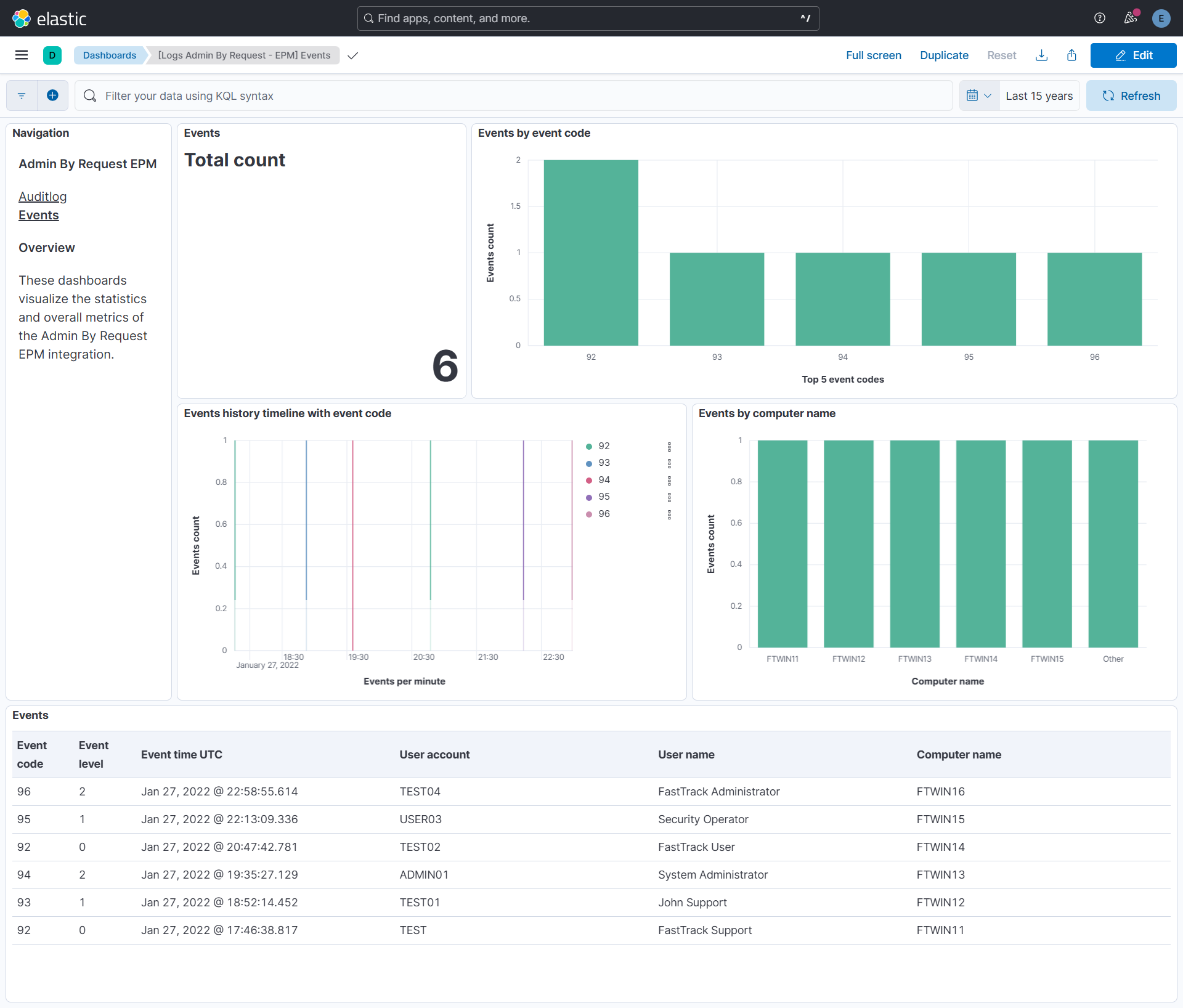
Events Data stream has field eventCode which is a unique identifier for each event type. Refer to the Event Codes table given on the Events API documentation for more information on event codes.
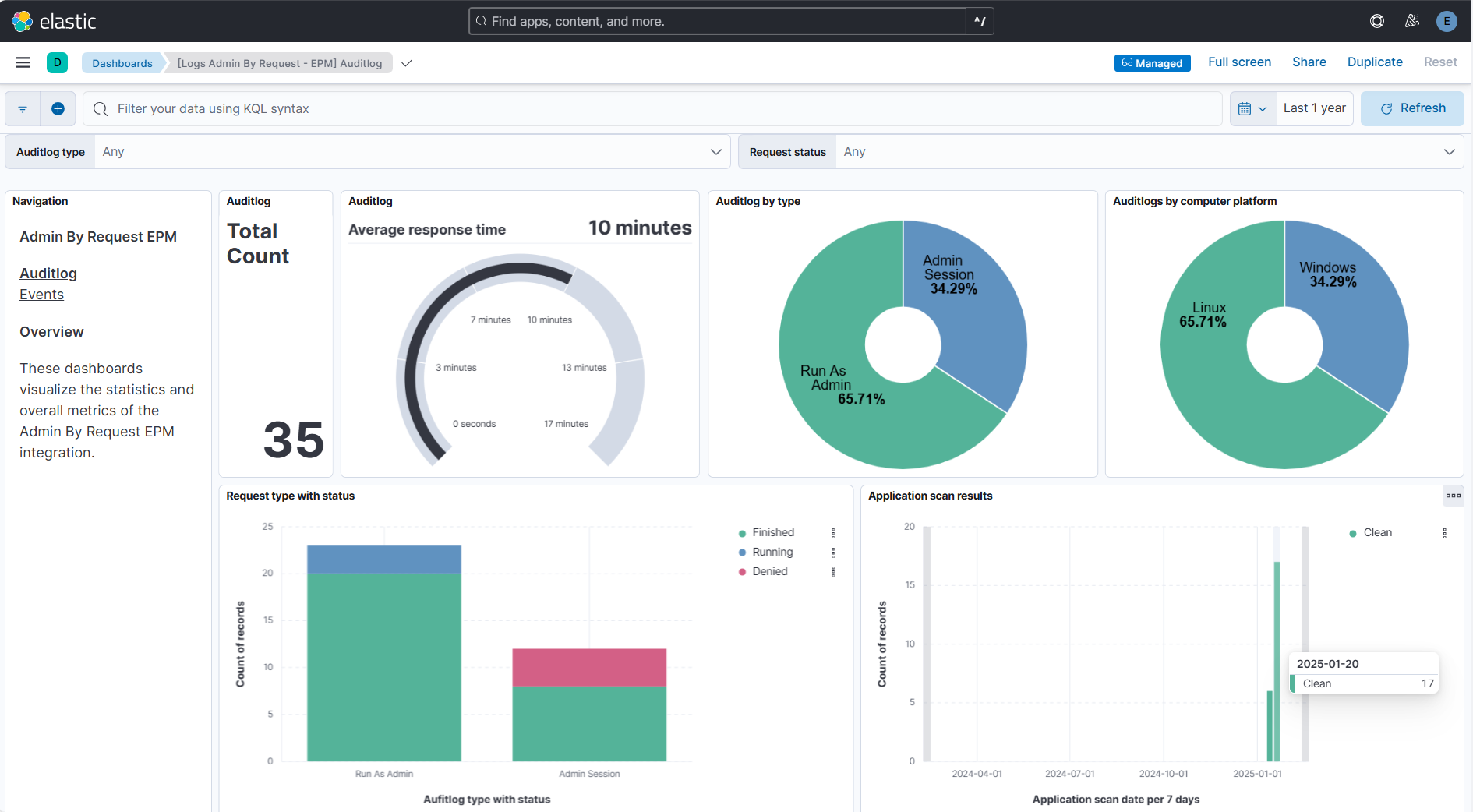
This integration includes one or more Kibana dashboards that visualizes the data collected by the integration. The screenshots below illustrate how the ingested data is displayed.
Changelog
| Version | Details | Minimum Kibana version |
|---|---|---|
| 1.6.0 | Enhancement (View pull request) Update Elastic Managed integration documentation to the current wording and docs links. |
9.0.5 8.19.2 |
| 1.5.1 | Bug fix (View pull request) Fix User account column in the Events dashboard to reference admin_by_request_epm.events.user_account. |
9.0.5 8.19.2 |
| 1.5.0 | Enhancement (View pull request) Add tags to ingest pipeline processors and add preserve_original_event to pipeline-level on_failure handlers. |
9.0.5 8.19.2 |
| 1.4.1 | Enhancement (View pull request) Set agentless deployment mode release field to ga. |
9.0.5 8.19.2 |
| 1.4.0 | Enhancement (View pull request) Publish Agentless to Elastic Managed integrations name change. |
9.0.5 8.19.2 |
| 1.3.0 | Enhancement (View pull request) Use new release field for agentless deployment mode to establish as beta. |
9.0.5 8.19.2 |
| 1.2.0 | Enhancement (View pull request) Add Agentless deployment support. |
9.0.5 8.19.2 |
| 1.1.2 | Bug fix (View pull request) Use triple-brace Mustache templating when referencing variables in ingest pipelines. |
9.0.0 8.15.3 |
| 1.1.1 | Bug fix (View pull request) Mark API key as secret in manifest. |
9.0.0 8.15.3 |
| 1.1.0 | Enhancement (View pull request) Improve documentation to align with new guidelines. |
9.0.0 8.15.3 |
| 1.0.0 | Enhancement (View pull request) Release package as GA. |
9.0.0 8.15.3 |
| 0.4.0 | Enhancement (View pull request) Remove redundant installation instructions. |
9.0.0 8.15.3 |
| 0.3.1 | Bug fix (View pull request) Fix default request trace enabled behavior. |
9.0.0 8.15.3 |
| 0.3.0 | Enhancement (View pull request) Enable request trace log removal. |
9.0.0 8.15.3 |
| 0.2.1 | Bug fix (View pull request) Added description to ssl nodes in package level manifest.yml file to including links to documentation. |
9.0.0 8.15.3 |
| 0.2.0 | Enhancement (View pull request) Update Kibana constraint to support 9.0.0. |
9.0.0 8.15.3 |
| 0.1.0 | Enhancement (View pull request) Initial release. |
8.15.3 |