Discover
Elastic Cloud Serverless projects are autoscaled environments, fully managed by Elastic and available on Elastic Cloud. Availability This functionality is generally available and ready for production usage. Serverless interfaces and procedures might differ from classic Elastic Stack deployments. The Elastic Stack includes Elastic's core products such as Elasticsearch, Kibana, Logstash, and Beats. Availability This functionality is generally available and ready for production usage. Unless stated otherwise on the page, this functionality is available when your Elastic Stack is deployed on Elastic Cloud Hosted, Elastic Cloud Enterprise, Elastic Cloud on Kubernetes, and self-managed environments. This documentation corresponds to the latest patch available for each minor version. If you're not using the latest patch, check the release notes for changes.
Serverless
Generally available
Stack
Generally available
If you need to find out why something happened, spot a trend, or check that your data arrived as expected, use Discover to query your Elasticsearch data in Kibana. The results appear as a table and, when the data allows it, a chart. From there, you can look into fields and documents, and save what you find to reuse later or share with dashboards.
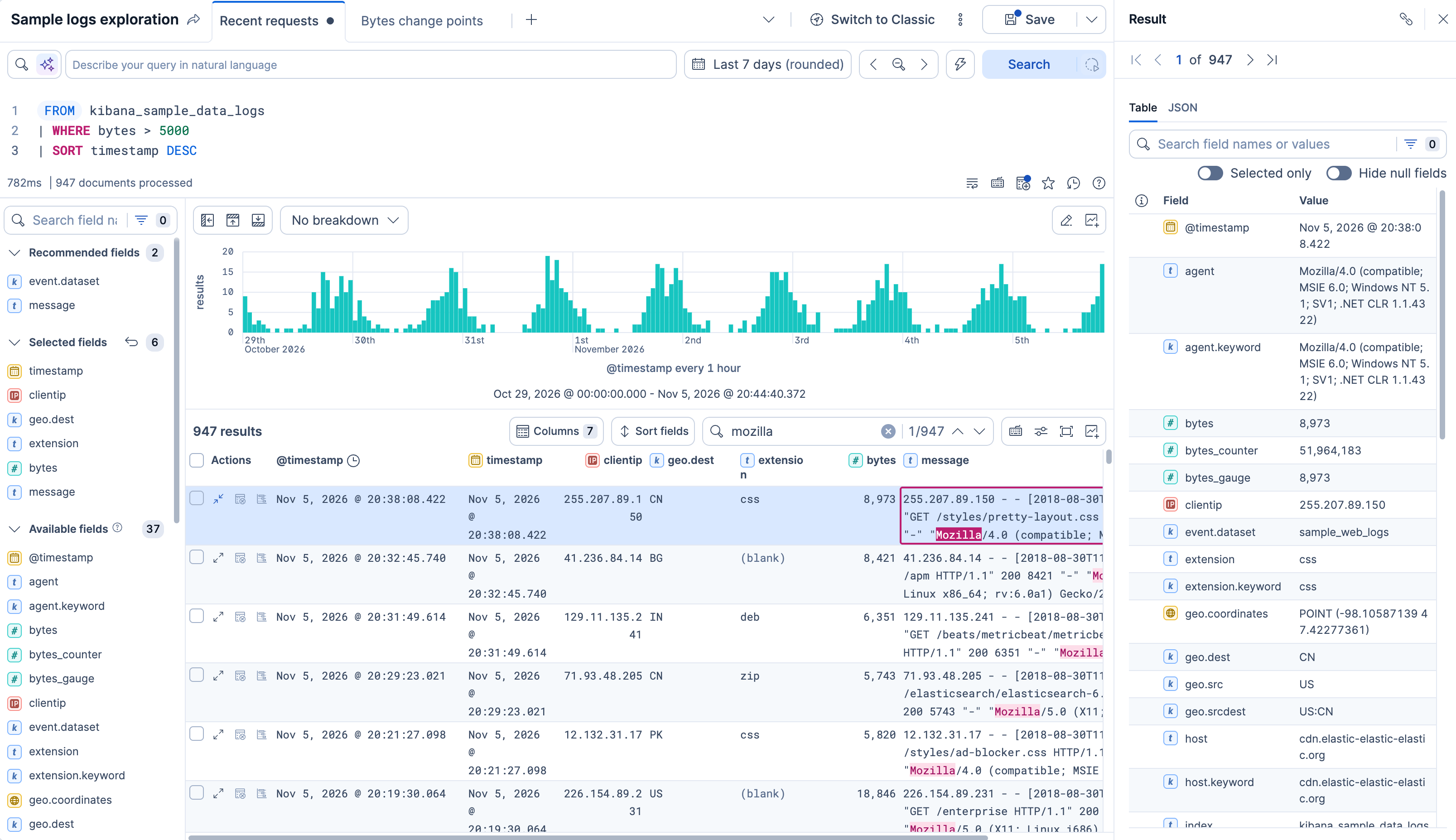
- To learn the basics, including the two query modes, tabs, and context-aware experiences, read How Discover works.
- To learn by running a first query, follow Get started with ES|QL in Discover.
- To work from a data view with KQL or Lucene, start with Search and filter with KQL, Lucene, and filters in Discover's classic mode.
Discover has two query modes: ES|QL mode, where you write an ES|QL query, and classic mode, where you search a data view with KQL or Lucene. Tasks that work in only one mode say which.
Query your data
- Query your data in ES|QL mode or in classic mode.
- Open Discover from a dashboard panel with a drilldown.
- Run long queries in the background.
- Elastic Cloud Serverless projects are autoscaled environments, fully managed by Elastic and available on Elastic Cloud. Availability Preview This functionality is in technical preview and is ready for evaluation. Use with caution in production; it is not recommended for mission-critical workloads. Elastic will work to fix any issues, but features in technical preview are not subject to the support SLA of official GA features. Specific Support terms apply. Serverless interfaces and procedures might differ from classic Elastic Stack deployments. The Elastic Stack includes Elastic's core products such as Elasticsearch, Kibana, Logstash, and Beats. Availability Preview since 9.2 This functionality is in technical preview and is ready for evaluation. Use with caution in production; it is not recommended for mission-critical workloads. Elastic will work to fix any issues, but features in technical preview are not subject to the support SLA of official GA features. Specific Support terms apply. Unless stated otherwise on the page, this functionality is available when your Elastic Stack is deployed on Elastic Cloud Hosted, Elastic Cloud Enterprise, Elastic Cloud on Kubernetes, and self-managed environments. This documentation corresponds to the latest patch available for each minor version. If you're not using the latest patch, check the release notes for changes. Keep several explorations open side by side in tabs.
Understand your data
- Explore individual results and documents.
- See which fields your data has and what they contain, and break the chart down by a field.
- Compare documents side by side.
- Find patterns in your log data with pattern analysis in classic mode, or with an ES|QL query that groups by pattern.
- Check how the values of each field are distributed (classic mode only).
- Chart a field from the fields list (classic mode only).
- Elastic Cloud Serverless projects are autoscaled environments, fully managed by Elastic and available on Elastic Cloud. Availability Generally available This functionality is generally available and ready for production usage. Serverless interfaces and procedures might differ from classic Elastic Stack deployments. The Elastic Stack includes Elastic's core products such as Elasticsearch, Kibana, Logstash, and Beats. Availability Generally available since 9.5 This functionality is generally available and ready for production usage. Unless stated otherwise on the page, this functionality is available when your Elastic Stack is deployed on Elastic Cloud Hosted, Elastic Cloud Enterprise, Elastic Cloud on Kubernetes, and self-managed environments. This documentation corresponds to the latest patch available for each minor version. If you're not using the latest patch, check the release notes for changes. Detect change points in a time series (ES|QL mode only).
- Elastic Cloud Serverless projects are autoscaled environments, fully managed by Elastic and available on Elastic Cloud. Availability Preview This functionality is in technical preview and is ready for evaluation. Use with caution in production; it is not recommended for mission-critical workloads. Elastic will work to fix any issues, but features in technical preview are not subject to the support SLA of official GA features. Specific Support terms apply. Serverless interfaces and procedures might differ from classic Elastic Stack deployments. The Elastic Stack includes Elastic's core products such as Elasticsearch, Kibana, Logstash, and Beats. Availability Preview since 9.5 This functionality is in technical preview and is ready for evaluation. Use with caution in production; it is not recommended for mission-critical workloads. Elastic will work to fix any issues, but features in technical preview are not subject to the support SLA of official GA features. Specific Support terms apply. Unless stated otherwise on the page, this functionality is available when your Elastic Stack is deployed on Elastic Cloud Hosted, Elastic Cloud Enterprise, Elastic Cloud on Kubernetes, and self-managed environments. This documentation corresponds to the latest patch available for each minor version. If you're not using the latest patch, check the release notes for changes. Analyze your data with AI (ES|QL mode only).
Shape what your queries return and show
- Customize the Discover view to show the columns, density, and layout you need.
- Read, sort, and filter ES|QL results in the table.
- Add variable controls to make your ES|QL query dynamic without having to duplicate it.
- Add runtime fields to a data view (classic mode only).
- Sort your results by relevance.
Save and share your explorations
- Save sessions to reuse your queries, filters, and views later.
- Add Discover content to dashboards, as charts, tables, or whole sessions.
- Export your results as a CSV file, or the session itself as JSON.
- Copy results as text, JSON, or Markdown, or share a link to a session or a document.
- Create an alert rule from the query and filters of a session.