Elastic Agent to Logstash for routing to multiple Elasticsearch clusters and additional destinations
Elastic Cloud Serverless projects are autoscaled environments, fully managed by Elastic and available on Elastic Cloud. Availability This functionality is generally available and ready for production usage. Serverless interfaces and procedures might differ from classic Elastic Stack deployments. The Elastic Stack includes Elastic's core products such as Elasticsearch, Kibana, Logstash, and Beats. Availability This functionality is generally available and ready for production usage. Unless stated otherwise on the page, this functionality is available when your Elastic Stack is deployed on Elastic Cloud Hosted, Elastic Cloud Enterprise, Elastic Cloud on Kubernetes, and self-managed environments. This documentation corresponds to the latest patch available for each minor version. If you're not using the latest patch, check the release notes for changes.
Serverless
Generally available
Stack
Generally available
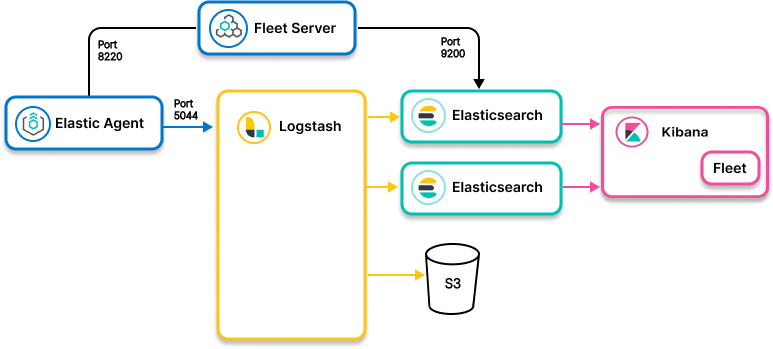
- Ingest model
- Elastic Agent to Logstash to Elasticsearch clusters and additional destinations
- Use when
- Data collected by Elastic Agent needs to be routed to different Elasticsearch clusters or non-Elasticsearch destinations depending on the content
- Example
-
Let’s take an example of a Windows workstation, for which we are collecting different types of logs using the System and Windows integrations. These logs need to be sent to different Elasticsearch clusters and to S3 for backup and a mechanism to send it to other destinations such as different SIEM solutions. In addition, the Elasticsearch destination is derived based on the type of data stream and an organization identifier.
In such use cases, agents send the data to Logstash as a routing mechanism to different destinations. The System and Windows integrations must be installed on all Elasticsearch clusters to which the data is routed.
input {
  elastic_agent {
    port => 5044
  }
}
filter {
  translate {
    source => "[http][host]"
    target => "[@metadata][tenant]"
    dictionary_path => "/etc/conf.d/logstash/tenants.yml"
  }
}
output {
  if [@metadata][tenant] == "tenant01" {
    elasticsearch {
      hosts => "ELASTICSEARCH_ENDPOINT_URL"
      api_key => "<api key>"
    }
  } else if [@metadata][tenant] == "tenant02" {
    elasticsearch {
      cloud_id => "<cloud id>"
      api_key => "<api key>"
    }
  }
}
- Use the
hostsoption with the Elasticsearch endpoint URL to send data to Elasticsearch Serverless - Use
cloud_idto send data to Elastic Cloud Hosted
Info on configuring Elastic Agent:
Info on Logstash and Logstash outputs:
Info on Elasticsearch: