Inspect documents and requests in Discover
Elastic Cloud Serverless projects are autoscaled environments, fully managed by Elastic and available on Elastic Cloud. Availability This functionality is generally available and ready for production usage. Serverless interfaces and procedures might differ from classic Elastic Stack deployments. The Elastic Stack includes Elastic's core products such as Elasticsearch, Kibana, Logstash, and Beats. Availability This functionality is generally available and ready for production usage. Unless stated otherwise on the page, this functionality is available when your Elastic Stack is deployed on Elastic Cloud Hosted, Elastic Cloud Enterprise, Elastic Cloud on Kubernetes, and self-managed environments. This documentation corresponds to the latest patch available for each minor version. If you're not using the latest patch, check the release notes for changes.
Serverless
Generally available
Stack
Generally available
When a table row doesn't tell you enough about a result, Discover offers several ways to look closer: finding a value across all loaded results, reading every field of a document, and checking the request that produced the results.
Open Discover and run a query that returns results.
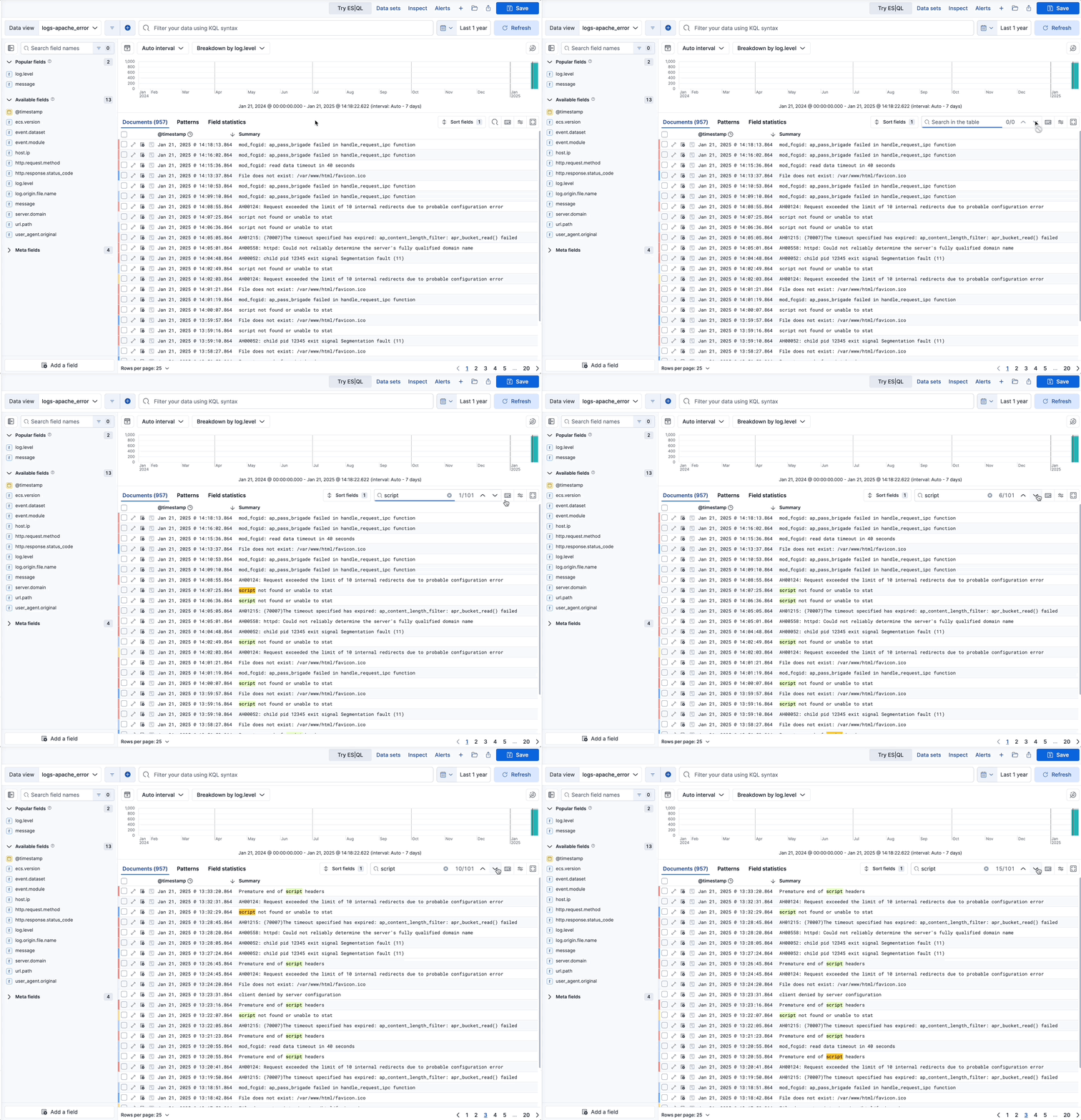
To find a value anywhere in the results loaded in the table, including rows you haven't scrolled to, select Find in table in the table toolbar and enter your text. Discover highlights the matches.
The in-table search looks for all matching values in all results and pages loaded in the table. In classic mode, the number of results loaded depends on the Sample size. In ES|QL mode, it depends on the rows that your query returns, so the LIMIT of your query sets the ceiling. If you load more results, the search automatically updates and reflects the new number of matching values, if any more are found.
To go to the next match, press Enter. To go to the previous match, press Shift + Enter.
When you need every field of a result, open the document in the document flyout.
Elastic Cloud Serverless projects are autoscaled environments, fully managed by Elastic and available on Elastic Cloud. Availability Generally available This functionality is generally available and ready for production usage. Serverless interfaces and procedures might differ from classic Elastic Stack deployments. The Elastic Stack includes Elastic's core products such as Elasticsearch, Kibana, Logstash, and Beats. Availability Planned We plan to add this functionality in a future Elastic Stack update. Subject to changes. Unless stated otherwise on the page, this functionality is available when your Elastic Stack is deployed on Elastic Cloud Hosted, Elastic Cloud Enterprise, Elastic Cloud on Kubernetes, and self-managed environments. This documentation corresponds to the latest patch available for each minor version. If you're not using the latest patch, check the release notes for changes. To filter or copy values in the table without opening the flyout, switch View mode to JSON. Refer to View documents as JSON.
In the document table, select View details (Toggle dialog with details in Elastic Stack 9.5 and earlier) to show document details.
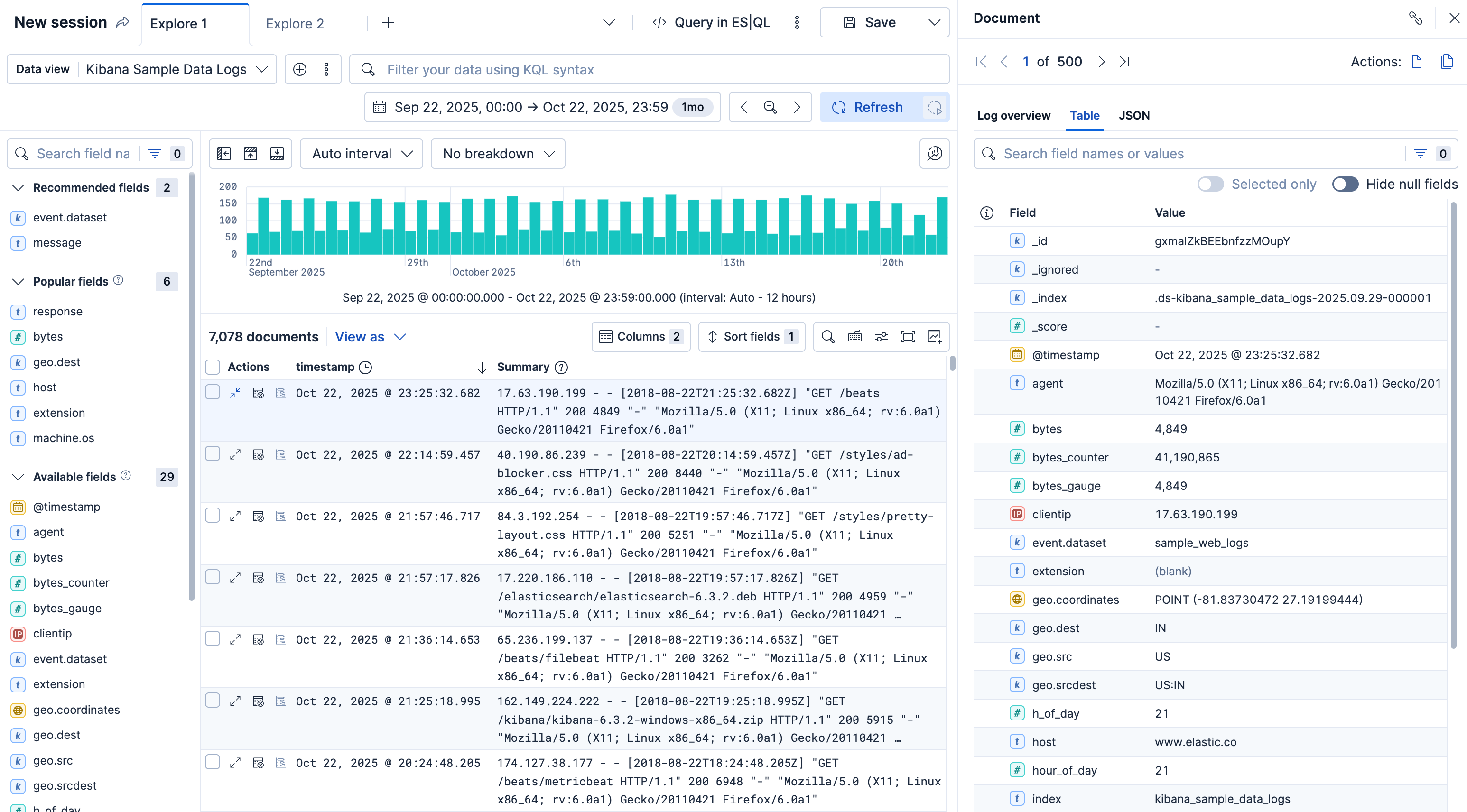
Scan through the fields and their values. To narrow the list or act on a value, use any of the following:
- To filter results by a field or value, hover over it in the Field or Value column and select one of the actions that appear.
- To narrow the list of fields, use the search field to look for specific fields or values, or filter by field type with the options next to it.
- To keep a field visible while you filter the list, pin it from the first column.
- To hide fields that have no value, turn on the Hide null fields toggle.
- The Elastic Stack includes Elastic's core products such as Elasticsearch, Kibana, Logstash, and Beats. Availability Generally available from 9.0 to 9.3 This functionality is generally available and ready for production usage. Unless stated otherwise on the page, this functionality is available when your Elastic Stack is deployed on Elastic Cloud Hosted, Elastic Cloud Enterprise, Elastic Cloud on Kubernetes, and self-managed environments. This documentation corresponds to the latest patch available for each minor version. If you're not using the latest patch, check the release notes for changes. In these versions, the toggle is available only in ES|QL mode.
TipYou can restrict the fields listed in the detailed view to the fields that you explicitly added to the Discover table, using the Selected only toggle. The toggle is unavailable until you add at least one field as a column. Selected only isn't available from the View single document page.
In classic mode, you can also open the document on a page of its own, or view the documents that occurred before and after it.
To copy a link that reopens this document, select Copy link in the flyout header. Refer to Share a link to a document.
In classic mode, you can open a document on a page that you can bookmark and share, or view the documents that occurred before and after it. These actions aren't available in ES|QL mode, where the document flyout is the way to read a document.
To use them, open Discover in classic mode and run a search that returns results. If Discover opens in ES|QL mode, refer to Switch to Discover's classic mode. To view the surrounding documents, select a data view that has a time field.
- In the document table, select View details (Toggle dialog with details in Elastic Stack 9.5 and earlier) on the row of the document you want to look at.
- In the flyout, select one of the following:
- View single document to open the document on its own page. You can bookmark the page and share its link.
- View surrounding documents to inspect the documents that occurred before and after this document. Only pinned filters, the filters you pinned across apps, remain active in this view.
Result: Discover opens the document on a page that you can bookmark, or shows the documents that occurred before and after it.
The request Inspector is available in Discover and for all Dashboards visualization panels that are built from a query. The available information can differ based on the request.
- Open the Inspector:
- If you're in Discover:
- Elastic Cloud Serverless projects are autoscaled environments, fully managed by Elastic and available on Elastic Cloud. Availability Generally available This functionality is generally available and ready for production usage. Serverless interfaces and procedures might differ from classic Elastic Stack deployments. The Elastic Stack includes Elastic's core products such as Elasticsearch, Kibana, Logstash, and Beats. Availability Generally available since 9.4 This functionality is generally available and ready for production usage. Unless stated otherwise on the page, this functionality is available when your Elastic Stack is deployed on Elastic Cloud Hosted, Elastic Cloud Enterprise, Elastic Cloud on Kubernetes, and self-managed environments. This documentation corresponds to the latest patch available for each minor version. If you're not using the latest patch, check the release notes for changes. Hover over the active tab and select the Actions icon, then select Inspect. You can also select Inspect tab from the application menu to inspect the active tab.
- The Elastic Stack includes Elastic's core products such as Elasticsearch, Kibana, Logstash, and Beats. Availability Generally available from 9.0 to 9.3 This functionality is generally available and ready for production usage. Unless stated otherwise on the page, this functionality is available when your Elastic Stack is deployed on Elastic Cloud Hosted, Elastic Cloud Enterprise, Elastic Cloud on Kubernetes, and self-managed environments. This documentation corresponds to the latest patch available for each minor version. If you're not using the latest patch, check the release notes for changes. Select Inspect from the application menu.
- If you're in Dashboards, open the panel menu and select Inspect.
- If you're in Discover:
- Open the View dropdown, then select Requests.
- Several tabs with different information can appear, depending on nature of the request and your deployment type:
Tip
Some visualizations rely on several requests. From the dropdown, select the request you want to inspect.
- Statistics: Provides general information and statistics about the request. For example, you can check if the number of hits and query time match your expectations. If not, this can indicate an issue with the request used to build the visualization.
- Clusters and shards: Lists the Elasticsearch clusters and shards queried to fetch the data, including for cross-cluster search queries. Use this tab to verify that the request ran correctly. This tab is not available for Vega visualizations. In Serverless, this tab appears only when your project has no linked projects.
- Elastic Cloud Serverless projects are autoscaled environments, fully managed by Elastic and available on Elastic Cloud. Availability Generally available This functionality is generally available and ready for production usage. Serverless interfaces and procedures might differ from classic Elastic Stack deployments. Projects: Replaces Clusters and shards when your project has linked projects for cross-project search. Lists the projects the request searched, so you can check which projects your query reached. Each row shows the project's status, response time, provider, region, and tag count. Expand a row to see its shard breakdown. This tab is not available for Vega visualizations.
- Request: Provides a full view of the request, which you can copy or Open in Console to refine, if needed.
- Response: Provides a full view of the response returned by the request.
- To compare several results side by side, refer to Compare documents in Discover.
- To copy a link to a document, refer to Copy results and share links to documents in Discover.