Create and upload source maps (RUM)
Elastic Cloud Serverless projects are autoscaled environments, fully managed by Elastic and available on Elastic Cloud. Availability This functionality is not available in Elastic Cloud Serverless. The Elastic Stack includes Elastic's core products such as Elasticsearch, Kibana, Logstash, and Beats. Availability This functionality is generally available and ready for production usage. Unless stated otherwise on the page, this functionality is available when your Elastic Stack is deployed on Elastic Cloud Hosted, Elastic Cloud Enterprise, Elastic Cloud on Kubernetes, and self-managed environments. This documentation corresponds to the latest patch available for each minor version. If you're not using the latest patch, check the release notes for changes.
Serverless
Unavailable
Unavailable
Stack
Generally available
Minifying JavaScript bundles in production is a common practice; it can greatly improve the load time and network latency of your applications. The problem with minifying code is that it can be hard to debug.
For best results, uploading source maps should become a part of your deployment procedure, and not something you only do when you see unhelpful errors. That’s because uploading source maps after errors happen won’t make old errors magically readable — errors must occur again for source mapping to occur.
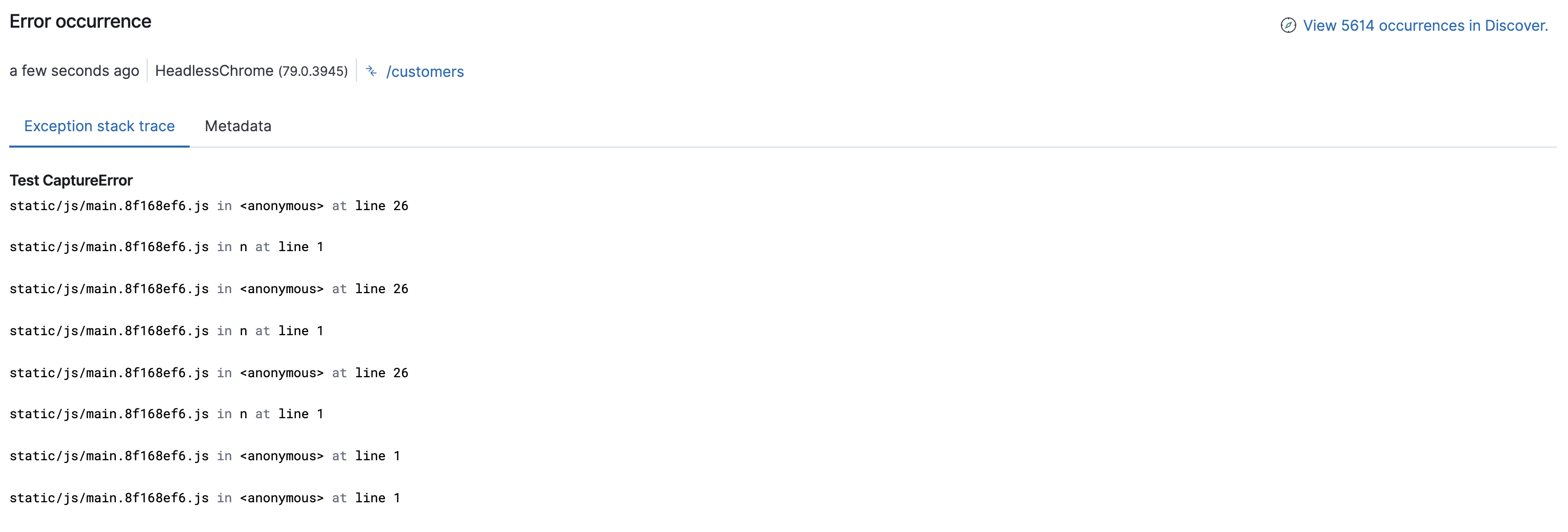
Here’s an example of an exception stack trace in the Applications UI when using minified code. As you can see, it’s not very helpful.
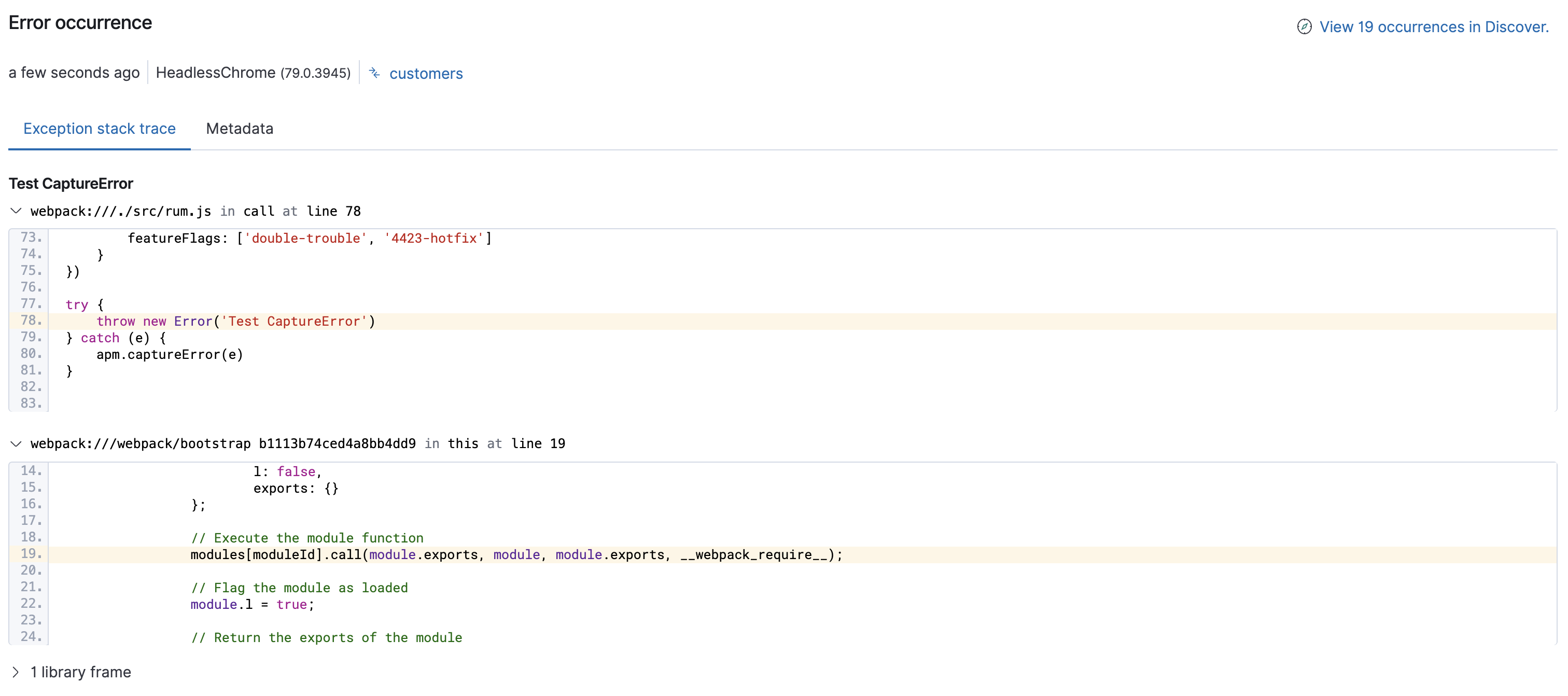
With a source map, minified files are mapped back to the original source code, allowing you to maintain the speed advantage of minified code, without losing the ability to quickly and easily debug your application. Here’s the same example as before, but with a source map uploaded and applied:
Follow the steps below to enable source mapping your error stack traces in the Applications UI:
Set the service name and version of your application when initializing the RUM Agent. To make uploading subsequent source maps easier, the serviceVersion you choose might be the version from your package.json. For example:
import { init as initApm } from '@elastic/apm-rum'
const serviceVersion = require("./package.json").version

const apm = initApm({
  serviceName: 'myService',
  serviceVersion: serviceVersion
})
Or, serviceVersion could be a git commit reference. For example:
const git = require('git-rev-sync')
const serviceVersion = git.short()
It can also be any other unique string that indicates a specific version of your application. The APM integration uses the service name and version to match the correct source map file to each stack trace.
To be compatible with Elastic APM, source maps must follow the source map revision 3 proposal spec.
Source maps can be generated and configured in many different ways. For example, parcel automatically generates source maps by default. If you’re using webpack, some configuration may be needed to generate a source map:
const webpack = require('webpack')
const serviceVersion = require("./package.json").version
const TerserPlugin = require('terser-webpack-plugin');
module.exports = {
  entry: 'app.js',
  output: {
    filename: 'app.min.js',
    path: './dist'
  },
  devtool: 'source-map',
  plugins: [
    new webpack.DefinePlugin({'serviceVersion': JSON.stringify(serviceVersion)}),
    new TerserPlugin({
      sourceMap: true
    })
  ]
}
- If you’re using a different method of defining
serviceVersion, you can set it here.
When uploading a source map, ensure that RUM support is enabled in the APM integration.
Kibana exposes a source map endpoint for uploading source maps. Source maps can be uploaded as a string, or as a file upload.
Let’s look at two different ways to upload a source map: curl and a custom application. Each example includes the four fields necessary for APM Server to later map minified code to its source:
service_name: Should match theserviceNamefrom step one.service_version: Should match theserviceVersionfrom step one.bundle_filepath: The absolute path of the final bundle as used in the web application.sourcemap: The location of the source map.
If you have multiple source maps, you’ll need to upload each individually.
Here’s an example curl request that uploads the source map file created in the previous step. This request uses an API key for authentication.
SERVICEVERSION=`node -e "console.log(require('./package.json').version);"` && \
curl -X POST "http://localhost:5601/api/apm/sourcemaps" \
-H 'Content-Type: multipart/form-data' \
-H 'kbn-xsrf: true' \
-H 'Authorization: ApiKey ${YOUR_API_KEY}' \
-F 'service_name=foo' \
-F 'service_version=$SERVICEVERSION' \
-F 'bundle_filepath=/test/e2e/general-usecase/app.min.js' \
-F 'sourcemap=@./dist/app.min.js.map'
- This example uses the version from
package.json - The API key used here needs to have appropriate privileges. Refer to the Elastic Stack API documentation.
To ensure uploading source maps become a part of your deployment process, consider automating the process with a custom application. Here’s an example Node.js application that uploads the source map file created in the previous step:
console.log('Uploading sourcemaps!')
var request = require('request')
var filepath = './dist/app.min.js.map'
var formData = {
  headers: {
    Content-Type: 'multipart/form-data',
    kbn-xsrf: 'true',
    Authorization: 'ApiKey ${YOUR_API_KEY}'
  },
  service_name: 'service-name’,
  service_version: require("./package.json").version,
  bundle_filepath: 'http://localhost/app.min.js',
  sourcemap: fs.readFileSync(filepath, { encoding: 'utf-8' })
}
request.post({url: 'http://localhost:5601/api/apm/sourcemaps',formData: formData}, function (err, resp, body) {
  if (err) {
    console.log('Error while uploading sourcemaps!', err)
  } else {
    console.log('Sourcemaps uploaded!')
  }
})
- Or use 'git-rev-sync' for git commit hash
Source maps are stored in Elasticsearch. When you upload a source map, a new Elasticsearch document is created containing the contents of the source map. When a RUM request comes in, APM Server will make use of these source map documents to apply the source map logic to the event’s stack traces.