Add a service name to logs
Elastic Cloud Serverless projects are autoscaled environments, fully managed by Elastic and available on Elastic Cloud. Availability This functionality is generally available and ready for production usage. Serverless interfaces and procedures might differ from classic Elastic Stack deployments. The Elastic Stack includes Elastic's core products such as Elasticsearch, Kibana, Logstash, and Beats. Availability This functionality is generally available and ready for production usage. Unless stated otherwise on the page, this functionality is available when your Elastic Stack is deployed on Elastic Cloud Hosted, Elastic Cloud Enterprise, Elastic Cloud on Kubernetes, and self-managed environments. This documentation corresponds to the latest patch available for each minor version. If you're not using the latest patch, check the release notes for changes.
Serverless
Generally available
Stack
Generally available
Adding the service.name field to your logs associates them with the services that generate them. You can use this field to view and manage logs for distributed services located on multiple hosts.
To add a service name to your logs, either:
- Use the
add_fieldsprocessor through an integration, Elastic Agent configuration, or Filebeat configuration. - Map an existing field from your data stream to the
service.namefield.
For log data without a service name, use the add_fields processor to add the service.name field. You can add the processor in an integration’s settings or in the Elastic Agent or Filebeat configuration.
For example, adding the add_fields processor to the inputs section of a standalone Elastic Agent or Filebeat configuration would add your_service_name as the service.name field:
processors:
    - add_fields:
        target: service
        fields:
            name: your_service_name
Adding the add_fields processor to an integration’s settings would add your_service_name as the service.name field:
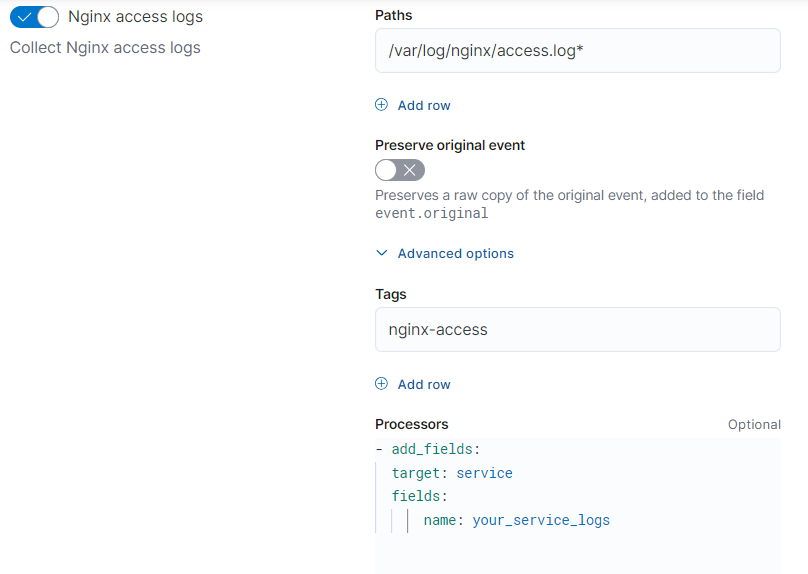
For more on defining processors, refer to define processors.
For logs that with an existing field being used to represent the service name, map that field to the service.name field using the alias field type. Follow these steps to update your mapping:
- Find the Index Management page in the navigation menu or by using the global search field.
- Select Index Templates.
- Search for the index template you want to update.
- From the Actions menu for that template, select edit.
- Go to Mappings, and select Add field.
- Under Field type, select Alias and add
service.nameto the Field name. - Under Field path, select the existing field you want to map to the service name.
- Select Add field.
For more ways to add a field to your mapping, refer to add a field to an existing mapping.
The Elastic Stack provides additional ways to process your data:
- Ingest pipelines: convert data to ECS, normalize field data, or enrich incoming data.
- Logstash: enrich your data using input, output, and filter plugins.