Tools in Elastic Agent Builder
Elastic Cloud Serverless projects are autoscaled environments, fully managed by Elastic and available on Elastic Cloud. Availability This functionality is generally available and ready for production usage. Serverless interfaces and procedures might differ from classic Elastic Stack deployments. The Elastic Stack includes Elastic's core products such as Elasticsearch, Kibana, Logstash, and Beats. Availability This functionality is generally available and ready for production usage. This functionality is in technical preview and is ready for evaluation. Use with caution in production; it is not recommended for mission-critical workloads. Elastic will work to fix any issues, but features in technical preview are not subject to the support SLA of official GA features. Specific Support terms apply. Unless stated otherwise on the page, this functionality is available when your Elastic Stack is deployed on Elastic Cloud Hosted, Elastic Cloud Enterprise, Elastic Cloud on Kubernetes, and self-managed environments. This documentation corresponds to the latest patch available for each minor version. If you're not using the latest patch, check the release notes for changes.
Serverless
Generally available
Stack
GA
9.3+
…
Generally available since 9.3
Preview in 9.2
Agents use tools to search, retrieve, and take actions on your behalf.
Tools can be thought of as functions: modular, reusable actions that agents can call to interact with your Elasticsearch data. Skills are higher-level capabilities that coordinate tools into domain-specific workflows. To learn more, refer to Skills.
Tools enable agents to work with Elasticsearch data. When an agent receives a natural language query, it does the following:
- Analyzes the semantic intent of the request
- Selects appropriate tools from its available toolset
- Maps the request parameters to tool input parameters
- Executes the tools in sequence as needed
- Processes the structured output data
Each tool is an atomic operation with a defined signature. Tools accept typed parameters and return structured results in a format the agent can parse, transform, and incorporate into its response generation.
Tool execution and result processing consume tokens. To understand how usage is calculated, refer to Token usage in Elastic Agent Builder.
Elastic Agent Builder ships with a comprehensive set of built-in tools that provide core capabilities for working with your Elasticsearch data. These tools are ready to use. They cannot be modified or deleted.
Built-in tools serve as building blocks for more complex interactions and provide the foundation for agent capabilities.
For the complete list, refer to Built-in tools reference.
The Elastic Stack includes Elastic's core products such as Elasticsearch, Kibana, Logstash, and Beats. Availability Planned We plan to add this functionality in a future Elastic Stack update. Subject to changes. Unless stated otherwise on the page, this functionality is available when your Elastic Stack is deployed on Elastic Cloud Hosted, Elastic Cloud Enterprise, Elastic Cloud on Kubernetes, and self-managed environments. This documentation corresponds to the latest patch available for each minor version. If you're not using the latest patch, check the release notes for changes. Elastic Cloud Serverless projects are autoscaled environments, fully managed by Elastic and available on Elastic Cloud. Availability Generally available This functionality is generally available and ready for production usage. Serverless interfaces and procedures might differ from classic Elastic Stack deployments. Every agent also has HTTP API tools for calling Elasticsearch and Kibana APIs. These tools don't appear on the Tools page.
Some built-in skills also include inline tools that are only available while that skill is active and are not listed in the tools reference. For details, refer to Built-in skills reference.
You can extend the built-in tool catalog with your own custom tool definitions. To learn how to create and manage custom tools, refer to Custom tools.
- You can view, organize, and manage tools from the Tools page in Kibana or programmatically using the Tools API.
-
-
Access the Tools page from Manage components at the bottom of the left sidebar, or from Customize > Tools > Manage all tools on an agent's page.
-
Access the Tools page from the key actions menu in the Agent Chat UI.
The Tools page lists each tool by ID and description. Use the search bar or filter by labels to find specific tools. Built-in tools are marked with a lock icon (🔒).
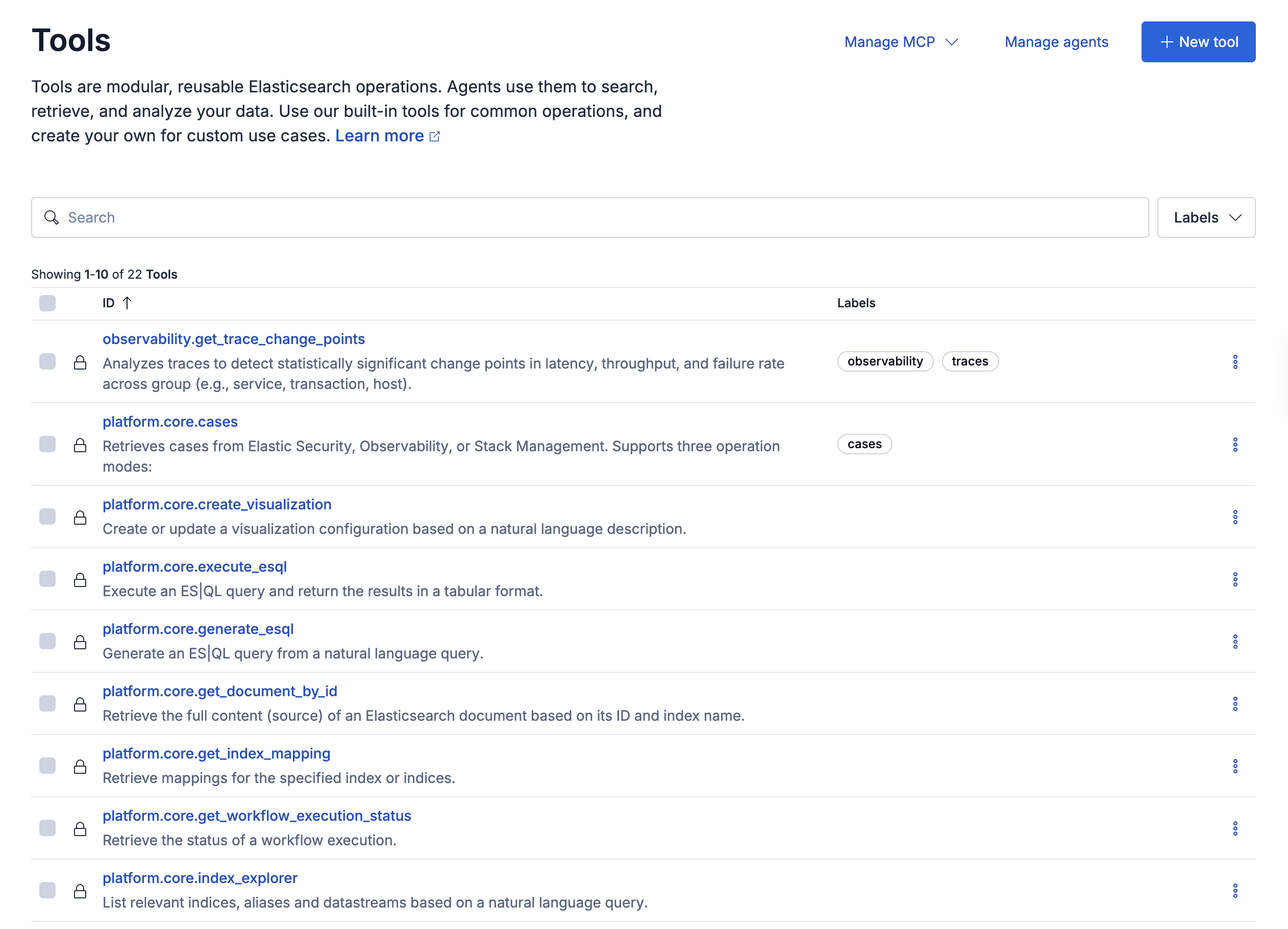
The Elastic Stack includes Elastic's core products such as Elasticsearch, Kibana, Logstash, and Beats. Availability Generally available since 9.4 This functionality is generally available and ready for production usage. Unless stated otherwise on the page, this functionality is available when your Elastic Stack is deployed on Elastic Cloud Hosted, Elastic Cloud Enterprise, Elastic Cloud on Kubernetes, and self-managed environments. This documentation corresponds to the latest patch available for each minor version. If you're not using the latest patch, check the release notes for changes. The Tools page also includes a Manage MCP dropdown (for MCP server configuration and bulk imports) and a Manage agents link for quick navigation to the global agents list.
Custom tools can be modified or removed as needed:
- From the Tools page, find the tool you want to modify.
- Select the edit icon to update the tool or the delete icon to remove it.
- For updates, modify the tool properties and save your changes.
Built-in tools cannot be modified or deleted.
For a quick overview of how to work programmatically with tools, refer to Tools API.
Direct tool calls through the Tools API are not subject to Elastic Agent Builder human-in-the-loop confirmation.
For the complete API reference, refer to the Kibana API reference.
Tools can also be accessed through the Model Context Protocol (MCP) server, which provides a standardized interface for external clients to use Agent Builder tools.
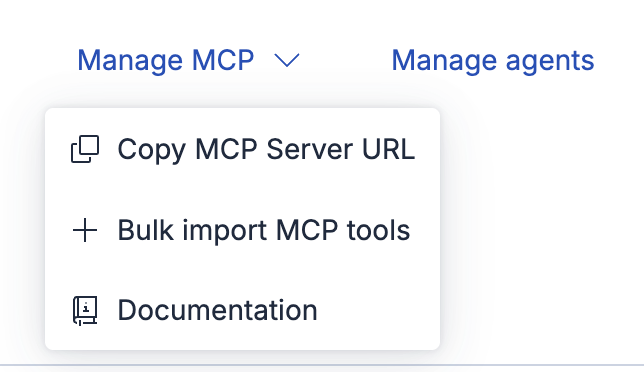
On the Tools page, open the Manage MCP dropdown to access:
- Copy MCP Server URL: Copy the current space's MCP server URL to configure external clients.
- Bulk import MCP tools: Import multiple tools from an MCP server at once.
- Documentation: Open the MCP documentation.
Elastic Cloud Serverless projects are autoscaled environments, fully managed by Elastic and available on Elastic Cloud. Availability Generally available This functionality is generally available and ready for production usage. Serverless interfaces and procedures might differ from classic Elastic Stack deployments. If you connect with OAuth, use the MCP server URL shown in your OAuth client's details instead.
To copy the MCP server URL, open the MCP Server dropdown on the Tools page (Elastic Stack 9.2) or the Manage MCP dropdown (Elastic Stack 9.3), then select Copy MCP Server URL.
Copy MCP Server URL doesn't include the space ID. Refer to the known issue.
For detailed MCP server configuration, refer to MCP server.