Upgrade from Elastic AI SOC Engine to Elastic Security to access additional features
Elastic Cloud Serverless projects are autoscaled environments, fully managed by Elastic and available on Elastic Cloud. Availability This functionality is in technical preview and is ready for evaluation. Use with caution in production; it is not recommended for mission-critical workloads. Elastic will work to fix any issues, but features in technical preview are not subject to the support SLA of official GA features. Specific Support terms apply.
Serverless Security
Preview
Preview
This page describes how to upgrade an Elastic Security Serverless project from the Elastic AI SOC Engine (EASE) feature tier to the Security Analytics Essentials or Security Analytics Complete feature tiers.
EASE provides a small subset of the features available on other Elastic Security Serverless feature tiers. It's designed to add a layer of AI features onto your existing SOC software stack. In contrast, Elastic Security provides a full set of SOC capabilities including many additional ways to ingest data, prebuilt and customizable detection rules, response actions, integrated threat intelligence, runtime protection, data visualization, and more.
For a full breakdown of the features available in the Security Analytics Essentials and Security Analytics Complete feature tiers, refer to Elastic Security Serverless pricing.
The AI features present in EASE are not available on the Essentials tier.
Log in to the Elastic Cloud console.
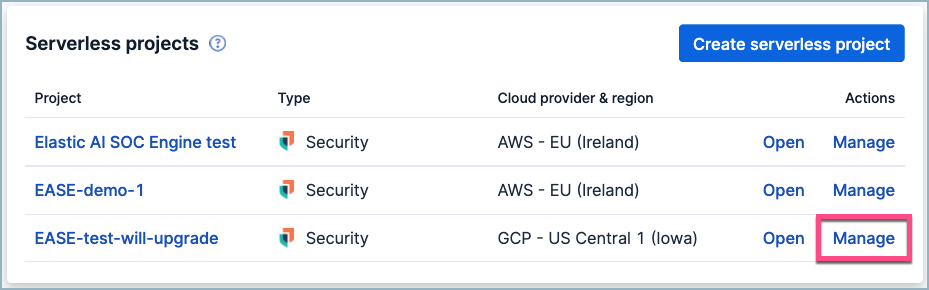
Find the project you wish to upgrade on the list of serverless projects, and click Manage.
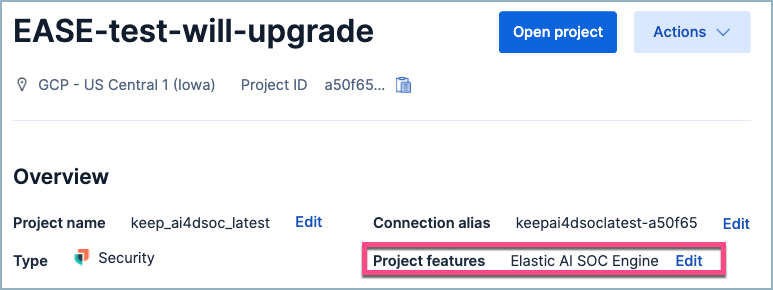
On the project management page, next to Project features, click Edit.
Select either the Security Analytics Essentials or Security Analytics Complete options, and select any desired add-on options. Click Save.
You can return to this page at any point to switch between Essentials and Complete and change your add-on selections. However, once you upgrade from EASE to another product tier, you cannot revert or downgrade the project back to EASE. You can always create another new project of any tier.
When you upgrade an EASE project, you gain access to all the Elastic Security capabilities included in your selected feature tier. To learn more about what Elastic Security can do and how to use it, refer to Get started with Elastic Security.