Data enrichment
Elastic Cloud Serverless projects are autoscaled environments, fully managed by Elastic and available on Elastic Cloud. Availability This functionality is generally available and ready for production usage. Serverless interfaces and procedures might differ from classic Elastic Stack deployments. The Elastic Stack includes Elastic's core products such as Elasticsearch, Kibana, Logstash, and Beats. Availability This functionality is generally available and ready for production usage. Unless stated otherwise on the page, this functionality is available when your Elastic Stack is deployed on Elastic Cloud Hosted, Elastic Cloud Enterprise, Elastic Cloud on Kubernetes, and self-managed environments. This documentation corresponds to the latest patch available for each minor version. If you're not using the latest patch, check the release notes for changes.
Serverless
Generally available
Stack
Generally available
You can use the enrich processor to add data from your existing indices to incoming documents during ingest.
For example, you can use the enrich processor to:
- Identify web services or vendors based on known IP addresses
- Add product information to retail orders based on product IDs
- Supplement contact information based on an email address
- Add postal codes based on user coordinates
Most processors are self-contained and only change existing data in incoming documents.
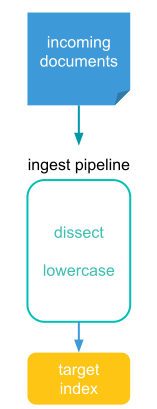
The enrich processor adds new data to incoming documents and requires a few special components:
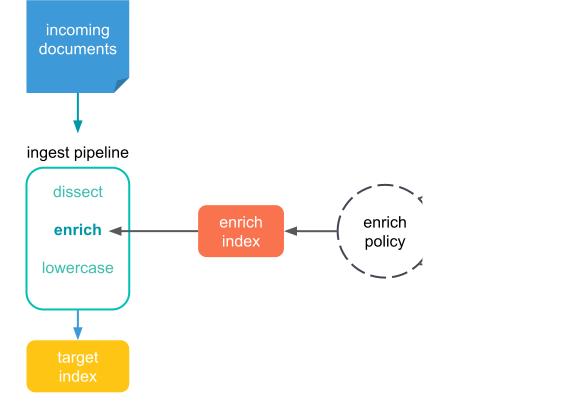
- enrich policy
- A set of configuration options used to add the right enrich data to the right incoming documents.
An enrich policy contains:
- A list of one or more source indices which store enrich data as documents
- The policy type which determines how the processor matches the enrich data to incoming documents
- A match field from the source indices used to match incoming documents
- Enrich fields containing enrich data from the source indices you want to add to incoming documents
Before it can be used with an enrich processor, an enrich policy must be executed. When executed, an enrich policy uses enrich data from the policy’s source indices to create a streamlined system index called the enrich index. The processor uses this index to match and enrich incoming documents.
- source index
- An index which stores enrich data you’d like to add to incoming documents. You can create and manage these indices just like a regular Elasticsearch index. You can use multiple source indices in an enrich policy. You also can use the same source index in multiple enrich policies.
- enrich index
- A special system index tied to a specific enrich policy.
Directly matching incoming documents to documents in source indices could be slow and resource intensive. To speed things up, the enrich processor uses an enrich index.
Enrich indices contain enrich data from source indices but have a few special properties to help streamline them:
- They are system indices, meaning they’re managed internally by Elasticsearch and only intended for use with enrich processors and the ES|QL
ENRICHcommand. - They always begin with
.enrich-*. - They are read-only, meaning you can’t directly change them.
- They are force merged for fast retrieval.
Use the Enrich Policies view to add data from your existing indices to incoming documents during ingest. An enrich policy contains:
- The policy type that determines how the policy matches the enrich data to incoming documents
- The source indices that store enrich data as documents
- The fields from the source indices used to match incoming documents
- The enrich fields containing enrich data from the source indices that you want to add to incoming documents
- An optional query.
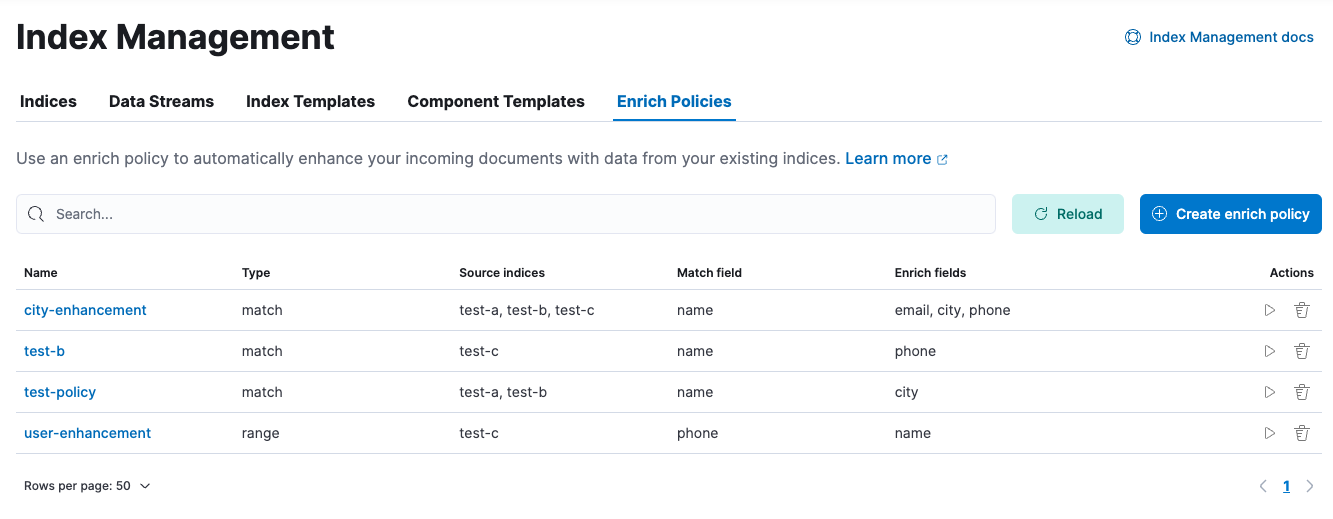
When creating an enrich policy, the UI walks you through the configuration setup and selecting the fields. Before you can use the policy with an enrich processor or ES|QL query, you must execute the policy.
When executed, an enrich policy uses enrich data from the policy’s source indices to create a streamlined system index called the enrich index. The policy uses this index to match and enrich incoming documents.
Check out these examples: