Elastic Agent to Elasticsearch: APIs for collection
Elastic Cloud Serverless projects are autoscaled environments, fully managed by Elastic and available on Elastic Cloud. Availability This functionality is generally available and ready for production usage. Serverless interfaces and procedures might differ from classic Elastic Stack deployments. The Elastic Stack includes Elastic's core products such as Elasticsearch, Kibana, Logstash, and Beats. Availability This functionality is generally available and ready for production usage. Unless stated otherwise on the page, this functionality is available when your Elastic Stack is deployed on Elastic Cloud Hosted, Elastic Cloud Enterprise, Elastic Cloud on Kubernetes, and self-managed environments. This documentation corresponds to the latest patch available for each minor version. If you're not using the latest patch, check the release notes for changes.
Serverless
Generally available
Stack
Generally available
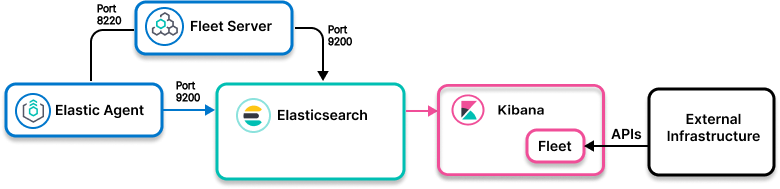
- Ingest model
- Control path: Elastic Agent to Fleet to Elasticsearch
Data path: Elastic Agent running on a user-managed host to collect data about the external infrastructure through APIs, and then forwarding to Elasticsearch - Use when
- An Elastic Agent integration exists for software components that expose APIs for data collection
- Examples
- Cloudflare or any other data sources that exposes API for data retrieval
- Find the integration for your data source. In Kibana, go to Management> Integrations.
- Enable the integration and set up Elastic Agent.
- Create a collector VM/container and run Elastic Agent and the integration to scrape the external API. Or, set up the external API to push data to the Elastic Agent running the integration.
For details and next steps, check out the Elastic Agent integrations docs for your data source.