Downsampling concepts
Elastic Cloud Serverless projects are autoscaled environments, fully managed by Elastic and available on Elastic Cloud. Availability This functionality is generally available and ready for production usage. Elastic Cloud Serverless projects are autoscaled environments, fully managed by Elastic and available on Elastic Cloud. Availability This functionality is generally available and ready for production usage. Elastic Cloud Serverless projects are autoscaled environments, fully managed by Elastic and available on Elastic Cloud. Availability This functionality is generally available and ready for production usage. Elastic Cloud Serverless projects are autoscaled environments, fully managed by Elastic and available on Elastic Cloud. Availability This functionality is not available in Serverless Elasticsearch Vector Database projects. The Elastic Stack includes Elastic's core products such as Elasticsearch, Kibana, Logstash, and Beats. Availability This functionality is generally available and ready for production usage. Unless stated otherwise on the page, this functionality is available when your Elastic Stack is deployed on Elastic Cloud Hosted, Elastic Cloud Enterprise, Elastic Cloud on Kubernetes, and self-managed environments. This documentation corresponds to the latest patch available for each minor version. If you're not using the latest patch, check the release notes for changes.
Serverless Elasticsearch
Generally available
Serverless Observability
Generally available
Serverless Security
Generally available
Serverless Vector Database
Unavailable
Unavailable
Stack
Generally available
This page explains core downsampling concepts.
Downsampling works with time series data streams only.
A time series is a sequence of observations taken over time for a specific entity. The observed samples can be represented as a continuous function, where the time series dimensions remain constant and the time series metrics change over time.
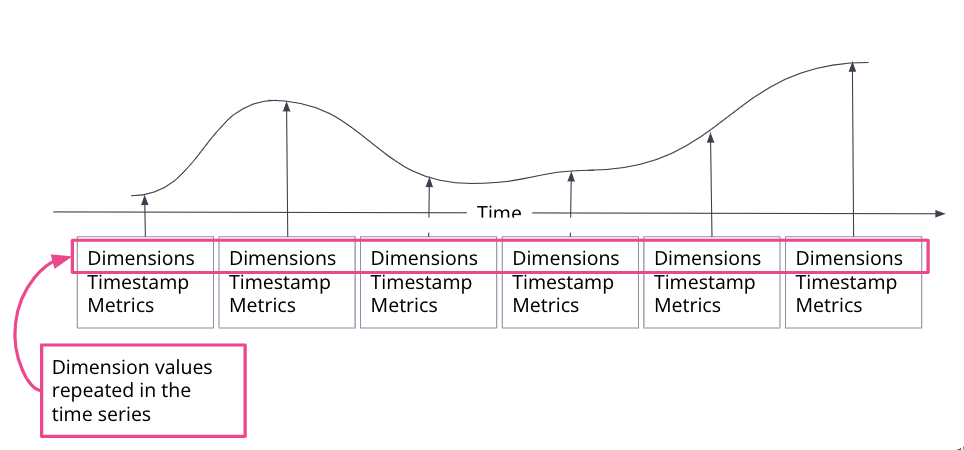
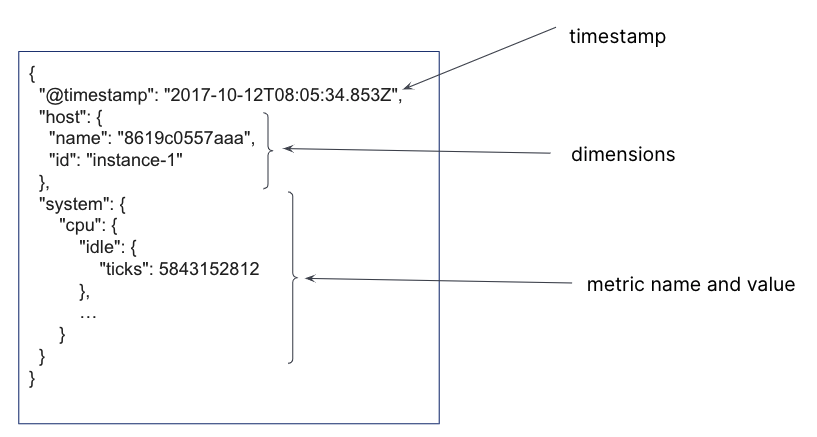
In a time series data stream, a single document is created for each timestamp. The document contains the immutable time series dimensions, plus metric names and values. Several time series dimensions and metrics can be stored for a single timestamp.
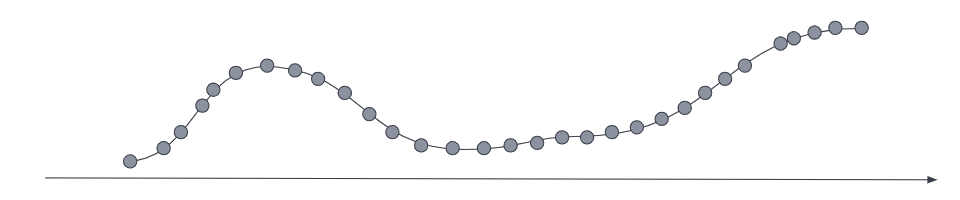
For the most current data, the metrics series typically has a low sampling time interval to optimize for queries that require a high data resolution.
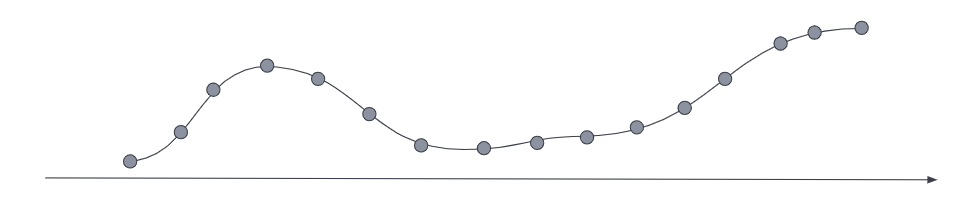
Downsampling reduces the footprint of older, less frequently accessed data by replacing the original time series with a data stream of a higher sampling interval, plus statistical representations of the data. For example, if the original metrics samples were taken every 10 seconds, you might choose to reduce the sample granularity to hourly as the data ages. Or you might choose to reduce the granularity of cold archival data to monthly or less.
Downsampling is applied to the individual backing indices of the TSDS. The downsampling operation traverses the source time series index and performs the following steps:
Creates a new document for each group of documents with matching
_tsidvalues (time series dimension fields), grouped into buckets that correspond to timestamps in a specific interval.For example, a TSDS index that contains metrics sampled every 10 seconds can be downsampled to an hourly index. All documents within a given hour interval are summarized and stored as a single document in the downsampled index.
For each new document, copies all time series dimensions from the source index to the target index. Dimensions in a TSDS are constant, so this step happens only once per bucket.
For each time series metric field, it computes the downsampled values based on the downsampling method.
For all other fields, copies the most recent value to the target index.
Replaces the original index with the downsampled index, then deletes the original index.
The new, downsampled index is created on the data tier of the original index and inherits the original settings, like number of shards and replicas.
You can downsample a downsampled index. The subsequent downsampling interval must be a multiple of the interval used in the preceding downsampling operation.
Downsampling supports two methods for reducing multiple values in the same bucket to a single representative result:
last_value: The Elastic Stack includes Elastic's core products such as Elasticsearch, Kibana, Logstash, and Beats. Availability Preview since 9.3 This functionality is in technical preview and is ready for evaluation. Use with caution in production; it is not recommended for mission-critical workloads. Elastic will work to fix any issues, but features in technical preview are not subject to the support SLA of official GA features. Specific Support terms apply. Unless stated otherwise on the page, this functionality is available when your Elastic Stack is deployed on Elastic Cloud Hosted, Elastic Cloud Enterprise, Elastic Cloud on Kubernetes, and self-managed environments. This documentation corresponds to the latest patch available for each minor version. If you're not using the latest patch, check the release notes for changes. Elastic Cloud Serverless projects are autoscaled environments, fully managed by Elastic and available on Elastic Cloud. Availability Generally available This functionality is generally available and ready for production usage. Serverless interfaces and procedures might differ from classic Elastic Stack deployments. Stores only the most recent value for each metric in the bucket. This method reduces the storage footprint the most, but it also reduces data accuracy. It applies to all metric types.aggregateStores statistical summaries for the values in each bucket. This method preserves more information thanlast_value, but it requires more storage. It applies to each metric type as follows:gaugefields:- Stores
min,max,sum, andvalue_countasaggregate_metric_double.
- Stores
counterfields:- For cumulative counters: stores the first value, and stores up to two data points if a counter reset is detected The Elastic Stack includes Elastic's core products such as Elasticsearch, Kibana, Logstash, and Beats. Availability Generally available since 9.4 This functionality is generally available and ready for production usage. Unless stated otherwise on the page, this functionality is available when your Elastic Stack is deployed on Elastic Cloud Hosted, Elastic Cloud Enterprise, Elastic Cloud on Kubernetes, and self-managed environments. This documentation corresponds to the latest patch available for each minor version. If you're not using the latest patch, check the release notes for changes. . The field type is preserved. In previous versions, only the last value is stored.
- The Elastic Stack includes Elastic's core products such as Elasticsearch, Kibana, Logstash, and Beats. Availability Generally available since 9.5 This functionality is generally available and ready for production usage. Unless stated otherwise on the page, this functionality is available when your Elastic Stack is deployed on Elastic Cloud Hosted, Elastic Cloud Enterprise, Elastic Cloud on Kubernetes, and self-managed environments. This documentation corresponds to the latest patch available for each minor version. If you're not using the latest patch, check the release notes for changes. For delta counters: stores the sum of values in the bucket.
histogramfields The Elastic Stack includes Elastic's core products such as Elasticsearch, Kibana, Logstash, and Beats. Availability Preview since 9.3 This functionality is in technical preview and is ready for evaluation. Use with caution in production; it is not recommended for mission-critical workloads. Elastic will work to fix any issues, but features in technical preview are not subject to the support SLA of official GA features. Specific Support terms apply. Unless stated otherwise on the page, this functionality is available when your Elastic Stack is deployed on Elastic Cloud Hosted, Elastic Cloud Enterprise, Elastic Cloud on Kubernetes, and self-managed environments. This documentation corresponds to the latest patch available for each minor version. If you're not using the latest patch, check the release notes for changes. Elastic Cloud Serverless projects are autoscaled environments, fully managed by Elastic and available on Elastic Cloud. Availability Preview This functionality is in technical preview and is ready for evaluation. Use with caution in production; it is not recommended for mission-critical workloads. Elastic will work to fix any issues, but features in technical preview are not subject to the support SLA of official GA features. Specific Support terms apply. Serverless interfaces and procedures might differ from classic Elastic Stack deployments.Merges individual histograms into a single histogram, preserving the field type.
All three histogram field types are supported:
histogram,tdigest, andexponential_histogram.The
histogramand thetdigestfield type use the T-Digest algorithm for merging.The Elastic Stack includes Elastic's core products such as Elasticsearch, Kibana, Logstash, and Beats. Availability Generally available since 9.5 This functionality is generally available and ready for production usage. Unless stated otherwise on the page, this functionality is available when your Elastic Stack is deployed on Elastic Cloud Hosted, Elastic Cloud Enterprise, Elastic Cloud on Kubernetes, and self-managed environments. This documentation corresponds to the latest patch available for each minor version. If you're not using the latest patch, check the release notes for changes. The metric temporality is preserved. For cumulative histograms, Elasticsearch use the same algorithm as for cumulative counters.
When downsampling a downsampled index, use the same downsampling method as the source index.
The target downsampled index uses the same field mappings as the source index, with one exception: time_series_metric: gauge fields are mapped to aggregate_metric_double.
An aggregate_metric_double can be used in max, min, sum, value_count, and avg aggregations without losing accuracy.
The Elastic Stack includes Elastic's core products such as Elasticsearch, Kibana, Logstash, and Beats.
Availability
Generally available since 9.4
This functionality is generally available and ready for production usage.
Unless stated otherwise on the page, this functionality is available when your Elastic Stack is deployed on Elastic Cloud Hosted, Elastic Cloud Enterprise, Elastic Cloud on Kubernetes, and self-managed environments.
This documentation corresponds to the latest patch available for each minor version. If you're not using the latest patch, check the release notes for changes.
Elastic Cloud Serverless projects are autoscaled environments, fully managed by Elastic and available on Elastic Cloud.
Availability
Generally available
This functionality is generally available and ready for production usage.
Serverless interfaces and procedures might differ from classic Elastic Stack deployments.
In ES|QL, a downsampled gauge stored as aggregate_metric_double can still be used as a double in other operations, but with reduced accuracy. In this case, the average value for each downsample interval is used as the single representative value.