Elastic Agent to Elasticsearch: Agent installed
Elastic Cloud Serverless projects are autoscaled environments, fully managed by Elastic and available on Elastic Cloud. Availability This functionality is generally available and ready for production usage. Serverless interfaces and procedures might differ from classic Elastic Stack deployments. The Elastic Stack includes Elastic's core products such as Elasticsearch, Kibana, Logstash, and Beats. Availability This functionality is generally available and ready for production usage. Unless stated otherwise on the page, this functionality is available when your Elastic Stack is deployed on Elastic Cloud Hosted, Elastic Cloud Enterprise, Elastic Cloud on Kubernetes, and self-managed environments. This documentation corresponds to the latest patch available for each minor version. If you're not using the latest patch, check the release notes for changes.
Serverless
Generally available
Stack
Generally available
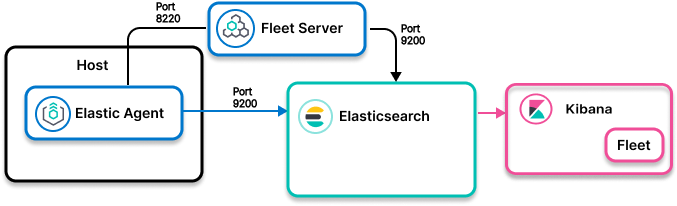
- Ingest model
- Control path: Elastic Agent to Fleet to Elasticsearch
Data path: Elastic Agent to Elasticsearch - Use when
- An Elastic Agent integration exists in the Kibana integrations UI for the software you want to monitor, observe, and protect.
- Examples
-
- System integration that collects metrics and logs from operating systems
- Kubernetes integration that collects metrics and logs from Kubernetes master and worker nodes, and from workloads running on worker node pods
- Find the integration for your data source. In Kibana, go to Management> Integrations.
- Enable the integration and set up Elastic Agent.
- Launch discover/dashboard to explore.
For details and next steps, check out the Elastic Agent integrations docs for your data source.