Duplicate a dashboard
Elastic Cloud Serverless projects are autoscaled environments, fully managed by Elastic and available on Elastic Cloud. Availability This functionality is generally available and ready for production usage. Serverless interfaces and procedures might differ from classic Elastic Stack deployments. The Elastic Stack includes Elastic's core products such as Elasticsearch, Kibana, Logstash, and Beats. Availability This functionality is generally available and ready for production usage. Unless stated otherwise on the page, this functionality is available when your Elastic Stack is deployed on Elastic Cloud Hosted, Elastic Cloud Enterprise, Elastic Cloud on Kubernetes, and self-managed environments. This documentation corresponds to the latest patch available for each minor version. If you're not using the latest patch, check the release notes for changes.
Serverless
Generally available
Stack
Generally available
Create a copy of an existing dashboard in Kibana to customize it independently without affecting the original. This is particularly useful when you want to create variations of a dashboard for different teams or use cases, or when you need to edit a managed dashboard that comes from an integration.
To duplicate a dashboard, you need:
- All privilege for the Dashboard feature in Kibana
- Open the dashboard you want to duplicate.
- Exit the edit mode, and click Duplicate in the application menu.
- In the Duplicate dashboard window, enter a title and optional description and tags.
- Click Save.
You will be redirected to the duplicated dashboard.
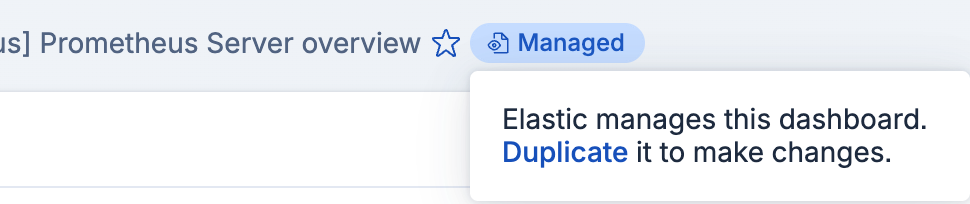
To duplicate a managed dashboard, follow the instructions above or click the Managed badge in the application menu. Then click Duplicate in the dialog that appears.