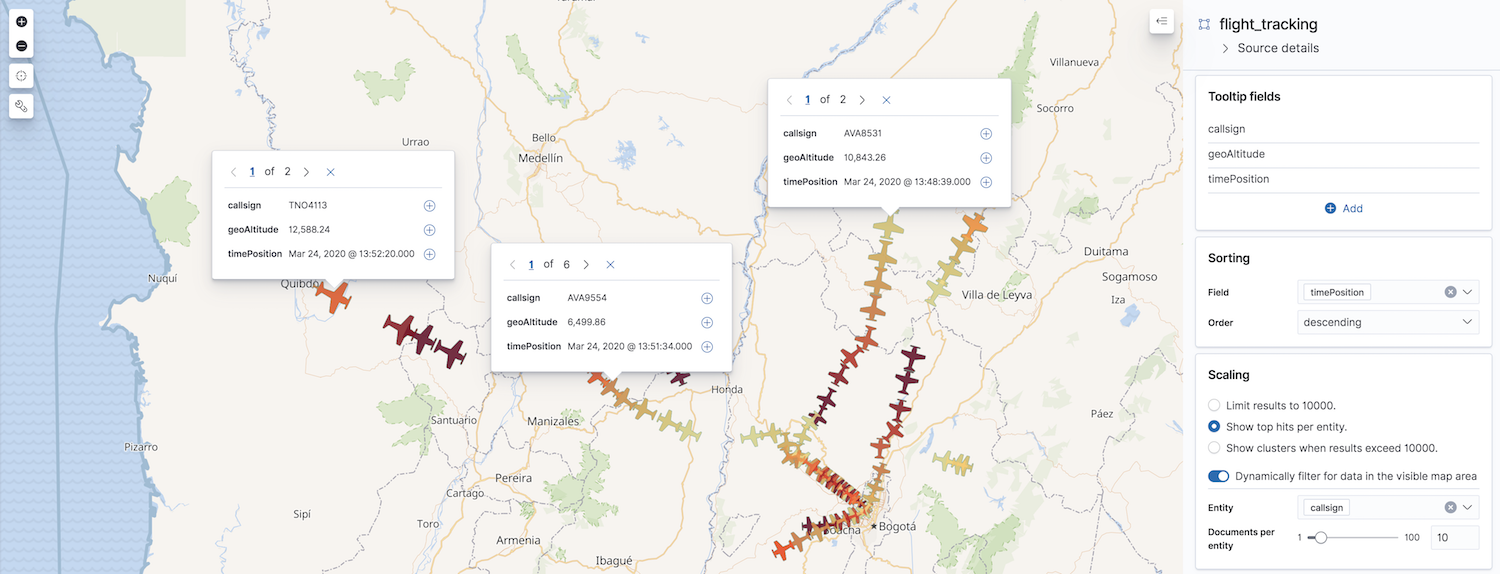
Display the most relevant documents per entity
Elastic Cloud Serverless projects are autoscaled environments, fully managed by Elastic and available on Elastic Cloud. Availability This functionality is generally available and ready for production usage. Serverless interfaces and procedures might differ from classic Elastic Stack deployments. The Elastic Stack includes Elastic's core products such as Elasticsearch, Kibana, Logstash, and Beats. Availability This functionality is generally available and ready for production usage. Unless stated otherwise on the page, this functionality is available when your Elastic Stack is deployed on Elastic Cloud Hosted, Elastic Cloud Enterprise, Elastic Cloud on Kubernetes, and self-managed environments. This documentation corresponds to the latest patch available for each minor version. If you're not using the latest patch, check the release notes for changes.
Serverless
Generally available
Stack
Generally available
Use Top hits per entity to display the most relevant documents per entity, for example, the most recent GPS tracks per flight route. To get this data, Elasticsearch first groups your data using a terms aggregation, then accumulates the most relevant documents based on sort order for each entry using a top hits metric aggregation.
To enable top hits:
- Click Add layer, then select the Top hits per entity layer.
- Configure Data view and Geospatial field.
- Set Entity to the field that identifies entities in your documents. This field will be used in the terms aggregation to group your documents into entity buckets.
- Set Documents per entity to configure the maximum number of documents accumulated per entity. This setting is limited to the
index.max_inner_result_windowindex setting, which defaults to 100.