Connectors in Elastic Agent Builder
Elastic Cloud Serverless projects are autoscaled environments, fully managed by Elastic and available on Elastic Cloud. Availability This functionality is in technical preview and is ready for evaluation. Use with caution in production; it is not recommended for mission-critical workloads. Elastic will work to fix any issues, but features in technical preview are not subject to the support SLA of official GA features. Specific Support terms apply. Serverless interfaces and procedures might differ from classic Elastic Stack deployments. The Elastic Stack includes Elastic's core products such as Elasticsearch, Kibana, Logstash, and Beats. Availability This functionality is in technical preview and is ready for evaluation. Use with caution in production; it is not recommended for mission-critical workloads. Elastic will work to fix any issues, but features in technical preview are not subject to the support SLA of official GA features. Specific Support terms apply. Unless stated otherwise on the page, this functionality is available when your Elastic Stack is deployed on Elastic Cloud Hosted, Elastic Cloud Enterprise, Elastic Cloud on Kubernetes, and self-managed environments. This documentation corresponds to the latest patch available for each minor version. If you're not using the latest patch, check the release notes for changes.
Serverless
Preview
Preview
Stack
Preview
9.4+
Preview since 9.4
Elastic Agent Builder connectors give agents access to external systems, such as messaging services, cloud functions, and third-party APIs. Agents use connectors to act on those systems without you building a custom tool for each action.
The connectors library is hidden until you turn on the agentBuilder:experimentalFeatures advanced setting in Kibana.
Elastic Agent Builder connectors use the underlying Kibana Stack connectors framework to store credentials securely and manage integrations. They're different from Generative AI connectors, which only configure external LLM providers.
The Elastic Stack includes Elastic's core products such as Elasticsearch, Kibana, Logstash, and Beats. Availability Deprecated since 9.5 This functionality is deprecated. You can still use it, but it'll be removed in a future Elastic Stack update. This documentation corresponds to the latest patch available for each minor version. If you're not using the latest patch, check the release notes for changes. Elastic Cloud Serverless projects are autoscaled environments, fully managed by Elastic and available on Elastic Cloud. Availability Deprecated This functionality is deprecated. You can still use it, but it'll be removed in a future Elastic Cloud Serverless update. Generative AI connectors are deprecated. This deprecation doesn't affect Elastic Agent Builder connectors.
You manage connectors per Kibana space from Manage components → Connectors. For the available connector types, refer to Data and context sources connectors. Some connector types in the catalog show a Technical preview badge.
When an agent needs to interact with an external system, it reads the schemas of the connectors available to it. It then runs the sub-action it needs through a built-in system tool, platform.core.execute_connector_sub_action, and fills in the sub-action's parameters itself. For example, it can look up a Slack channel ID or search AlienVault OTX for threat intelligence.
The Elastic Stack includes Elastic's core products such as Elasticsearch, Kibana, Logstash, and Beats.
Availability
Planned
We plan to add this functionality in a future Elastic Stack update. Subject to changes.
Unless stated otherwise on the page, this functionality is available when your Elastic Stack is deployed on Elastic Cloud Hosted, Elastic Cloud Enterprise, Elastic Cloud on Kubernetes, and self-managed environments.
This documentation corresponds to the latest patch available for each minor version. If you're not using the latest patch, check the release notes for changes.
Elastic Cloud Serverless projects are autoscaled environments, fully managed by Elastic and available on Elastic Cloud.
Availability
Preview
This functionality is in technical preview and is ready for evaluation. Use with caution in production; it is not recommended for mission-critical workloads. Elastic will work to fix any issues, but features in technical preview are not subject to the support SLA of official GA features. Specific Support terms apply.
Serverless interfaces and procedures might differ from classic Elastic Stack deployments.
An agent can only run the connectors assigned to it. At run time, it uses the built-in connector-discovery skill to look up its connectors and load their sub-actions and parameter schemas. Enable Elastic capabilities includes this skill. To assign connectors, refer to Assign connectors to an agent.
The Elastic Stack includes Elastic's core products such as Elasticsearch, Kibana, Logstash, and Beats. Availability Planned We plan to add this functionality in a future Elastic Stack update. Subject to changes. Unless stated otherwise on the page, this functionality is available when your Elastic Stack is deployed on Elastic Cloud Hosted, Elastic Cloud Enterprise, Elastic Cloud on Kubernetes, and self-managed environments. This documentation corresponds to the latest patch available for each minor version. If you're not using the latest patch, check the release notes for changes. Elastic Cloud Serverless projects are autoscaled environments, fully managed by Elastic and available on Elastic Cloud. Availability Preview This functionality is in technical preview and is ready for evaluation. Use with caution in production; it is not recommended for mission-critical workloads. Elastic will work to fix any issues, but features in technical preview are not subject to the support SLA of official GA features. Specific Support terms apply. Serverless interfaces and procedures might differ from classic Elastic Stack deployments. Within those connectors, an agent sees only the actions that the connector allows and that aren't marked Workflow only. Refer to Limit a connector's actions.
The Elastic Stack includes Elastic's core products such as Elasticsearch, Kibana, Logstash, and Beats. Availability Preview from 9.4 to 9.5 This functionality is in technical preview and is ready for evaluation. Use with caution in production; it is not recommended for mission-critical workloads. Elastic will work to fix any issues, but features in technical preview are not subject to the support SLA of official GA features. Specific Support terms apply. Unless stated otherwise on the page, this functionality is available when your Elastic Stack is deployed on Elastic Cloud Hosted, Elastic Cloud Enterprise, Elastic Cloud on Kubernetes, and self-managed environments. This documentation corresponds to the latest patch available for each minor version. If you're not using the latest patch, check the release notes for changes. Unlike standalone tools, connectors don't need to be assigned to agents. Any agent can run any connector in the space.
To add a connector to the library:
- In the left sidebar, select Manage components → Connectors to open the Connectors library.
- Click Create connector.
- Select a connector type from the catalog.
- Provide the required configuration.
- The Elastic Stack includes Elastic's core products such as Elasticsearch, Kibana, Logstash, and Beats. Availability Planned We plan to add this functionality in a future Elastic Stack update. Subject to changes. Unless stated otherwise on the page, this functionality is available when your Elastic Stack is deployed on Elastic Cloud Hosted, Elastic Cloud Enterprise, Elastic Cloud on Kubernetes, and self-managed environments. This documentation corresponds to the latest patch available for each minor version. If you're not using the latest patch, check the release notes for changes. Elastic Cloud Serverless projects are autoscaled environments, fully managed by Elastic and available on Elastic Cloud. Availability Preview This functionality is in technical preview and is ready for evaluation. Use with caution in production; it is not recommended for mission-critical workloads. Elastic will work to fix any issues, but features in technical preview are not subject to the support SLA of official GA features. Specific Support terms apply. Serverless interfaces and procedures might differ from classic Elastic Stack deployments. (Optional) If the form includes Actions, select Custom to limit which actions the connector can run. Refer to Limit a connector's actions.
- Click Save.
The configured connector appears in the library.
The Elastic Stack includes Elastic's core products such as Elasticsearch, Kibana, Logstash, and Beats. Availability Planned We plan to add this functionality in a future Elastic Stack update. Subject to changes. Unless stated otherwise on the page, this functionality is available when your Elastic Stack is deployed on Elastic Cloud Hosted, Elastic Cloud Enterprise, Elastic Cloud on Kubernetes, and self-managed environments. This documentation corresponds to the latest patch available for each minor version. If you're not using the latest patch, check the release notes for changes. Elastic Cloud Serverless projects are autoscaled environments, fully managed by Elastic and available on Elastic Cloud. Availability Preview This functionality is in technical preview and is ready for evaluation. Use with caution in production; it is not recommended for mission-critical workloads. Elastic will work to fix any issues, but features in technical preview are not subject to the support SLA of official GA features. Specific Support terms apply. Serverless interfaces and procedures might differ from classic Elastic Stack deployments. To let an agent use the connector, assign it to the agent.
The Elastic Stack includes Elastic's core products such as Elasticsearch, Kibana, Logstash, and Beats. Availability Preview from 9.4 to 9.5 This functionality is in technical preview and is ready for evaluation. Use with caution in production; it is not recommended for mission-critical workloads. Elastic will work to fix any issues, but features in technical preview are not subject to the support SLA of official GA features. Specific Support terms apply. Unless stated otherwise on the page, this functionality is available when your Elastic Stack is deployed on Elastic Cloud Hosted, Elastic Cloud Enterprise, Elastic Cloud on Kubernetes, and self-managed environments. This documentation corresponds to the latest patch available for each minor version. If you're not using the latest patch, check the release notes for changes. Any agent can use the connector immediately.
Elastic Cloud Serverless projects are autoscaled environments, fully managed by Elastic and available on Elastic Cloud. Availability This functionality is in technical preview and is ready for evaluation. Use with caution in production; it is not recommended for mission-critical workloads. Elastic will work to fix any issues, but features in technical preview are not subject to the support SLA of official GA features. Specific Support terms apply. Serverless interfaces and procedures might differ from classic Elastic Stack deployments. The Elastic Stack includes Elastic's core products such as Elasticsearch, Kibana, Logstash, and Beats. Availability We plan to add this functionality in a future Elastic Stack update. Subject to changes. Unless stated otherwise on the page, this functionality is available when your Elastic Stack is deployed on Elastic Cloud Hosted, Elastic Cloud Enterprise, Elastic Cloud on Kubernetes, and self-managed environments. This documentation corresponds to the latest patch available for each minor version. If you're not using the latest patch, check the release notes for changes.
Serverless
Preview
Preview
Stack
Planned
Planned
Newer connector types, such as Gmail, Jira Cloud, and GitHub, include an Actions setting on the create and edit form when they define more than one action. Older connector types, such as Email, Jira, and ServiceNow ITSM, don't show it, even when they have several actions.
The setting applies everywhere the connector runs: in agents, workflows, and the Run a connector API. Kibana rejects calls to actions that the setting doesn't allow.
The Actions setting has two options:
- All
- The default. Allows every action, including actions added to the connector type in later versions.
- Custom
-
Allows only the actions you select. You must select at least one action.
When you first switch to Custom, the read actions are selected by default. You can change the selection.
Actions added to the connector type later stay unselected until you edit the connector and select them.
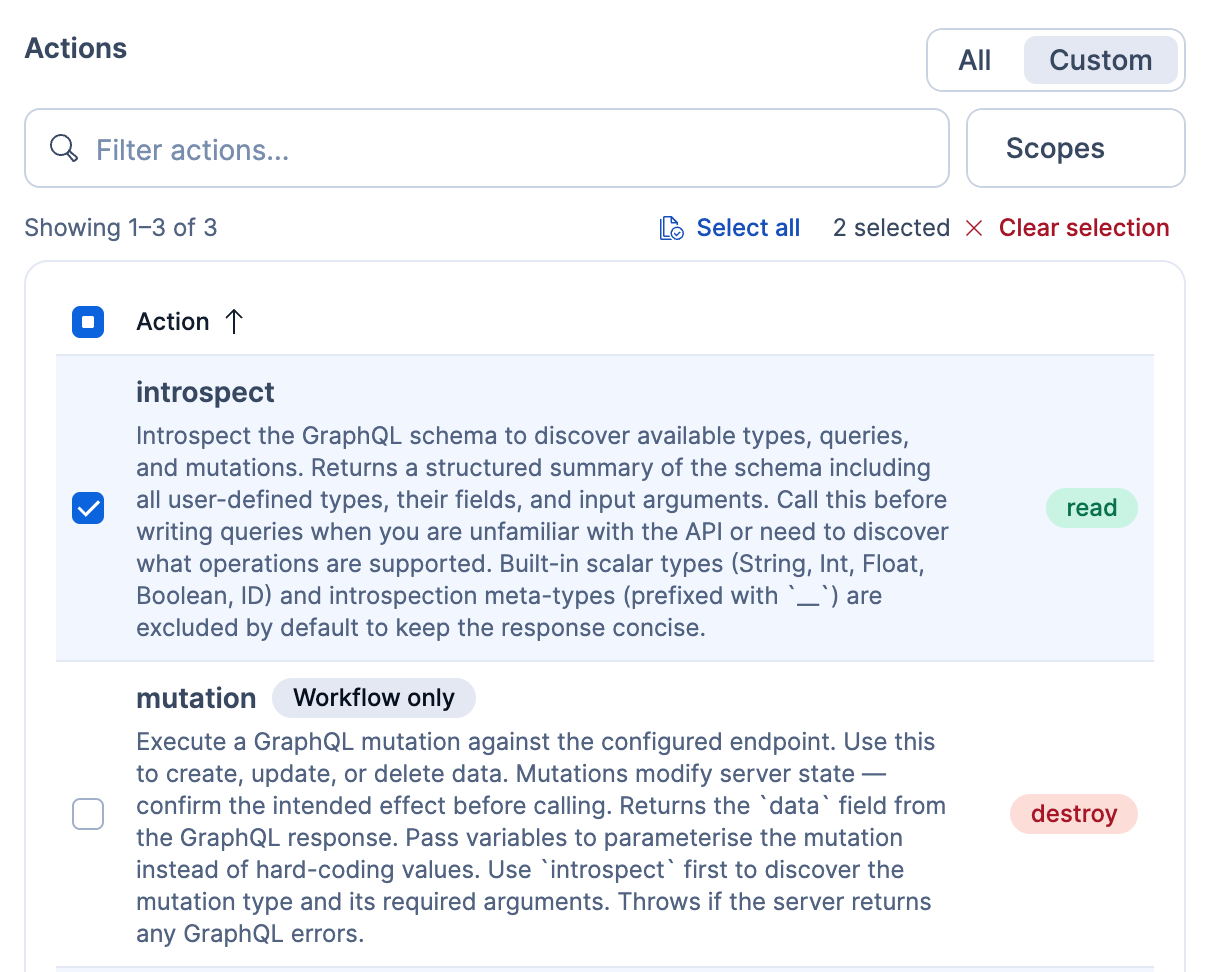
Each action has a scope badge: read, write, or destroy. Some actions also have a Workflow only badge. Agents can't run these actions, even when the connector allows them. The Run a connector API can run them, and so can workflows, for connector types available in workflows.
The following screenshot shows a GraphQL connector in Custom mode, with its read actions selected and a Workflow only action left unselected:
To change which actions an existing connector allows:
- In the sidebar, select Manage components → Connectors.
- In the Connectors library, click the connector name to open its edit form.
- Under Actions, select Custom.
- Select the actions to allow.
- Click Save.
The allowed actions are the same for every caller of the connector. To make an action with the write or destroy badge available to workflows but not to agents:
- Use a separate connector for workflows, and don't assign it to the agent.
- Don't give the agent a workflow tool that runs that workflow.
This works only for connector types available in workflows.
Elastic Cloud Serverless projects are autoscaled environments, fully managed by Elastic and available on Elastic Cloud. Availability This functionality is in technical preview and is ready for evaluation. Use with caution in production; it is not recommended for mission-critical workloads. Elastic will work to fix any issues, but features in technical preview are not subject to the support SLA of official GA features. Specific Support terms apply. Serverless interfaces and procedures might differ from classic Elastic Stack deployments. The Elastic Stack includes Elastic's core products such as Elasticsearch, Kibana, Logstash, and Beats. Availability We plan to add this functionality in a future Elastic Stack update. Subject to changes. Unless stated otherwise on the page, this functionality is available when your Elastic Stack is deployed on Elastic Cloud Hosted, Elastic Cloud Enterprise, Elastic Cloud on Kubernetes, and self-managed environments. This documentation corresponds to the latest patch available for each minor version. If you're not using the latest patch, check the release notes for changes.
Serverless
Preview
Preview
Stack
Planned
Planned
New agents start with no connectors. You assign connectors from the agent after you save it. You can also create a connector in chat and assign it to that agent.
To assign connectors in Kibana, you need:
- Permission to edit the agent
- The Actions and Connectors: All Kibana privilege
If Enable Elastic capabilities is off for the agent, also assign the built-in connector-discovery skill on the agent's Skills page. Without it, the agent can't find its connectors.
To assign a connector to an agent:
- Select the agent, then select Customize → Connectors in the left sidebar.
- Select Add connector.
- Select one of the following:
- From library: Assign connectors that already exist in the connectors library.
- Create new connector: Configure a new connector. Kibana adds it to the library and assigns it to the agent.
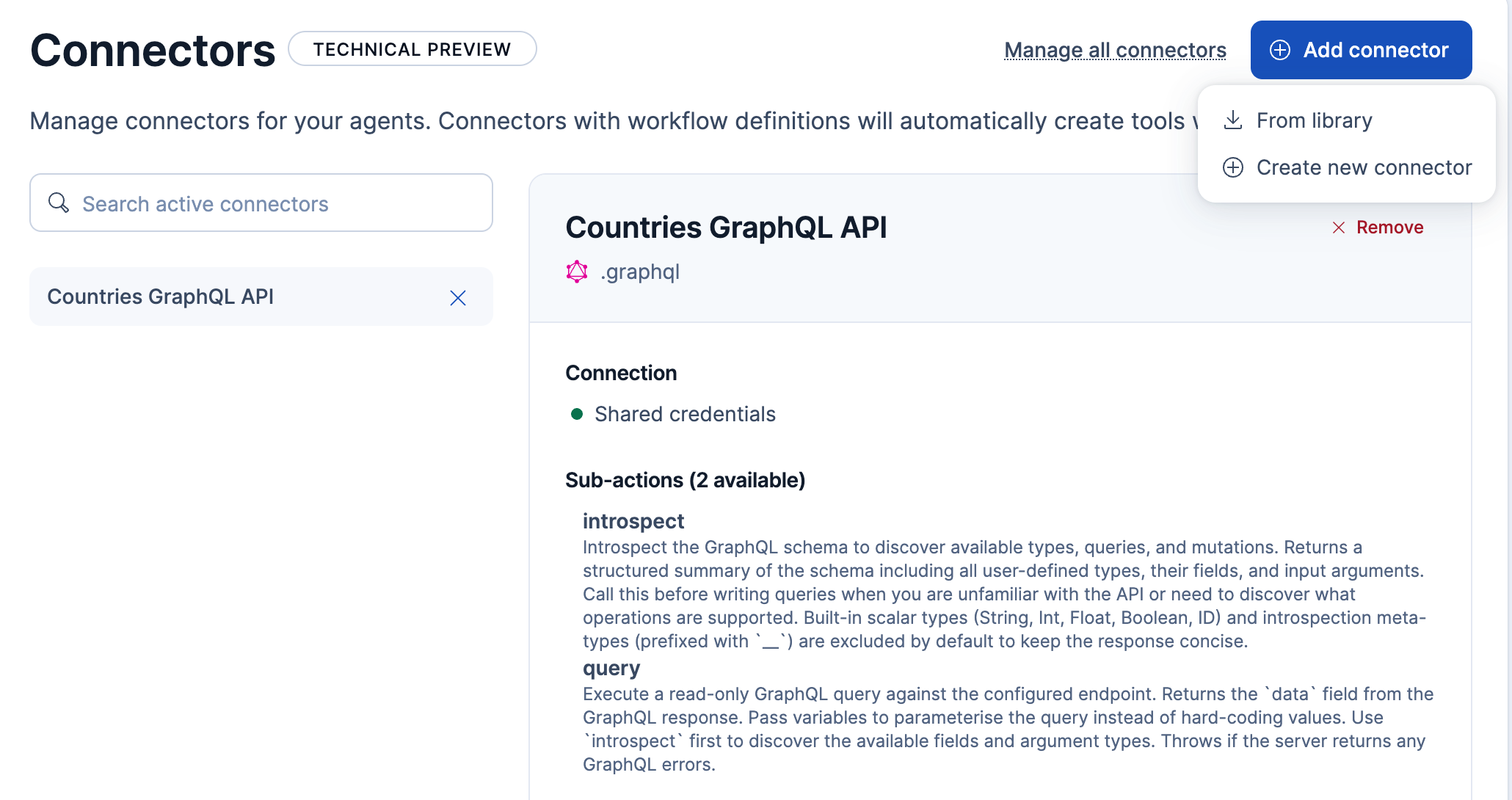
The connector and its sub-actions appear on the agent's Connectors page. The following image shows the page with one assigned connector and the Add connector menu open:
To stop an agent from using a connector, select the connector on the agent's Connectors page, then select Remove and confirm. The connector stays in the library, and other agents it's assigned to can still use it.
An agent that was never assigned connectors can't use any. Check for the following agents and assign the connectors they need:
- The built-in Elastic AI Agent.
- Agents created with the Agents API without
connector_ids. - The Elastic Stack includes Elastic's core products such as Elasticsearch, Kibana, Logstash, and Beats. Availability Planned We plan to add this functionality in a future Elastic Stack update. Subject to changes. Unless stated otherwise on the page, this functionality is available when your Elastic Stack is deployed on Elastic Cloud Hosted, Elastic Cloud Enterprise, Elastic Cloud on Kubernetes, and self-managed environments. This documentation corresponds to the latest patch available for each minor version. If you're not using the latest patch, check the release notes for changes. Agents created in 9.4 or 9.5 without a connector list. In those versions, these agents could use any connector.
- Elastic Cloud Serverless projects are autoscaled environments, fully managed by Elastic and available on Elastic Cloud. Availability Preview This functionality is in technical preview and is ready for evaluation. Use with caution in production; it is not recommended for mission-critical workloads. Elastic will work to fix any issues, but features in technical preview are not subject to the support SLA of official GA features. Specific Support terms apply. Serverless interfaces and procedures might differ from classic Elastic Stack deployments. Existing agents without a connector list, including agents created before new agents started with an empty list. Previously, these agents could use any connector.
Also check agents that already had a connector list in 9.5 or on Serverless, and assign any connectors they still need. These agents can run only the connectors in their list. Previously, the list limited which connectors an agent could discover, not which ones it could run.
When you create a connector from chat with the connector-authoring skill, Kibana adds it to the connectors library. If you have the required privileges, Kibana also assigns it to the agent in that conversation.
You need these privileges:
- To create the connector: Actions and Connectors: All.
- To also assign it: Create and edit agents and permission to edit the agent.
To create a connector from chat:
- On the connector setup card in the conversation, select Configure connector.
- Complete the form.
- Select Create connector.
You can edit the Elastic AI Agent, so connectors you create while chatting with it are assigned to it. Other built-in agents are read-only.
If Kibana can't assign the connector, it still creates it and shows a Connector created, but not added to the agent warning. This happens when:
- You don't have the Create and edit agents privilege.
- You can't edit the agent, such as a read-only built-in agent or an agent you only have view access to.
To fix this, assign the connector from the agent's Connectors page.
Connector types that the agent can't call from chat, such as email or Slack (v1), are added to the library only. For these types, Kibana doesn't show the warning unless you lack the Create and edit agents privilege.
Elastic Cloud Serverless projects are autoscaled environments, fully managed by Elastic and available on Elastic Cloud. Availability This functionality is in technical preview and is ready for evaluation. Use with caution in production; it is not recommended for mission-critical workloads. Elastic will work to fix any issues, but features in technical preview are not subject to the support SLA of official GA features. Specific Support terms apply. Serverless interfaces and procedures might differ from classic Elastic Stack deployments. The Elastic Stack includes Elastic's core products such as Elasticsearch, Kibana, Logstash, and Beats. Availability This functionality is in technical preview and is ready for evaluation. Use with caution in production; it is not recommended for mission-critical workloads. Elastic will work to fix any issues, but features in technical preview are not subject to the support SLA of official GA features. Specific Support terms apply. Unless stated otherwise on the page, this functionality is available when your Elastic Stack is deployed on Elastic Cloud Hosted, Elastic Cloud Enterprise, Elastic Cloud on Kubernetes, and self-managed environments. This documentation corresponds to the latest patch available for each minor version. If you're not using the latest patch, check the release notes for changes.
Serverless
Preview
Preview
Stack
Preview
9.5+
Preview since 9.5
When an agent needs access to an OAuth connector, the chat pauses and displays an authorization prompt. Select Authorize to open the provider's sign-in flow in a new browser tab. After authorization succeeds, return to the chat, where the agent retries the connector call and continues. Select Deny to cancel the call.
If authorization fails or the provider doesn't return you to Kibana, close the provider tab and select Deny in the chat. Correct the connector or OAuth configuration, then retry your request. To learn more about this prompt, refer to Authorize a connector.