Maintenance windows
Elastic Cloud Serverless projects are autoscaled environments, fully managed by Elastic and available on Elastic Cloud. Availability This functionality is generally available and ready for production usage. Elastic Cloud Serverless projects are autoscaled environments, fully managed by Elastic and available on Elastic Cloud. Availability This functionality is generally available and ready for production usage. The Elastic Stack includes Elastic's core products such as Elasticsearch, Kibana, Logstash, and Beats. Availability This functionality is generally available and ready for production usage. This functionality is in technical preview and is ready for evaluation. Use with caution in production; it is not recommended for mission-critical workloads. Elastic will work to fix any issues, but features in technical preview are not subject to the support SLA of official GA features. Specific Support terms apply. Unless stated otherwise on the page, this functionality is available when your Elastic Stack is deployed on Elastic Cloud Hosted, Elastic Cloud Enterprise, Elastic Cloud on Kubernetes, and self-managed environments. This documentation corresponds to the latest patch available for each minor version. If you're not using the latest patch, check the release notes for changes.
Serverless Observability
Generally available
Serverless Security
Generally available
Stack
GA
9.2+
…
Generally available since 9.2
Preview from 9.0 to 9.1
You can schedule single or recurring maintenance windows to temporarily reduce rule notifications. For example, a maintenance window prevents false alarms during planned outages.
By default, a maintenance window affects all rules in all Kibana apps within its space. You can refine the scope of a maintenance window by adding filters and rule categories.
Alerts continue to be generated, however notifications are suppressed as follows:
- When an alert occurs during a maintenance window, there are no notifications. When the alert recovers, there are no notifications—even if the recovery occurs after the maintenance window ends.
- When an alert occurs before a maintenance window and recovers during or after the maintenance window, notifications are sent as usual.
To use maintenance windows, you must have the appropriate subscription and Kibana feature privileges.
- To have full access to maintenance windows, you must have
Allprivileges for the Management > Maintenance Windows feature. - To have view-only access to maintenance windows, you must have
Readprivileges for the Management > Maintenance Windows feature.
For more details, refer to Kibana privileges.
In Management > Stack Management > Maintenance Windows or Project settings > Management > Maintenance Windows in Serverless, you can create, edit, cancel, and archive maintenance windows.
The Elastic Stack includes Elastic's core products such as Elasticsearch, Kibana, Logstash, and Beats. Availability Generally available since 9.1 This functionality is generally available and ready for production usage. Unless stated otherwise on the page, this functionality is available when your Elastic Stack is deployed on Elastic Cloud Hosted, Elastic Cloud Enterprise, Elastic Cloud on Kubernetes, and self-managed environments. This documentation corresponds to the latest patch available for each minor version. If you're not using the latest patch, check the release notes for changes. In Elastic Stack 9.1.0 and later, you can also delete maintenance windows that are running, canceled, or archived. Be aware that you can't recover maintenance windows once you delete them.
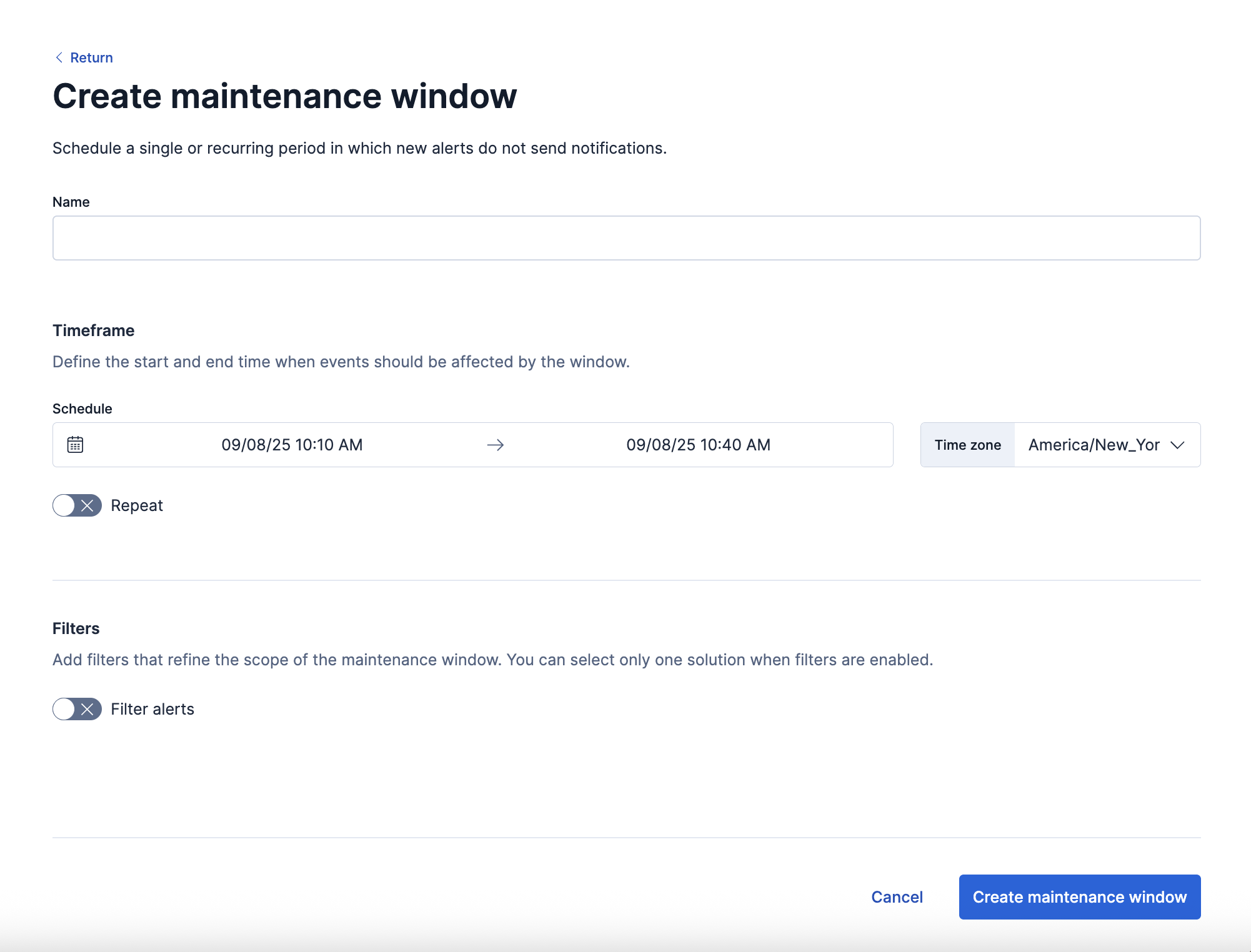
When you create a maintenance window, you must provide a name and a schedule. You can optionally configure it to repeat daily, monthly, yearly, or on a custom interval.
By default, maintenance windows affect all categories of rules. The category-specific maintenance window options alter this behavior. For the definitive list of rule types in each category, refer to the get rule types API.
The Elastic Stack includes Elastic's core products such as Elasticsearch, Kibana, Logstash, and Beats. Availability Removed in 9.2 This functionality was removed. You can no longer use it if you're running on this version or a later one. This documentation corresponds to the latest patch available for each minor version. If you're not using the latest patch, check the release notes for changes. Elastic Cloud Serverless projects are autoscaled environments, fully managed by Elastic and available on Elastic Cloud. Availability Removed This functionality was removed. You can no longer use it if you're running on this version or a later one. The option to specify rule categories for a maintenance window is no longer available. Maintenance windows apply to all rule types.
Note that existing maintenance windows are still applied to rule categories that were specified. However, if you edit a maintenance window after upgrading or using the latest version of Serverless, specified rule categories are removed and the maintenance window will be applied to all rules types.
If you turn on Filter alerts, you can use KQL to filter the alerts affected by the maintenance window:

- The Elastic Stack includes Elastic's core products such as Elasticsearch, Kibana, Logstash, and Beats. Availability Removed in 9.2 This functionality was removed. You can no longer use it if you're running on this version or a later one. This documentation corresponds to the latest patch available for each minor version. If you're not using the latest patch, check the release notes for changes. Elastic Cloud Serverless projects are autoscaled environments, fully managed by Elastic and available on Elastic Cloud. Availability Removed This functionality was removed. You can no longer use it if you're running on this version or a later one. You can select only a single category when you turn on filters.
- Some rules are not affected by maintenance window filters because their alerts do not contain requisite data. In particular, Stack Monitoring, tracking containment, anomaly detection jobs health, and transform health rules are not affected by the filters.
A maintenance window can have any one of the following statuses:
Upcoming: It will run at the scheduled date and time.Running: It is running.Finished: It ended and does not have a repeat schedule.Archived: It is archived. In a future release, archived maintenance windows will be queued for deletion.
When you view alert details in Kibana, each alert shows unique identifiers for maintenance windows that affected it.