Model Context Protocol (MCP) tools in Elastic Agent Builder
Elastic Cloud Serverless projects are autoscaled environments, fully managed by Elastic and available on Elastic Cloud. Availability This functionality is in technical preview and is ready for evaluation. Use with caution in production; it is not recommended for mission-critical workloads. Elastic will work to fix any issues, but features in technical preview are not subject to the support SLA of official GA features. Specific Support terms apply. Elastic Cloud Serverless projects are autoscaled environments, fully managed by Elastic and available on Elastic Cloud. Availability This functionality is in technical preview and is ready for evaluation. Use with caution in production; it is not recommended for mission-critical workloads. Elastic will work to fix any issues, but features in technical preview are not subject to the support SLA of official GA features. Specific Support terms apply. Elastic Cloud Serverless projects are autoscaled environments, fully managed by Elastic and available on Elastic Cloud. Availability This functionality is in technical preview and is ready for evaluation. Use with caution in production; it is not recommended for mission-critical workloads. Elastic will work to fix any issues, but features in technical preview are not subject to the support SLA of official GA features. Specific Support terms apply. The Elastic Stack includes Elastic's core products such as Elasticsearch, Kibana, Logstash, and Beats. Availability This functionality is in technical preview and is ready for evaluation. Use with caution in production; it is not recommended for mission-critical workloads. Elastic will work to fix any issues, but features in technical preview are not subject to the support SLA of official GA features. Specific Support terms apply. Unless stated otherwise on the page, this functionality is available when your Elastic Stack is deployed on Elastic Cloud Hosted, Elastic Cloud Enterprise, Elastic Cloud on Kubernetes, and self-managed environments. This documentation corresponds to the latest patch available for each minor version. If you're not using the latest patch, check the release notes for changes.
Serverless Elasticsearch
Preview
Preview
Serverless Observability
Preview
Preview
Serverless Security
Preview
Preview
Stack
Preview
9.3+
Preview since 9.3
Agent Builder MCP tools enable calling a remote MCP server's tools in your agent chat. For example, you can import a documentation-lookup tool from an external service so your agent can fetch current library docs during a conversation. When your agent calls an MCP tool, it executes the associated tool on the MCP server and returns its result.
On this page, Elastic Agent Builder acts as the MCP client: your agents connect to an external MCP server to use its tools. To instead let external MCP hosts use your Elastic Agent Builder tools, refer to Elastic Agent Builder MCP server.
To use external MCP tools, you first need to set up an MCP connector. This interface enables Agent Builder MCP tools to communicate with a remote MCP server.
You can import MCP tools individually or in bulk.
Once you've set up an MCP connector, click + New tool on the Tools page and select the MCP tool type.
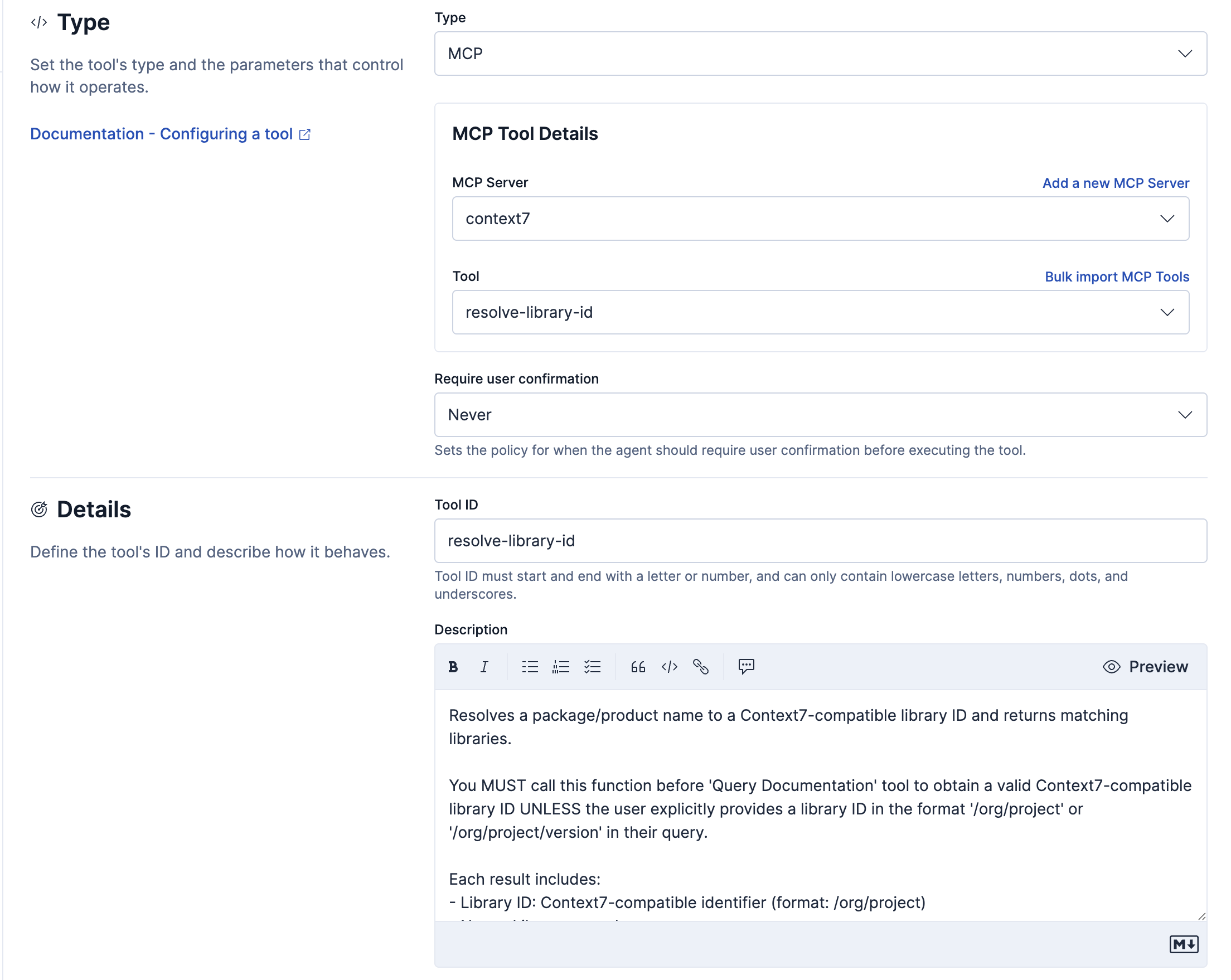
Individual MCP tools have the following configuration settings:
- MCP Server
- The MCP connector to interface with.
- Tool
- The specific tool on MCP server to create an Agent Builder MCP tool for.
- After you select a tool, the Tool ID and Description fields automatically populate with the tool name and description provided by the MCP server.
- Require user confirmation (Optional) The Elastic Stack includes Elastic's core products such as Elasticsearch, Kibana, Logstash, and Beats. Availability Planned We plan to add this functionality in a future Elastic Stack update. Subject to changes. Unless stated otherwise on the page, this functionality is available when your Elastic Stack is deployed on Elastic Cloud Hosted, Elastic Cloud Enterprise, Elastic Cloud on Kubernetes, and self-managed environments. This documentation corresponds to the latest patch available for each minor version. If you're not using the latest patch, check the release notes for changes. Elastic Cloud Serverless projects are autoscaled environments, fully managed by Elastic and available on Elastic Cloud. Availability Preview This functionality is in technical preview and is ready for evaluation. Use with caution in production; it is not recommended for mission-critical workloads. Elastic will work to fix any issues, but features in technical preview are not subject to the support SLA of official GA features. Specific Support terms apply. Serverless interfaces and procedures might differ from classic Elastic Stack deployments.
- Controls whether the agent asks you to approve a tool call before it runs. Select Never to run without a prompt, Once to prompt the first time the agent calls the tool in a conversation, or Always to prompt on every call. The default is Never.
- With Once, your response applies to every later call to the tool in the same conversation, whether you confirmed or denied the action, including retries after a failed call.
- Confirmation applies only when an agent calls the tool. Refer to Human-in-the-loop prompts.
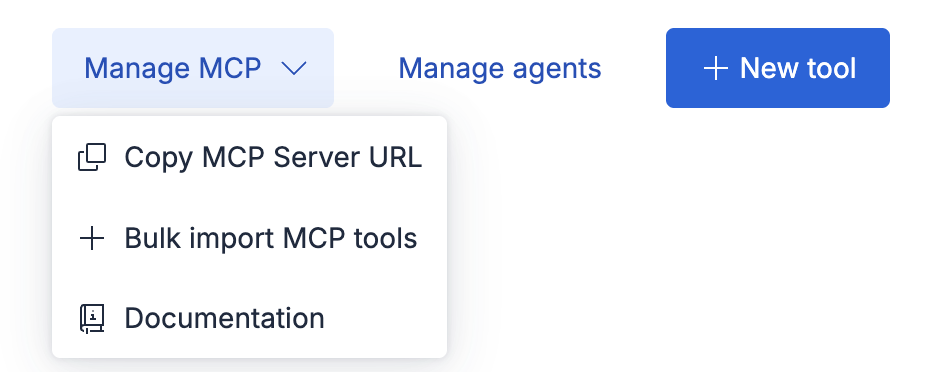
To import multiple tools at once, go to the Tools page and select Bulk import MCP tools from the Manage MCP dropdown.
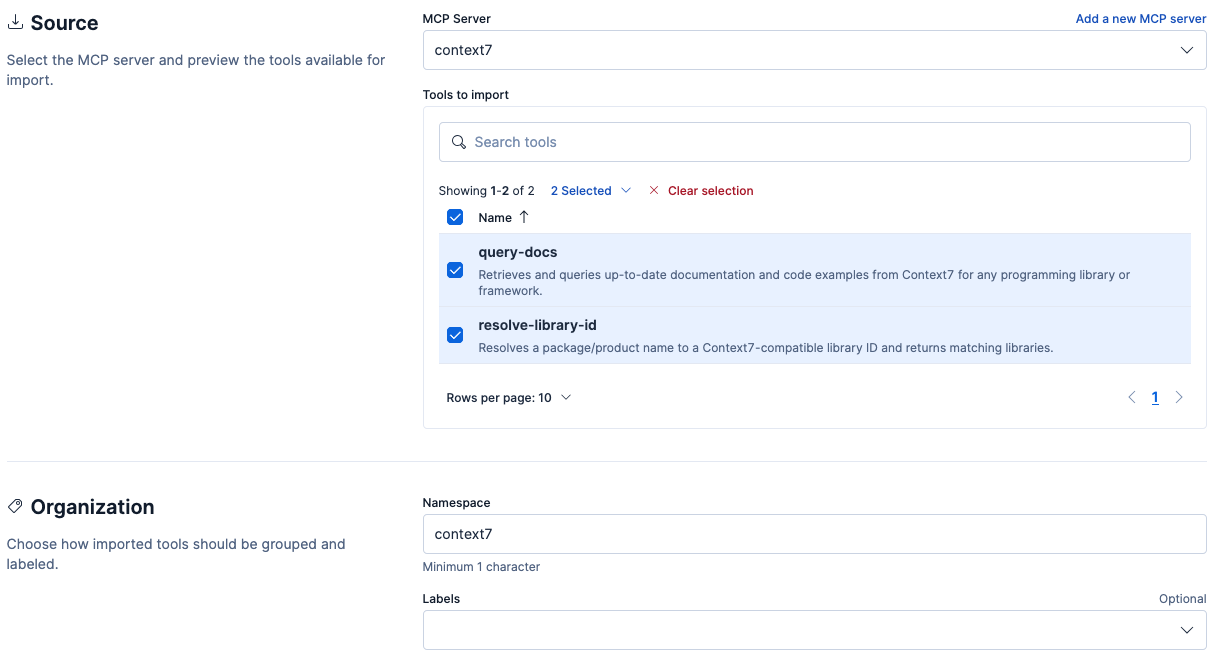
Configure the following fields:
- MCP Server
- The MCP connector to interface with.
- Tools to import
- The specific tools from the MCP server to import.
- Namespace
- A string to prepend to the tool name to aid in searching and organization. A namespace must start with a letter and contain only lowercase letters, numbers, and hyphens.
After clicking Import tools, Agent Builder creates an MCP tool for each selection.
Each tool's ID is generated as namespace.tool-name (for example, context7.resolve-library-id), and descriptions are populated automatically from the MCP server.
Bulk import does not configure confirmation, so each imported tool starts with Require user confirmation set to Never. To require confirmation for an imported tool, edit it after import. The Elastic Stack includes Elastic's core products such as Elasticsearch, Kibana, Logstash, and Beats. Availability Planned We plan to add this functionality in a future Elastic Stack update. Subject to changes. Unless stated otherwise on the page, this functionality is available when your Elastic Stack is deployed on Elastic Cloud Hosted, Elastic Cloud Enterprise, Elastic Cloud on Kubernetes, and self-managed environments. This documentation corresponds to the latest patch available for each minor version. If you're not using the latest patch, check the release notes for changes. Elastic Cloud Serverless projects are autoscaled environments, fully managed by Elastic and available on Elastic Cloud. Availability Preview This functionality is in technical preview and is ready for evaluation. Use with caution in production; it is not recommended for mission-critical workloads. Elastic will work to fix any issues, but features in technical preview are not subject to the support SLA of official GA features. Specific Support terms apply. Serverless interfaces and procedures might differ from classic Elastic Stack deployments.
When an agent calls an MCP tool:
- Agent Builder retrieves the tool's input schema from the MCP connector.
- Agent Builder calls the MCP server tool with the required parameters.
- The MCP server returns the result directly to the LLM with no post-processing.
- The LLM interprets the result for the user.
MCP tools have built-in health monitoring. Tools that are unhealthy display an icon next to their IDs on the Tools page.
An MCP tool is marked "unhealthy" when:
The MCP tool's associated MCP connector is unavailable.

The MCP tool's associated tool on the MCP server no longer exists.

The MCP tool's execution failed.