Connect Elastic Agent Builder agents and Elastic Workflows
Elastic Cloud Serverless projects are autoscaled environments, fully managed by Elastic and available on Elastic Cloud. Availability This functionality is generally available and ready for production usage. Serverless interfaces and procedures might differ from classic Elastic Stack deployments. The Elastic Stack includes Elastic's core products such as Elasticsearch, Kibana, Logstash, and Beats. Availability This functionality is generally available and ready for production usage. This functionality is in technical preview and is ready for evaluation. Use with caution in production; it is not recommended for mission-critical workloads. Elastic will work to fix any issues, but features in technical preview are not subject to the support SLA of official GA features. Specific Support terms apply. Unless stated otherwise on the page, this functionality is available when your Elastic Stack is deployed on Elastic Cloud Hosted, Elastic Cloud Enterprise, Elastic Cloud on Kubernetes, and self-managed environments. This documentation corresponds to the latest patch available for each minor version. If you're not using the latest patch, check the release notes for changes.
Serverless
Generally available
Stack
GA
9.4+
…
Generally available since 9.4
Preview in 9.3
Elastic Workflows and Elastic Agent Builder combine deterministic automation with conversational reasoning. You can create workflows conversationally, make workflows available to agents, invoke agents from workflows, and start workflows from conversation events.
Elastic Agent Builder and workflows work together in the following ways:
- Create workflows from Agent Chat: The Elastic Stack includes Elastic's core products such as Elasticsearch, Kibana, Logstash, and Beats. Availability Generally available since 9.5 This functionality is generally available and ready for production usage. Unless stated otherwise on the page, this functionality is available when your Elastic Stack is deployed on Elastic Cloud Hosted, Elastic Cloud Enterprise, Elastic Cloud on Kubernetes, and self-managed environments. This documentation corresponds to the latest patch available for each minor version. If you're not using the latest patch, check the release notes for changes. Elastic Cloud Serverless projects are autoscaled environments, fully managed by Elastic and available on Elastic Cloud. Availability Generally available This functionality is generally available and ready for production usage. Serverless interfaces and procedures might differ from classic Elastic Stack deployments. Create and edit workflows by describing what you want in plain language. Kibana generates and updates the workflow YAML for you, so you can quickly build without memorizing step types or Liquid syntax.
- Use workflows from agents:
- The Elastic Stack includes Elastic's core products such as Elasticsearch, Kibana, Logstash, and Beats. Availability Preview since 9.3 This functionality is in technical preview and is ready for evaluation. Use with caution in production; it is not recommended for mission-critical workloads. Elastic will work to fix any issues, but features in technical preview are not subject to the support SLA of official GA features. Specific Support terms apply. Unless stated otherwise on the page, this functionality is available when your Elastic Stack is deployed on Elastic Cloud Hosted, Elastic Cloud Enterprise, Elastic Cloud on Kubernetes, and self-managed environments. This documentation corresponds to the latest patch available for each minor version. If you're not using the latest patch, check the release notes for changes. Elastic Cloud Serverless projects are autoscaled environments, fully managed by Elastic and available on Elastic Cloud. Availability Preview This functionality is in technical preview and is ready for evaluation. Use with caution in production; it is not recommended for mission-critical workloads. Elastic will work to fix any issues, but features in technical preview are not subject to the support SLA of official GA features. Specific Support terms apply. Serverless interfaces and procedures might differ from classic Elastic Stack deployments. Trigger an existing workflow from a conversation with a workflow tool.
- The Elastic Stack includes Elastic's core products such as Elasticsearch, Kibana, Logstash, and Beats. Availability Generally available since 9.4 This functionality is generally available and ready for production usage. Unless stated otherwise on the page, this functionality is available when your Elastic Stack is deployed on Elastic Cloud Hosted, Elastic Cloud Enterprise, Elastic Cloud on Kubernetes, and self-managed environments. This documentation corresponds to the latest patch available for each minor version. If you're not using the latest patch, check the release notes for changes. Elastic Cloud Serverless projects are autoscaled environments, fully managed by Elastic and available on Elastic Cloud. Availability Generally available This functionality is generally available and ready for production usage. Serverless interfaces and procedures might differ from classic Elastic Stack deployments. Assign pre-execution workflows that run before the agent starts reasoning.
- The Elastic Stack includes Elastic's core products such as Elasticsearch, Kibana, Logstash, and Beats. Availability Planned We plan to add this functionality in a future Elastic Stack update. Subject to changes. Unless stated otherwise on the page, this functionality is available when your Elastic Stack is deployed on Elastic Cloud Hosted, Elastic Cloud Enterprise, Elastic Cloud on Kubernetes, and self-managed environments. This documentation corresponds to the latest patch available for each minor version. If you're not using the latest patch, check the release notes for changes. Elastic Cloud Serverless projects are autoscaled environments, fully managed by Elastic and available on Elastic Cloud. Availability Generally available This functionality is generally available and ready for production usage. Serverless interfaces and procedures might differ from classic Elastic Stack deployments. Assign post-execution workflows that run after the agent finishes responding.
- Use agents from workflows: Invoke an agent from a workflow with the
ai.agentstep. To add context to a conversation without triggering an agent response, use the conversation steps The Elastic Stack includes Elastic's core products such as Elasticsearch, Kibana, Logstash, and Beats. Availability Planned We plan to add this functionality in a future Elastic Stack update. Subject to changes. Unless stated otherwise on the page, this functionality is available when your Elastic Stack is deployed on Elastic Cloud Hosted, Elastic Cloud Enterprise, Elastic Cloud on Kubernetes, and self-managed environments. This documentation corresponds to the latest patch available for each minor version. If you're not using the latest patch, check the release notes for changes. Elastic Cloud Serverless projects are autoscaled environments, fully managed by Elastic and available on Elastic Cloud. Availability Generally available This functionality is generally available and ready for production usage. Serverless interfaces and procedures might differ from classic Elastic Stack deployments. . To manage a conversation's attachments and metadata, use the attachment and metadata steps The Elastic Stack includes Elastic's core products such as Elasticsearch, Kibana, Logstash, and Beats. Availability Planned We plan to add this functionality in a future Elastic Stack update. Subject to changes. Unless stated otherwise on the page, this functionality is available when your Elastic Stack is deployed on Elastic Cloud Hosted, Elastic Cloud Enterprise, Elastic Cloud on Kubernetes, and self-managed environments. This documentation corresponds to the latest patch available for each minor version. If you're not using the latest patch, check the release notes for changes. Elastic Cloud Serverless projects are autoscaled environments, fully managed by Elastic and available on Elastic Cloud. Availability Generally available This functionality is generally available and ready for production usage. Serverless interfaces and procedures might differ from classic Elastic Stack deployments. . For advanced API operations, use thekibana.requeststep. - React to conversation activity: The Elastic Stack includes Elastic's core products such as Elasticsearch, Kibana, Logstash, and Beats. Availability Planned We plan to add this functionality in a future Elastic Stack update. Subject to changes. Unless stated otherwise on the page, this functionality is available when your Elastic Stack is deployed on Elastic Cloud Hosted, Elastic Cloud Enterprise, Elastic Cloud on Kubernetes, and self-managed environments. This documentation corresponds to the latest patch available for each minor version. If you're not using the latest patch, check the release notes for changes. Elastic Cloud Serverless projects are autoscaled environments, fully managed by Elastic and available on Elastic Cloud. Availability Preview This functionality is in technical preview and is ready for evaluation. Use with caution in production; it is not recommended for mission-critical workloads. Elastic will work to fix any issues, but features in technical preview are not subject to the support SLA of official GA features. Specific Support terms apply. Serverless interfaces and procedures might differ from classic Elastic Stack deployments. Run a workflow when an attachment is added, updated, or deleted, or when conversation metadata changes. For supported conversation templates, you can also run a workflow when a conversation gets new messages or other changes. Refer to Elastic Agent Builder triggers.
Before you begin:
- Familiarize yourself with the core concepts of Elastic Workflows.
- Turn on Elastic Workflows through the
workflows:ui:enabledadvanced setting, which is on by default in 9.4 and later. When this setting is off, the workflow options in Elastic Agent Builder are hidden and assigned workflows don't run. - Make sure you have the appropriate subscription. Elastic Workflows requires an Enterprise subscription on Elastic Stack deployments, or the appropriate project feature tier on Serverless.
- Make sure you have the correct privileges to create and run workflows.
For details, refer to Set up workflows.
Elastic Cloud Serverless projects are autoscaled environments, fully managed by Elastic and available on Elastic Cloud. Availability This functionality is generally available and ready for production usage. Serverless interfaces and procedures might differ from classic Elastic Stack deployments. The Elastic Stack includes Elastic's core products such as Elasticsearch, Kibana, Logstash, and Beats. Availability This functionality is generally available and ready for production usage. Unless stated otherwise on the page, this functionality is available when your Elastic Stack is deployed on Elastic Cloud Hosted, Elastic Cloud Enterprise, Elastic Cloud on Kubernetes, and self-managed environments. This documentation corresponds to the latest patch available for each minor version. If you're not using the latest patch, check the release notes for changes.
Serverless
Generally available
Stack
9.4+
Generally available since 9.4
Pre-execution workflows run after each user message, before the agent makes any calls to the large language model (LLM) in response. They let you use Elastic Workflows for deterministic preparation or control before the agent begins its reasoning loop.
Configuring an agent's pre-execution workflows requires a role that grants wildcard (*) Kibana privileges, such as the built-in superuser role or the Admin role in Serverless. You can't grant this from the Kibana role management UI. Refer to Users and roles for how to assign roles.
Changing the space setting works differently: it requires the manage_advanced_settings privilege, which you can grant through the Advanced Settings feature privilege.
A pre-execution workflow runs before the agent calls the model. It doesn't run before every LLM call or tool call inside that response. When the agent resumes after a human-in-the-loop prompt, the workflow runs again for that same user message. Elastic Agent Builder waits up to 120 seconds for each workflow to finish. If the workflow fails, or Elastic Agent Builder can't find the execution after that wait, the agent run stops. A workflow that is still running after 120 seconds, or that pauses for input with waitForInput or waitForApproval, doesn't hold the agent back: Elastic Agent Builder ignores its output and continues the run. Don't use pausing steps in a pre-execution workflow.
By default, each pre-execution workflow runs as the user who sent the message, so its steps can do only what that user's privileges allow. If the workflow is private, that user must own it or have Executor or Editor access to it. Otherwise the workflow fails and the agent run stops.
Pre-execution workflows can:
- Add or rewrite prompt context before the agent starts.
- Cancel the agent run when a workflow detects that the request should not continue.
- Run multiple workflows in sequence when more than one workflow is assigned.
You can assign pre-execution workflows to a single agent or to every agent in a space. If you do both, the agent runs the workflows from both settings. Workflows assigned to the space run first, then workflows assigned to the agent.
A pre-execution workflow receives details about the run as inputs, and its output can rewrite the user message, stop the run, or add context for the model.
- Select Manage components at the bottom of the left sidebar to open the Agents list.
- Select an agent, then select Settings.
- Under Pre-execution workflow, select one or more workflows in Workflows.
- Select Save.
To confirm the setup, send a message to the agent, then check that the run appears in the workflow's execution history.
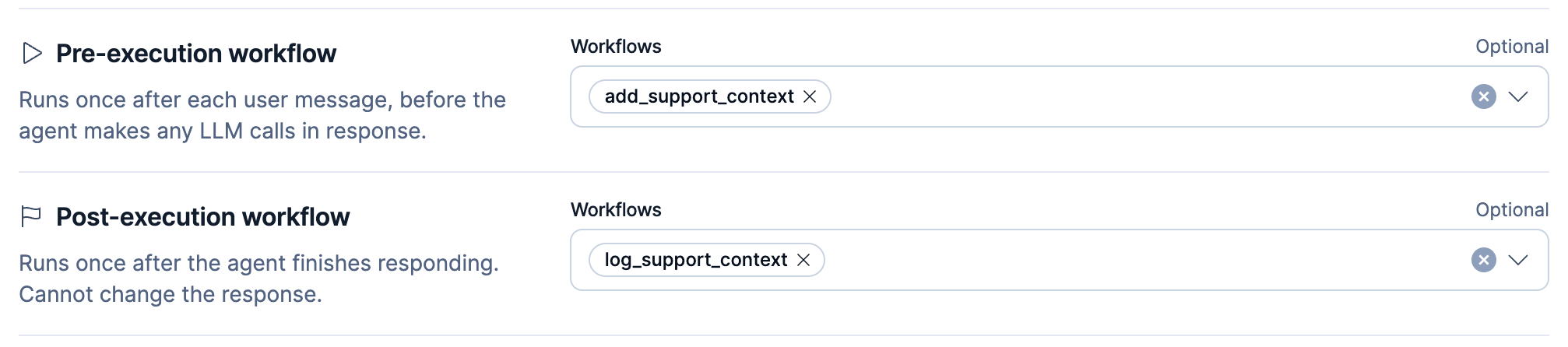
The following screenshot shows the Pre-execution workflow setting in the agent Settings view.

Elastic Cloud Serverless projects are autoscaled environments, fully managed by Elastic and available on Elastic Cloud. Availability This functionality is in technical preview and is ready for evaluation. Use with caution in production; it is not recommended for mission-critical workloads. Elastic will work to fix any issues, but features in technical preview are not subject to the support SLA of official GA features. Specific Support terms apply. Serverless interfaces and procedures might differ from classic Elastic Stack deployments. The Elastic Stack includes Elastic's core products such as Elasticsearch, Kibana, Logstash, and Beats. Availability This functionality is in technical preview and is ready for evaluation. Use with caution in production; it is not recommended for mission-critical workloads. Elastic will work to fix any issues, but features in technical preview are not subject to the support SLA of official GA features. Specific Support terms apply. Unless stated otherwise on the page, this functionality is available when your Elastic Stack is deployed on Elastic Cloud Hosted, Elastic Cloud Enterprise, Elastic Cloud on Kubernetes, and self-managed environments. This documentation corresponds to the latest patch available for each minor version. If you're not using the latest patch, check the release notes for changes.
Serverless
Preview
Preview
Stack
Preview
9.4+
Preview since 9.4
The prerequisites apply here too. In addition, the Agent Builder section in GenAI Settings appears only when the agentBuilder:experimentalFeatures advanced setting is turned on. It's off by default.
- Go to Stack Management → AI → GenAI Settings.
- In the Agent Builder section, find Pre-execution workflow and open the Workflows selector.
- Select one or more workflows.
- Select Save changes.
To confirm the setup, send a message to any agent in the space, then check that the run appears in the workflow's execution history.
Workflows that you assign here run for every agent in the space, in addition to any workflows you assign to an individual agent. If you assign the same workflow in both places, it runs only once.
Agents keep running these workflows whenever Elastic Workflows is turned on, even if you later turn off agentBuilder:experimentalFeatures and the Agent Builder section disappears. To clear the setting when the section is hidden, use the API. Refer to Remove the workflow from the space setting.
Disabling a workflow doesn't remove it from the agents or spaces that use it. Until you remove the workflow, every message to the affected agents fails. Refer to Disabled pre-execution workflow.
Declare the inputs you want the workflow to receive under its manual trigger, not at the workflow root. Elastic Agent Builder doesn't detect inputs declared at the root of a workflow saved in 9.5 or later. Refer to inputs. Inside the workflow, reference an input as {{ inputs.prompt }}.
Elastic Agent Builder can send these inputs:
| Input | Type | Contains |
|---|---|---|
prompt |
string |
The user message for this run, or an empty string when there's none, such as when a resumed run only answers a human-in-the-loop prompt. |
conversation_id
The Elastic Stack includes Elastic's core products such as Elasticsearch, Kibana, Logstash, and Beats.
Availability
Planned
We plan to add this functionality in a future Elastic Stack update. Subject to changes.
Unless stated otherwise on the page, this functionality is available when your Elastic Stack is deployed on Elastic Cloud Hosted, Elastic Cloud Enterprise, Elastic Cloud on Kubernetes, and self-managed environments.
This documentation corresponds to the latest patch available for each minor version. If you're not using the latest patch, check the release notes for changes.
|
string |
The conversation ID. If the run doesn't save the conversation, the ID might not match a saved conversation. |
agent_id
The Elastic Stack includes Elastic's core products such as Elasticsearch, Kibana, Logstash, and Beats.
Availability
Planned
We plan to add this functionality in a future Elastic Stack update. Subject to changes.
Unless stated otherwise on the page, this functionality is available when your Elastic Stack is deployed on Elastic Cloud Hosted, Elastic Cloud Enterprise, Elastic Cloud on Kubernetes, and self-managed environments.
This documentation corresponds to the latest patch available for each minor version. If you're not using the latest patch, check the release notes for changes.
|
string |
The agent ID. Omitted when the run has no agent ID. |
round_execution_index
The Elastic Stack includes Elastic's core products such as Elasticsearch, Kibana, Logstash, and Beats.
Availability
Planned
We plan to add this functionality in a future Elastic Stack update. Subject to changes.
Unless stated otherwise on the page, this functionality is available when your Elastic Stack is deployed on Elastic Cloud Hosted, Elastic Cloud Enterprise, Elastic Cloud on Kubernetes, and self-managed environments.
This documentation corresponds to the latest patch available for each minor version. If you're not using the latest patch, check the release notes for changes.
|
integer |
0 the first time the agent runs for a user message. Greater than 0 each time the agent resumes after a human-in-the-loop prompt. |
Elastic Agent Builder always sends prompt, and sends conversation_id whenever the run has one, even if the workflow doesn't declare it. It sends agent_id and round_execution_index only when the workflow declares them under its manual trigger.
If the workflow declares its inputs with additionalProperties: false, declare every input that Elastic Agent Builder sends. Otherwise input validation fails, the workflow execution fails, and the agent run stops.
Starting in 9.6, Elastic Agent Builder also sends conversation_id. Before you upgrade, add conversation_id to any pre-execution workflow that sets additionalProperties: false. Otherwise every message to the agents that use the workflow fails.
The Elastic Stack includes Elastic's core products such as Elasticsearch, Kibana, Logstash, and Beats.
Availability
Planned
We plan to add this functionality in a future Elastic Stack update. Subject to changes.
Unless stated otherwise on the page, this functionality is available when your Elastic Stack is deployed on Elastic Cloud Hosted, Elastic Cloud Enterprise, Elastic Cloud on Kubernetes, and self-managed environments.
This documentation corresponds to the latest patch available for each minor version. If you're not using the latest patch, check the release notes for changes.
When Elastic Agent Builder starts the workflow, execution.triggeredBy is agent-builder-hook. To reject runs that someone started directly, check that value in the workflow. This is useful when the workflow uses settings.run_as to run with a service account's privileges. In earlier versions, the value is manual.
Elastic Agent Builder reads the output of the last top-level step that ran, including a top-level step with an if condition. It doesn't merge outputs from multiple steps or loops. To return output fields reliably, end the workflow with a top-level data.set step or a top-level workflow.output step
The Elastic Stack includes Elastic's core products such as Elasticsearch, Kibana, Logstash, and Beats.
Availability
Preview since 9.4
This functionality is in technical preview and is ready for evaluation. Use with caution in production; it is not recommended for mission-critical workloads. Elastic will work to fix any issues, but features in technical preview are not subject to the support SLA of official GA features. Specific Support terms apply.
Unless stated otherwise on the page, this functionality is available when your Elastic Stack is deployed on Elastic Cloud Hosted, Elastic Cloud Enterprise, Elastic Cloud on Kubernetes, and self-managed environments.
This documentation corresponds to the latest patch available for each minor version. If you're not using the latest patch, check the release notes for changes.
Elastic Cloud Serverless projects are autoscaled environments, fully managed by Elastic and available on Elastic Cloud.
Availability
Preview
This functionality is in technical preview and is ready for evaluation. Use with caution in production; it is not recommended for mission-critical workloads. Elastic will work to fix any issues, but features in technical preview are not subject to the support SLA of official GA features. Specific Support terms apply.
Serverless interfaces and procedures might differ from classic Elastic Stack deployments.
.
The output can include these fields:
| Output | Effect |
|---|---|
new_prompt |
A non-empty value replaces the user message that the agent receives. Later workflows receive this text as prompt. |
abort |
true stops the agent run. |
abort_message |
Any non-empty value stops the agent run, even when abort is false. The conversation shows the message in a Conversation Aborted notice. Without a message, the notice says that the workflow stopped the run. |
model_context
The Elastic Stack includes Elastic's core products such as Elasticsearch, Kibana, Logstash, and Beats.
Availability
Planned
We plan to add this functionality in a future Elastic Stack update. Subject to changes.
Unless stated otherwise on the page, this functionality is available when your Elastic Stack is deployed on Elastic Cloud Hosted, Elastic Cloud Enterprise, Elastic Cloud on Kubernetes, and self-managed environments.
This documentation corresponds to the latest patch available for each minor version. If you're not using the latest patch, check the release notes for changes.
|
Text that the model receives as a separate message after the user message. The chat UI doesn't display it, though Elastic Agent Builder stores it on the conversation record. |
workflow_context
The Elastic Stack includes Elastic's core products such as Elasticsearch, Kibana, Logstash, and Beats.
Availability
Planned
We plan to add this functionality in a future Elastic Stack update. Subject to changes.
Unless stated otherwise on the page, this functionality is available when your Elastic Stack is deployed on Elastic Cloud Hosted, Elastic Cloud Enterprise, Elastic Cloud on Kubernetes, and self-managed environments.
This documentation corresponds to the latest patch available for each minor version. If you're not using the latest patch, check the release notes for changes.
|
Data for the agent's post-execution workflows. The model never receives it, but Elastic Agent Builder stores it on the conversation record. |
Each user message and the agent's response to it form a round. Elastic Agent Builder stores model_context with the round, so the model keeps receiving it later in the conversation. When Elastic Agent Builder summarizes older rounds to shorten a long conversation, the summary leaves model_context out.
Because Elastic Agent Builder stores both values on the conversation record, anyone who can read the conversation can read them through the API. Don't put secrets in either one.
A workflow assigned under Post-execution workflow in the agent's Settings receives the stored workflow_context when it declares a workflow_context input.
Elastic Cloud Serverless projects are autoscaled environments, fully managed by Elastic and available on Elastic Cloud. Availability This functionality is generally available and ready for production usage. Serverless interfaces and procedures might differ from classic Elastic Stack deployments. The Elastic Stack includes Elastic's core products such as Elasticsearch, Kibana, Logstash, and Beats. Availability We plan to add this functionality in a future Elastic Stack update. Subject to changes. Unless stated otherwise on the page, this functionality is available when your Elastic Stack is deployed on Elastic Cloud Hosted, Elastic Cloud Enterprise, Elastic Cloud on Kubernetes, and self-managed environments. This documentation corresponds to the latest patch available for each minor version. If you're not using the latest patch, check the release notes for changes.
Serverless
Generally available
Stack
Planned
Planned
Elastic Agent Builder ignores a model_context or workflow_context value that breaks these rules. The agent run continues without it.
model_context rules:
- The value must be a string. Elastic Agent Builder removes leading and trailing whitespace and ignores a string that is empty after that.
- Elastic Agent Builder keeps the first 100,000 characters and drops the rest.
- When more than one workflow returns
model_context, Elastic Agent Builder joins the texts in run order, separated by a blank line, and keeps the first 100,000 characters of the result.
workflow_context rules:
- The value is an object keyed by namespace, a name you choose to group your data, such as
support.policy. Each namespace has aversionand adataobject.versionis a positive integer.datais a JSON object. Nested objects and arrays can go eight levels deep, countingdataas the first level.
- A namespace name can be 1 to 256 characters long.
- The whole
workflow_contextJSON, including namespaces from earlier workflows, can contain at most 16 namespaces and be at most 65,536 bytes. - If any namespace breaks a rule, Elastic Agent Builder ignores that workflow's whole
workflow_context. Namespaces that earlier workflows stored stay in place.
When more than one workflow returns workflow_context, a later workflow replaces a namespace with the same name and keeps the other namespaces. If the combined object would exceed a limit, Elastic Agent Builder ignores the later workflow's workflow_context and keeps the earlier one.
When the agent resumes after a human-in-the-loop prompt, pre-execution workflows run again:
- The workflow can still stop the agent run with
abortorabort_message. -
The Elastic Stack includes Elastic's core products such as Elasticsearch, Kibana, Logstash, and Beats.
Availability
Planned
We plan to add this functionality in a future Elastic Stack update. Subject to changes.
Unless stated otherwise on the page, this functionality is available when your Elastic Stack is deployed on Elastic Cloud Hosted, Elastic Cloud Enterprise, Elastic Cloud on Kubernetes, and self-managed environments.
This documentation corresponds to the latest patch available for each minor version. If you're not using the latest patch, check the release notes for changes.
Elastic Agent Builder keeps
model_contextandworkflow_contextfrom the first run of the round (round_execution_index: 0) and ignores any that a later run returns. To skip steps that only prepare initial context, declareround_execution_indexand addif: "inputs.round_execution_index : 0"to those steps. -
The Elastic Stack includes Elastic's core products such as Elasticsearch, Kibana, Logstash, and Beats.
Availability
Planned
We plan to add this functionality in a future Elastic Stack update. Subject to changes.
Unless stated otherwise on the page, this functionality is available when your Elastic Stack is deployed on Elastic Cloud Hosted, Elastic Cloud Enterprise, Elastic Cloud on Kubernetes, and self-managed environments.
This documentation corresponds to the latest patch available for each minor version. If you're not using the latest patch, check the release notes for changes.
A
new_promptdoesn't change the message the agent answers, which stays the original user message.
Elastic Cloud Serverless projects are autoscaled environments, fully managed by Elastic and available on Elastic Cloud. Availability This functionality is generally available and ready for production usage. Serverless interfaces and procedures might differ from classic Elastic Stack deployments. The Elastic Stack includes Elastic's core products such as Elasticsearch, Kibana, Logstash, and Beats. Availability We plan to add this functionality in a future Elastic Stack update. Subject to changes. Unless stated otherwise on the page, this functionality is available when your Elastic Stack is deployed on Elastic Cloud Hosted, Elastic Cloud Enterprise, Elastic Cloud on Kubernetes, and self-managed environments. This documentation corresponds to the latest patch available for each minor version. If you're not using the latest patch, check the release notes for changes.
Serverless
Generally available
Stack
Planned
Planned
The following workflow searches the Kibana sample flight data for delayed flights. It gives the model the current count, and stores the count for the agent's post-execution workflows.
version: "1"
name: add_flight_delay_context
description: Adds the current number of delayed flights before the agent answers.
enabled: true
triggers:
  - type: manual
    inputs:
      properties:
        round_execution_index:
          type: integer
steps:
  - name: find_delays
    type: elasticsearch.search
    if: "inputs.round_execution_index : 0"
    with:
      index: "kibana_sample_data_flights"
      query:
        range:
          FlightDelayMin:
            gt: 60
      size: 0
  - name: return_context
    type: data.set
    if: "inputs.round_execution_index : 0"
    with:
      model_context: |
        There are currently {{ steps.find_delays.output.hits.total.value }} flights delayed by more than an hour in kibana_sample_data_flights.
        Use this number when the user asks about delays.
      workflow_context:
        flights.delays:
          version: 1
          data:
            index: "kibana_sample_data_flights"
            delayed_flights: "{{ steps.find_delays.output.hits.total.value }}"
- Declares
round_execution_indexso Elastic Agent Builder sends it. Because the trigger doesn't setadditionalProperties: false, Elastic Agent Builder can still sendpromptandconversation_idwithout failing validation. - Runs the search only on the first execution for the user message, and skips it when the agent resumes after a human-in-the-loop prompt.
data.setis the last top-level step that runs, so Elastic Agent Builder reads its output. You can also useworkflow.output.- The model receives this text as a separate message. The chat UI doesn't display it.
- A namespace you choose. Post-execution workflows read this data from their
workflow_contextinput.
Elastic Cloud Serverless projects are autoscaled environments, fully managed by Elastic and available on Elastic Cloud. Availability This functionality is generally available and ready for production usage. Serverless interfaces and procedures might differ from classic Elastic Stack deployments. The Elastic Stack includes Elastic's core products such as Elasticsearch, Kibana, Logstash, and Beats. Availability We plan to add this functionality in a future Elastic Stack update. Subject to changes. Unless stated otherwise on the page, this functionality is available when your Elastic Stack is deployed on Elastic Cloud Hosted, Elastic Cloud Enterprise, Elastic Cloud on Kubernetes, and self-managed environments. This documentation corresponds to the latest patch available for each minor version. If you're not using the latest patch, check the release notes for changes.
Serverless
Generally available
Stack
Planned
Planned
Post-execution workflows run after the agent finishes each response. Use them to audit the exchange, open a ticket, notify a channel, or grade the response. They can't change the response, and Elastic Agent Builder ignores their output.
You assign post-execution workflows to individual agents. Unlike pre-execution workflows, post-execution workflows have no space setting.
- The prerequisites for using workflows with Elastic Agent Builder.
- A role that grants wildcard (
*) Kibana privileges, such as thesuperuserrole or the Admin role in Serverless. You need this role to configure an agent's post-execution workflows. Without it, the Workflows selector is disabled. You can't grant wildcard privileges from the Kibana role management UI. Refer to Users and roles for how to assign roles. - By default, each workflow runs as the user who sent the message, so its steps can do only what that user's privileges allow. If the workflow is private, that user must own it or have Executor or Editor access to it.
- Select Manage components at the bottom of the left sidebar to open the Agents list.
- Select an agent, then select Settings.
- Under Post-execution workflow, select one or more workflows in Workflows.
- Select Save.
To confirm the setup, check that Post-execution workflows shows Enabled on the agent overview. Then send a message to the agent and check that the run appears in the workflow's execution history.
The following screenshot shows the Post-execution workflow setting in the agent Settings view.

To assign post-execution workflows through the Agent Builder API, set the agent field configuration.post_execution_workflow_ids. The following request assigns one workflow:
PUT kbn:/api/agent_builder/agents/<agent_id>{ "configuration": { "post_execution_workflow_ids": ["<workflow_id>"] } }
- The update replaces only the keys you send, so the agent keeps its instructions, tools, skills, and other settings.
- Without wildcard (
*) Kibana privileges, a request that changespost_execution_workflow_idsreturns a400error:Only administrators can configure post-execution workflows.
A post-execution workflow runs only when the agent completes its response. It doesn't run in these cases:
- The agent run fails, or the user stops it.
- A pre-execution workflow cancels the run.
- The agent is paused on a human-in-the-loop prompt. The workflow runs later, after the user answers and the agent finishes that response.
- The agent reads an existing conversation without saving to it, such as an
ai.agentstep that setsephemeral: trueand a conversation ID.
When an agent has more than one post-execution workflow, they run in the order they're listed. Elastic Agent Builder waits up to 120 seconds for each workflow to complete, fail, or pause for input before it starts the next. A workflow that's still running after that wait doesn't block the workflows that follow.
Elastic Agent Builder sets execution.triggeredBy to agent-builder-hook for these runs, so a workflow can check that value and skip runs that someone started directly. Refer to execution.triggeredBy.
If a workflow fails, the agent's response stays in place. Kibana logs the failure and still runs any later workflows assigned to the agent. In the following cases, Kibana logs the failure before it records an execution, so the failure doesn't appear in execution history:
- The workflow doesn't exist, for example, because someone deleted it.
- The workflow is turned off.
- The workflow has validation errors.
- The workflow is private, and the user who sent the message doesn't have access to run it.
Declare the inputs you want the workflow to receive under its manual trigger, not at the workflow root. Elastic Agent Builder doesn't detect inputs declared at the root of a workflow saved in 9.5 or later. Refer to inputs. Inside the workflow, reference an input as {{ inputs.prompt }}.
The following workflow logs each exchange:
name: log_agent_exchange
enabled: true
triggers:
  - type: manual
    inputs:
      properties:
        prompt:
          type: string
        response:
          type: string
steps:
  - name: log_exchange
    type: console
    with:
      message: "User asked: {{ inputs.prompt }}. Agent answered: {{ inputs.response }}"
Elastic Agent Builder always sends prompt, response, round_id, and tool_calls. It also sends conversation_id and agent_id when the run has them, even if the workflow doesn't declare them. It sends round_connector_id, workflow_context, and tool_results only when the workflow declares them. To keep one of these three out of the workflow, remove it from the manual trigger.
| Input | Description |
|---|---|
prompt |
The user message for this response, including any rewrite by a pre-execution workflow, or an empty string when there's no user message. |
response |
The agent's final answer, or an empty string when the response has no answer text. |
round_id |
The ID of the completed conversation round, meaning one user message and the agent's response to it. |
tool_calls |
One entry for each tool call, with tool_id, tool_call_id, and params, or an empty array when the agent called no tools. |
conversation_id |
The conversation ID. If the run doesn't save the conversation, no saved conversation has this ID. |
agent_id |
The agent ID. |
round_connector_id |
The connector the agent used for this response. Not sent when the connector ID isn't available. |
workflow_context |
Data that pre-execution workflows returned as workflow_context for this response, keyed by namespace. Each namespace has a numeric version and a data object. Not sent when there's none. |
tool_results |
One entry for each tool call that has results, with tool_id, tool_call_id, and results. A workflow that declares tool_results as an array receives an empty array when no tool call has results. Elastic Agent Builder truncates this data, so it might not be complete. Refer to the limits after this table. |
The tool_results data is truncated and might not be the complete tool output. To limit size, Elastic Agent Builder truncates tool_results before the workflow receives it: each string to 4,000 characters and each array to 50 items. If a result's data is still larger than 32,000 characters, Elastic Agent Builder replaces it with type: other and data set to { "omitted": "result data exceeded 32000 characters" }.
If the workflow sets additionalProperties: false, declare every input that Elastic Agent Builder sends, including conversation_id and agent_id. Otherwise, the run fails input validation and appears as a failed execution in the workflow's execution history.
Example: Manual trigger that declares every input
triggers:
  - type: manual
    inputs:
      properties:
        prompt:
          type: string
        response:
          type: string
        conversation_id:
          type: string
        round_id:
          type: string
        agent_id:
          type: string
        round_connector_id:
          type: string
        workflow_context:
          type: object
        tool_calls:
          type: array
          items:
            type: object
            additionalProperties: true
        tool_results:
          type: array
          items:
            type: object
            additionalProperties: true
      additionalProperties: false
Follow these steps to invoke an ai.agent as a step within a workflow.
- Open the Workflows editor and create or edit a workflow.
- Add a new step with the type
ai.agent. - Set the
agent-idparameter at the top level of the step to the unique identifier of the target agent. If you omit it, the step uses the built-in Elastic AI Agent. - In the
withblock, set themessageparameter to your natural language prompt. - Optionally, in the
withblock, set theschemaparameter to a JSON Schema object to receive structured output from the agent instead of free-text. - Optionally, route the step to a specific model by setting
connector-idorinference-idat the top level of the step. These parameters are mutually exclusive.
Example: Analyze flight delays
The following example demonstrates a workflow that searches for flight delays and uses the Elastic AI Agent to summarize the impact. To follow along with this example ensure that the Kibana sample flight data is installed.
version: "1"
name: analyze_flight_delays
description: Fetches delayed flights and uses an agent to summarize the impact.
enabled: true
triggers:
  - type: manual
steps:
  # Step 1: Get data from Elasticsearch
  - name: get_delayed_flights
    type: elasticsearch.search
    with:
      index: "kibana_sample_data_flights"
      query:
        range:
          FlightDelayMin:
            gt: 60
      size: 5

  # Step 2: Ask the agent to reason over the data
  - name: summarize_delays
    type: ai.agent
    agent-id: "elastic-ai-agent"
    with:
      message: |
        Review the following flight delay records and summarize which airlines are most affected and the average delay time:
        {{ steps.get_delayed_flights.output }}

  # Step 3: Print the agent's summary
  - name: print_summary
    type: console
    with:
      message: "{{ steps.summarize_delays.output }}"
- agent-id: The ID of the agent you want to call (must exist in Agent Builder). Set it at the top level of the step, not in the
withblock. - message: The prompt sent to the agent. You can use template variables (like
{{ steps.step_name.output }}) to inject data dynamically.
Set agent-id and other configuration keys at the top level of the step. Set inputs like message in the with block.
| Parameter | Location | Type | Required | Description |
|---|---|---|---|---|
agent-id |
Top level | string | No | The unique identifier of the target agent (must exist in Elastic Agent Builder). Defaults to the built-in Elastic AI Agent. |
connector-id |
Top level | string | No | The Generative AI connector to use for model routing. Mutually exclusive with inference-id. Generative AI connectors are deprecated, so use inference-id for new workflows. |
inference-id |
Top level | string | No | The inference endpoint ID to use for model routing. Mutually exclusive with connector-id. |
create-conversation |
Top level | boolean | No | When true, persists the conversation so that follow-up steps or later requests can continue it. |
public-conversation
The Elastic Stack includes Elastic's core products such as Elasticsearch, Kibana, Logstash, and Beats.
Availability
Planned
We plan to add this functionality in a future Elastic Stack update. Subject to changes.
Unless stated otherwise on the page, this functionality is available when your Elastic Stack is deployed on Elastic Cloud Hosted, Elastic Cloud Enterprise, Elastic Cloud on Kubernetes, and self-managed environments.
This documentation corresponds to the latest patch available for each minor version. If you're not using the latest patch, check the release notes for changes.
Elastic Cloud Serverless projects are autoscaled environments, fully managed by Elastic and available on Elastic Cloud.
Availability
Generally available
This functionality is generally available and ready for production usage.
Serverless interfaces and procedures might differ from classic Elastic Stack deployments.
|
Top level | boolean | No | When true, makes the conversation this step creates public. Any user who can access the agent can read and continue the conversation and see it in their conversation list. Only applies when create-conversation is true. Defaults to false (private). Refer to Conversation access control. |
ephemeral
The Elastic Stack includes Elastic's core products such as Elasticsearch, Kibana, Logstash, and Beats.
Availability
Planned
We plan to add this functionality in a future Elastic Stack update. Subject to changes.
Unless stated otherwise on the page, this functionality is available when your Elastic Stack is deployed on Elastic Cloud Hosted, Elastic Cloud Enterprise, Elastic Cloud on Kubernetes, and self-managed environments.
This documentation corresponds to the latest patch available for each minor version. If you're not using the latest patch, check the release notes for changes.
Elastic Cloud Serverless projects are autoscaled environments, fully managed by Elastic and available on Elastic Cloud.
Availability
Generally available
This functionality is generally available and ready for production usage.
Serverless interfaces and procedures might differ from classic Elastic Stack deployments.
|
Top level | boolean | No | When true, the agent reads the conversation set in conversation_id but doesn't change it. Has no effect without conversation_id. Defaults to false. Can't be combined with create-conversation: true. Refer to Example: Summarize a conversation without changing it. |
reasoning-level
The Elastic Stack includes Elastic's core products such as Elasticsearch, Kibana, Logstash, and Beats.
Availability
Planned
We plan to add this functionality in a future Elastic Stack update. Subject to changes.
Unless stated otherwise on the page, this functionality is available when your Elastic Stack is deployed on Elastic Cloud Hosted, Elastic Cloud Enterprise, Elastic Cloud on Kubernetes, and self-managed environments.
This documentation corresponds to the latest patch available for each minor version. If you're not using the latest patch, check the release notes for changes.
Elastic Cloud Serverless projects are autoscaled environments, fully managed by Elastic and available on Elastic Cloud.
Availability
Preview
This functionality is in technical preview and is ready for evaluation. Use with caution in production; it is not recommended for mission-critical workloads. Elastic will work to fix any issues, but features in technical preview are not subject to the support SLA of official GA features. Specific Support terms apply.
Serverless interfaces and procedures might differ from classic Elastic Stack deployments.
|
Top level | string | No | How much reasoning the agent's model does before it responds, from none to xhigh. If omitted, the step uses the agent's default level, if it has one. Refer to Reasoning level. |
message |
with |
string | Yes | The natural language prompt to send to the agent. Can include template variables to reference data from previous steps. |
schema |
with |
object | No | A JSON Schema object that defines the structure of the expected response. When provided, the agent returns structured data matching the schema instead of free-text. |
conversation_id |
with |
string | No | Continue an existing conversation by ID. |
attachments |
with |
array | No | Attachments to provide to the agent. |
For the complete step reference, refer to ai.agent.
Elastic Cloud Serverless projects are autoscaled environments, fully managed by Elastic and available on Elastic Cloud. Availability This functionality is generally available and ready for production usage. Serverless interfaces and procedures might differ from classic Elastic Stack deployments. The Elastic Stack includes Elastic's core products such as Elasticsearch, Kibana, Logstash, and Beats. Availability We plan to add this functionality in a future Elastic Stack update. Subject to changes. Unless stated otherwise on the page, this functionality is available when your Elastic Stack is deployed on Elastic Cloud Hosted, Elastic Cloud Enterprise, Elastic Cloud on Kubernetes, and self-managed environments. This documentation corresponds to the latest patch available for each minor version. If you're not using the latest patch, check the release notes for changes.
Serverless
Generally available
Stack
Planned
Planned
A workflow can add events, such as notes, and user messages to an Elastic Agent Builder conversation. The agent reads user messages and notes the next time it runs on the conversation. For example, a workflow can post incident updates as they arrive, and a later ai.agent step or chat request can summarize them.
Use these steps:
ai.conversation.create: Create a conversation and get its ID. The Elastic Stack includes Elastic's core products such as Elasticsearch, Kibana, Logstash, and Beats. Availability Planned We plan to add this functionality in a future Elastic Stack update. Subject to changes. Unless stated otherwise on the page, this functionality is available when your Elastic Stack is deployed on Elastic Cloud Hosted, Elastic Cloud Enterprise, Elastic Cloud on Kubernetes, and self-managed environments. This documentation corresponds to the latest patch available for each minor version. If you're not using the latest patch, check the release notes for changes. Elastic Cloud Serverless projects are autoscaled environments, fully managed by Elastic and available on Elastic Cloud. Availability Preview This functionality is in technical preview and is ready for evaluation. Use with caution in production; it is not recommended for mission-critical workloads. Elastic will work to fix any issues, but features in technical preview are not subject to the support SLA of official GA features. Specific Support terms apply. Serverless interfaces and procedures might differ from classic Elastic Stack deployments.ai.conversation.add_event: Add an event, such as a note.ai.conversation.add_user_message: Add a user message.
Elastic Cloud Serverless projects are autoscaled environments, fully managed by Elastic and available on Elastic Cloud. Availability This functionality is generally available and ready for production usage. Serverless interfaces and procedures might differ from classic Elastic Stack deployments. The Elastic Stack includes Elastic's core products such as Elasticsearch, Kibana, Logstash, and Beats. Availability We plan to add this functionality in a future Elastic Stack update. Subject to changes. Unless stated otherwise on the page, this functionality is available when your Elastic Stack is deployed on Elastic Cloud Hosted, Elastic Cloud Enterprise, Elastic Cloud on Kubernetes, and self-managed environments. This documentation corresponds to the latest patch available for each minor version. If you're not using the latest patch, check the release notes for changes.
Serverless
Generally available
Stack
Planned
Planned
Workflows can read and update the attachments and metadata of Elastic Agent Builder conversations:
- Attachments are content, such as a runbook or a dashboard, that the agent can use as context. For example, a workflow can add a runbook to a conversation that an
ai.agentstep created. - Metadata is a set of structured fields, such as
statusandseverity, that track the state of a conversation. For example, a workflow can mark an investigation as closed. Only conversations created from a template have metadata. To create one from a workflow, useai.conversation.createThe Elastic Stack includes Elastic's core products such as Elasticsearch, Kibana, Logstash, and Beats. Availability Planned We plan to add this functionality in a future Elastic Stack update. Subject to changes. Unless stated otherwise on the page, this functionality is available when your Elastic Stack is deployed on Elastic Cloud Hosted, Elastic Cloud Enterprise, Elastic Cloud on Kubernetes, and self-managed environments. This documentation corresponds to the latest patch available for each minor version. If you're not using the latest patch, check the release notes for changes. Elastic Cloud Serverless projects are autoscaled environments, fully managed by Elastic and available on Elastic Cloud. Availability Preview This functionality is in technical preview and is ready for evaluation. Use with caution in production; it is not recommended for mission-critical workloads. Elastic will work to fix any issues, but features in technical preview are not subject to the support SLA of official GA features. Specific Support terms apply. Serverless interfaces and procedures might differ from classic Elastic Stack deployments. .
Use these steps:
- Conversation attachment steps: Add, update, delete, read, and list attachments.
- Conversation metadata steps: Read and update metadata fields.
Use the generic kibana.request step to interact with Elastic Agent Builder APIs programmatically.
- Add a new step with the type
kibana.request. - Set the method (for example:
GET,POST). - Set the
pathto the specific Agent Builder API endpoint.
Example: List available agents
This step retrieves a list of all agents currently available in Agent Builder.
name: list_agents
enabled: true
triggers:
  - type: manual
steps:
  - name: list_agents
    type: kibana.request
    with:
      method: GET
      path: /api/agent_builder/agents
The elastic/workflows GitHub repo contains more than 50 examples you can use as a starting point.