Elastic Inference Service
Elastic Cloud Serverless projects are autoscaled environments, fully managed by Elastic and available on Elastic Cloud. Availability This functionality is generally available and ready for production usage. Serverless interfaces and procedures might differ from classic Elastic Stack deployments. The Elastic Stack includes Elastic's core products such as Elasticsearch, Kibana, Logstash, and Beats. Availability This functionality is generally available and ready for production usage. Unless stated otherwise on the page, this functionality is available when your Elastic Stack is deployed on Elastic Cloud Hosted, Elastic Cloud Enterprise, Elastic Cloud on Kubernetes, and self-managed environments. This documentation corresponds to the latest patch available for each minor version. If you're not using the latest patch, check the release notes for changes.
Serverless
Generally available
Stack
Generally available
Elastic Inference Service (EIS) enables you to leverage AI-powered search as a service without deploying a model in your environment. With EIS, you don't need to manage the infrastructure and resources required for machine learning inference by adding, configuring, and scaling machine learning nodes. Instead, you can use machine learning models for ingest, search, and chat independently of your Elasticsearch infrastructure.
The Elastic Stack includes Elastic's core products such as Elasticsearch, Kibana, Logstash, and Beats. Availability Generally available since 9.3 This functionality is generally available and ready for production usage. Unless stated otherwise on the page, this functionality is available when your Elastic Stack is deployed on Elastic Cloud Hosted, Elastic Cloud Enterprise, Elastic Cloud on Kubernetes, and self-managed environments. This documentation corresponds to the latest patch available for each minor version. If you're not using the latest patch, check the release notes for changes. You can use EIS with your Elastic Cloud Enterprise, Elastic Cloud on Kubernetes, or self-managed cluster through Cloud Connect. For details, refer to Elastic Inference Service for Elastic Cloud Enterprise, Elastic Cloud on Kubernetes, and self-managed clusters.
Your Elastic deployment or project comes with Elastic Managed LLMs by default. These can be used in Agent Builder, the AI Assistant, Attack Discovery, and Automatic Import. For the list of available models, refer to Supported models.
Search Playground also uses Elastic Managed LLMs. The Elastic Stack includes Elastic's core products such as Elasticsearch, Kibana, Logstash, and Beats. Availability Planned for removal This functionality is planned to be removed in an upcoming Elastic Stack update. Subject to changes. Deprecated from 9.4 to 9.5 This functionality is deprecated. You can still use it, but it'll be removed in a future Elastic Stack update. Beta from 9.1 to 9.3 This functionality is in beta and is not ready for production usage. For beta features, the design and code is less mature than official GA features and is being provided as-is with no warranties. Beta features are not subject to the support SLA of official GA features. Specific Support terms apply. Preview in 9.0 This functionality is in technical preview and is ready for evaluation. Use with caution in production; it is not recommended for mission-critical workloads. Elastic will work to fix any issues, but features in technical preview are not subject to the support SLA of official GA features. Specific Support terms apply. Unless stated otherwise on the page, this functionality is available when your Elastic Stack is deployed on Elastic Cloud Hosted, Elastic Cloud Enterprise, Elastic Cloud on Kubernetes, and self-managed environments. This documentation corresponds to the latest patch available for each minor version. If you're not using the latest patch, check the release notes for changes. Elastic Cloud Serverless projects are autoscaled environments, fully managed by Elastic and available on Elastic Cloud. Availability Unavailable This functionality is not available in Elastic Cloud Serverless.
You can use ELSER to perform semantic search as a service (ELSER on EIS). The Elastic Stack includes Elastic's core products such as Elasticsearch, Kibana, Logstash, and Beats. Availability Generally available since 9.2 This functionality is generally available and ready for production usage. Preview in 9.1 This functionality is in technical preview and is ready for evaluation. Use with caution in production; it is not recommended for mission-critical workloads. Elastic will work to fix any issues, but features in technical preview are not subject to the support SLA of official GA features. Specific Support terms apply. Unless stated otherwise on the page, this functionality is available when your Elastic Stack is deployed on Elastic Cloud Hosted, Elastic Cloud Enterprise, Elastic Cloud on Kubernetes, and self-managed environments. This documentation corresponds to the latest patch available for each minor version. If you're not using the latest patch, check the release notes for changes. Elastic Cloud Serverless projects are autoscaled environments, fully managed by Elastic and available on Elastic Cloud. Availability Generally available This functionality is generally available and ready for production usage. Serverless interfaces and procedures might differ from classic Elastic Stack deployments.
You can use the
jina-embeddings-v3multilingual dense vector embedding model to perform semantic search through the Elastic Inference Service. The Elastic Stack includes Elastic's core products such as Elasticsearch, Kibana, Logstash, and Beats. Availability Preview since 9.3 This functionality is in technical preview and is ready for evaluation. Use with caution in production; it is not recommended for mission-critical workloads. Elastic will work to fix any issues, but features in technical preview are not subject to the support SLA of official GA features. Specific Support terms apply. Unless stated otherwise on the page, this functionality is available when your Elastic Stack is deployed on Elastic Cloud Hosted, Elastic Cloud Enterprise, Elastic Cloud on Kubernetes, and self-managed environments. This documentation corresponds to the latest patch available for each minor version. If you're not using the latest patch, check the release notes for changes. Elastic Cloud Serverless projects are autoscaled environments, fully managed by Elastic and available on Elastic Cloud. Availability Preview This functionality is in technical preview and is ready for evaluation. Use with caution in production; it is not recommended for mission-critical workloads. Elastic will work to fix any issues, but features in technical preview are not subject to the support SLA of official GA features. Specific Support terms apply. Serverless interfaces and procedures might differ from classic Elastic Stack deployments.
Kibana provides interfaces for managing EIS models and endpoints.
Go to the Elastic inference page by using the navigation menu or the global search field.
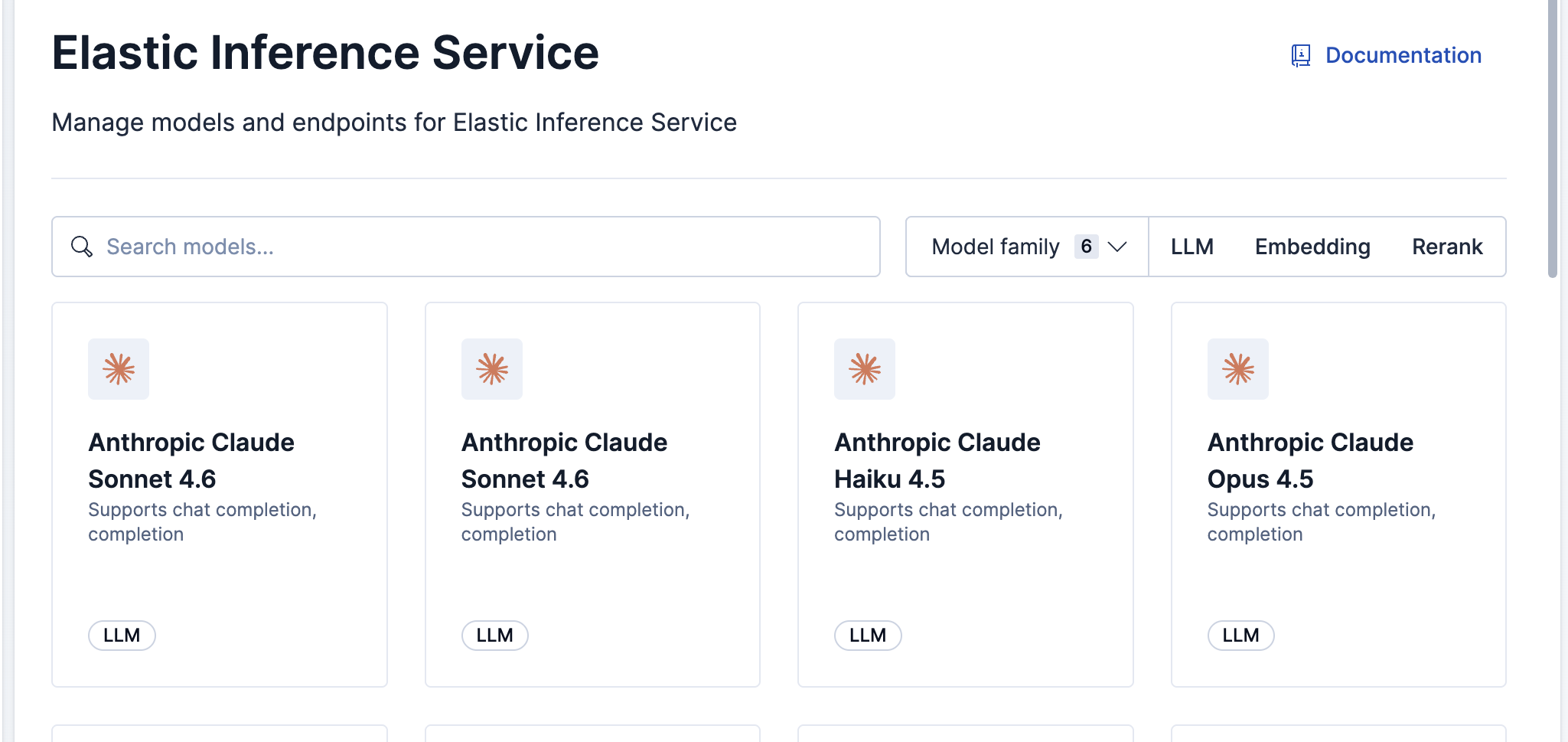
To access Elastic inference, you need the Inference Endpoints: all and Advanced Settings: read Kibana privileges.
Go to the Inference endpoints page by using the navigation menu or the global search field.
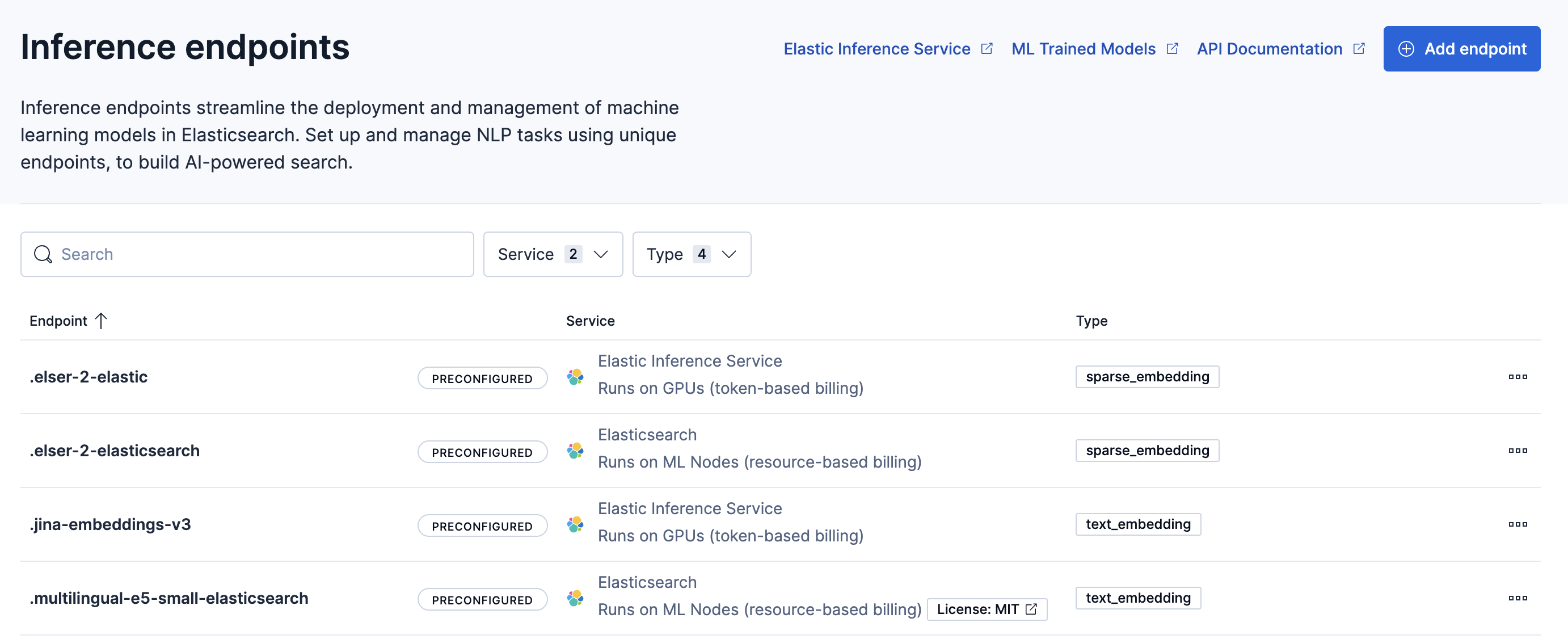
Available actions include:
- Add endpoints
- View endpoint details
- Copy the inference endpoint ID
- Delete endpoints
- The Elastic Stack includes Elastic's core products such as Elasticsearch, Kibana, Logstash, and Beats. Availability Generally available since 9.5 This functionality is generally available and ready for production usage. Unless stated otherwise on the page, this functionality is available when your Elastic Stack is deployed on Elastic Cloud Hosted, Elastic Cloud Enterprise, Elastic Cloud on Kubernetes, and self-managed environments. This documentation corresponds to the latest patch available for each minor version. If you're not using the latest patch, check the release notes for changes. Elastic Cloud Serverless projects are autoscaled environments, fully managed by Elastic and available on Elastic Cloud. Availability Generally available This functionality is generally available and ready for production usage. Serverless interfaces and procedures might differ from classic Elastic Stack deployments. Region preferences for where EIS processes inference requests
- Elastic Cloud Serverless projects are autoscaled environments, fully managed by Elastic and available on Elastic Cloud. Availability Generally available This functionality is generally available and ready for production usage. Serverless interfaces and procedures might differ from classic Elastic Stack deployments. The Elastic Stack includes Elastic's core products such as Elasticsearch, Kibana, Logstash, and Beats. Availability Planned We plan to add this functionality in a future Elastic Stack update. Subject to changes. Unless stated otherwise on the page, this functionality is available when your Elastic Stack is deployed on Elastic Cloud Hosted, Elastic Cloud Enterprise, Elastic Cloud on Kubernetes, and self-managed environments. This documentation corresponds to the latest patch available for each minor version. If you're not using the latest patch, check the release notes for changes. Show or hide models that are in preview, past end of life, or outside your region preferences
- Elastic Cloud Serverless projects are autoscaled environments, fully managed by Elastic and available on Elastic Cloud. Availability Generally available This functionality is generally available and ready for production usage. Serverless interfaces and procedures might differ from classic Elastic Stack deployments. The Elastic Stack includes Elastic's core products such as Elasticsearch, Kibana, Logstash, and Beats. Availability Planned We plan to add this functionality in a future Elastic Stack update. Subject to changes. Unless stated otherwise on the page, this functionality is available when your Elastic Stack is deployed on Elastic Cloud Hosted, Elastic Cloud Enterprise, Elastic Cloud on Kubernetes, and self-managed environments. This documentation corresponds to the latest patch available for each minor version. If you're not using the latest patch, check the release notes for changes. Find models available in specific geographies or regions with the Region filter on the toolbar. The filter doesn't change where EIS processes inference requests, which region preferences control. Models that are hidden by default stay hidden unless you show them.
To find a model faster, filter the list by region, sort the model cards by name or release date, or show models that are hidden by default.
Elastic Cloud Serverless projects are autoscaled environments, fully managed by Elastic and available on Elastic Cloud. Availability This functionality is generally available and ready for production usage. Serverless interfaces and procedures might differ from classic Elastic Stack deployments. The Elastic Stack includes Elastic's core products such as Elasticsearch, Kibana, Logstash, and Beats. Availability We plan to add this functionality in a future Elastic Stack update. Subject to changes. Unless stated otherwise on the page, this functionality is available when your Elastic Stack is deployed on Elastic Cloud Hosted, Elastic Cloud Enterprise, Elastic Cloud on Kubernetes, and self-managed environments. This documentation corresponds to the latest patch available for each minor version. If you're not using the latest patch, check the release notes for changes.
Serverless
Generally available
Stack
Planned
Planned
If a model you expect is missing from the list, it might be hidden. By default, Kibana leaves out three groups of models:
- Models outside your region preferences: Models that you can't use until you update your region preferences. If you can edit region preferences, open the model's details, expand the banner with View details, and select Edit Region preferences.
- End-of-life models: Models that have already reached their end-of-life date, which you can't use. Models that are close to that date stay in the list.
- Preview models: Models in preview, which aren't recommended for production use.
To show or hide any of these groups:
- On the toolbar, select Display options.
- In Model display options, set each group to Show or Hide.
- Select Apply.
The list now includes the groups you set to Show. In card view, Kibana shows how many models match, for example Showing 12 of 20. The second number also counts hidden models, so a lower first number doesn't always mean that your search or filters removed a model.
Kibana doesn't save your selection. After you reload Kibana, all three groups are hidden again.
Your deployment includes default inference endpoints which are preconfigured and ready to use. In most cases, you should use these default endpoints. However, you can choose to create custom EIS endpoints if you need to instantiate a specific model version or configuration that is not covered by the defaults.
- Go to the Elastic inference page by using the navigation menu or the global search field.
- Select the model you want the new endpoint to use.
- Click Add endpoint.
- Enter a unique Model ID. For a complete list of valid Model IDs and their corresponding task types, refer to the Supported models.
- Select Save.
- Go to the Inference endpoints page by using the navigation menu or the global search field.
- In the Service dropdown, select Elastic Inference Service.
- In the Settings section, enter the specific Model ID. For a complete list of valid Model IDs and their corresponding task types, refer to the Elastic Inference Service supported models.
- (Optional) Under More options, set the Maximum Input Tokens. This limits the number of tokens processed per request. If left blank, the model's default limit is used.
- Expand Additional settings and select the Task type that corresponds to your model.
- Select Save.
Alternatively, you can use inference APIs, as described in the following section.
The following sections describe how to get started with specific models available through Elastic Inference Service, including creating inference endpoints and using them for search and ingest.
Elastic Cloud Serverless projects are autoscaled environments, fully managed by Elastic and available on Elastic Cloud. Availability This functionality is generally available and ready for production usage. Serverless interfaces and procedures might differ from classic Elastic Stack deployments. The Elastic Stack includes Elastic's core products such as Elasticsearch, Kibana, Logstash, and Beats. Availability This functionality is generally available and ready for production usage. Unless stated otherwise on the page, this functionality is available when your Elastic Stack is deployed on Elastic Cloud Hosted, Elastic Cloud Enterprise, Elastic Cloud on Kubernetes, and self-managed environments. This documentation corresponds to the latest patch available for each minor version. If you're not using the latest patch, check the release notes for changes.
Serverless
Generally available
Stack
9.3+
Generally available since 9.3
The Jina v5 omni models availability and the support for the semantic_text field type depend on your Elastic Stack version:
-
The Elastic Stack includes Elastic's core products such as Elasticsearch, Kibana, Logstash, and Beats.
Availability
Generally available since 9.3
This functionality is generally available and ready for production usage.
Unless stated otherwise on the page, this functionality is available when your Elastic Stack is deployed on Elastic Cloud Hosted, Elastic Cloud Enterprise, Elastic Cloud on Kubernetes, and self-managed environments.
This documentation corresponds to the latest patch available for each minor version. If you're not using the latest patch, check the release notes for changes.
In Elastic Stack 9.3 and later, you can create endpoints and run multimodal
embeddinginference requests. You cannot use these models with thesemantic_textfield type. -
The Elastic Stack includes Elastic's core products such as Elasticsearch, Kibana, Logstash, and Beats.
Availability
Generally available since 9.4
This functionality is generally available and ready for production usage.
Unless stated otherwise on the page, this functionality is available when your Elastic Stack is deployed on Elastic Cloud Hosted, Elastic Cloud Enterprise, Elastic Cloud on Kubernetes, and self-managed environments.
This documentation corresponds to the latest patch available for each minor version. If you're not using the latest patch, check the release notes for changes.
In Elastic Stack 9.4 and later, you can use
semantic_textmappings for text-only embeddings at ingest and search time. -
The Elastic Stack includes Elastic's core products such as Elasticsearch, Kibana, Logstash, and Beats.
Availability
Generally available since 9.5
This functionality is generally available and ready for production usage.
Unless stated otherwise on the page, this functionality is available when your Elastic Stack is deployed on Elastic Cloud Hosted, Elastic Cloud Enterprise, Elastic Cloud on Kubernetes, and self-managed environments.
This documentation corresponds to the latest patch available for each minor version. If you're not using the latest patch, check the release notes for changes.
In Elastic Stack 9.5 and later, the
semanticfield type supports all modalities, such as text, images, video, audio, and documents.
There are two Jina v5 omni embedding models available through Elastic Inference Service, jina-embeddings-v5-omni-small and jina-embeddings-v5-omni-nano. Both models support multimodal embeddings for text, images, video, audio, and documents such as PDF in one shared vector space.
- Use
jina-embeddings-v5-omni-smallfor larger context windows and higher-capacity retrieval workloads. - Use
jina-embeddings-v5-omni-nanofor lower cost and lower resource usage.
Create an inference endpoint that references the jina-embeddings-v5-omni-small model in the model_id field. Use the embedding task type so the endpoint can accept multimodal input.
PUT _inference/embedding/eis-jina-embeddings-v5-omni-small{ "service": "elastic", "service_settings": { "model_id": "jina-embeddings-v5-omni-small" } }
You can reference the inference_id in embedding inference tasks and search queries on any supported version.
For examples of ingesting different media types and generating embeddings for text, images, audio, and video, refer to Getting started with Jina v5 omni embedding models through Elastic Inference Service. Select the jina-embeddings-v5-omni-small tab in each example.
Create an inference endpoint that references the jina-embeddings-v5-omni-nano model in the model_id field. Use the embedding task type so the endpoint can accept multimodal input.
PUT _inference/embedding/eis-jina-embeddings-v5-omni-nano{ "service": "elastic", "service_settings": { "model_id": "jina-embeddings-v5-omni-nano" } }
You can reference the inference_id in embedding inference tasks and search queries on any supported version.
For examples of ingesting different media types and generating embeddings for text, images, audio, and video, refer to Getting started with Jina v5 omni embedding models through Elastic Inference Service. Select the jina-embeddings-v5-omni-nano tab in each example.
Elastic Cloud Serverless projects are autoscaled environments, fully managed by Elastic and available on Elastic Cloud. Availability This functionality is in technical preview and is ready for evaluation. Use with caution in production; it is not recommended for mission-critical workloads. Elastic will work to fix any issues, but features in technical preview are not subject to the support SLA of official GA features. Specific Support terms apply. Serverless interfaces and procedures might differ from classic Elastic Stack deployments. The Elastic Stack includes Elastic's core products such as Elasticsearch, Kibana, Logstash, and Beats. Availability This functionality is in technical preview and is ready for evaluation. Use with caution in production; it is not recommended for mission-critical workloads. Elastic will work to fix any issues, but features in technical preview are not subject to the support SLA of official GA features. Specific Support terms apply. Unless stated otherwise on the page, this functionality is available when your Elastic Stack is deployed on Elastic Cloud Hosted, Elastic Cloud Enterprise, Elastic Cloud on Kubernetes, and self-managed environments. This documentation corresponds to the latest patch available for each minor version. If you're not using the latest patch, check the release notes for changes.
Serverless
Preview
Preview
Stack
Preview
9.4+
Preview since 9.4
You can use the jina-embeddings-v5-text-small model through Elastic Inference Service. Running the model on EIS means that you use the model on GPUs, without the need of managing infrastructure and model resources.
Create an inference endpoint that references the jina-embeddings-v5-text-small model in the model_id field.
PUT _inference/text_embedding/eis-jina-embeddings-v5-text-small{ "service": "elastic", "service_settings": { "model_id": "jina-embeddings-v5-text-small" } }
The created inference endpoint uses the model for inference operations on the Elastic Inference Service. You can reference the inference_id of the endpoint in index mappings for the semantic_text field type, text_embedding inference tasks, or search queries.
Elastic Cloud Serverless projects are autoscaled environments, fully managed by Elastic and available on Elastic Cloud. Availability This functionality is in technical preview and is ready for evaluation. Use with caution in production; it is not recommended for mission-critical workloads. Elastic will work to fix any issues, but features in technical preview are not subject to the support SLA of official GA features. Specific Support terms apply. Serverless interfaces and procedures might differ from classic Elastic Stack deployments. The Elastic Stack includes Elastic's core products such as Elasticsearch, Kibana, Logstash, and Beats. Availability This functionality is in technical preview and is ready for evaluation. Use with caution in production; it is not recommended for mission-critical workloads. Elastic will work to fix any issues, but features in technical preview are not subject to the support SLA of official GA features. Specific Support terms apply. Unless stated otherwise on the page, this functionality is available when your Elastic Stack is deployed on Elastic Cloud Hosted, Elastic Cloud Enterprise, Elastic Cloud on Kubernetes, and self-managed environments. This documentation corresponds to the latest patch available for each minor version. If you're not using the latest patch, check the release notes for changes.
Serverless
Preview
Preview
Stack
Preview
9.3+
Preview since 9.3
You can use the jina-embeddings-v3 model through Elastic Inference Service. Running the model on EIS means that you use the model on GPUs, without the need of managing infrastructure and model resources.
Create an inference endpoint that references the jina-embeddings-v3 model in the model_id field.
PUT _inference/text_embedding/eis-jina-embeddings-v3{ "service": "elastic", "service_settings": { "model_id": "jina-embeddings-v3" } }
The created inference endpoint uses the model for inference operations on the Elastic Inference Service. You can reference the inference_id of the endpoint in index mappings for the semantic_text field type, text_embedding inference tasks, or search queries.
Elastic Cloud Serverless projects are autoscaled environments, fully managed by Elastic and available on Elastic Cloud. Availability This functionality is generally available and ready for production usage. Serverless interfaces and procedures might differ from classic Elastic Stack deployments. The Elastic Stack includes Elastic's core products such as Elasticsearch, Kibana, Logstash, and Beats. Availability This functionality is generally available and ready for production usage. This functionality is in technical preview and is ready for evaluation. Use with caution in production; it is not recommended for mission-critical workloads. Elastic will work to fix any issues, but features in technical preview are not subject to the support SLA of official GA features. Specific Support terms apply. Unless stated otherwise on the page, this functionality is available when your Elastic Stack is deployed on Elastic Cloud Hosted, Elastic Cloud Enterprise, Elastic Cloud on Kubernetes, and self-managed environments. This documentation corresponds to the latest patch available for each minor version. If you're not using the latest patch, check the release notes for changes.
Serverless
Generally available
Stack
GA
9.2+
…
Generally available since 9.2
Preview in 9.1
ELSER on EIS enables you to use the ELSER model on GPUs, without having to manage your own ML nodes. We expect better performance for ingest throughput than ML nodes and equivalent performance for search latency. We will continue to benchmark, remove limitations and address concerns.
You can now use semantic_text with the new ELSER endpoint on EIS. To learn how to use the .elser-2-elastic inference endpoint, refer to Using ELSER on EIS.
Semantic Search with semantic_text has a detailed tutorial on using the semantic_text field and using the ELSER endpoint on EIS instead of the default endpoint. This is a great way to get started and try the new endpoint.
All models on EIS incur a charge per million tokens. Certain LLM providers charge different prices depending on the prompt size. The pricing details are available on our Pricing page.
This pricing model differs from the existing Machine Learning Nodes, which is billed through VCUs consumed.
EIS is billed per million tokens used:
- For chat models, input and output tokens are billed. Longer conversations with extensive context or detailed responses will consume more tokens.
- For embeddings models, only input tokens are billed.
Tokens are the fundamental units that language models process for both input and output. Tokenizers convert text into numerical data by segmenting it into subword units. A token can be a complete word, part of a word, or a punctuation mark, depending on the model's trained tokenizer and the frequency patterns in its training data.
For example, the sentence It was the best of times, it was the worst of times. contains 52 characters but would tokenize into approximately 14 tokens with a typical word-based approach, though the exact count varies by tokenizer.
To track your token consumption:
- Navigate to Billing > Usage in the Elastic Cloud Console.
- Look for line items where the Billing dimension is set to "Inference".
Elastic Inference Service (EIS) is a global service on Elastic Cloud. Like any service, it might undergo availability changes from time to time. When availability changes, Elastic posts updates on the Cloud Status page.
EIS incidents and maintenance affect features that rely on EIS, such as semantic search, embeddings, reranking, and AI-powered assistants.
To check current and past EIS availability, go to the Cloud Status page. EIS is listed under Global services as Elastic Inference Service.
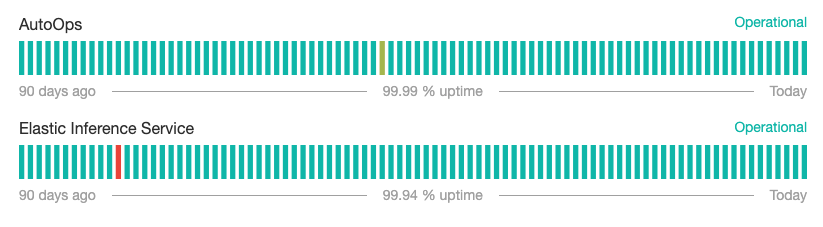
Learn how to subscribe to updates on the Service status page.