Reporting and sharing
Elastic Cloud Serverless projects are autoscaled environments, fully managed by Elastic and available on Elastic Cloud. Availability This functionality is generally available and ready for production usage. Serverless interfaces and procedures might differ from classic Elastic Stack deployments. The Elastic Stack includes Elastic's core products such as Elasticsearch, Kibana, Logstash, and Beats. Availability This functionality is generally available and ready for production usage. Unless stated otherwise on the page, this functionality is available when your Elastic Stack is deployed on Elastic Cloud Hosted, Elastic Cloud Enterprise, Elastic Cloud on Kubernetes, and self-managed environments. This documentation corresponds to the latest patch available for each minor version. If you're not using the latest patch, check the release notes for changes.
Serverless
Generally available
Stack
Generally available
Kibana provides you with several options to share Discover sessions, Dashboards, Visualize Library visualizations, and Canvas workpads. These sharing options are available from the icons Share and Export in the toolbar. In Discover 9.4 and later, and in Serverless, Export is in the application menu instead.
To be able to share objects or generate reports, you must have a role that allows these actions on the specific Elasticsearch indices and Kibana applications containing the data that you want to share. Check Configuring reporting for more information.
You can share direct links to saved Discover sessions, dashboards, and visualizations. To do that, look for the Share icon.
The Elastic Stack includes Elastic's core products such as Elasticsearch, Kibana, Logstash, and Beats. Availability Generally available since 9.1 This functionality is generally available and ready for production usage. Unless stated otherwise on the page, this functionality is available when your Elastic Stack is deployed on Elastic Cloud Hosted, Elastic Cloud Enterprise, Elastic Cloud on Kubernetes, and self-managed environments. This documentation corresponds to the latest patch available for each minor version. If you're not using the latest patch, check the release notes for changes. When applicable, you can choose to share the object using a relative or an absolute time range:
- Relative time range: The link shows current data. For example, if you share a "Last 7 days" view, users will see the most recent 7 days when they open the link.
- Absolute time range (default): The link shows a fixed time period. For example, if you share a "Last 7 days" view on January 7, 2025, the link will always show that exact week of January 1-7, 2025, regardless of when users open the link.
Elastic Cloud Serverless projects are autoscaled environments, fully managed by Elastic and available on Elastic Cloud. Availability Generally available This functionality is generally available and ready for production usage. Serverless interfaces and procedures might differ from classic Elastic Stack deployments. The Elastic Stack includes Elastic's core products such as Elasticsearch, Kibana, Logstash, and Beats. Availability Planned We plan to add this functionality in a future Elastic Stack update. Subject to changes. Unless stated otherwise on the page, this functionality is available when your Elastic Stack is deployed on Elastic Cloud Hosted, Elastic Cloud Enterprise, Elastic Cloud on Kubernetes, and self-managed environments. This documentation corresponds to the latest patch available for each minor version. If you're not using the latest patch, check the release notes for changes. To copy a link that reopens a specific document in Discover, refer to Share a link to a document.
When sharing an object with unsaved changes, you get a temporary link that might break in the future, for example in case of upgrade. Save the object to get a permanent link instead.
To access the object shared with the link, users need to authenticate.
Anonymous users can also access the link if you have configured Anonymous authentication and your anonymous service account has privileges to access what you want to share.
For more information on how to configure reporting in Kibana, refer to Configure reporting in Kibana.
Create and download PDF, PNG, or CSV reports of Discover sessions, dashboards, visualizations, and workpads. For dashboard-specific export instructions, refer to Export and share Kibana dashboards.
- PDF Elastic Cloud Serverless projects are autoscaled environments, fully managed by Elastic and available on Elastic Cloud. Availability Unavailable This functionality is not available in Elastic Cloud Serverless. — Generate and download PDF files of dashboards, visualizations, and Canvas workpads. PDF reports are a subscription feature.
- PNG Elastic Cloud Serverless projects are autoscaled environments, fully managed by Elastic and available on Elastic Cloud. Availability Unavailable This functionality is not available in Elastic Cloud Serverless. — Generate and download PNG files of dashboards and visualizations. PNG reports are a subscription feature.
- CSV reports: Generate CSV reports of Discover sessions. You don't need to save a session before you export it.
- CSV download — Generate and download CSV files of Lens visualizations.
- Download as JSON Elastic Cloud Serverless projects are autoscaled environments, fully managed by Elastic and available on Elastic Cloud. Availability Unavailable This functionality is not available in Elastic Cloud Serverless. — Generate and download JSON files of Canvas workpads.
- Export JSON
- Elastic Cloud Serverless projects are autoscaled environments, fully managed by Elastic and available on Elastic Cloud. Availability Generally available This functionality is generally available and ready for production usage. Serverless interfaces and procedures might differ from classic Elastic Stack deployments. The Elastic Stack includes Elastic's core products such as Elasticsearch, Kibana, Logstash, and Beats. Availability Preview from 9.4 to 9.5 This functionality is in technical preview and is ready for evaluation. Use with caution in production; it is not recommended for mission-critical workloads. Elastic will work to fix any issues, but features in technical preview are not subject to the support SLA of official GA features. Specific Support terms apply. Unless stated otherwise on the page, this functionality is available when your Elastic Stack is deployed on Elastic Cloud Hosted, Elastic Cloud Enterprise, Elastic Cloud on Kubernetes, and self-managed environments. This documentation corresponds to the latest patch available for each minor version. If you're not using the latest patch, check the release notes for changes. For a dashboard, export the JSON source in a format that the dashboards API can consume. Refer to Export as dashboards API-compatible JSON.
- Elastic Cloud Serverless projects are autoscaled environments, fully managed by Elastic and available on Elastic Cloud. Availability Preview This functionality is in technical preview and is ready for evaluation. Use with caution in production; it is not recommended for mission-critical workloads. Elastic will work to fix any issues, but features in technical preview are not subject to the support SLA of official GA features. Specific Support terms apply. Serverless interfaces and procedures might differ from classic Elastic Stack deployments. The Elastic Stack includes Elastic's core products such as Elasticsearch, Kibana, Logstash, and Beats. Availability Planned We plan to add this functionality in a future Elastic Stack update. Subject to changes. Unless stated otherwise on the page, this functionality is available when your Elastic Stack is deployed on Elastic Cloud Hosted, Elastic Cloud Enterprise, Elastic Cloud on Kubernetes, and self-managed environments. This documentation corresponds to the latest patch available for each minor version. If you're not using the latest patch, check the release notes for changes. For a Discover session, export the definition as JSON, not the query results, to inspect its definition or to use that JSON as the starting point for managing the session as code. This export copies or downloads the JSON from the open session. It does not queue a report. Refer to Export a Discover session as JSON.
Several applications let you schedule exports.
Open the Discover session, dashboard, visualization, or Canvas workpad you want to share.
Select a file type for the report.
- The Elastic Stack includes Elastic's core products such as Elasticsearch, Kibana, Logstash, and Beats. Availability Generally available since 9.1 This functionality is generally available and ready for production usage. Unless stated otherwise on the page, this functionality is available when your Elastic Stack is deployed on Elastic Cloud Hosted, Elastic Cloud Enterprise, Elastic Cloud on Kubernetes, and self-managed environments. This documentation corresponds to the latest patch available for each minor version. If you're not using the latest patch, check the release notes for changes. From the toolbar, select the Export icon, then select a file type.
- The Elastic Stack includes Elastic's core products such as Elasticsearch, Kibana, Logstash, and Beats. Availability Generally available in 9.0 This functionality is generally available and ready for production usage. Unless stated otherwise on the page, this functionality is available when your Elastic Stack is deployed on Elastic Cloud Hosted, Elastic Cloud Enterprise, Elastic Cloud on Kubernetes, and self-managed environments. This documentation corresponds to the latest patch available for each minor version. If you're not using the latest patch, check the release notes for changes. From the toolbar, select Share → Export tab, then select a file type.
In Discover, look for the CSV export action in the actions available in the application menu. Depending on your version, this action can be called Export → CSV, Export tab results → CSV, or Export → Tab results as CSV, and can be nested under More or Share.
Some export formats have specific considerations:
PDF
- When a dashboard report includes a data table or Discover session, the PDF includes only the visible data.
- For dashboard PDFs, select For printing to create printer-friendly PDFs with multiple A4 portrait pages and two visualizations per page.
- For workpad PDFs, select Full page layout to create PDFs without the margins that surround the workpad.
- Certain limitations apply.
CSV
- The Elastic Stack includes Elastic's core products such as Elasticsearch, Kibana, Logstash, and Beats. Availability Generally available since 9.5 This functionality is generally available and ready for production usage. Unless stated otherwise on the page, this functionality is available when your Elastic Stack is deployed on Elastic Cloud Hosted, Elastic Cloud Enterprise, Elastic Cloud on Kubernetes, and self-managed environments. This documentation corresponds to the latest patch available for each minor version. If you're not using the latest patch, check the release notes for changes. Elastic Cloud Serverless projects are autoscaled environments, fully managed by Elastic and available on Elastic Cloud. Availability Generally available This functionality is generally available and ready for production usage. Serverless interfaces and procedures might differ from classic Elastic Stack deployments. When you export a Discover session whose ES|QL query references a variable control, the report uses the values currently selected in the controls. In earlier versions, these exports failed with an unknown query parameter error.
- Certain limitations apply.
Select the button that generates or exports the report. A message appears, indicating that the report is in the export queue.
NoteTo generate reports without exporting them by hand, use one of these methods:
- Elastic Cloud Serverless projects are autoscaled environments, fully managed by Elastic and available on Elastic Cloud. Availability Generally available This functionality is generally available and ready for production usage. Serverless interfaces and procedures might differ from classic Elastic Stack deployments. The Elastic Stack includes Elastic's core products such as Elasticsearch, Kibana, Logstash, and Beats. Availability Generally available since 9.1 This functionality is generally available and ready for production usage. Unless stated otherwise on the page, this functionality is available when your Elastic Stack is deployed on Elastic Cloud Hosted, Elastic Cloud Enterprise, Elastic Cloud on Kubernetes, and self-managed environments. This documentation corresponds to the latest patch available for each minor version. If you're not using the latest patch, check the release notes for changes. Schedule a recurring task in Kibana that generates reports on a repeating basis. Refer to Automatically generate reports to learn more.
-
Elastic Cloud Serverless projects are autoscaled environments, fully managed by Elastic and available on Elastic Cloud.
Availability
Unavailable
This functionality is not available in Elastic Cloud Serverless.
To generate the report from outside of Kibana, use the POST URL, then submit an HTTP
POSTrequest using a script. - Elastic Cloud Serverless projects are autoscaled environments, fully managed by Elastic and available on Elastic Cloud. Availability Unavailable This functionality is not available in Elastic Cloud Serverless. Trigger reports from Watcher.
Go to the Reporting page to access all of your reports. To find the page, navigate to Stack Management > Alerts and Insights > Reporting in the main menu, or use the global search field.
In self-managed installations and Elastic Cloud Hosted deployments, reports are stored in Elasticsearch and managed by the kibana-reporting index lifecycle management (ILM) policy. By default, the policy stores reports forever. To learn more about ILM policies, refer to the Elasticsearch ILM documentation.
Elastic Cloud Serverless projects are autoscaled environments, fully managed by Elastic and available on Elastic Cloud. Availability This functionality is not available in Elastic Cloud Serverless.
Serverless
Unavailable
Unavailable
The layout and size of PDF and PNG reports depend on what you are sharing. For saved Discover sessions, dashboards, and visualizations, the layout depends on the size of the panels. For workpads, the layout depends on the size of the worksheet dimensions.
To change the output size, resize the browser before generating the report. The browser resizes the shareable container, which then determines the report dimensions. It might take some trial and error before you're satisfied.
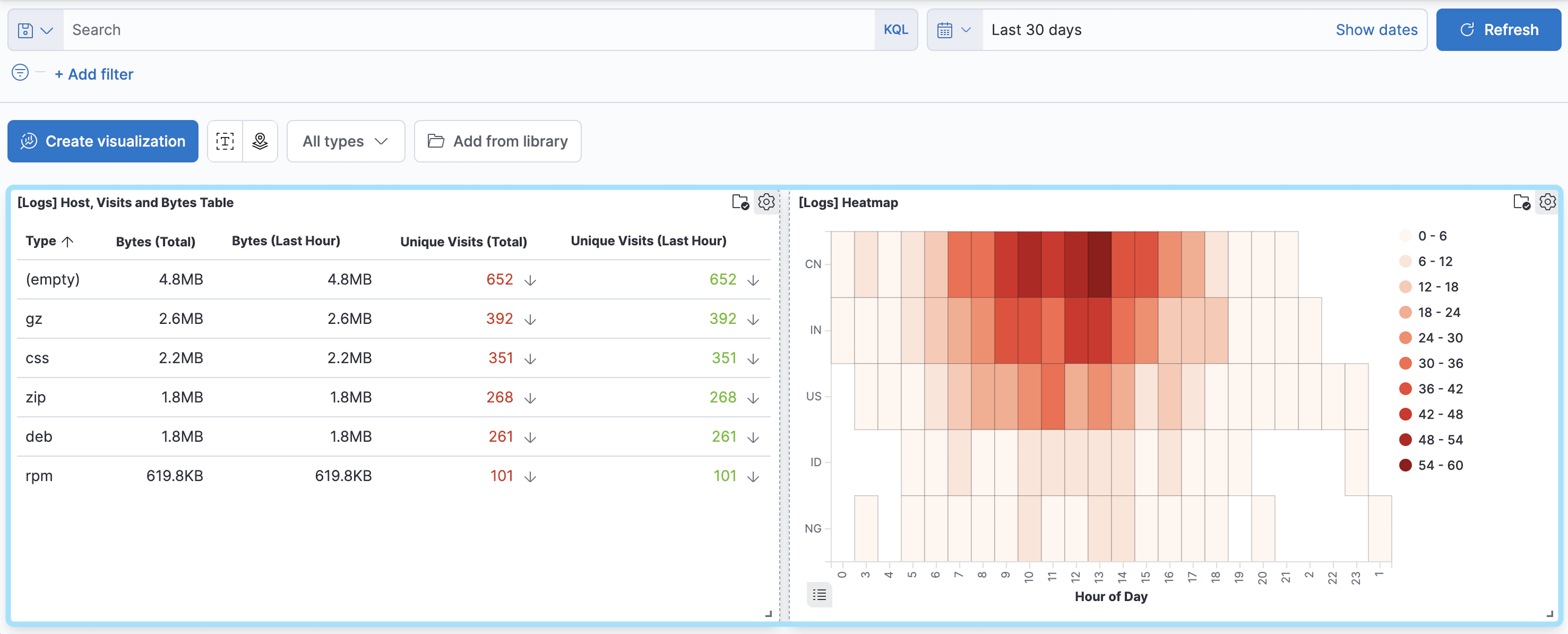
In the following dashboard, the shareable container is highlighted:
We recommend using CSV reports to export moderate amounts of data only. The feature enables analysis of data in external tools, but it is not intended for bulk export or to backup Elasticsearch data. The following conditions increase the risk of timeouts or incomplete data:
- More than 250 MB of data is being exported
- Data is stored on slow storage tiers
- Any shard needed for the search is unavailable
- Network latency between nodes is high
- Queries use cross-cluster search (CCS) across many indices or remote clusters
- ES|QL is used and result row count exceeds the limits of ES|QL queries
In Discover, a CSV report also stops at a row limit, and the file is truncated at a size limit. To find both limits for your deployment and how they work in each query mode, refer to Export Discover session results as CSV.
For large or long-running exports, use the Elasticsearch APIs directly. They are the recommended path for bulk data extraction. To reduce report size, use filters to create multiple smaller reports.
For more information on using Elasticsearch APIs directly, see Scroll API, Point in time API, ES|QL or SQL with CSV response data format. We recommend that you use an official Elastic language client: details for each programming language library that Elastic provides are in the Elasticsearch Client documentation.
Reporting parameters can be adjusted to overcome some of these limiting scenarios. Results are dependent on data size, availability, and latency factors and are not guaranteed.
Elastic Cloud Serverless projects are autoscaled environments, fully managed by Elastic and available on Elastic Cloud. Availability This functionality is not available in Elastic Cloud Serverless.
Serverless
Unavailable
Unavailable
We recommend using PNG/PDF reports to export moderate amounts of data only. The feature enables a high-level export capability, but it’s not intended for bulk export. If you need to export several pages of image data, consider using multiple report jobs to export a small number of pages at a time. If the screenshot of exported dashboard contains a large number of pixels, consider splitting the large dashboard into smaller artifacts to use less memory and CPU resources.
For the most reliable configuration of PDF/PNG reporting features, consider installing Kibana using Docker or using Elastic Cloud.
Elastic Cloud Serverless projects are autoscaled environments, fully managed by Elastic and available on Elastic Cloud. Availability This functionality is not available in Elastic Cloud Serverless.
Serverless
Unavailable
Unavailable
Create and share JSON files for workpads.
- Go to Canvas.
- Open the workpad you want to share.
- From the toolbar, click Export, then select JSON.
Elastic Cloud Serverless projects are autoscaled environments, fully managed by Elastic and available on Elastic Cloud. Availability This functionality is not available in Elastic Cloud Serverless.
Serverless
Unavailable
Unavailable
- The Elastic Stack includes Elastic's core products such as Elasticsearch, Kibana, Logstash, and Beats. Availability Beta This functionality is in beta and is not ready for production usage. For beta features, the design and code is less mature than official GA features and is being provided as-is with no warranties. Beta features are not subject to the support SLA of official GA features. Specific Support terms apply. Unless stated otherwise on the page, this functionality is available when your Elastic Stack is deployed on Elastic Cloud Hosted, Elastic Cloud Enterprise, Elastic Cloud on Kubernetes, and self-managed environments. This documentation corresponds to the latest patch available for each minor version. If you're not using the latest patch, check the release notes for changes. Share on a website — Download and securely share Canvas workpads on any website.
- Embed code — Embed fully interactive dashboards as an iframe on web pages. Refer to Embed in a webpage for detailed instructions.
For Elastic Cloud Hosted deployments, Kibana instances require a minimum of 2 GB RAM to generate PDF or PNG reports. For large dashboards or dashboards showing panels with complex queries, we recommend a minimum of 4 GB RAM.
To change Kibana sizing, edit the deployment.
Elastic Cloud Serverless projects are autoscaled environments, fully managed by Elastic and available on Elastic Cloud. Availability This functionality is not available in Elastic Cloud Serverless. The Elastic Stack includes Elastic's core products such as Elasticsearch, Kibana, Logstash, and Beats. Availability This functionality is in beta and is not ready for production usage. For beta features, the design and code is less mature than official GA features and is being provided as-is with no warranties. Beta features are not subject to the support SLA of official GA features. Specific Support terms apply. Unless stated otherwise on the page, this functionality is available when your Elastic Stack is deployed on Elastic Cloud Hosted, Elastic Cloud Enterprise, Elastic Cloud on Kubernetes, and self-managed environments. This documentation corresponds to the latest patch available for each minor version. If you're not using the latest patch, check the release notes for changes.
Serverless
Unavailable
Unavailable
Stack
Beta
Beta
Create and securely share static Canvas workpads on a website. To customize the behavior of the workpad on your website, you can choose to autoplay the pages or hide the workpad toolbar.
Go to Canvas.
Open the workpad you want to share.
Click Share > Share on a website.
To customize the workpad behavior to autoplay the pages or hide the toolbar, use the inline parameters.
To make sure that your data remains secure, the data in the JSON file is not connected to Kibana. Canvas does not display elements that manipulate the data on the workpad.
NoteShareable workpads encode the current state of the workpad in a JSON file. When you make changes to the workpad, the changes do not appear in the shareable workpad on your website.
To change the settings, click the settings icon, then choose the settings you want to use.
Elastic Cloud Serverless projects are autoscaled environments, fully managed by Elastic and available on Elastic Cloud. Availability This functionality is not available in Elastic Cloud Serverless. The Elastic Stack includes Elastic's core products such as Elasticsearch, Kibana, Logstash, and Beats. Availability This functionality is generally available and ready for production usage. Unless stated otherwise on the page, this functionality is available when your Elastic Stack is deployed on Elastic Cloud Hosted, Elastic Cloud Enterprise, Elastic Cloud on Kubernetes, and self-managed environments. This documentation corresponds to the latest patch available for each minor version. If you're not using the latest patch, check the release notes for changes.
Serverless
Unavailable
Unavailable
Stack
Generally available
Display your dashboards on an internal company website or personal web page with an iframe. To embed other Kibana objects, manually create the HTML code.
For information about granting access to embedded dashboards, refer to Authentication.
- Open the dashboard you want to share.
- Click Share > Embed code.
- Specify which parts of the dashboard you want to include: Top menu, query, time filter, and filter bar.
- Click Copy embed code.