Lucene query syntax in Kibana
Elastic Cloud Serverless projects are autoscaled environments, fully managed by Elastic and available on Elastic Cloud. Availability This functionality is generally available and ready for production usage. Serverless interfaces and procedures might differ from classic Elastic Stack deployments. The Elastic Stack includes Elastic's core products such as Elasticsearch, Kibana, Logstash, and Beats. Availability This functionality is generally available and ready for production usage. Unless stated otherwise on the page, this functionality is available when your Elastic Stack is deployed on Elastic Cloud Hosted, Elastic Cloud Enterprise, Elastic Cloud on Kubernetes, and self-managed environments. This documentation corresponds to the latest patch available for each minor version. If you're not using the latest patch, check the release notes for changes.
Serverless
Generally available
Stack
Generally available
Lucene query syntax is available to Kibana users who opt out of the Kibana Query Language. Full documentation for this syntax is available as part of Elasticsearch query string syntax.
The main reason to use the Lucene query syntax in Kibana is for advanced Lucene features, such as regular expressions or fuzzy term matching. However, Lucene syntax is not able to search nested objects or scripted fields.
To use the Lucene syntax, open the query menu next to the search bar, select Language: KQL, and then select Lucene.
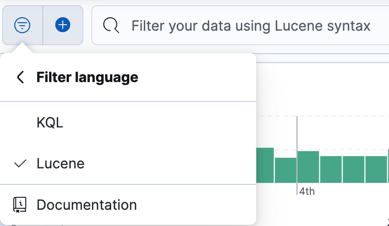
To perform a free text search, simply enter a text string. For example, if you’re searching web server logs, you could enter safari to search all fields:
safari
To search for a value in a specific field, prefix the value with the name of the field:
status:200
To search for a range of values, use the bracketed range syntax, [START_VALUE TO END_VALUE]. For example, to find entries that have 4xx status codes, you could enter status:[400 TO 499].
status:[400 TO 499]
For an open range, use a wildcard:
status:[400 TO *]
To specify more complex search criteria, use the boolean operators AND, OR, and NOT. For example, to find entries that have 4xx status codes and have an extension of php or html:
status:[400 TO 499] AND (extension:php OR extension:html)