Grok processor
Elastic Cloud Serverless projects are autoscaled environments, fully managed by Elastic and available on Elastic Cloud. Availability This functionality is generally available and ready for production usage. Serverless interfaces and procedures might differ from classic Elastic Stack deployments. The Elastic Stack includes Elastic's core products such as Elasticsearch, Kibana, Logstash, and Beats. Availability This functionality is generally available and ready for production usage. This functionality is in technical preview and is ready for evaluation. Use with caution in production; it is not recommended for mission-critical workloads. Elastic will work to fix any issues, but features in technical preview are not subject to the support SLA of official GA features. Specific Support terms apply. Unless stated otherwise on the page, this functionality is available when your Elastic Stack is deployed on Elastic Cloud Hosted, Elastic Cloud Enterprise, Elastic Cloud on Kubernetes, and self-managed environments. This documentation corresponds to the latest patch available for each minor version. If you're not using the latest patch, check the release notes for changes.
Serverless
Generally available
Stack
GA
9.2+
…
Generally available since 9.2
Preview in 9.1
The Grok processor parses unstructured log messages using a set of predefined patterns to match the log messages and extract the fields. The Grok processor is powerful and can parse a wide variety of log formats.
You can provide multiple patterns to the Grok processor. The Grok processor tries to match the log message against each pattern in the order they are provided. If a pattern matches, it extracts the fields and the remaining patterns are skipped.
If a pattern doesn't match, the Grok processor tries the next pattern. If no patterns match, the Grok processor fails and you can troubleshoot the issue. Instead of writing Grok patterns, you can have Streams generate patterns for you. Refer to generate patterns for more information.
To improve pipeline performance, start with the most common patterns first, then add more specific patterns. This reduces the number of times the Grok processor has to run.
To parse a log message with a Grok processor:
- Set the Source Field to the field you want to search for Grok matches.
- Set the patterns you want to use in the Grok patterns field. Refer to the example pattern for more information on patterns.
This functionality uses the Elasticsearch Grok processor internally, but you configure it in Streamlang. Streamlang doesn’t always have 1:1 parity with the ingest processor options and behavior. Refer to Processor limitations and inconsistencies.
Grok patterns are defined in the following format:
{
  "MY_DATE": "%{YEAR}-%{MONTHNUM}-%{MONTHDAY}"
}
Where MY_DATE is the name of the pattern.
The previous pattern can then be used in the processor.
%{MY_DATE:date}
This feature requires a Generative AI connector.
Instead of writing the Grok patterns by hand, you can select Generate Patterns to have AI generate them for you.
Generated patterns work best on semi-structured data. For very custom logs with a lot of text, creating patterns manually generally creates more accurate results.
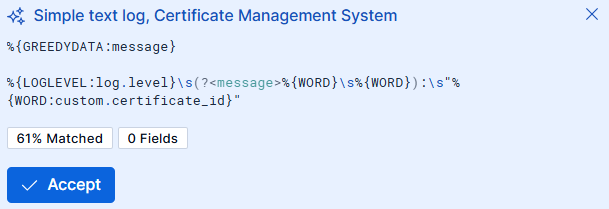
To add a generated Grok pattern:
- Select Create → Create processor.
- Select Grok from the Processor menu.
- Select Generate pattern.
- Select Accept to add a generated pattern to the list of patterns used by the Grok processor.
Streams groups the samples from the Data preview table into categories of similar messages. For each category, Streams generates suggestions by sending samples to the LLM. Suggestions are then shown in the UI.
This can incur additional costs, depending on the LLM connector you are using. Typically a single iteration uses between 1000 and 5000 tokens depending on the number of identified categories and the length of the messages.
In YAML mode, configure the Grok processor using the following parameters. For the complete Streamlang syntax, refer to the Streamlang reference.
| Parameter | Type | Required | Description |
|---|---|---|---|
from |
string | Yes | Source field to parse. |
patterns |
string[] | Yes | One or more Grok patterns, tried in order. |
pattern_definitions |
object | No | Custom pattern definitions as key-value pairs. |
ignore_missing |
boolean | No | When true, skip this processor if the source field is missing. |
- action: grok
  from: body.message
  patterns:
    - "%{IP:attributes.client_ip} %{WORD:attributes.method} %{URIPATHPARAM:attributes.path}"
  pattern_definitions:
    MY_PATTERN: "%{YEAR}-%{MONTHNUM}-%{MONTHDAY}"