Manage a data stream in Kibana
Elastic Cloud Serverless projects are autoscaled environments, fully managed by Elastic and available on Elastic Cloud. Availability This functionality is generally available and ready for production usage. Serverless interfaces and procedures might differ from classic Elastic Stack deployments. The Elastic Stack includes Elastic's core products such as Elasticsearch, Kibana, Logstash, and Beats. Availability This functionality is generally available and ready for production usage. Unless stated otherwise on the page, this functionality is available when your Elastic Stack is deployed on Elastic Cloud Hosted, Elastic Cloud Enterprise, Elastic Cloud on Kubernetes, and self-managed environments. This documentation corresponds to the latest patch available for each minor version. If you're not using the latest patch, check the release notes for changes.
Serverless
Generally available
Stack
Generally available
Investigate your data streams and address lifecycle management needs in the Data Streams view.
The value in the Indices column indicates the number of backing indices. Click this number to drill down into details.
A value in the data retention column indicates that the data stream is managed by a data stream lifecycle policy. This value is the time period for which your data is guaranteed to be stored. Data older than this period can be deleted by Elasticsearch at a later time.
In Elasticsearch Serverless, indices matching the logs-*-* pattern use the logsDB index mode by default. The logsDB index mode creates a logs data stream.
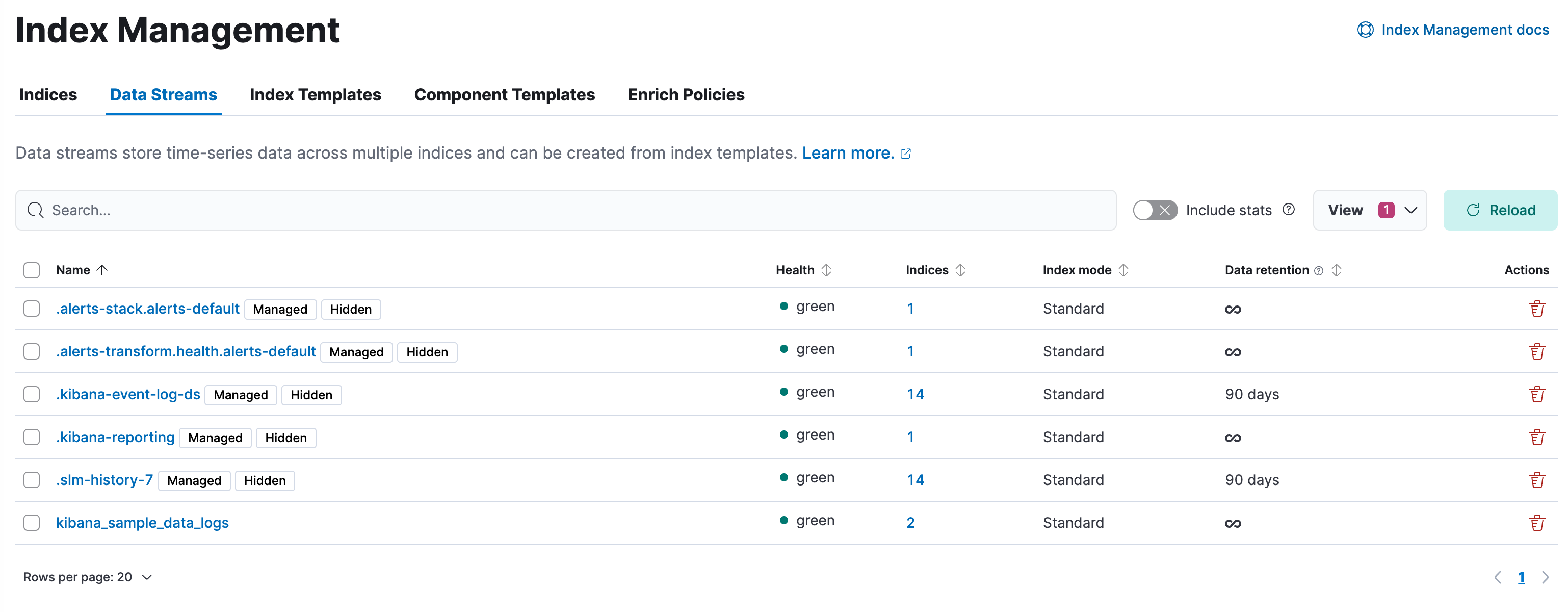
- To view more information about a data stream, such as its generation or its current index lifecycle policy, click the stream’s name. From this view, you can navigate to Discover to further explore data within the data stream.
- To view information about the stream’s backing indices, click the number in the Indices column.
- A value in the Data retention column indicates that the data stream is managed by a data stream lifecycle policy. This value is the time period for which your data is guaranteed to be stored. Data older than this period can be deleted by Elasticsearch at a later time.
- To modify the data retention value, select a data stream, open the Manage menu, and click Edit data retention. On Elastic Stack, this action is only available if your data stream is managed by a data stream lifecycle.
- Elastic Cloud Serverless projects are autoscaled environments, fully managed by Elastic and available on Elastic Cloud. Availability Generally available This functionality is generally available and ready for production usage. Serverless interfaces and procedures might differ from classic Elastic Stack deployments. If your project has a maximum retention period configured, the Edit data retention flyout shows the maximum below the retention field and won't let you save a longer value. To learn how default and maximum retention are applied, refer to Data stream retention.
Elastic Cloud Serverless projects are autoscaled environments, fully managed by Elastic and available on Elastic Cloud. Availability This functionality is generally available and ready for production usage. Serverless interfaces and procedures might differ from classic Elastic Stack deployments. The Elastic Stack includes Elastic's core products such as Elasticsearch, Kibana, Logstash, and Beats. Availability This functionality is generally available and ready for production usage. This functionality is in technical preview and is ready for evaluation. Use with caution in production; it is not recommended for mission-critical workloads. Elastic will work to fix any issues, but features in technical preview are not subject to the support SLA of official GA features. Specific Support terms apply. Unless stated otherwise on the page, this functionality is available when your Elastic Stack is deployed on Elastic Cloud Hosted, Elastic Cloud Enterprise, Elastic Cloud on Kubernetes, and self-managed environments. This documentation corresponds to the latest patch available for each minor version. If you're not using the latest patch, check the release notes for changes.
Serverless
Generally available
Stack
GA
9.2+
…
Generally available since 9.2
Preview in 9.1
The Streams page provides a centralized interface for managing your data in Kibana. It consolidates common data management tasks and eliminates the need for manual configuration of multiple applications and components. A stream maps directly to an Elasticsearch data stream, for example logs-myapp-default. Any changes that you make on the Streams page are automatically propagated to the associated data stream.
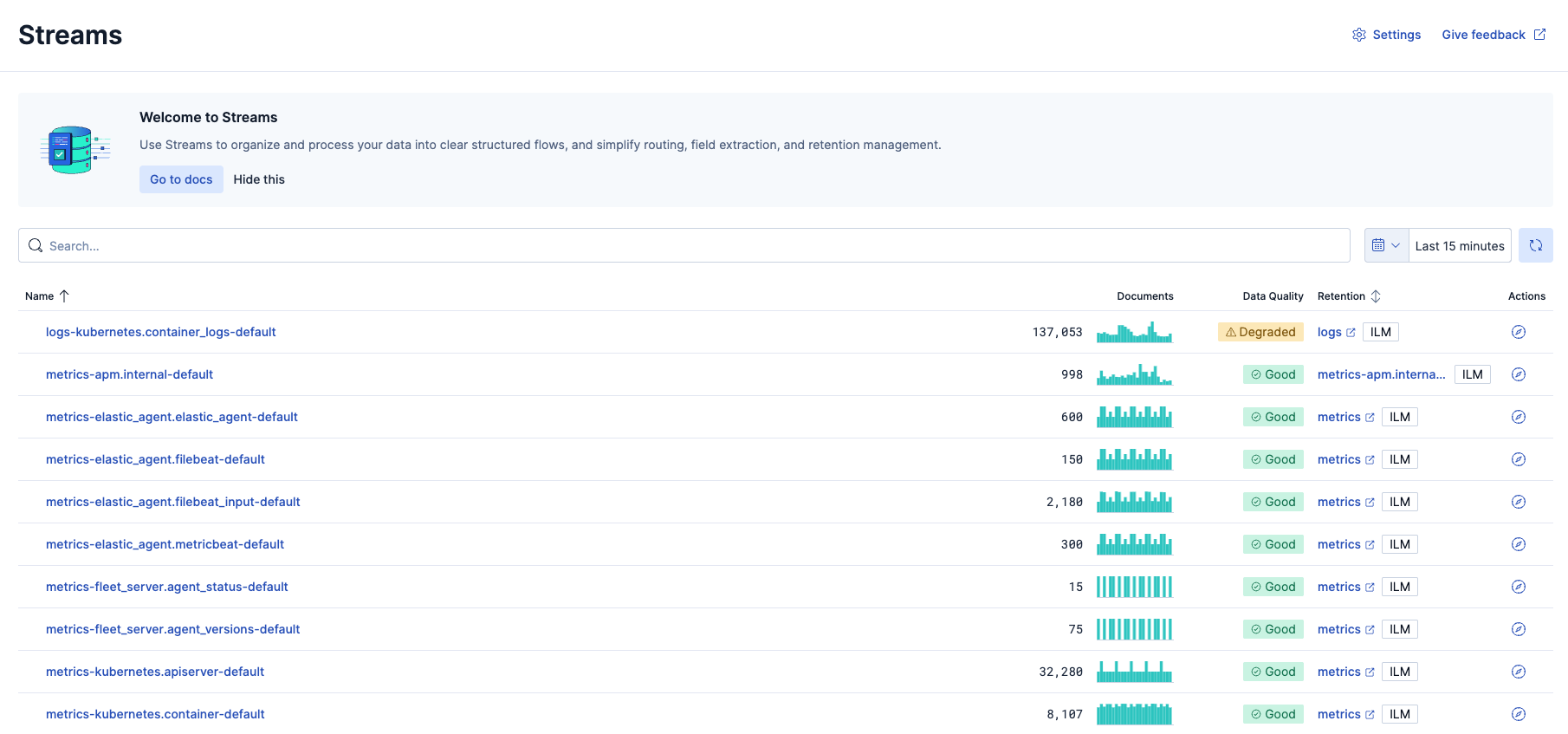
You can perform the following data management tasks on the Streams page:
- define parsing and field extraction logic
- configure data retention policies
- manually adjust index settings
- manage and update field mappings
- identify failed and degraded documents
- partition data into child streams The Elastic Stack includes Elastic's core products such as Elasticsearch, Kibana, Logstash, and Beats. Availability Preview since 9.2 This functionality is in technical preview and is ready for evaluation. Use with caution in production; it is not recommended for mission-critical workloads. Elastic will work to fix any issues, but features in technical preview are not subject to the support SLA of official GA features. Specific Support terms apply. Unless stated otherwise on the page, this functionality is available when your Elastic Stack is deployed on Elastic Cloud Hosted, Elastic Cloud Enterprise, Elastic Cloud on Kubernetes, and self-managed environments. This documentation corresponds to the latest patch available for each minor version. If you're not using the latest patch, check the release notes for changes. Elastic Cloud Serverless projects are autoscaled environments, fully managed by Elastic and available on Elastic Cloud. Availability Preview This functionality is in technical preview and is ready for evaluation. Use with caution in production; it is not recommended for mission-critical workloads. Elastic will work to fix any issues, but features in technical preview are not subject to the support SLA of official GA features. Specific Support terms apply. Serverless interfaces and procedures might differ from classic Elastic Stack deployments.