Logstash pipelines
Elastic Cloud Serverless projects are autoscaled environments, fully managed by Elastic and available on Elastic Cloud. Availability This functionality is generally available and ready for production usage. Elastic Cloud Serverless projects are autoscaled environments, fully managed by Elastic and available on Elastic Cloud. Availability This functionality is generally available and ready for production usage. Elastic Cloud Serverless projects are autoscaled environments, fully managed by Elastic and available on Elastic Cloud. Availability This functionality is generally available and ready for production usage. The Elastic Stack includes Elastic's core products such as Elasticsearch, Kibana, Logstash, and Beats. Availability This functionality is generally available and ready for production usage. Unless stated otherwise on the page, this functionality is available when your Elastic Stack is deployed on Elastic Cloud Hosted, Elastic Cloud Enterprise, Elastic Cloud on Kubernetes, and self-managed environments. This documentation corresponds to the latest patch available for each minor version. If you're not using the latest patch, check the release notes for changes.
Serverless Elasticsearch
Generally available
Serverless Observability
Generally available
Serverless Security
Generally available
Stack
Generally available
On the Logstash Pipelines management page, you can control multiple Logstash instances and pipeline configurations.
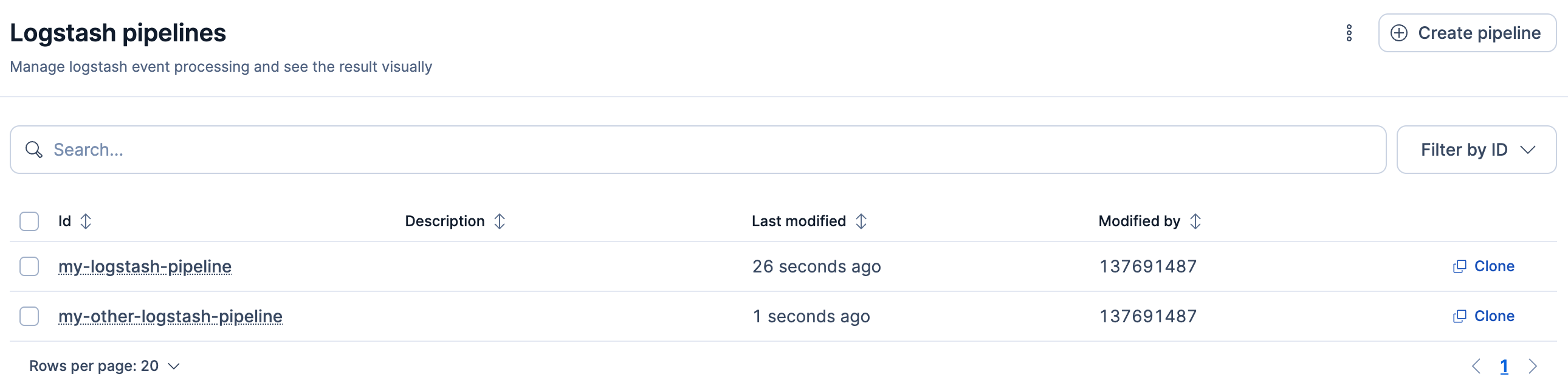
On the Logstash side, you must enable configuration management and register Logstash to use the centrally managed pipeline configurations.
After you configure Logstash to use centralized pipeline management, you can no longer specify local pipeline configurations. The pipelines.yml file and settings such as path.config and config.string are inactive when centralized pipeline management is enabled.
To add a new pipeline, go to the Logstash Pipelines management page using the navigation menu or the global search field.
Click Create pipeline.
Provide the following details, then click Create and deploy.
- Pipeline ID
- A name that uniquely identifies the pipeline. This is the ID that you used when you configured centralized pipeline management and specified a list of pipeline IDs in the
xpack.management.pipeline.idsetting. - Description
- A description of the pipeline configuration. This information is for your use.
- Pipeline
- The pipeline configuration. You can treat the editor like any other editor. You don’t have to worry about whitespace or indentation.
- Pipeline workers
- The number of parallel workers used to run the filter and output stages of the pipeline.
- Pipeline batch size
- The maximum number of events an individual worker thread collects before executing filters and outputs.
- Pipeline batch delay
- Time in milliseconds to wait for each event before sending an undersized batch to pipeline workers.
- Queue type
- The internal queueing model for event buffering. Options are
memoryfor in-memory queueing andpersistedfor disk-based acknowledged queueing. - Queue max bytes
- The total capacity of the queue when persistent queues are enabled.
- Queue checkpoint writes
-
The maximum number of events written before a checkpoint is forced when persistent queues are enabled.
To delete one or more pipelines, select their checkboxes then click Delete.
For more information about pipeline behavior, go to Centralized Pipeline Management.