Microsoft PowerShell
Elastic Cloud Serverless projects are autoscaled environments, fully managed by Elastic and available on Elastic Cloud. Availability This functionality is generally available and ready for production usage. Serverless interfaces and procedures might differ from classic Elastic Stack deployments. The Elastic Stack includes Elastic's core products such as Elasticsearch, Kibana, Logstash, and Beats. Availability This functionality is generally available and ready for production usage. Unless stated otherwise on the page, this functionality is available when your Elastic Stack is deployed on Elastic Cloud Hosted, Elastic Cloud Enterprise, Elastic Cloud on Kubernetes, and self-managed environments. This documentation corresponds to the latest patch available for each minor version. If you're not using the latest patch, check the release notes for changes.
Serverless
Generally available
Stack
Generally available
You can use the Elasticsearch ODBC driver to access Elasticsearch data from Microsoft PowerShell.
Elastic does not endorse, promote or provide support for this application; for native Elasticsearch integration in this product, reach out to its vendor.
- Microsoft PowerShell
- Elasticsearch SQL ODBC driver
- A preconfigured User or System DSN (see Configuration section on how to configure a DSN).
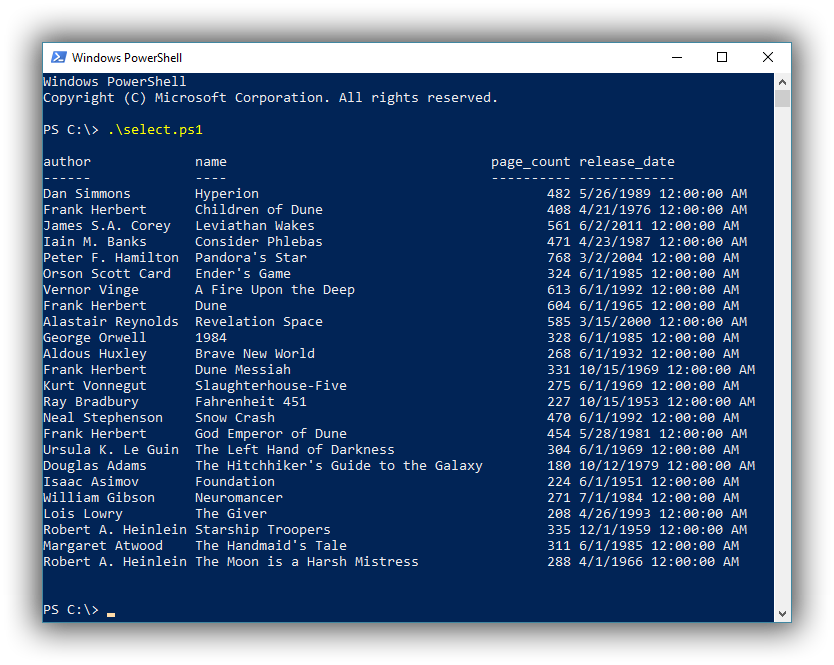
While putting the following instructions into a script file is not an absolute requirement, doing so will make it easier to extend and reuse. The following instructions exemplify how to execute a simple SELECT query from an existing index in your Elasticsearch instance, using a DSN configured in advance. Open a new file, select.ps1, and place the following instructions in it:
$connectstring = "DSN=Local Elasticsearch;"
$sql = "SELECT * FROM library"

$conn = New-Object System.Data.Odbc.OdbcConnection($connectstring)
$conn.open()
$cmd = New-Object system.Data.Odbc.OdbcCommand($sql,$conn)
$da = New-Object system.Data.Odbc.OdbcDataAdapter($cmd)
$dt = New-Object system.Data.datatable
$null = $da.fill($dt)
$conn.close()
$dt
Now open a PowerShell shell and simply execute the script: