Manage credentials and privileges for ES|QL Data Federation
Elastic Cloud Serverless projects are autoscaled environments, fully managed by Elastic and available on Elastic Cloud. Availability This functionality is not available in Elastic Cloud Serverless. The Elastic Stack includes Elastic's core products such as Elasticsearch, Kibana, Logstash, and Beats. Availability This functionality is experimental and is not ready for production usage. Experimental features may change or be removed at any time. Elastic will work to fix any issues, but experimental features are not subject to the support SLA of official GA features. Specific Support terms apply. Unless stated otherwise on the page, this functionality is available when your Elastic Stack is deployed on Elastic Cloud Hosted, Elastic Cloud Enterprise, Elastic Cloud on Kubernetes, and self-managed environments. This documentation corresponds to the latest patch available for each minor version. If you're not using the latest patch, check the release notes for changes.
Serverless
Unavailable
Unavailable
Stack
Experimental
9.5
…
Experimental in 9.5
Because federated data lives outside Elasticsearch, connecting to a private store means Elasticsearch holds that data source's credentials and must control who can manage connections and read external data. This page covers credential encryption and masking, and the privilege model for data sources and datasets.
When a data source connects to a private bucket, its encrypted credentials are stored in the cluster state. Elasticsearch protects these credentials with encryption at rest and redaction in API responses.
When a data source includes credentials, Elasticsearch encrypts them with the cluster state encryption key before storing them in the cluster state. If cluster state encryption isn't configured, a request that includes credentials returns a 503 error.
All credential values are replaced by ::es_redacted:: in GET responses. Credentials are never returned in API responses or written to the audit log, even when xpack.security.audit.logfile.events.emit_request_body is true.
A data source's credentials are masked when its definition is read back, and at query time the store is accessed using the data source's stored credentials.
These privileges control what users can do in Elasticsearch. What a data source can read in external storage is controlled by your cloud provider. Refer to grant read access to your data.
superuser has full access to data sources and datasets.
Dataset operations are authorized by the standard Elasticsearch index privileges, so a role that already administers or reads the matching index names covers datasets with no additional grant. Grant these index privileges on the dataset name:
| Operation | Privilege |
|---|---|
| Query a dataset | read |
| Create, read, or delete a dataset | manage or all |
| Dataset administration granted on its own | create_dataset, read_dataset_metadata, delete_dataset, manage_dataset |
The read privilege granted on a dataset name must not carry document-level or field-level security. FROM <dataset> is rejected if it does. The same restriction applies to ES|QL views.
Creating or replacing a dataset that references a data source also requires the read data source privilege for that data source. The two are authorized independently. Querying a dataset requires only read on the dataset name, not a data source privilege.
Data source operations require either the cluster manage (or all) privilege, which covers every data source, or fine-grained global.data_source privileges on specific data sources. Data source names in global.data_source accept wildcard patterns, such as acme_*, the same as index names in a role.
Each global.data_source privilege allows one operation, and manage allows all of them:
| Operation | global.data_source privilege |
|---|---|
| Create or replace a data source | create |
| Read a data source definition | read_metadata |
| Delete a data source | delete |
| Reference a data source from a dataset | read |
| All of the above | manage |
| Test a data source connection | None. Requires the cluster manage privilege. |
A GET /_query/data_source request without a name lists every data source, so it requires privileges on * or the cluster manage privilege. With privileges on specific data sources, include a name or pattern in the request, such as GET /_query/data_source/acme_*.
The ES|QL Data Federation UI in Kibana requires the cluster manage privilege. A role with only global.data_source privileges can manage data sources with the API, but not in the UI.
The Elastic Stack includes Elastic's core products such as Elasticsearch, Kibana, Logstash, and Beats. Availability We plan to add this functionality in a future Elastic Stack update. Subject to changes. Unless stated otherwise on the page, this functionality is available when your Elastic Stack is deployed on Elastic Cloud Hosted, Elastic Cloud Enterprise, Elastic Cloud on Kubernetes, and self-managed environments. This documentation corresponds to the latest patch available for each minor version. If you're not using the latest patch, check the release notes for changes.
Stack
Planned
Planned
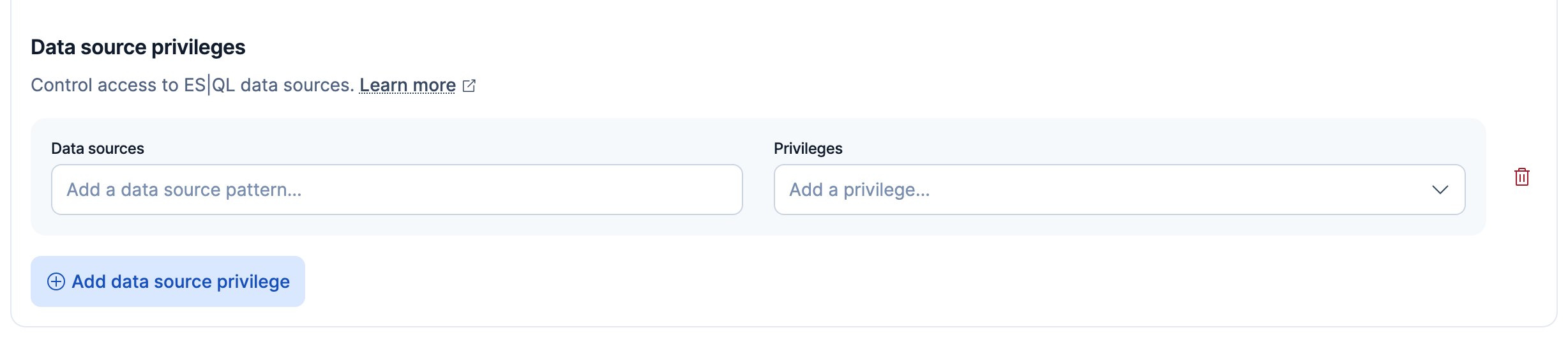
You can grant global.data_source privileges from the Kibana role editor:
- Find Roles in the navigation menu or use the global search field, then create or edit a role.
- Under Data source privileges, click Add data source privilege.
- In Data sources, enter the data source names or patterns, such as
acme_*. - In Privileges, select the privileges to grant.
The Data source privileges section appears with the other Elasticsearch privileges:
The following role grants querying sales and clicks, dataset administration over acme_*, and management of the acme_* data sources:
{
  "indices": [
    { "names": ["sales", "clicks"], "privileges": ["read"] },
    { "names": ["acme_*"], "privileges": ["manage"] }
  ],
  "global": {
    "data_source": [
      { "names": ["acme_*"], "privileges": ["manage"] }
    ]
  }
}
Continue with the following security and configuration tasks:
- To set up credentials for a data source, refer to connect with static credentials or connect with federated identity.
- For the operator-level setting that gates managed identity, refer to the authentication cluster settings.
- For the full Elasticsearch privilege reference, refer to security privileges.