Kafka module
Elastic Cloud Serverless projects are autoscaled environments, fully managed by Elastic and available on Elastic Cloud. Availability This functionality is generally available and ready for production usage. Serverless interfaces and procedures might differ from classic Elastic Stack deployments. The Elastic Stack includes Elastic's core products such as Elasticsearch, Kibana, Logstash, and Beats. Availability This functionality is generally available and ready for production usage. Unless stated otherwise on the page, this functionality is available when your Elastic Stack is deployed on Elastic Cloud Hosted, Elastic Cloud Enterprise, Elastic Cloud on Kubernetes, and self-managed environments. This documentation corresponds to the latest patch available for each minor version. If you're not using the latest patch, check the release notes for changes.
Serverless
Generally available
Stack
Generally available
Refer to the Elastic Integrations documentation.
Learn more
Elastic Agent is a single, unified way to add monitoring for logs, metrics, and other types of data to a host. It can also protect hosts from security threats, query data from operating systems, forward data from remote services or hardware, and more. Refer to the documentation for a detailed comparison of Beats and Elastic Agent.
This is the Kafka module.
The default metricsets are consumergroup and partition.
If authorization is configured in the Kafka cluster, the following ACLs are required for the Metricbeat user:
- READ Topic, for the topics to be monitored
- DESCRIBE Group, for the groups to be monitored
For example, if the stats user is being used for Metricbeat, to monitor all topics and all consumer groups, ACLS can be granted with the following commands:
kafka-acls --authorizer-properties zookeeper.connect=localhost:2181 --add --allow-principal User:stats --operation Read --topic '*'
kafka-acls --authorizer-properties zookeeper.connect=localhost:2181 --add --allow-principal User:stats --operation Describe --group '*'
This module is tested with Kafka 0.10.2.1, 1.1.0, 2.1.1, 2.2.2, 3.6.0 and 4.0.0.
The Broker, Producer, Consumer metricsets require Jolokia to fetch JMX metrics. Refer to the link for Jolokia’s compatibility notes.
The Broker, Producer, Consumer metricsets require Jolokia to fetch JMX metrics. Refer to those Metricsets' documentation about how to use Jolokia.
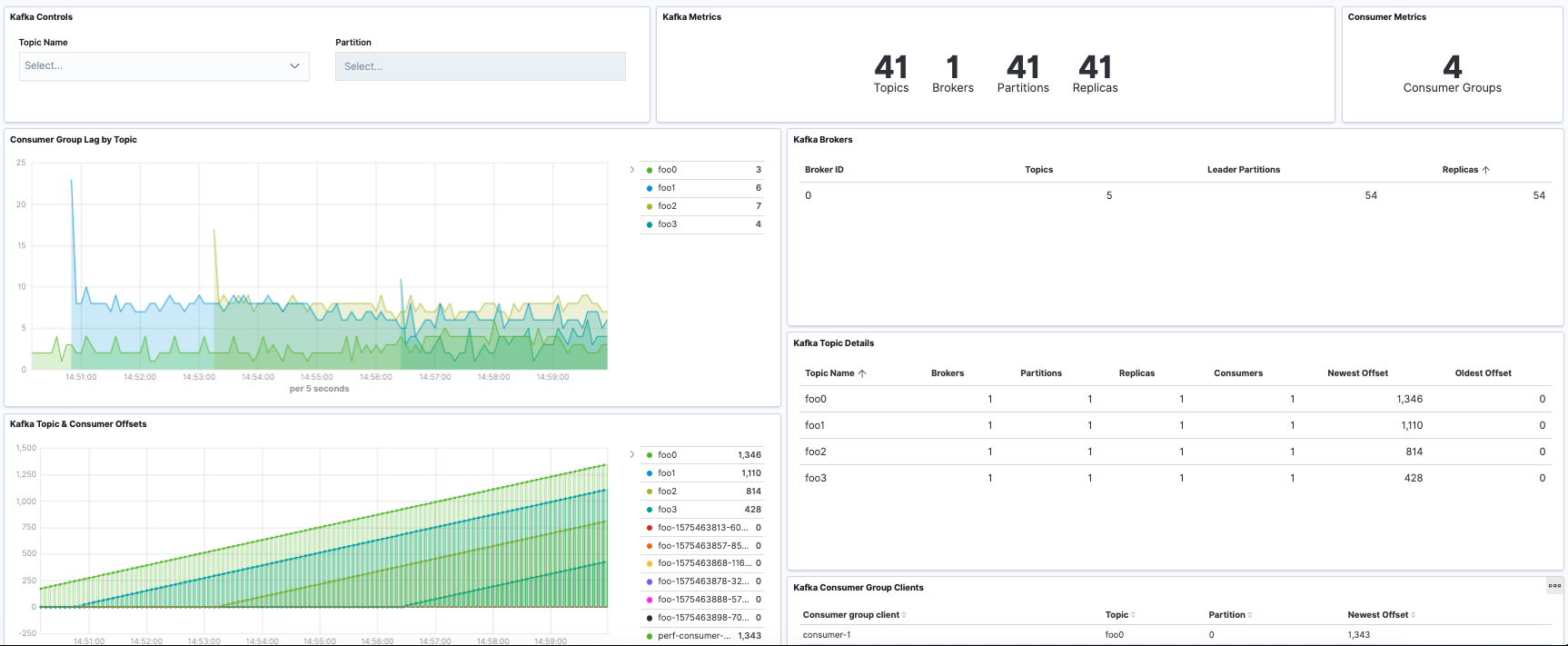
The Kafka module comes with a predefined dashboard. For example:
The Kafka module supports the standard configuration options that are described in Modules. Here is an example configuration:
metricbeat.modules:
# Kafka metrics collected using the Kafka protocol
- module: kafka
  #metricsets:
  #  - partition
  #  - consumergroup
  period: 10s
  hosts: ["localhost:9092"]

  #client_id: metricbeat
  #retries: 3
  #backoff: 250ms

  # List of Topics to query metadata for. If empty, all topics will be queried.
  #topics: []

  # Optional SSL. By default is off.
  # List of root certificates for HTTPS server verifications
  #ssl.certificate_authorities: ["/etc/pki/root/ca.pem"]

  # Certificate for SSL client authentication
  #ssl.certificate: "/etc/pki/client/cert.pem"

  # Client Certificate Key
  #ssl.key: "/etc/pki/client/cert.key"

  # Client Certificate Passphrase (in case your Client Certificate Key is encrypted)
  #ssl.key_passphrase: "yourKeyPassphrase"

  # SASL authentication
  #username: ""
  #password: ""

  # SASL authentication mechanism used. Can be one of PLAIN, SCRAM-SHA-256 or SCRAM-SHA-512.
  # Defaults to PLAIN when `username` and `password` are configured.
  #sasl.mechanism: ''

# Metrics collected from a Kafka broker using Jolokia
#- module: kafka
#  metricsets:
#    - broker
#  period: 10s
#  hosts: ["localhost:8779"]

# Metrics collected from a Java Kafka consumer using Jolokia
#- module: kafka
#  metricsets:
#    - consumer
#  period: 10s
#  hosts: ["localhost:8774"]

# Metrics collected from a Java Kafka producer using Jolokia
#- module: kafka
#  metricsets:
#    - producer
#  period: 10s
#  hosts: ["localhost:8775"]
The following metricsets are available:
- broker The Elastic Stack includes Elastic's core products such as Elasticsearch, Kibana, Logstash, and Beats. Availability Beta This functionality is in beta and is not ready for production usage. For beta features, the design and code is less mature than official GA features and is being provided as-is with no warranties. Beta features are not subject to the support SLA of official GA features. Specific Support terms apply. Unless stated otherwise on the page, this functionality is available when your Elastic Stack is deployed on Elastic Cloud Hosted, Elastic Cloud Enterprise, Elastic Cloud on Kubernetes, and self-managed environments. This documentation corresponds to the latest patch available for each minor version. If you're not using the latest patch, check the release notes for changes.
- consumer The Elastic Stack includes Elastic's core products such as Elasticsearch, Kibana, Logstash, and Beats. Availability Beta This functionality is in beta and is not ready for production usage. For beta features, the design and code is less mature than official GA features and is being provided as-is with no warranties. Beta features are not subject to the support SLA of official GA features. Specific Support terms apply. Unless stated otherwise on the page, this functionality is available when your Elastic Stack is deployed on Elastic Cloud Hosted, Elastic Cloud Enterprise, Elastic Cloud on Kubernetes, and self-managed environments. This documentation corresponds to the latest patch available for each minor version. If you're not using the latest patch, check the release notes for changes.
- consumergroup
- partition
- producer The Elastic Stack includes Elastic's core products such as Elasticsearch, Kibana, Logstash, and Beats. Availability Beta This functionality is in beta and is not ready for production usage. For beta features, the design and code is less mature than official GA features and is being provided as-is with no warranties. Beta features are not subject to the support SLA of official GA features. Specific Support terms apply. Unless stated otherwise on the page, this functionality is available when your Elastic Stack is deployed on Elastic Cloud Hosted, Elastic Cloud Enterprise, Elastic Cloud on Kubernetes, and self-managed environments. This documentation corresponds to the latest patch available for each minor version. If you're not using the latest patch, check the release notes for changes.