Beats
Elastic Cloud Serverless projects are autoscaled environments, fully managed by Elastic and available on Elastic Cloud. Availability This functionality is generally available and ready for production usage. Serverless interfaces and procedures might differ from classic Elastic Stack deployments. The Elastic Stack includes Elastic's core products such as Elasticsearch, Kibana, Logstash, and Beats. Availability This functionality is generally available and ready for production usage. Unless stated otherwise on the page, this functionality is available when your Elastic Stack is deployed on Elastic Cloud Hosted, Elastic Cloud Enterprise, Elastic Cloud on Kubernetes, and self-managed environments. This documentation corresponds to the latest patch available for each minor version. If you're not using the latest patch, check the release notes for changes.
Serverless
Generally available
Stack
Generally available
Beats are open source data shippers that you install as agents on your servers to send operational data to Elasticsearch.
New to Beats? Check out the Beats overview to see what Beats can do for you.
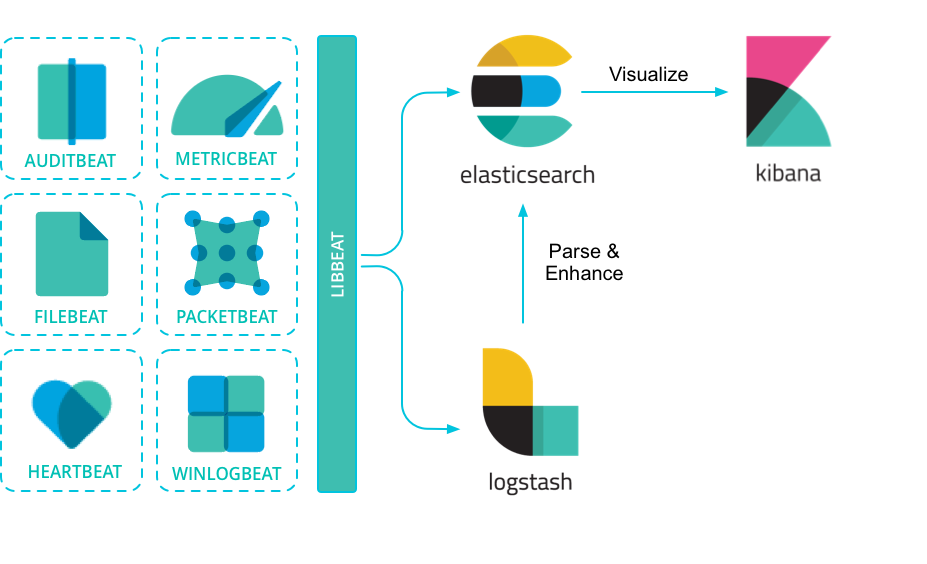
Elastic provides Beats for capturing:
- Audit data
- Auditbeat
- Log files and journals
- Filebeat
- Availability
- Heartbeat
- Metrics
- Metricbeat
- Network traffic
- Packetbeat
- Windows event logs
- Winlogbeat
Beats can send data directly to Elasticsearch or through Logstash, where you can further process and enhance the data, before visualizing it in Kibana.
Want to get up and running quickly with infrastructure metrics monitoring and centralized log analytics? Try out the Metrics app and the Logs app in Kibana. For more details, check out Analyze metrics and Monitor logs.
If you have a specific use case to solve, we encourage you to create a community Beat. We’ve created an infrastructure to simplify the process. The libbeat library, written entirely in Go, offers the API that all Beats use to ship data to Elasticsearch, configure the input options, implement logging, and more. To learn how to create a new Beat, see Contribute to Beats.