Observability AI Assistant connector and action
Elastic Cloud Serverless projects are autoscaled environments, fully managed by Elastic and available on Elastic Cloud. Availability This functionality is in technical preview and is ready for evaluation. Use with caution in production; it is not recommended for mission-critical workloads. Elastic will work to fix any issues, but features in technical preview are not subject to the support SLA of official GA features. Specific Support terms apply. Serverless interfaces and procedures might differ from classic Elastic Stack deployments. The Elastic Stack includes Elastic's core products such as Elasticsearch, Kibana, Logstash, and Beats. Availability This functionality is in technical preview and is ready for evaluation. Use with caution in production; it is not recommended for mission-critical workloads. Elastic will work to fix any issues, but features in technical preview are not subject to the support SLA of official GA features. Specific Support terms apply. Unless stated otherwise on the page, this functionality is available when your Elastic Stack is deployed on Elastic Cloud Hosted, Elastic Cloud Enterprise, Elastic Cloud on Kubernetes, and self-managed environments. This documentation corresponds to the latest patch available for each minor version. If you're not using the latest patch, check the release notes for changes.
Serverless
Preview
Preview
Stack
Preview
Preview
The Observability AI Assistant connector sends alerts to the AI Assistant, to enable adding AI-driven insights and custom actions to your workflows.
To learn how to interact with the assistant through this connector, refer to the Observability AI Assistant documentation.
To use this connector, you must have been granted access to use the Observability AI Assistant feature. You cannot manage this connector in Stack Management > Connectors or by using APIs. You also cannot create an Observability AI Assistant preconfigured connector. It is available only when you're creating a rule in Kibana. For example:
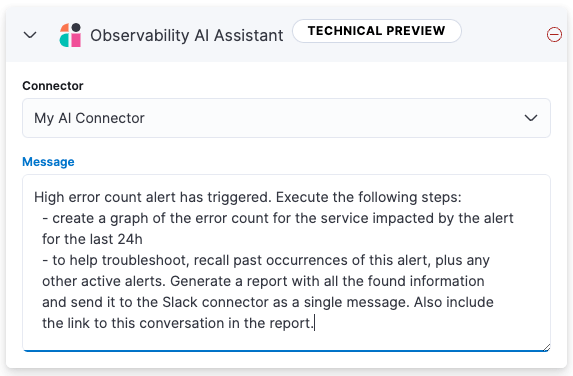
You can have only one Observability AI Assistant action in each rule.
Observability AI Assistant connectors have the following configuration properties:
- Connector
- The name of the connector to use to send requests to your AI provider. For more information, refer to OpenAI or Amazon Bedrock.
- Message
- A message containing the prompt to send to the Observability AI Assistant. The message can specify a set of tasks for the assistant to perform, such as creating a graph or report, and it can call an available connector to send messages to an external system, such as Slack.
Currently you can only send messages to a Slack webhook. Support for additional connectors will be added in the future.
For example, you can create a rule that sends the following prompt to the AI Assistant when an error count threshold is breached:
High error count alert has triggered. Execute the following steps:
  - create a graph of the error count for the service impacted by the alert
  for the last 24h
  - to help troubleshoot, recall past occurrences of this alert, plus any
  other active alerts. Generate a report with all the found information
  and send it to the Slack connector as a single message. Also include
  the link to this conversation in the report.
You cannot test or edit these connectors in Kibana or by using APIs.