Centrally manage Elastic Agents in Fleet
Elastic Cloud Serverless projects are autoscaled environments, fully managed by Elastic and available on Elastic Cloud. Availability This functionality is generally available and ready for production usage. Serverless interfaces and procedures might differ from classic Elastic Stack deployments. The Elastic Stack includes Elastic's core products such as Elasticsearch, Kibana, Logstash, and Beats. Availability This functionality is generally available and ready for production usage. Unless stated otherwise on the page, this functionality is available when your Elastic Stack is deployed on Elastic Cloud Hosted, Elastic Cloud Enterprise, Elastic Cloud on Kubernetes, and self-managed environments. This documentation corresponds to the latest patch available for each minor version. If you're not using the latest patch, check the release notes for changes.
Serverless
Generally available
Stack
Generally available
The Fleet app in Kibana supports both Elastic Agent infrastructure management and agent policy management. You can use Fleet to:
- Manage Elastic Agent binaries and specify settings installed on the host that determine whether the agent is enrolled in Fleet, what version of the agent is running, and which agent policy is used.
- Manage agent policies that specify agent configuration settings, which integrations are running, whether agent monitoring is turned on, input settings, and more.
Advanced users who don’t want to use Fleet for central management can use an external infrastructure management solution and install Elastic Agent in standalone mode instead.
To manage agents, agent policies, and integrations in Fleet, you need a Kibana user with All privileges on Fleet and Integrations. To create a role with more limited access, and to learn how the privileges apply across spaces, refer to Fleet and Integrations roles and privileges.
To learn how to add Elastic Agents to Fleet, refer to Install Fleet-managed Elastic Agents.
Find Fleet in the Kibana navigation menu, or use the global search field. The following table describes the main management actions you can perform in Fleet:
| Component | Management actions |
|---|---|
| Fleet settings | Configure global settings available to all Elastic Agents managed by Fleet, including Fleet Server hosts and output settings. |
| Elastic Agents | Enroll, unenroll, upgrade, add tags, and view Elastic Agent status and logs. |
| Policies | Create and edit agent policies and add integrations to them. |
| Fleet enrollment tokens | Create and revoke enrollment tokens. |
| Uninstall tokens | (Elastic Defend integration only) Access tokens to allow uninstalling Elastic Agent from endpoints with Agent tamper protection enabled. |
| Data streams | View data streams and navigate to dashboards to analyze your data. |
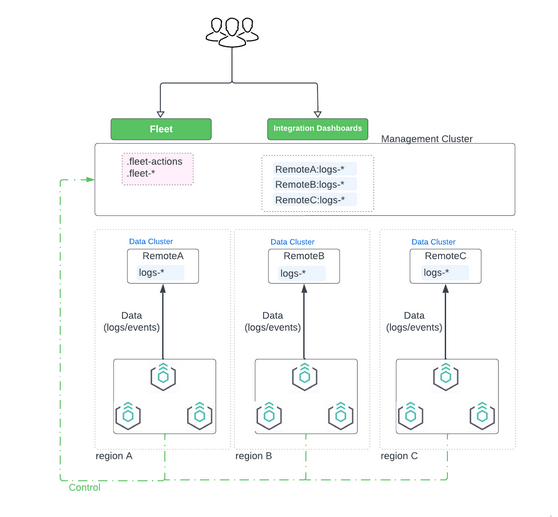
In Fleet deployments where Elastic Agents are installed in diverse locations and where data must be stored in local clusters, operators need a unified view of all agents and a central management interface for tasks like upgrades, policy organization, and metrics collection. Fleet offers features to facilitate this deployment model:
- Remote Elasticsearch output: Configure Elastic Agents to send data to remote Elasticsearch clusters while still sending their check-in payloads to the management cluster. This allows Fleet on the management cluster to maintain a global view of all agents while the ingested data is routed to the agents' respective local clusters.
- The Elastic Stack includes Elastic's core products such as Elasticsearch, Kibana, Logstash, and Beats. Availability Generally available since 9.1 This functionality is generally available and ready for production usage. Unless stated otherwise on the page, this functionality is available when your Elastic Stack is deployed on Elastic Cloud Hosted, Elastic Cloud Enterprise, Elastic Cloud on Kubernetes, and self-managed environments. This documentation corresponds to the latest patch available for each minor version. If you're not using the latest patch, check the release notes for changes. Automatic integrations synchronization: Install an integration once in the management cluster and use Fleet to synchronize and update the integration across all remote clusters. This enables you to initiate services like OSquery from the management cluster, and to collect and display responses from dispersed agents in Fleet on the central management cluster.